
KT50 - Thermometer ELRO - Free user manual and instructions
Find the device manual for free KT50 ELRO in PDF.


| Product Type | Indoor residential thermostat for single stage heating systems |
| Compatible Heating Systems | Electric, gas, or oil |
| Dimensions (W x L x H) | 98 x 28 x 73 mm |
| Weight | 98 g (batteries not included) |
| Housing Material | Polycarbonate (PC) |
| Power Source | 2 x AAA 1.5V alkaline batteries (not included) |
| Switching Relay (Resistive Load) | 5A at 250VAC |
| Switching Relay (Inductive Load) | 3A at 250VAC |
| Temperature Measurement Range | 0°C to 40°C |
| Temperature Measurement Accuracy | ±1.0°C |
| Temperature Control Range | 5°C to 35°C |
| Temperature Control Span | ±0.5°C |
| Output On Delay | 20 seconds (for safety) |
| Operating Temperature | -10°C to 50°C (non-condensing) |
| Storage Temperature | -30°C to 60°C |
| Display | LCD showing room temperature, control temperature, heater on/off, low battery |
| Control Buttons | ▲ (increase) and ▼ (decrease) buttons |
| Installation Type | Wall-mounted, requires drilling and screws (not included) |
| Wiring Terminals | COM (common), NC (normal close), NO (normal open) |
| Low Battery Indication | LCD goes blank when battery voltage is low |
| On/Off Switch | Slide switch to turn thermostat on/off |
Frequently Asked Questions - KT50 ELRO
User questions about KT50 ELRO
0 question about this device. Answer the ones you know or ask your own.
Ask a new question about this device
Download the instructions for your Thermometer in PDF format for free! Find your manual KT50 - ELRO and take your electronic device back in hand. On this page are published all the documents necessary for the use of your device. KT50 by ELRO.
USER MANUAL KT50 ELRO


GB
TABLE OF CONTENT
1 INTRODUCTION....2
2 INSTALLATION 4
3 CONTROL TEMPERATURE.... 11
4 LOW BATTERY OPERATION.... 13
5 HEATER OPERATION.... 13
6 SPECIFICATIONS....14
1 INTRODUCTION
This thermostat can replace most common indoor residential thermostat and is designed to be used with electric, gas or oil heating system.
-1-
-2-

GB


GB
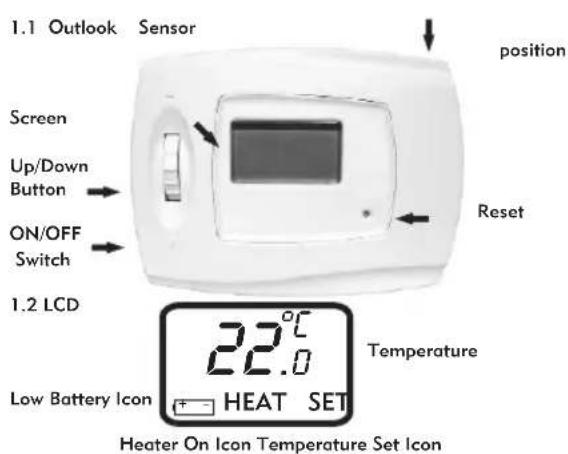
1.3 Features
Several useful functions and operating modes have been incorporated to adapt a variety of customer needs.
- LCD shows the "NEED TO KNOW" information only, which is more easy to understand
- Room Temperature Display
- Simplified Temperature Adjustment
- Heater Operation Mode
- 2 x AAA Size Alkaline Batteries (not included)
- Low Battery Indicator
- On/Off Switch
- Slim Housing Design
2 INSTALLATION
CAUTION:
-
The appliance can only be mounted on dry indoor places.
-
A suitable fuse with a rating not exceeding 5A, should be in the power line.
- Observe the national regulation for the wiring.
- Qualified electrician is recommended for installation and servicing.
This thermostat has been designed for simple and quick installation requiring only a few tools.
2.1 Required Material
Hammer
Masking tape
Drill and 3/16" drill bit
Screwdriver


GB


GB
2.2 Removing your old thermostat
CAUTION: To avoid electric shock, turn off the power of the heating system at the main power box in your home. Read the following instructions carefully before disconnecting the wires.
- Turn off the old thermostat.
- Remove the cover from the old thermostat.
- Unscrew the old thermostat from the wall plate.
- Find and remove the screws attaching the wall plate to the wall. Pull the wall plate a small distance from the wall. Do not disconnect any wire yet, simply locate the wires.
Warning: After removing the wall plate, if you find that it is mounted on a junction box (e.g. a box similar to one behind a light switch or electric outlet), high voltage circuit may be present and there is a danger of electric shock. Please consult a qualified electrician.
-5-
2.3 Wire Labeling
- Disconnect and identify each wire.
- Tape the wires to the wall to keep them from slipping through the hole in the wall. If the hole in the wall is larger than necessary, fill it in order to prevent hot or cold air to penetrate the thermostat. In this manner, the thermostat will function perfectly.
2.4 Choosing a Location
For a new installation, choose a mounting location:
- About 5 feet (1.5 meter) above the floor in an area with good air circulation.
- Away from:
i. Drafts of dead air sports
ii. Air ducts
iii. Radiant heat from the sun or appliances
iv. Concealed pipes and chimneys - The best viewing angle is 12 o'clock direction.
-6-
GB


GB
2.5 Mounting
- Mounting the thermostat onto the wall.
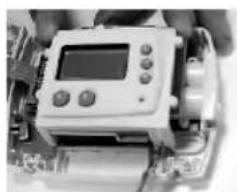
- Remove completely the front housing of the thermostat by loosening the screws at the bottom.(see picture)
- Mark the holes' position and align the wire coming from the wall in the hole beside the connectors.(see picture)
- Drill two holes and insert the plastic anchors carefully into the holes until they are flush with the wall.
- Fasten securely the thermostat to the wall with the two screws.
2.6 Connecting the Wires
- Connect the system wires to the terminals according to the wiring diagram shown in the section 2.7 "WIRING DIAGRAM".
natural_image
Close-up of a handheld electronic device with a display and control buttons (no visible text or symbols)
natural_image
Interior view of an electronic device showing internal circuitry and components (no visible text or symbols)GB
2.7 Wiring Diagram
The KT50 thermostat can be used with single stage heating system. Inside the thermostat, three terminals which label COM(common), NC(normal close) and NO(normal open) would be found. In most case, COM and NO are used.

GB

natural_image
Close-up of a hand holding an electronic device with visible internal components (no text or symbols)2.8 Battery Installation
The KT50 is operated by two AAA 1.5V Alkaline batteries. Please follow the installation instruction
- Find out the battery door at the side of the case.
-9.-10-
- Slide the door downward to open it.
- Two old batteries would "jump out".
- Take out the old batteries.
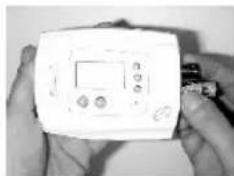
- Insert two batteries in right position as shown. Ensure the polarity of the batteries are in right position.
- Push and slide the door up to close it. If first use, skips the instruction (3) and (4).
natural_image
Close-up of hands holding a white electronic device with a display screen (no visible text or symbols)2.9 Temperature Span
Span is the temperature difference between the turn ON and OFF temperature.
GB


GB
The factory pre-set spanis +/- 0.5°C. For example, control temperature setting is 20°C. The heater will be operated when the roomtemperature drops to 19.5°C and will be turned off when the temperature rises to 20.5°C.
2.10 Temperature Measurement
'HI' will be shown when temperature is above 40^ C and 'LO' will be shown when temperature falls below 0^ C.
2.11 Power Installation
The thermostat is operated by two AAA 1.5V Alkaline batteries.
To power-up the unit, install the batteries as shown in above section "Battery Installation" and slide the ON/OFF switch to ON position.
When power is supplied for the first time or reset button is pressed, the display will show as follows:
TEMPERATURE 22°C CONTROL TEMPERATURE 20°C OUTPUT OFF

If the display is different as shown, use a fine probe such as straightened paper clip to gently push the reset button.
3 CONTROL TEMPERATURE
At the normal operation mode, the temperature could be set.
- Push ▲/▼button to view the setting temperature which was set last time.
- When power up or reset, the factory preset control temperature 20^ C is shown.
GB


GB
- Hold ▲/▼button about 3 seconds and the temperature indicator will flash one time.
- Push ▲/▼button to increase or decrease the temperature setting.
- Hold ▲/▼button to fast advances the adjustment rate.
- The unit will be back to normal operation mode automatically when no button is pressed about 10 seconds.
- Program temperature can only be set in the control temperature range from 5°C to 35°C, not wrap around at two ends.
- When pushing the ▲button to increase the temperature to 35°C, it is no further increment.

Likewise, when pushing ▼ button to decrease the temperature to 5°C, it is no further decrement.
-13--14-
When the voltage of the battery decrease to certain level, the LCD will be blank. In this case, the batteries should be changed as soon as possible to avoid any data loss.
5 HEATER OPERATION
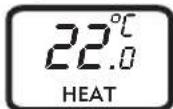
5.1 Heater On Operation
The heater will be turned on when the room temperature is lower than the programmed temperature and the Heater On Icon will be displayed as shown.
5.2 Output-On Delay
For safety purposes, the thermostat has an auto 20 seconds' delay for heater to restart.
GB


GB
6 SPECIFICATIONS
6.1 hysical Characteristics
Size: 98(W)X 28(L)X 73(H) mm
Material: Polycarbonate (PC)
Weight: 98g (battery not included)
6.2 Electrical Characteristics
Power Source:
AAA 1.5V Alkaline battery x 2
Switching Relay:
Resistive load: 5A at 250VAC
Inductive load: 3A at 250VAC
Temperature Measurement: 0 - 40°C
Temperature Accuracy: +/- 1.0°C
Temperature Control: 5 - 35°C
Temperature Control Span: +/- 0.5°C
Output On Delay: 20 seconds
Operating Temperature: -10°C to 50°C
(non-condensing)
Storage Temperature: -30°C to 60°C
Operating polluted condition: Normal
-15--16-


GB

Brand : ELRO
Model : KT50
Category : Thermometer