 ManualGo.com
AF-S NIKKOR 600MM F-4G ED VR - Camera lens NIKON - Free user manual and instructions
Find the device manual for free AF-S NIKKOR 600MM F-4G ED VR NIKON in PDF.



Download the instructions for your Camera lens in PDF format for free! Find your manual AF-S NIKKOR 600MM F-4G ED VR - NIKON and take your electronic device back in hand. On this page are published all the documents necessary for the use of your device. AF-S NIKKOR 600MM F-4G ED VR by NIKON.
USER MANUAL AF-S NIKKOR 600MM F-4G ED VR NIKON
(P.2–17) (PP.18–35) (S. 36–53) (P. 54–71) (PP. 72–89) (S. 90–107) (CTP. 108–125) (P. 126–143) (PP. 144–161) (P. 162–180) (P. 181–197) (P. 198–215) Notes on Safety Operations CAUTION
Do not disassemble Touching the internal parts of the camera or lens could result in injury. Repairs should be performed only by qualified technicians. Should the camera or lens break open as the result of a fall or other accident, take the product to a Nikon authorized service representative for inspection after unplugging the product and/or removing the battery. Turn off immediately in the event of malfunction Should you notice smoke or an unusual smell coming from the camera or lens, remove the battery immediately, taking care to avoid burns. Continued operation could result in injury. After removing or disconnecting the power source, take the equipment to a Nikon-authorized service representative for inspection. Do not use the camera or lens in the presence of flammable gas If the electronic equipment is operated in the presence of flammable gas, it could result in an explosion or a fire. Do not look at the sun through the lens or viewfinder Viewing the sun or other strong light sources through the lens or viewfinder could cause permanent visual impairment. Keep out of reach of children Particular care should be taken to prevent infants from putting the batteries or other small parts into their mouths.
Observe the following precautions when handling the camera and lens
- Keep the camera or lens unit dry. Failure to do so could result in a fire or electric shock.
- Do not handle or touch the unit with wet hands. Failure to do so could result in electric shock.
- In backlit shooting, keep the sun well out of the frame. The sunlight could focus into the lens body and cause a fire. When the sun gets close to the frame, it can also cause a fire.
- When the lens will not be used for a long time, attach both front and rear lens caps and store the lens away from direct sunlight. Failure to do so could result in a fire, as the lens might focus sunlight onto an object.
AF-S NIKKOR 500mm f/4G ED VR
1. Nomenclature ( ): Reference page
1 Lens hood HK-34 (p. 31) 2 Lens hood screw (p. 31) 3 Rubber grip 4 Focus operation button (Focus Lock/MEMORY RECALL/AF Start) (p. 28) 5 Focus ring (p. 28) 6 Depth-of-field scale (p. 30) 7 Distance index line (p. 30) 8 Distance scale 9 Vibration reduction ON/OFF ring switch (p. 29) ! Tripod collar lock screw (p. 31) " Lens rotating position index # Strap eyelet $ Slip-in filter holder knob (p. 31)
% Slip-in filter holder (p. 31) & Mounting index ( Lens mount rubber gasket (p. 27) ) CPU contacts (p. 26) ~ Built-in rotating tripod collar (p. 31) + Monopod collar (replaceable) (p. 31) , Focus mode switch (p. 27) - Focusing limit switch (p. 28) . Vibration reduction mode switch (p. 29) / Focus operation selection switch (AF-L/MEMORY RECALL/AF-ON) (p. 28) : Sound monitor switch (p. 28) ; Memory Set button (p. 29)
AF-S NIKKOR 600mm f/4G ED VR
1. Nomenclature ( ): Reference page
1 Lens hood HK-35-2 (p. 31) 2 Lens hood HK-35-1 (p. 31) 3 Lens hood screw (p. 31) 4 Rubber grip 5 Lens rotating position index 6 Tripod collar lock screw (p. 31) 7 Strap eyelet 8 Focus operation button (Focus Lock/MEMORY RECALL/AF Start) (p. 28) 9 Focus ring (p. 28) ! Depth-of-field scale (p. 30) " Distance index line (p. 30) # Distance scale $ Vibration reduction ON/OFF ring switch (p. 29) % Slip-in filter holder (p. 31)
& Slip-in filter holder knob (p. 31) ( Mounting index ) Lens mount rubber gasket (p. 27) ~ CPU contacts (p. 26) + Built-in rotating tripod collar (p. 31) , Monopod collar (replaceable) (p. 31) - Memory Set button (p. 29) . Focus mode switch (p. 27) / Focusing limit switch (p. 28) : Vibration reduction mode switch (p. 29) ; Focus operation selection switch (AF-L/MEMORY RECALL/AF-ON) (p. 28) < Sound monitor switch (p. 28)
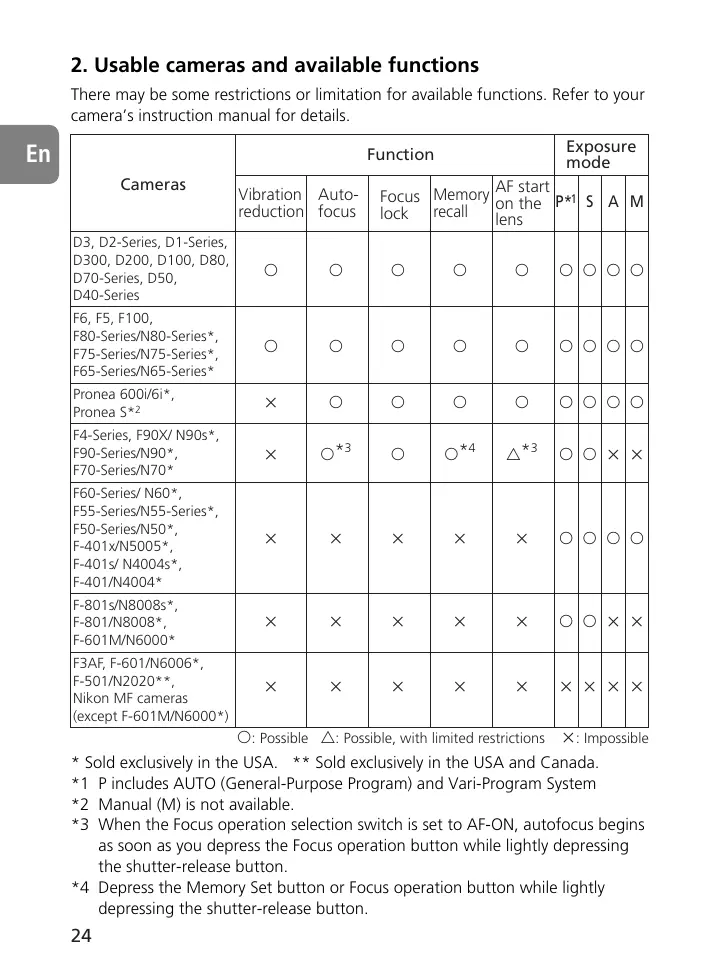
2. Usable cameras and available functions
There may be some restrictions or limitation for available functions. Refer to your camera’s instruction manual for details.
Exposure mode Function Cameras Vibration Autoreduction focus AF start Focus Memory on the P*1 S A M lock recall lens D3, D2-Series, D1-Series, D300, D200, D100, D80, D70-Series, D50, D40-Series
F6, F5, F100, F80-Series/N80-Series*, F75-Series/N75-Series*, F65-Series/N65-Series*
F4-Series, F90X/ N90s*, F90-Series/N90*, F70-Series/N70*
F60-Series/ N60*, F55-Series/N55-Series*, F50-Series/N50*, F-401x/N5005*, F-401s/ N4004s*, F-401/N4004*
F3AF, F-601/N6006*, F-501/N2020**, Nikon MF cameras (except F-601M/N6000*)
: Possible : Possible, with limited restrictions ҂: Impossible
- Sold exclusively in the USA. ** Sold exclusively in the USA and Canada. *1 P includes AUTO (General-Purpose Program) and Vari-Program System *2 Manual (M) is not available. *3 When the Focus operation selection switch is set to AF-ON, autofocus begins as soon as you depress the Focus operation button while lightly depressing the shutter-release button. *4 Depress the Memory Set button or Focus operation button while lightly depressing the shutter-release button.
- If this lens is used with cameras not compatible with vibration reduction, set the vibration reduction ON/OFF ring switch to OFF. With the Pronea 600i/6i camera, in particular, battery power may become quickly depleted if this switch is left ON.
3. Introduction
Thank you for purchasing the AF-S NIKKOR 500mm f/4G ED VR/AF-S NIKKOR 600mm f/4G ED VR lens. These are high performance lenses featuring special Vibration Reduction (VR) and high-speed Internal Focusing (IF) mechanisms. They also employ a Silent (S) Wave Motor to drive the focusing mechanism. Focus preset is also provided. Major features Two AF modes (p. 27) Autofocus can be overridden by setting the focus mode switch to “A/M” or “M/A” and manually focusing with the focus ring. M/A: Autofocus can be overridden by manually focusing with the focus ring. This mode should be used for fine-focusing. A/M: Autofocus can be overridden by manually focusing with the focus ring, but focus ring detection sensitivity is lower than in M/A mode. Use this mode to avoid canceling the AF setting by unintentionally moving the focus ring. Limiting the range of autofocus (p. 28) Focus time can be reduced by setting focusing limits. For example, if a subject is at least 8 m (26.2 ft.) (AF-S 500mm)/10 m (32.8 ft.) (AF-S 600mm) away, set the focusing limit switch to ∞ – 8 m (AF-S 500mm)/ ∞ – 10 m (AF-S 600mm). AF-L/MEMORY RECALL/AF-ON (p. 28-29) Focus distances can be locked and saved during autofocus (AF-L) and then recalled by pushing the “MEMORY RECALL” button. Autofocus is restarted on the lens by setting switch to AF-ON. Vibration reduction* (VR II) (p. 29-30) NORMAL: Reduces camera shake during handheld shooting or use of a monopod. This mode allows pictures to be taken at shutter speeds approx. 4 stops slower than is possible with a non-VR lens, therefore expanding the range of shutter speed options and making handheld or monopod telephoto shooting much easier. Panning is also possible. TRIPOD: Recommended mode to reduce camera shake when using a tripod. With a super-telephoto lens, camera shake may occur even when the camera is mounted on a tripod. TRIPOD mode reduces camera shake when shooting with a tripod, especially with shutter speeds between 1/15 and 1 sec. It also reduces image shake in the viewfinder.
- Under Nikon measurement conditions. The effects of vibration reduction vary depending on individual and shooting conditions.
Number of vibrations Vibration reduction using a tripod (in TRIPOD mode)
Camera shake during handheld shooting or when using a monopod (in NORMAL mode) Panning shots (in NORMAL mode) Strength of vibrations Basic concept of vibration reduction More accurate exposure control is possible when this is mounted on a Nikon camera having 3D Matrix Metering capability, because subject distance information is transferred from the lens to the camera body. The use of three ED (extra-low dispersion) lens elements ensures sharp pictures virtually free of color fringing. Also, by utilizing a 9-blade diaphragm that produces a nearly circular aperture, out-of-focus images in front of or behind the subject are rendered as pleasing blurs. The Nano Crystal Coat deposited on some of the lens elements ensures that fine, clear images can be reproduced under any shooting conditions, from the sunny outdoors to spotlighted interior scenes. Meniscus glass, unlike existing flat glass, is used for the lens protective glass. Closest focusing distances of 4 m (13.1 ft) (AF) and 3.85 m (12.6 ft) (MF) (AF-S 500mm)/5 m (16.4 ft) (AF) and 4.8 m (15.7 ft) (MF) (AF-S 600mm). Important!
- Be careful not to hold the camera body when the lens is attached, as this may cause damage to the camera. Be sure to hold both the lens and camera when carrying.
- Be sure to attach a 52mm screw-in filter to the slip-in filter holder.
- Be careful not to soil or damage the CPU contacts.
- AF-I/AF-S Teleconverters TC-14E/TC-14EII/TC-17EII/TC-20E/TC-20EII are usable.
- When mounted on Nikon digital SLR (Nikon DX format) cameras, such as the D2-Series and D50, the following applies. AF-S 500mm: the lens’ picture angle is 3°20’ and its 35 mm equivalent focal length is approx. 750 mm. (The lens’ picture angle is 5° at 35 mm focal length.) AF-S 600mm: the lens’ picture angle is 2°40’ and its 35 mm equivalent focal length is approx. 900 mm. (The lens’ picture angle is 4°10’ at 35 mm focal length.)
- If the lens mount rubber gasket is damaged, be sure to visit the nearest Nikon authorized dealer or service center for repair.
4. Focusing
Set your camera’s focus mode selector according to this chart: Cameras Camera’s focus mode D3, D2-Series, D1-Series, D300, D200, D100, D80, D70-Series, D50, D40-Series, F6, F5, F4-Series, F100, F90X/N90s*, F90-Series/N90*, F80-Series/N80-Series*, F75-Series/N75-Series*, F70-Series/N70*, F65-Series/N65-Series*, Pronea 600i/6i*, Pronea S A/M Lens’ focus mode M/A
Autofocus with Autofocus with Manual focus manual override manual override (Focus assist (C/S) (AF priority) is available.) (MF priority)
F60-Series/N60*, F55-Series/N55-Series*, F50-Series/N50*, F-801s/N8008s*, F-801/N8008*, (C/S) F-601M/N6000*, F-401x/N5005*, F-401s/N4004s*, F-401/N4004* Manual focus (Focus assist is available.) Manual focus (Focus assist is available, except with the F-601M/N6000*.)
- Sold exclusively in the USA. AF: Autofocus MF: Manual focus Autofocus with manual override (p. 25) A/M mode: Autofocus with manual override. AF priority M/A mode: Autofocus with manual override. MF priority 1 Set the focus mode switch to “A/M” or “M/A”. (Fig. 1) 2 You can manually override autofocus by operating the focus ring while lightly depressing the shutter release button or the AF start button on the camera or the Focus operation button on the lens. Fig. 1
- To cancel manual override, remove your finger from the shutter release button or the AF start button on the camera or the Focus operation button on the lens, and lightly depress the shutter release button to return to the autofocus mode.
5. To limit the range of autofocus
(See page 24 for usable cameras.)
- With AF operation, if the subject is more than 8 m (26.2 ft) (AF-S 500mm)/10 m (32.8 ft) (AF-S 600mm) away, set the focusing limit switch (Fig. 2) to ∞–8 m (AF-S 500mm)/∞–10 m (AF-S 600mm) to reduce focusing time.
- If the subject is sometimes 8 m (26.2 ft)/10 m (32.8 ft) or closer, set it to “FULL.”
- This function is only compatible with autofocus. Fig. 2
6. AF-L/MEMORY RECALL/AF-ON
Focus operation selection switch (AF-L/MEMORY RECALL/ AF-ON) and Focus operation button
- Depending on the position of the Focus operation selection switch (Fig. 3), the function of the Focus operation button (Fig. 4) varies. Position of Focus operation selection switch AF-L MEMORY RECALL AF-ON Function of Focus operation button Focus lock Memory recall AF start (AF-ON) on the lens
- The position of the Focus operation buttons can be changed to suit your preference. For more details on this change, contact your nearest Nikon service center or representative office.
- Press one of four Focus operation buttons to activate each function. Fig. 3 Fig. 4 Using the Focus lock button (See page 24 for usable cameras.) 1 Set the Focus mode switch to “A/M“ or “M/A“. (Fig. 1)
- This function is only compatible with autofocus. 2 Set the Focus operation selection switch (Fig. 3) to “AF-L“. 3 During autofocus, the focus can be locked while you are pressing the Focus operation button. (Fig. 4)
- Focus is locked while either of these buttons is pressed.
- The AF-Lock function can be engaged on either the camera and lens. MEMORY RECALL (See page 24 for usable cameras. Available during autofocus and manual focus.)
- Set the sound monitor switch (Fig. 5) to “ “ to activate the sound monitor; set it to “ “ to cancel.
- The following operation is with the sound monitor activated.
Fig. 5 1 Set the focus mode switch to “A/M“, “M/A“ or “M“. (Fig. 1) 2 Focus on a subject that you want to memorize the focused distance. Press the Memory Set button (Fig. 6) and a beep sounds, indicating that the focused distance was stored in Fig. 6 memory.
- Memory set is possible regardless of the position of the Focus mode switch or Focus operation selection switch.
- The focused distance is kept stored in the memory even when the camera is turned off or the lens is detached from the camera. Note: If the distance scale ring turns from right to left about 10 times when setting, and at the same time one short beep and three long beeps sound, perform Memory set again. 3 Set the Focus operation selection switch (Fig. 3) to “MEMORY RECALL“. 4 Press the Focus operation button (Fig. 4).
- While softly pressing the shutter release button, press the focus operation button to recall the memorized focus distance. 5 Two beeps sound to indicate the focused distance was recalled. Then depress the shutter release button all the way to take the picture. Note: To take pictures at the memorized focused distance, fully depress the shutter release button before removing your finger from the focus operation button.
- In the A/M or M/A mode, the lens reverts from Memory recall to autofocus or manual focus only when you remove your finger from the Focus operation button and lightly depress the shutter release button. AF-ON (See page 24 for usable cameras.) 1 Set the Focus mode switch (Fig. 1) to “A/M“ or “M/A“. 2 Set the Focus operation selection switch (Fig. 3) to “AF-ON“. 3 Press the focus operation button (Fig. 4) to take pictures.
- Autofocus is activated while you are pressing the Focus operation button.
7. Vibration reduction mode (See page 24 for usable cameras.)
1 Set the vibration reduction ON/OFF ring switch to “ON“ 2, while pressing the button on the ring switch 1. (Fig. 7) 2 Set the vibration reduction mode switch (Fig. 8) to “NORMAL“ or “TRIPOD“.
- Image vibration in the viewfinder can be reduced by softly pressing the shutter release button, making auto/manual focusing and exact framing of the subject easier. Fig. 7 Fig. 8
Notes on using vibration reduction
- Wait until the image in the viewfinder stops vibrating before fully depressing the shutter release button after you have lightly pressed the shutter release button.
- Due to the characteristics of the vibration reduction mechanism, the image in the viewfinder may become blurred after releasing the shutter.
- If you set the AF start (AF-ON) button (Fig. 4) to “ON“ on the camera or the Focus operation button on the lens, vibration reduction will not operate.
- Set the vibration reduction mode switch to “TRIPOD“ to reduce camera shake and image shake in the viewfinder while using a tripod. Very slight camera shake may fail to activate the vibration reduction system. Conversely, the VR system may cause camera shake in the lens. In this case, vibration reduction should be turned off. When using a tripod with an untightened head or a monopod, select NORMAL mode.
- When taking panning shots, be sure to set the vibration reduction mode switch (Fig. 8) to “NORMAL“.
- If you move the camera in a wide arc when panning, vibration in the direction of that movement is not affected. For example, if you pan the camera horizontally, only vibration in the vertical direction is reduced, making smooth pans much easier.
- Do not turn the camera power OFF or remove the lens from the camera while the vibration reduction mode is in operation. (Otherwise, the lens may emit a chattering noise if the camera is shaken. This is not a malfunction. Turn the camera power ON again to correct this.)
- With F80-Series/N80-Series, F75-Series/N75-Series, F65-Series/N65-Series, D300, D200, D100, D80, D70-Series, D50 and D40-Series cameras, vibration reduction does not work while the built-in flash is recycling.
8. Depth of field
- Approximate depth of field can be determined by checking the depth-of-field scale. (Fig. 9)
- If your camera has a depth of field preview (stopdown) button or lever, depth of field can be observed while looking through the camera viewfinder.
- For more information, see p. 216. Depth-of-field scale Distance index line Fig. 9
- Because this lens does not have an aperture ring, you must set the aperture on the camera.
10. Built-in rotating tripod collar
- When shooting vertical pictures, loosen the tripod collar lock screw by turning it counterclockwise, rotate the lens to an appropriate position, then tighten the screw clockwise.
- When holding the camera by its handgrip and rotating the camera with the lens in its tripod collar, your hand may bump into the tripod, depending on the tripod in use. Monopod (supplied accessory)
- The tripod collar can be exchanged for a monopod collar by removing the tripod collar lock screw.
- After changing the tripod collar, make sure the screw is fully tightened. Failure to fully tighten the screw could lead to accidents or damage to the lens and camera. For details on this procedure, contact your nearest Nikon service center or representative office.
11. Lens hood HK-34 (AF-S 500mm)/HK-35 (AF-S 600mm )
- Tighten the lens hood screw securely when using the lens hood.
- To store the hood, place it in the reverse position and tighten the screw securely. (AF-S 600mm: HK-35-1/HK-35-2) Two-part lens hoods (HK-35-1 for attachment to the front of the lens and HK-35-2 for attachment to the front of HK-35-1) are provided. Using the HK-35-1: First, loosen the lens hood screw on the HK-35-1, slip HK-35-1 onto the front of the lens, then tighten the screw. Attaching the HK-35-2: Loosen the lens hood screw on the HK-35-2, slip HK-35-2 onto the front of the HK-35-1, then tighten the screw. Storing the lens hoods: First, reverse the HK-35-2, and slip it back onto the HK-35-1. Then reverse the HK-35-1 with the HK-35-2 attached, and slide both back onto the front of the lens.
12. Slip-in filter holder
- Always use a (52mm screw-in) filter. A 52mm screwin NC filter is attached to the filter holder when shipped from the factory. 1 Screw a filter into the side of the filter holder marked with the words “Nikon” and “JAPAN”. (Fig. 10) Fig. 10
2 Press down on the slip-in filter holder knob, and turn counterclockwise until the white line on the knob is at a right angle to the axis of the lens.
- The slip-in filter holder can be attached either facing lens or camera side without having any effect on your pictures.
C-PL1L slip-in circular polarizing filter (optional)
- Blocks reflections from nonmetallic surfaces such as glass and water
- The focus point of a C-PL1L slip-in circular polarizing filter differs from that of a 52mm screw-in filter. The distance scale is shifted from the correct position. The closest focused distance is extended slightly.
- The memory set position may change slightly when using focus preset. Attach the C-PL1L filter before using the memory recall function.
13. Recommended focusing screens
Various interchangeable focusing screens are available for certain Nikon SLR cameras to suit any picture-taking situation. The ones recommended for use with this lens are: AF-S NIKKOR 500mm f/4G ED VR Screen Camera
◎: Excellent focusing ○: Acceptable focusing Slight vignetting or moiré patterns appear in the viewfinder, but not on the film.
―: Not available. ( ): Indicates degree of exposure compensation needed (Center-Weighted metering only). For F6 cameras, compensate by selecting “Other screen“ in Custom Setting “b6: Screen comp.“ and setting the EV level to -2.0 to +2.0 in 0.5 EV steps. When using screens other than type B or E, “Other screen“ must be selected even when the required compensation value is “0“ (no compensation required). For F5 cameras, compensate using Custom Setting #18 on the camera body. For F4-Series cameras, compensate using the Exposure Compensation Dial for the focusing screen. See instruction manual of the camera body for more details. Blank box means not applicable. Since type M screen can be used for both macrophotography at a 1:1 magnification ratio and for photomicrography, it has different applications than other screens.
- For F5 cameras, only EC-B, EC-E, B, E, J, A, L focusing screens are usable in Matrix Metering.
- When using the B and E focusing screens in cameras other than those listed above, refer to the columns for the B and E screens.
14. Lens care
- Clean the lens surfaces with a blower brush. To remove dirt and smudges, use a soft, clean cotton cloth or lens tissue moistened with ethanol (alcohol) or lens cleaner. Wipe in a circular motion from center to outer edge, taking care not to leave traces or touch other parts of the lens.
- Never use thinner or benzene to clean the lens as this might damage it, result in a fire, or cause health problems.
- When the lens is not in use, attach the lens cap to protect the front lens element.
- When storing the lens in its lens case, attach both front and rear caps.
- When the lens will not be used for a long time, store it in a cool, dry place to prevent mold. Also store the lens away from direct sunlight or chemicals such as camphor or naphthalene.
- Do not get water on the lens or drop it in water as this will cause it to rust and malfunction.
- Reinforced plastic is used for certain parts of the lens. To avoid damage, never leave the lens in an excessively hot place.
15. Supplied accessories
- Heavy duty case CT-504 (AF-S 500mm)/CT-607 (AF-S 600mm) • Slip-on front lens cap • Rear lens cap LF-1 • Lens hood HK-34 (AF-S 500mm)/HK-35 (AF-S 600mm) • Dedicated filter holder* • 52 mm screw-in NC filter • Strap LN-1
- Monopod collar *If dedicated accessories are broken or missing, contact your nearest Nikon service center or representative office as they are not available at general shops.
16. Optional accessories
- Semi-soft case CL-L2 • 52mm screw-in filters (except circular polarizing filter II)
- Slip-in circular polarizing filter C-PL1L • AF-S Teleconverters (TC-14EII/ TC-17EII/TC-20EII)
17. Specifications
Type of lens: Focal length: Maximum aperture: Lens construction: Picture angle: Distance information: Focusing: Vibration reduction:
G-type AF-S Nikkor lens having built-in CPU and Nikon bayonet mount. Special vibration reduction (VR) mechanism incorporated AF-S 500mm: 500mm AF-S 600mm: 600mm f/4 AF-S 500mm: 14 elements in 11 groups (3 ED glass and 1 Nano Crystal Coat deposited lens elements), as well as 1 protective glass AF-S 600mm: 15 elements in 12 groups (3 ED glass and 1 Nano Crystal Coat deposited lens elements), as well as 1 protective glass AF-S 500mm: 5° with 35 mm (135) format Nikon film-SLR cameras and Nikon FX format digital SLR cameras 3°20’ with Nikon DX format digital SLR cameras 4° with IX240 system cameras AF-S 600mm: 4°10’ with 35 mm (135) format Nikon film-SLR cameras and Nikon FX format digital SLR cameras 2°40’ with Nikon DX format digital SLR cameras 3°20’ with IX240 system cameras Output to camera body Nikon Internal Focusing (IF) system (utilizing an internal Silent Wave Motor); manually via separate focus ring. Lens-shift method using voice coil motors (VCMs) Shooting distance scale: AF-S 500mm: Graduated in meters and feet from
3.85 m (15 ft) to infinity (∞)
AF-S 600mm: Graduated in meters and feet from
4.8 m (17 ft) to infinity (∞)
Closest focusing distance: AF-S 500mm: 4 m (13.1 ft) in AF mode, 3.85 m (12.6 ft) in MF mode AF-S 600mm: 5 m (16.4 ft) in AF mode, 4.8 m (15.7 ft) in MF mode No. of diaphragm blades: 9 pcs. (rounded) Diaphragm: Fully automatic Aperture scale: f/4—f/22 Exposure measurement: Via full-aperture method with cameras with CPU interface system Focusing limit switch: AF-S 500mm: Provided; two ranges available: FULL (∞–4 m), or ∞–8 m AF-S 600mm: Provided; two ranges available: FULL (∞–5 m), or ∞–10 m Tripod collar: Built-in. Rotatable through 360°, lens rotating position index at 90°. Tripod collar can be exchanged for a monopod collar Dimensions: AF-S 500mm: Approx. 139.5 mm dia. x 391.0 mm extension from the camera's lens mounting flange AF-S 600mm: Approx. 166.0 mm dia. x 445.0 mm extension from the camera's lens mounting flange Weight: AF-S 500mm: Approx. 3,880 g (8.6 lbs) AF-S 600mm: Approx. 5,060 g (11.2 lbs) Specifications and design are subject to change without notice.
Autofocus with manual override (S. 43)
6. AF-L/MEMORY RECALL/AF-ON
Vibrations- Autoreducering fokus
F3AF, F-601, F-501, îÓÚÓ͇ÏÂ˚ Nikon MF (Á‡ ËÒÍβ˜ÂÌËÂÏ F-601M)
AF: ‡‚ÚÓÙÓÍÛÒËӂ͇ MF: ÙÓÍÛÒËӂ͇ ‚Û˜ÌÛ˛
6. AF-L/MEMORY RECALL/AF-ON
èÂÂÍβ˜‡ÚÂθ ‚˚·Ó‡ ÂÊËχ ÙÓÍÛÒËÓ‚ÍË (AF-L/MEMORY
(–1.0) (+0.5) (–1.5)
AF-L MEMORY RECALL AF-ON F5+DA-30 F4+DP-20 F4+DA-20
G4 J K AF-L MEMORY RECALL AF-ON
F5+DP-30 F5+DA-30 F4+DP-20 F4+DA-20