SV150/SV-150S - Musical instrument YAMAHA - Free user manual and instructions
Find the device manual for free SV150/SV-150S YAMAHA in PDF.


User questions about SV150/SV-150S YAMAHA
0 question about this device. Answer the ones you know or ask your own.
Ask a new question about this device
Download the instructions for your Musical instrument in PDF format for free! Find your manual SV150/SV-150S - YAMAHA and take your electronic device back in hand. On this page are published all the documents necessary for the use of your device. SV150/SV-150S by YAMAHA.
USER MANUAL SV150/SV-150S YAMAHA
Thank you for purchasing the Yamaha Silent Violin ^TM . In order to obtain the maximum performance and enjoyment from your Silent Violin ^TM , we urge you to read this Owner's Manual thoroughly before using the instrument. Please keep this Owner's Manual in a safe place for later reference.
Contents
Precautions....3
Main Body/Accessories 4
Nomenclature .... 5
Setup 8
■ Tuning and Changing the Strings 8
■ The Shoulder Rest .... 10
■ The Bow (supplied with the SV150S) 10
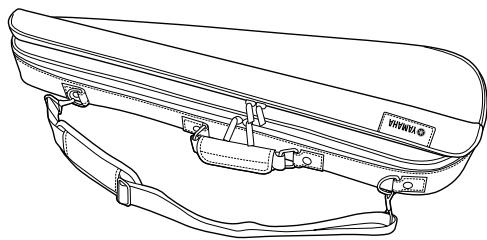
■ About the Soft Case (SV150S Accessory) 10
Usage 11
■ Sound Output Basics ...... 11
■ Using the Built-In Tuner 11
■ Using the Built-In Metronome 12
■ Using the Built-In Effects 12
■ Using the Music Player 14
■ Messages .... 16
Power Supply 17
■ Using Batteries 17
■ Supplying AC Power 17
Specifications 18
SPECIAL MESSAGE SECTION
This product utilizes batteries or an external power supply (adaptor). DO NOT connect this product to any power supply or adaptor other than one described in the manual, on the name plate, or specifically recommended by Yamaha.
This product should be used only with the components supplied or; a cart, rack, or stand that is recommended by Yamaha. If a cart, etc., is used, please observe all safety markings and instructions that accompany the accessory product.
SPECIFICATIONS SUBJECT TO CHANGE: The information
contained in this manual is believed to be correct at the time of printing. However, Yamaha reserves the right to change or modify any of the specifications without notice or obligation to update existing units.
Do not attempt to service this product beyond that described in the user-maintenance instructions. All other servicing should be referred to qualified service personnel.
This product, either alone or in combination with an amplifier and headphones or speaker/s, may be capable of producing sound levels that could cause permanent hearing loss. DO NOT operate for long periods of time at a high volume level or at a level that is uncomfortable. If you experience any hearing loss or ringing in the ears, you should consult an audiologist.
IMPORTANT: The louder the sound, the shorter the time period before damage occurs.
NOTICE: Service charges incurred due to a lack of knowledge relating to how a function or effect works (when the unit is operating as designed) are not covered by the manufacturer's warranty, and are therefore the owner's responsibility. Please study this manual carefully and consult your dealer before requesting service.
ENVIRONMENTAL ISSUES: Yamaha strives to produce products that are both user safe and environmentally friendly. We sincerely believe that our products and the production methods used to produce them meet these goals. In keeping with both the letter and the spirit of the law, we want you to be aware of the following:
Battery Notice: This product MAY contain a small non-rechargeable battery which (if applicable) is soldered in place. The average life span of this type of battery is approximately five years. When replacement becomes necessary, contact a qualified service representative to perform the replacement.
This product may also use “household” type batteries. Some of these may be rechargeable. Make sure that the battery being charged is a rechargeable type and that the charger is intended for the battery being charged.
When installing batteries, do not mix old batteries with new, or with batteries of a different type. Batteries MUST be installed correctly. Mismatches or incorrect installation may result in overheating and battery case rupture.
Warning: Do not attempt to disassemble or incinerate any battery. Keep all batteries away from children. Dispose of used batteries promptly and as regulated by the laws in your area. Note: Check with any retailer of household type batteries in your area for battery disposal information.
Disposal Notice: Should this product become damaged beyond repair, or for some reason its useful life is considered to be at an end, please observe all local, state, and federal regulations that relate to the disposal of products that contain lead, batteries, plastics, etc. If your dealer is unable to assist you, please contact Yamaha directly.
NAMEPLATE LOCATION: The nameplate is located on the bottom of the product. The model number, serial number, power requirements, etc., are located on this plate. You should record the model number, serial number, and the date of purchase in the spaces provided below and retain this manual as a permanent record of your purchase.
Model
Serial No.
Purchase Date
PLEASE KEEP THIS MANUAL
92-BP
FCC INFORMATION (U.S.A.)
1. IMPORTANT NOTICE: DO NOT MODIFY THIS UNIT!
This product, when installed as indicated in the instructions contained in this manual, meets FCC requirements. Modifications not expressly approved by Yamaha may void your authority, granted by the FCC, to use the product.
- IMPORTANT: When connecting this product to accessories and/or another product use only high-quality shielded cables. Cable/s supplied with this product MUST be used. Follow all installation instructions. Failure to follow instructions could void your FCC authorization to use this product in the USA.
- NOTE: This product has been tested and found to comply with the requirements listed in FCC Regulations, Part 15 for Class “B” digital devices. Compliance with these requirements provides a reasonable level of assurance that your use of this product in a residential environment will not result in harmful interference with other electronic devices. This equipment generates/uses radio frequencies and, if not installed and used according to the instructions found in the user’s manual, may cause interference harmful to the operation of
other electronic devices. Compliance with FCC regulations does not guarantee that interference will not occur in all installations. If this product is found to be the source of interference, which can be determined by turning the unit “OFF” and “ON”, please try to eliminate the problem by using one of the following measures:
Relocate either this product or the device that is being affected by the interference.
Utilize power outlets that are on different branch (circuit breaker or fuse) circuits or install AC line filter/s.
In the case of radio or TV interference, relocate/reorient the antenna. If the antenna lead-in is 300 ohm ribbon lead, change the lead-in to co-axial type cable.
If these corrective measures do not produce satisfactory results, please contact the local retailer authorized to distribute this type of product. If you cannot locate the appropriate retailer, please contact Yamaha Corporation of America, Electronic Service Division, 6600 Orangethorpe Ave, Buena Park, CA 90620
The above statements apply ONLY to those products distributed by Yamaha Corporation of America or its subsidiaries.
CANADA
THIS DIGITAL APPARATUS DOES NOT EXCEED THE “CLASS B” LIMITS FOR RADIO NOISE EMISSIONS FROM DIGITAL APPARATUS SET OUT IN THE RADIO INTERFERENCE REGULATION OF THE CANADIAN DEPARTMENT OF COMMUNICATIONS.
LE PRESENT APPAREIL NUMERIQUE N'EMET PAS DE BRUITS RADIOELECTRIQUES DEPASSANT LES LIMITES APPLICABLES AUX APPAREILS NUMERIQUES DE LA "CLASSE B" PRESCRITES DANS LE REGLEMENT SUR LE BROUILLAGE RADIOELECTRIQUE EDICTE PAR LE MINISTERE DES COMMUNICATIONS DU CANADA.
Your Silent Violin™ will give you years of reliable service if you follow the simple rules given below:
■ Location
Do not expose it to the following conditions to avoid deformation, discoloration, or more serious damage.
- Direct sunlight (e.g. near a window).
- High temperatures (e.g. near a heat source, outside, or in a car during the daytime).
- Excessive humidity.
- Excessive dust.
- Strong vibration.
■ Power Supply
- Turn the power switch OFF when not in use.
- If you use an AC power adaptor, unplug the adaptor from the AC outlet if not to be used for an extended period of time.
- Unplug the AC power adaptor during electric storms.
- Avoid plugging the AC power adaptor into the same AC outlet as appliances with high power consumption, such as electric heaters or ovens. Also avoid using multi-plug adaptors since these can result in reduced sound quality and possibly damage.
■ Turn Power OFF When Making Connections
- To avoid damage to the Silent Violin™ and other devices to which it is connected (a sound system, for example), turn the power switches of all related devices OFF prior to connecting or disconnecting audio cables.
■ Handling and Transport
- Never apply excessive force to the controls, connectors or other parts.
- Always unplug cables by gripping the plug firmly, not by pulling on the cable.
- Disconnect all cables before moving the unit.
- Physical shocks caused by dropping, bumping, or placing heavy objects on the unit can result in scratches and more serious damage.
■ Cleaning
- Clean the cabinet and panel with a dry soft cloth.
- A slightly damp cloth may be used to remove stubborn grime and dirt.
- Never use cleaners such as alcohol or thinner.
- Avoid placing vinyl objects on top of the unit (vinyl can stick to and discolor the surface).
■ Electrical Interference
- This unit contains electric circuitry and may cause interference if placed too close to radio or television receivers. If this occurs, move it further away from the affected equipment.
YAMAHA is not responsible for damage caused by improper handling or operation.
Information for Users on Collection and Disposal of Old Equipment and used Batteries

These symbols on the products, packaging, and/or accompanying documents mean that used electrical and electronic products and batteries should not be mixed with general household waste. For proper treatment, recovery and recycling of old products and used batteries, please take them to applicable collection points, in accordance with your national legislation and the Directives 2002/96/EC and 2006/66/EC.
By disposing of these products and batteries correctly, you will help to save valuable resources and prevent any potential negative effects on human health and the environment which could otherwise arise from inappropriate waste handling.
For more information about collection and recycling of old products and batteries, please contact your local municipality, your waste disposal service or the point of sale where you purchased the items.

[For business users in the European Union]
If you wish to discard electrical and electronic equipment, please contact your dealer or supplier for further information.
![YAMAHA SV150/SV-150S - [For business users in the European Union] - 1](/content/2025/01/114861/images/8a3d4a2d3142dfba6174e64c5e9d2a28d149c0924811adf787f129efeb0f0a9e.jpg)
[Information on Disposal in other Countries outside the European Union]
These symbols are only valid in the European Union. If you wish to discard these items, please contact your local authorities or dealer and ask for the correct method of disposal.
Note for the battery symbol (bottom two symbol examples):
This symbol might be used in combination with a chemical symbol. In this case it complies with the requirement set by the Directive for the chemical involved.
Cd
Main Body/Accessories
After opening the packaging, please check that all the parts listed below are included.
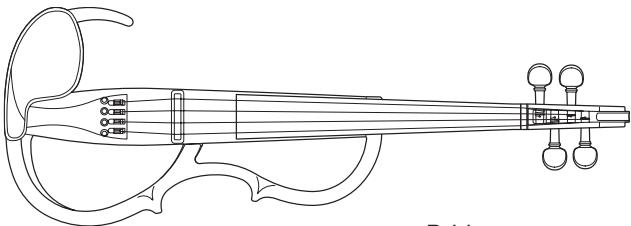
SV150
- Main Unit
(The instrument is shipped from the factory with its bridge removed.)
natural_image
Line drawing of a traditional Chinese string instrument with tuning pegs and strings (no text or symbols)-
Bridge
-
Control Box
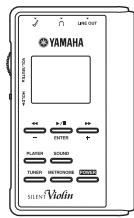
text_image
YAMAHA SILENT VIOIN- SD Card

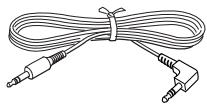
- Cable
(Connects the instrument to the Control Box.)
natural_image
Line drawing of a coiled audio cable with two connectors (no text or symbols)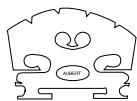
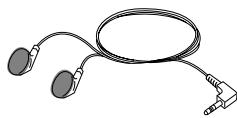
- Stereo earphones
natural_image
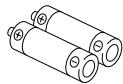
Line drawing of a medical or electronic device with two earbuds and a coiled cable (no text or symbols)• SUM-3 (AA) size Manganese battery x2
* The supplied battery is for demonstration purposes.
- Owner's Manual (this booklet)
- “Let’s Enjoy Yamaha Silent Violin™” (booklet with practice pieces)
SV150S
The following items are in addition to the SV150 package.
- Bow : 4/4 size

natural_image
Pure technical line drawing of a curved mechanical component (no text or symbols)- Rosin : PIRASTRO Schwarz 9005
- Soft Case
natural_image
Line drawing of a car rear bumper with straps and seat (no text or symbols)* If the use an AC power adaptor is required, please purchase the PA-D05K, sold separately.
Nomenclature
[Main Unit]
- Front
![YAMAHA SV150/SV-150S - [Main Unit] - 1](/content/2025/01/114861/images/d661c851ea6ae5aa508314f746d29f48c260d01f066c4297b4f9b0dc1526c00e.jpg)
text_image
Tuning peg Nut Fingerboard Neck 4th string (G) 3rd string (D) 2nd string (A) 1st string (E) Frame Body Bridge seat Bridge Adjuster Chin rest Tailpiece- Back
![YAMAHA SV150/SV-150S - [Main Unit] - 2](/content/2025/01/114861/images/89f30612f6d5617f27689d1a486f3d3a2e88630892b11578b08e729604dc2cc5.jpg)
text_image
Neck Volume Control Box Instrument Jack YAMAHA Shoulder Rest Holder[Control Box]
* For use with the SV150. Not compatible with other instruments.
![YAMAHA SV150/SV-150S - [Control Box] - 1](/content/2025/01/114861/images/d2baf2faf2212aaef4f5e07113939b5f49bd89f46c414de1d59bd880018a7d73.jpg)
flowchart
graph TD
    A["Main Unit"] --> B["Stereo Earphones"]
    B --> C["Instrument Jack"]
    C --> D["LONE OUT"]
    D --> E["External Audio Device"]
    E --> F["P.A. Mixer, Recording Mixer"]
    F --> G["To the AUX IN jack, etc."]
    G --> H["Line OUT"]
    H --> I["Main Volume"]
    I --> J["Louder"]
    J --> K["Push Mute ⇔ Cancel"]
    K --> L["Quieter"]
    L --> M["Select Buttons"]
    M --> N["Power Button (POWER)"]
    N --> O["Selected Buttons"]
    O --> P["SILENT Violin"]
    P --> Q["LONE OUT"]
    Q --> R["YAMAHA"]
    R --> S["LCD Panel"]
    R --> T["Cue Buttons (-, ENTER, +)"]
    R --> U["Player Sound"]
    R --> V["TUNER METRONOME POWER"]
    R --> W["SD Card"]
    R --> X["SD Card Slot"]
    R --> Y["Hold Switch (HOLD)"]
    R --> Z["Volume (VOL/MUTE)"]
    R --> AA["Unlock"]
    AA --> AB["Power Adaptor Jack (DC 5V 500 mA)"]
    AB --> AC["Electric Outlet"]
    AC --> AD["Power Adaptor (Option)"]
[Explanation of Input/Output Section]
● Control Box Instrument Jack
This jack is used to receive power from the Control Box and transmit the audio signal from the instrument to the Control Box. Use the supplied cable to connect the instrument to the “Instrument Jack” on the Control Box.
* A commercially available audio cable with stereo mini plugs on both ends can also be used. (Cables with resistors are not compatible.)
* The system will not operate properly if a monaural cable is used.
* The system will not operate properly if the cable is attached to anything other than the Control Box.
- Instrument Jack
This jack supplies power to the SV150 instrument and receives the audio signal from the SV150. Use the supplied cable to connect the instrument to the “Instrument Jack” on the Control Box.

Never connect any devices (including other Silent Violins™ with different model numbers) other than the SV150 Silent Violin™ that is included in the bundled set. Doing so may result in damage to the other device.
● PHONES Jack
For connecting the supplied inner earphones. Any commercially available headphones or inner earphones can be used.
● LINE OUT Jack
Connecting one end of a commercially available audio cable with a stereo mini plug (sold separately) here, sends the stereo audio output of the Silent Violin™, complete with effects and functions, to an external audio device such as an amp, etc.
The violin and the click tone are heard in the center, while the effects, depending upon the effect type, are heard in stereo. The audio signal from the SD card is output according to the original file recording.
- SD Memory Card Slot
Inserting the supplied SD memory card into the slot here allows playback the following music files. (Refer to page 14 for more information.)
- Compatible Music Files
| Extension | File Type |
| .aac | AAC file compression |
| .m4a | MPEG4 file compression |
| .mp3 | MPEG1 Audio-Layer-3 file compression |
| .wav | Windows standard (no file compression) |
| .mid | MIDI File |
- Do not listen for extended periods of time at loud volume levels using the inner earphones or headphones. Doing so can result in damage to your hearing.
- If the sound is distorted, use the volume control on the instrument or on the Control Box and lower the volume until the sound is no longer distorted.
- Connect or disconnect the cable between the Silent Violin™ and the Control Box only after the Control Box power is switched OFF.
- When connecting the Silent Violin™'s Control Box to an external device, make sure that the power is switched OFF on all devices, or that the volume on all devices is set to the minimum level. Loud volume levels can damage your hearing, and damage equipment.
- Disconnecting the cable while the power is ON may result in damage to the equipment. The sudden shock to your ears may be severe, so please use caution.
- When making connections to external devices, make sure that the proper plugs are used and securely connected.
Set up
■ Tuning and Changing the Strings
The Silent Violin ^™ is shipped from the factory with the bridge unfitted. First, set up the bridge and then proceed with tuning. As the strings get old, sound quality will gradually decrease, and it will become difficult to tune the instrument. Change the strings as soon as you think they are getting old.
- The end of the strings are sharp and can cut fingers. Use caution when changing strings.
-
When changing or adjusting strings, do not put your face close to the instrument. The string may suddenly break resulting in eye or other unexpected injuries.
-
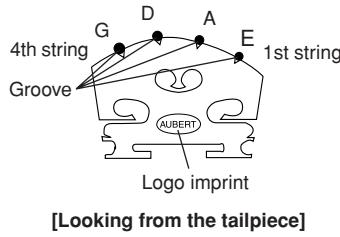
The lower side of the bridge supports the 1st string (E), the higher side supports the 4th string (G). Make sure the bridge is placed properly, then set the bridge in the bridge seat. The side of the bridge with the logo imprint should face the tailpiece.
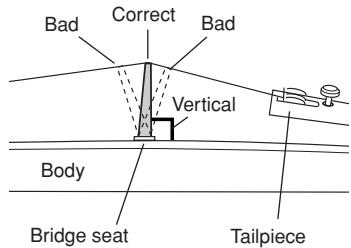
- Ensure that the bridge stands vertically. If it leans to one side, use both hands to adjust. Make sure that each string passes over the corresponding slits in the bridge.
text_image
4th string Groove G D A E 1st string AUBERT Logo imprint [Looking from the tailpiece]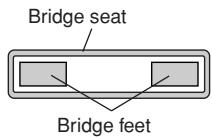
text_image
Bridge seat Bridge feet[Make sure the bridge feet do not come in contact with the bridge seat]
text_image
Bad Correct Bad Vertical Body Bridge seat Tailpiece
Make sure that the strings are resting in their appropriate grooves in the bridge when playing the instrument.
Strings may come out of their grooves when adjusting the bridge or changing strings. Since the first (E) and fourth (G) strings tend to come out of their grooves easily, use your fingers to hold the strings gently in place when tuning the instrument. Also, the 1st (E) string is fitted with a protective tube. Make sure that the tube rests on the bridge.
Always make sure that the bridge is standing vertically, whether the instrument is being played or stored.
Even if the bridge is standing vertically before tuning, it may tilt during the tuning process. If so, readjust the bridge so it stands vertically.
It is very important that the bridge stands vertically. If it leans in either direction it will impair the sound and risk damaging the instrument.
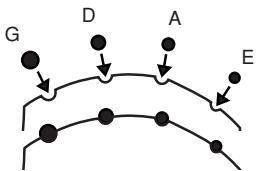
flowchart
graph TD
    G --> D
    D --> A
    A --> E
    E --> G
[Make sure that the strings do not come out of their grooves]
Protective tube on the 1st (E) string
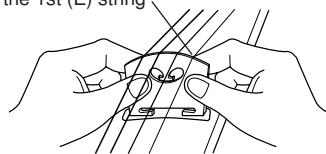
natural_image
Line drawing of hands holding a small object with parallel lines, no text or symbols present[Bridge is placed vertically]
- The strings are tuned to the following pitches. The 1st string is tuned to E, the 2nd string to A, the 3rd string to D, and the 4th string to G.
Using the Tuner function on the Control Box ( pg 11), push in on the peg while turning to tune.
• Finally, use the adjuster to fine tune the strings.
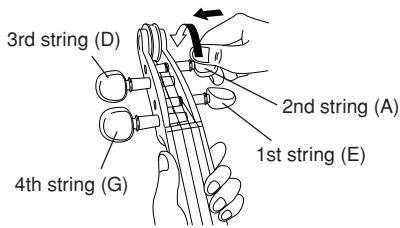
text_image
3rd string (D) 2nd string (A) 1st string (E) 4th string (G)
If the adjuster is too loose, it could produce noise while playing.
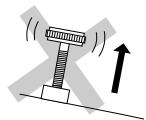
Don't loosen too much.
- When the instrument is not going to be used for an extended period of time, loosen the strings until the pitch drops a whole tone.
- Before using the instrument, make sure that the bridge is positioned vertically. Damage to the bridge and poor sound quality may result if the bridge is not properly positioned.
● Winding the Strings
(Please refer to this section when changing the strings)
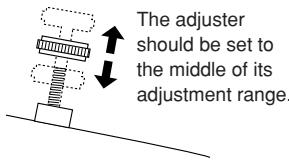
1 Before you string the instrument, set the adjuster so that it is in the middle of its adjustment range. (All adjusters)
2 Place the ball (on the end of the string) in the notch on the adjuster. Make sure the ball is properly inserted in the adjuster's notch.
text_image
The adjuster should be set to the middle of its adjustment range.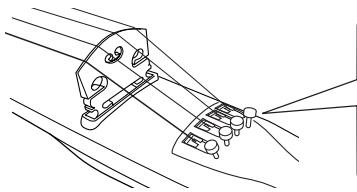
natural_image
Line drawing of a mechanical device with no visible text or symbols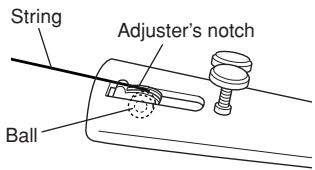
text_image
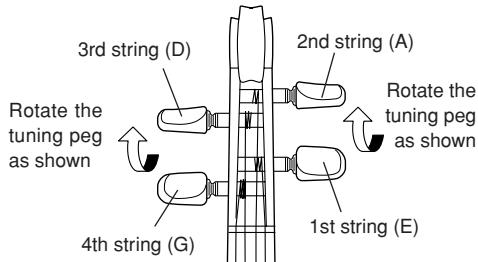
String Adjuster's notch Ball3 Insert the other end of the string into the hole on the tuning peg. Rotate the tuning peg. As shown in the illustration, wind the string on the side away from the peg handle once around the peg, then return the string back overlapping that wind so that the remaining slack is wound gradually toward the peg handle. 1st (E) and 2nd (A) strings are shown on the left, 3rd (D) and 4th (G) strings on the right.
text_image
3rd string (D) 2nd string (A) Rotate the tuning peg as shown Rotate the tuning peg as shown 4th string (G) 1st string (E)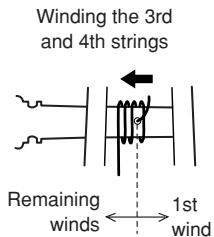
text_image
Winding the 3rd and 4th strings Remaining winds ← 1st wind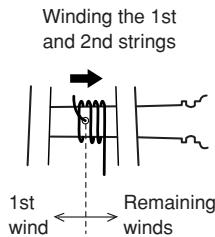
text_image
Winding the 1st and 2nd strings 1st wind ← Remaining winds■ The Shoulder Rest
A commercially available violin shoulder rest (4/4 size) can be attached to the instrument.
■ The Bow (supplied with the SV150S)
- Apply rosin to the bow hairs before using. Before using the bow for the first time, apply rosin carefully and evenly to the whole bow. From the 2nd time, apply a small amount of rosin to the bow hairs.
- Loosen the bow whenever the bow is not used.
- If the bow is not used for an extended period of time, the hairs may suffer damage caused by insects. Please treat with care.
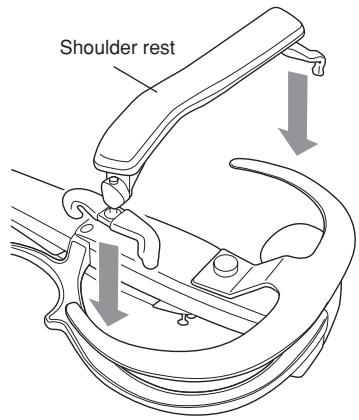
text_image
Shoulder rest
text_image
Bow hairRotate the screw to adjust the bow's tension.
■ About the Soft Case (SV150S Accessory)
The accessory soft case is designed for use with this particular instrument. It is designed to hold the instrument, Control Box, and your own shoulder rest.
The bow case can also be detached and used. When the bow case is removed, pull out the belt attached to the back of the bow case, and attach it to the soft case as shown in the diagram.
- The case is designed for carrying the instrument. It is not designed to protect the instrument from impacts. Do not expose the instrument to impact or strong pressure while carrying or storing the instrument.
- Remove the shoulder rest before placing the instrument in the soft case.
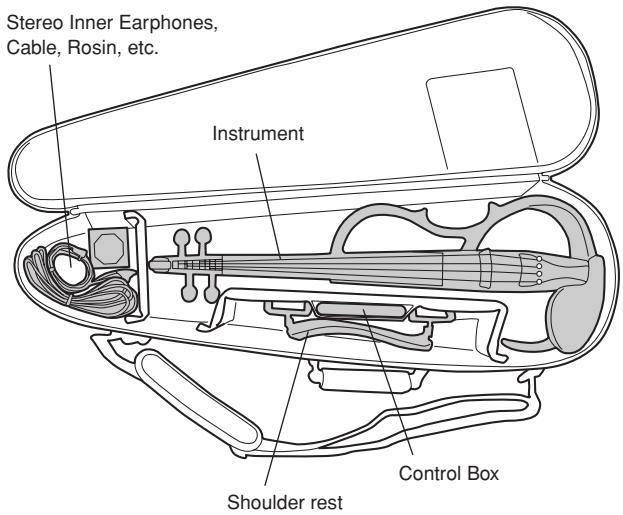
text_image
Stereo Inner Earphones, Cable, Rosin, etc. Instrument Shoulder rest Control Box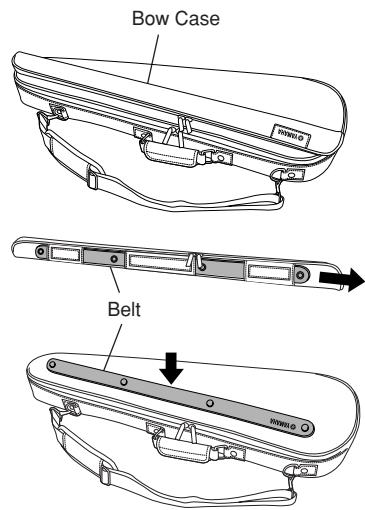
text_image
Bow Case BeltUsage
■ Sound Output Basics
1 First, connect the instrument to the Control Box using the supplied cable.
2 Connect the supplied stereo inner earphones to the jack with the Ⓞ mark.
To reproduce sound from an external audio device, use a cable that matches the input jack on the audio device and connect it to the instrument's LINE OUT jack.
3 Press and hold the power button on the Control Box for about 1 second to switch the power ON and light the LCD display.
* The power will not switch ON if the HOLD switch is in the lower position. Slide the HOLD switch to the upper position and press the POWER button again.
* To switch the power off, hold the POWER button for more than 2 seconds.
4 The volume is controlled with the volume control on the instrument, and the VOL/MUTE dial on the Control Box. The volume control on the instrument only adjusts the instrument's volume, while the VOL/MUTE dial on the Control Box adjusts the overall volume level (0 to 30) of the violin plus the effect/metronome/player.
* This instrument will not produce any sound if the volume control on the instrument is set to "0".
* Pressing the VOL/MUTE dial engages the mute function and displays the icon (☐). Press the VOL/MUTE dial again disengages the mute and the headphones icon (☐) reappears.
* When the HOLD switch is set to its lower position, none of the buttons on the Control Box will operate.
■ Using the Built-In Tuner
1 Connect the instrument to the Control Box and make the proper settings as described in the previous “Sound Output Basics” section.
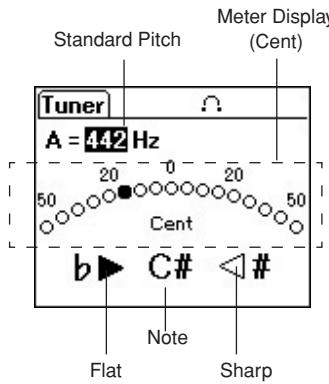
2 Press the TUNER button on the Control Box, and call up the display shown on the right.
3 Using the + and - buttons, set the standard pitch (A=430 to 450 Hz).
4 Play a string and its note name will appear in the lower center of the display. The tuner will indicate whether the note played on the instrument is flat/lower ▶, or sharp/higher #◀. The meter section indicates how far off the pitch is.
When the note is in tune both the b▶ and #◀ icons appear, and the meter stops at the “0” position in the center.
Also, pressing the ENTER button plays a tuning note that corresponds to the set standard pitch (A note). Press the ENTER button once again to stop playback of the tuning note.
text_image
Standard Pitch Meter Display (Cent) Tuner A = 442 Hz 50 20 0 20 50 Cent b C# Note Sharp Flat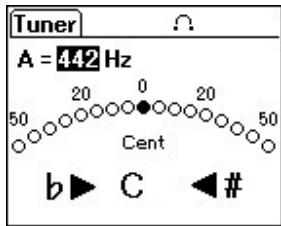
text_image
Tuner A = 4.42 Hz 50 20 0 20 50 Cent b ▶ C ◀ # Cent[When the note is in tune: C]
■ Using the Built-In Metronome
* The built-in metronome operates even if the instrument is not connected to the Control Box, and can be heard through the stereo inner earphones or through the LINE OUT jack.
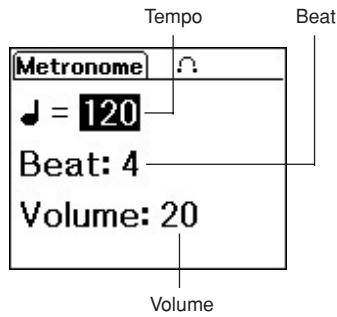
1 Press the METRONOME button on the Control Box to call up the display shown at the right.
2 Press the METRONOME button to select the item you want to set in the display, then use the +/- buttons to set the value.
* Holding the + or – button changes the value continuously. Also, pressing the + and – buttons simultaneously reverts the value to its factory default value.
♩= Sets the quarter note tempo (32-280). The default value is 120.
Beat: Sets the beat (0-7 beats, 8-beat, triplet, 16-beat). The default value is 4-beat.
Volume: Sets the volume level (0-30). The default value is 20.
3 Press the ENTER button to start the metronome. Press the button again to stop the metronome.
text_image
Tempo Beat Metronome Ω ♩ = 120 Beat: 4 Volume: 20 Volume■ Using the Built-In Effects
The SV150 Silent Violin™ features a built-in DSP (Digital Signal Processor) that can be used to add any of the processor's 24 effects including reverb to make playing more enjoyable.
1 As described in the previous “Sound Output Basics” section, connect the instrument to the Control Box and make the proper settings.
2 Press the SOUND button on the Control Box to call up the display shown on the right.
3 Using the + and - buttons, select an EFFECT (No. 1-25)
* Effect "No. 25 No Effect" switches the effect OFF.
If a parameter appears below the effect name, press the SOUND button to select the parameter, then use the +/- buttons to set the parameter value.
* Holding the + or – button changes the value continuously. Also, pressing the + and – buttons simultaneously reverts the value to its factory default value.
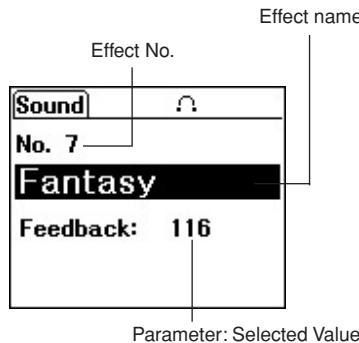
text_image
Effect No. Sound No. 7 Fantasy Feedback: 116 Effect name Parameter: Selected Value● Effect List
| No. | Effect Name | Parameter | Range (Default) | Description |
| 1 | Studio | — | — | Natural room reverberation. Basic sound for practicing. |
| 2 | Large Hall | — | — | Large hall reverberation with long decay. |
| 3 | Middle Hall | — | — | Medium-sized hall reverberation. |
| 4 | Small Hall | — | — | Small hall reverberation with short decay. |
| 5 | Club | — | — | Reverberation typical of a small jazz club. |
| 6 | Jazz | — | — | Effect based on a jazz violin recorded with a microphone. |
| 7 | Fantasy | Feedback | 64–127 (116) | Reverb and delay are used to create a dreamy atmosphere. Feedback adjusts the number of delays. |
| 8 | Mirror Room | Feedback | 64–127 (116) | Produces mirror-like sound reflections. Feedback adjusts the number of delays. |
| 9 | Chorus | Depth | 24–127 (72) | Chorus effect adds depth to the sound. Depth adjusts the intensity of the effect. |
| 10 | Strings | Effect Level | 10–100 (40) | Sounds like a string section of 2 or more players playing simultaneously. Effect Level adjust the thickness of the sound. |
| 11 | Vibrato | Speed | 40–104 (83) | Simulates the vibrato typical of a classical performance. Speed adjusts the vibrato rate. |
| 12 | Lazy | Depth | 32–127 (127) | A very lazy feeling. Depth adjusts the intensity of the effect. |
| 13 | Under the Sea | Speed | 0–92 (4) | A mysterious underwater or tunnel type effect. Speed changes the tone. |
| 14 | Planet | Depth | 32–127 (94) | Alien worlds come to mind. Depth adjusts the intensity of the effect. |
| 15 | Pan Reverb | Reverb Time | 6–53 (36) | Sound shifts between left and right sides. Reverb Time adjusts the length of the effect. |
| 16 | Pan Chorus | Speed | 8–84 (55) | Auto pan + rich chorus sound shifts quickly from left to right like a car speeding down the highway. Speed adjusts the speed of the shifting sound. |
| 17 | Auto Wah | Speed | 5–90 (17) | Changes the tone automatically. Speed adjusts the speed of the tone change. |
| 18 | Over Drive | Tone | 34–58 (46) | Light distortion. Tone adjusts brightness and projection. |
| 19 | Delay Drive | Delay Level | 0–92 (24) | Distorted sound with delay. Delay level adjusts the amount of effect. |
| 20 | Buzz Drive | Tone | 34–58 (46) | Ring modulation and distortion create a unique effect. Tone adjusts brightness and projection. |
| 21 | Wah Drive | Over Drive | 2–18 (8) | Combines Auto Wah and Overdrive effects. Overdrive adjusts the amount of distortion. |
| 22 | Jet | Tone | 34–58 (46) | Creates a jet sound made popular in 70's rock music. Tone adjusts brightness and projection. |
| 23 | Chorus Lead | Tone | 34–52 (46) | Chorus and Overdrive effects create a punchy lead solo tone. Tone adjusts brightness and projection. |
| 24 | Tube Drive | Tone | 34–52 (46) | Amp simulation creates a heavily distorted tone. Tone adjusts brightness and projection. |
| 25 | No Effect | — | — | No effect is produced. Use this setting when external effectors are being used. |
■ Using the Music Player
The Control Box has a built in music player that can play music files (.aac, .m4a, .mp3, .wav, .mid) from an SD card.
* Refer to page 7 for more information on each of the music file formats.
* You can listen to music playback through the inner earphones or the LINE OUT jack even if when the instrument is disconnected.
● Preparing Music Files
Copy the music file to the SD card using a computer with an SD card reader.
* The player is compatible with SD cards of up to 2GB (it is not compatible with SDHC cards).
1 Use a computer running a commercially available or freeware application to convert the song data from your CD collection, music files you've downloaded from the Internet, etc., to one of these compatible file formats (.aac, .m4a, .mp3, .wav).
2 Insert the SD card into the computer to copy the converted music files to the SD card.

Music data from CDs or downloaded from the net is copyrighted (rights of the songwriter, composer, producer). Copying the data requires permission from the copyright owner however, permission is not required when the data is used for personal use. If the data is being copied for distribution or uploading on the net, permission must be obtained from the copyright owner beforehand.
● Playing Music Files
The Control Box can playback music files in the SD card.
* Multiple music files can be grouped together into folders according to genre, etc. however, we will first explain how to make/copy files without creating folders in the SD card.
1 Insert an SD card with music files into the card slot on the Control Box.
2 Press the PLAYER button on the Control Box, to show the player display shown below.
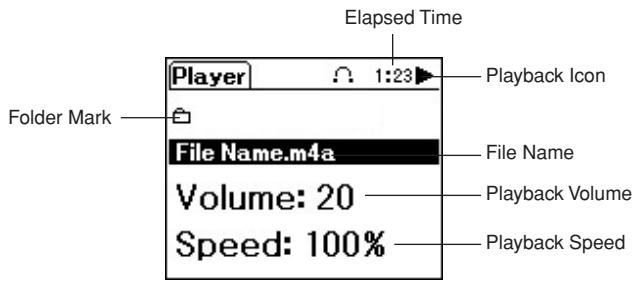
text_image
Elapsed Time Player 1:23 Playback Icon Folder Mark File Name.m4a File Name Volume: 20 Playback Volume Speed: 100% Playback Speed3 Press the PLAYER button to highlight the File Name field, then use the +/- buttons to select the music file for playback. Music files that can be played are displayed in alphabetical order.
4 Press the ENTER (▶/■) button to start playback. Elapsed playback time and a playback icon (▶) are shown in the upper right of the display. Press ENTER (▶/■) button once again to pause (■) playback.
Adjusting Playback Volume
Press the PLAYER button to highlight the Volume field, then use the +/- buttons to adjust the volume. The adjustable range is from 0 to 30. The factory default is 20.
* This setting has no effect on the Silent Violin™'s volume.
Adjusting Playback Speed
Press the PLAYER button to highlight the Speed field, then use the +/- buttons to adjust the playback speed. The adjustable range is from 75 to 125% . The factory default is 100% .
* With the exception of MIDI files (.mid), noise may be heard when the playback speed is changed.
Using the -() and +() Button Functions
- The -(◀◀) button can be used to rewind and the +(▶▶) button to fast forward playback when the folder mark (☐) or the File Name field is highlighted during playback.
- Pressing the -(◀◀) button while playback is paused, moves the playback point to the start of the song with playback paused. Pressing the -(◀◀) button again selects and displays the previous music file.
- Pressing the +(▶▶) button while playback is paused, selects the next music file.
Selecting music files within folders
If files are in folders, first highlight the File Name field, then use the +/- buttons to select the desired folder and press the ENTER button.

Files (and subfolders) inside of the selected folder are displayed in alphabetical order in the File Name field. Use the +/- buttons to select the desired file (or subfolder).
Highlighting a sub folder in the File Name field then pressing the ENTER button displays the names of files found in the subfolder.
Press the PLAYER button to highlight the folder mark (→) and then press the ENTER button to move to the parent folder (higher in the folder hierarchy).
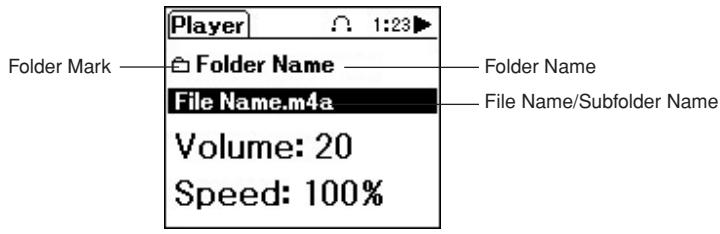
text_image
Player Folder Mark Folder Name File Name.m4a Volume: 20 Speed: 100% Folder Name File Name/Subfolder Name● Compatible Formats
[AAC (.m4a), .mp3, .wav Compatible Formats]
| Sampling Frequency | 8, 11.025, 12, 16, 22.05, 24, 32, 44.1, 48 (kHz) |
| Number of Channels | 1 (Monaural), 2 (Stereo) |
| Bit Rate (kbps) | 8 to 320 (with AAC (.m4a), .mp3) |
| Bit Length | 8bit, 16bit (with .wav) |
[. mid Compatible Formats]
| File Type | Standard Midi File Format 0, 1 |
| File Size | 100KB |
| Tone Generator Specifications | General Midi Level 1 |
| Number of Channels | 16 |
| Maximum Polyphony | 32 Notes |
- Never remove the SD card during playback or while playback is paused. It can damage the files or Control Box.
* The maximum number of subfolders/files that can be set in a single folder is 100.
* The maximum number of subfolder hierarchies is 5.
* The maximum number of characters for the full path name (from the root folder through all the tied folders) is 258.
* File names using umlaut, circumflex, Asian multi-byte language, etc. are not compatible.
* Compatible with SD memory cards of up to 2GB (not compatible with SDHC cards).
* Please use the special software provided by the card maker when formatting the SD card.
* Not compatible with copyright protection functions such as SD-Audio.
■ Messages
| Message | Contents |
| Total Volume: n | Displays the overall volume (n). |
| Mute On. | The mute function is engaged. |
| Holding. | The hold function is engaged. |
| Low Battery! | Battery power is low. Please change batteries as soon as possible. |
| Clear Setting! | Settings have been cleared. |
| Format Error! | An error was found in file selected for playback. |
| File Open Error! | An error occurred while opening a file from the SD card. |
| File Read Error! | An error occurred while reading a file from the SD card. |
Power Supply
The Silent Violin ^™ SV150 can be operated with either battery or AC power.
Power is supplied to the instrument when the POWER button is depressed for approximately 1 second and batteries are installed or a power adaptor (sold separately) is attached. To switch the power OFF, hold the POWER button down for more than 2 seconds.
* Settings are saved in memory even when the power is switched off and batteries are installed or the power adaptor is connected.
■ Using Batteries
1 Turn the Control Box over and remove the battery compartment cover.
2 Insert the two batteries supplied (SUM-3 (AA) size). Take careful note of the polarity markings as shown in the illustration above, and insert the batteries.
3 Replace the battery compartment cover.
Battery compartment cover

natural_image
Line drawing of a battery casing with a label and pointer (no text or symbols)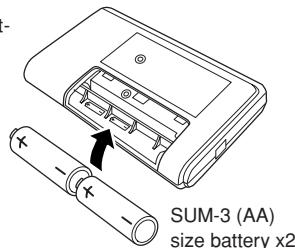
text_image
SUM-3 (AA) size battery x2* For customers in the Netherlands
A “Low Battery” message is displayed in the Control Box’s LCD when battery power becomes low. The low battery icon (☐) appears in the upper portion of the display. In this case, replace the batteries as soon as possible, taking note of the following.
- Always follow the +/- signs when inserting the batteries. Improper insertion may result in fire.
- Always replace worn batteries with a complete set of new batteries. Never mix new and old batteries. Do not mix different types of batteries (alkaline and manganese, or batteries from different manufacturers, or different types by the same manufacturer). Doing so may result in fire.
- To prevent possible damage to the unit due to battery leakage and unnecessary power drain, remove the batteries from the unit when it is not going to be used for an extended period of time.
- The supplied battery is for demonstration purposes.
■ Supplying AC Power
AC adaptor is optional, please purchase the optional power adaptor PA-D05K.
1 Securely connect the power adaptor's DC connector to the DC IN jack on the side of the Control Box.
2 Plug the AC adaptor into a convenient wall AC power socket.
- Battery power is automatically disconnected when the AC adaptor is connected.
- When using an AC adaptor, make sure you use only the appointed compatible adaptor. The use of an incompatible adaptor may result in damage to the instrument or cause fire, etc. Please use with caution.
Specifications
Instrument
| Neck | Maple |
| Body | Spruce |
| Fingerboard/Tuning Pegs | Ebony |
| Bridge | Maple (Aubert) |
| Frame | Synthetic Resin |
| Tailpiece | Adjuster: 4 pieces (Wittner) |
| Strings | Ball-end type violin strings (Helicore) |
| Sensor | Piezo pick-up (underneath the bridge) |
| Power | Supplied via the Control Box connection |
| String Length | 328 mm (12-15/16") |
| Dimensions | 589 (L) x 206 (W) x 116 (H) mm23-3/16" (L) x 8-1/8" (W) x 4-9/16" (H) |
| Weight (instrument only) | approximately 490 g (1 lbs. 1 oz.) |
| Control | VOLUME |
Control Box
| Case | Synthetic Resin |
| Controls | Data Enter Buttons (−, ENTER, +)Mode Select Buttons (PLAYER, SOUND, TUNER, METRONOME)POWER Button (ON/Hold to switch OFF)VOLUME/MUTE Rotary SwitchHOLD Switch |
| Connections | Instrument Jack (Input/Output)PHONES Jack (Output)LINE OUT Jack (Output)SD Card SlotPower Adaptor Jack (DC5V 500mA) |
| Power | SUM-3 (AA) size battery x2 or AC Adaptor |
| Battery Life (Continuous Use) | Using Manganese batteries : approximately 2 hoursUsing Alkaline batteries : approximately 10.5 hours |
| Dimensions(excluding the buttons) | 111 (L) x 66 (W) x 19 (H) mm4-3/8” (L) x 2-5/8” (W) x 3/4” (H) |
| Weight | approximately 85 g (3 oz.) |
Accessories
| SV150 | Cable, SD Card, Stereo earphones, SUM-3 (AA) size Manganese battery x2, Owner's Manual (this booklet), “Let's Enjoy Yamaha Silent ViolinTM” (booklet with practice pieces) |
| SV150S | Bow (4/4 size), Rosin, Soft Case, Cable, SD Card, Stereo earphones, SUM-3 (AA) size Manganese battery x2, Owner's Manual (this booklet), “Let's Enjoy Yamaha Silent ViolinTM” (booklet with practice pieces) |