DPFP2WH - Accessory Panduit - Free user manual and instructions
Find the device manual for free DPFP2WH Panduit in PDF.


User questions about DPFP2WH Panduit
0 question about this device. Answer the ones you know or ask your own.
Ask a new question about this device
Download the instructions for your Accessory in PDF format for free! Find your manual DPFP2WH - Panduit and take your electronic device back in hand. On this page are published all the documents necessary for the use of your device. DPFP2WH by Panduit.
USER MANUAL DPFP2WH Panduit
Modular Patch Panels
SELECTION GUIDE

natural_image
Three black Ethernet connectors with labeled ports and sizes, displayed against a blurred background of people (no text or symbols on the devices themselves)An Extensive Selection of Patch Panels Supports Your Application
Panduit offers an extensive selection of modular patch panels, with various styles and port densities and an assortment of labeling options making them ideal for any installation. Select patch panels are available in a standard White color option.
Modular patch panels accept all Mini-Com® Modules in copper, fiber, and A/V, which snap in and out for easy moves, adds, and changes. This modular system is ideal for multimedia applications, providing flexibility to customize any installation. All patch panels mount to standard EIA 19-inch or 23-inch racks with optional extender brackets.
A variety of accessories are available to optimize the installation. Strain relief bars are recommended for all installations to properly support cables exiting the back of the panel. Covers and blank panels promote proper airflow and cooling by filling unused rack openings.
Unshielded and Shielded
Unshielded Patch Panels
Unshielded patch panels consist of a metal panel and molded snap-in faceplates. Removable faceplates on select panels allow front access to installed modules.
Available features:
- Label pockets for easy identification; designs without a label pocket accommodate optional adhesive labeling
• Standard and high density - Flush mount and front access
- Flat, angled, and recessed designs

natural_image
Front view of a rack-mounted network interface (no visible text or labels)Shielded Patch Panels
Shielded patch panels are recommended for high RFI/EMI environments, where interference is a risk. Panduit's shielded offering includes integrated shielding which allows seamless integration with the Panduit® Structured Ground™ Grounding System.
Available features:
- Stainless steel construction (48-port High Density includes a molded faceplate)
• Dedicated areas for port identification which accept adhesive labels - Accept Mini-Com ^® Shielded Jack Modules
• Standard and High Density - Flat and angled designs
- Select models include built-in strain relief bar
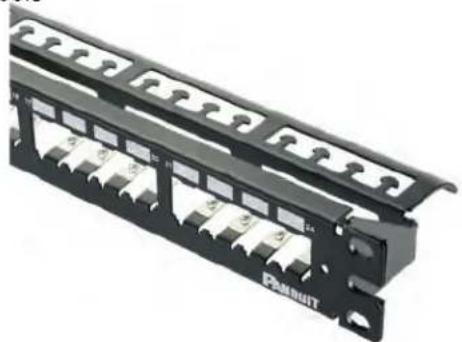
natural_image
Black network switch panel with multiple slots and a labeled 'PUBUT' logo (no readable text or symbols beyond branding)Style
Flat
Flat panels require horizontal cable managers to help organize and route cables into vertical managers. Extended strain relief bars are recommended to allow proper cable support.
Angled
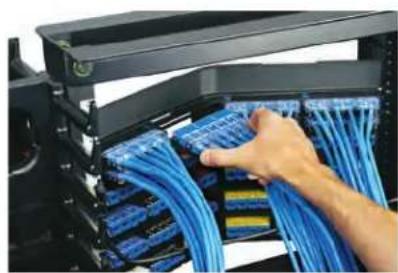
Angled panels enable higher density by allowing cables to flow to each side of the rack, thus minimizing the need for horizontal cable managers and allowing patch cords to be routed directly into vertical cable managers. Straight strain relief bars are recommended, as closer mounting to the panel eliminates sagging and provides improved cable support.
High-Density Patch Panels
High-density patch panels are an ideal solution for installations with space constraints, are available in flat and angled designs, with 48 ports in one rack space and 72 ports in two rack spaces. The angled design increases rack density, managing high-density applications in one-fourth the area needed for conventional cable management systems. (High capacity vertical managers are recommended.)
Strain Relief Bars
Strain relief bars (SRB) are used to support and manage cables in telecommunication rooms. Panduit's extensive selection offers the flexibility to fit in a variety of applications, and ranges from a simple straight bar to one with distinctive features such as integrated adjustable clips.
In single rail cabinets or racks, the strain relief bar with direct patch panel mount and quick release bracket is recommended; it attaches directly to most Panduit patch panels providing integrated support.
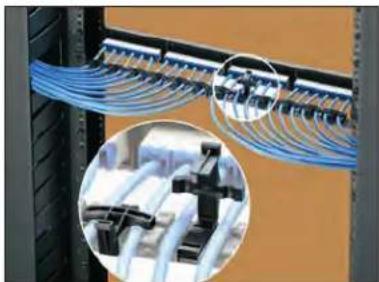
natural_image
Close-up of blue network cables mounted on a server rack, with inset close-ups showing mechanical components (no text or symbols visible)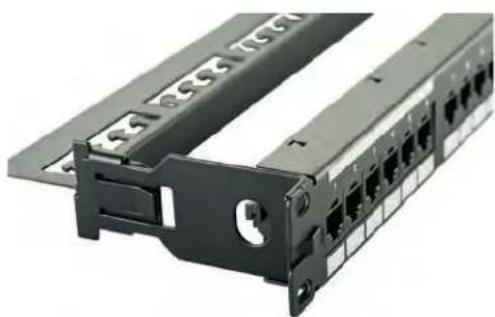
natural_image
Close-up of a black hard drive rack with multiple Ethernet ports and mounting brackets (no visible text or labels)DISCLAIMER: The information contained herein is intended as a guide for use by persons having technical skill. Buyer shall determine the suitability of the Panduit product for his intended use and Buyer assumes all risk and liability whatsoever in connection therewith.
Unshielded
Front Access
- Recommended for installations where access to the back of the rack is limited
- Label feature available, includes label and cover

Front removable faceplate extends 12 " from the rack, providing front access to the connections
Easy quick release tab
| Part Number Style | Ports RU | Recommended SRB | Replacement Faceplate | Replacement Label Label | Label (see page 19) | |||
| CPP24WBLY | Flat | 24 | 1 | Extended | CFFP4BL | — | Adhesive A | |
| CPP48WBLY 48 2 | ||||||||
| CPPL24WBLY 24 1 | CFFPL4BL C4 | PPLK Pocket | A, B | |||||
| CPPL48WBLY 48 2 | ||||||||
| CPPLA24WBLY | Angled | 24 | 1 | Straight | ||||
| CPPLA48WBLY 48 2 | ||||||||
| CPPL24WRBLY | Recessed 24 1 | — |
Unshielded
Ultimate ID® Patch Panels
- Recommended for installations that follow common labeling standard or where multiple labeling areas are needed
- Meet TIA-606-B labeling standards with ease

UICMPP24BLY
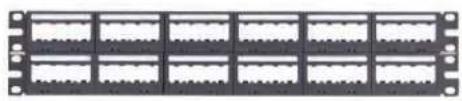
natural_image
Front view of a black rack-mounted server or memory unit (no visible text or labels)UICMPP48BLY

UICMPPA24BLY

natural_image
Black rack-mounted server rack unit with multiple slots and mounting brackets (no visible text or labels)UICMPPA48BLY
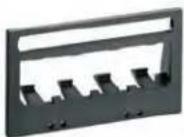
UICPPL4BL
Extends 1/8" from the rack

natural_image
Diagram of a black rectangular device with internal components and a separate row of connected ports (no text or symbols)UICMPPT24BLY
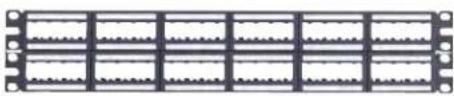
natural_image
Pure electrical circuit lines without any symbolsUICMPPT48BLY

UICMPPTA24BLY

natural_image
Front view of a black rack-mounted server or connector unit (no visible text or symbols)UICMPPTA48BLY

UICPP2L4BL
| Part Number Style Ports RU | Recommended SRB | Replacement Faceplate | Replacement Cover Label | Label (see page 19) | ||||
| UICMPP24BLY | Flat1 UICPP2L4BL | 24 | 1 | Extended | UICPPL4BL | UILC4CL-X Pocket E, H | ||
| UICMPP48BLY 48 2 | ||||||||
| UICMPPT24BLY 24 1 | UICPP2L4BL | |||||||
| UICMPPT48BLY 48 2 | ||||||||
| UICMPPA24BLY | Angled1 UICPP2L4BL | 24 | 1 | Straight | UICPPL4BL | |||
| UICMPPA48BLY 48 2 | ||||||||
| UICMPPTA24BLY 24 1 | UICPP2L4BL | |||||||
| UICMPPTA48BLY 48 2 | ||||||||
Unshielded
Flush Mount
- Mount flush with the rack to match other product or equipment installed
- Optional vertical number sequence simplifies installation by mimicking common switch-port numbering
• Pre-printed numbers above each port - White write-on areas for port or panel identification
- Select part numbers available in standard White color option on page 20

text_image
1 2 3 4 5 6 7 8 9 10 11 12 13 14 Vitcom Smart Classif Switch TSSS/SMNCS WERT PTM BLS WISI/DTY 100 MHzPre-printed numbers for easy identification
Write on areas for custom adhesive labels
Flush mount design allows panel to align with other rack-mountable products

CPP24FMWBLY

CPPA24FMWBLY
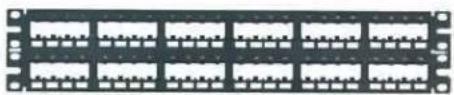
natural_image
Front view of a black rack-mounted server or network module with multiple slots and mounting holes (no visible text or labels)CPP48FMWBLY
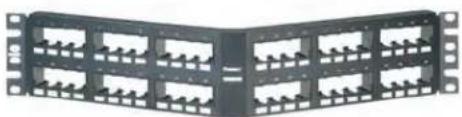
natural_image
Front view of a black rack-mounted network device with multiple ports (no visible text or labels)CPPA48FMWBLY
| Part Number Style Ports RU | Recommended SRB Label | Label (see page 19) | ||||
| CPP24FMWBLY | Flat | 24 | 1 | Extended | Adhesive A | |
| CPP48FMWBLY | 48 2 | |||||
| CPP48FMVNSWBLY | ||||||
| CPPA24FMWBLY | Angled | 24 | 1 | Straight | ||
| CPPA48FMWBLY 48 2 | ||||||
Unshielded
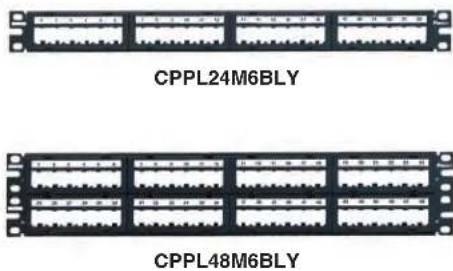
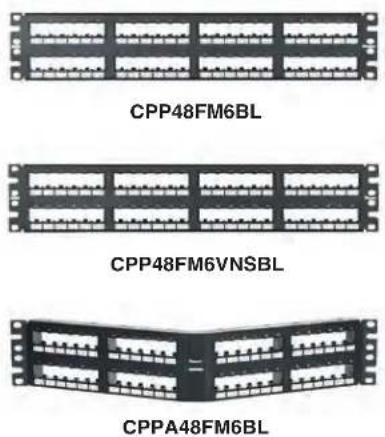
6-Port Configuration
- Modules arranged in groups of six to match the layout of select switches
- Faceplate style (M6) includes label pocket with preprinted labels and cover
- Flush mount style (FM6) mounts flush with the rack to match other product or equipment installed
Faceplate Style
text_image
CPPL24M6BLY CPPL48M6BLY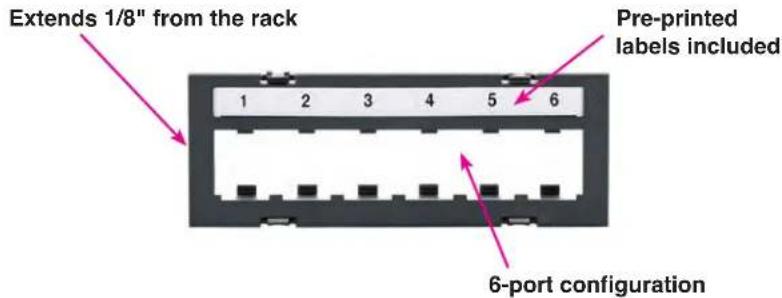
text_image
Extends 1/8" from the rack Pre-printed labels included 1 2 3 4 5 6 6-port configuration| Part Number Style Ports RU | Recommended SRB | Replacement Faceplate | Replacement Label Label | Label (see page 19) | ||||
| CPPL24M6BLY Flat 24 1 | Extended CFPLM6BLY | C6PPLK1-24 | Pocket C | |||||
| CPPL48M6BLY Flat 48 2 | C6PPLK1-24C6PPLK25-48 | |||||||
Flush Mount Style
text_image
CPP48FM6BL CPP48FM6VNSBL CPPA48FM6BL
text_image
Vertical number sequence mimics common switch port numbering 1 3 5 7 9 11 2 4 6 8 10 12 Write-on area for custom adhesive labeling| Part Number Style Ports | RU | Recommended SRB | Label | Labels (page 19) | ||
| CPP48FM6BL | Flat | 48 | 2 | Extended | Adhesive | G |
| CPP48FM6VNSBL | ||||||
| CPPA48FM6BL | Angled | Straight | ||||
| CPPA48FM6VNSBL |
Unshielded
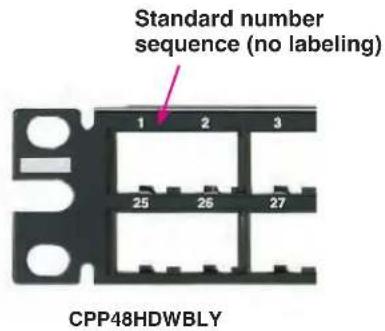
High Density
- Recommended for installations with limited real estate
- Allows up to 48 unshielded connections per rack unit
- Select part numbers available in standard White color option on page 20
text_image
Standard number sequence (no labeling) 1 2 3 25 26 27 CPP48HDWBLY
text_image
Enhanced label area accepts custom adhesive labeling 1 2 3 25 26 27 CPP48HDEWBL
text_image
Vertical number sequence mimics common switch port numbering (no labeling) 1 3 5 2 4 6 CPP48HDVNSWBL
natural_image
Two black network interface panels: top shows a 25-pin rack with multiple slots, bottom shows a V-shaped connector (no text or symbols visible)| Part Number Style Ports RU | Recommended SRB Label | Label (see page 19) | ||||
| CPP48HDWBLY | Flat | 48 1 | Extended | — | — | |
| CPP48HDEWBL Adhesive | E | |||||
| CPP48HDVNSWBL — | ||||||
| CPPA48HDWBLY | Angled SRB | M19BLY | — | — | ||
| CPPA48HDEWBL Adhesive | ||||||
| CPPA48HDVNSWBL — |
Unshielded
High Density
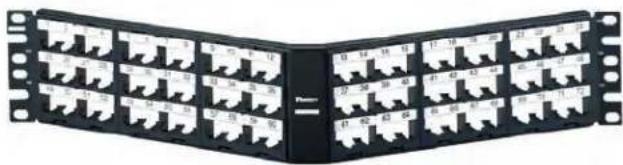
- Recommended for installations with limited real estate; allows up to 72 connections in 2 rack units
Faceplate Design
- Faceplate can be removed from the front of the panel, allowing easy access to the connections
- Recommended for installations with space limitation that need labeling
- Includes label pocket with labels and label covers

text_image
1 2 3 4 25 26 27 28 49 50 51 52 Extends 1/8" from the rack Preprinted labels included
text_image
1 2 3 4 5 6 7 8 9 10 11 12 13 14 15 16 17 18 19 20 21 22 23 24 25 26 27 28 29 30 31 32 33 34 35 36 37 38 39 40 41 42 43 44 45 46 47 48 40 50 51 52 53 54 55 56 57 58 59 60 61 62 63 64 65 66 67 68 69 70 71 72CPPL72WBLY
natural_image
Black rectangular electronic connector array with multiple pin slots (no visible text or symbols)CPPLA72WBLY
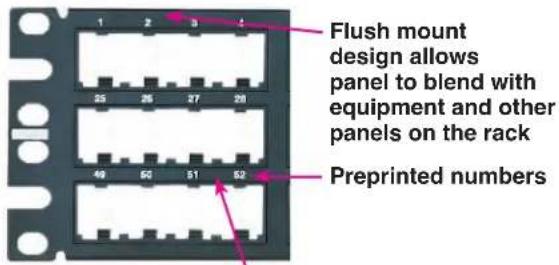
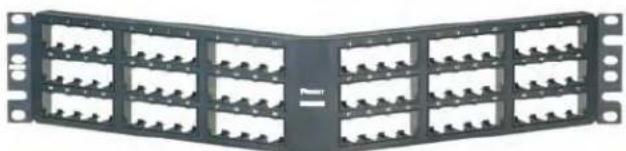
Flush Mount Design
text_image
Flush mount design allows panel to blend with equipment and other panels on the rack Preprinted numbersAccepts adhesive labels

natural_image
Front view of a black rack-mounted server or memory unit with multiple slots and mounting holes (no visible text or labels)CPP72FMWBLY
natural_image
Black rectangular rack-mounted device with multiple slots and mounting holes (no visible text or symbols)CPPA72FMWBY
| Part Number Style Ports RU | Recommended SRB | Replacement Label Label | Label (see page 19) | ||||
| Flush Mount Design | |||||||
| CPP72FMWBLY Flat | 72 | 2 | Extended | NA Adhesive E | |||
| CPPA72FMWBLY Angled SRBM19BLY | |||||||
| Faceplate Design | |||||||
| CPPL72WBLY Flat | 72 | 2 | Extended | C72PPLK Pocket D | |||
| CPPLA72WBLY Angled SRBM19BLY | |||||||
Unshielded
32 Port
- Recommended for installations in need of a semi-high-density panel in 1 RU

natural_image
Front panel of a black rectangular electronic component with multiple white slots and mounting holes (no visible text or symbols)CPP32WBLY

text_image
Arranged in groups of 8 Extends 1/8" from the rack Jacks mount in 90° orientation| Part Number Style Ports RU | Recommended SRB Label | Label (see page 19) | ||||
| CPP32WBLY Flat 32 1 | Extended | Adhesive | E |
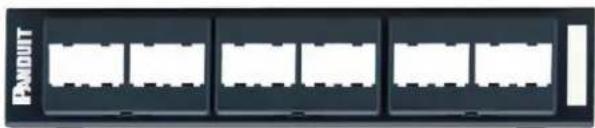
Wall Mount
- Recommended for wall mount applications with limited space, when few ports are required
• Accepts custom adhesive labels - Front access for easier access to connections
natural_image
Exterior view of a modern office building (no signage)CPP12WBL (WB89D bracket not included)
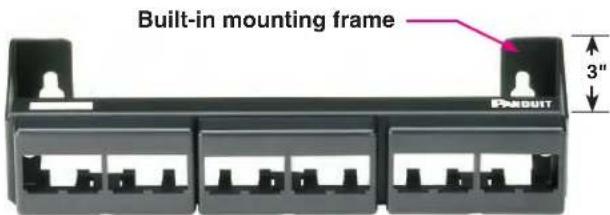
text_image
Built-in mounting frame PARKUIT 3"CWPP12WBL

natural_image
Metal mechanical bracket with four vertical supports (no text or symbols visible)WB89D
89D bracket for use with CPP12WBL
| Part Number Style Ports RU | ReplacementFaceplate Label | Label (see page 19 | ||||
| CPP12WBL | 89D | 12 | — | CFFP4BL Adhesive A | ||
| CWPP12WBL | Wall Mount | — | ||||
Shielded
Standard Density
- Recommended for environments with potential RFI/EMI interference
• Shielded jack module removal tool included

natural_image
Front panel of a network switch or rack device (no visible text or symbols)CP16BLY

natural_image
Front view of a black rectangular electronic component with multiple slots and mounting holes (no visible text or symbols)CP24BLY
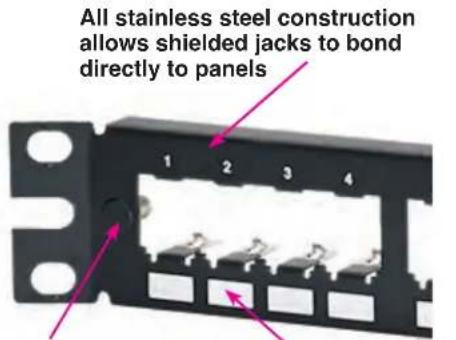
text_image
All stainless steel construction allows shielded jacks to bond directly to panelsBuilt in
grounding
lug bonds
panel to rack
Write-on areas accept custom adhesive labeling

natural_image
Front view of a black network interface rack with multiple slots and connectors (no visible text or symbols)CP48BLY

natural_image
Front panel of a network switch or rack device (no visible text or symbols)CPA24BLY
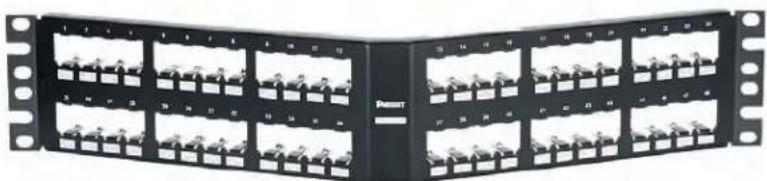
natural_image
Black server rack unit with multiple slots and mounting holes (no visible text or labels)CPA48BLY
| Part Number Style Ports RU | Recommended SRB Label | Label (see page 19) | ||||
| CP16BLY | Flat | 16 | 1 | Extended | Adhesive | F |
| CP24BLY 24 | A | |||||
| CP48BLY 48 2 | ||||||
| CPA24BLY | Angled | 24 | 1 | Straight | ||
| CPA48BLY 48 2 | ||||||
Shielded
Standard Density with Integral Support
- Recommended for environments with potential RFI/EMI interference
• Shielded jack module removal tool included
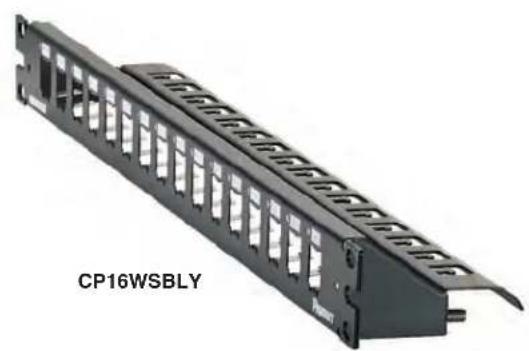
natural_image
Black hard drive rack with ventilation slots, labeled 'CP16WSBLY' (no other text or symbols visible)
text_image
Integral support bar helps organize cables (cable ties included) Write-on areas accept custom adhesive labeling Stainless steel construction allows shielded jacks to bond directly to the panel Built-in grounding lug helps bond panel to rack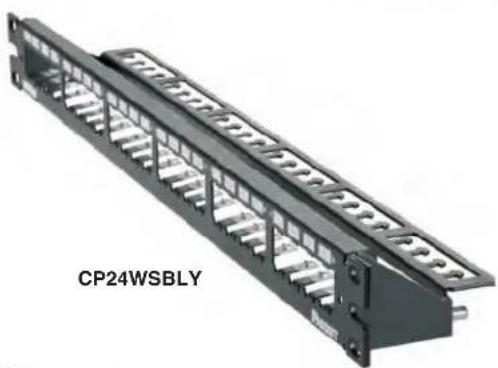
natural_image
3D rendering of a black industrial electrical connector with multiple slots and terminal blocks (no text or symbols visible)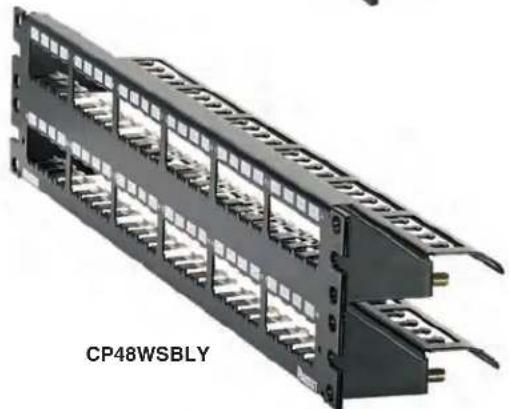
natural_image
3D rendering of a black multi-layer cable connector with multiple slots and connectors (no text or symbols visible)| Part Number Style Ports RU Label | Label (see page 19) | ||||
| CP16WSBLY | Flat | 16 | 1 | Adhesive | F |
| CP24WSBLY 24 | A | ||||
| CP48WSBLY 48 2 |
Shielded
High Density
- Recommended for installations with limited real estate and potential RFI/EMI interference
• 48 ports in 1 RU

text_image
Preprinted numbers for easy port identification; accepts custom adhesive labeling 5 6 7 8 29 30 31 32 Stainless steel construction with metal bonding strip properly bonds shielded jack modules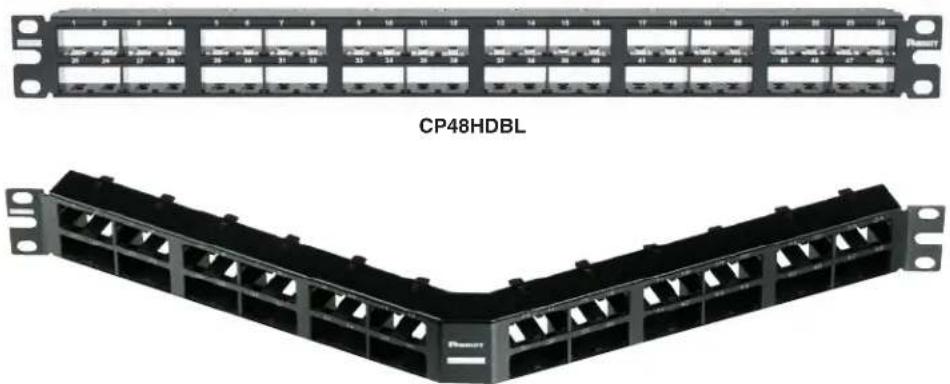
natural_image
Two black Ethernet rack panels labeled CP48HDBL, showing network ports and connectors (no text or symbols on the modules themselves)CPA48HDBL
| Part Number Style Ports RU | Recommended SRB Label | Label (see page 19) | ||||
| CP48HDBL Flat | 48 1 | Extended | Adhesive E | |||
| CPA48HDBL Angled | Straight |
*Includes trilobular screws to properly bond the panel to the rack
Shielded
High Density
- Recommended for installations with limited real estate and potential RFI/EMI interference
• 72 ports in 2 RU
• Shielded jack module removal tool included

text_image
Stainless steel construction properly bonds shielded jack Built-in grounding lug helps bond panel to the rack 49 25 4 5 28 29 52 53 Write-on areas accept custom adhesive labeling
natural_image
Diagram of a 32-pin network module labeled CP72BLY, showing multiple slots and connectors (no readable text beyond label)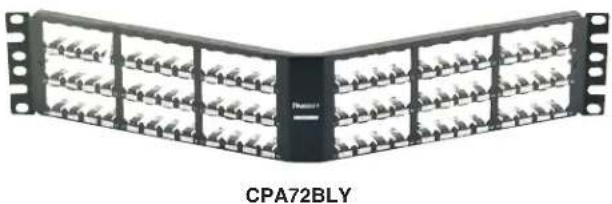
natural_image
Diagram of a V-shaped mechanical or electrical component with multiple parallel slots and mounting flanges (no text or symbols on the main structure)| Part Number Style Ports RU | Recommended SRB Label | Label (see page 19) | ||||
| CP72BLY Flat | 72 | 2 | Extended | Adhesive E | ||
| CPA72BLY Angled | Straight |
QuickNet™ Patch Panels
- Designed to work with Panduit's preterminated Copper and Fiber systems
• High density available for areas with limited real estate - For shielded or unshielded applications
- Select part numbers available in standard White color option on page 21

natural_image
Front view of a black rectangular electronic component with multiple slots and connectors (no visible text or symbols)QPP24BL QSP24BL^
natural_image
Close-up of a hand inserting blue network cables into a rack-mounted server unit (no visible text or labels)
natural_image
Pure electrical circuit lines without any symbolsQPP48HDBL QPP48HDVNSBL** QSP48HDBL^

natural_image
Black rectangular network switch device with multiple ports and mounting holes (no visible text or symbols)QAPP24BL QASP24BL^

natural_image
Black rectangular industrial rack frame with mounting flanges and a central logo (no visible text or symbols)QAPP48HDBL QAPP48HDVNSBL** QASP48HDBL^

text_image
1 3 6 7 2 4 6 8**Vertical numbering sequence
| Part Number Style Ports RU | Recommended SRB Label | Label (see page 19) | ||||
| QPP24BL | Flat | 24 | 1 | Extended | Adhesive/QPPLC24 | G |
| QSP24BL^ Adhesive/ | QPPLC24 | |||||
| QPP48HDBL | 48 | — | — | |||
| QPP48HDVNSBL — | ||||||
| QSP48HDBL^ — — | ||||||
| QAPP24BL | Angled | 24 | Straight | Adhesive/QPPLC24 | G | |
| QASP24BL^ Adhesive/ | QPPLC24 | |||||
| QAPP48HDBL | 48 | — | — | |||
| QAPP48HDVNSBL — — | ||||||
| QASP48HDBL^ — — | ||||||
^Shielded
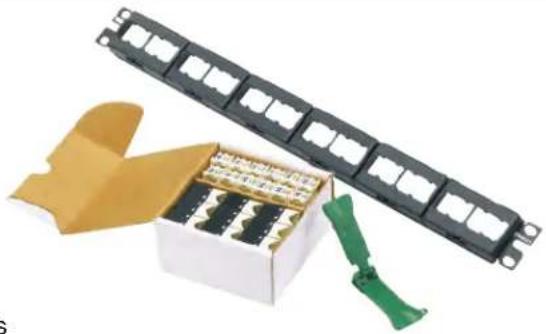
Patch Panel Kits
• One easy-to-order part number with all necessary components
- Select kits available in flat or angled style, in multiple performance levels
natural_image
Product photo of a black rectangular device with multiple slots and a white box containing multiple small electronic components, accompanied by a green clip (no text or symbols visible)Unshielded
Supplied with black Mini-Com® Giga-TX™ Jack Modules
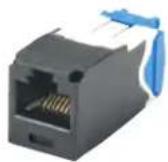
Category 6A
CJ6X88TGBL
| Part Number Category Ports Patch Panel Style RU Labeling | Label (see page 19) | |||||
| CPPKL6ATG24WBL | 24 CPPL24WBLY | Flat | 1 | A, B | ||
| CPPKL6ATG48WBL 48 CPPL24WBLY 6A | 2 A, B | |||||
| CPPKLA6ATG24WBL 24 CPPLA24WBLY | Angled | 1 A, B | ||||
| CPPKLA6ATG48WBL 48 CPPLA24WBLY 2 A, B | ||||||
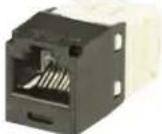
Category 6
CJ688TGBL
| CPPK6G24WBL | 6 | 24 | CPP24WBLY | FlatE, H1 | 1 | Adhesive A | |
| CPPKL6G24WBL CPPL24WBLY | A, B | ||||||
| UICMPPK6G24BL UICMPP24BLY | |||||||
| CPPKA6G24WBL | CPPA24WBL* | Angled | Adhesive A | ||||
| CPPKLA6G24WBL | CPPLA24WBLY | A, B | |||||
| UICMPPKA6G24BL | UICMPPA24BLY | E, H | |||||
| CPPKL6G48WBL | 48 | CPPL24WBLY | Flat | 2 A, B |

Category 5e CJ5E88TGBL
| CPPKL5EG24WBL | 5e | 24 | CPPL24WBLY | Flat | 1 | A, B | |
| CPPKL5EG48WBL | 48 | CPPL24WBLY 2 A, B |
* This patch panel only available in this kit
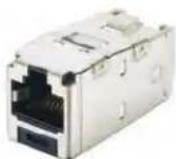
Category 6
CJS688TGY
Shielded
Supplied with Mini-Com® Giga-TX™ Shielded Jack Modules and strain relief bars.
| Part Number | Category | Ports | Patch Panel | Included SRB | Style | RU | Labeling | Label (see page 19) |
| CP24WSK6TGLGY | 6 | 24 | CP24WSLGY^ | Integrated | Flat | 1 Adhesive | A | |
| CP24WSBBK6TGBL | CP24BLY | SRBBRCT-KIT | ||||||
^ The color of this patch panel is light gray. All other panels are black.

Category 6A
CC6X88BL
Category 6
CC688BL
Category 5e
CC5E88BL
Coupler panels
Supplied with preinstalled couplers
| Part Number | Category | Ports | Patch Panel | Style | RU | Labeling | Label (see page 19) |
| CP246X88BL | 6A | 24 | CPP24WBLY | Flat | 1 | Adhesive | A |
| CP24688BL | 6 | CPP24WBLY | |||||
| CP245E88BLY | 5e | CPP24WBLY |
Accessories
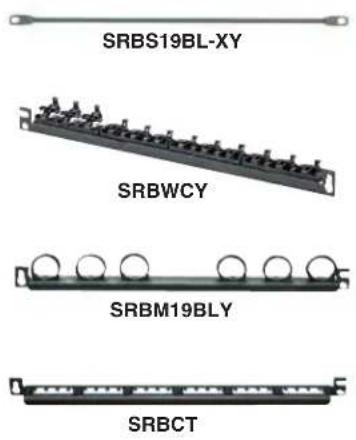
text_image
SRBS19BL-XY SRBWCY SRBM19BLY SRBCT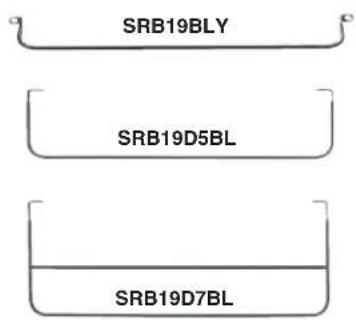
text_image
SRB19BLY SRB19D5BL SRB19D7BL
text_image
SRB19MDBL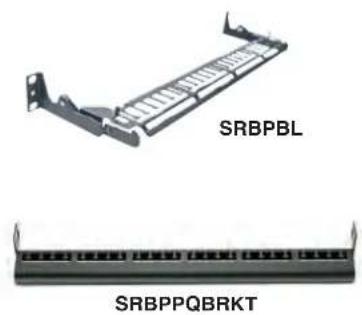
natural_image
Two types of electrical connectors labeled SRBPBL and SRBPPQBRKT, shown from different angles (no text or symbols on the connectors themselves)Strain Relief Bars
Straight
| SRBS19BL-XY Straight strain relief bar. Package of 10. | |
| SRBWCY Straight strain relief bar with clips | |
| SRBM19BLY Straight strain relief bar with Tak-Ty * Hook & Loop Cable Ties | |
| SRBCT Straight strain relief bar with cable ties |
Extended
| SRB19BLY Extended strain relief bar — 2.8" |
| SRB19D5BL Extended strain relief bar — 4.5" |
| SRB19D7BL Extended strain relief bar — 7.6" |
| SRB19MDBL Extended multi-depth strain relief bar — 7" |
| SRBPBL Extended pivoting strain relief bar |
| SRBPPQBRKT Direct mount PP strain relief bar |
Accessories
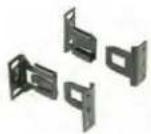
SRBBRKT

SRBBRCT-KIT

SRBBRM-KIT

SRBBRWC-KIT




CPAF2BL
Strain Relief Bars
Quick Release Bracket Kits
| SRBBRKT Quick release brackets | |
| SRBBRCT-KIT Quick release bracket + SRB with cable ties (SRBBRKT + SRBCT) | |
| SRBBRM-KIT Quick release bracket + SRB with Tak-Ty * Cable Ties (SRBBRKT + SRBM19BLY) | |
| SRBBRWC-KIT Quick release bracket + SRB with clips (SRBBRKT + SRBWCY) |
Front Manager
| WMBZ Strain relief | bar with bend radius clips, front mountable zero RU |
Angled Covers
| CPATCBL Transitional cover |
| CPAF1BLY Blank angled cover — 1 RU |
| CPAF2BLY Blank angled cover — 2 RU |
Accessories (continued)

Flat Covers
| DPFP1 Blank flat cover — 1 RU |
| DPFP2 Blank flat cover — 2 RU |
| DPFP4 Blank flat cover — 4 RU |
| DPFP8 Blank flat cover — 8 RU |
| FLBSIM-Y Full length blanking shade 4-45 RU |
Tool-Less Blanking Panels
| TLBP1S-V For 3/8" cage nut holes — 1 RU |
| TLBP2S-V For 3/8" cage nut holes — 2 RU |
| TLBP1R-V For tapped rails — 1 RU |
| TLBP2R-V For tapped rails — 2 RU |
Extender Brackets
| PEB1 Converts 19" | panels to 23" panels — 1 RU |
| PEB2 Converts 19" | panels to 23" panels — 2 RU |
Mounting Screws
| Standard | Bonding Green | Bonding Black | |
| Imperial size #12-24 x 0.5" round head S | 1224-C RGTBSG-C RGTBS-C | ||
| Metric size #M6-1.0mm x 0.15mm SCREWM6-C RGTBSM6G-C RGTBSM6-C | |||
| M6 screw with cage nut CNWSM6-C — — | |||
Standard White Products
Patch Panels

| Part Number Style Ports RU | Recommended SRB's Label Type | Label Options | |||
| CPP24FMWWH | Flat | 24 | 1 | Extended | Adhesive A |
| CPP48FMWWH | 48 2 | ||||
| CPPA24FMWWH | Angled | 24 | 1 | Straight | |
| CPPA48FMWWH | 48 2 | ||||
High Density Patch Panels

| Part Number Style Ports RU | Recommended SRB's Label Type | Label Options | ||||
| CPP48HDWWH | Flat | 48 1Straight | Extended | — | — | |
| CPPA48HDWWH | Angled | |||||
Standard White Products
Quick-Net™ Patch Panels

text_image
QPP24WH QSP24WH QPP48HDWH QPP48HDVNSWH QSP48HDWH QAPP24WH QASP24WH QAPP48HDWH QAPP48HDVNSWH QASP48HDWH| Part Number Style Ports RU | Recommended SRB's Label Type | Label Options | |||
| QPP24WH | Flat | 24 | 1 | Extended | G |
| QSP24WH^ | |||||
| QPP48HDWH | 48 | - | |||
| QPP48HDVNSWH | 48 | ||||
| QSP48HDWH^ | 48 | ||||
| QAPP24WH | Angled | 24 | Straight | G | |
| QASP24WH^ | |||||
| QAPP48HDWH | 48 | ||||
| QAPP48HDVNSWH | |||||
| QASP48HDWH^ |
^Shielded
Standard White Products
Accessories
| CPATCWH Transitional Cover | |
| CPAF1WH Blank angled cover - 1 RU | |
| CPAF2WH Blank angled cover - 2 RU | |
| DPFP1WH Blank flat cover - 1 RU) | |
| DPFP2WH Blank flat cover - 2 RU |
Labeling
| Labeling Options | ||
| Laser/Ink LS8E | ||
| A | C252X030FJJ C252X030FJC | |
| B | C261X035Y1J C261X035Y1C | |
| C | C390X030Y1J C390X030Y1C | |
| D | C282X030Y1J C282X030Y1C | |
| E | T024X000VPC-BK | |
| F | C061X030FJJ C061X030FJC | |
| G | C379X030FJJ C379X030FJC | |
| H | UILJ4 UILS8BW | |
Permanent labeling is critical for all network cabling system installations. Panduit labeling solutions provide clean and efficient labeling of the network physical infrastructure in accordance with TIA/EIA-606-B.

natural_image
Exterior view of a TDP43MI printer (no visible text or symbols on body)TDP43ME
| Part Number | Description |
| TDP43ME | 300 dpi printer; includes printer, Panduit® Easy-MarkTM Labeling Software, RMEH4BL hybrid black ribbon, AC power adapter with US power cord, USB cable, user manual, quick start card, and driver disk. |
Labeling (continued)

LS8EQ
| Part Number | Description |
| LS8EQ | Includes LS8EQ printer with QWERTY keyboard, one cassette of S100X150VAC self-laminating labels, six AA alkaline batters and quick reference card. |

LS8E
| Part Number Description | |
| LS8E | Includes LS8E printer, one cassette of S100X150VAC self-laminating labels, six AA alkaline batteries and quick reference card. |
Unshielded
| Ports Part Number | Original Recommendation | |
| 24 | CPP24WBLY A | |
| CPPL24WBLY A, B | ||
| CPPL24M6BLY C | ||
| CPPL24WRBLY A, B | ||
| CPP24FMWBLY A | ||
| CPPA24FMWBLY A | ||
| CPPLA24WBLY A, B | ||
| UICMPP24BLY E, H | ||
| UICMPPA24BLY E, H | ||
| UICMPPT24BLY E, H | ||
| UICMPPTA2BLY E, H | ||
| 48 | CPP48WBLY A | |
| CPPL48WBLY A, B | ||
| CPPL48M6BLY C | ||
| CPP48FMWBLY A | ||
| CPPA48FMWBLY A | ||
| CPPLA48WBLY A, B | ||
| CPP48HDWBLY - | ||
| CPPA48HDWBLY - | ||
| CPP48HDEWBLY E | ||
| CPPA48HDEWBLY | E | |
| CPP48FM6BL | G | |
| CPPA48FM6BL G | ||
| CPP48FM6VNSBL | G | |
| CPPA48FM6VNSBL | G | |
| UICMPP48BLY E, H | ||
| UICMPPA48BLY E, H | ||
| UICMPPT48BLY E, H | ||
| UICMPPTA48BLY | E, H | |
| MISC | CPPL72WBLY | D |
| CPPLA72WBLY | D | |
| CPP32WBLY E | ||
| CWPP12WBL | A | |
| CPP12WBL | A | |
| CPP72FMWBLY E | ||
| CPPA72FMWBLY E | ||
Shielded
| Ports Part Number | Recommended Labels | |
| 16 | CP16BLY | F |
| CP16WSBLY | ||
| 24 | CP24BLY | A |
| CP24WSBLY | ||
| CPA24BLY | ||
| 48 | CP48BLY | |
| CP48WSBLY | ||
| CPA48BLY | ||
| 72 | CP72BLY | E |
| CPA72BLY | ||
| 48HD | CP48HDBL | |
| CPA48HDBL | ||
Standard White
| Ports Part Number | Recommended Labels | |
| 24 | CPP24FMWWH | A |
| CPPA24FMWWH | ||
| QPP24WH | G | |
| QSP24WH | ||
| QAPP24WH | ||
| QASP24WH^ | ||
| 48 | CPP48FMWWH | A |
| CPPA48FMWWH | ||
Panduit Corp.
World Headquarters
Tinley Park, IL 60487
cs@panduit.com
US and Canada: 800.777.3300
Europe, Middle East, and Africa:
44.20.8601.7200
Latin America: 52.33.3777.6000
Asia Pacific: 65.6305.7575
www.panduit.com