VXF532 - Wall mount SANUS - Free user manual and instructions
Find the device manual for free VXF532 SANUS in PDF.


User questions about VXF532 SANUS
0 question about this device. Answer the ones you know or ask your own.
Ask a new question about this device
Download the instructions for your Wall mount in PDF format for free! Find your manual VXF532 - SANUS and take your electronic device back in hand. On this page are published all the documents necessary for the use of your device. VXF532 by SANUS.
USER MANUAL VXF532 SANUS
THANK YOU FOR CHOOSING SANUS THE #1 TV MOUNT BRAND IN THE US.
VXF532 Instruction Manual

natural_image
Landscape painting of a vibrant sunset over rolling hills with purple and orange clouds (no text or symbols)Scan for easy install video
SANUS MAGNETIC STUD FINDER
Designed to find your studs and make life easier—included in hardware kit.

text_image
magnet locates screws in drywall to show exactly where your studs are probing pin helps find the edges of your stud within the wall level attaches to your wall plate for hands free levelingTWO SIMPLE STEPS TO FINDING YOUR STUDS:
flowchart
graph TD
    A["Top Tank"] --> B["Bottom Tank"]
    B --> C["Top Tank"]
    style A fill:#999
    style B fill:#ccc
    style C fill:#fff
    D["Step 1"] --> E["Arrow to Top Tank"]
    D --> F["Arrow to Bottom Tank"]
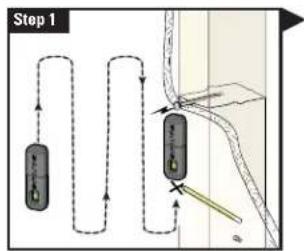
Holding it vertically, lightly move the SANUS Magnetic Stud Finder up and down while sliding across your wall. The magnet within will be attracted to the screws in the stud.
Once the magnet has landed on a screw, place a pencil mark on the wall directly below the magnet.
You can verify this is a stud by moving the Magnetic Stud Finder up or down to find a second or third screw within the wall.
text_image
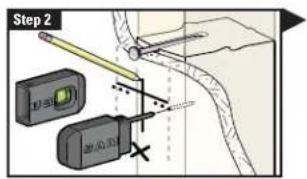
Step 2 13.00 28.00 24.00Pull apart the SANUS Magnetic Stud Finder to expose the probing pin within. Starting about y_2 inch away from the first pencil mark insert the probing pin into the wall every 1/8 inch until it inserts completely into the wall. Once that happens, you know you've found one edge of your stud. Repeat this process till you have found the stud edges and center of the stud.
WARNING: This product contains a magnet. If an implanted medical device such as a pacemaker or implantable cardioverter defibrillator (ICD) is in use, magnetic fields may affect the operation of those devices, resulting in serious injury or death. If you have an implanted medical device, keep at least 13 cm (5in.) between your device and the magnet. Please consult with your physician or medical professional prior to using this product.
natural_image
Technical line drawing of a mechanical assembly with no visible text or symbolsWe'll Make It Stress-Free
If you have any questions along the way, just give us a call. 1-800-359-5520 (UK: 0800-056-2853) We're ready to help!
IMPORTANT SAFETY INSTRUCTIONS – SAVE THESE INSTRUCTIONS – PLEASE READ ENTIRE MANUAL PRIOR TO USE
Before getting started, let's make sure this mount is perfect for you!
1
Does your TV weigh more than 150 lb (68 kg) including accessories?
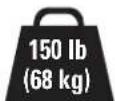
No — Perfect!
Yes — This mount is NOT compatible. Visit MountFinder.Sanus.com or call 1-800-359-5520 (UK: 0800-056-2853) to find a compatible mount.
2
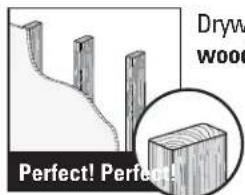
What is your wall made of?
text_image
Dryw wood Perfect! Perfect!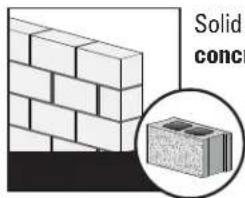
text_image
Solid conc
Unsure?
Call Customer Service: 1-800-359-5520 (UK: 0800-056-2853)
3
Do you have all the tools needed?
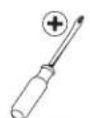
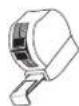

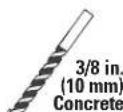

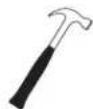

Screwdriver Tape Measure Drill Bit Drill Bit Electric Drill Hammer Socket Wrench
4
Ready to begin?
Please read through these instructions completely to be sure you're comfortable with this easy install process. Also check your TV owner's manual to see if there are any special requirements for mounting your TV.
If you do not understand these instructions or have doubts about the safety of the installation, assembly or use of this product, contact Customer Service at 1-800-359-5520 (UK: 0800-056-2853).
CAUTION: Avoid potential personal injuries and property damage!
- This product includes directions and hardware for use with wood stud, solid concrete and concrete block walls – DO NOT install into drywall alone.
- The wall must be capable of supporting five times the weight of the TV and mount combined.
- Do not use this product for any purpose not explicitly specified by manufacturer.
● Manufacturer is not responsible for damage or injury caused by incorrect assembly or use.
STEP 1 Attach Brackets to TV
Parts and Hardware for STEP 1
WARNING: This product contains small items that could be a choking hazard if swallowed. Before starting assembly, verify all parts are included and undamaged. If any parts are missing or damaged, do not return the damaged item to your dealer; contact Customer Service. Never use damaged parts!

NOTE: Not all hardware included will be used.
Vertical TV Bracket

text_image
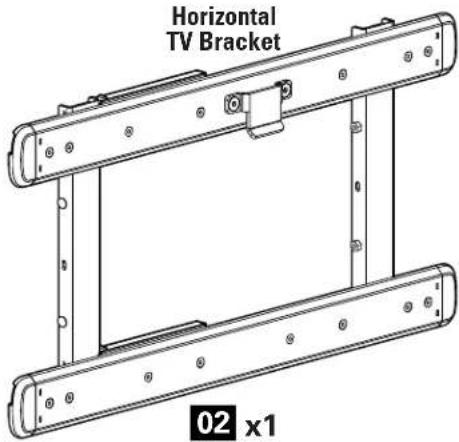
Horizontal TV Bracket 02 x101 x2

03 x4
05 x4
07 x4
04 x4
06 x4
08 x4
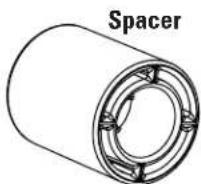
09 x4
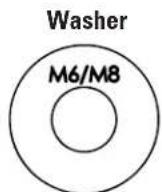
10 x4
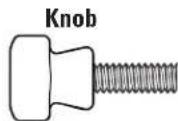
11 x2
16π
1-1 Select TV Screw Diameter
Hand thread screws into the threaded inserts on the back of your TV to determine which screw diameter (M6, or M8) to use.

text_image
M6 M81-2 Select TV Screw Length
If your TV has a flat back AND you want your TV closer to the wall, use the shorter screws (a).
Use the spacers and longer screws (b) to accommodate:
• Round/irregular back TVs
• TVs with inset mounting holes
• Extra space needed for cables
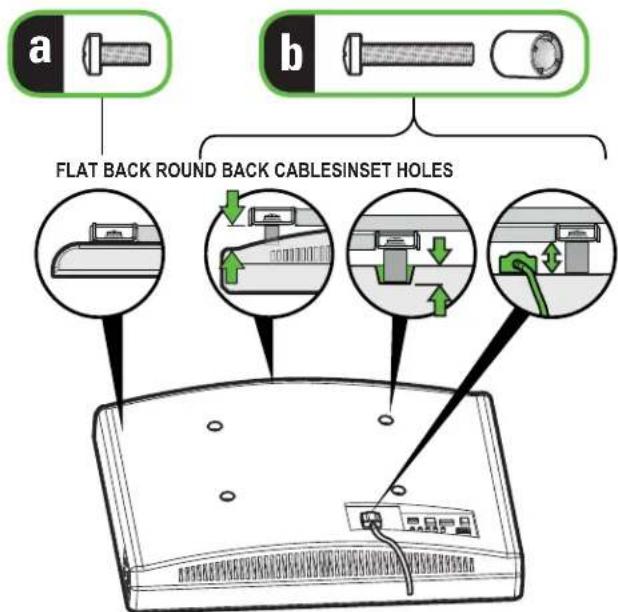
text_image
a b FLAT BACK ROUND BACK CABLESINSET HOLESCAUTION:
Verify adequate thread engagement with the screw or screw/spacer combination.
- Too short will not hold the TV.
- Too long will damage the TV.
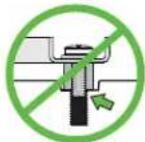
Too Short
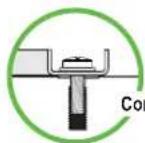
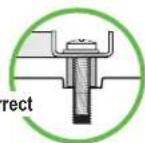

Too Long
Standard configurations are shown. For special applications, or if you are uncertain about your hardware selection, contact Customer Service at 1-800-359-5520.
1-3 Attach Vertical TV Brackets
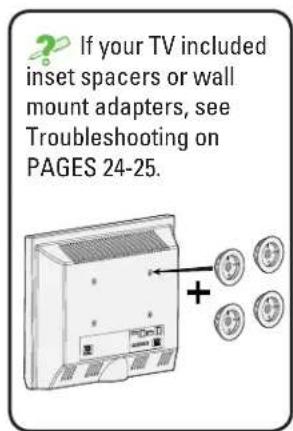
Align the vertical TV brackets 01 over your TV hole pattern, and secure using your screw/washer (a) or spacer/screw/washer (b) selection.
CAUTION: Avoid potential personal injury or property damage! The hanging tabs must face downward as shown.
text_image
If your TV included inset spacers or wall mount adapters, see Troubleshooting on PAGES 24-25.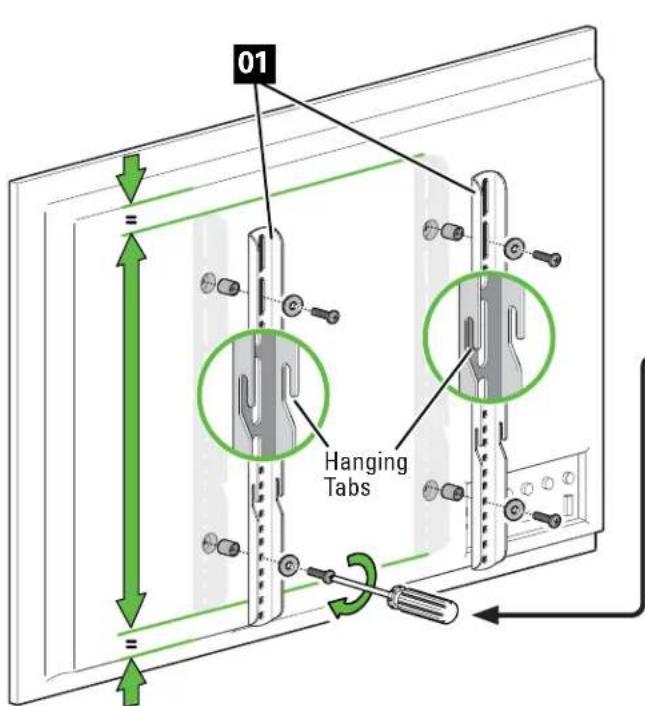
text_image
01 Hanging Tabs
text_image
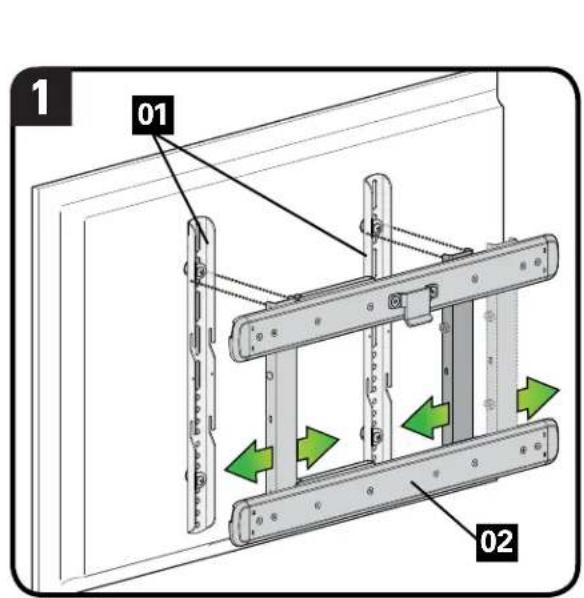
a Flat Back 03 04 05 06 10 b Round Back / Extra Space 07 08 09 101-4 Attach Horizontal TV Bracket
- Slide the sides of horizontal TV bracket 02 to align with the vertical TV brackets 01
- Position horizontal TV bracket 02 onto the vertical TV brackets 01 by sliding the four bolts into the four hanging tabs.

NOTE: Horizontal TV bracket 02 does not stay in place until securing in step 3 on PAGE 9.

CAUTION: Avoid potential personal injury or property damage! Horizontal TV bracket 02 must be oriented as shown.
text_image
1 01 02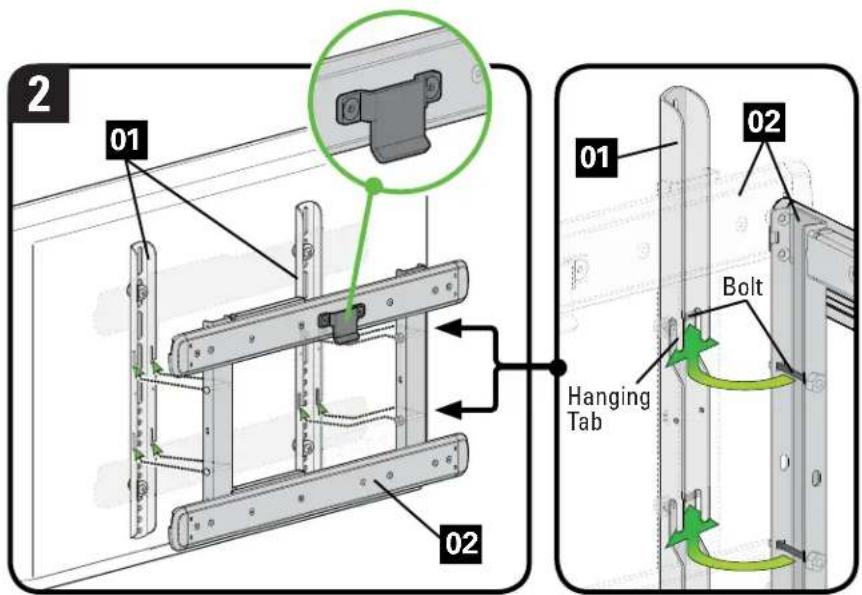
text_image
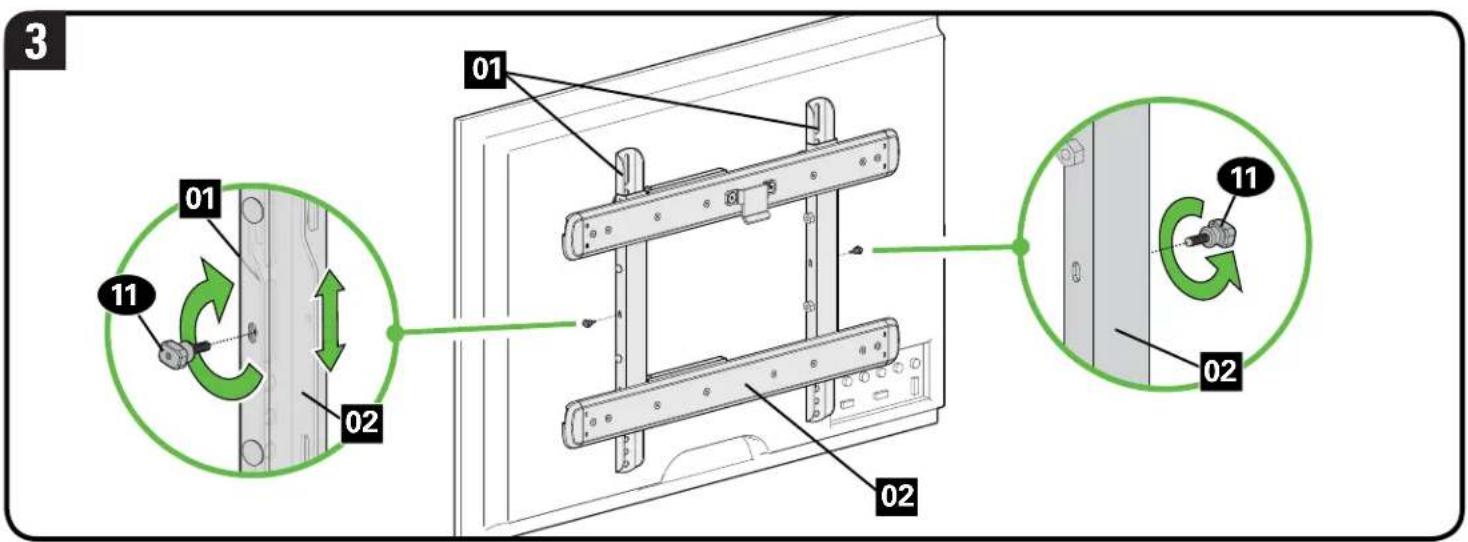
2 01 02 Hanging Tab 01 02 Bolt- Secure horizontal TV bracket 02 onto the vertical TV brackets 01 using the knobs 11.

NOTE: Slide horizontal TV bracket 02 up or down to locate the mounting holes in the vertical TV brackets 01.
CAUTION: Avoid potential personal injury or property damage! The knobs 11 must be installed to secure horizontal TV bracket 02 onto the vertical TV brackets 01.
text_image
3 01 02 11 01 01 11 02 02STEP 2 Attach Wall Plate to Wall
For wood stud installations, follow STEP 2A on PAGE 11
For concrete installations, follow STEP 2B on PAGE 15
Parts and Hardware for STEP 2
⚠ WARNING: This product contains small items that could be a choking hazard if swallowed.
Before starting assembly, verify all parts are included and undamaged. If any parts are missing or damaged, do not return the damaged item to your dealer; contact Customer Service. Never use damaged parts!
* ▲ WARNING: This product contains a magnet. If an implanted medical device such as a pacemaker or implantable cardioverter defibrillator (ICD) is in use, magnetic fields may affect the operation of those devices, resulting in serious injury or death. If you have an implanted medical device, keep at least 5 in. (13 cm) between your device and the magnet. Please consult with your physician or medical professional prior to using this product.

NOTE: Not all hardware included will be used.

text_image
Wall Plate Template12 x1

natural_image
Diagram of a wall plate with rounded corners and a 13x1 scale indicator (no text or symbols on the diagram itself)13 x1
*Sanus Magnetic Stud Finder

text_image
SANUS14 x1
text_image
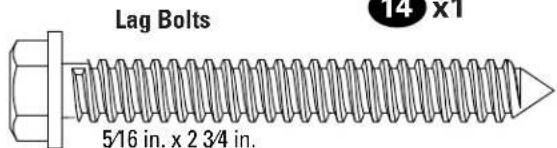
Lag Bolts 5/16 in. x 2 3/4 in. 14 x 115 x4
Concrete Anchors

16 x4
STEP 2A Wood Stud Option
CAUTION: Avoid potential personal injuries and property damage!
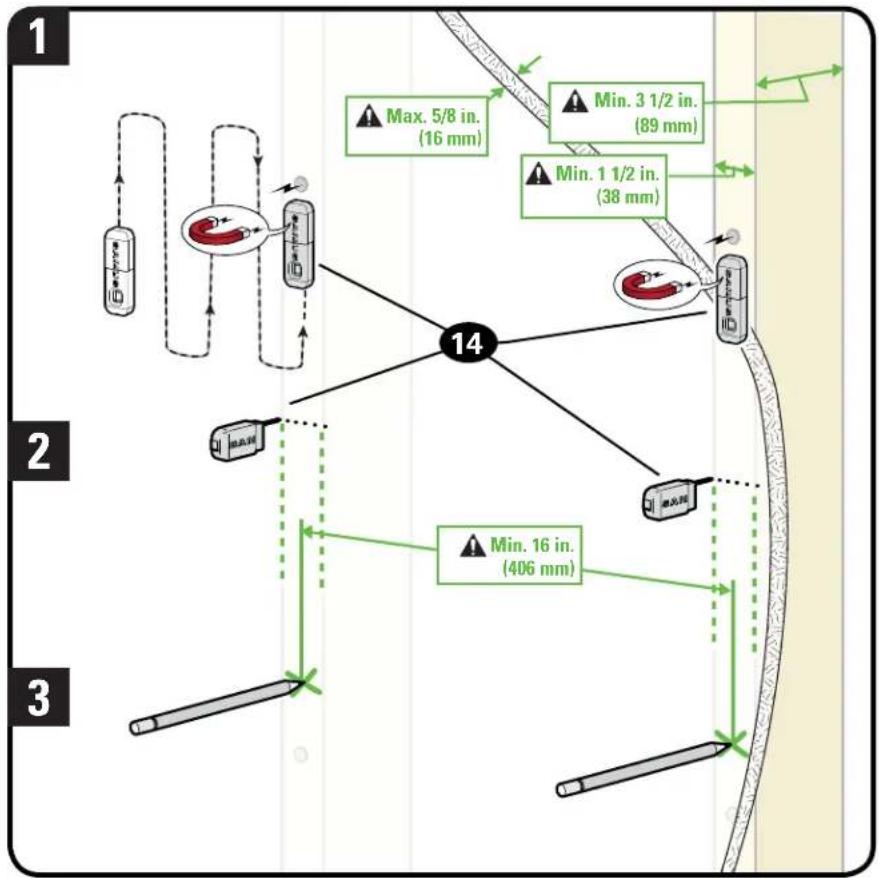
- Drywall covering the wall must not exceed 5/8 in. (16 mm)
- Minimum wood stud size: common 2 x 4 in. (51 x 102 mm) nominal 1½ x 3½ in. (38 x 89 mm)
- Minimum horizontal space between fasteners: 16 in. (406 mm)
-
Stud centers must be verified - not all walls have a conventional 16 in. (406 mm) or 24 in. (610 mm) spacing
-
Locate a nail/screw in the studs using the Sanus magnetic stud finder 14 provided.
- Find the edges of the studs using the probe of the stud finder 14.
- Mark the centers of the studs with pencil.
flowchart
graph TD
    A["1"] --> B["2"]
    B --> C["3"]
    C --> D["14"]
    D --> E["Max. 5/8 in. (16 mm)"]
    D --> F["Min. 3 1/2 in. (89 mm)"]
    D --> G["Min. 1 1/2 in. (38 mm)"]
    D --> H["Min. 16 in. (406 mm)"]
    H --> I["End"]
- Place the wall plate template 12 at your desired height and position the slotted holes over your stud center lines. Level the wall plate template 12 and tape in place.

NOTE: For assistance in determining wall plate location, see Height Finder at sanus.com.
IMPORTANT: Be sure you mark and drill into the center of the stud.
- Drill the four pilot holes using a 7/32 in. (5.5 mm) diameter drill bit.
IMPORTANT: Pilot holes must be drilled to a depth of 3 in. (75 mm).

text_image
4 12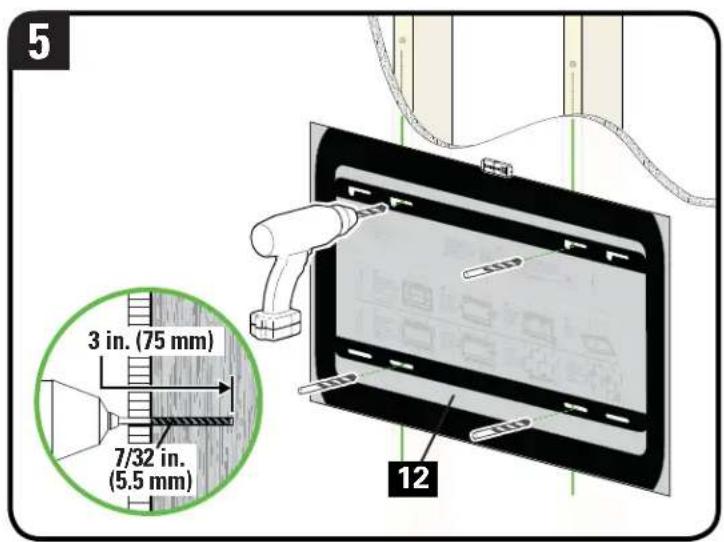
text_image
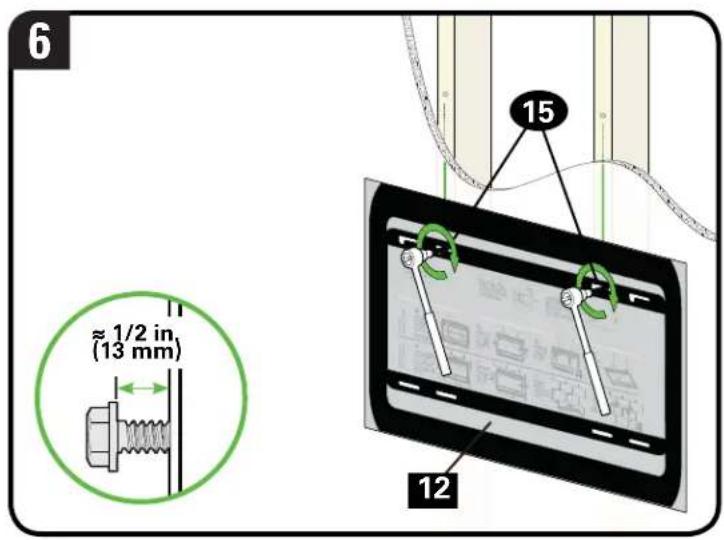
5 3 in. (75 mm) 7/32 in. (5.5 mm) 12- Partially install the top two lag bolts 15, leaving about 1/2 in. (13 mm) space from the wall.

NOTE: This space allows you to remove the wall plate template 12 and hang the wall plate 13 onto the top lag bolts 15.
- Remove the wall plate template 12
text_image
6 ≈ 1/2 in (13 mm) 15 12
text_image
7 12-
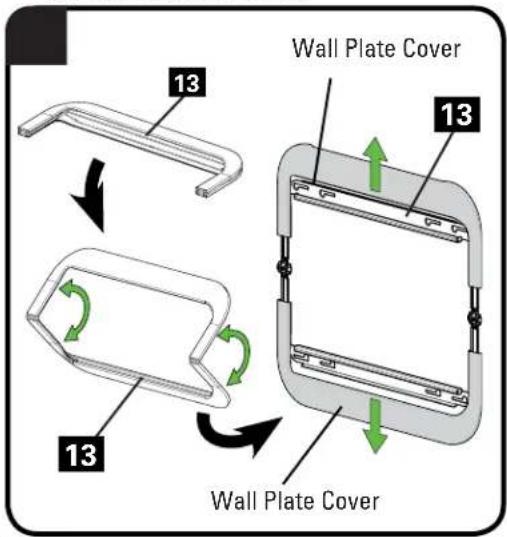
Prepare the wall plate 13 by unfolding and then sliding the wall plate covers up/down so the mounting holes are visible.
-
Hang the wall plate 13 on the top lag bolts.
-
Install the bottom two lag bolts 15. Tighten all four lag bolts 15 only until they are pulled firmly against the wall plate 13.

NOTE: Hold the wall plate 13 in place when tightening the first lag bolt 15 to keep the plate from shifting out of place.

CAUTION: Improper use could reduce the holding power of the lag bolts 15. DO NOT over-tighten the lag bolts.
Go to STEP 3 on PAGE 18.
text_image
Wall Plate Cover 13 13 13 Wall Plate Cover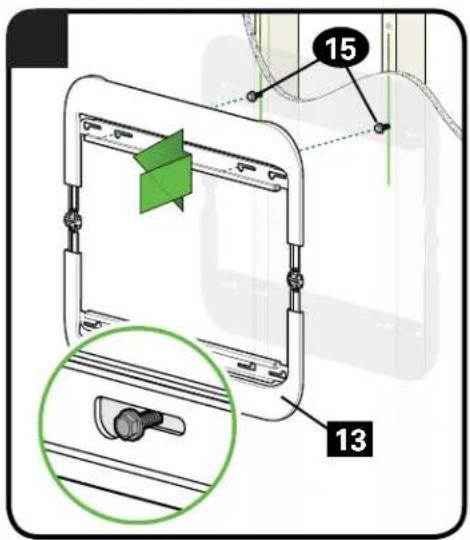
text_image
15 13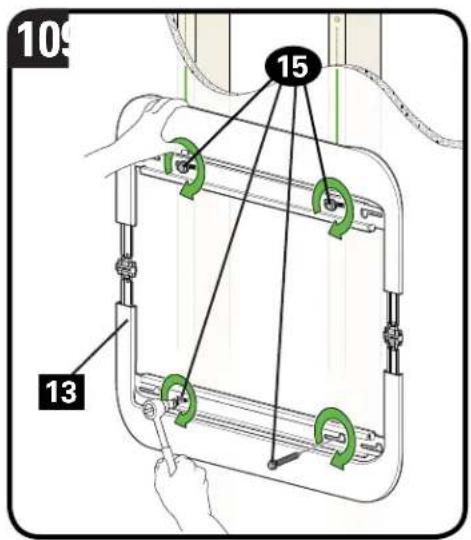
text_image
109 15 13STEP 2B Solid Concrete or Concrete Block Option
CAUTION: Avoid potential personal injuries and property damage!
- Mount the wall plat 13 directly onto the concrete surface
• Minimum solid concrete thickness: 8 in. (203 mm)
• Minimum concrete block size: 8 x 8 x 16 in. (203 x 203 x 406 mm)
• Minimum horizontal space between fasteners: 24 in. (610 mm) -
For concrete applications, arr17 (STEP 3) must remain centered in wall plate 13. Keep this in mind when selecting the wall plate location
-
Position the wall plate template 12 on the wall at your desired height. Level the wall plate template and mark the hole locations.

NOTE: For assistance in determining wall plate location, see Height Finder at sanus.com.
- Drill four pilot holes using a 3/8 in. (10 mm) diameter masonry drill bit.
IMPORTANT: Pilot holes must be drilled to a depth of 3 in. (75 mm). Never drill into the mortar between blocks.

text_image
1 12 Min. 24 in. (610 mm)
text_image
2 3 in. (75 mm) 3/8 in. (10 mm) 12- Remove the wall plate template 12 and insert four anchors 16.
CAUTION: Be sure the anchors 16 are seated flush with the concrete surface.
- Partially install the top two lag bolts 15, leaving about 1/2 in. (13 mm) space from the wall.
NOTE: This space allows you to hang the wall plate 13 onto the top lag bolts 15.

text_image
3 16 12
text_image
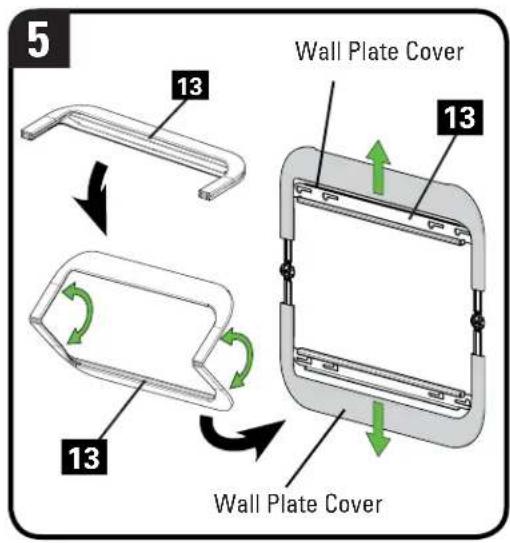
4 15 ≈ 1/2 in (13 mm)- Prepare the wall plate 13 by unfolding and then sliding the wall plate covers up/down so the mounting holes are visible.
- Hang the wall plate 13 on the top lag bolts. Install the bottom two lag bolts 15.
- Tighten all four lag bolts 15 only until they are pulled firmly against the wall plate 13.

NOTE: Hold the wall plate 13 in place when tightening the first lag bolt 15 to keep the plate from shifting out of place.

CAUTION: Improper use could reduce the holding power of the lag bolts 15. DO NOT over-tighten the lag bolts.
text_image
5 13 Wall Plate Cover 13 13 Wall Plate Cover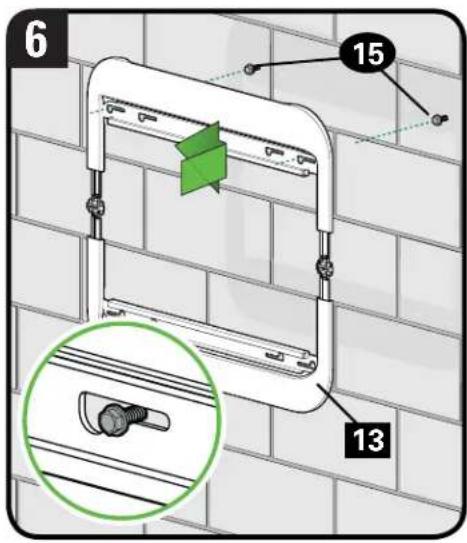
text_image
6 15 13
text_image
7 15 13STEP 3 Attach TV to Wall Plate
Parts for STEP 3
⚠ WARNING: Before starting assembly, verify this part is undamaged. If damaged, do not return the damaged item to your dealer; contact Customer Service. Never use damaged parts!
Arm Assembly
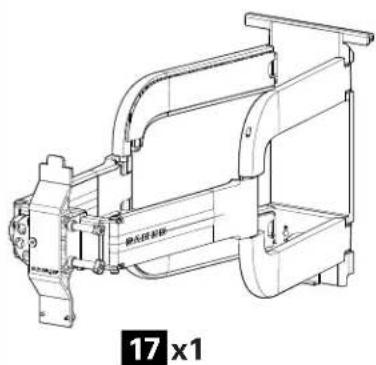
natural_image
Technical line drawing of a mechanical pump or motor assembly (no text or symbols visible)3-1 Attach Arm Assembly to Wall Plate

HEAVY! You may need assistance with this step.
- Hang the arm assembly 17 onto the wall plate 13.
CAUTION: Avoid potential personal injury or property damage! For concrete applications, the arm assembly 17 must remain centered in the wall plate 13.
NOTE: For wood stud applications, the arm assembly 17 can be slid anywhere along the wall plate 13 for optimal positioning of your TV.

text_image
1 17 13- Loosen both locking knobs until the arm assembly 17 slips onto the wall plate 13, then hand tighten both locking knobs evenly to secure the arm assembly 17 in place.
- Lock the arm assembly 17 onto the wall plate 13.
CAUTION: Avoid potential personal injury or property damage! Always make sure your arm assembly 17 is in the locked position so the TV is securely fastened to the wall plate 13.
- Close the wall plate 13 covers.

text_image
2 17 13 Locking Knob Locking Knob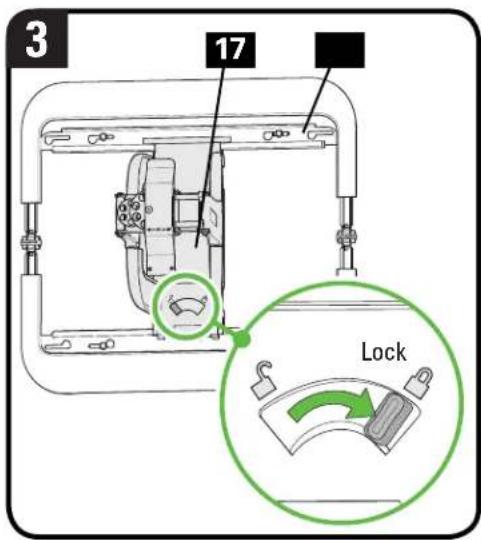
text_image
3 17 Lock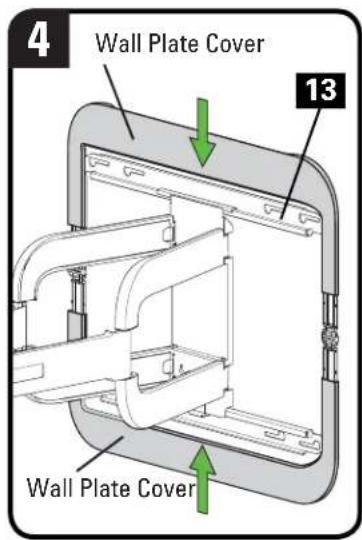
text_image
4 Wall Plate Cover 13 Wall Plate Cover3-2 Hang TV onto Arm Assembly

HEAVY! You may need assistance with this step.
- Hang the TV/bracket assembly
02 onto the arm assembly 17.
- Lock the TV/bracket assembly
02 to the arm assembly 17 by pushing and turning the spring loaded screws on the arm assembly 17.
CAUTION: Avoid potential personal injury or property damage! Locks must be engaged to secure the TV onto the arm assembly 17.

text_image
1 02 17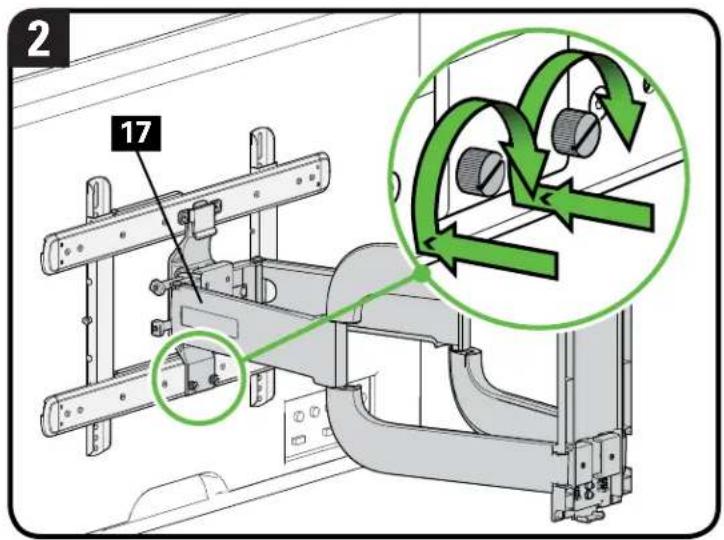
text_image
2 17Manage Cables
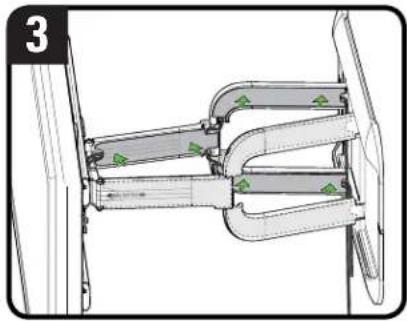
- Remove cable covers from the inside of the arms 17.
NOTE: Pull both ends of the covers to avoid bending.

- Route cables through space behind cable covers.

NOTE: Use both arms if extra cable space is needed.
- Replace cable covers.
natural_image
Technical diagram of a mechanical assembly with green triangular markers indicating features (no text or symbols present)
text_image
17 Cable Covers
text_image
CablesAdjustments
TILTLEVEL
natural_image
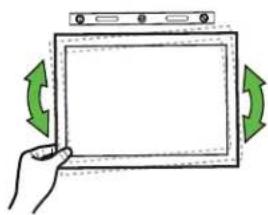
Hand holding a tablet device with green directional arrows indicating rotation (no text or symbols)Your TV should adjust easily when moved, then stay in place.
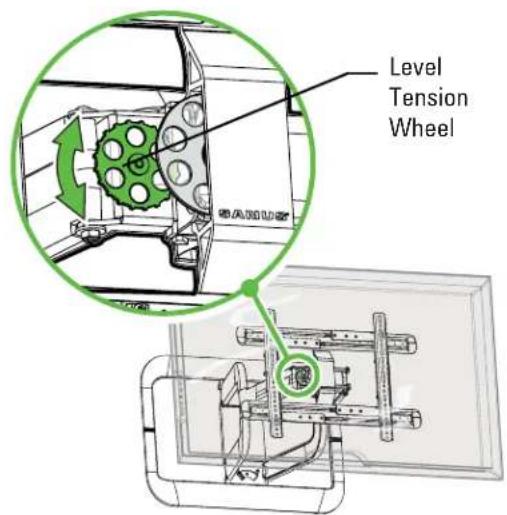
Adjust the level tension wheel if your TV is too loose or too tight.
text_image
Level Tension Wheel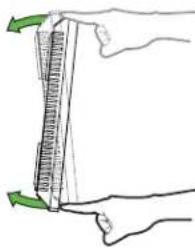
natural_image
Illustration of a hand holding a ruler with green arrows indicating measurement direction (no text or symbols)Your TV should adjust easily when moved, then stay in place.
Adjust the TV balance wheel if your TV naturally tilts up or down. Experiment with multiple revolutions first, then smaller rotation increments to fine tune the TV balance.
NOTE: If you do not intend to adjust the tilt for different viewing locations, you can tighten the tilt tension knobs to prevent unwanted movement.

text_image
TV Balance Wheel Tilt Tension KnobsTV LATERAL SHIFT
REMOVING THE TV

HEAVY! You may need assistance with this step.
CAUTION: Avoid potential injuries or property damage! Do NOT adjust the arm position from center for concrete applications. Arm 17 MUST remain centered in wall plate 13 for all concrete applications!
For wood stud applications:
Use two people for this procedure, or remove TV before starting.
-
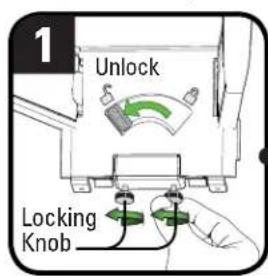
Unlock arm assembly 17 by sliding the lock lever to the unlock position.
-
Slide arm assembly 17 along wall plate 13 as needed.

NOTE: You may need to loosen the locking knobs before moving arm embly 17, tighten the locking knobs when finished.
- Slide the lock lever to the lock position.
CAUTION: Avoid potential personal injury or property damage!
Always make sure your arm assembly 17 is in the locked position so the TV is securely fastened to the wall plate 13.
text_image
1 Unlock Locking Knob
text_image
2 17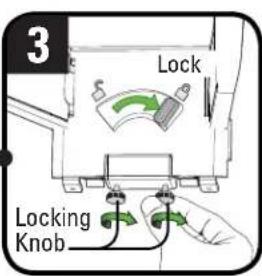
text_image
3 Lock Locking Knob
HEAVY! You may need assistance with this step.
If you need to remove your TV from the arm assembly 17, disconnect all cables and then reverse the procedures in STEP 3-2 on PAGE 20.

text_image
17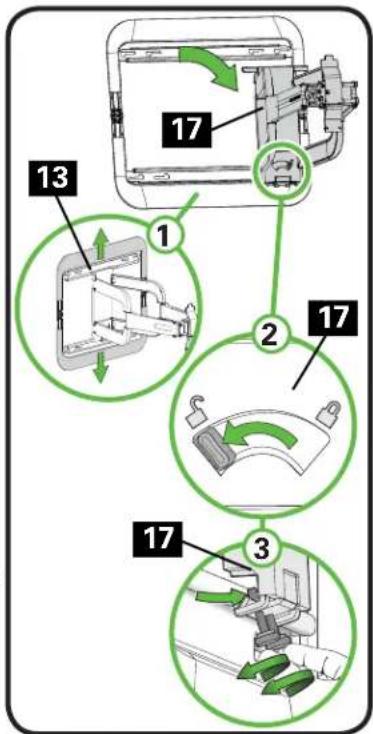
text_image
13 1 2 17 17 3
Troubleshooting
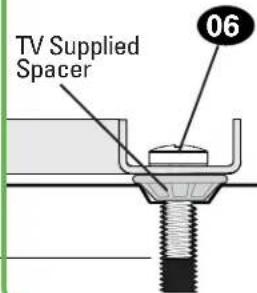
For TVs that come with inset spacers or wall mount adapter rings, and your installation requires Flat Back / Low Profile
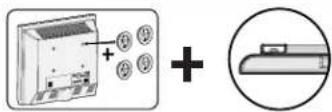
Use your TV supplied spacers and do not use the Sanus spacers 09.

NOTE: If using the M8x20 mm ews 06, you may or may not d the washers 10, depending length of screw engagement.

text_image
09TV Supplied Spacer
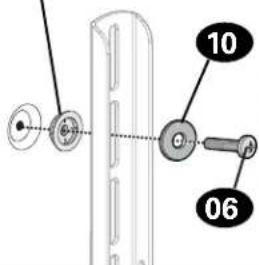
text_image
10 06TV Supplied Spacer

text_image
06CAUTION: Verify adequate thread engagement with the screw or screw/spacer combination.
- Too short will not hold the TV. - Too long will damage the TV.

natural_image
Diagram of a mechanical assembly with a green diagonal line and arrow indicating direction (no text or symbols)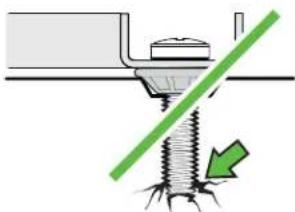
natural_image
Diagram showing a screw being inserted into a mechanical component with a green diagonal line indicating force or direction (no text or symbols)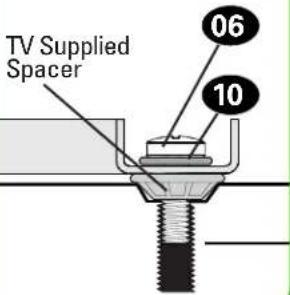
text_image
TV Supplied Spacer 06 10
text_image
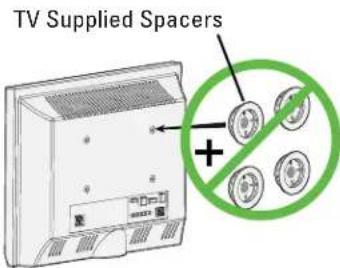
TV Supplied Spacer 06For TVs that come with inset spacers or wall mount adapter rings, and your installation requires Rounded Back / Extra Space

text_image
Diagram illustrating a device operation with plus signs and directional arrows, likely for system or process tracking.Use the Sanus spacers 09 and longer screws. Do not use your TV supplied spacers.
NOTE: If using the M8x35 mm screws 08, you may or may not need the washers 10, depending on length of screw engagement.
text_image
TV Supplied Spacers +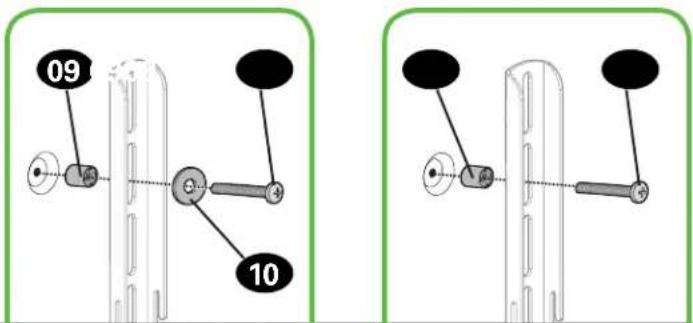
text_image
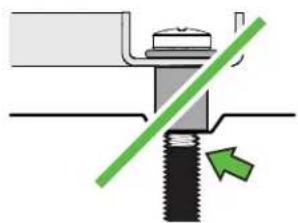
09 10CAUTION: Verify adequate thread engagement with the screw or screw/spacer combination.
— Too short will not hold the TV.
— Too long will damage the TV.
natural_image
Diagram of a mechanical assembly with a green diagonal line and arrow indicating direction (no text or symbols)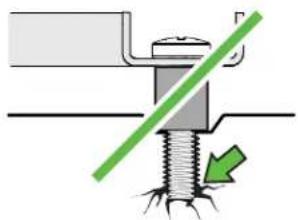
natural_image
Diagram of a bolted joint with a green diagonal line indicating force or direction (no text or symbols)
text_image
09 08 10Features

text_image
Extend the fully articulating arm from 3.3 in. (85 mm) to 31.5 in. (800 mm) Easily tilt the TV for the perfect viewing angle Slide TV side-to-side for perfect positioning on the wall Conceal unsightly cables with the cable management system Conceal mounting hardware with decorative covers for a fi nished look Arm locks into position for added safety Easily adjust leveling and tilt tension without tools Align the center of gravity of any TV for optimal tilt motion Expand the TV bracket to fi t TV hole patterns from 200 x 200 mm up to 700 x 400 mmDimensions
in.
[mm]

text_image
27.56 [700.0] 7.87 [200.0] 15.75 [400.0]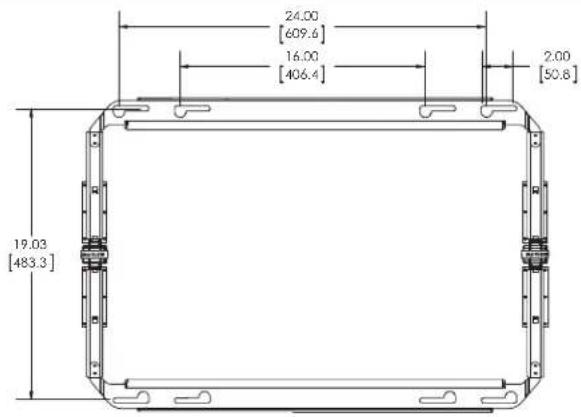
text_image
24.00 [609.6] 16.00 [406.4] 2.00 [50.8] 19.03 [483.3]
text_image
31.98 [812.4] 3.48 [88.5] 30.50 [774.7] 上部侧对角 UP TILT 5 DOWN TILT 15
text_image
27.02 [686.2] INNER WALL PLATE 15.27 [387.8] INNER WALL PLATE 22.27 [565.6]ESPAÑOL
text_image
i Hor o blo ceme
¿No está seguro?
Milestone AV Technologies and its affiliated corporations and subsidiaries (collectively, "Milestone"), intend to make this manual accurate and complete. However, Milestone makes no claim that the information contained herein covers all details, conditions, or variations. Nor does it provide for every possible contingency in connection with the installation or use of this product. The information contained in this document is subject to change without notice or obligation of any kind. Milestone makes no representation of warranty, expressed or implied, regarding the information contained herein. Milestone assumes no responsibility for accuracy, completeness or sufficiency of the information contained in this document.
Learn ways to get the most out of your space. Find product updates and more.
TWITTER.COM/SANUSSYSTEMS

Learn installation tips, tricks and household know-hows.
View step-by-step product videos to ease your install experiences. Find the latest news stories about your favorite SANUS products.
REGISTER YOUR NEW SANUS PRODUCT!
1 By registering, you'll be entered to win, and will receive the latest product updates, design tips, and other ways to enhance your life in your home.
2 Visit SANUS.com/register to complete your registration and start enjoying all of the benefits SANUS has to offer.
3 Leave a product review and let us know how your install went! ★★★★★
If you ever have questions about your SANUS product, give us a call at 1-800-359-5520. We're ready to help! 'Monthly prize' rules and restrictions apply. Visit SANUS.com for more info.
800-359-5520 (UK: 0800-056-2853) • info@sanus.com • sanus.com
©2014 Milestone AV Technologies. All rights reserved. SANUS is a division of Milestone. All other brand names or marks are used for identification purposes and are trademarks of their respective owners.
SANUS • 6436 City West Parkway • Eden Prairie, MN 55344 USA
6901-002389 00