ManualGo.com
PABS 10.8 B2 - Electric drill PARKSIDE - Free user manual and instructions
Find the device manual for free PABS 10.8 B2 PARKSIDE in PDF.



Download the instructions for your Electric drill in PDF format for free! Find your manual PABS 10.8 B2 - PARKSIDE and take your electronic device back in hand. On this page are published all the documents necessary for the use of your device. PABS 10.8 B2 by PARKSIDE.
USER MANUAL PABS 10.8 B2 PARKSIDE
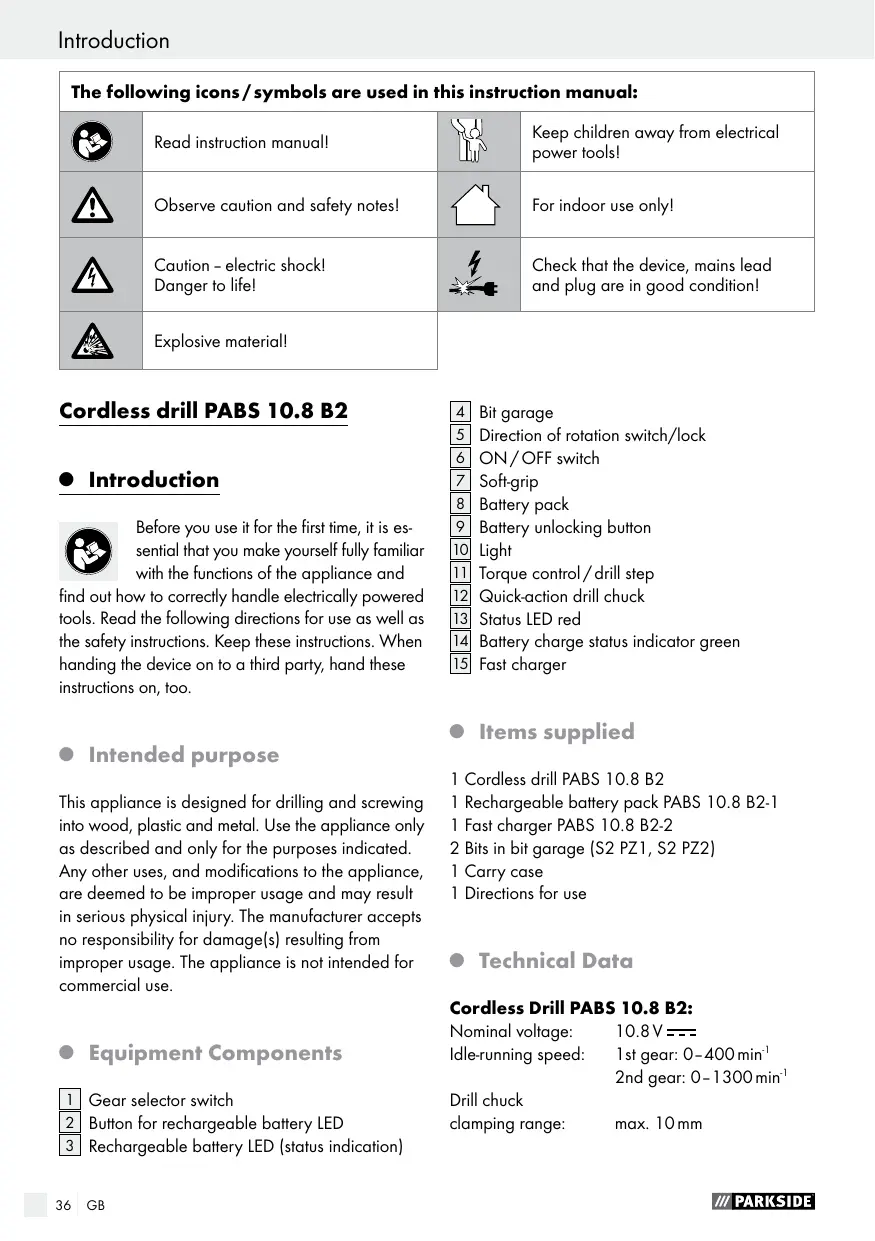
Introduction The following icons / symbols are used in this instruction manual: Read instruction manual! Keep children away from electrical power tools! Observe caution and safety notes! For indoor use only! Caution – electric shock! Danger to life! Check that the device, mains lead and plug are in good condition! Explosive material! Cordless drill PABS 10.8 B2
Introduction Before you use it for the first time, it is essential that you make yourself fully familiar with the functions of the appliance and find out how to correctly handle electrically powered tools. Read the following directions for use as well as the safety instructions. Keep these instructions. When handing the device on to a third party, hand these instructions on, too.
Intended purpose This appliance is designed for drilling and screwing into wood, plastic and metal. Use the appliance only as described and only for the purposes indicated. Any other uses, and modifications to the appliance, are deemed to be improper usage and may result in serious physical injury. The manufacturer accepts no responsibility for damage(s) resulting from improper usage. The appliance is not intended for commercial use.
Equipment Components 1 Gear selector switch 2 Button for rechargeable battery LED 3 Rechargeable battery LED (status indication)
Items supplied 1 Cordless drill PABS 10.8 B2 1 Rechargeable battery pack PABS 10.8 B2-1 1 Fast charger PABS 10.8 B2-2 2 Bits in bit garage (S2 PZ1, S2 PZ2) 1 Carry case 1 Directions for use
Technical Data Cordless Drill PABS 10.8 B2: Nominal voltage:
Idle-running speed: 1st gear: 0–400 min-1 2nd gear: 0–1300 min-1 Drill chuck clamping range: max. 10 mm Introduction / General safety advice for electrical power tools Maximum drill diameter: Steel: Wood: 8 mm 20 mm Battery pack PABS 10.8 B2-1: Type: LITHIUM-ION Nom. voltage:
Capacity: 1300 mAh PABS 10.8 B2-2 Fast Charger: INPUT Nominal voltage: 230 V~ 50 Hz Nominal power: 27 W OUTPUT Nominal voltage: Charging current Charging time: Protection class:
max. 1500 mA approx. 60 min II / Noise / vibration data: Measured values for noise are determined in accordance with EN 60745. The A-weighted noise level of the electrical power tool are typically: Sound pressure level: 66.4 dB(A) Sound power level:
Uncertainty K: 3 dB vibration levels and in many cases they may exceed the values given in these instructions. It is easy to underestimate the vibration load if the electrical power tool is used regularly in particular circumstances. Note: If you wish to make an accurate assessment of the vibration loads experienced during a particular period of working, you should also take into account the intervening periods of time when the device is switched off or is running but is not actually in use. This can result in a much lower vibration load over the whole of the period of working. eneral safety advice for electrical power tools Read all the safety advice and instructions! Failure to observe the safety advice and instructions may result in electric shock, fire and / or serious injury. Keep all the safety advice and instructions in a safe place for future reference! The term “electrical tool” used in the safety advice refers to electrical tools powered by mains electricity (by means of a mains lead) and electrical tools powered by rechargeable batteries (without a mains lead). Wear ear protection! Total vibration (vector sum of three directions) is calculated in accordance with EN 60745: Drilling in metal: Vibration emission value ah,D = 1.052 m / s2, uncertainty K = 1.5 m / s2, Screwing: Vibration emission value ah = 0.881 m / s2, uncertainty K = 1.5 m / s2. The vibration level given in these instructions has been measured in accordance with a standardised measurement procedure specified in EN 60745 and can be used to compare devices. Different uses of the device give rise to different
Keep your working area clean and well lit. Untidy or poorly lit working areas can lead to accidents.
Do not work with the device in potentially explosive environments in which there are inflammable liquids, gases or dusts. Electrical power tools create sparks, which can ignite dusts or fumes. Keep children and other people away while you are operating the electrical tool. Distractions can cause you to lose control of the device.
General safety advice for electrical power tools
2. Electrical safety
a) T he mains plug on the device must match the mains socket. The plug must not be modified in any way. Do not use an adapter plug with devices fitted with a protective earth. Unmodified plugs and matching sockets reduce the risk of electric shock. b) Avoid touching earthed surfaces such as pipes, radiators, ovens and refrigerators with any part of your body. There is an increased risk of electric shock if your body is earthed. Keep the device away from rain or moisture. Water entering an electrical device increases the risk of electric shock.
Do not use the mains lead for any purpose for which it was not intended, e.g. to carry the device, to hang up the device or to pull the mains plug out of the mains socket. Keep the mains lead away from heat, oil, sharp edges or moving parts of the device. Damaged or tangled mains leads increase the risk of electric shock. e) When working outdoors with an electrical power tool always use extension cables that are also approved for use outdoors. The use of an extension cable suitable for outdoor use reduces the risk of electric shock. f) Use a residual current device (RCD) for protection if operating the electrical power tool in a moist environment is unavoidable. The use of an RCD reduces the risk of electric shock.
a) R emain alert at all times, watch what you are doing and always proceed with caution. Do not use the device if you are tired or under the influence of drugs, alcohol or medication. One moment of carelessness when using the device can lead to serious injury.
ear personal protective equipment and always wear safety glasses. The wearing of personal protective equipment such as dust masks, non-slip safety shoes, safety helmets or ear protectors, appropriate to the type of electrical power tool used and work undertaken, reduces the risk of injury. c) Avoid unintentional operation of the device. Check that the electrical power tool is switched off before you connect it to the mains, pick it up or carry it. Accidents can happen if you carry the device with your finger on the ON / OFF switch or with the device switched on. Remove any setting tools or spanners before you switch the device on. A tool or spanner left attached to a rotating part of a device can lead to injury. Avoid placing your body in an unnatural position. Keep proper footing and balance at all times. By doing this you will be in a better position to control the device in unforeseen circumstances. f) Wear suitable clothing. Do not wear loose clothing or jewellery. Keep your hair, clothing and gloves clear of moving parts. Loose clothing, jewellery or long hair can become trapped in moving parts. g) If vacuum dust extraction and collection devices are fitted do not forget to check that they are properly connected and correctly used. The use of these devices reduces the hazard presented by dust.
handling and use of electrical power tools a) Do not overload the device. Always use an electrical power tool that is intended for the task you are undertaking. By using the right electrical power tool for the job you will work more safely and achieve a better result. b) Do not use an electrical power tool if its switch is defective. An electrical power General safety advice for electrical power tools tool that can no longer be switched on and off is dangerous and must be repaired. c) Pull the mains plug out of the socket and / or remove the rechargeable battery before you make any adjustments to the device, change accessories or when the device is put away. This precaution is intended to prevent the device from unintentionally starting. d) When not in use always ensure that electrical power tools are kept out of reach of children. Do not let anyone use the device if he or she is not familiar with it or has not read the instructions and advice. Electrical power tools are dangerous when they are used by inexperienced people. e) Look after the device carefully. Check that moving parts are working properly and move freely. Check for any parts that are broken or damaged enough to detrimentally affect the functioning of the device. Have damaged parts repaired before you use the device. Many accidents have their origins in poorly maintained electrical power tools. Keep cutting tools clean and sharp. Carefully maintained cutting tools with sharp cutting edges are less likely to jam and are easier to control. Use the electrical power tool, accessories, inserted tools etc. in accordance with these instructions and advice, and the stipulations drawn up for this particular type of device. In doing this, take into account the working conditions and the task in hand. The use of electrical power tools for purposes other than those intended can lead to dangerous situations.
5. Use and handling of the cordless electrical power tool
a) C harge a rechargeable battery unit using only the charger recommended by the manufacturer. Chargers are often designed for a particular type of rechargeable battery unit. There is the danger of fire if other types of rechargeable battery units are used. b) Only the rechargeable battery units supplied are to be used with an electrical power tool. The use of other rechargeable battery units may lead to the danger of injury or fire. When they are not being used, store rechargeable battery units away from paperclips, coins, keys. nails, screws or other small metal objects that could cause the contacts to be bridged. Shortcircuiting the contacts of a rechargeable battery unit may result in heat damage or fire. d) Fluids may leak out of rechargeable battery units if they are misused. If this happens, avoid contact with the fluid. If contact occurs, flush the affected area with water. Seek additional medical help if any of the fluid gets into your eyes. Escaping battery fluid may cause skin irritation or burns.
CAUTION! DANGER OF EXPLOSION! The batteries must never be recharged!
Have your device repaired at the service centre or by qualified specialist personnel using original manufacturer parts only. This will ensure that your device remains safe to use. Safety advice relating to cordless drill drivers The inserted tool may strike concealed electricity cables, therefore when working you must hold the electrical power tool by the insulated handle areas only. Contact with a live wire means that the metal parts of the electrical power tools may become live and this can result in an electric shock.
General safety advice for electrical power tools / Before first use ecurely support the workpiece. A workpiece held in a clamp or vice is kept more securely in place than one held by your hand. POISONOUS DUSTS! Harmful / noxious dusts generated from your work represent a risk to the health of the person operating the device and to anyone near the work area. Wear safety glasses and a dust mask! Do not drill any material containing asbestos. Asbestos is a known carcinogen. Hold the electrical power tool firmly. High reaction torques may occur momentarily during tightening or loosening of screws. If the inserted tool jams, switch off the electrical power tool immediately. Be prepared for high reaction torques as they may cause kickback. The inserted tool may jam if the electrical power tool is overloaded or is held at an angle to the workpiece. Before you carry out any tasks on the device, transport or store it, make sure that the direction of rotation switch is in the middle position (lock). To prevent the device from starting up unintentionally. Children or persons who lack the knowledge or experience to use the device or whose physical, sensory or intellectual capacities are limited must never be allowed to use the device without supervision or instruction by a person responsible for their safety. Children must never be allowed to play with the device.
Attention - Service lines! Take steps to ensure that you do not hit upon any service lines (electricity, gas, water) when working with electrical appliances. Check, if need be with a service line detector, before you start to cut or bore into a surface.
Original ancillaries / accessories se only the ancillaries and accessories that are detailed in the operating instructions. The use of ancillaries and accessories other than those recommended in the operating instructions could lead to an increased risk of personal injury for you.
emoving / charging / inserting rechargeable battery pack Note: The battery is supplied partially charged. Charge the rechargeable battery in the charging station for at least one hour before first use. By doing this the battery will operate at its highest capacity. You can charge the Li-Ion battery at any time without risk of shortening battery life. Interrupting the charging process does not damage the battery.
1. In order to remove the rechargeable battery pack
8 , press the release buttons 9 and take the rechargeable battery pack 8 out of the device.
2. Insert the rechargeable battery pack 8 into the
3. Insert the mains plug into the mains socket.
The indicator LED 13 illuminates red.
4. The green charge indicator LED 14 shows you
that the charging process is complete and the battery pack 8 is ready for use.
5. Insert the rechargeable battery pack 8 into
Checking the battery status To check the battery status, press the button for the rechargeable battery LED 2 (refer to main diagram). The status or the remaining power will be displayed in the rechargeable battery LED 3 as follows: RED / ORANGE / GREEN = maximum charge / performance RED / ORANGE = medium charge / performance RED = low charge – recharge battery Before first use / Preparing the tool for use
Changing tools Your cordless drill / screwdriver has a fully automatic spindle lock Once the motor has come to a halt, the drive shaft is automatically locked, so that the chuck 12 can be opened simply by turning it . After you have inserted the required bit and fixed it in place by turning the chuck , you can immediately continue working. The spindle lock releases itself automatically when the motor is started (by operation of the ON / OFF switch 6 ).
2 Gear Drive Note: Move the gear selector switch 1 only after the device has come to a standstill. In the first gear (Gear selector switch 1 in Position: 1) you achieve a speed of approx. 400 rpm and a high torque. This setting is suitable for all screwing tasks. In the second gear (Gear selector switch 1 in Position: 2) It achieves a speed of up to approx. 1300 rpm, for the carrying out of drilling tasks.
Q Changing the direction of rotation / unlocking the device Unlock the device and change the direction of rotation by pressing the rotational direction switch 5 to the right or to the left.
control / drill step You can use the torque control / drill step 11 to adjust the torque. When the value of the torque setting is reached, the clutch disengages the drive connection to the chuck. Select a low setting for small screws, soft work material. Select a high setting for large screws, hard work materials and for the extraction of screws. For drilling work, select the drill setting by putting the torque control / drill setting into the position. For drilling tasks, also push the gear selector switch 1 to the front (Position: 2). Switching On / Off Switching on: To start the appliance squeeze on the ON / OFF switch 6 and then keep it pressed down. The light 10 comes on with a slightly or fully pressed ON / OFF switch 6 and illuminates the working area in poor lighting conditions. Switching off: To stop the appliance, release the ON / OFF switch 6 . Changing the rotational speed: The ON / OFF switch 6 has a variable speed control. Light pressure on the ON / OFF switch 6 causes the device to operate at a low speed. Increasing the pressure increases the speed.
Q Torque Preparing the tool for use Activating the lock Press the rotational direction switch 5 into the middle position. The ON / OFF switch 6 is now blocked.
Tips and Tricks When screwing into wood, metal and other materials: Screw bits are designated with their dimensions and their shape. If you are unsure, always try the particular screw bit out to see whether it sits in the screw head without any free play. Before you use the appliance, check to see that the screw or drill bit is properly fitted, i.e. located centrally in the chuck.
Preparing the tool for use / Cleaning and Maintenance / Service / Warranty Torque: Smaller screws and bits in particular can be easily damaged if you adjust the appliance with too high a torque and/or rotation speed. Hard screw bed: Particularly high torques can occur, for example with metal screws tightened by socket tool bits. Select a lower rotation speed. Soft screw bed: You should also select a low speed in order not to damage the wood workpiece surface through contact with the metal screw head. Use a countersinker. When drilling into wood, metal and other materials: With small diameter drill bits use a high drill speed. For large diameter drill bits, use a low drill speed. For hard materials, select a low drill speed. For soft materials, select a high drill speed. Secure or fix down the workpiece (if possible) in a clamp or vice. Mark the intended position of the hole with a centre punch or a nail and select a low drill speed for drilling. Take the rotating drill bit out of the hole frequently so that swarf or drill dust can be re-moved and the hole and tool is ventilated. Drilling in metal: Use a metal drill bit (HSS). For the best results, you should cool the bit with oil. Metal drill bits can also be used to drill into plastic. Drilling in wood: Normally you should use a wood drill with a centring point. You can screw small screws into soft wood without the need for pre-drilling.
Cleaning and Maintenance Pull the mains plug out of the mains socket and remove the rechargeable battery pack 8 every time before you clean or maintain the device.
The Cordless Drill / Screwdriver is maintenance-free. Always keep the device clean, dry and free of oil or grease. Clean the device immediately after you have finished using it. Do not allow any liquids to enter the device. Use a cloth to clean the housing. Never use petrol, solvents or cleaning agents that might attack plastic.
Service Have your device repaired at the service centre or by qualified specialist personnel using original manufacturer parts only. This will ensure that your device remains safe to use. If the plug or lead needs to be replaced, always have the replacement carried out by the manufacturer or its service centre. This will ensure that your device remains safe to use.
Warranty The warranty for this appliance is for 3 years from the date of purchase. The appliance has been manufactured with care and meticulously examined before delivery. Please retain your receipt as proof of purchase. In the event of a warranty claim, please make contact by telephone with our Service Department. Only in this way can a post-free despatch for your goods be assured. The warranty covers only claims for material and maufacturing defects, but not for transport damage, for wearing parts or for damage to fragile components, e.g. buttons or batteries. This product is for private use only and is not intended for commercial use. The warranty is void in the case of abusive and improper handling, use of force and internal tampering not carried out by our authorized service branch. Warranty / Disposal / Conformity Declaration / Manufacturer Your statutory rights are not restricted in any way by this warranty. The warranty period will not be extended by repairs made unter warranty. This applies also to replaced and repaired parts. Any damage and defects extant on purchase must be reported immediately after unpacking the appliance, at the latest, two days after the purchase date. Repairs made after the expiration of the warranty period are subject to payment. Service Great Britain Tel.: 0871 5000 720 (0,10 GBP/Min.) e-mail: kompernass@lidl.co.uk IAN 71599
Disposal The packaging comprises exclusively environmentally-friendly material. Dispose of it in your local recycling containers. o not dispose of electrical appliances with your domestic waste! According to the European Directive 2002 / 96 / EC, concerning used electrical and electronic appliances and its implementation in national law, superannuated electrical appliances must be collected and disposed of via an environmentally suitable recycling facility. Your local communal or municipal authorities can provide information on how to dispose of the worn out appliance.
Conformity Declaration / Manufacturer We, Kompernaß GmbH, the person responsible for documents: Mr Semi Uguzlu, Burgstr. 21, D-44867 Bochum, Germany, hereby declare that this product complies with the following standards, normative documents and EU directives: Machinery Directive (2006 / 42 / EC) EU Low Voltage Directive (2006 / 95 / EC) Electromagnetic Compatibility (2004 / 108 / EC) Applicable harmonized standards EN 60745-1/A11:2010, EN 60745-2-1:2010 EN 60745-2-2:2010, EN 55014-1/A1:2009 EN 55014-2/A2:2008, EN 60335-2-29/A2:2010 EN 60335-1/A14:2010, EN 62233:2008 EN 61000-3-2/A2:2009, EN 61000-3-3:2008 Type / Appliance Designation: Cordless drill PABS 10.8 B2 Date of manufacture (DOM): 12–2011 Serial number: IAN 71599 Bochum, 31.12.2011 o not dispose of rechargeable batteries with your household refuse! Defective or worn out rechargeable batteries must be recycled according to Directive 2006 / 66 / EC. Dispose of batteries and appliances over the existing collection facilities. Semi Uguzlu - Quality Manager We reserve the right to make technical modifications in the course of further development.