F-VCM85M - Air purifier PANASONIC - Free user manual and instructions
Find the device manual for free F-VCM85M PANASONIC in PDF.


| Product Type | Air Purifier |
| Brand | Panasonic |
| Model | F-VCM85M |
| Dimensions (H x W x D) | 520 x 275 x 590 mm |
| Weight | 8.5 kg |
| Power Supply | AC 220-240 V, 50 Hz |
| Power Consumption | 50 W (max) |
| Noise Level | 25 - 48 dB(A) |
| Coverage Area | Up to 25 m² |
| CADR (Dust) | 300 m³/h |
| Filtration Stages | 4-stage (Pre-filter, HEPA, Activated Carbon, nanoe) |
| HEPA Filter | H13 Grade HEPA |
| Activated Carbon Filter | Yes, removes odors and VOCs |
| nanoe Technology | Yes, nanoe X generator |
| Air Quality Sensor | Yes (PM2.5, dust, odor) |
| Control Type | Touch panel with remote control |
| Fan Speeds | 5 speeds (Quiet, Low, Medium, High, Turbo) |
| Timer | Yes (1, 2, 4, 8 hours) |
| Sleep Mode | Yes, ultra-quiet operation |
| Auto Mode | Yes, adjusts based on air quality |
| Filter Replacement Indicator | Yes, LED alert |
| Safety Features | Auto shut-off when front panel removed |
| Maintenance | Clean pre-filter monthly; replace HEPA and carbon filters every 1-2 years |
| Replacement Filters | F-ZXHP85M (HEPA), F-ZXCP85M (Carbon) |
Frequently Asked Questions - F-VCM85M PANASONIC
User questions about F-VCM85M PANASONIC
0 question about this device. Answer the ones you know or ask your own.
Ask a new question about this device
Download the instructions for your Air purifier in PDF format for free! Find your manual F-VCM85M - PANASONIC and take your electronic device back in hand. On this page are published all the documents necessary for the use of your device. F-VCM85M by PANASONIC.
USER MANUAL F-VCM85M PANASONIC
natural_image
Line drawing of a cylindrical trash bin with a handle and side panel (no text or symbols)Panasonic®
OPERATING INSTRUCTIONS
تعليمات التشفيل
Humidifying Air Purifier
منقي الهواء وترطييه
F-VCM85M
Model No.
رقم الموديل
This product is for indoor use only
SETTING AND OPERATING
REQUIREMENTS 7\~8
MAIN PARTS IDENTIFICATION 9\~10
SETUP.... 11\~12
- CLEANING METHOD 17\~23
• FILTER REPLACEMENT....24
- WHEN IDLE FOR A LONG TIME ....25
FURTHER INFORMATION 25\~26
FAQ....26\~27
TROUBLESHOOTING.... 27\~29
WHEN THE LOUVER SHIFTS 30
SPECIFICATIONS.... 31
OPTIONAL ACCESSORIES ...... BACK COVER
Thank you very much for purchasing this Panasonic product.
Please read this instructions carefully before operating or maintaining the product.
Also, be sure to read the "SAFETY PRECAUTIONS" (P.3\~7) section before operation.
Failure to comply with instructions could result in injury or property damage.
Make sure that the correct information is written on the warranty card, including the date of purchase and the name of the distributor. Keep the warranty card in a safe place along with the instructions for future reference.
"HEPA composite filter" and "Mist cooling technology" can bring visibly fresh, cool and humid air to you.
The safety precautions should be strictly followed in order to prevent injury or damage to properties.
■ The following symbols differentiate the levels of danger or injury that may result if the product is not used correctly as instructed.
Those things shown in this column indicate that there is possibility of causing death or severe injury.
Those things shown in this column indicate that there is possibility of causing minor injury or damage to properties.
■ The following symbols are used to indicate the type of instructions that need to be followed.
(The symbols given below are examples)
This symbol indicates an action that must not be performed.
This symbol indicates an action that must be performed.
■ Do not pull the power cord when carrying or storing the product.
(Otherwise, the power cord may be damaged with the possibility of fire or electric shock.)
■ Do not damage the power cord or power plug.
- Do not cut, modify, excessive distort, twist, squeeze the power cord, and do not place it near heat sources, place heavy weight on it, etc.
(Otherwise, the power cord may be damaged with the possibility of fire or electric shock.)
■ Do not use chloric or acid detergents.
(Toxic gases given off by the detergent may be harmful to your health.)
■ Do not insert your fingers, metallic objects or others into the air inlet, air outlet or gaps.
(Otherwise, you may be hurt by the inner units with the possibility of electric shock or injury.)
■Do not touch the power plug with wet hands.
(Otherwise, electric shock may occur.)
■Do not let the product get wet.
(Otherwise, the product may short circuit with the possibility of fire or electric shock.)
■Do not use power other than the rated voltage (P.31).
(Otherwise, the power cord may be overheat and induce fire.)
■ Do not disassemble or modify the product.
(Otherwise, the product may malfunction with the possibility of fire or electric shock.)
→ Contact the dealer for repair.
■ Clean the power plug regularly.
(If dust is found on the power plug, humidity may cause damage to insulation, causing fire.)
- Disconnect the power plug and wipe it with dry cloth.
- When the product has not been used for long period, disconnect the power plug.
■ Make sure to disconnect the power plug before cleaning the product.
(Otherwise, the product might operate with the possibility of electric shock or injury.)
■ If the supply cord is damaged, it must be replaced by the manufacturer, its service agent or similarly qualified persons in order to avoid a hazard.
(Otherwise, fire or electric shock may occur.)
■ In case of any abnormality or malfunction, stop using the product immediately and disconnect the power plug.
(Otherwise, electric shock, fire or smoke may occur.)
- The product stops operating when moving the power cord.
- If any switches do not work.
- If the circuit breaker is tripped or when fuse blows.
- If the power cord or power plug becomes abnormally hot.
- If there is any other abnormalities or malfunctions.
→ Please stop using the product immediately and disconnect the power plug, and contact the dealer to check and repair.
■ Insert the power plug completely.
(Otherwise, the power plug may overheating with the possibility of fire or electric shock.)
- Do not use damaged power plug or loose power socket.
■ Keep battery out of reach of children and infants.
■ Do not put battery into fire or heat, break, modify it.
(If the insulation or exhaust valve is damaged, the battery may become hot, crack, and result in injury.)
■ Do not clean the product with gasoline or other volatile mixture solvents, and avoid contacting with spray insecticides.
(Otherwise, the product may crack or short circuit with the possibility of injury, fire or electric shock.)
■ Do not operate this product in places where indoor fumigation type insecticides are being used.
(Chemical residue may build up inside the product and discharge from the air outlet, damaging health.)
→ Ventilate the room with fresh air thoroughly after using insecticides before operating the product.
■ Do not sit on or lean against this product.
(Otherwise, the product may fall over and injury may occur.)
- Families with children should pay more attention.
■ Do not place the product in the following places.
• Incline and unstable place.
(Otherwise, the product may fall over and injury may occur.)
- Where the temperature or humidity is too high, or watery area such as bathroom.
(Otherwise, current may leak with the possibility of fire or electric shock.)
- Where oil content is airborne, such as in kitchens.
(Otherwise, the product may crack and injury may occur.)
- Where oil or inflammable gas is present and may be leaked.
(Otherwise, a fire may occur due to ignition in the product.)
• Where the air outlet faces anir plants directly.
■ Do not place the product near combustible materials such as lighted cigarette, incense, etc.
(Otherwise, these may be absorbed into the product with possibility of fire.)
■ Do not push over or overturn the product.
(Otherwise, the water may spill out and fire, electric shock may occur or wet furniture, etc.)
■ Do not use a punctured or damaged tank.
(Otherwise, the water spill out and may wet furniture, etc.)
■ Do not use the following water.
- Water from a water purifier, alkaline ion water, mineral water and well water (where the mildew and miscellaneous bacterium multiply fast).
→ When you feel uncomfortable, please consult a doctor at once.
■ Please pull out the tray slowly.
(If pull out quickly, the water may spill out and wet furniture, etc.)
- Keep the room well-ventilated when using the product together with a burner.
• This product cannot remove carbon monoxide.
■ When disconnecting the power plug, hold the power plug instead of the power cord.
(Otherwise, the power cord may damage with the possibility of fire or electric shock.)
■ Discharge water after removing the tray, and do not discharge water from the product directly.
(Otherwise, fire or electric shock may be caused due to short circuit.)
■ Be sure to always keep the water in the tank and interior of the product clean.
- Replace the water in the tank with new tap water every day.
- Maintain the interior of the product periodically.
que presiyaة الجزء الداخلي من الوحدة الرئيسية بشكل دوري. (If the interior is contaminated by dirt or incrustation, a foul odor may occur due to mildew and miscellaneous bacterium breed, and thus do harm to your health, depending on individual constitution.)
→ When you feel uncomfortable, please consult a doctor at once.
■When moving the product
عند نقل الإmntج
- Turn off the product and disconnect the power plug, take out the tray, and pour out water.
(Otherwise, the water may spill out and fire, electric shock may occur or wet furniture, etc.)
- Hold the left and right handles, but not the louver to carry the product.
(Otherwise, the product may slip out injury may occur.)
■ When moving the product by the wheels
- Before moving the product, please unlock the fixed hook from wheels. (P.9)
(Otherwise, the product is easily turned over and result in injury.)
- Hold the handles to lift up and carry the product onto the carpet.
(Otherwise, the carpet may be scratched.)
This product is not intended for use by persons (including children) with reduced physical, sensory or mental capabilities, or lack of experience and knowledge, unless they have been given supervision or instruction concerning use of the product by a person responsible for the safety.
Children should be supervised to ensure that they do not play with the product.
Area that can enhance the effectiveness!
■ Way to against sand dust and indoor dust, etc.
Since sand dust, indoor dust, etc are likely to float in the air near the floor, we recommend you to place the product on flat floor in the room.
■ Way to circulate air more effectively.
Install the equipment with its left, right and top about 30 cm or more away from walls, furniture or curtains etc, otherwise the dirty air is difficult to be cleared.
To ensure effectiveness of this product, keep its back at least 1 cm away from the wall.
■ Do not set the product in the following places.
- Near equipment such as TV and radio.
→ Keep the product 1m or above away from such devices.
- Where window or other objects may obstruct the temperature/humidity sensor.
(Otherwise, the humidity sensor may not work normally.)
■ Do not use the same power socket with TV, radio, etc.
→ In this case, insert the power plug into another power socket.
■ Do not use other remote control which is not special.
(Otherwise, an operation error or malfunction may be caused.)
■ If the product is used in the same place for a long period.
Using the product continuously at the same location may result in the surrounding walls or floor to become dirty. We recommend that you move the product away from where it is placed for maintenance.
■ The remote receiver should not be exposed directly to sunlight or the glare of any lighting appliance.
(Otherwise, the remote control may be difficult to operate.)
■ Do not place any object on the product.
■When there may be freezing, please empty the tank and tray.
(If the product operates in the frozen status, malfunction may be caused.)
Dirt sensor can detect air pollutants such as sand dust, etc.
The sensor sensitivity is changeable. (P.25)
Indicates that you need add water when the indicator lights on. If you want to humidify or cool air, please add water. (P.11\~12)
After fill water, the indicator lights off.
Indicate the humidity by the indicator lights on as below.
The indicated humidity is just an approximate value, which may differ from the value on your hygrometer.
(The indicator indicates humidity only, humidity cannot be set.)
( hippocampusModernised throughout the pathway, para eligible)
Air pollution indicator
Yeشتر تلاوث الهواء
Show the air pollution levels detected by sensor.
Blue: indicates clean
Red (small): indicates slight dirty
Red (big): indicates dirty
Indicates sand dust pollution reaches a certain level when the indicator lights on.
When the check indicator is on, please see P.29.
Indicate the temperature by the indicator lights on as below.
between 20 °C and 30 °C
When temperature is higher than 35 °C
The indicated temperature is just an approximate value, which may differ from the value on your thermometer.
(The indicator indicates temperature only, temperature cannot be set.)
If Cool & Humid and Air Volume are pressed at the same time for about 3 seconds, some indicators will turn off and the other indicators will dim. Press them again restore.
1 Fill in the label with the first date of use.
natural_image
Line drawing of a portable air conditioner unit with ventilation grilles and control panel (no text or symbols)■ Humidifying filter replacement
● Once every 10 years or so (based on operation of 8 hours every day)
Replacement humidifying filter Part No. F-ZCME85Z
Date installed:
■ HEPA composite filter replacement
● Once every 10 years or so (based on operation of 8 hours every day)
Replacement HEPA composite filter Part No. F-ZCMP85Z
Date installed:
Notice ملاحظة
Be sure to read "SAFETY PRECAUTIONS" and "SETTING AND OPERATING REQUIREMENTS" before setup. (P.3\~8)
2 Remove the tank, fill it with water, then install it back.
(Not required if not operates in mode of "Cool & Humid.". )
■ Be sure to disconnect the power plug before filling water.
(1) Remove the 2 tank covers (left and right).
(4)Screw the tank caps tightly.
(5) Install the 2 tanks according to the instruction of arrow on tank.
natural_image
Line drawing of a hand inserting a device into a rack unit (no text or symbols visible)(6) Install the 2 tank covers.
رکب غطائي الاخزاني.
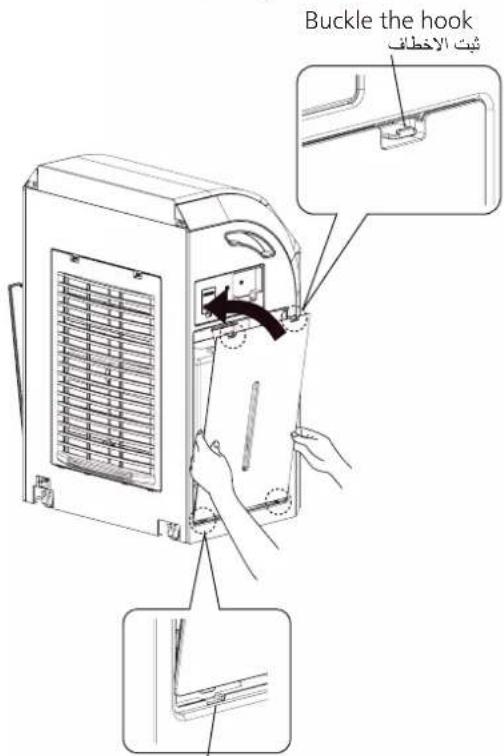
Connect the power plug.
(Wipe the water off the power plug and your hands before connect the power plug.)
■ Press Power Off/On button, then the air pollution indicator blinks for about 5 seconds.
■ Be sure to use the tap water.
(Because chlorination has been performed generally for tap water and hence the miscellaneous bacterium is difficult to breed.)
■ Do not use the following water.
- Water above 40 °C, or water mixed with detergents. (Otherwise, the tank deformation may be caused.)
• Water mixed with chemicals, air fresheners, alcohol, essential oil.
• Water from a water purifier, alkaline ion water, mineral water and well water (where the mildew and miscellaneous bacterium multiply fast).
→ When you feel uncomfortable, please consult a doctor at once.
If you have to use the well water (drinkable), please maintain and clean the tray, humidifying filter assembly and anti-fungus assembly more frequently.
A tank of water can operate for about 10 hours. (Under the condition of room temperature 20^ and humidity 30% when the product operates in high speed.)
Turn on or off the product.
Press the button to operate.
The product operates in auto air volume mode for first time usage, then it will operate based on the last used mode when it is resumed.
■ Press the button again, the product stops operating.
Select appropriate air volume to purify or humidify air.
The indicator will be changed sequentially as below each time the button is pressed.
(Automatically adjust the air volume according to the air pollution and humidity detected by sensor, and purify air or humidify by optimal air volume.)
(Operate quietly in a low speed, and purify air or humidify slowly.)
(Purify air or humidify in a medium speed.)
If not in "Cool & Humid" mode (P.14), the product cannot humidify air.
Cool and humidify air.
Press the button to cool and humidify air, when you feel hot or dry.
(Make sure there is water in tanks.)
■ Press the button again to cancel. (Indicator lights off)
The target humidity can be set as follow. (The factory setting is "50%".)
① Stop operating the product, then press Timer and Cool & Humid at the same time for about 3 seconds. The indicator will light on in sequence as illustrated below.
② Please release the buttons, when the sensitivity is set as required.
flowchart
graph TD
    A["50%"] --> B["60%"]
    B --> C["40%"]
    D["Target 50% to humidify\n%50"] --> E["Target 60% to humidify\n%60"]
    E --> F["Target 40% to humidify\n%40"]
Notice ملاحظة
Due to influence of the surroundings (such as the humidity, temperature, room size), the set humidity may not be reached completely.
■The setting target humidity will be effective only when the air volume setting is "Auto".
Change the air blow direction.
The indicator will be changed sequentially as below each time the button is pressed.
The air blow direction is changing. (The louver is swinging.)
The air blow at one direction. (The louver stops swinging.)
Cancel (The louver will be full open.)
To prevent child from pressing.
Long press the button for 3 seconds, then the child lock is set.
With this setting, other buttons cannot operate as you press them, it will generate
"BI-BI-" sound.
■ Long press the button for 3 seconds again to cancel. (Indicator lights off)
(Indicator lights on)
The indicator will be changed sequentially as below each time the button is pressed.
The product will stop operating after 2 hours.
The product will stop operating after 4 hours.
The product will stop operating after 8 hours.
The product will stop operating after 12 hours.
① The tape must be removed before using.
(Otherwise, the battery cannot be powered on.)
② The remote control works by pointing to the remote receiver in an acceptable range. The acceptable range is (as right figure): within 5.5 m from the product and within the angle of 60^ .
③ The usage of buttons is the same as buttons on product (P.13\~15), but cannot operate with double-button.
④ Put the remote control in remote control box after use.
natural_image
Line drawing of a portable air conditioner unit with ventilation grilles and control panel (no text or symbols)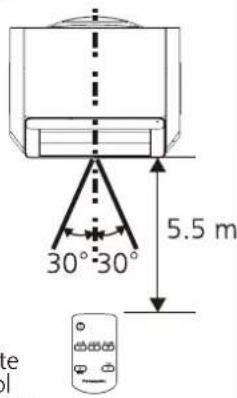
■ Method of changing battery (Panasonic CR2025 is recommended.)
① Use your nail to push to right and hold at ① position, at the same time pull battery holder out at ② position.
The battery may become hot or crack if it is misused, and result in injury or malfunction.
Make sure to follow the precautions below.
② Install battery with ⊕ facing up into battery holder.
Keep the battery out of reach of children and infants.
③ Push into remote control at the middle of battery holder, then you will hear a "tick" sound.
Do not put battery into fire or heat, break, modify it.
Please comply with local laws and regulations when dispose the battery.
Make sure to disconnect the power plug before cleaning the product.
(Otherwise, the product might operate with the possibility of electric shock or injury.)
■ When cleaning, do not leave the removed parts unattended.
(Otherwise, it may cause tripping or damage.)
■ Do not operate the product when the HEPA composite filter is removed.
(Dust will be inhaled into product inner parts, and causes the product breakdown. The HEPA composite filter cannot function while it is removed.)
■ Do not operate the product when the humidifying filter is removed.
(The humidifying filter cannot function while it is removed.)
■ Do not operate the product when the anti-fungus assembly is removed.
(The anti-fungus assembly cannot function while it is removed.)
Discharge water after removing the tray, and do not discharge water from the product directly.
(Otherwise, fire or electric shock may be caused due to short circuit.)
■ When using chemically treated cloth, be sure to follow the instructions carefully.
1 Clean tanks and tank covers.
The method of remove tank cover and tank please see P.12.
قم بتنظيف közرات واغطية közرات.
If there is hard stains, please wipe it off with a soft cloth moistened with warm water or water containing neutral detergent for kitchen purpose.
Tank cover < about once a month >
Wipe off any dust and dirt using a well wrung-out cloth.
Do not wipe it with a hard cloth or hardly.
Otherwise, the surface may be damaged.
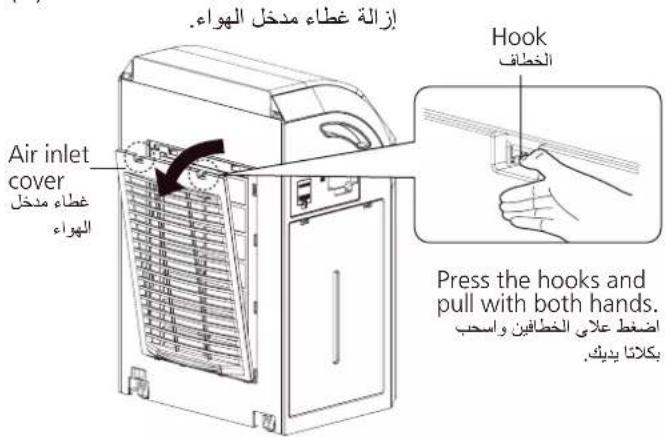
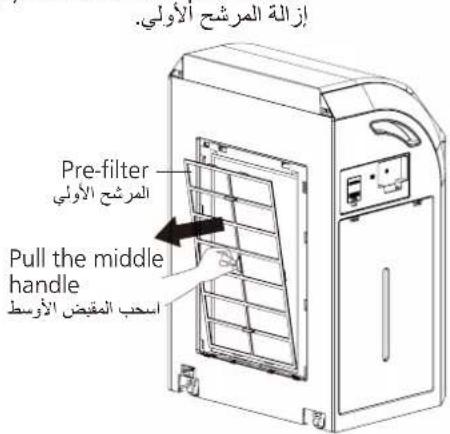
Clean air inlet cover, body, pre-filter, HEPA composite filter and dirt sensor.
(1)Remove the air inlet cover.
(2)Remove the pre-filter.
(3)Remove the HEPA composite filter.
Wipe off any dust and dirt using a well wrung-out cloth.
■ Do not wipe it with a hard cloth or hardly. Otherwise, the surface may be damaged.
■ Wipe the power plug with a dry cloth.
Wipe the dirt off with a soft cloth moistened with warm water or water containing neutral detergent for kitchen purpose.
HEPA composite filter
Clean the black side (front side) with a vacuum cleaner, etc.
natural_image
3D diagram of a mechanical assembly with labeled components (no readable text or symbols)Dirt sensor < approx. once every 3 months >
Wipe the dirt off the lens with a dry cotton swab.
② Wipe the lens with a dry cotton swab as shown in right.
■ Wipe the lens periodically.
(The sensor may not function normally with accumulation of moisture and smoke from cigarette.)
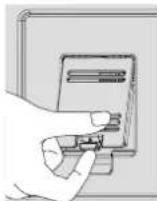
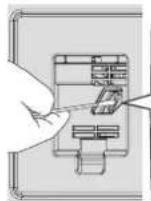
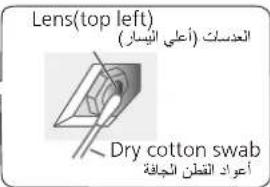
■ Do not insert a cotton swab in other parts other than the lens.
■ Be sure to disconnect the power plug before cleaning.
■ You can use a light to see the lens clearly.
2 Clean filter frame, mist cover, humidifying filter cap and humidifying filter.
(1) Remove the filter frame. (2) Remove the mist assembly.
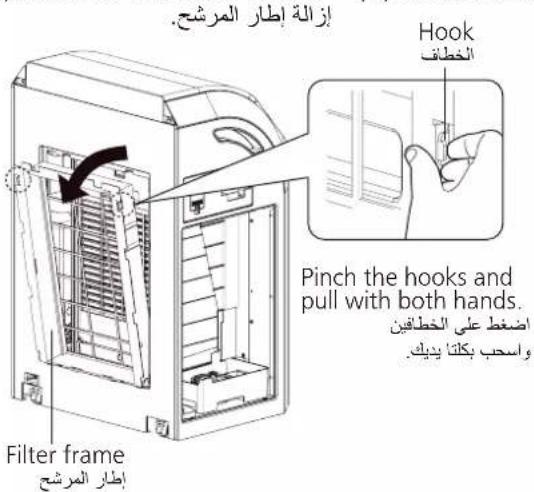
(3)Remove the humidifying filter cap and humidifying filter.
Filter frame\Mist cover\Humidifying filter cap
Wipe the dirt off with a soft cloth moistened with warm water or water containing neutral detergent for kitchen purpose.
Press and wash it with clean warm water (below 40 CC).
- If there is hard stains, please immerse the heavily stained filter in warm water containing neutral detergent for kitchen purpose or in the solution of citric acid for 30 minutes and scrub it, then wash for 2\~3 times with clean water.
※1 As the dirtiness varies with the water quality, maintenance may be required even within one month after the last maintenance if there is unpleasant odor or the water in the tank is reduced in slow speed.
(1)Remove the mist grill.
إزالة شبكة الرذاذ.
Move up and pull the handle ارفع المقبض واسحبه
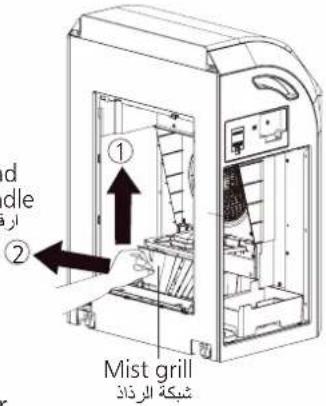
(2)Turn over the mist holder.
اقلاب حامل الرداد.
Wipe the dirt off with a soft cloth moistened with warm water or water containing neutral detergent for kitchen purpose.
Wipe it gently with clean soft cloth.
■ If you want to clean the inside of disk, please contact the dealer for cleaning.
natural_image
Isometric technical diagram of a mechanical assembly with two mounting holes and internal components (no text or labels)Anti-fungus assembly
Immerse it in kitchen-purpose neutral detergent solution and clean it.
■ Please soak it in warm water containing neutral detergent for kitchen purpose 30 minutes, then wash it 2\~3 times with clean water.
■ Do not disassemble it and scrub it with a brush.
■The anti-fungus assembly may have powder sometimes. It has no effect for use.
■The anti-fungus agent will become small along with use. It has no effect for anti-fungus.
■The anti-fungus agent has its own special smell, but harmless to humans.
■ Function of the anti-fungus assembly
Inhibit the mold bacteria with the anti-fungus agent.
Testing authority: Boken Quality Evaluation Institute
Testing method: Install the anti-fungus assembly in the tray, and verify the method to prevent mold bacteria (Halo method)
Testing result: Verify the effectiveness of preventing mold bacteria. (Test No.09006504-1)
※1 As the dirtiness varies with the water quality, maintenance may be required even within one month after the last maintenance if there is unpleasant odor or the water in the tank is reduced in slow speed.
(1) Keep the anti-fungus level and fit it into tray. (2) Install the tray.
(3)Push the motor support to the right for unfixing, then put down and buckled the hooks.
(5) Install humidifying filter.
(There is no distinction between sides.)
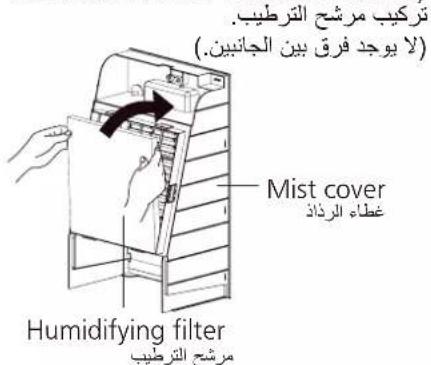
Do not make the humidifying filter protrude from mist cover or rumple it.
(Otherwise, the humidifying amount may be reduced.)
(4)Insert and press down the mist grill.
(6) Install humidifying filter cap with the handle outside.
(7) Install the mist assembly.
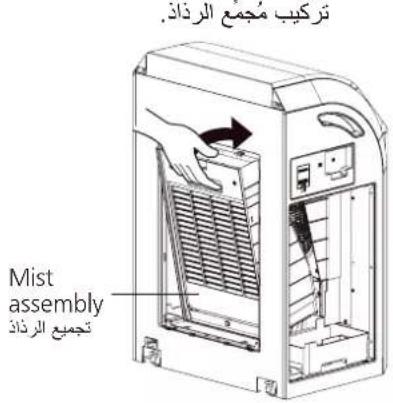
(8) Install the filter frame.
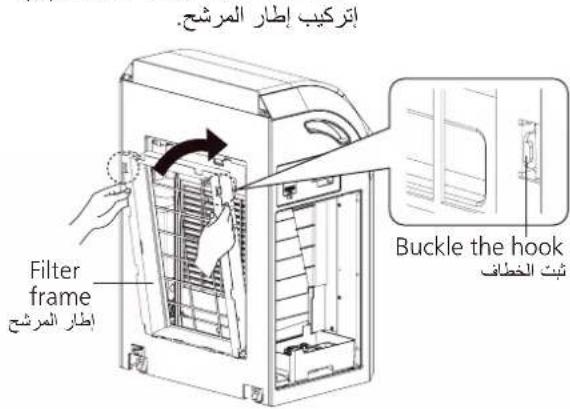
(9) Install the HEPA composite filter, with the black side outside.
(10) Install the Pre-filter, with the handle outside.
(11) Install the air inlet cover.
(12) Install tanks and tank covers back. (Method please see P.12)
Be sure to install the air inlet cover before use.
(Optional accessories: back cover)
※1 Filter replacement period may be shorten, depending on the environment (such as where smoking is frequent). Please replace it when ineffective.
※2 The service life of the humidifying filter may vary with the water quality. In any one of the following cases, please replace it immediately.
• After maintaining it, its odor is still not removed.
- The water in tank is not reduced.
- It is seriously damaged.
يوجد تلاف جسيم.
① After replacement (except the humidifying filter), press 🔒 and Timer at the same time for about 3 seconds until the filter exchange indicator turns off then the reset is complete.
② Fill in the date installed on the label and stick on the old label of product (P.11).
Notice ملاحظة
■ The filter which needs to exchange cannot be used again even is cleaned, please dispose it as non-flammable garbage.
■ Do not discard the humidifying filter cap when replacing the humidifying filter.
If the product is used in a room with strong odor such as aromatic smell, cigarette smoke or barbecue smell, these odors may adhere to the filter and blow out when the product is operating. When there is above situation, please clean the HEPA composite filter and deodorizing filter. If the situation persists, please replace the above filters. In addition, if often used in a room with strong odor, please open the windows to ventilate the room regularly.
- Cover the product with a poly bag, and keep it in a dry place.
(If you overturn it or keep it flat, malfunction may be caused.)
The HEPA composite filter with the Bio-sterilization and Super Allergy-buster can inhibit allergens (pollen, dead mites and feces), bacteria and mold.
■ Super Allergy-buster: inhibits the activity of allergens (pollen, dead mites and feces).
Testing authority: Osaka Municipal Technical Research Institute
Test method: check the decrease of refined house dust mite allergen, by using enzyme immune measuring method.
Inhibiting method: contact with Super Allergy-buster
Target: allergens trapped by the filter (mites, pollen)
Test result: inhibited 99% and above. (Daikou research report No. 2127)
■ The HEPA composite filter can give off unique and harmless smell of "Green Tea Catechin", "Bio-sterilization" and "Super Allergy-buster".
The sensor can detect the pollution of the air, and show the pollution level by indicator.
The product can adjust the air volume according to the air pollution automatically and purify air by optimal air volume when the setting of air volume is "Auto" operation.
The sensor's operation may vary depending on the indoor airflow condition if a heater is placed near the product in a room.
■ The sensitivity of the sensor can be adjusted. (The factory setting is "medium sensitivity".)
① Stop operating the product, then press Spot Air and Cool & Humid at the same time for about 3 seconds. The indicator will light on in sequence as illustrated below.
② Please release the buttons, when the sensitivity is set as required.
Medium sensitivity High sensitivity Low sensitivity
Please confirm the following before you put questions forward or send the product for repair.
Why is the wind cold during humidifying?
When operating in "Cool & Humid", the product will blow out the wind below the room temperature since the moisture from the humidifying filter containing water absorbs the heat in the air.
Why is there no steam during humidifying?
This product is just to make the humidifying filter containing water generate moisture when encountering wind but not boil the water, and hence not generate the steam.
The filter may change in color depending on the water quality. This is not a performance problem.
Why is there dewing on the window
Even if the humidity in the room is moderate, there may be dewing on a cold window or wall.
Why does the humidity indication remain unchanged?
■ The indicator 70 is always on.
The product may not sense the humidity properly depending on the setting place.
→Change the setting place. (P.8)
■ The indicator 30 or less is always on.
The room size is too large for the product?
→Refer to the applicable room size. (P.31)
- Please use the humidify sign only as a reference.
- It is different from the display of the household hygrometer sometimes.
The humidity value will vary with the temperature.
Why is the humidifying amount reduced?
In the rainy season with high humidity or in the cold weather, the humidifying amount may change, depending on the room temperature and humidity, just as the washed clothes are difficult to dry. The humidifying amount will increase when the weather is warm and dry.
Why do the air pollution indicator not change?
A
Such problems are easy to occur when the sensitivity of the sensor is high or low. You can adjust the sensor sensitivity. (P.25)
If a problem is encountered, investigate it by going through the following items.
If the problem still persists, please disconnect the power plug and contact the dealer for repair.
If any of the following cases occur, please contact the dealer immediately for repair.
1 Insert the lug boss with a hole to hole with a shaft.
2 Slightly bend the middle of louver, and insert the other side into the other hole.
3 Insert the other louver in the same way.
There is no distinction between the 2 louvers.
natural_image
3D rendering of a rectangular panel with a mesh pattern on the left side (no text or symbols)- All the air volume indicator are blinking or the cool and humidify indicator is blinking
Product may be out of order. Please disconnect the power plug and contact the dealer for repair.