F-PXV35A - Air purifier PANASONIC - Free user manual and instructions
Find the device manual for free F-PXV35A PANASONIC in PDF.


| Product Type | Air Purifier |
| Brand | Panasonic |
| Model | F-PXV35A |
| Dimensions (H x W x D) | Approx. 55 x 40 x 20 cm |
| Weight | Approx. 6.0 kg |
| Power Supply | AC 220-240V, 50/60Hz |
| Power Consumption | Max 30 W |
| CADR (Clean Air Delivery Rate) | Approx. 200 m³/h |
| Coverage Area | Up to 30 m² |
| Fan Speeds | 3 speeds (Low, Medium, High) |
| Filter Type | HEPA H13 + Activated Carbon |
| Pre-filter | Washable mesh pre-filter |
| Ionizer | nanoe™ X (optional) |
| Noise Level | 20 - 44 dB(A) |
| Timer | 1, 2, 4, 8 hours |
| Air Quality Indicator | LED ring (blue/green/red) |
| Auto Mode | Yes, with sensor |
| Sleep Mode | Yes, ultra-quiet |
| Child Lock | Yes |
| Filter Replacement Indicator | Yes, estimated 2 years |
| Maintenance | Vacuum pre-filter every 2 weeks; replace HEPA/charcoal every 2 years |
| Safety Features | Overheat protection, auto shut-off when front panel opened |
| Spare Parts | Filter set available (F-ZXMP35A) |
Frequently Asked Questions - F-PXV35A PANASONIC
User questions about F-PXV35A PANASONIC
0 question about this device. Answer the ones you know or ask your own.
Ask a new question about this device
Download the instructions for your Air purifier in PDF format for free! Find your manual F-PXV35A - PANASONIC and take your electronic device back in hand. On this page are published all the documents necessary for the use of your device. F-PXV35A by PANASONIC.
USER MANUAL F-PXV35A PANASONIC
natural_image
Illustration of a white electronic device with a logo on the front panel (no text or symbols visible)OPERATING INSTRUCTIONS
HUỐNG DÃN SỬ DỤNG
Air Purifier
Máy lọc Không khí
Model No.
Model số
F-PXV35A
This product is for indoor use only
PRODUCT FEATURES 7\~8
MAIN PARTS IDENTIFICATION 9
SETUP 10\~11
OPERATION 12\~13
- POWER OFF/ON·AIR VOLUME 12
• TURBO TIMER • SLEEP 13
MAINTENANCE 14\~16
- CLEANING METHOD 15
• FILTER REPLACEMENT 16
- WHEN IDLE FOR A LONG TIME 16
FURTHER INFORMATION 17\~18
FAQ 18
TROUBLESHOOTING 19
SPECIFICATIONS……BACK COVER
OPTIONAL ACCESSORIES ...... BACK COVER
NỘI DUNG
CÁC BIỆN PHÁP AN TOÀN 2\~5
CÁC YÊU CẦU CÀI ĐẶT VÀ VẬN HÀNH … 6
TÍNH NĂNG SĂN PHĂM……7\~8
NHĂN DẠNG CÁC BỘ PHĂN CHÍNH …… 9
CÀI ĐẶT TRƯỚC KHI VẬN HÀNH…… 10\~11
VĂN HÀNH 12\~13
• TẮT/BẮT NGUỒN LU'RE LƯỢNG KHÔNG KHÍ ……12
• HÊN GIỒ' NHANH·CHẾ ĐỘ NGÙ ……13
BẢO TRÌ 14\~16
• PHƯƠNG PHÁP VỆ SINH MÁY …… 15
• THAY BỘ LỌC 16
• KHI MÁY KHÔNG VẬN HÀNH TRONG…… 16 THỜI GIAN DÀI
Warranty card attached
Thank you very much for purchasing this Panasonic product.
Please read these operating instructions carefully before operation and maintenance.
Also, be sure to read the "SAFETY PRECAUTIONS" section (P.2\~5) before use.
Failure to comply with instructions could result in injury or property damage.
Make sure that the correct information is written on the warranty card, including the date of purchase and the name of the dealer. Keep the warranty card in a safe place along with the operating instructions for future reference.
The following symbols differentiate the levels of danger or injury that may result if the product is not used correctly as instructed.
Those things shown in this column indicate that there is possibility of causing death or severe injury.
Those things shown in this column indicate that there is possibility of causing minor injury or damage to properties.
■ The following symbols are used to indicate the type of instructions that need to be followed.
(The symbols given below are examples)
This symbol indicates an action that must not be performed.
This symbol indicates an action that must be performed.
■Do not touch the power plug with wet hands.
(Otherwise, electric shock may occur.)
■Do not let the product get wet.
- Do not place cups, etc. on the product.
(Otherwise, the product may short circuit with the possibility of fire or electric shock.)
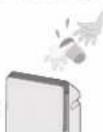
■ Do not insert your fingers, metallic objects or others into the air inlet, air outlet or gaps.
(Otherwise, you may be hurt by the inner units with the possibility of electric shock or injury.)
■ Do not pull the power cord when carrying or storing the product.
(Otherwise, the power cord may be damaged with the possibility of fire or electric shock.)
■ Do not damage the power cord or power plug.
- Do not cut, modify, excessive distort, twist, squeeze the power cord, and do not place it near heat sources, place heavy weight on it, etc.
(Otherwise, the power cord may be damaged with the possibility of fire or electric shock.)
■ Do not use power other than the rated voltage.
(Otherwise, the power cord may be overheated and induce fire.)
■ Do not disassemble or modify the product.
(Otherwise, the product may catch fire or malfunction, thus resulting in fire or electric shock.)
In case of any abnormality or malfunction, stop using the product immediately and disconnect the power plug.
(Otherwise, electric shock, fire or smoke may occur.)
- The product stops operating when moving the power cord.
- If the circuit breaker is tripped or when fuse blows.
- If the power cord or power plug becomes abnormally hot.
- If there is any other abnormalities or malfunctions.
→ Please stop using the product immediately and disconnect the power plug, and contact the dealer to check and repair.
■ Clean the power plug regularly.
(If dust is found on the power plug, insulation may be damaged by humidity and fire may occur.)
- Disconnect the power plug and wipe it with dry cloth.
- When the product will not be used for a long period, disconnect the power plug.
■ Insert the power plug completely.
(If the power plug is not fully inserted, the power cord may be overheated, thus resulting in fire or electric shock.)
- Do not use damaged power plug or loose power socket.
■ Do not clean the product with gasoline or other volatile mixture solvents, and avoid contacting with spray insecticides.
(Otherwise, the product may crack or short circuit with the possibility of injury, fire or electric shock.)
■Do not sit on or lean against this product.
(Otherwise, the product may fall over and injury may occur.)
- Families with children should pay more attention.
■ Do not operate this product in places where indoor fumigation type insecticides are being used.
(Chemical residue may build up inside the product and discharge from the air outlet, and cause damage to health.)
→ Ventilate the room with fresh air thoroughly after using insecticides before operating the product.
■ Do not place the product near combustible materials such as lighted cigarette, incense, etc.
(Otherwise, these may be absorbed into the product with possibility of fire.)
■When disconnecting the power plug, hold the power plug instead of the power cord.
(Otherwise, the power cord may damage with the possibility of fire or electric shock.)
- Keep the room well-ventilated when using the product together with a burner.
- This product cannot remove carbon monoxide.
■When carrying the product, please hold the left and right handles, but not the front panel.
(Otherwise, the product may fall off, injury may occur.)
■Do not place the product in the following places.
- Where the temperature or humidity is too high, or watery area such as bathroom.
(Otherwise, the product may crack and injury may occur.)
- Where oil or inflammable gas is present and may be leaked.
(Otherwise, a fire may occur due to ignition in the product.)
- Where the air outlet faces animals or plants directly.
(Otherwise, it may cause discomfort to animals and dry out plant.)
Area that can enhance the effectiveness!
■ Way to against PM2.5 and indoor dust, etc.
We recommend you to place the product on flat floor in the room.
natural_image
Interior layout diagram of a modern living room with sofa, TV, and wall-mounted devices (no text or symbols)■ Way to circulate air more effectively.
Place the product with its left, right and top about 30 cm or more away from walls, furniture or curtains, etc. Otherwise, the pollutants are difficult to be cleared.
To ensure effectiveness of this product, keep its back at least 1 cm away from the wall.
■ If the product is used in the same place for a long period.
Using the product continuously at the same location may result in dirty surrounding walls or floor. You are recommend to move the product away from where it is placed when maintenance it.
■ Do not use the same power socket with TV, radio, etc.
→ In this case, insert the power plug into another power socket.
■ Do not set the product in the following places.
- Where the product will be exposed directly to sunlight, outlet air of air conditioner or heat, etc.
(Otherwise, deformation, degeneration, discolor or malfunction may be occurred.)
• Near equipment such as TV and radio.
→ Keep the product 1 m or above away from such devices.
■ Do not place any object on the product.
(Otherwise, the product may malfunction.)
■ Do not place obstacles on the product air inlet and outlet.
(Otherwise it may affect product performance.)
"House Dust Catcher" and "nanoe™ X" give you clean and fresh air.
■ House Dust Catcher completely cleaning dust from the air near the floor
■ Equipped with nanoe™ X technology
■ Compact and stylish design
- The so-called nanoe™ X are charged water purification particles generated by applying high voltage to separate water molecules.
- nanoe™ X features: high moisture content, small particles, high stability, etc.
- High moisture content (the moisture content is 1,000 times the moisture content of ordinary anions).
- Small particles (about 5 nm - 20 nm (nanometers) in size, able to penetrate deep into the fiber and stratum corneum).
- High stability (6 times more stable than a common ion, covering a distance of 10 m or above).
- More hydroxyl radicals (up to 4,800 billion of radicals are generated per second).
- Weak acidity (with weak acidity features close to that of hair and skin).
All of the above features have been tested by SGS-CSTC Standards Technical Services Co., Ltd.
Note: nanoe™ and the nanoe™ mark are trademarks of Panasonic Holdings Corporation.
nanoe™ X are particulate ions containing hydroxyl radicals whose amount is 10 times that of nanoe™.
The indicator lights on indicates nanoe™ X is being generated. nanoe™ X will be generated in all operation modes except you switch off it. (P.17)
1 Fill in the label with the first date of use.
natural_image
Diagram of a device with a rectangular opening and ventilation grille (no text or symbols)■ HEPA composite filter replacement (About once every 3 years)
Replacement filter Part No. F-ZXMP35Z
Date installed:
■ Deodorizing filter replacement
- Replace a new one when the deodorizing function becomes less effective. (About once every 3 years)
Replacement filter Part No. F-ZXFD35X
Date installed:
Notice Luru y
Be sure to read P.2\~5 before startup.
2 Remove the deodorizing filter from poly bag.
Pull it forward with both hands Dùng hai tay kéo ra phía trước
③ Remove the deodorizing filter from the poly bag. Lấy bộ lọc khởi túi bóng.
Notice Luru y
① Install deodorizing filter.
(There is no distinction between inside and outside, upper and lower)
Lắp bộ lọc khử mùi.
natural_image
Illustration of hands inserting a card into a device (no text or symbols visible)② Install HEPA composite filter.
(There is distinction between inside and outside, no distinction between upper and lower)
natural_image
Illustration of a hand holding a device with an arrow pointing upward (no text or symbols)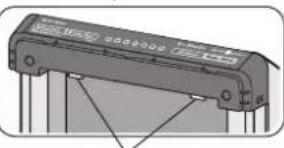
natural_image
Illustration of an electronic component with pins and connectors (no text or symbols visible)With the black side (front side) outside, and align it with the projections of the product.
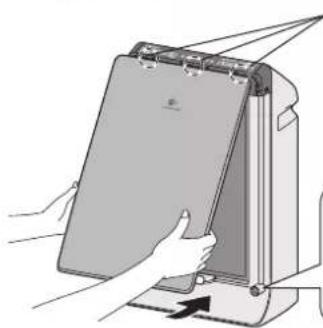
③ Install front panel.
Lắp tâm càn trước.
natural_image
Illustration of hands inserting a card into a device (no text or symbols visible)Fit the clutch into the indentation (3 places) of the product.
natural_image
Pure technical diagram of a mechanical component with no visible text, numbers, or symbolsPush in the protrusion into holes (2 places) of product and press properly.
Be sure to install the front panel before use.
natural_image
Hand inserting a plug into an electrical socket (no text or symbols visible)Turn on or off the product.
Bật/Tất nguồn.
Press the button to operate. (Air volume indicator lights on)
- Press the button again, the product stops operating.
To operate product within 2 minutes after the power plug is inserted, the indicator of air volume under "Auto" will blink about 2 minutes, what it indicates the odor sensor is in the standby mode.
Select appropriate air volume for purifying air.
The indicator will be changed sequentially as figure below.
(Indicator lights on)
Press this button to begin turbo operation.
If power failure occurs when product is operating, the product will restart automatically when power on again, and operate in the mode when power failure.
Make sure to disconnect the power plug before cleaning the product.
※ Filter replacement period may be shorten, depending on the environment (such as where smoking is frequent).
About nanoe™ X Thông tin về nanoe™ X
■ nanoe™ X can be switched off.
During operation, press ■ Turbo Timer and ■ Sleep (8 h) buttons at the same time for about 3 seconds to switch off. (nanoe™ X indicator lights off)
Please press the buttons for about 3 seconds again to restart the nanoe™ X.
■ Conditions for nanoe™ X generation
nanoe™ X is generated using the air in the room. Therefore, depending on the temperature and humidity, nanoe™ X may not be generated stably.
• Room temperature: about 5 °C\~35 °C (dew-point temperature: 2 °C and above)
- Relative humidity: about 30%\~85%
■ When nanoe™ X is generated, small amount of ozone will be released. However, the quantity will be far less than the level in natural environment such as forest, and not be harmful to human beings.
The HEPA composite filter which with the Bio-sterilization and Super Allergy-buster can inhibit allergens (pollen, dead mites and feces), bacteria and mold.
■ Super Allergy-buster: inhibits the activity of allergens (pollen, dead mites and feces).
Testing authority: Osaka Municipal Technical Research Institute
Test method: check the decrease of refined house dust mite allergen, by using enzyme immune measuring method.
Inhibiting method: contact with Super Allergy-buster
Target: allergens trapped by the filter (mites, pollen)
Test result: inhibited 99 % and above. (Daikou research report No. 2127)
■ The HEPA composite filter may give off unique and harmless smell of "Green Tea Catechin", "Bio-sterilization" and "Super Allergy-buster".
The sensor can detect the pollution of the air, and show the pollution level by indicator. The product can optimize the air volume automatically in auto operation according to the air quality.
① Stop operating the product, then press ■ Turbo Timer and Air Volume buttons at the same time for about 3 seconds. The air volume indicator will light on sequentially.
② Please release the buttons, when the sensitivity is set as required.
Why is there a "jee" sound from the air outlet?
There is a slight sound when nanoe™ X is being generated. Depends on the environment and operation mode, the sound may be a bit loud or inaudible but it is not abnormal.
Why does the clean sign remain red even when the operation continues?
The indicator may illuminate red when the product is subject to steam or vapor emitting from sprayers.
Why does the clean sign remain blue even when the air is dirty?
Is the product placed in area where the dirty air is difficult to be cleared or the room size is too large for the product? (P.6, back cover)
How to turn off the clean sign?
■ Please press Sleep (8 h) and Air Volume buttons at the same time for about 3 seconds during operation to turn off.
If a problem is encountered, please investigate it by going through the following items.
If the problem still persists, please disconnect the power plug and contact the dealer for repair.
If any of the following cases occur, please contact the dealer immediately for repair.
● Replacement HEPA composite filter
● Replacement deodorizing filter
- All the air volume indicators are blinking.
Product may be out of order.
Please disconnect the power and contact the dealer for repair.
© Panasonic Corporation 2022
Issue date:12/2022