HL1 - Smartwatch BEMI - Free user manual and instructions
Find the device manual for free HL1 BEMI in PDF.


| Type de produit | Smartwatch |
| Brand | BEMI |
| Model | HL1 |
| Dimensions | 45 x 38 x 10 mm |
| Weight | 50 g |
| Display | 1.3 inch AMOLED touchscreen |
| Connectivity | Bluetooth 5.0, GPS |
| Sensors | Heart rate, accelerometer, gyroscope |
| Battery | 300 mAh lithium-ion |
| Battery Life | Up to 7 days typical use |
| Charging | Magnetic charging cable |
| Water Resistance | IP68 (up to 1.5m for 30 min) |
| Compatibility | iOS 10+ and Android 5.0+ |
| Main Functions | Heart rate monitoring, step counting, sleep tracking, notifications, GPS tracking |
| Additional Features | Music control, camera remote, find phone, weather |
| Maintenance | Clean with soft dry cloth; avoid soap and chemicals |
| Safety | Do not expose to extreme temperatures or strong magnetic fields |
| Replaceable Parts | Wrist straps are replaceable; battery not user-replaceable |
| General Information | User manual available in multiple languages; free PDF download |
Frequently Asked Questions - HL1 BEMI
User questions about HL1 BEMI
0 question about this device. Answer the ones you know or ask your own.
Ask a new question about this device
Download the instructions for your Smartwatch in PDF format for free! Find your manual HL1 - BEMI and take your electronic device back in hand. On this page are published all the documents necessary for the use of your device. HL1 by BEMI.
USER MANUAL HL1 BEMI
Highlander – smartwatch
INSTRUKCJA OBSŁUGI PL
natural_image
Two black smartwatches with a red arrow pointing to one, showing a change in size (no text or symbols visible)Podstawowa obsługa
Adres: C602, 6th Floor, Building C, Hangcheng Road, Huafeng International Robot Industrial Zone, Xi'xiang, Bao'an, Shenzhen, Chiny 518126
Highlander – smartwatch
USER MANUAL EN
Extended user guide available on www.bemi-electronics.com
Product description
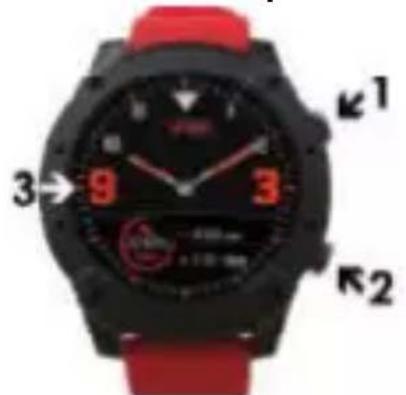
- Shortcut key for Sport mode/ back
2.Power button
3.Touch screen
4.Speaker - Charging terminals
6.Microphone - Heart rate sensor
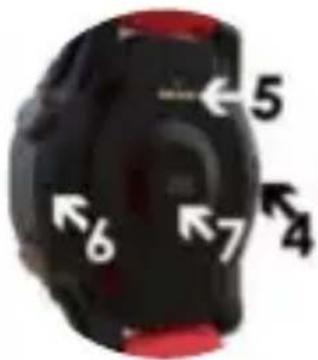
Smart watch mode: HL1, in manual called "device".
It is mandatory to read this manual and the warranty card before start to using the device.
Maintaining Equipment
Clean the device regularly, especially part that close to the skin, to keep it dry. Adjust the tightness of the device belt to ensure air circulation. On wrist, where wearing device should not use excessive skin care products. If you have skin allergy or discomfort, please stop wearing device. Do not wear the device during a hot bath or shower. Do not expose the device to cleaning agents, caustic agents or other chemicals. Do not expose the device to high (over + 50 °C), low (below -10 °C) temperatures or heat due to, for example, sunlight or other heat source. It may damage the device. For accuracy, the device should be worn on the forearm about 1 centimeter from the wrist. The product is not suitable for children and infants.
Note: IP68 means that this device is resistant to a single immersion in standing water to a depth of 1.1 meters for up to 1 hour. Exposing the device to tougher conditions can damage it. This device is not intended for water sports, diving and swimming.
How to charge battery
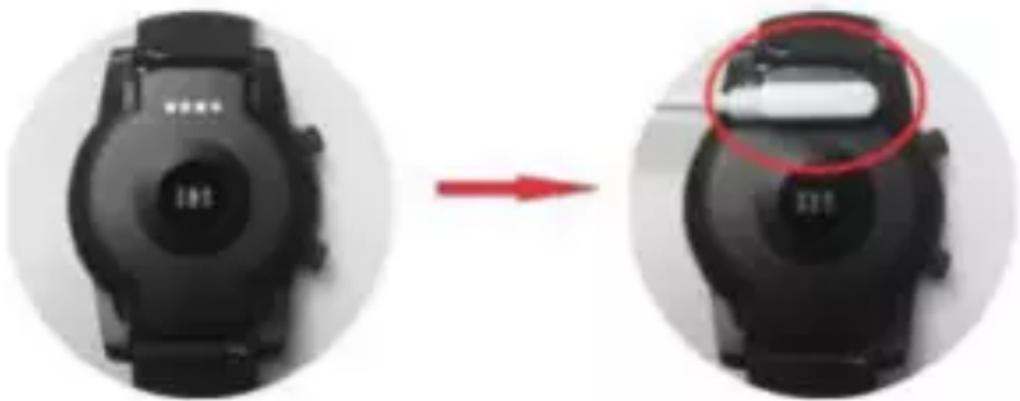
Before start using the smart watch, please make sure the battery is charged. For charging, please use the provided magnet charging cable. The recommended power adaptor current is 5V, 1A. It takes about 3 hours to fully charge the device. Please follow the steps below to charge.
- Place the connector of the charging cable under the device so that its pins contact the metal points in the device charging terminal.
- Magnetic connector will place itself in right position.
- Connect the charging cable to the power source using the USB connector.
- Charging animation will display on the device screen
Note: if the device was completely discharged then animation of charging may appear after a few minutes.
natural_image
Two black smartwatches with a red arrow pointing to one, showing a change in the interior (no text or symbols visible)Basic operation
- Turn on: long press the power button for 3 seconds or connect to the charger. To turn off: press the power button for 3 seconds.
- Access sport modes: swipe from to left on the watch face, or press the top key.
- Navigate functions in the main menu: swipe up/down on the screen.
- Confirm selection: tap the icon on the screen.
5.Exit/back: swipe from left to right on the screen. -
Return to the watch face: short press the power button on any screen.
-
Sport mode shortcut: press the upper button
-
Check notifications: swipe to right on the watch face. Note: Notification settings are available in APP. Regardless of the settings in the APP, if the notification does not appear as a notification in the phone, it will not be sent to the device. Check the phone's notification settings.
9.Switch submenu/shortcut: swipe up/down on the screen.
- GPS: For correct and quick location fixing it is necessary for the device to be in open space during GPS connection. The first GPS location fixing can last around one minute, the next ones will be much quicker.
Pair the watch with smartphone
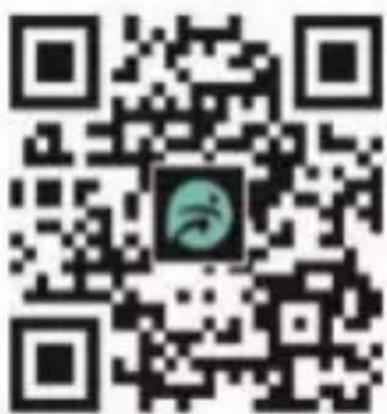
Mobile phones requirement: Android 4.4 and above; iOS8.0 and above. Search and download "FunDo" app from App store, or Google Play Store on your smart phone. Or scan the following QR code to install the app. Make sure your smart phone is set to be "Detectable to all nearby Bluetooth devices". While pairing, the phone should be connected to the Internet.
- Pairing for calling function
1.1. On the Bluetooth settings of your smart phone, activate Bluetooth and turn on
the option of "Detectable to all nearby Bluetooth devices
1.2. Enable Bluetooth device searching.
1.3. Select "Bemi HL1" from the list of devices for connection
1.4. If the connection is successful, “Connected” appears next to Bemi HL1 device name. On the Bluetooth settings of the smart watch, the checking mark for Bluetooth connectivity appears next
to the name of your phone. The Bluetooth icon on the watch screen changes to blue.

1.5. After the successful initial pairing, the watch will automatically connect with phone, and the watch will automatically synchronize date and time with phone. You can also connect the smart watch with your phone via the menu option of the watch.
2. Pairing through the "FunDo" (in manual called "APP") app to synchronize data and notifications etc.
2.1. Pair the watch with your smartphone as described in step 1.
2.2.Open the APP on your smart phone, and tap "More" in the bottom right corner.
2.3. Tap "Add device" on the top.
2.4.Select and tap Bemi HL1 to connect.
2.5. If the connection is successful, “Connected” appears next to Bemi HL1, and the app will synchronize data from the smart watch. The Bluetooth icon on the watch screen shows both blue and green. Your phone is now connected.

If device cannot connect with application or smartphone, please restart your smartphone and then try again. Problem with Bluetooth connection may appear in some circumstances, the most common: phone and device are too far from each other(more than 10 meters), there are some walls between them, there are some magnetic or radio interference in environment, user close the APP working in background, user click on the one-button cleaning of the phone, there is too many devices on smartphone Bluetooth list.
Warning: Although the smart device can monitor the real-time dynamic heart rate, it cannot be used for any medical purpose.
Warning: Lithium battery inside.
Basic Parameters: Screen type: 1,3 inches Amoled ; battery capacity: 560 mAh; storage: 32MB+256MB; protection level: IP68
Made in China
natural_image
Symbol of a trash bin with crossed lines and a solid black rectangle below (no text or labels)Proper disposal of this product. The device cannot be disposed of together with household waste. To prevent potential threats to the environment and human health due to improper disposal of waste, it is mandatory to take used electronic equipment to a designated collection point, or to the place where the product was purchased for the purpose of recycling electronic waste.
CE
This device, smart watch model HL1, is in compliance with Directive 2014/53/EU of the European Parliament and of the Council. The complete declaration of conformity is available online at the following link www.bemi-electronics.com/certificates
This manual is not covered by the warranty, and the appearance and/or functionality of the software installed on the device may be different from the one described. The Guarantor reserves the right to modify the instruction manual at any time without prior notice.
Maximum power consumption - 0,672W; Standard power consumption - 0,15W; Power consumption in standby mode - 0,005W; Operating Frequency Range of device - 2,4 GHz

Highlander – 智能手表
用户手册 CN
natural_image
Two black smartwatches with a white display showing a white object, one being processed and the other before (no text or symbols visible)使用环境
第一步:蓝牙配对