
REX - Smartwatch BEMI - Free user manual and instructions
Find the device manual for free REX BEMI in PDF.


| Product type | Smart watch |
| Model | REX |
| Brand | BEMI |
| Display | 0.96-inch TFT color screen |
| Battery capacity | 100 mAh lithium-ion |
| Charging time | Approximately 2 hours |
| Storage | 16 MB |
| Water resistance | IP68 (1.1m for 1 hour) |
| Connectivity | Bluetooth 4.0+ |
| Operating frequency | 2.4 GHz |
| Compatibility | Android 5.1+ / iOS 8.0+ |
| Required app | Fundo Pro (formerly FunDo) |
| Sensors | Heart rate, blood pressure, blood oxygen |
| Sports modes | Walking, running, cycling, swimming, mountain climbing, football, basketball, table tennis, badminton |
| Health monitoring | Heart rate, blood pressure, blood oxygen, sleep |
| Other features | Step counter, calorie tracker, distance, message notifications, find phone, weather |
| Charging | Magnetic charging cable, 5V 1A adapter |
| Operating temperature | -10°C to +50°C |
| Disposal | Do not dispose with household waste; recycle at designated collection points |
| Certification | CE, Directive 2014/53/EU |
| Power consumption (max) | 0.150 W |
| Power consumption (standby) | 0.672 mW |
| Cleaning | Wipe with soft cloth; avoid chemicals; dry after contact with water |
Frequently Asked Questions - REX BEMI
User questions about REX BEMI
0 question about this device. Answer the ones you know or ask your own.
Ask a new question about this device
Download the instructions for your Smartwatch in PDF format for free! Find your manual REX - BEMI and take your electronic device back in hand. On this page are published all the documents necessary for the use of your device. REX by BEMI.
USER MANUAL REX BEMI
www.bemi-electronics.com/certificates
Adres: 602, 6/F, Block C, Huafeng International Robotics Industry Park, Huacheng Community Road, Xi'xiang, Bao'an, Shenzhen, Chiny 518126
Extended user guide available on www.bemi-electronics.com
Product description

Smart band mode: REX, in manual called "device"
The device is controlled by a touch button, hereafter called TB. To turn on the device, press the TB for 5 seconds or connect to the charger. To wake up the device press TB. To go to the next screen press TB. To enter the submenu of a given screen press and hold for TB 3 seconds.
Maintaining Equipment
Clean the device regularly, especially part that close to the skin, to keep it dry. Adjust the tightness of the device belt to ensure air circulation. On wrist, where wearing device should not use excessive skin care products. If you have skin allergy or discomfort, please stop wearing device. Do not wear the device during a hot bath or shower. Do not expose the device to cleaning agents, caustic agents or other chemicals. Do not expose the device to high (over + 50 °C), low (below -10 °C) temperatures or heat due to, for example, sunlight or other heat
source. It may damage the device. The product is not suitable for children and infants. Note: IP68 means that this device is resistant to a single immersion in standing water to a depth of 1.1 meters for up to 1 hour. Exposing the device to tougher conditions can damage it. This device is not intended for water sports, diving and swimming.
Charging
Before start using the device, please make sure the battery is charged. For charging, please use the provided charging cable. The recommended power adaptor current is 5V, 1A. It takes about 2 hours to fully charge device, please follow the steps
below to the charge.
- Place the connector of the charging cable under the device so that its pins contact the metal points in the device charging terminal.
- Magnetic connector will place it self in right position.
- Connect the charging cable to the power source using the USB connector.
- Charging animation will display on the device screen. Note: if the device was completely discharged then animation of charging may appear after a few minutes.
Installing APP for Phone and pair with Device
Note: mobile phone must support Android 5.1 or IOs 8.0 or above and Bluetooth 4.0 or above. Scan QT code with mobile phone to download and install APP or search, download and install “Fundo Pro” APP from App store or Google Play Store on your smart phone. While pairing, the phone should be connected to the Internet. Make sure that the smartphone is set to "Visible to


all nearby Bluetooth devices" when pairing. Pairing the device with the phone via APP:
- Activate Bluetooth on your phone
2.Open the application and click "More", and then in "MY DEVICE" click "+ Add device" - Click on the name of your device in the device list. If the connection is successful, “Connected” appears next to device name, and the app will synchronize data from the smart watch.
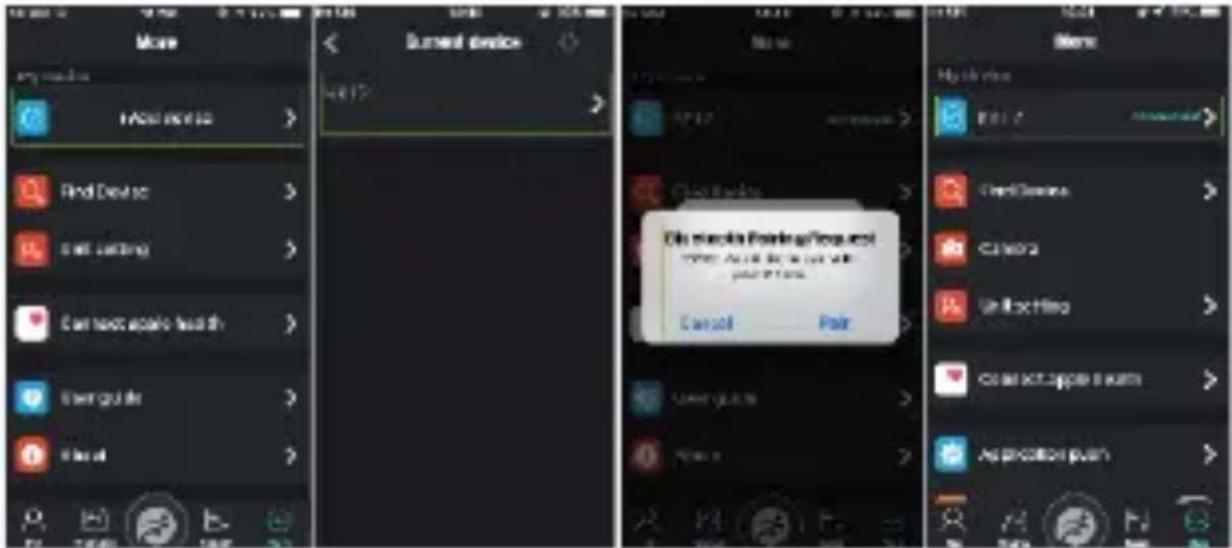
Bluetooth connection between phone and device may disconnect in some circumstances, the most common of them are: phone and device are too far from each other(more than 10 meters), there are some walls between them, there are some magnetic or radio interference in environment, user close the APP working in background, user click on the one-button cleaning of the phone. Bluetooth should reconnected automatically when the reasons for its disconnection disappear.
Introduction on the Function of Device
The main screen menu interface is switched, such as the interface shown below.

When the device and APP are first time connected and paired, the time, date, number of exercise steps and calorie will be synchronized with of the mobile phone.
Introduction to Main Interface Function
For accuracy, the device should be worn on the forearm about 1 centimeter from the wrist. During test, please keep your body inactive and sit still, otherwise the time of test will be longer or data will be inaccurate. If there is a big difference in the measured data, please take a break and test again. Factors affecting the lowering of the accuracy of measurement include: tattoos, scars, moisture, thickness, strong pigment and hair of the skin in the place of measurement. Keep the heart rate sensor clean and close to the skin. If you wear it too loosely, the sensor's light will be exposed, resulting in inaccurate measurement values. Do not look directly at the sensor light. Longtime measurement may lead to overheating of the device. In case of overheating, please remove device until it cools down.
Unnatural cooling or warming up of the body may result in an incorrect measurement result. Warning: The data of Heart rate, blood pressure and blood oxygen measurement are for reference only and cannot be used as a basis for medical related aspects.
1.Main screen
Displayed first. It contains data such as: current time, date, weather, Bluetooth connection. Weather data will not be available until the app is connected. If the device and application are disconnected for a long time, the weather forecast will show the weather of the day of the last update or will not show any data.
2.3.4. Steps, calories and distance
Steps, calories and distance will count automatically after start of

using the device. The data is displayed every specific number of steps, their amount depends on distance already walked and device software version (between 3-25 steps). These data are approximate due to individual differences between users. In order for the steps to be recorded, the hands should move in a natural manner when walking, for example walking with a stroller may not be read as a step.
5.Health
Hold the touch button to access the available functions. After entering the function, it will start automatically. The history of measurement results can be displayed in APP
5.1 Heart rate
It measures heart rate in real time.
5.2.Blood pressure
The test result will be one result of the Blood Pressure measurement.
5.3.Oxygen in the blood
The test result will be one result of measuring the oxygen level in the blood.
6.Sleep
Sleep monitoring period: from 21:00 p.m. to 09:00p.m. the next day, after device generated the data of sleep monitoring, click on the upper left corner of APP sleep interface to synchronize the sleep data from the device to the APP.
7.Sport
Go in to the Sport submenu. By moving between the screens and choose the sport mode you need. Sport modes available: walking, running, cycling, swimming, mountain climbing, football, basketball, table tennis, badminton. When the distance is more than 200 meters or the activity time is more than 5 minutes, the data can be
8.Message
The message interface allows to view on device messages came on phone as SMS, incoming calls and chat software.
Device can store up to 8 messages, and when the number of message reaches 8, the previously displayed oldest message will be replaced by new one.
Bluetooth connection phone-device required for this function
9.More
9.1. Find phone When the device is connected to APP, clicks on Find phone, and the phone will pop up with a ring tone.
9.2.About - Information about Model name (Bluetooth name), MAC number(Bluetooth number) and version of firmware.
9.3.QR code - Code with link to download FunDo APP for phone.
9.4. Reset - Restart device with cleaning of settings and data from it memory. Restore to the factory state.
9.5.Shut down - Turns off the device.
Warning: Although the smart device can monitor the real-time dynamic heart rate, it cannot be used for any medical purpose.
Basic Parameters: Screen type: 0,96 inches TFT; battery capacity: 100 mAh; storage: 16MB; protection level: IP68

Proper disposal of this product. The device cannot be disposed of together with household waste. To prevent potential threats to the environment and human health due to improper disposal of waste, it is mandatory to take used electronic equipment to a designated collection point, or to the place where the product was purchased for the purpose of recycling electronic waste. Warning: Lithium battery inside.
CE
This device, smartband model REX, is in compliance with Directive 2014/53/EU of the European Parliament and of the Council. The complete declaration of conformity is available
online at the following link www.bemi-electronics.com/certificates
This manual is not covered by the warranty, and the appearance and/or functionality of the software installed on the device may be different from the one described. The Guarantor reserves the right to modify the instruction manual at any time without prior notice.
Maximum power consumption - 0.150W; Standard power consumption - 0.126W; Power consumption in standby mode - 0.672mW; Operating Frequency Range of device - 2,4 GHz
Made in China
用户手册

下载手机应用程序,并与设备配对
配对时,手机应连接到互联网。
5. 健康
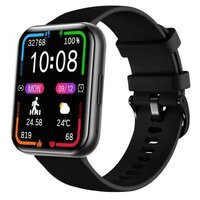
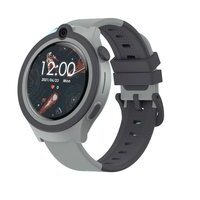

- PRODUCT DESCRIPTION
- MAINTAINING EQUIPMENT
- CHARGING
- INSTALLING APP FOR PHONE AND PAIR WITH DEVICE
- INTRODUCTION ON THE FUNCTION OF DEVICE
- INTRODUCTION TO MAIN INTERFACE FUNCTION
- 1.MAIN SCREEN
- STEPS, CALORIES AND DISTANCE
- 5.HEALTH
- 5.1 HEART RATE
- 5.2.BLOOD PRESSURE
- 5.3.OXYGEN IN THE BLOOD
- 6.SLEEP
- 7.SPORT
- 8.MESSAGE
- 9.MORE
- 用户手册
- 健康
Brand : BEMI
Model : REX
Category : Smartwatch