Flying Calf - Uncategorized M-AUDIO - Free user manual and instructions
Find the device manual for free Flying Calf M-AUDIO in PDF.


User questions about Flying Calf M-AUDIO
0 question about this device. Answer the ones you know or ask your own.
Ask a new question about this device
Download the instructions for your Uncategorized in PDF format for free! Find your manual Flying Calf - M-AUDIO and take your electronic device back in hand. On this page are published all the documents necessary for the use of your device. Flying Calf by M-AUDIO.
USER MANUAL Flying Calf M-AUDIO
FCC Class B and CE Compliance 2
Overview 3
Features....4
Panels - Fig. 1....4
Panel Description.... 5
Front Panel 5
Rear Panel 5
Installation and Typical Setup 6
Typical Setup - Fig. 2 ...... 7
Operation 8
Internal Jumper Settings - Fig. 3 9
Troubleshooting 10
Specifications 11
Lifetime Limited Warranty.... 12
FCC Class B and CE Compliance
WARNING: This equipment has been tested and found to comply with the limits for a CLASS B digital device, pursuant to Part 15 of the FCC Rules. These limits are designed to provide reasonable protection against harmful interference in a residential installation. This equipment generates, uses and can radiate radio frequency energy and, if not installed and used in accordance with the instructions contained in this manual, may cause harmful interference to radio and television communications. However, there is no guarantee that interference will not occur in a particular installation.
If this equipment does cause harmful interference to radio or television reception, which can be determined by turning the equipment off and on, the user is encouraged to try to correct the interference by one or more of the following measures: 1) reorient or relocate the receiving antenna; 2) increase the separation between the equipment and the receiver; 3) connect the equipment into an outlet on a circuit different from that of the receiver; 4) consult the dealer or an experienced audio television technician.
NOTE: Connecting this device to peripheral devices that do not comply with CLASS B requirements or using an unshielded peripheral data cable could also result in harmful interference to radio or television reception.
The user is cautioned that any changes or modifications not expressly approved by the party responsible for compliance could void the user's authority to operate this equipment.
To ensure that the use of this product does not contribute to interference, it is necessary to use shielded I/O cables.
This product also complies with European CE requirements.
Overview
Thank you for choosing the Flying Calf Professional External Digital Audio Converter Box. This unit provides high-quality Digital-to-Analog (D/A) conversion and supports the popular S/PDIF digital audio format.
The Flying Calf is a perfect companion for computer digital I/O cards (such as the Midiman DiO), DAT machines, or any other digital audio device that requires high-quality D/A conversion.
This manual assumes you have a basic understanding of D/A conversion and digital audio. If after reading this manual you need additional tech support or if you have comments or suggestions, we invite you to contact us directly by any one of the following methods:
MIDIMAN
45 E. Saint Joseph Street
Arcadia CA 91006-2861
Technical Assistance: (626) 445-8495
Fax: (626) 445-7564
Internet Tech Support: techsupt@midiman.net
Internet:
Home Page: http://www.midiman.net
Tech Support: techsupt@midiman.net
Sales Info: info@midiman.net
Refer to the back cover of this manual for addresses and telephone numbers of our overseas office.
Features
• High-quality stereo D/A converter.
- Compact desk-top size: 5.2" x 3.2" x 1.2".
- S/PDIF digital input on an RCA connector.
- Unbalanced analog outputs on independent left and right 1/4" jacks.
D/A Converter
- 20-bit, stereo D/A, delta-sigma with 128x oversampling.
• Dynamic range of 102 dB (A-weighted). - Sample rate automatically locks to digital audio signal received at S/PDIF input.
Front Panel
- "Data Valid" LED indicates valid incoming digital data.
Panels - Fig. 1
FLYING CALF D/A S/PDIF D/A CONVERTER BOX
DATA VALID POWER
1.2.3.
^▲ 9 vdc
ANALOG OUT RL
S/PDIF IN
5.4.
Panel Description
Front Panel
- Data Valid: This LED indicates valid incoming digital data at the S/PDIF Input. This LED lights whenever the Flying Calf has acquired and locked to that data.
- Power LED: The Power LED lights whenever the power is properly applied to the Flying Calf. For the Power LED to light the power adapter must be properly plugged in and the Power button must be depressed.
- Power switch: When this button is in (and the power adapter is properly plugged in), power is applied to the unit.
Rear Panel
- Power connector: For connection to the Calf's external "wall-wart" power supply. The Flying Calf uses a 9 Volt DC, 300 milliamp (or larger), center-pin positive supply.
- Analog Out (Right and Left): These are the analog audio outputs from the Flying Calf's D/A converter. These 1/4" jacks provide unbalanced line-level signals. Each jack provides a "tip/sleeve" type of connection.
- S/PDIF In: This female RCA jack accepts a standard S/PDIF digital audio input. The S/PDIF signal is "stereo," containing both left channel and right channel audio data. The S/PDIF data rate also determines the audio sample rate. The Flying Calf will lock to S/PDIF sample rates of 50 kHz and below.
Installation and Typical Setup
Your Flying Calf should contain this user manual, a "wall-wart" power adapter and the Flying Calf unit itself. Please save all packing materials in case you should ever need to ship the unit.
Plug one end of the provided power adapter into the Flying Calf's power jack, and the other end into a wall socket or power strip. Verify that the Flying Calf and any other devices you plan to connect to the Flying Calf are powered off. Now connect your S/PDIF and analog audio cables to the Flying Calf.
NOTE: For best results, use a good-quality S/PDIF cable. The cable should be coaxial with 75 ohm impedance. For example, a good quality video cable has these same characteristics.
After all connections are made, power up the Flying Calf by pressing the Power button on its front panel.
IMPORTANT: Before powering up the Flying Calf, turn off or turn down any amplifiers (or mixers) connected to the Flying Calf's audio outputs. Since it may take several milliseconds to acquire and lock onto an S/PDIF signal, the Flying Calf may emit a slight "pop" sound while powering up.
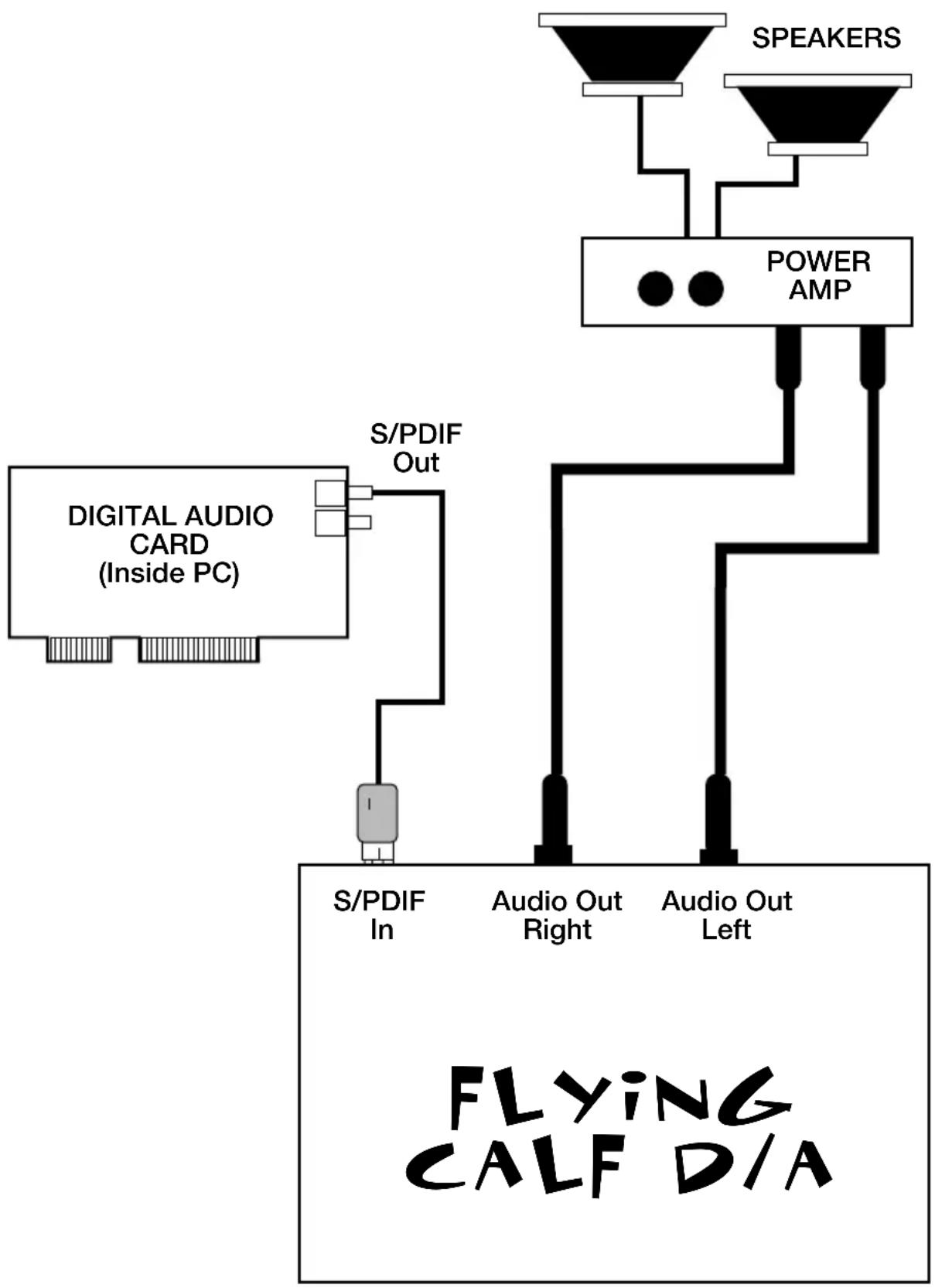
A typical configuration in which a Flying Calf would be used includes a “Calf”, a PC-based digital I/O card, a mixer and an amplifier/sound system. Such a configuration could be setup as follows: 1.) the S/PDIF Out of the digital audio card connects to the S/PDIF In of the Calf, 2.) the Analog Out of the Calf connects to the line-level audio inputs of the mixer or amplifier/sound system.
Typical Setup - Fig. 2
flowchart
graph TD
    A["Digital Audio Card (Inside PC)"] --> B["S/PDIF In"]
    A --> C["S/PDIF Out"]
    C --> D["Audio Out Right"]
    C --> E["Audio Out Left"]
    F["SPEAKERS"] --> G["POWER AMP"]
    G --> H["Flying CALF D/A"]
Operation
The Flying Calf is compatible with 20-bit, 18-bit and even 16-bit S/PDIF data. The more bits per data word, the better the dynamic range of the output signal and better dynamic range equates to better audio quality.
When a valid signal is present at the Flying Calf's S/PDIF In jack, the Calf automatically detects the S/PDIF sample rate and synchronizes to it. Once locked to the sample rate, the front panel "Data Valid" LED will light.
REMEMBER: The Flying Calf accepts any sample rate that is 50 kHz or less.
The Flying Calf then decodes the S/PDIF data to a format recognized by the Calf's D/A converter. The D/A converter then outputs stereo analog audio to the internal output amplifiers. The left channel output amplifier drives unbalanced audio to Left Analog Out jack, and the right channel output amplifier drives unbalanced audio to Right Analog Out jack.
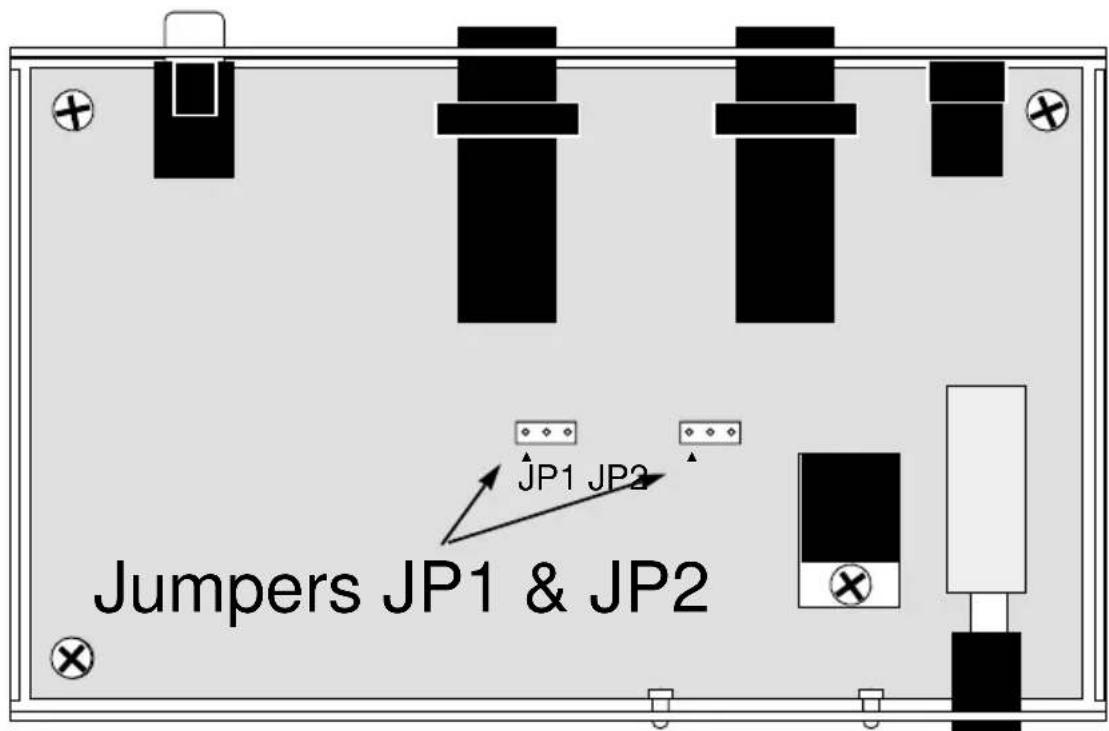
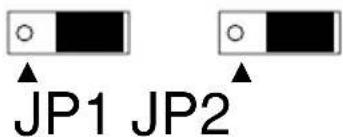
The analog outputs of the Flying Calf provide line-level audio signals typical of most consumer audio components. The output level is adjustable, however, and may be set for less gain (6 dB less) by moving two internal jumpers within the Flying Calf. To do this, 1.) remove power from the Flying Calf and disconnect all external cables, 2.) carefully remove the Flying Calf chassis cover by removing the 4 screws from the sides of the chassis, 3.) locate jumpers JP1 and JP2 on the Flying Calf's circuit board, 4.) position JP1 and JP2 as shown in the diagram below, 5.) replace the Flying Calf chassis cover and screws.
Internal Jumper Settings - Fig. 3
for 2 V rms (standard)
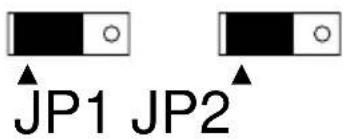
for 1 V rms (-6 dB option)
Troubleshooting
Symptom: When power is applied, there are no LED's lit on the Flying Calf's front panel.
Solution: Make sure the power supply is properly plugged into the unit and into a live wall source or power strip. Also, make sure the Calf's Power button is pushed in and latched.
Symptom: When first turning the unit on, small bursts of noise or a "pop" sound are sometimes heard.
Symptom: When the S/PDIF source sample rates change, small bursts of noise or a "pop" sound are sometimes heard.
Solution: This is normal as it takes a small amount of time for an S/PDIF receiver to lock onto a digital audio source. Be sure to turn down your mixer or amplifier before powering up the Flying Calf or changing sample rates.
Symptom: When applying a digital signal to the Flying Calf, the Calf's "Data Valid" LED light is erratic or doesn't light at all.
Solution: The S/PDIF digital signal may be invalid or the S/PDIF cable may be faulty.
Symptom: Valid digital data is coming into the S/PDIF input (the Data Valid LED is lit), but there is no audible D/A output.
Solution 1: Check your analog output connections from the Flying Calf.
Solution 2: The digital data source may be sending valid data, but the data could be static (non-changing or DC). Verify that digital source material is actually valid.
Solution 3: The digital data source may be sending valid data, but the data could represent an audio signal that is so quiet that you are unable to hear it. In this case, nothing is wrong.
Specifications
Physical Specifications:
Size: Approximately 5.2" x 3.2" x 1.2".
Power Supply: 9 volt DC, center-pin positive, 300 mil-
liamps or larger.
D/A Converter:
Full-Scale Output Level: 2 volts RMS, unbalanced, jumper-switchable to 1 volt RMS unbalanced.
Frequency Response: 20 Hz to 22 kHz, +/ -0.5 dB.
Dynamic Range: 102 dB (A-weighted).
Lifetime Limited Warranty
MIDIMAN warrants that this product is free of defects in materials and workmanship under normal use so long as the product is owned by the original purchaser and that purchaser has registered his/her ownership of the product by sending in the completed warranty card.
In the event that MIDIMAN receives written notice of defects in materials or workmanship from such an original purchaser, MIDIMAN will either replace the product, repair the product, or refund the purchase price at its option. In the event any repair is required, shipment to and from MIDIMAN and a nominal handling charge shall be born by the purchaser. In the event that repair is required, a Return Authorization number must be obtained from MIDIMAN. After this number is obtained, the unit should be shipped back to MIDIMAN in a protective package with a description of the problem and the Return Authorization clearly written on the package.
In the event that MIDIMAN determines that the product requires repair because of user misuse or regular wear, it will assess a fair repair or replacement fee. The customer will have the option to pay this fee and have the unit repaired and returned, or not pay this fee and have the unit returned unrepaired.
The remedy for breach of this limited warranty shall not include any other damages. MIDIMAN will not be liable for consequential, special, indirect, or similar damages or claims including loss of profit or any other commercial, damage, even if its agents have been advised of the possibility of such damages, and in no event will MIDIMAN's liability for any damages to the purchaser or any other person exceed the price paid for the product, regardless of any form of the claim. MIDIMAN specifically disclaims all other warranties, expressed or implied. Specifically, MIDIMAN makes no warranty that the product is fit for any particular purpose.
This warranty shall be construed, interpreted, and governed by the laws of the state of California. If any provision of this warranty is found void, invalid or unenforceable, it will not affect the validity of the balance of the warranty, which shall remain valid and enforceable according to its terms. In the event any remedy hereunder is determined to have failed of its essential purpose, all limitations of liability and exclusion of damages set forth herein shall remain in full force and effect.