
IE-20 XB - Earphones M-AUDIO - Free user manual and instructions
Find the device manual for free IE-20 XB M-AUDIO in PDF.


| Product Type | In-Ear Headphones |
| Driver Size | 10 mm dynamic |
| Frequency Response | 20 Hz - 20 kHz |
| Impedance | 16 Ω |
| Sensitivity | 105 dB/mW |
| Cable Length | 1.2 m |
| Connector | 3.5 mm gold-plated |
| Weight | Approx. 15 g (without cable) |
| Dimensions (earpiece) | Ø12 mm x 20 mm |
| Noise Isolation | Up to 26 dB |
| Compatibility | Smartphones, tablets, laptops, audio players with 3.5mm jack |
| Features | Enhanced bass response, ergonomic design, tangle-free cable |
| Care & Cleaning | Wipe with dry cloth; do not use liquids; clean ear tips regularly |
| Safety Warnings | Do not use at high volumes for extended periods; keep away from moisture |
| Spare Parts | Replacement ear tips (S, M, L) and cable available separately |
| Repairability | Not user-serviceable; contact authorized service center |
Frequently Asked Questions - IE-20 XB M-AUDIO
User questions about IE-20 XB M-AUDIO
0 question about this device. Answer the ones you know or ask your own.
Ask a new question about this device
Download the instructions for your Earphones in PDF format for free! Find your manual IE-20 XB - M-AUDIO and take your electronic device back in hand. On this page are published all the documents necessary for the use of your device. IE-20 XB by M-AUDIO.
USER MANUAL IE-20 XB M-AUDIO
natural_image
Close-up of a transparent medical device with earphones and connectors (no visible text or symbols)IE-30 | IE-20 XB | IE-10
Professional Reference Earphones
TABLE OF CONTENTS
⚠ Safe Listening Warnings .... 3
Listen Responsibly!....4
What's in the Box 5
Earphone Components 6
Fitting the Ear Tips 7
Attaching the Ear Tips 7
Care and Cleaning of Flanged Silicone Ear Tips 7
Care of Foam Ear Tips....7
Connecting to a Listening Device....7
Earphone Insertion – “Rock ‘N’ Roll” 8
Proper Reference Earphone Removal – Reverse "Rock 'N' Roll" . . . . . 9
Earphone Care and Maintenance 10
Using the Cleaning Tool 10
Suggestions for Using Ear Tips 10
Troubleshooting 11
Diminished Sound Over Time 11
No Sound 11
Product Specifications 11
Optional Accessories.... 12
Warranty 12
Warranty Terms 12
Warranty Registration 12
Certification for the European Union 13
Contact Us....14
Thank you for choosing M-Audio's IE professional reference earphones. Your IE earphones have been designed to provide you with the best in professional-quality personal monitoring and music enjoyment. Whether you use your IE earphones for onstage monitoring, with your digital audio workstation software or just to listen to your favorite tunes, you'll find that they deliver the ultimate in audio performance.
SAFE LISTENING WARNINGS
Please be sure to read all warnings and instructions before using your M-Audio IE earphones.
⚠️ To avoid damage to your hearing, we recommend that you do not exceed 50% of the maximum volume on your audio device and that you limit your use to one hour or less per day.
⚠ Always turn the volume down on your listening device before inserting your M-Audio IE earphones into your ears. Once your IE earphones are inserted, gradually increase the volume to a moderate listening level.
⚠️ Using earphones at high volumes (greater than 85dB) or for extended periods of time (more than one hour per day) can permanently damage your hearing. Ringing in your ears or other discomfort can indicate that the music volume is too high.
⚠ Hearing damage can be gradual and cumulative. In many cases there are no obvious warning signs. A hearing test and medical examination are the only way to accurately diagnose hearing damage. However, we strongly recommend you make an appointment with your ear doctor if you notice any of the following symptoms:
■ Ringing or buzzing in the ears
■ Difficulty in understanding speech
■ Muffling of sounds
Listen Responsibly!
Hearing health is critical to your enjoyment of music and to your quality of life. Protect your hearing by listening to your music in a responsible manner that protects your long-term hearing health.
Please review and consider the following Occupational Safety Health Administration ("OSHA") guidelines regarding the maximum time exposure to sound pressure levels before hearing damage may occur.
OSHA has established the following noise exposure limits:
| Sound Pressure Level dB(A) | Permissible Noise Exposure Duration (per day) |
| 90 8 hours | |
| 95 4 hours | |
| 100 2 hours | |
| 105 1 hour | |
| 110 30 minutes |
WARNING: Exposure to sound pressure levels above 115dB(A) for even short periods of time can cause permanent hearing damage.
The preceding OSHA exposure levels should be considered maximum limits. Compliance with the OSHA limits will not provide you with protection from potential hearing loss. Accordingly, we recommend never exceeding 50% of the permitted volume on your audio playing device and limiting your use of headphones to durations of one hour or less per day. Decibel levels of 85 dB(A) are dangerous to your hearing and may cause hearing loss.
For more information visit the OSHA website at www.osha.gov.
Additional Safety Tips for Proper Use
Do not use these earphones in any environment where a failure to hear surrounding sounds could be dangerous. In no way should these earphones be used while driving a car, biking, walking or operating machinery.
⚠ Do not submerge or expose the earphones to water (see the section on Earphone Care and Maintenance).
When using your earphones with an unfamiliar or unstable sound system (airplane, public access ports, etc.) make sure volume is low and is kept at a moderate level to prevent “break-in” bursts of loud sounds.
⚠️ Keep your M-Audio IE earphones away from young children. This product includes small parts and cables that may create a choking hazard.
⚠️ Remove earphones if they cause any ear discomfort or you have difficulty inserting the ear tips (see the section on Suggestions for Using Ear Tips). Remember, ears are sensitive and you should never force anything into the ear canal.
⚠️ Consult regularly with a physician or audiologist if you have problems hearing, excessive wax build-up, or any discomfort after use.
⚠️ Your M-Audio professional reference earphones are intended for your personal use. If you are sharing your earphones, remove your ear tips, and clean your earphones with antiseptic wipes before and after sharing.
WHAT'S IN THE BOX
User Guide
■ IE reference earphones (46-inch cord, cable adjuster and gold-plated 1/8-inch input plug)
Universal fit kit: 6 single-flange silicone ear tips (2 small; 2 large; 2 medium, attached to earphones), 2 double-flange silicone ear tips and 2 disposable foam tips
Cleaning tool
■ Soft carrying pouch
Airline attenuator/limiter (included with IE-20 XB and IE-30 only)
1/4-inch adapter (included with IE-20 XB and IE-30 only)
- Hard metallic storage case (included with IE-20 XB and IE-30 only)
EARPHONE COMPONENTS
Earphones ①
Ear tips ②
Ear conductor (visible only when ear tip is removed)
Ear loops ③
Cleaning tool ④
Airline attenuator/limiter ⑤
1/4" adapter ⑥
Cable adjuster – Y-Junction ⑦ (see page 9)

Hard metallic storage case, airline attenuator/limiter and 1/4" adapter not included with IE-10.
FITTING THE EAR TIPS
M-Audio has included a variety of ear tips to ensure a good seal for your ears. All ears are unique so you will need to determine which tips are most comfortable for you.
Most users find that the single-flange silicone ear tips provide a good fit for their ears and are the easiest to use. However, some customers prefer the foam tips for the best seal and more secure fit (see section on Suggestions for Using Ear Tips).
Your M-Audio earphones come with medium single-flange silicone ear tips already attached. Included with your earphones are the following additional ear tips:
① Single-flange silicone ear tips (2 small and 2 large)
② Double-flange silicone ear tips
③ Disposable foam ear tips

natural_image
Three grayscale 3D-rendered objects arranged in a grid, labeled 1, 2, and 3 (no text or symbols on objects)Attaching the Ear Tips
The ear tips can be attached or removed by using a gentle grasping and twisting motion. The ear tip should fit securely over the ear conductor and—once the ear tip is in place—the ear conductor should not be exposed.
Care and Cleaning of Flanged Silicone Ear Tips
The silicone ear tips are reusable and should be cleaned with an antiseptic wipe after each use. They should also be removed and cleaned regularly with mild soap and water. The ear tip should be completely dry before you place it on the ear conductor.
Care of Foam Ear Tips
The foam ear tips are designed for limited use and should be discarded when they appear discolored.
Connecting to a Listening Device
M-Audio earphones come with an 1/8-inch input plug that is compatible with most personal listening devices. In addition, our optional 1/4-inch adapter (included with the IE-20 XB and the IE-30 earphones) will allow you to connect to a variety of other consumer electronics equipment.
EARPHONE INSERTION
"Rock 'N' Roll"
It is important to get a good ear fit to maximize comfort and optimize the listening experience. A correct seal will help eliminate background noise and offer the best frequency response when listening to music.
Go to www.m-audio.com/earphones to view the Earphone Insertion Demonstration.
⚠ Be sure that the volume is turned down to a minimum on the device that you will be using. Next, plug your earphones into the output.
Step 1
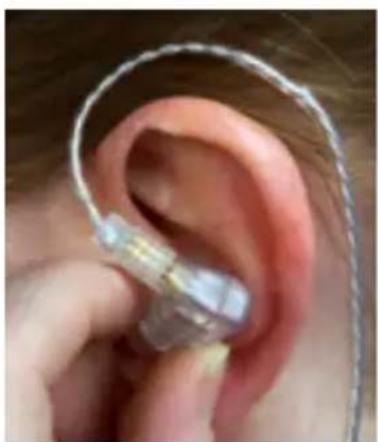
Identify the left earphone (marked with an "L") and the right earphone (marked with an "R"). Holding each earphone with the cord pointing straight up, gently glide the ear tip into the ear canal.
Step 2
Keeping your earphones in the same position, rock your hands slightly forward to slide the ear tip comfortably into the ear canal.

natural_image
Close-up of a person's ear with an earpiece inserted, no visible text or symbolsStep 1
natural_image
Close-up of a person's ear with a medical device attached, showing ear structure and finger placement (no text or symbols visible)Step 2
Step 3
Now, gently roll your earphones back to create the seal desired. (Note: if you are having difficulty please see the section on Suggestions for Using Ear Tips).
Step 4
Wrap the ear loops around the top of the ear to secure the earphones. The cables will hang behind the ears and either down your back, or in front of your chest. Use the adjustment slider located near the Y-junction to change the length of the cables.
Now you are ready to gradually increase the volume on your listening device and begin your M-Audio professional reference earphone experience.
Proper Reference Earphone Removal - Reverse "Rock 'N' Roll"
To remove, grasp the earphone and gradually rock forward to break the seal. Once the seal is broken, gently slide the earphone out of the canal. Be sure to clean the earphones before your next use and store them in your storage case.
Remember: never pull on the cables to remove your earphones.

natural_image
Close-up of a person's ear with a medical or electronic device attached, showing ear and teeth (no visible text or symbols)Step 3

natural_image
Close-up of a person's hand holding a thin white string tied with a string, wearing a black T-shirt with 'KAND' text (no other visible text or symbols)Step 4
EARPHONE CARE AND MAINTENENCE
- Keep earphones clean by using a moistened antiseptic wipe after each use.
- Avoid exposing your earphones to water, extreme temperatures, high humidity or prolonged exposure to ultraviolet light.
■ Use the cleaning tool regularly to keep the ear conductor clear and unobstructed.
■ Clean and change the ear tips regularly. - Avoid physical abuse of earphones. Dropping or striking them may damage the components.
- Do not pull on the cables to remove the earphones from your ear.
- Do not pull the cables to remove the input plug from a listening device.
Using the Cleaning Tool
■ Remove ear tip and wipe the exterior of the ear conductor with an antiseptic wipe.
■ Using the cleaning tool, angle into the ear conductor and use a gentle upward and outward sweeping motion to remove any build-up.
- Clean the ear conductor again with an antiseptic wipe and attach a new and clean ear tip.
SUGGESTIONS FOR USING EAR TIPS
If the ear tips on the earphones don't seal well or are uncomfortable, try some alternate ear tips until the best fit for your ear is achieved.
If you have difficulty inserting the ear tip into your ear canal, identify the left earphone (marked with an "L") and the right earphone (marked with an "R"). Inserting them one at a time, gently grasp the top ridge of your ear and extend the ear upward and outward to open up the ear canal while you rock the earphone forward and then roll it back into your ear canal.
Flanged silicone ear tips: For best results, moisten the external surface of the flanged silicone ear tip before you insert it into the ear canal. This will allow the ear tip to slide more easily into place and create a good seal.
- Disposable foam ear tips: Compress the foam at the end of the earphone by pressing it between your thumb and forefinger before inserting it into the ear canal. Hold the earphone in place for five seconds while the foam expands to create a tight seal in the ear canal.
TROUBLESHOOTING
■ Diminished Sound Over Time
If you experience lower performance over time, use the cleaning tool to make certain that the ear conductor is unobstructed.
No Sound
If you are not receiving any sound, make certain that the jack is properly attached to your listening device and that the volume has been gradually increased. If you are still not receiving sound, confirm that the connections between the cable and your earphones are secure.
If the suggestions listed above do not solve your problem, please contact one of our customer service representatives.
PRODUCT SPECIFICATIONS
| Specification IE-10 IE-20 XB IE-30 | |||
| Speaker Type Precision | balanced armature | Precision balanced armature and dynamic driver | Two precision balanced armatures |
| Input Sensitivity 115dB/mW 119dB/mW 119dB/mW | |||
| Impedance 13 ohms (@1kHz) | 11 ohms (@ 1kHz) 21 ohms (@ 1kHz) | ||
| Cable Length 46 inches 46 inches 46 inches | |||
| Complete Assembly Weight | .5 oz | .7 oz .6 oz | |
| Input Connector 1/8" (3.5mm) gold plated | 1/8" (3.5mm) gold plated | 1/8" (3.5mm) gold plated | |
| Noise Isolation 26dB | 16dB | 26dB | |
OPTIONAL ACCESSORIES
M-Audio offers a variety of accessories for your IE professional reference earphones. To purchase replacement cables, tips, adapters and more, visit the M-Audio web store at www.m-audio.com.
WARRANTY
Warranty Terms
M-Audio warrants products to be free from defects in materials and workmanship, under normal use and provided that the product is owned by the original, registered user. Visit www.m-audio.com/warranty for terms and limitations applying to your specific product.
Warranty Registration
Registering your product immediately entitles you to full warranty coverage and helps M-Audio develop and manufacture the finest quality products available. Register online at www.m-audio.com/register to receive FREE product updates and for the chance to win M-Audio giveaways.
CERTIFICATION FOR THE EUROPEAN UNION
This product conforms to European EMC Directive 89/336/EEC. Meets applicable tests and performance criteria in European Standard EN 55103 (1996) Parts 1 and 2, for residential (E1) and light industrial (E2) environments.
The exclamation mark symbol shown on the left is designed to draw the attention of the reader to the need to consult this Instruction Manual.
© 2006 Avid Technology, Inc. All rights reserved. Product features, specifications, system requirements and availability are subject to change without notice. Avid, M-Audio and IE are either trademarks or registered trademarks of Avid Technology, Inc. All other trademarks contained herein are the property of their respective owners.
WARNING: This product contains chemicals, including lead, known to the State of California to cause cancer, and birth defects or other reproductive harm. Wash hands after handling


N382
CONTACT Us
M-Audio USA 5795 Martin Rd., Irwindale, CA 91706
| Technical Support Sales | |
| web: . . . . . . . . . . . . . . . . . . . . . . . . . . . . . . . . . . . . . . . . . . . . . . . . . . . . . . . . . . . . . . . . . . . . . . . . . . . . . . . . . . . . . . . . . . . . . . . . . . . . e-mail: . . . . . . . . . . . . . . . . . . . . . . . . . . . . . . . . . . . . . . . . . . . . . . . . . . . . . . . . . . . . . . . . . . . . . . . . . . . . . . . . . . . . . . . . . . . . . . . . . . tel (pro products): . . . . . . . . . . . . . . . . . . . . . . . . . . . . . . . . . . . . . . . . . . . . . . . . . . . . . . . . . . . . . . . . . . . . . . . . . . . . . . . . . . . . . . . . . . . tel (consumer products): . . . . . . . . . . . . . . . . . . . . . . . . . . . . . . . . . . . . . . . . . . . . . . . . . . . . . . . . . . . . . . . . . . . . . . . . . . . . . . . . . . . . . . . . . . . . . . . . . . . Fax (shipping): . . . . . . . . . . . . . . . . . . . . . . . . . . . . . . . . . . . . . . . . . . . . . . . . . . . . . . . . . . . . . . . . . . . . . . . . . . . . . . . . . . . . . . . . . Web. . . . . . . . . . . . . . . . . . . . . . . . . . . . . . . . . . . . . . . . . . . . . . . . . . . . . . . . . . . . . . . . . . . . . . . . . . . . . . . . . . . . . . . . . . . . . . . . . . . . www.m-audio.com |
M-Audio U.K. Floor 6, Gresham House, 53 Clarenden Road, Watford, WD17 1LA, United Kingdom
| Technical Support Salese-mail: . . . . . . . . . . . . . . . . . . . . . . . . . . . . . . . . . . . . . . . . . . . . . . . . . . . . . . . . . . . . . . . . . . . . . . . . . . . . . . . . . . . . . . . . . . . . . . . . . . . . +44 (0)1765 650072tel:(Mac support): . . . . . . . . . . . . . . . . . . . . . . . . . . . . . . . . . . . . . . . . . . . . . . . . . . . . . . . . . . . . . . . . . . . . . . . . . . . . . . . . . . . . . . . . . . . . . . . . . . . Fax:(0)1923 204010tel:(PC support): . . . . . . . . . . . . . . . . . . . . . . . . . . . . . . . . . . . . . . . . . . . . . . . . . . . . . . . . . . . . . . . . . . . . . . . . . . . . . . . . . . . . . . . . . . . . . . . . . Web www.maudio.co.uk |
M-Audio France Floor 6, Gresham House, 53 Clarenden Road, Watford, WD17 1LA, United Kingdom
| Renseignements Commerciaux Assistance Technique | |
| tel: .0 810 001 105e-mail: .info@m-audio.fr | e-mail: .support@m-audio.fr. mac@m-audio.frfax: +33 (0)1 72 72 90 52Site Web www.m-audio.fr |
| Assistance Technique | |
| PC: .0 820 000 731Mac: .0 820 391 191 | |
M-Audio Germany Kuhallmand 34, D-74613 Ohringen, Germany
| Technical Support Salese-mail: . . . . . . . . . . . . . . . . . . . . . . . . . . . . . . . . . . . . . . . . . . . . . . . . . . . . . . . . . . . . . . . . . . . . . . . . . . . . . . . . . . . . . . . . . . . . . . . . . . . . e-mail: . . . . . . . . . . . . . . . . . . . . . . . . . . . . . . . . . . . . . . . . . . . . . . . . . . . . . . . . . . . . . . . . . . . . . . . . . . . . . . . . . . . . . . . . . . . . . . . . . tel: . . . . . . . . . . . . . . . . . . . . . . . . . . . . . . . . . . . . . . . . . . . . . . . . . . . . . . . . . . . . . . . . . . . . . . . . . . . . . . . . . . . . . . . . . . . . . . . . . .fax: . . . . . . . . . . . . . . . . . . . . . . . . . . . . . . . . . . . . . . . . . . . . . . . . . . . . . . . . . . . . . . . . . . . . . . . . . . . . . . . . . . . . . . . . . . . . . . . . . . +49 (0)7941 98 70070fax: . . . . . . . . . . . . . . . . . . . . . . . . . . . . . . . . . . . . . . . . . . . . . . . . . . . . . . . . . . . . . . . . . . . . . . . . . . . . . . . . . . . . . . . . . . . . . . . . . +46 (0)7941 98 70070Web. . . . . . . . . . . . . . . . . . . . . . . . . . . . . . . . . . . . . . . . . . . . . . . . . . . . . . . . . . . . . . . . . . . . . . . . . . . . . . . . . . . . . . . . . . . . . . . . . . . . + 49 (0)7941 98 70070Web. . . . . . . . . . . . . . . . . . . . . . . . . . . . . . . . . . . . . . . . . . . . . . . . . . . . . . . . . . . . . . . . . . . . . . . . . . . . . . . . . . +49 (0)7941 98 7007 |
M-Audio Canada 1400 St-Jean Baptiste Ave. #150, Quebec City, Quebec G2E 5B7, Canada
| Technical Support Salese-mail: . . . . . . . . . . . . . . . . . . . . . . . . . . . . . . . . . . . . . . . . . . . . . . . . . . . . . . . . . . . . . . . . . . . . . . . . . . . . . . . . . . . . . . . . . . . . . . . . . . . . e-mail: . . . . . . . . . . . . . . . . . . . . . . . . . . . . . . . . . . . . . . . . . . . . . . . . . . . . . . . . . . . . . . . . . . . . . . . . . . . . phone: . . . . . . . . . . . . . . . . . . . . . . . . . . . . . . . . . . . . . . . . . . . . . . . . . . . . . . . . . . . . . . . . . . . . . . . . . . . . . . . . . . . . . . . . . . . . . . . . . . fax: . . . . . . . . . . . . . . . . . . . . . . . . . . . . . . . . . . . . . . . . . . . . . . . . . . . . . . . . . . . . . . . . . . . . . . . . . . . . . . . . . . . . . . . . . . . . . . . . . . Web . . . . . . . . . . . . . . . . . . . . . . . . . . . . . . . . . . . . . . . . . . . . . . . . . . . . . . . . . . . . . . . . . . . . . . . . . . . . . . . . . . . . . . . . . . . . . . . . . . . |
M-Audio Japan

- TABLE OF CONTENTS
- SAFE LISTENING WARNINGS
- Listen Responsibly!
- Additional Safety Tips for Proper Use
- WHAT'S IN THE BOX
- EARPHONE COMPONENTS
- FITTING THE EAR TIPS
- Attaching the Ear Tips
- Care and Cleaning of Flanged Silicone Ear Tips
- Care of Foam Ear Tips
- Connecting to a Listening Device
- EARPHONE INSERTION
- "Rock 'N' Roll"
- Step 1
- Step 2
- Step 3
- Step 4
- Proper Reference Earphone Removal - Reverse "Rock 'N' Roll"
- EARPHONE CARE AND MAINTENENCE
- Using the Cleaning Tool
- SUGGESTIONS FOR USING EAR TIPS
- TROUBLESHOOTING
- ■ Diminished Sound Over Time
- No Sound
- OPTIONAL ACCESSORIES
- WARRANTY
- Warranty Terms
- Warranty Registration
- CERTIFICATION FOR THE EUROPEAN UNION
- CONTACT Us
- M-Audio Japan
Brand : M-AUDIO
Model : IE-20 XB
Category : Earphones