
MacBook (late 2009) - Laptop APPLE - Free user manual and instructions
Find the device manual for free MacBook (late 2009) APPLE in PDF.


| Product Type | Laptop |
| Brand | Apple |
| Model | MacBook (Late 2009) |
| Dimensions | 12.78 x 8.94 x 0.9 in (32.5 x 22.7 x 2.3 cm) |
| Weight | 4.7 lbs (2.13 kg) |
| Processor | Intel Core 2 Duo (2.26 GHz or 2.53 GHz) |
| Memory | 2 GB DDR3 (upgradeable to 8 GB) |
| Storage | 160 GB, 250 GB, or 320 GB HDD (5400 rpm) |
| Graphics | NVIDIA GeForce 9400M |
| Display | 13.3-inch glossy widescreen (1280x800) |
| Wireless | AirPort Extreme (802.11a/b/g/n), Bluetooth 2.1+EDR |
| Power Adapter | 60W MagSafe Power Adapter |
| Battery | Non-removable 60 Wh lithium polymer, up to 7 hours |
| Operating System | Mac OS X v10.6 Snow Leopard (included) |
| Main Features | Multi-Touch trackpad, iLife suite, Time Machine, MagSafe power |
| Maintenance | Clean with soft lint-free cloth; avoid liquids; do not open case |
| Safety Certifications | FCC Class B, CE, ENERGY STAR, ICES-003 |
| Spare Parts Availability | Battery, RAM modules, hard drive, trackpad, keyboard (third-party) |
| Repairability | User-replaceable RAM and hard drive; battery is not user-replaceable |
Frequently Asked Questions - MacBook (late 2009) APPLE
User questions about MacBook (late 2009) APPLE
0 question about this device. Answer the ones you know or ask your own.
Ask a new question about this device
Download the instructions for your Laptop in PDF format for free! Find your manual MacBook (late 2009) - APPLE and take your electronic device back in hand. On this page are published all the documents necessary for the use of your device. MacBook (late 2009) by APPLE.
USER MANUAL MacBook (late 2009) APPLE
www.apple.com/nl/macbook

www.apple.com/nl/macosx

Time Machine
www.apple.com/nl/ilife

iPhoto
www.apple.com/nl/macbook
Mac Help migratie-assistent
natural_image
Line drawing of a laptop with two connected devices: one with a plug and cable, the other with a power plug and cord (no text or symbols)MagSafe-lichtnetadapter van 60 W
Netsnoer
De MacBook installeren
www.apple.com/nl/macosx
Mac Help Mac OS X
natural_image
Illustration of a hand pressing a button with two blue arrows indicating left and right movement (no text or symbols)natural_image
Simple geometric shape with two blue squares on a white background (no text or symbols)natural_image
Line drawing of a hand pressing a button on a rectangular surface (no text or symbols)natural_image
Hand holding a square object with two blue arrows pointing to the left side (no text or symbols)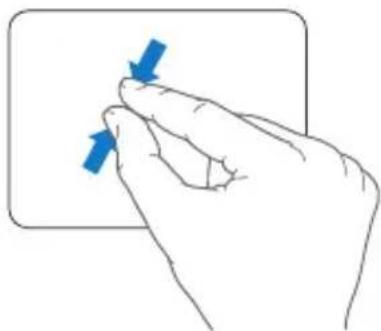
natural_image
Hand holding a rectangular object with two blue arrows pointing to it, no text or symbols presentnatural_image
Hand holding a curved object with blue arrows indicating rotation or movement (no text or symbols)natural_image
Illustration of a hand pressing a button on a surface with a blue curved arrow indicating rotation (no text or symbols)natural_image
Illustration of a hand pressing a button with a blue curved arrow indicating rotation (no text or symbols)
natural_image
Illustration of a hand holding a blue house icon with an upward arrow, next to a rounded rectangular frame (no text or symbols)www.apple.com/nl/store
Mac Help RAM
natural_image
Line drawing of a hand inserting a component into a tablet device (no text or symbols)natural_image
Technical line drawing of a tablet device showing internal components and a screwdriver inserted (no text or symbols)natural_image
Line drawing of a tablet device with an Apple logo on the screen and blue arrows indicating directional movement (no text or symbols)www.apple.com/nl/support
Mac Help help
www.apple.com/contact/phone_contacts.html
www.apple.com/nl/environment
Mac Help

ergonomie
natural_image
Illustration of hands typing on a keyboard with blue dashed lines indicating typing position (no text or symbols)
www.apple.com/nl/about/ergonomics
Apple en het milieu
www.apple.com/nl/environment
Regulatory Compliance Information
FCC Compliance Statement
This device complies with part 15 of the FCC rules. Operation is subject to the following two conditions: (1) This device may not cause harmful interference, and (2) this device must accept any interference received, including interference that may cause undesired operation. See instructions if interference to radio or television reception is suspected.
Radio and Television Interference
This computer equipment generates, uses, and can radiate radio-frequency energy. If it is not installed and used properly—that is, in strict accordance with Apple's instructions—it may cause interference with radio and television reception.
This equipment has been tested and found to comply with the limits for a Class B digital device in accordance with the specifications in Part 15 of FCC rules. These specifications are designed to provide reasonable protection against such interference in a residential installation. However, there is no guarantee that interference will not occur in a particular installation.
You can determine whether your computer system is causing interference by turning it off. If the interference stops, it was probably caused by the computer or one of the peripheral devices. If your computer system does cause interference to radio or television reception, try to correct the interference by using one or more of the following measures:
- Turn the television or radio antenna until the interference stops.
- Move the computer to one side or the other of the television or radio.
- Move the computer farther away from the television or radio.
- Plug the computer in to an outlet that is on a different circuit from the television or radio. (That is, make certain the computer and the television or radio are on circuits controlled by different circuit breakers or fuses.)
If necessary, consult an Apple Authorized Service Provider or Apple. See the service and support information that came with your Apple product. Or, consult an experienced radio/television technician for additional suggestions.
Important: Changes or modifications to this product not authorized by Apple Inc. could void the EMC compliance and negate your authority to operate the product.
This product has demonstrated EMC compliance under conditions that included the use of compliant peripheral devices and shielded cables (including Ethernet network cables) between system components. It is important that you use compliant peripheral devices and shielded cables between system components to reduce the possibility of causing interference to radios, television sets, and other electronic devices.
Responsible party (contact for FCC matters only):
Apple Inc. Corporate Compliance
1 Infinite Loop, MS 26-A
Cupertino, CA 95014
Wireless Radio Use
This device is restricted to indoor use when operating in the 5.15 to 5.25 GHz frequency band.
Exposure to Radio Frequency Energy
The radiated output power of the AirPort Extreme technology is below the FCC radio frequency exposure limits. Nevertheless, it is advised to use the wireless equipment in such a manner that the potential for human contact during normal operation is minimized.
FCC Bluetooth Wireless Compliance
The antenna used with this transmitter must not be collocated or operated in conjunction with any other antenna or transmitter subject to the conditions of the FCC Grant.
Bluetooth Industry Canada Statement
This Class B device meets all requirements of the Canadian interference-causing equipment regulations.
Industry Canada Statement
Complies with the Canadian ICES-003 Class B specifications. Cet appareil numérique de la classe B est conforme à la norme NMB-003 du Canada. This device complies with RSS 210 of Industry Canada.
Bluetooth (Europa): verklaring van overeenstemming EU
Korea Warning Statements
Singapore Wireless Certification
Complies with IDA Standards DB00063
Taiwan Wireless Statements
無線設備的警告聲明
Taiwan Class B Statement
Class B 設備的警告聲明
NIL
VCCI Class B Statement
情報処理装置等電波障害自主規制について
As an ENERGY STAR ^® partner, Apple has determined that standard configurations of this product meet the ENERGY STAR ^® guidelines for energy efficiency. The ENERGY STAR ^® program is a partnership with electronic equipment manufacturers to promote energy-efficient products. Reducing energy consumption of products saves money and helps conserve valuable resources.
This computer is shipped with power management enabled with the computer set to sleep after 10 minutes of user inactivity. To wake your computer, click the mouse or trackpad button or press any key on the keyboard.
For more information about ENERGY STAR®, visit: www.energystar.gov
Turkey


- Time Machine
- iPhoto
- De MacBook installeren
- Apple en het milieu
- Regulatory Compliance Information
- FCC Compliance Statement
- Radio and Television Interference
- Wireless Radio Use
- Exposure to Radio Frequency Energy
- FCC Bluetooth Wireless Compliance
- Bluetooth Industry Canada Statement
- Industry Canada Statement
- Bluetooth (Europa): verklaring van overeenstemming EU
- Korea Warning Statements
- Singapore Wireless Certification
- Taiwan Wireless Statements
- 無線設備的警告聲明
- Taiwan Class B Statement
- VCCI Class B Statement
- Turkey
Brand : APPLE
Model : MacBook (late 2009)
Category : Laptop