
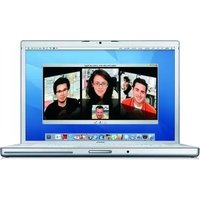
MB471N/A - Laptop APPLE - Free user manual and instructions
Find the device manual for free MB471N/A APPLE in PDF.


| Brand | Apple |
| Model | MB471N/A |
| Product Type | Laptop |
| Display Size | 15.4 inches (diagonal) |
| Display Resolution | 1440 x 900 pixels |
| Processor | Intel Core 2 Duo |
| Processor Speed | 2.66 GHz |
| Memory (RAM) | 4 GB DDR3 (expandable to 8 GB) |
| Storage | 250 GB Serial ATA hard drive |
| Graphics | NVIDIA GeForce 9400M + 9600M GT with 512 MB |
| Operating System | Mac OS X v10.5 Leopard |
| Weight | 5.5 pounds (2.49 kg) |
| Dimensions (W x D x H) | 14.35 x 9.82 x 0.95 inches (364 x 249 x 24.1 mm) |
| Power Adapter | 85W MagSafe Power Adapter |
| Battery Type | Integrated 58 Wh lithium-polymer |
| Battery Life | Up to 5 hours wireless productivity |
| Connectivity | Wi-Fi 802.11a/b/g/n, Bluetooth 2.1 + EDR |
| Ports | 2 x USB 2.0, FireWire 800, Mini DisplayPort, audio in/out |
| Maintenance | Clean with a soft, dry cloth; avoid liquids |
| Safety | FCC Class B compliant; operate within temperature range 50-95°F |
| Spare Parts Availability | Authorized Apple service providers offer official spare parts |
Frequently Asked Questions - MB471N/A APPLE
If still no response, reset the SMC (System Management Controller).
User questions about MB471N/A APPLE
0 question about this device. Answer the ones you know or ask your own.
Ask a new question about this device
Download the instructions for your Laptop in PDF format for free! Find your manual MB471N/A - APPLE and take your electronic device back in hand. On this page are published all the documents necessary for the use of your device. MB471N/A by APPLE.
USER MANUAL MB471N/A APPLE
www.apple.com/nl/macosx
Mac Help Spotlight
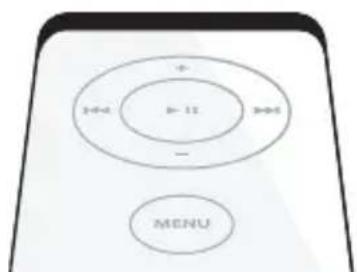
www.apple.com/nl/macbookpro
Mac Help Front Row

www.apple.com/nl/ilife/iweb
iWeb Help website
Podcasts
www.apple.com/nl/ilife/garageband
GarageBand Help podcast
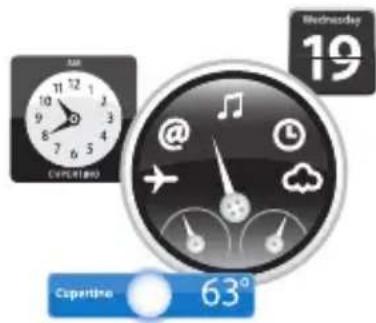
Dashboard-widgets
www.apple.com/nl/macosx
Mac Help Dashboard
Uw foto's beheren
www.apple.com/nl/ilife/iphoto
iPhoto Help
Inhoudsopgave
www.apple.com/nl/macbookpro
Mac Help migratie-assistent
www.apple.com/nl/macosx
Mac Help Mac OS X
www.apple.com/nl/store
Mac Help RAM
natural_image
Diagram of a laptop with internal components and two circular annotations highlighting specific areas (no text or symbols present)natural_image
Technical line drawing of a laptop chassis showing internal components and mounting holes (no text or symbols)natural_image
Line drawing of a laptop with a hand inserting a component into the screen (no text or symbols)natural_image
Diagram of a laptop with three views showing internal components and a rack mechanism (no text or symbols present)natural_image
Technical line drawing of a laptop chassis showing internal components and a blue arrow indicating a specific area (no text or symbols present)natural_image
Line drawing of a laptop with a highlighted internal portion showing a blue download arrow (no text or symbols)www.apple.com/nl/support
Mac Help help
www.apple.com/nl/contact/phone_contacts.html
www.apple.com/environment
Mac Help
ergonomie
natural_image
Illustration of two hands typing on a laptop keyboard, with 'Zo' text below (no other symbols or text)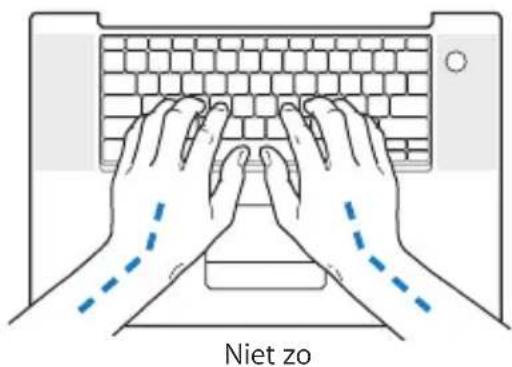
natural_image
Illustration of hands typing on a laptop keyboard, with no text or symbols present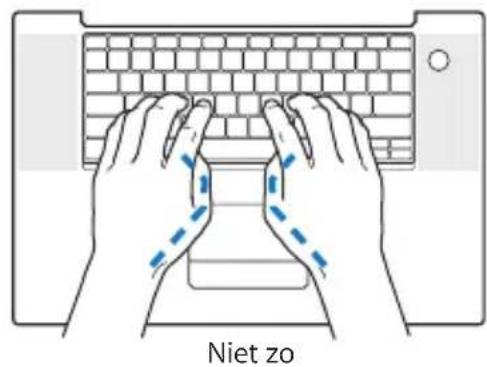
www.apple.com/about/ergonomics
Apple en het milieu
www.apple.com/environment
Regulatory Compliance Information
Compliance Statement
This device complies with part 15 of the FCC rules. Operation is subject to the following two conditions: (1) This device may not cause harmful interference, and (2) this device must accept any interference received, including interference that may cause undesired operation. See instructions if interference to radio or television reception is suspected.
Radio and Television Interference
This computer equipment generates, uses, and can radiate radio-frequency energy. If it is not installed and used properly—that is, in strict accordance with Apple's instructions—it may cause interference with radio and television reception.
This equipment has been tested and found to comply with the limits for a Class B digital device in accordance with the specifications in Part 15 of FCC rules. These specifications are designed to provide reasonable protection against such interference in a residential installation. However, there is no guarantee that interference will not occur in a particular installation.
You can determine whether your computer system is causing interference by turning it off. If the interference stops, it was probably caused by the computer or one of the peripheral devices. If your computer system does cause interference to radio or television reception, try to correct the interference by using one or more of the following measures:
- Turn the television or radio antenna until the interference stops.
- Move the computer to one side or the other of the television or radio.
- Plaats de computer verder van de televisie of radio.
- Plug the computer into an outlet that is on a different circuit from the television or radio. (That is, make certain the computer and the television or radio are on circuits controlled by different circuit breakers or fuses.)
If necessary, consult an Apple-authorized service provider or Apple. See the service and support information that came with your Apple product.
Or, consult an experienced radio/television technician for additional suggestions.
Important: Changes or modifications to this product not authorized by Apple Computer, Inc., could void the EMC compliance and negate your authority to operate the product.
This product has demonstrated EMC compliance under conditions that included the use of compliant peripheral devices and shielded cables (including Ethernet network cables) between system components. It is important that you use compliant peripheral devices and shielded cables between system components to reduce the possibility of causing interference to radios, television sets, and other electronic devices.
Responsible party (contact for FCC matters only):
Apple Computer, Inc. Product Compliance, 1 Infinite Loop, M/S 26-A, Cupertino, CA 95014-2084, 408-974-2000.
Wireless Radio Use
This device is restricted to indoor use due to its operation in the 5.15 to 5.25 GHz frequency range to reduce the potential for harmful interference to co-channel Mobile Satellite systems.
Exposure to Radio Frequency Energy
The radiated output power of the AirPort Extreme technology is below the FCC radio frequency exposure limits. Nevertheless, it is advised to use the wireless equipment in such a manner that the potential for human contact during normal operation is minimized.
FCC Bluetooth Wireless Compliance
The antenna used with this transmitter must not be colocated or operated in conjunction with any other antenna or transmitter subject to the conditions of the FCC Grant.
Bluetooth Industry Canada Statement
This Class B device meets all requirements of the Canadian interference-causing equipment regulations.
Industry Canada Statement
Complies with the Canadian ICES-003 Class B specifications. Cet appareil numérique de la classe B est conforme à la norme NMB-003 du Canada. This device complies with RSS 210 of Industry Canada.
Bluetooth (Europa): verklaring van overeenstemming EU
Singapore Wireless Certification
Complies with IDA Standards DB00063
Taiwan Wireless Statements
Taiwan Class B Statement
Class B 設備的警告聲明 NIL
VCCI Class B Statement
情報処理装置等電波障害自主規制について
As an ENERGY STAR ^® partner, Apple has determined that standard configurations of this product meet the ENERGY STAR ^® guidelines for energy efficiency. The ENERGY STAR ^® program is a partnership with office product equipment manufacturers to promote energy-efficiency. Reducing energy consumption of office products saves money and reduces pollution by eliminating wasted energy.
California: The coin cell battery in your product contains perchlorates. Special handling and disposal may apply. Refer to www.dtsc.ca.gov/hazardouswaste/perchlorate.
Apple Computer, Inc.



- Podcasts
- Dashboard-widgets
- Uw foto's beheren
- Inhoudsopgave
- Apple en het milieu
- Regulatory Compliance Information
- Compliance Statement
- Radio and Television Interference
- Wireless Radio Use
- Exposure to Radio Frequency Energy
- FCC Bluetooth Wireless Compliance
- Bluetooth Industry Canada Statement
- Industry Canada Statement
- Bluetooth (Europa): verklaring van overeenstemming EU
- Singapore Wireless Certification
- Taiwan Wireless Statements
- Taiwan Class B Statement
- VCCI Class B Statement
Brand : APPLE
Model : MB471N/A
Category : Laptop