
ASPIRE ONE D270-N261G326CR - Laptop ACER - Free user manual and instructions
Find the device manual for free ASPIRE ONE D270-N261G326CR ACER in PDF.



| Product type | Laptop |
| Brand | ACER |
| Model | ASPIRE ONE D270-N261G326CR |
| Processor | Intel Atom N2600 (1.6 GHz) |
| RAM memory | 2 GB |
| Hard drive | 320 GB |
| Screen | 10.1-inch LED (resolution 1024x600) |
| Battery | Lithium-ion 3-cell (4400 mAh) |
| Power supply | AC adapter 19 V |
| Weight | Approximately 1.2 kg |
| Dimensions (W x D x H) | 256 x 184 x 24 mm |
| Connectivity | Wi-Fi 802.11 b/g/n, Bluetooth, Ethernet 10/100 |
| Ports | 2 x USB 2.0, VGA, HDMI, headphone/mic jack, card reader |
| Webcam | Integrated 0.3 MP |
| Operating system | Windows 7 Starter |
| Maintenance | Clean with a soft, dry cloth; do not use abrasive products |
| Operating temperature | 5°C to 35°C |
| Humidity | 20% to 80% (non-condensing) |
Frequently Asked Questions - ASPIRE ONE D270-N261G326CR ACER
User questions about ASPIRE ONE D270-N261G326CR ACER
0 question about this device. Answer the ones you know or ask your own.
Ask a new question about this device
Download the instructions for your Laptop in PDF format for free! Find your manual ASPIRE ONE D270-N261G326CR - ACER and take your electronic device back in hand. On this page are published all the documents necessary for the use of your device. ASPIRE ONE D270-N261G326CR by ACER.
USER MANUAL ASPIRE ONE D270-N261G326CR ACER
We would like to thank you for making an Acer notebook your choice for meeting your mobile computing needs.
Your guides
To help you use your Acer notebook, we have designed a set of guides:
First off, the setup poster helps you get started with setting up your computer.
The Aspire One Generic User Guide contains useful information applying to all models in the Aspire product series. It covers basic topics such as using the keyboard and audio, etc. Please understand that due to its nature, the Generic User Guide will occasionally refer to functions or features which are only contained in certain models of the series, but not necessarily in the model you purchased. Such instances are marked in the text with language such as "only for certain models".
The Quick Guide introduces you to the basic features and functions of your new computer. For more on how your computer can help you to be more productive, please refer to the Aspire One Generic User Guide. This guide contains detailed information on such subjects as system utilities, data recovery, expansion options and troubleshooting. In addition it contains warranty information and the general regulations and safety notices for your notebook. It is available in Portable Document Format (PDF) and comes preloaded on your notebook. Follow these steps to access it:
1 Click on

Start > All Programs > AcerSystem.
2 Click on AcerSystem User Guide.

Note: Viewing the file requires Adobe Reader. If Adobe Reader is not installed on your computer, clicking on AcerSystem User Guide will run the Adobe Reader setup program first. Follow the instructions on the screen to complete the installation. For instructions on how to use Adobe Reader, access the Help and Support menu.
Your Acer notebook tour
After setting up your computer as illustrated in the setup poster, let us show you around your new Acer notebook.
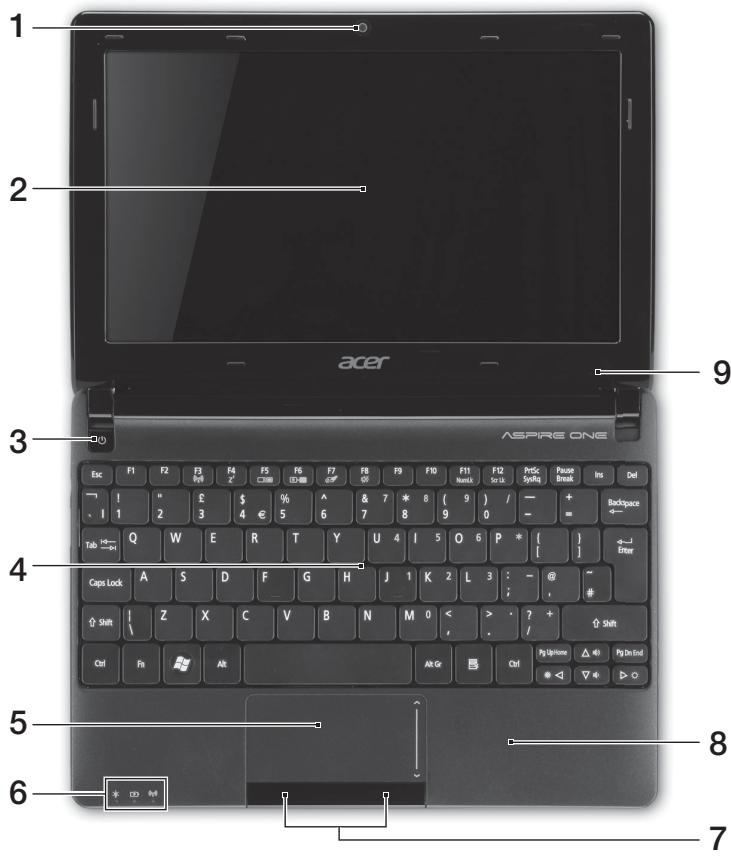
Top view
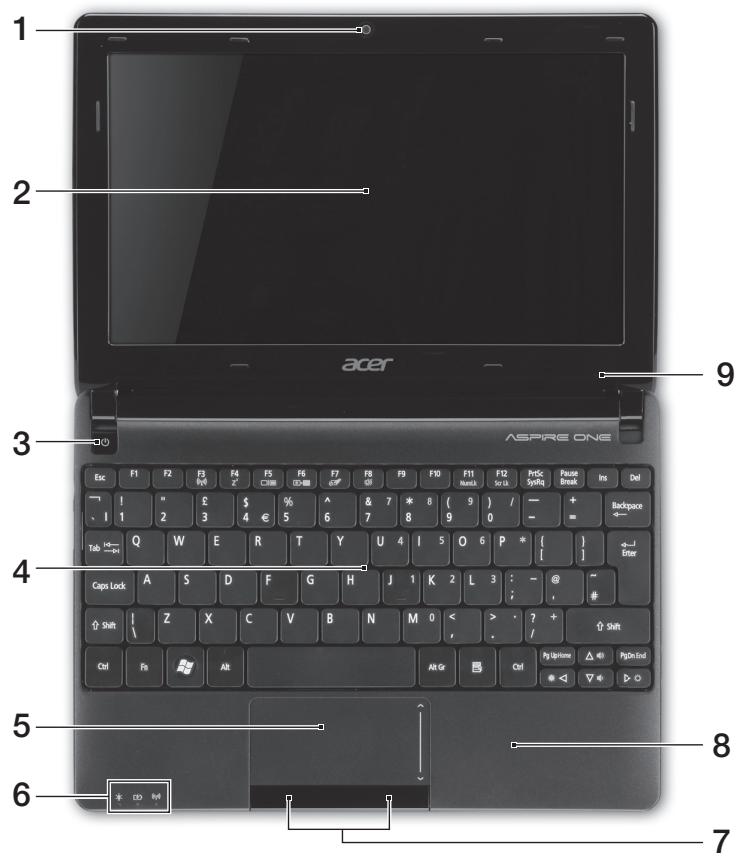
| # | Icon | Item | Description |
| 1 | Integrated webcam | Web camera for video communication (configuration may vary by model). | |
| 2 | Display screen | Also called Liquid-Crystal Display (LCD), displays computer output (configuration may vary by model). | |
| 3 | Power button | Turns the computer on and off. | |
| 4 | Keyboard | For entering data into your computer. | |
| 5 | Touchpad | Touch-sensitive pointing device which functions like a computer mouse. | |
| 6 | Status indicators1 | Light-Emitting Diodes (LED) that light up to show the status of the computer's functions and components. | |
| 7 | Click buttons (left and right) | The left and right buttons function like the left and right mouse buttons. | |
| 8 | Palmrest | Comfortable support area for your hands when you use the computer. | |
| 9 | Microphone | Internal microphone for sound recording. |
- The front panel indicators are visible even when the computer cover is closed.
Hotkeys
The computer employs hotkeys or key combinations to access most of the computer's controls like screen brightness and volume output.
To activate hotkeys, press and hold the
| Hotkey | Icon | Function | Description |
| +Fn> + <F3> | (通讯) | Communication | Enables/disables the computer's communication devices. (Communication devices may vary by configuration.) |
| <Fn> + <F4> | Z² | Sleep | Puts the computer in Sleep mode. |
| <Fn> + <F5> | □|□ | Display toggle | Switches display output between the display screen, external monitor (if connected) and both. |
| <Fn> + <F6> | +|+ | Screen blank | Turns the display screen backlight off to save power. Press any key to return. |
| <Fn> + <F7> | ○▲ | Touchpad toggle | Turns the internal touchpad on and off. |
| +Fn> + <F8> | Speaker toggle | Turns the speakers on and off. | |
| +Fn> + <F11> | Num Lock | When Num Lock is on, the embedded keypad is in numeric mode. The keys function as a calculator (complete with the arithmetic operators +, -, *, and /). Use this mode when you need to do a lot of numeric data entry. A better solution would be to connect an external keypad. | |
| +Fn> + <F11> only for certain models. | |||
| +Fn> + <F12> | Scroll Lock | When Scroll Lock is on, the screen moves one line up or down when you press the up or down arrow keys respectively. Scroll Lock does not work with some applications. | |
| +Fn> + <F13> | Brightness up | Increases the screen brightness. | |
| +Fn> + <F14> | Brightness down | Decreases the screen brightness. | |
| +Fn> + <F15> | Volume up | Increases the sound volume (only for certain models). | |
| +Fn> + <F16> | Volume down | Decreases the sound volume (only for certain models). |
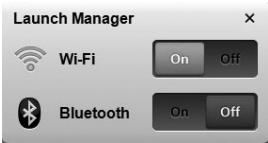
Using the communication key*
Here you can enable and disable the various wireless connectivity devices on your computer.
Press <Fn> + <F3> to bring up the Launch Manager window panel.
A red toggle indicates the device is off. Click On to enable Wi-Fi/Bluetooth connection. Click Off to disable connection.
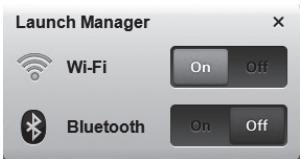
- Communication devices may vary by model.
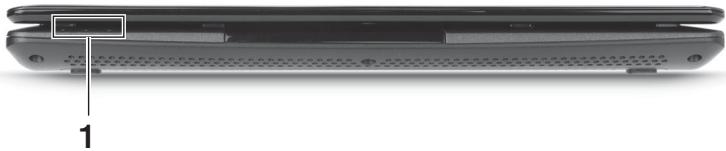
Closed front view
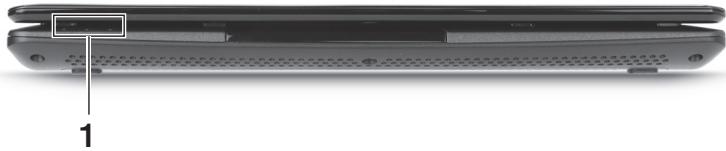
| # | Icon | Item | Description | ||
| 1 | Power indicator | Indicates the computer's power status. | |||
| Battery indicator | Indicates the computer's battery status. 1. Charging: The light shows amber when the battery is charging. 2. Fully charged: The light shows blue when in AC mode. | ||||
| Communication indicator | Indicates the status of 3G / Wi-Fi communication | ||||
| Blue light on | Orange light on | Not lit | |||
| 3G on / Wi-Fi on 3G on / Wi-Fi off | 3G off / Wi-Fi on | 3G off / Wi-Fi off | |||
Rear view
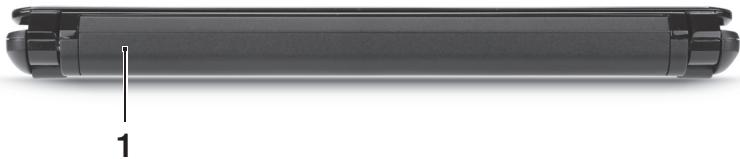
| # | Item | Description |
| 1 | Battery bay | Houses the computer's battery pack. |

Note: Your computer may be equipped with a different battery to the one in the picture.
Left view
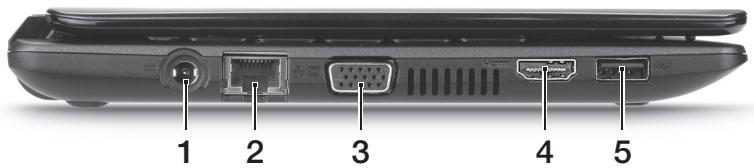
| # | Icon | Item | Description |
| 1 | DC-in jack | Connects to an AC adapter. | |
| 2 | Ethernet (RJ-45) port | Connects to an Ethernet 10/100 based network. | |
| 3 | External display (VGA) port | Connects to a display device (e.g., external monitor, LCD projector). | |
| 4 | HDMI | HDMI port | Supports high-definition digital video connections. |
| 5 | USB port | Connects to USB devices (e.g., USB mouse, USB camera). |
Right view
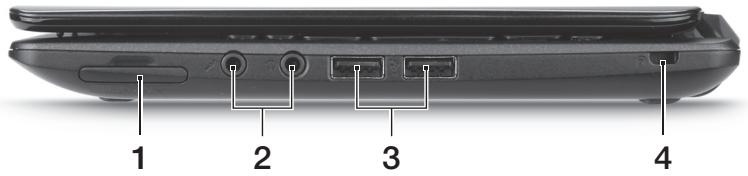
| # | Icon | Item | Description |
| 1 | MULTIMEDICARD PRO | Multi-in-1 card reader | Accepts Secure Digital (SD), MultiMediaCard (MMC), Memory Stick (MS), Memory Stick PRO (MS PRO), xD-Picture Card (xD). Note: Push to remove/install the card. Only one card can operate at any given time. |
| 2 | Headphone/speaker/ line-out jack | Connects to audio line-out devices (e.g., speakers, headphones). | |
| Microphone-in jack | Accepts inputs from external microphones. | ||
| 3 | + | USB ports | Connect to USB devices (e.g., USB mouse, USB camera). |
| 4 | K | Kensington lock slot | Connects to a Kensington-compatible computer security lock. |
Base view
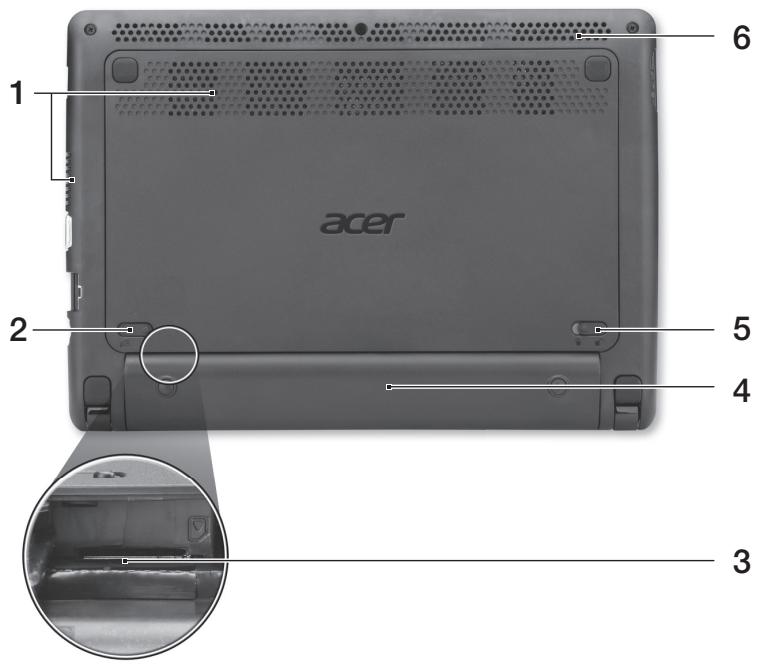
| # | Icon | Item | Description |
| 1 | Ventilation slots and cooling fan | Enable the computer to stay cool, even after prolonged use. Note: Do not cover or obstruct the opening of the fan. | |
| 2 | Battery release latch | Releases the battery for removal. | |
| 3 | 3G SIM card slot | Accepts a 3G SIM card for 3G connectivity (only for certain models). | |
| 4 | Battery bay | Houses the computer's battery pack. | |
| 5 | Battery lock | Locks the battery in position. | |
| 6 | Speaker | Emits audio from your computer. |
Environment
- Temperature:
- Operating: 5^ to 35^ - Non-operating: -20^ to 65^
Humidity (non-condensing): - Operating: 20% to 80% - Non-operating: 20% to 80%
Gamme Aspire One
Guide rapide
Modèle:
No. de série :
Date d'achat :
Lieud'achat:
Pour commencer
Tenepb, KOrda Bbl BbIOnHnHn HacToPoiKn, KaN NOKa3aHo Ha nJaKe T NO yCTaHOBKe, daBaTe NoBnXke No3HaKOMMcC BaShm HOBbIM HOyTbYkom Acer.
BnD cBepxu
KpacHbI INHnKaTop O3Haayet, YTO MOyIb bByIKIIOueH. IJIa NOkJIIOUeHIna K 6ecnpoBODHOcTn Wi-Fi/Bluetooth haxMnte BKn. IJIa OTKJIIOUeHn HaxMnte BblkJ.
*Tnbl MoDyIe CBA3N 3aBNCrT O KOHpIpyaunu CNCTembl.
BnD cpeeni C 3aKpbIToi KpbIshkoI
- Pa60Tha: OTo 20% Do 80%
3a cxbxaHene:OT 20%do 80%
Aspire One seeria
Luhijuhend