
STYG 2000 B2 - Hob SILVERCREST - Free user manual and instructions
Find the device manual for free STYG 2000 B2 SILVERCREST in PDF.


| Product Type | Hob |
| Brand | SilverCrest |
| Model | STYG 2000 B2 |
| Installation Type | Built-in |
| Cooking Surface | Ceramic glass |
| Number of Cooking Zones | 2 |
| Power (Total) | 2000 W |
| Power per Zone | 1000 W each |
| Control Type | Touch control |
| Power Levels | 9 |
| Timer Function | Yes |
| Residual Heat Indicator | Yes |
| Child Lock | Yes |
| Automatic Shut-Off | Yes |
| Dimensions (W x D x H) | 590 x 520 x 50 mm |
| Weight | Approx. 5.5 kg |
| Power Supply | 230 V ~ 50 Hz |
| Plug Type | Schuko (Type F) |
| Cleaning | Wipe with damp cloth; use ceramic hob cleaner |
| Spare Parts Availability | Contact manufacturer or authorized service |
| Manual Languages | DE, EN, RO |
Frequently Asked Questions - STYG 2000 B2 SILVERCREST
User questions about STYG 2000 B2 SILVERCREST
0 question about this device. Answer the ones you know or ask your own.
Ask a new question about this device
Download the instructions for your Hob in PDF format for free! Find your manual STYG 2000 B2 - SILVERCREST and take your electronic device back in hand. On this page are published all the documents necessary for the use of your device. STYG 2000 B2 by SILVERCREST.
USER MANUAL STYG 2000 B2 SILVERCREST
natural_image
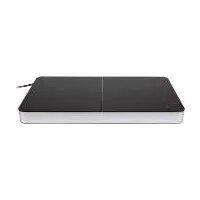
Black grater with various food items on its side, placed on a flat surface (no text or symbols visible)TEPPANYAKI GRILL STYG 2000 B2
GB CY
TEPPANYAKI GRILL
Operating instructions
RO
GRILL TEPPANYAKI
natural_image
Three geometric crosshair targets with central dots, no text or symbols presentContents
- Overview 2
- Intended purpose 3
- Safety instructions .... 3
- Items supplied 6
- How to use .... 6
- Operation 7
6.1 Heating up.... 7
6.2 Grilling.... 7
6.3 Switching off 8
- Cleaning 8
- Storage 9
-
Troubleshooting 9
-
Disposal 9
-
Technical specifications 9
- Warranty of the HOYER Handel GmbH 10
1. Overview
1 Handles
2 Grill plate
3 Grease drain
4 Connecting socket for the plug with thermostat 6
5 Power cable with mains plug
6 Thermostat with plug
7 Grease drip tray
8 8 wooden spatulas
9 Control lamp
(illuminates while heating up)
10 Thermostat control
2 GB


natural_image
Three geometric crosshair targets with central dots, no text or symbols presentThank you for your trust!
Congratulations on your new Teppanyaki Grill.
For a safe handling of the product and in order to get to know the entire scope of features:
• Thoroughly read these operating instructions prior to initial use.
- Above all, observe the safety instructions!
- The device should only be used as described in these operating instructions.
- Keep these operating instructions for reference.
- If you pass the device on to someone else, please include these operating instructions.
We hope you enjoy your new Teppanyaki Grill!
Symbol on your device The food-safe material of devices with this symbol will not change the taste or smell of food.
2. Intended purpose
The Teppanyaki Grill is intended for the grilling of food (e.g. meat, fish, vegetables, etc.). The device is designed for private, domestic use. The device must only be used indoors. This device must not be used for commercial purposes.
Foreseeable misuse
WARNING! Risk of material damage! The device is not designed for operation outdoors.
3. Safety instructions
Warnings
If necessary, the following warnings will be used in these operating instructions:

DANGER! High risk: failure to observe this warning may result in injury to life and limb.
WARNING! Moderate risk: failure to observe this warning may result in injury or serious material damage.
CAUTION: low risk: failure to observe this warning may result in minor injury or material damage.
NOTE: circumstances and specifics that must be observed when handling the device.


Symbol on your device
The food-safe material of devices with this symbol will not change the taste or smell of food.
GB
3


natural_image
Three geometric crosshair targets with central dots, no text or symbols presentInstructions for safe operation
- This device can be used by children from the age of 8 and people with restricted physical, sensory or intellectual abilities or people without adequate experience and/ or understanding, if they are supervised or instructed on how to use this device safely and if they are aware of the resulting danger.
- Children must not play with the device.
- Cleaning and user maintenance must not be performed by children unless they are older than 8 years and supervised.
- Children under the age of 8 must be kept away from the device and the power cable.
Before cleaning, remove the mains plug from the wall socket and the thermostat from the socket. Before reconnecting, ensure that the socket is completely dry. - Use only the thermostat supplied for the operation of the device.
- If the power cable of the thermostat should become damaged, it must be replaced by the manufacturer, the manufacturer's customer service department or a similarly qualified specialist, in order to avoid any hazards.
- This device is not intended to be operated using an external timer clock or a separate remote control system.
- Please take note of the chapter on cleaning (see “Cleaning” on page 8).

DANGER for children
Children must not play with packing material. Do not allow children to play with plastic bags. There is a risk of suffocation.
- Please ensure that children are not able to pull the device down from the work surface with the power cable.

DANGER to and from pets and livestock
Electrical devices can represent a hazard to pets and livestock. In addition, animals can also cause damage to the device. For this reason you should keep animals away from electrical devices at all times.
4
GB


natural_image
Pure geometric crosshair symbol with concentric circles and a central dot, no text or labels present
DANGER for birds
Birds breathe faster, distribute the air differently in their bodies and are significantly smaller than humans. For this reason, it may be dangerous for birds to inhale even the smallest smoke quantities, which develop while this device is running. When using this device, birds should be relocated into a different room.

DANGER! Risk of electric shock due to moisture!
The thermostat, the power cable and the mains plug must not be immersed in water or other liquids.
- All parts of the device must be completely dry before the device is reused.
- Protect the device from moisture, water drops and water splashes.
- If liquid gets into the device or the connecting socket for the thermostats, pull out the mains plug immediately. Have the device checked before reusing.
- Never touch the device with wet hands.
- If the device falls into water, disconnect the mains plug immediately. Only then is it safe to retrieve the device.

DANGER! Risk of electric shock!
- Only plug the mains plug into an earthed wall socket when the plug on the thermostat is firmly connected with the connecting socket of the device.
- Only connect the mains plug to a properly installed and easily accessible earthed wall socket whose voltage corresponds to the specifications on the rating plate. The wall socket must continue to be easily accessible after the device is plugged in.
- Ensure that the power cable cannot be damaged by sharp edges or hot points. Do not wrap the power cable around the device.
- When using the device, ensure that the power cable cannot be trapped or crushed.
The device is not fully disconnected from the power supply, even after it is switched off. In order to fully disconnect it, pull out the mains plug.
- When removing the mains plug from the wall socket, always pull the plug and never the cable.
- Disconnect the mains plug from the wall socket ...
... if there is a fault, ... when you are not using the device, ... before you clean the device and ... during thunderstorms.
- To avoid any risk, do not make modifications to the device.
- Do not use the device if there is visible damage to the device or the power cable.

DANGER! Risk of fire
- Place the device on a dry, level, non-slip and heat-resistant surface.
The device must not be operated close to flammable liquids or materials, or in a potentially explosive environment. Keep at a distance of at least 50 cm from walls. In order to prevent overheating of the device or a potential fire, the device must not be covered.
- The power cable must not touch the metal surfaces during operation.
- If fat or oil catches fire, it must never be extinguished with water, because this would lead to a fat explosion. Quench the fire with a damp blanket or a damp towel.

DANGER! Risk of injury through burning!
The metal surfaces become very hot during operation. Only touch the handles and control elements of the device during operation.

The device remains very hot after it is switched off, and must not be touched. Allow the device to cool down before you clean it.
- Only transport the device when it has cooled down, and when doing so only use the handles intended for this purpose.
- Protect yourself against being burned by hot fat splashes, e.g. using oven gloves.
- Allow the fat to cool in the grease drip tray before you remove it from the device.
WARNING! Risk of material damage
- Ensure that the device is switched off before you plug it into an earthed wall socket (set the thermostat control to 0).
- Only use the original accessories.
- Do not use kitchen utensils made of metal. Use e.g. the supplied wooden spatulas.
- Do not use any astringent or abrasive cleaning agents.
The device is fitted with non-slip plastic bases. As furniture is coated with a wide array of varnishes and synthetics, and is also treated with different care products, it cannot be fully ruled out that some of these materials contain ingredients that could attack and soften the non-slip plastic bases. If necessary, place a non-slip mat under the device.
4. Items supplied
1 Teppanyaki Grill
1 Thermostat 6, power cable with mains plug 5
1 Grease drip tray 7
8 wooden spatulas 8
1 Operating instructions
5. How to use

FIRE HAZARD!
- Place the device on a dry, level, non-slip and heat-resistant surface.
The device must not be operated close to flammable liquids or materials, or in a potentially explosive environment. Keep at a distance of at least 50 cm from walls.
NOTE: when in operation for the first time, some smoke and odour may be generated by the device. This is related to materials used on the heating elements during assembly, and is not a defect with the product. Ensure adequate ventilation.
- Remove all packing material.
- Remove the stickers from the device, but not the rating plate on the underside.
- Check to ensure that all parts are present and undamaged.
-
Clean the device prior to its first use (see "Cleaning" on page 8).
-
Before connecting the device, check that the thermostat control 10 is set to 0.
- Connect the thermostat 6 with the connecting socket 4.
- Insert the mains plug 5 into a wall socket corresponding to the specifications of the rating plate.
- Set the thermostat control 10 to temperature setting 5. The device then heats up the grill plate 2, and the control lamp 9 is illuminated.
- When the control lamp 9 goes out, switch the device off by setting the thermostat control 10 to 0.
- Pull out the mains plug 5 and allow the device to cool.
- Disconnect the thermostat 6 from the connecting socket 4.
- Clean the device again (see "Cleaning" on page 8).
6
GB


natural_image
Three geometric crosshair targets with central dots, no text or symbols present


natural_image
Three geometric crosshair targets with central dots, no text or symbols present6. Operation

FIRE HAZARD!
- Place the device on a dry, level, non-slip and heat-resistant surface.
The device must not be operated close to flammable liquids or materials, or in a potentially explosive environment. Keep at a distance of at least 50 cm from walls.

DANGER! Risk of injury through burning!
The metal surfaces become very hot during operation. Only touch the handles 1 and control elements of the device during operation.
6.1 Heating up
-
Before connecting the device, check that the thermostat control 10 is set to 0.
-
Connect the thermostat 6 with the connecting socket 4.
-
Insert the mains plug 5 into a wall socket corresponding to the specifications of the rating plate.
NOTE: when grilling vegetables, you can apply a little oil to the grill plate 2.
- Set the thermostat control 10 to the desired temperature setting 1, 2, 3, 4 or 5. Setting 1 to 3
- Medium temperatures: suitable for fish fillets, vegetables or slow cooking. Setting 3 to 5
- High temperature: suitable for slices of meat or poultry.
-
The device then heats up the grill plate 2, and the control lamp 9 is illuminated.
-
The control lamp 9 switches off when the device has reached the selected temperature setting.
6.2 Grilling

DANGER! Risk of injury through burning!
- Protect yourself against being burned by hot fat splashes, e.g. using oven gloves.
- Allow the fat to cool in the grease drip tray 7 before you remove it from the device.
WARNING! Risk of material damage!
Do not use kitchen utensils made of metal. Use e.g. the supplied wooden spatulas 8.
- Place the food to be grilled on the preheated grill plate 2. The food being grilled must not extend over the edge of the grill plate 2.
- After a while, turn the food being grilled using the wooden spatulas 8 supplied.
- When the food being grilled is done, use the wooden spatulas 8 to lift it off the grill plate 2.
NOTE: during the grilling process, the excess hot fat runs through the grease drain 3 and into the grease drip tray 7. If large volumes of fat make it necessary to empty the grease drip tray 7 during the grilling process, protect yourself e.g. with oven gloves, and pull out the grease drip tray 7 very carefully.

GB
7




natural_image
Three geometric crosshair targets with central dots, no text or symbols present6.3 Switching off
- Switch the device off by setting the thermostat control 10 to 0.
- Pull out the mains plug 5 and allow the device to cool.
- Disconnect the thermostat 6 from the connecting socket 4.
- Clean the device again (see "Cleaning" on page 8).
7. Cleaning
Clean the device prior to its first use!

DANGER! Risk of electric shock!
- Pull the mains plug 5 out of the wall socket before you clean the device.
- The thermostat 6 and the power cable 5 with the mains plug must not be immersed in water or other liquids.
The connecting socket 4, the thermostat 6 and the power cable 5 with the mains plug must be completely dry before the device is reused.

DANGER! Risk of injury through burning!
The device remains very hot after it is switched off, and must not be touched. Allow the device to cool down before you clean it.
- Only transport the device when it has cooled down, and when doing so only use the handles 1 intended for this purpose.
- Allow the fat to cool in the grease drip tray 7 before you remove it from the device.
WARNING! Risk of material damage!
- Do not use any astringent or abrasive cleaning agents.
Clean the device after each use and remove all food residues.
Grease drip tray
- Figure A: carefully withdraw the grease drip tray 7 from the device.
- Dispose of the fat with the household waste.
- The grease drip tray 7 may be cleaned in the dishwasher.
Figure B: thermostat
- Clean the thermostat 6 and the power cable 5 with the mains plug using either a dry or a slightly moistened cloth. Water must never be allowed to get into the thermostat control 10.
- Carefully dry all elements.
Grill plate
The grill plate 2 is firmly connected with the base of the device, and can be submerged in dishwater.
- Clean the grill plate 2 and the bottom part by hand using gentle dishwater.
NOTE: burnt-on food or grease residues are often easier to remove if you leave a damp washcloth on the burnt-on residues overnight to soften it.
Wooden spatulas
- Clean the wooden spatulas 8 by hand using gentle dishwater.
8
GB



natural_image
Three geometric crosshair targets with central dots, no text or symbols present8. Storage

DANGER for children!
- Keep the device out of the reach of children.
- Clean all parts and make sure they are properly dry before putting away the device.
- Select a location where neither high temperatures nor moisture can affect the device.
9. Troubleshooting
If your device fails to function as required, please try this checklist first. Perhaps there is only a minor problem, and you can solve it yourself.

DANGER! Risk of electric shock!
- Do not attempt to repair the device yourself under any circumstances.
| Fault Possible causes / Action | |
| No function | Has the device been connected to the power supply?Inspect the connections of the mains plug 5 and the thermostat 6.Is the thermostat control 10 set to 0? |
10. Disposal
The symbol showing a wheelie bin crossed through indicates that the product requires separate refuse collection in the European Union. This applies to the

product and all accessories marked with this symbol. Products identified with this symbol may not be discarded with normal household waste, but must be taken to a collection point for recycling electric and electronic appliances. Recycling helps to reduce the consumption of raw materials and protect the environment.
Packaging
When disposing of the packaging, make sure you comply with the environmental regulations applicable in your country.
11. Technical specifications
| Model: STYG 2000 B2 |
| Mains voltage: 220-240 V ~ 50/60 Hz |
| Protection class: I |
| Power rating: 1700-2000 W |
| Thermostat: CTW300C |

Subject to technical modification.
GB
9



natural_image
Three geometric crosshair targets with central dots, no text or symbols present12. Warranty of the HOYER Handel GmbH
Dear Customer,
your device is provided with a 3 year warranty starting with the purchase date. In the event of product defects, you are entitled to statutory rights against the vendor. These statutory rights are not restricted by our warranty presented in the following.
Warranty conditions
The warranty period starts with the purchase date. Please keep the original purchase receipt in a safe place. This document is required to verify the purchase.
If within three years from the purchase date of this product a material or factory defect occurs, the product will be repaired or replaced by us – at our discretion – free of charge to you. This warranty implies that within the period of three years the defective device and the purchase receipt are presented, including a brief written description of the defect and the time it occurred.
If the defect is covered by our warranty, the repaired or a new product will be returned to you. No new warranty period starts with a repair or replacement of the product.
Warranty period and statutory claims for defects
The warranty period is not extended when the warranty has been claimed. This also applies to replaced and repaired parts. Any damages and defects already existing at the time of purchase must be reported immediately upon unpacking. Repairs arising after the expiration of the warranty period are subject to a charge.
Warranty coverage
The device was produced carefully according to strict quality guidelines and tested diligently prior to delivery.
The warranty applies to material or factory defects. This warranty does not include product parts that are subject to standard wear and therefore can be considered wear parts; the same applies to damages at fragile parts, e.g. switches, rechargeable batteries or parts made of glass.
This warranty expires if the product is damaged, not used as intended or not serviced. For the proper operation of the product, all instructions listed in the operating instructions must be observed carefully. Any form of use and handling that is advised against in the operating instructions or warned against must always be avoided.
The product is only intended for private and not for commercial use. In the case of incorrect and improper treatment, use of force and interventions not performed by our authorised Service Centre, the warranty shall cease.
Handling in case of a warranty claim
In order to ensure prompt processing of your matter, please observe the following notes:
- Please keep the article number
IAN: 273383 and the purchase receipt as a purchase verification for all inquiries. - If faulty operation or other defects occur, first contact the Service Centre listed in the following by telephone or email.
- Then, you are able to send a product reported as defective free of charge to the service address specified to you, including the purchase receipt and the information on the defect and when it occurred.

Please visit www.lidl-service.com to download this and many other manuals, product videos and software.


natural_image
Three geometric crosshair targets with central dots, no text or symbols presentSadržaj
- Pregled 12
- Predviđena uporaba .... 13
- Sigurnosne upute .... 13
- Opseg isporuke 16
- Početak uporabe .... 16
- Rukovanje 17
6.1 Zagrijavanje 17
6.2 Roštiljanje 17
6.3 Isključivanje.... 18 - Čišćenje 18
- Čuvanje 18
- Rješavanje problema .... 19
- Uklanjanje otpada 19
- Tehnički podaci 19
- Jamstvo tvrtke HOYER Handel GmbH 20
1. Pregled
natural_image
Three geometric crosshair targets with central dots, no text or symbols presentnatural_image
Three geometric crosshair targets with central dots, no text or symbols presentUpute za siguran rad
natural_image
Three geometric crosshair targets with central dots, no text or symbols present


natural_image
Three geometric crosshair targets with central dots, no text or symbols present- Ponovno očistite uredaj (pogledajte "Čišćenje" na stranici 18).
6. Rukovanje

OPASNOST OD POŽARA!
- Uredaj stavite na suhu, ravnu i nesklisku podlogu otpornu na visoku temperatu- ru.
- Uređaj se ne smije koristiti u blizini zapaljivih tekućina i materijala ili u okolini u kojoj postoji opasnost od eksplozija. Pri tome osigurajte razmak od najmanje cca. 50 cm od zidova.

natural_image
Three geometric crosshair targets with central dots, no text or symbols present6.3 Isključivanje
- Uredaj isključite tako da regulator termostata 10 stavite na 0.
- Izvucite mrežni utikač 5 i pričekajte da se uređaj ohladi.
- Izvucite termostat 6 iz priključne utičnice 4.
- Ponovno očistite uredaj (pogledajte "Čišćenje" na stranici 18).
7. Čišćenje
Očistite uređaj prije prve uporabe!

OPASNOST od strujnog uda- ra!
- Prije čišćenja uređaja izvucite mrežni utikač 5 iz utičnice.
- Termostat 6 i priključni vod 5 s mrežnim utikačem nikada nemojte uranjati u vodu ili druge tekućine.
- Priključnu utičnicu 4, termostat 6 i priključni vod 5 s mrežnim utikačem moraju biti potpuno suhi prije ponovnog korištenja uređaja.

natural_image
Pure geometric diagram with crosshair and circular pattern (no text or symbols)


9. Rješavanje problema
Ako vaš uredaj ne funkcionira na željeni način, najprije provjerite ovaj kontrolni popis. Možda se radi o malom problemu koji možete sami ukloniti.

OPASNOST od strujnog uda- ra!
natural_image
Three geometric crosshair targets with central dots, no text or symbols present12. Jamstvo tvrtke HOYER Handel GmbH
Poštovani korisnici,
Na ovaj uređaj možete ostvariti 3 godine jamstva koje vrijedi od datuma kupnje. U slučaju neispravnosti uređaja, možete iskoristiti svoja zakonska prava kod prodavača proizvoda. Kao što je opisano u nastavku, ta zakonska prava nisu ograničena našim jamstvom.
Jamstveni uvjeti
natural_image
Three geometric crosshair targets with central dots, no text or symbols presentCuprins
natural_image
Three geometric crosshair targets with central dots, no text or symbols presentnatural_image
Three geometric crosshair targets with central dots, no text or symbols presentThe Ground Truth image displays a single, solid horizontal line. According to Rule 2 (UNDERSCORE & LINE RULES), this is a stylistic or background line, not a placeholder underscore. Therefore, the OCR result must ignore it and output nothing or only meaningful text. The provided OCR content is "____", which consists of four underscores. This is an incorrect interpretation of the line as a placeholder, violating the rule that stylistic lines must be ignored. The OCR has hallucinated underscores where none should exist based on the GT's visual context. Hence, the OCR result is inconsistent with the Ground Truth.
[Non-Text]
[Non-Text]
24 —
24 —
24 —
24 —
24
[Non-Text]
[Non-Text]
-
[Non-Text]
[Non-Text]
24
24
24
24
24
[Non-Text]
[Non-Text]
-
[Non-Text]
24
24
24
24
24
24
[Non-Text]
[Non-Text]
[Non-Text]
[Non-Text]
[Non-Text]
[Non-Text]
[Non-Text]
[Non-Text]
[Non-Text]
[Non-Text]
[Non-Text]
[Non-Text]
[Non-Text]
[Non-Text]
[Non-Text]
[Non-Text]
[Non-Text]
[Non-Text]
[Non-Text]
[Non-Text]
[Non-Text]
[Non-Text]
[Non-Text]
[Non-Text]
[Non-Text]
[Non-Text]
[Non-Text]
[Non-Text]
[Non-Text]

24
[Non-Text]

m = 311
-
[Non-Text]
[Non-Text]
-
-
-
-
m = 311
-
[Non-Text]
-
-
-
-
m = 311
-
一
一
一
一
一
一
一
一
一
一
一
|
一
一
一
一
-
-
-
-
-
m = 311
m = 311
m = 311
m = 311
m = 311
m = 311
m = 311
m = 311
( x - 2x) t - xy^2 = ( x - 2x) f^ t
m = 311
m = 311
m = 311
m = 311
The Ground Truth image displays a single, solid horizontal line. According to Rule 2 (UNDERSCORE & LINE RULES), this is a stylistic or background line, not a placeholder underscore. Therefore, the OCR result must ignore it and output nothing or only meaningful text. The provided OCR content is "____", which consists of four underscores. This is an incorrect interpretation of the line as a placeholder, violating the rule that stylistic lines must be ignored. The OCR has hallucinated underscores where none should exist based on the GT's visual context. Hence, the OCR result is inconsistent with the Ground Truth.
The Ground Truth image displays a single, solid horizontal line. According to Rule 2 (UNDERSCORE & LINE RULES), this is a stylistic or background line, not a placeholder underscore. Therefore, the OCR result must ignore it and output nothing or only meaningful text. The provided OCR content is "____", which consists of four underscores. This is an incorrect interpretation of the line as a placeholder, violating the rule that stylistic lines must be ignored. The OCR has hallucinated underscores where none should exist based on the GT's visual context. Hence, the OCR result is inconsistent with the Ground Truth.
The Ground Truth image displays a single, solid horizontal line. According to Rule 2 (UNDERSCORE & LINE RULES), this is a stylistic or background line, not a placeholder underscore. Therefore, the OCR result must ignore it and output nothing or only meaningful text. The provided OCR content is "____", which consists of four underscores. This is an incorrect interpretation of the line as a placeholder, violating the rule that stylistic lines must be ignored. The OCR has hallucinated underscores where none should exist based on the GT's visual context. Hence, the OCR result is inconsistent with the Ground Truth.
The Ground Truth image displays a single, solid horizontal line. According to Rule 2 (UNDERSCORE & LINE RULES), this is a stylistic or background line, not a placeholder underscore. Therefore, the OCR result must ignore it and output nothing or only meaningful text. The provided OCR content is "____", which consists of four underscores. This is an incorrect interpretation of the line as a placeholder, violating the rule that stylistic lines must be ignored. The OCR has hallucinated underscores where none should exist based on the GT's visual context. Hence, the OCR result is inconsistent with the Ground Truth.
The Ground Truth image displays a single, solid horizontal line. According to Rule 2 (UNDERSCORE & LINE RULES), this is a stylistic or background line, not a placeholder underscore. Therefore, the OCR result must ignore it and output nothing or only meaningful text. The provided OCR content is "____", which consists of four underscores. This is an incorrect interpretation of the line as a placeholder, violating the rule that stylistic lines must be ignored. The OCR has hallucinated underscores where none should exist based on the GT's visual context. Hence, the OCR result is inconsistent with the Ground Truth.
m = 311
m = 311
m = 311
m = 311
m = 311
m = 311
m = 311
m = 311
m = 311
m = 311

natural_image
Three geometric crosshair targets with central dots, no text or symbols presentnatural_image
Three geometric crosshair targets with central dots, no text or symbols presentnatural_image
Three geometric crosshair targets with central dots, no text or symbols present


natural_image
Three geometric crosshair targets with central dots, no text or symbols presentnatural_image
Three geometric crosshair targets with central dots, no text or symbols present10. Eliminarea
natural_image
Three geometric crosshair targets with central dots, no text or symbols presentnatural_image
Three geometric crosshair targets with central dots, no text or symbols presentСъдържание
natural_image
Three geometric crosshair targets with central dots, no text or symbols presentnatural_image
Three geometric crosshair targets with central dots, no text or symbols presentnatural_image
Three geometric crosshair targets with central dots, no text or symbols present
ОПАСНОСТ от пожар
natural_image
Three geometric crosshair targets with central dots, no text or symbols presentnatural_image
Three geometric crosshair targets with central dots, no text or symbols present7. Почистване
natural_image
Three geometric crosshair targets with central dots, no text or symbols present8. Съхранение

ОПАСНОСТ за деца!
natural_image
Three geometric crosshair targets with central dots, no text or symbols presentnatural_image
Three geometric crosshair targets with central dots and alignment lines (no text or symbols)



natural_image
Three geometric crosshair targets with central dots, no text or symbols presentΠεριεχόμενα
natural_image
Three geometric crosshair targets with central dots, no text or symbols presentnatural_image
Three geometric crosshair targets with central dots, no text or symbols presentnatural_image
Pure geometric diagram with crosshair and circular pattern (no text or symbols)
ΚΙΝΔΥΝΟΣ για παιδιά
natural_image
Three geometric crosshair targets with central dots, no text or symbols present6.1 Θέρμανση
natural_image
Three geometric diagrams with crosshair and circular patterns, no text or symbols present7. Καθαρισμός
natural_image
Three geometric crosshair targets with central dots, no text or symbols present9. Λύση προβλήματος
natural_image
Pure geometric diagram with crosshair and circular pattern (no text or symbols)
natural_image
Three geometric crosshair targets with central dots, no text or symbols presentnatural_image
Three geometric crosshair targets with central dots, no text or symbols present


natural_image
Three geometric crosshair targets with central dots, no text or symbols presentInhalt
natural_image
Three geometric crosshair targets with central dots, no text or symbols presentnatural_image
Three geometric crosshair targets with central dots, no text or symbols presentnatural_image
Three geometric crosshair targets with central dots, no text or symbols present
GEFAHR von Brand
natural_image
Three geometric crosshair targets with central dots, no text or symbols present5. Inbetriebnahme

BRANDGEFAHR!
natural_image
Three geometric crosshair targets with central dots, no text or symbols present6. Bedienung

BRANDGEFAHR!
natural_image
Three geometric crosshair targets with central dots, no text or symbols present6.3 Ausschalten
natural_image
Three geometric crosshair targets with central dots, no text or symbols present8. Aufbewahrung

GEFAHR für Kinder!
natural_image
Three geometric diagrams with crosshair and circular patterns, no text or symbols presentnatural_image
Three geometric crosshair targets with central dots, no text or symbols present




natural_image
Pure color palette bar with no text or symbols, showing grayscale gradient and a vertical gray bar at bottom (no text or symbols)HOYER HANDEL GMBH
Kühnehöfe 5
22761 Hamburg
Germany
Status of information · Stanje informacija · Data reviziei · Дата на информацията ·


- TEPPANYAKI GRILL STYG 2000 B2
- TEPPANYAKI GRILL
- GRILL TEPPANYAKI
- Contents
- Overview
- Thank you for your trust!
- Intended purpose
- Foreseeable misuse
- Safety instructions
- Warnings
- Symbol on your device
- Instructions for safe operation
- DANGER for children
- DANGER to and from pets and livestock
- DANGER for birds
- DANGER! Risk of electric shock due to moisture!
- DANGER! Risk of electric shock!
- DANGER! Risk of fire
- DANGER! Risk of injury through burning!
- WARNING! Risk of material damage
- Items supplied
- How to use
- FIRE HAZARD!
- Operation
- Heating up
- Grilling
- WARNING! Risk of material damage!
- Switching off
- Cleaning
- Grease drip tray
- Figure B: thermostat
- Grill plate
- Wooden spatulas
- Storage
- DANGER for children!
- Troubleshooting
- Disposal
- Packaging
- Technical specifications
- Warranty of the HOYER Handel GmbH
- Warranty conditions
- Warranty period and statutory claims for defects
- Warranty coverage
- Handling in case of a warranty claim
- Sadržaj
- Pregled
- Upute za siguran rad
- Rukovanje
- OPASNOST OD POŽARA!
- Isključivanje
- Čišćenje
- Očistite uređaj prije prve uporabe!
- OPASNOST od strujnog uda- ra!
- Rješavanje problema
- Jamstvo tvrtke HOYER Handel GmbH
- Jamstveni uvjeti
- Cuprins
- Eliminarea
- Съдържание
- ОПАСНОСТ от пожар
- Почистване
- Съхранение
- ОПАСНОСТ за деца!
- Περιεχόμενα
- ΚΙΝΔΥΝΟΣ για παιδιά
- Θέρμανση
- Καθαρισμός
- Λύση προβλήματος
- Inhalt
- GEFAHR von Brand
- Inbetriebnahme
- BRANDGEFAHR!
- Bedienung
- Ausschalten
- Aufbewahrung
- GEFAHR für Kinder!
Brand : SILVERCREST
Model : STYG 2000 B2
Category : Hob