USER MANUAL NVR-9546CVTT NEVIR
natural_image
Exterior view of a white electric heater with black ventilation grilles and a 'nevir' logo on the side (no other text or symbols visible)
natural_image
Technical line drawing of a mechanical tool with a screwdriver inserted, showing no text or symbols
natural_image
Exterior view of a white electric heater with black ventilation grilles and a 'nevir' logo on the side (no other text or symbols visible)
INSTRUCTION MANUAL
PLEASE READ THIS OPERATING MANUAL
COMPLETELY BEFORE OPERATING THIS UNIT AND
RETAIN IT FOR FUTURE REFERENCE
Congratulations on the purchase of your product.
We recommend you to spend some time to read this Instruction Manual in order to fully understand how to use it correctly.
Read all the safety instructions carefully before use and keep this Instruction / Installation Manual for future reference.
SAFETY INSTRUCTIONS
- Remove the packaging and make sure that the appliance is intact. In case of doubt do not use the appliance and contact your local authorised service agent. Do not leave packaging materials like bags and staples within reach of children.
- Before switching on appliance check if the electrical voltage and frequency of the circuit correspond to those indicated on the appliance.
- The appliance has to be connected to a circuit according the rules in force concerning the civil plant. The plant has to be related to the nominal power of the appliance and has to be provided with an earth-wire.
- The appliance only for normal indoor domestic/household use only. Do not use it for any other application as it could get dangerous.
- The manufacturer is not responsible for any eventual-damages caused by improper or faulty-use.
- The use of every electrical appliance calls-for the awareness of some basic rules, such as:
* Never touch the appliance with wet or damp hands or feet, or other conductor.
* Never immerse or expose the appliance to any liquid or atmospheric-conditions (rain, sun, etc.=and so on).
- The appliance must be always placed on a flat and stable surface. Do not place on soft surface, like a bed, where openings could get dangerous.
- Do not use the appliance near liquids or combustible/inflammable-matters or explosive gas.
- A correct operation of the appliance is obtained when the appliance is installed vertically. Do not switch on the appliance near pieces of furniture, curtains, shelves, etc.
- The appliance must have clear place on both sides back and a minimum 1 metre clearance in front of the grill.
- To avoid personal injury or property damage, never insert fingers, pencils or any other objects through the front grill and any slot.
- Avoid touching hot surfaces, always use the handles.
- When the appliance is not in use switch it off and unplug it. Make harmless the parts of the appliance which could be handled hazardously by children for playing.
- Do not put the supply-cord on the appliance when it is still warm. Do not kink or wrap the supply cord around the appliances, particularly where it enters the appliance.
Ensure the supply cord is fully extended before use and arrange it so that it is not in contact with any part of the appliance. Do not pull on the supply cord, never move, carry or hang the appliance by the supply cord. Do not let supply cord hang over edge of table.
- Do not connect the appliance to extension cords or multiple outlets.
- Before cleaning the appliance or carrying-out any maintenance switch off the whole system and unplug it.
- If the appliance is not working switch it off without tampering with it. If any repair is required please contact your local authorised agent and ask for original spare parts. Otherwise safety of the appliance may be compromised.
WARNINGS
- Children should be supervised to make sure they do not play with the device.
- Children should stay away unless they are continuously supervised.
- Children and people should only turn on / off the appliance as long as they are under supervision and understand the hazards involved in the use of this appliance.
-
Children should not plug, regulate and clean the appliance or perform maintenance on it.
-
This appliance should not be used by children or persons with reduced physical, sensory or mental abilities or lack of experience and knowledge unless under supervision.
6.CAUTION: Some parts of this product may become very hot and cause burns. Special attention must be paid to children and vulnerable people.
- If the power cord is damaged, it must be replaced by the manufacturer or authorized persons.
- To avoid overheating, do not cover the heater.
- The heater must not be located immediately below a power outlet.
- Do not use this appliance with a timer, timer or any other device that turns on the heater automatically, as there is a risk of fire if the heater is covered or incorrectly installed.
- Do not use this heater in the immediate surroundings of a bath, shower or swimming pool.
- There may be danger of installation near curtains and other combustible materials.
- If the device does not work, turn it off without manipulating it. If any repair is required, contact your local authorized agent and request original spare parts. Otherwise, the safety of the device could be compromised.
ASSEMBLY

natural_image
Technical line drawing of a mechanical component with a tool and lever (no text or symbols)
Before using the heater, the feet (supplied separately in the cartoon), must be fitted to the unit. These are to be attached to the base of
the heater using the 4 self-tapping screws provided, taking care to ensure that they are located correctly in the bottom ends of the heater side moldings.
OPERATING INSTRUCTIONS
Note: It is normal when the heaters are turned on for the first time or when they are turned on after having been used for a long
period of time the heaters may emit some smell and fumes. This willdisappear when the heater has been on a short while.
First, please choose a suitable location for the heater, taking into account the safety instructions above.
Insert the plug of the heater into a suitable socket.
Turn the thermostat knob fully in a clockwise directions to the maximum setting.
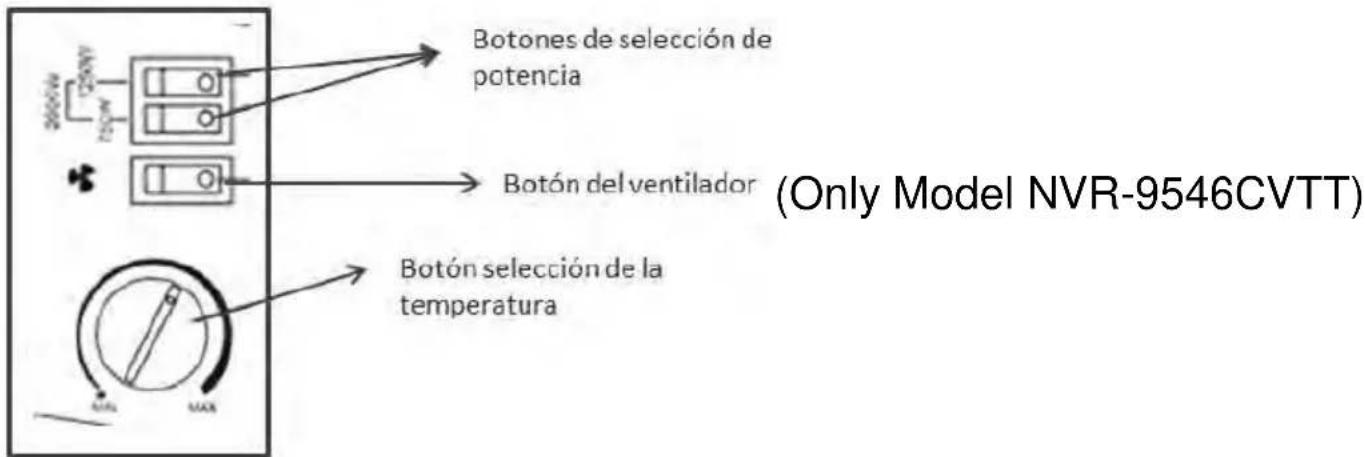
Turn on the heating elements by means of the rocker switches on the side panel. When the heating elements are on the switches will illuminate. For maximum heat output both switches should be on.
When the desired room temperature has been reached, the thermostat knob should be turned slowly anti-clockwise until is heard a ‘click’ on the thermostat and the lights on the elements are switched off. .After this the heater will keep the air temperature in the room at the set temperature by switching on and off automatically.
This model also incorporates an internal fan, which can be switched on independent of the heating elements. To use the fan, please use the button highlighted in below picture The fan will only operate with the thermostat in the “on” position and can be used when the heating elements are “on” to blow warm air into the room.
In warm conditions the fan can be used with the heating elements “off” to blow cool air into the room.
CLEANING AND MAINTENANCE
After use and before cleaning always unplug the appliance and wait until the item is cool.
The appliance should be cleaned regularly to stop dirt and dust building up which will affect its performance.
Wipe exterior surface of the appliance with a moistened cloth. Not rinse with water directly. Do not clean the painted-parts with emery-flour or solvents and use only a moistened-cloth.
Use the appliance when the body is dried completely after cleaning the heater.
To store the appliance, put the appliance back into its original packaging and store it in a clean dry place.

The European Directive on Waste Electrical and Electronic Equipment (WEEE) required that old household electrical appliances must not be disposed of in the normal unsorted municipal waste stream. Old appliances must be collected separately in order to optimize the recovery and recycling of the material they contain, and reduce the impact on human health and the environment. The crossed out “wheeled bin” symbol on the product remind you of your obligations that when you dispose of the appliance, it must be separately collected.
Besides that, waste batteries and/or accumulator must be removed prior to delivery of WEEE, thought the separated collection channels provided for this purpose (distributors and/or facilities from Local
Authorities)

ERP TABLE
| Detail | Symbol | Value | Unit | Item | Unit |
| Heat output | Type of heat input for electric storage local space heater only |
| Nominal heat output | Pnom | 1.8 kW | | manual heat charge control, with integrated thermostat | No |
| Minimum heat output(indicative) | Pmin | 1.3 | kW | manual heat charge control with room and/or outdoor temperature feedback | No |
| Maximum continuous heat output | Pmax,c | 2.00 | kW | electronic heat charge control with room and/or outdoor temperature feedback | No |
| Auxiliary electricity | | | | fan assisted heat output | No |
| At nominal heat output | elmax | N/A | kW | Type of heat output/room temperature control (select one) |
| At nominal heat output | elmin | N/A | kW | single stage heat output and no room temperature control | No |
| In standby mode | eISB | 0.00091 | kW | Two or more manual stages, no room temperature controlwith mechanic thermostat room temperature control | NoYES |
| | | | with electronic room temperature control | No |
| | | | electronic room temperature control plus day timer | No |
| | | | electronic room temperature control plus week timer | No |
| | | | Other control options (multiple selections possible) room temperature control, with presence detection | No |
| | | | room temperature control, with open window detection | No |
| | | | with distance control option | No |
| | | | with adaptive start control | No |
| | | | with working time limitation | No |
| | | | with black bulb sensor | No |
NEVIR S.A. declares under its responsibility that the indicated appliances meet the requirements of the following directives:
EMC DIRECTIVE
EN 55014-1:2006/+A1:2009/+A2:2011 EN55014-2:2015
EN61000-3-2:2014 EN61000-3-3:2013
the EMC directive(2014/30/EU)
LOW VOLTAGE EEC DIRECTIVE
EN 60335-2-30:2009+A11:2012
EN 60335-1:2012+AC:2014+A11:2014 EN62233:2008
Low Voltage Directive 2014/35/EU
Description of the appliances: CONVECTION HEATER
Model NEVIR: NVR-9545CVT / NVR-9546CVTT
Importer: NEVIR, S.A. (CIF: A-28966307)
Importer Address:
NEVIR, S.A.
C/ Canteros, 14


