
BSFSA 091 - Air conditioner BEKO - Free user manual and instructions
Find the device manual for free BSFSA 091 BEKO in PDF.


| Product Type | Split-type room air conditioner (cooling only) |
| Model | BSFSA 090 (indoor) / BSFSA 091 (outdoor) |
| Cooling Capacity | 2769 W (9448 Btu/h) |
| Heating Capacity | Not available (cooling only) |
| Power Supply | 220-240 V~, 50 Hz, 1 Ph |
| Power Input (Cooling) | 711 W |
| Current (Cooling) | 3.23 A |
| Refrigerant | R32, 500 g |
| Indoor Unit Noise Level | 39 dB(A) |
| Outdoor Unit Noise Level | 54 dB(A) |
| Indoor Unit Dimensions (WxDxH) | 805 x 194 x 285 mm |
| Indoor Unit Net Weight | 8.5 kg |
| Outdoor Unit Dimensions (WxDxH) | 681 x 285 x 434 mm |
| Outdoor Unit Net Weight | 28 kg |
| Connecting Pipe Diameter (Liquid) | Φ6.35 mm (1/4 inch) |
| Connecting Pipe Diameter (Vapor) | Φ9.52 mm (3/8 inch) |
| Airflow Volume | 520 m³/h |
| Climate Class | T1 |
| Auto-Restart | Yes – unit automatically resumes operation after power failure |
| Sleep Operation | Yes – gradually adjusts temperature for energy saving |
| Timer | Yes – ON/OFF timer available |
| Filter Cleaning Reminder | Yes – displays "CL" after 240 hours of use |
| Recommended Filter Cleaning Interval | Every 2 weeks |
| Refrigerant Leakage Detection | Yes – displays "EC" if leakage detected |
| Manual Control Button | Yes – for forced operation without remote |
Frequently Asked Questions - BSFSA 091 BEKO
User questions about BSFSA 091 BEKO
0 question about this device. Answer the ones you know or ask your own.
Ask a new question about this device
Download the instructions for your Air conditioner in PDF format for free! Find your manual BSFSA 091 - BEKO and take your electronic device back in hand. On this page are published all the documents necessary for the use of your device. BSFSA 091 by BEKO.
USER MANUAL BSFSA 091 BEKO
Split-type room air conditioner
User Manual

natural_image
Line drawing of a cylindrical air conditioner unit (no text or symbols)
BSFSA 050/BSFSA 051
BSFSA 090/BSFSA 091
BSFSA 120/BSFSA 121
EN

Read this manual carefully before installing or operating your new air conditioning unit. Make sure to save this manual for future reference.
Nomor : I.15.BAI3.01533.0219

Table of Contents
Owner's Manual
1 Safety Precautions....03
2 Unit Specifications and Features....05
- Indoor unit display ....05
- Other features ....07
- Normal Operating temperature 08
- Setting angle of airflow....09
3 Care and Maintenance....10
4 Troubleshooting....12
Disposal Guidelines
This marking shown on the product or its literature, indicates that waste electrical and electrical equipment should not be mixed with general household waste.

Correct Disposal of This Product (Waste Electrical & Electronic Equipment)
This symbol indicates that this product shall not be disposed with other household wastes at the end of its service life. Used device must be returned to official collection point for recycling of electrical and electronic devices. To find these collection systems please contact to your local authorities or retailer where the product was purchased. Each household performs important role in recovering and recycling of old appliance. Appropriate disposal of used appliance helps prevent potential negative consequences for the environment and human health.
Safety Precautions
1
Read Safety Precautions Before Operation and Installation
Incorrect installation due to ignoring instructions can cause serious damage or injury. The seriousness of potential damage or injuries is classified as either a WARNING or CAUTION.
WARNING
This symbol indicates that ignoring instructions may cause death or serious injury.

CAUTION
This symbol indicates that ignoring instructions may cause moderate injury to your person, or damage to your appliance or other property.

WARNING
This appliance can be used by children aged from 8 years and above and persons with reduced physical, sensory or mental capabilities or lack of experience and knowledge if they have been given supervision or instruction concerning use of the appliance in a safe way and understand the hazards involved. Children shall not play with the appliance. Cleaning and user maintenance shall not be made by children without supervision(EN Standard requirements).
This appliance is not intended for use by persons(including children) with reduced physical, sensory or mental capabilities, or lack of experience and knowledge, unless they have been given supervision or instruction concerning use of the appliance by a person responsible for their safety. Children should be supervised to ensure that they do not play with the appliance(IEC Standard requirements).
WARNINGS FOR PRODUCT USE
- If an abnormal situation arises (like a burning smell), immediately turn off the unit and disconnect the power. Call your dealer for instructions to avoid electric shock, fire or injury.
- Do not insert fingers, rods or other objects into the air inlet or outlet. This may cause injury, since the fan may be rotating at high speeds.
- Do not use flammable sprays such as hair spray, lacquer or paint near the unit. This may cause fire or combustion.
- Do not operate the air conditioner in places near or around combustible gases. Emitted gas may collect around the unit and cause explosion.
- Do not operate your air conditioner in a wet room such as a bathroom or laundry room. Too much exposure to water can cause electrical components to short circuit.
- Do not expose your body directly to cool air for a prolonged period of time.
- Do not allow children to play with the air conditioner. Children must be supervised around the unit at all times.
- If the air conditioner is used together with burners or other heating devices, thoroughly ventilate the room to avoid oxygen deficiency.
- In certain functional environments, such as kitchens, server rooms, etc., the use of specially designed air-conditioning units is highly recommended.
CLEANING AND MAINTENANCE WARNINGS
- Turn off the device and disconnect the power before cleaning. Failure to do so can cause electrical shock.
- Do not clean the air conditioner with excessive amounts of water.
- Do not clean the air conditioner with combustible cleaning agents. Combustible cleaning agents can cause fire or deformation.

CAUTION
- Turn off the air conditioner and disconnect the power if you are not going to use it for a long time.
- Turn off and unplug the unit during storms.
• Make sure that water condensation can drain unhindered from the unit. - Do not operate the air conditioner with wet hands. This may cause electric shock.
- Do not use device for any other purpose than its intended use.
- Do not climb onto or place objects on top of the outdoor unit.
- Do not allow the air conditioner to operate for long periods of time with doors or windows open, or if the humidity is very high.
- How to install the appliance to its support, please refer to the "INSTALLATION MANUAL" for details in "indoor unit installation" and "outdoor unit installation" sections.
Note about Fluorinated Gasses
- This air-conditioning unit contains fluorinated greenhouse gasses. For specific information on the type of gas and the amount, please refer to the relevant label on the unit itself or the "Owner's Manual - Product Fiche" in the packaging of the outdoor unit. (European Union products only).
- Installation, service, maintenance and repair of this unit must be performed by a certified technician.
- Product uninstallation and recycling must be performed by a certified technician.
- For equipment that contains fluorinated greenhouse gases in quantities of 5 tonnes of CO2 equivalent or more, but of less than 50 tonnes of CO2 equivalent, If the system has a leak-detection system installed, it must be checked for leaks at least every 24 months.
- When the unit is checked for leaks, proper record-keeping of all checks is strongly recommended.
Unit Specifications and Features
2
Unit Parts

"fresh " when Fresh feature is activated(some units)
"defrost" when defrost feature is activated.
"run " when the unit is on.
"timer " when TIMER is set.
" ∏ " when Wireless Control feature is activated(some units)
"88" Displays temperature, operation feature and Error codes:
When ECO function(some units) is activated, the
'88' illuminates gradually one by one as E -- C -- 0 --set temperature -- E ..... in one second interval.
"ON" for 3 seconds when:
- TIMER ON is set
- FRESH, SWING, TURBO, or SILENCE feature is turned on
"OF" for 3 seconds when:
- TIMER OFF is set
- FRESH, SWING, TURBO, or SILENCE feature is turned off
“ cF” when anti-cold air feature is turned on
"df" when defrosting
"5C" when unit is self-cleaning(some units)
"FP" when 8^ heating feature is turned on(some units)
Display Code Meanings

and Features
Unit specifications
“” when Fresh feature is activated(some units)
" ∽ " when Wireless Control feature is activated(some units)
“⏻” when the unit is on.
“①” when TIMER is set
“” when defrosting(cooling & heating units).
"26" Displays temperature, operation feature and Error codes:
When ECO function(some units) is activated, the '88' illuminates gradually one by one as E -- C -- O --set temperature -- E ..... in one second interval.
"ON" for 3 seconds when:
- TIMER ON is set - FRESH, SWING, TURBO, or SILENCE feature is turned on
"OF" for 3 seconds when:
- TIMER OFF is set - FRESH, SWING, TURBO, or SILENCE feature is turned off
“cF” when anti-cold air feature is turned on
"df" when defrosting
“5C” when unit is self-cleaning
"FP " when 8°C heating feature is turned on
Display Code Meanings
NOTE: Different models have different front panel and display window. Not all the indicators describing below are available for the air conditioner you purchased. Please check the indoor display window of the unit you purchased.
Illustrations in this manual are for explanatory purposes. The actual shape of your indoor unit may be slightly different. The actual shape shall prevail.
A guide on using the infrared remote is not included in this literature package. Not all the functions are available for the air conditioner, please check the indoor display and remote control of the unit you purchased.
Other Features
• Auto-Restart(some units)
If the unit loses power, it will automatically restart with the prior settings once power has been restored.
• Anti-mildew (some units)
When turning off the unit from COOL, AUTO (COOL), or DRY modes, the air conditioner will continue operate at very low power to dry up condensed water and prevent mildew growth.
• Wireless Control (some units)
Wireless control allows you to control your air conditioner using your mobile phone and a wireless connection.
For the USB device access, replacement, maintenance operations must be carried out by professional staff.
- Louver Angle Memory(some units)
When turning on your unit, the louver will automatically resume its former angle.
• Refrigerant Leakage Detection (some units)
The indoor unit will automatically display "EC" when it detects refrigerant leakage.
- Sleep Operation
The SLEEP function is used to decrease energy use while you sleep (and don't need the same temperature settings to stay comfortable). This function can only be activated via remote control. And the Sleep function is not available in FAN or DRY mode.
Press the SLEEP button when you are ready to go to sleep. When in COOL mode, the unit will increase the temperature by 1°C (2°F) after 1 hour, and will increase an additional 1°C (2°F) after another hour. When in HEAT mode, the unit will decrease the temperature by 1°C (2°F) after 1 hour, and will decrease an additional 1°C (2°F) after another hour.
For some units, the sleep feature will stop after 8 hours and the system will keep running with final situation.

flowchart
graph LR
    A["Set temperature"] --> B["Cool mode(+1℃/2℉) per hour for the first two hours"]
    B --> C["Heat mode(-1℃/2℉) per hour for the first two hours"]
    C --> D["Keep running"]
    E["Saving energy during sleep"] --> F["Sun"]
    G["Bed with person sleeping"] --> H["Bed with person sleeping"]
For some units, the unit will turn off after 7 hours.

flowchart
graph LR
    A["Set temperature"] --> B["Cool mode(+1°C/2°F) per hour for the first two hours"]
    B --> C["Heat mode(-1°C/2°F) per hour for the first two hours"]
    C --> D["Hold the new temperature for 5 hours"]
    D --> E["7 hours timer off"]
    E --> F["Saving energy during sleep"]
Normal Operating temperature
When your air conditioner is used outside of the following temperature ranges, certain safety protection features will activate and cause the unit to disable.
Inverter Split Type
| COOL mode HEAT mode DRY mode | |||
| Room Temperature | 17°C - 32°C(63°F - 90°F) | 0°C - 30°C(32°F - 86°F) | 10°C - 32°C(50°F - 90°F) |
| Outdoor Temperature | 0°C - 50°C(32°F - 122°F) | -15°C - 30°C(5°F - 86°F) | 0°C - 50°C(32°F - 122°F) |
| -15°C - 50°C(5°F - 122°F)(For models with low temp. cooling systems.) | |||
| 0°C - 52°C(32°F - 126°F)(For special tropical models) | 0°C - 52°C(32°F - 126°F)(For special tropical models) | ||
FOR OUTDOOR UNITS WITH AUXILIARY ELECTRIC HEATER
When outside temperature is below 0^ C ( 32^ F), we strongly recommend keeping the unit plugged in at all time to ensure smooth ongoing performance.
Fixed-speed Type
| COOL mode | HEAT mode | DRY mode | |
| Room Temperature | 17°C-32°C (63°F-90°F) | 0°C-30°C(32°F-86°F) | 10°C-32°C (50°F-90°F) |
| Outdoor Temperature | 18°C-43°C (64°F-109°F) | -7°C-24°C(19°F-75°F) | 11°C-43°C (52°F-109°F) |
| -7°C-43°C (19°F-109°F)(For models with low-temp cooling systems) | 18°C-43°C (64°F-109°F) | ||
| 18°C-52°C (64°F-126°F)(For special tropical models) | 18°C-52°C (64°F-126°F)(For special tropical models) |
NOTE: Room relative humidity less than 80%. If the air conditioner operates in excess of this figure, the surface of the air conditioner may attract condensation. Please sets the vertical air flow louver to its maximum angle (vertically to the floor), and set HIGH fan mode.
To further optimize the performance of your unit, do the following:
- Keep doors and windows closed.
- Limit energy usage by using TIMER ON and TIMER OFF functions.
- Do not block air inlets or outlets.
- Regularly inspect and clean air filters.
- Setting Angle of Air Flow
Setting vertical angle of air flow
While the unit is on, use the SWING/DIRECT button on remote control to set the direction (vertical angle) of airflow. Please refer to the Remote Control Manual for details.
NOTE ON LOUVER ANGLES
When using COOL or DRY mode, do not set louver at too vertical an angle for long periods of time. This can cause water to condense on the louver blade, which will drop on your floor or furnishings.
When using COOL or HEAT mode, setting the louver at too vertical an angle can reduce the performance of the unit due to restricted air flow.
Setting horizontal angle of air flow
The horizontal angle of the airflow must be set manually. Grip the deflector rod (See Fig.B) and manually adjust it to your preferred direction. For some units, the horizontal angle of the airflow can be set by remote control. please refer to the Remote Control Manual.
Manual Operation(without remote)

CAUTION
The manual button is intended for testing purposes and emergency operation only. Please do not use this function unless the remote control is lost and it is absolutely necessary. To restore regular operation, use the remote control to activate the unit. Unit must be turned off before manual operation.
To operate your unit manually:
- Open the front panel of the indoor unit.
- Locate the MANUAL CONTROL button on the right-hand side of the unit.
- Press the MANUAL CONTROL button one time to activate FORCED AUTO mode.
- Press the MANUAL CONTROL button again to activate FORCED COOLING mode.
- Press the MANUAL CONTROL button a third time to turn the unit off.
- Close the front panel.
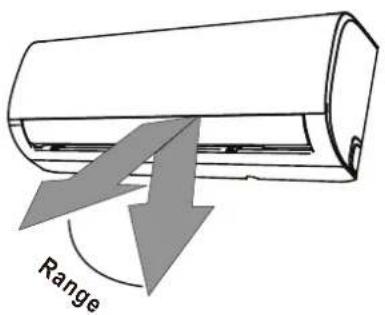
NOTE: Do not move louver by hand. This will cause the louver to become out of sync. If this occurs, turn off the unit and unplug it for a few seconds, then restart the unit. This will reset the louver.
Fig. A

CAUTION
Do not put your fingers in or near the blower and suction side of the unit. The high-speed fan inside the unit may cause injury.
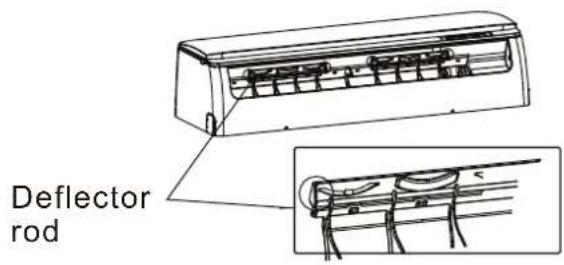
Fig. B

Care and Maintenance
3
Cleaning Your Indoor Unit

BEFORE CLEANING OR MAINTENANCE
ALWAYS TURN OFF YOUR AIR CONDITIONER SYSTEM AND DISCONNECT ITS POWER SUPPLY BEFORE CLEANING OR MAINTENANCE.

CAUTION
Only use a soft, dry cloth to wipe the unit clean. If the unit is especially dirty, you can use a cloth soaked in warm water to wipe it clean.
- Do not use chemicals or chemically treated cloths to clean the unit
- Do not use benzene, paint thinner, polishing powder or other solvents to clean the unit. They can cause the plastic surface to crack or deform.
- Do not use water hotter than 40°C (104°F) to clean the front panel. This can cause the panel to deform or become discolored.
Cleaning Your Air Filter
A clogged air conditioner can reduce the cooling efficiency of your unit, and can also be bad for your health. Make sure to clean the filter once every two weeks.
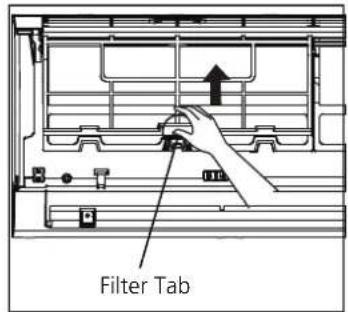
- Lift the front panel of the indoor unit.
- First press the tab on the end of filter to loosen the buckle, lift it up, then pull it towards yourself.
- Now pull the filter out.
- If your filter has a small air freshening filter, unclip it from the larger filter. Clean this air freshening filter with a hand-held vacuum.
-
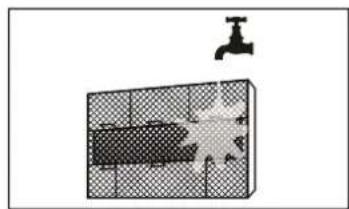
Clean the large air filter with warm, soapy water. Be sure to use a mild detergent.
-
Rinse the filter with fresh water, then shake off excess water.
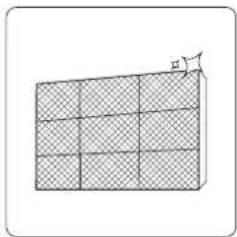
- Dry it in a cool, dry place, and refrain from exposing it to direct sunlight.
- When dry, re-clip the air freshening filter to the larger filter, then slide it back into the indoor unit.
- Close the front panel of the indoor unit.

natural_image
Hand placing a black arrow on a patterned panel inside a container (no text or symbols visible)
natural_image
Diagram showing a faucet above a grid-patterned object with a central explosion (no text or symbols)
CAUTION
Do not touch air freshening (Plasma) filter for at least 10 minutes after turning off the unit.

CAUTION
- Before changing the filter or cleaning, turn off the unit and disconnect its power supply.
- When removing filter, do not touch metal parts in the unit. The sharp metal edges can cut you.
- Do not use water to clean the inside of the indoor unit. This can destroy insulation and cause electrical shock.
- Do not expose filter to direct sunlight when drying. This can shrink the filter.
Air Filter Reminders (Optional)
Air Filter Cleaning Reminder
After 240 hours of use, the display window on the indoor unit will flash "CL." This is a reminder to clean your filter. After 15 seconds, the unit will revert to its previous display.
To reset the reminder, press the LED button on your remote control 4 times, or press the
MANUAL CONTROL button 3 times. If you don't reset the reminder, the "CL" indicator will flash again when you restart the unit.
Air Filter Replacement Reminder
After 2,880 hours of use, the display window on the indoor unit will flash "nF." This is a reminder to replace your filter. After 15 seconds, the unit will revert to its previous display.
To reset the reminder, press the LED button on your remote control 4 times, or press the
MANUAL CONTROL button 3 times. If you don't reset the reminder, the "nF" indicator will flash again when you restart the unit.

CAUTION
- Any maintenance and cleaning of outdoor unit should be performed by an authorized dealer or a licensed service provider.
- Any unit repairs should be performed by an authorized dealer or a licensed service provider.
Maintenance – Long Periods of Non-Use
If you plan not to use your air conditioner for an extended period of time, do the following:
natural_image
Diagram of a 3D rectangular block with a grid pattern and an arrow labeled 'E' pointing upward (no text or symbols on the block itself)Clean all filters

natural_image
Simple line drawing of a house with wavy lines inside, no text or symbols presentTurn on FAN function until unit dries out completely

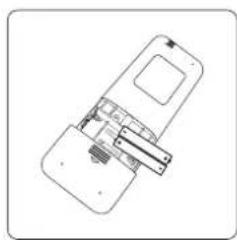
Turn off the unit aRemove batteries disconnect the power from
natural_image
Diagram of a smartphone with internal components and a handle, no visible text or symbolsfrom remote control
Maintenance – Pre-Season Inspection
After long periods of non-use, or before periods of frequent use, do the following:
natural_image
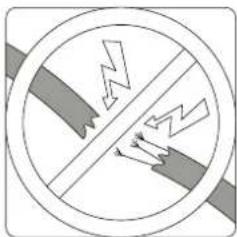
Cross-sectional diagram of a hazard symbol with lightning and ground symbols (no text or labels)Check for damaged wires Clean all filters
natural_image
Diagram of a 3D grid structure with a small arrow labeled 'H' pointing to the top-right corner (no text or symbols on the grid itself)
natural_image
Technical line drawing of a mechanical assembly or device with no visible text or symbols
natural_image
Prohibition sign with diagonal line and droplet symbols inside a circle (no text)Check for leaks Replace batteries


Make sure nothing is blocking all air inlets and outlets
Troubleshooting
4

SAFETY PRECAUTIONS
If ANY of the following conditions occurs, turn off your unit immediately!
- The power cord is damaged or abnormally warm
- You smell a burning odor
- The unit emits loud or abnormal sounds
- A power fuse blows or the circuit breaker frequently trips
• Water or other objects fall into or out of the unit
DO NOT ATTEMPT TO FIX THESE YOURSELF! CONTACT AN AUTHORIZED SERVICE PROVIDER IMMEDIATELY!
Common Issues
The following problems are not a malfunction and in most situations will not require repairs.
Issue Possible Causes
| Unit does not turn on when pressing ON/OFF button | The Unit has a 3-minute protection feature that prevents the unit from overloading. The unit cannot be restarted within three minutes of being turned off. |
| The unit changes from COOL/HEAT mode to FAN mode | The unit may change its setting to prevent frost from forming on the unit. Once the temperature increases, the unit will start operating in the previously selected mode again. |
| The set temperature has been reached, at which point the unit turns off the compressor. The unit will continue operating when the temperature fluctuates again. | |
| The indoor unit emits white mist | In humid regions, a large temperature difference between the room's air and the conditioned air can cause white mist. |
| Both the indoor and outdoor units emit white mist | When the unit restarts in HEAT mode after defrosting, white mist may be emitted due to moisture generated from the defrosting process. |
Issue Possible Causes
| The indoor unit makes noises | A rushing air sound may occur when the louver resets its position. |
| A squeaking sound may occur after running the unit in HEAT mode due to expansion and contraction of the unit's plastic parts. | |
| Both the indoor unit and outdoor unit make noises | Low hissing sound during operation: This is normal and is caused by refrigerant gas flowing through both indoor and outdoor units. |
| Low hissing sound when the system starts, has just stopped running, or is defrosting: This noise is normal and is caused by the refrigerant gas stopping or changing direction. | |
| Squeaking sound: Normal expansion and contraction of plastic and metal parts caused by temperature changes during operation can cause squeaking noises. | |
| The outdoor unit makes noises | The unit will make different sounds based on its current operating mode. |
| Dust is emitted from either the indoor or outdoor unit | The unit may accumulate dust during extended periods of non-use, which will be emitted when the unit is turned on. This can be mitigated by covering the unit during long periods of inactivity. |
| The unit emits a bad odor | The unit may absorb odors from the environment (such as furniture, cooking, cigarettes, etc.) which will be emitted during operations. |
| The unit's filters have become moldy and should be cleaned. | |
| The fan of the outdoor unit does not operate | During operation, the fan speed is controlled to optimize product operation. |
| Operation is erratic, unpredictable, or unit is unresponsive | Interference from cell phone towers and remote boosters may cause the unit to malfunction.In this case, try the following:Disconnect the power, then reconnect.Press ON/OFF button on remote control to restart operation. |
NOTE: If problem persists, contact a local dealer or your nearest customer service center. Provide them with a detailed description of the unit malfunction as well as your model number.
Troubleshooting
When troubles occur, please check the following points before contacting a repair company.
Problem Possible Causes Solution
| Poor Cooling Performance | Temperature setting may be higher than ambient room temperature | Lower the temperature setting |
| The heat exchanger on the indoor or outdoor unit is dirty | Clean the affected heat exchanger | |
| The air filter is dirty | Remove the filter and clean it according to instructions | |
| The air inlet or outlet of either unit is blocked | Turn the unit off, remove the obstruction and turn it back on | |
| Doors and windows are open | Make sure that all doors and windows are closed while operating the unit | |
| Excessive heat is generated by sunlight | Close windows and curtains during periods of high heat or bright sunshine | |
| Too many sources of heat in the room (people, computers, electronics, etc.) | Reduce amount of heat sources | |
| Low refrigerant due to leak or long-term use | Check for leaks, re-seal if necessary and top off refrigerant | |
| SILENCE function is activated(optional function) | SILENCE function can lower product performance by reducing operating frequency. Turn off SILENCE function. | |
| Problem Possible Causes Solution | ||
| The unit is not working | Power failure | Wait for the power to be restored |
| The power is turned off Turn on the power | ||
| The fuse is burned out Replace the fuse | ||
| Remote control batteries are dead | Replace batteries | |
| The Unit's 3-minute protection has been activated | Wait three minutes after restarting the unit | |
| Timer is activated Turn timer off | ||
| The unit starts and stops frequently | There's too much or too little refrigerant in the system | Check for leaks and recharge the system with refrigerant. |
| Incompressible gas or moisture has entered the system. | Evacuate and recharge the system with refrigerant | |
| The compressor is broken Replace the compressor | ||
| The voltage is too high or too low | Install a manostat to regulate the voltage | |
| Poor heating performance | The outdoor temperature is extremely low | Use auxiliary heating device |
| Cold air is entering through doors and windows | Make sure that all doors and windows are closed during use | |
| Low refrigerant due to leak or long-term use | Check for leaks, re-seal if necessary and top off refrigerant | |
| Indicator lamps continue flashing | The unit may stop operation or continue to run safely. If the indicator lamps continue to flash or error codes appear, wait for about 10 minutes. The problem may resolve itself. If not, disconnect the power, then connect it again. Turn the unit on.If the problem persists, disconnect the power and contact your nearest customer service center. | |
| Error code appears in the window display of indoor unit:• E0, E1, E2...• P1, P2, P3...• F1, F2, F3... | ||
NOTE: If your problem persists after performing the checks and diagnostics above, turn off your unit immediately and contact an authorized service center.
The design and specifications are subject to change without prior notice for product improvement. Consult with the sales agency or manufacturer for details. Any updates to the manual will be uploaded to the service website, please check for the latest version.
| Type | Indoor unit | BSFSA 050 BSFSA 090 BSFSA | 120 | |
| Outdoor unit | BSFSA 051 BSFSA 091 BSFSA | 121 | ||
| Climate Mode | T1 T1 T1 | |||
| Cooling capacity(W) / Heating capacity(W) | 1525 / - 2769 / - 3523 / - | |||
| Cooling capacity(Btu/Hr)/ Heating capacity(Btu/Hr) | 5203 / - 9448 / - 12019 / - | |||
| EER (Btu/hw) | 14.54 13.28 | 11.03 | ||
| Star Level | 4 4 4 | |||
| Air Flow volume(m3/h) | 380 520 551 | |||
| Power Supply form(V/Hz/Ph) | 220-240V~ /50Hz / 1Ph | 220-240V~ /50Hz / 1Ph | 220-240V~ /50Hz / 1Ph | |
| PowerInput(W) C | Cooling / Heating 358 / - 711 / - 1 | 090 / - | ||
| Current(A) Cooling | / Heating 1.63 / - 3.23 / - 4.95 | / - | ||
| Refrigerant /Total gas quantity(g) | R32 / 320 R32 / 500 R32 / 450 | |||
| Noise SoundPressure(dB) | Indoor unit | 35 | 39 | 40 |
| Outdoor unit | 49 | 54 | 53 | |
| Indoor | Size of shape(WxDxH)(mm) | 715x194x285 | 805x194x285 | 805x194x285 |
| Net weight(Kg) | 8 | 8.5 | 9 | |
| Outdoor | Size of shape(WxDxH)(mm) | 681x285x434 | 681x285x434 | 770x300x555 |
| Net weight(Kg) | 18.5 | 28 | 28 | |
| Diameter ofconnectingpipe(mm) | Liquid tube | Φ6.35(1/4") | Φ6.35(1/4") | Φ6.35(1/4") |
| Vapor tube | Φ9.52(3/8") | Φ9.52(3/8") | Φ12.7(1/2") | |
Notes: 1, Specifications are standard values calculated based on rated operating conditions,
They will vary in difference work condition.
2, Rated Cooling value is tested under 27/19(In.) 35/24(Out.) condition.

natural_image
Abstract geometric design with blue triangular shapes on white background (no text or symbols)natural_image
Line drawing of a cylindrical air conditioner unit with cooling fins and ventilation slots (no text or symbols)
BSFSA 050/BSFSA 051
BSFSA 090/BSFSA 091
BSFSA 120/BSFSA 121
ID
CATATAN PENTING:
natural_image
Simple line drawing of a trash bin with crossed lines indicating no waste or discharge (no text or symbols)natural_image
Diagram of a vehicle interior with a checkered patterned panel and hand interacting (no text or symbols)

natural_image
Diagram showing a bathroom with a faucet and tiled floor, no text or symbols present
PERHATIAN
natural_image
Diagram of a 3D rectangular block with checkered pattern and a small protrusion labeled 'H' (no text or symbols on the block itself)natural_image
Simple line drawing of a house with airflow lines inside (no text or symbols)natural_image
Technical line drawing of a device with internal components (no text or symbols)Periksa kerusakan kabel

natural_image
Diagram of a grid-patterned rectangular block with a small cat on top (no text or symbols)Periksa kebocoran

natural_image
Technical line drawing of a device with internal components (no text or symbols)Ganti baterai
natural_image
Abstract geometric design with blue triangular shapes on white background (no text or symbols)
PT. BEKO APPLIANCES INDONESIA,
The Plaza Office Tower Lt. 22 Unit F2-F3
22 Lingang Road, Northern of No.5 Industrial District Beijiao,
Shunde, Foshan, Guangdong. P.R. China.
Made in China
www.beko.com
- Split-type room air conditioner
- Table of Contents
- Owner's Manual
- Disposal Guidelines
- Safety Precautions
- 1
- Read Safety Precautions Before Operation and Installation
- WARNING
- CAUTION
- WARNINGS FOR PRODUCT USE
- CLEANING AND MAINTENANCE WARNINGS
- Note about Fluorinated Gasses
- Unit Specifications and Features
- 2
- Display Code Meanings
- Other Features
- Normal Operating temperature
- FOR OUTDOOR UNITS WITH AUXILIARY ELECTRIC HEATER
- To further optimize the performance of your unit, do the following:
- - Setting Angle of Air Flow
- Setting vertical angle of air flow
- NOTE ON LOUVER ANGLES
- Setting horizontal angle of air flow
- Manual Operation(without remote)
- Care and Maintenance
- 3
- Cleaning Your Indoor Unit
- BEFORE CLEANING OR MAINTENANCE
- Cleaning Your Air Filter
- Air Filter Reminders (Optional)
- Air Filter Cleaning Reminder
- Air Filter Replacement Reminder
- Maintenance – Long Periods of Non-Use
- Maintenance – Pre-Season Inspection
- Troubleshooting
- 4
- DO NOT ATTEMPT TO FIX THESE YOURSELF! CONTACT AN AUTHORIZED SERVICE PROVIDER IMMEDIATELY!
- Common Issues
- PERHATIAN
Brand : BEKO
Model : BSFSA 091
Category : Air conditioner