
EVO-CF52CG - Household Fan Evolar - Free user manual and instructions
Find the device manual for free EVO-CF52CG Evolar in PDF.


| Product Type | Ceiling Fan |
| Brand | Evolar |
| Model | EVO-CF52CG |
| Blade Span | 52 inches (132 cm) |
| Number of Blades | 5 |
| Motor Type | AC Motor |
| Mounting Type | Downrod (included) or Flush mount |
| Control Type | Remote Control (included) |
| Reversible Motor | Yes (for summer/winter operation) |
| Light Kit Compatible | Yes (installation instructions provided) |
| Power Supply | 120 V AC, 60 Hz |
| Maximum Weight Capacity of Mounting Box | 100 lbs (45.4 kg) minimum for support |
| Minimum Ceiling Clearance | 7 ft (2.3 m) |
| Recommended Room Size | Up to 400 sq ft |
| Installation Requirements | Fan-rated electrical box required; do not use dimmer switch |
| Cleaning Instructions | Use dry or lightly dampened cloth; no detergents |
| Balancing Kit | Included (clip and weights) |
| Safety Certifications | Meets applicable safety standards (verify with local codes) |
| Warranty | Refer to product documentation |
Frequently Asked Questions - EVO-CF52CG Evolar
User questions about EVO-CF52CG Evolar
0 question about this device. Answer the ones you know or ask your own.
Ask a new question about this device
Download the instructions for your Household Fan in PDF format for free! Find your manual EVO-CF52CG - Evolar and take your electronic device back in hand. On this page are published all the documents necessary for the use of your device. EVO-CF52CG by Evolar.
USER MANUAL EVO-CF52CG Evolar
natural_image
Line drawing of a five-blade ceiling fan with a central hub and four blades (no text or symbols)EVO-CF52CG/MW/SN
natural_image
Row of eight black-and-white icons representing various objects or tools, including a ladder, tools, and a hammer (no text or symbols present)natural_image
Collection of mechanical parts including washers, bolts, and a small component (no text or symbols visible)natural_image
Three simple geometric shapes: two overlapping squares and one with a folded paper-like form (no text or symbols)
natural_image
Simple line drawing of an open book with a lowercase 'i' symbol on the right page (no text or labels)Plafondventilator installeren
Stap 1 - Verlengstang en motor monteren
1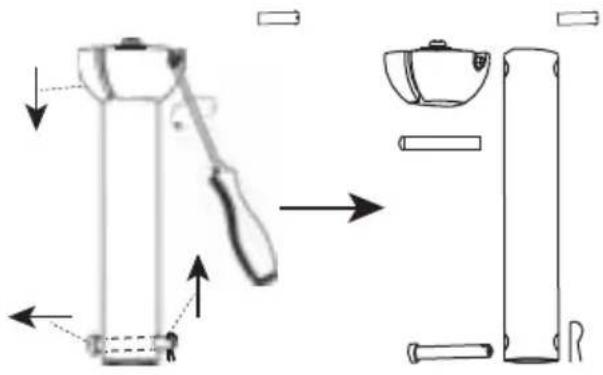 | 2 |
3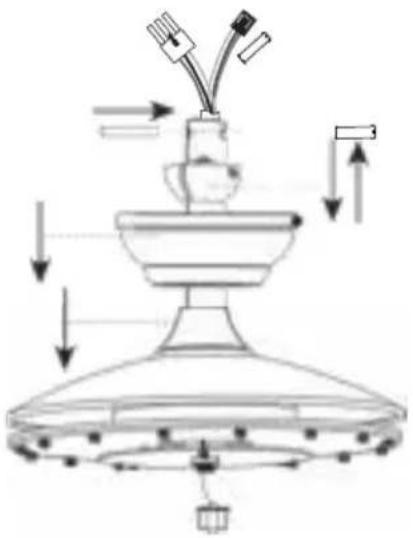 | |
4 | |
Stap 2 - Plafondhouder en ventilatorelement installeren
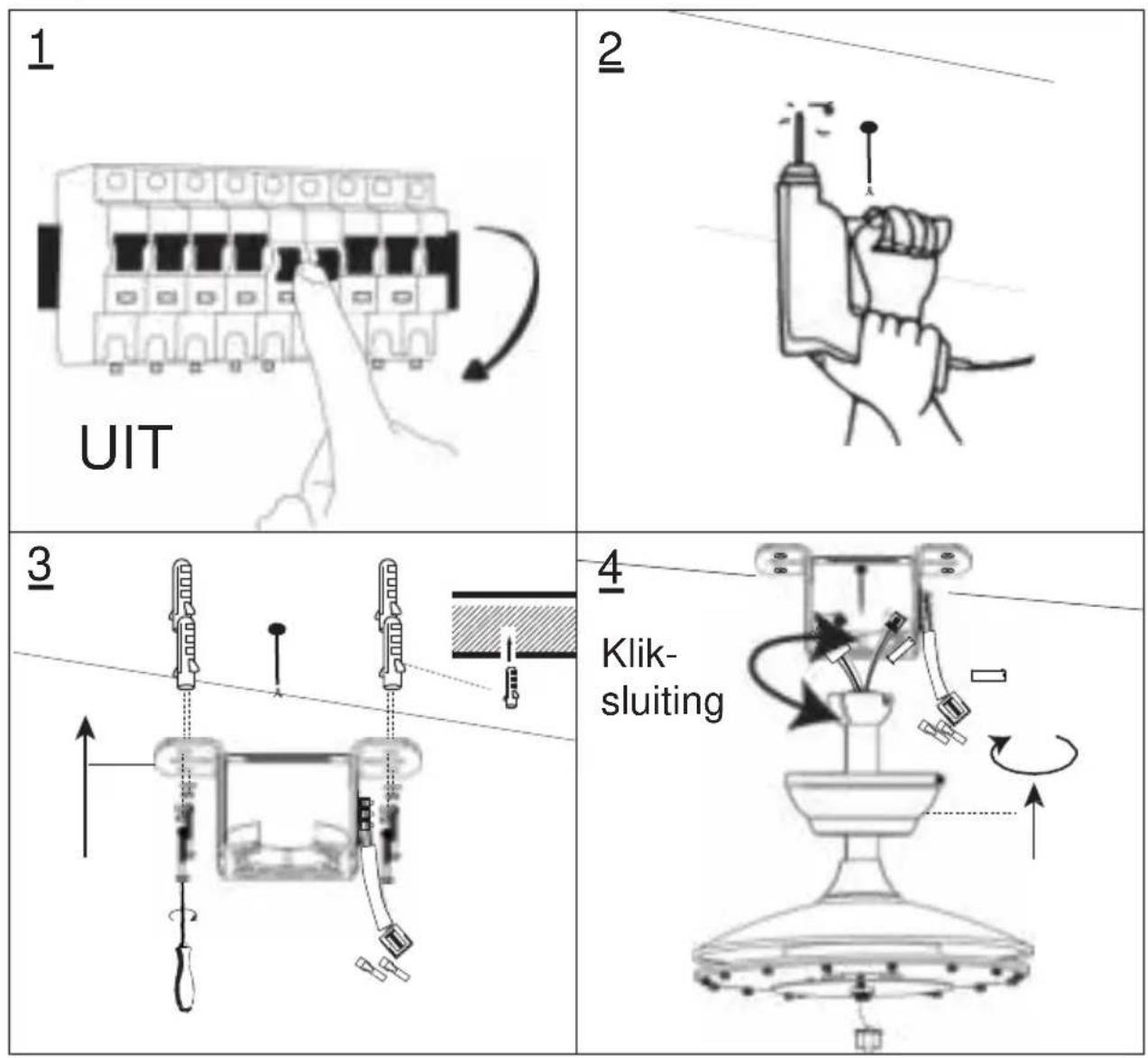
flowchart
graph TD
    A["1: UIT"] --> B["2: Hand Tool Application"]
    B --> C["3: Klik-sluiting"]
    C --> D["4: Shipment with Switch"]
natural_image
Line drawing of a ceiling fan with attached blades and hanging weights (no text or symbols)natural_image
Line drawing of a five-petal fan with a rotating base and directional arrow (no text or symbols)Stap 5 - Ventilator inschakelen


natural_image
Simple line drawing of an open remote with two circular gauges and a signal icon (no text or symbols)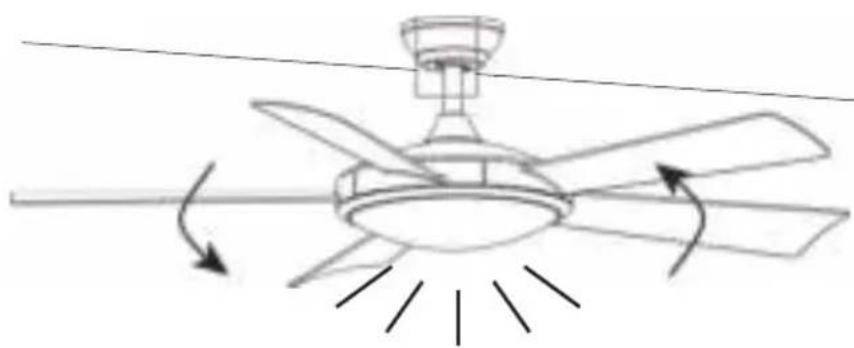
natural_image
Line drawing of a ceiling fan with five blades and directional arrows indicating airflow or rotation (no text or symbols)Ventilator trilt of wiebelt
natural_image
Simple line drawing of a curved object with a labeled point (1) and a small attached component, no text or symbols present.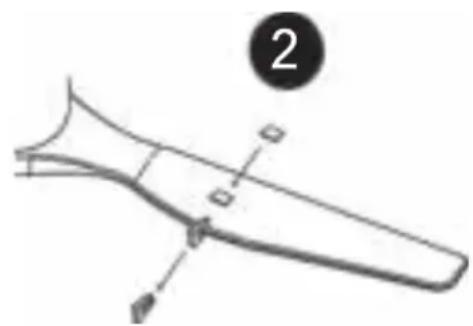
natural_image
Diagram of a curved mechanical component with labeled parts (no text or symbols present)evolar

natural_image
Line drawing of a five-blade ceiling fan with a top-mounted head (no text or symbols)EVO-CF52CG/MW/SN
Ceiling fan Installation instructions
SAFETY TIPS
WARNING: To reduce the risk of electrical shock, turn off the electricity to the fan at the main fuse box or circuit panel before you begin the fan installation or before servicing the fan or installing accessories.
READ ALL INSTRUCTIONS AND SAFETY INFORMATION CAREFULLY BEFORE INSTALLING YOUR FAN AND SAVE THESE INSTRUCTIONS.
CAUTION: To avoid personal injury, the use of gloves may be necessary while handling fan parts with sharp edges.
-
Make sure all electrical connections comply with Local Codes or Ordinances, the National Electrical Code. If you are unfamiliar with electrical wiring or if the house/building wires are different colors than those referred to in the instruction please use a qualified electrician.
-
Make sure you have a location selected for your fan that allows clear space for the blades to rotate and at least seven (7) feet (2.3 meters) of clearance between the floor and the fan blade tips. The fan should be mounted so that the tips of the blades are at least thirty (30) inches (76 centimeters) from walls or other upright structures.
-
The outlet box and ceiling support joist used must be securely mounted, and capable of supporting at least 100 Pounds (45.4 kilograms). The outlet box must be supported directly by the building structure. Make sure the electrical box that will hold the ceiling fan is fan-rated. There should be an inscription on the box indicating it.
WARNING: To reduce the risk of fire, electrical shock, or personal injury, mount to the outlet box marked “Acceptable for Fan Support,” and use the mounting screws provided with the outlet box. Most outlet boxes commonly used for the support of lighting fixtures are not acceptable for fan support and may need to be replaced. Consult a qualified electrician if in doubt.
- After making electrical connections, spliced conductors should be turned upward and pushed carefully up into the outlet box. The wires should be spread apart with the grounded conductor and the equipment-grounding conductor on opposite sides of the outlet box.
WARNING: To reduce the risk of electrical shock, fire and to prevent humming noise do not use this fan with any solid state speed control device or control fan speed with a full range dimmer switch. Using a full range dimmer switch to control fan speed will cause a loud humming noise from fan.
- Do not operate the reverse switch until fan has come to a complete stop.(If included Forward/Reverse Switch)
6.Do not insert anything between the fan blades while they are rotating.
WARNING: To reduce the risk of personal Injury, do not bend the blade brackets when installing the brackets, balancing the blades, or cleaning the fan. Do not insert foreign objects in between rotating fan blades.
WARNING: To avoid personal injury or damage to the fan and other items, be cautious when working around or cleaning the fan.
- Do not use water or detergents when cleaning the fan or fan blades. A dry dust cloth or lightly dampened cloth will be suitable for most cleaning.
WARNING: To reduce the risk of personal injury, use only parts provided with this fan. The use of parts OTHER than those provided with this fan will void the warranty.
NOTE: The important safety precautions and instructions appearing in the manual are not meant to Cover all possible conditions and situations that may occur. It must be understood that common sense and caution are necessary factors in the installation and operation of this fan.
Preparing for installation

Package Lists

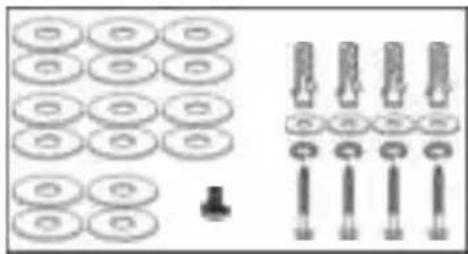
Installation kit
natural_image
Collection of mechanical parts including washers, bolts, and a small component (no text or symbols)Blade balancing kit Instructions manual

natural_image
Three simple geometric shapes: two overlapping squares and one with a folded paperclip (no text or symbols)
natural_image
Simple line drawing of an open book with a lowercase 'i' symbol on the right page (no text or labels)Installing the ceiling fan
Step 1(Down rod and motor assembling)
1 | 2 |
3 | |
4 | |
Step 2 (Ceiling bracket and fan body installation)
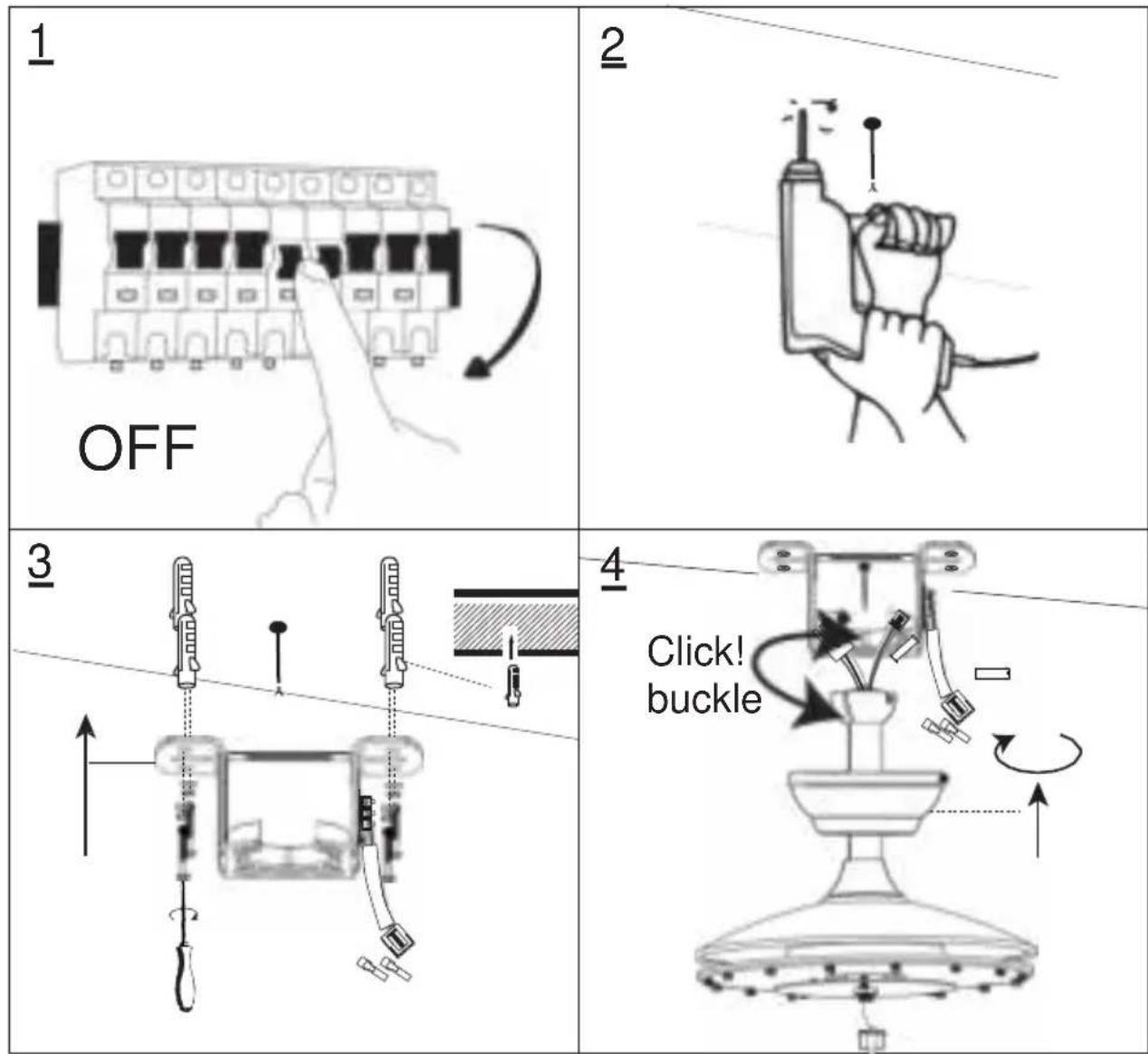
Step 3 (Put receiver into ceiling bracket and wiring)

Step 4 ( Blades and Light kit installation)
1

natural_image
Line drawing of a ceiling fan with attached screwdriver and fan blade (no text or symbols)Take out the pre-installed screws, aim the blades to the right hole position and then screw tightly
2
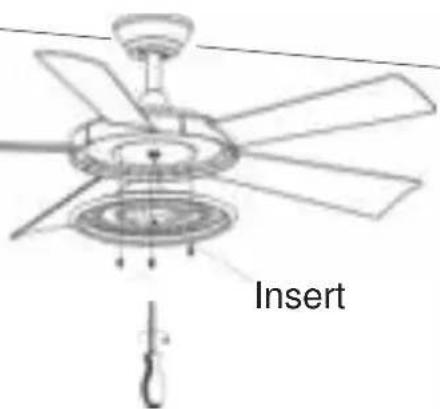
Remove the pre-installed screws. Connect the light kit cable, and then lock the light kit.
3
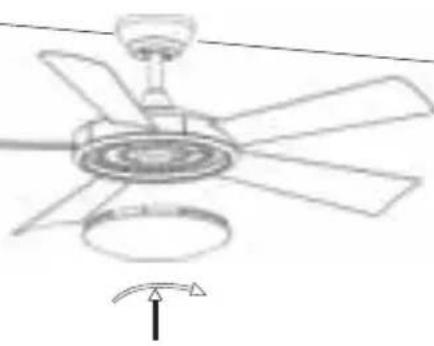
natural_image
Line drawing of a five-petal air conditioner fan with a rotating base and airflow direction indicator (no text or symbols)Step 5(Switch on and ceiling fan works)


natural_image
Line drawing of a ceiling fan with five blades and directional arrows indicating airflow or rotation (no text or symbols)
natural_image
Simple line drawing of an open box with internal circular elements and a Wi-Fi signal icon (no text or symbols)Remote control (emitter) operation
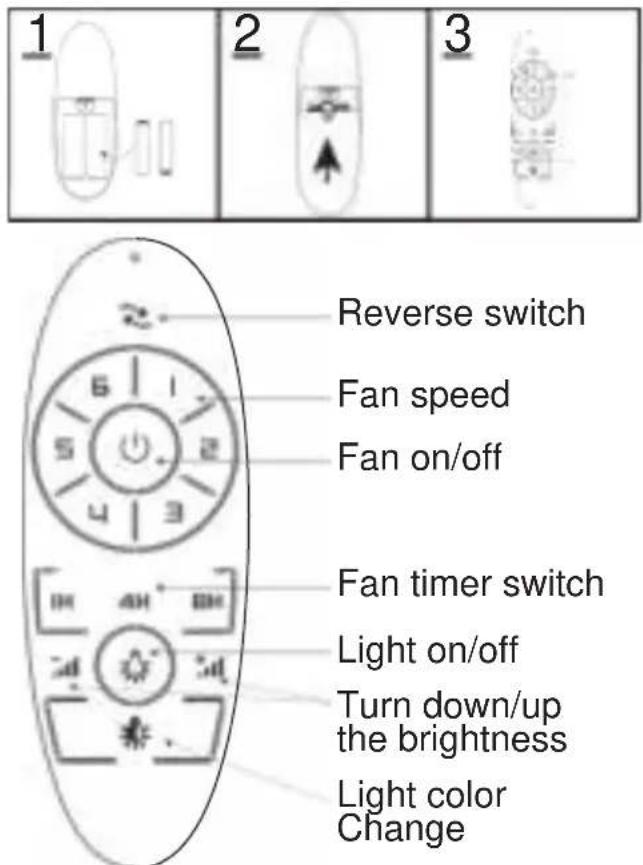
If emitter can not control the far
- Please check whether the battery is installed correctly and whether it is charged. If necessary, replace the remote control battery.
- Please check if there are similar remote control products working nearby, because remote control products of the same frequency will interfere with each other.
- Use learning code matching mode is used between emitter and receiver Turn "ON" the supply power within 30 seconds and press the emitter, 's " 🔊" button for 5 seconds. it can load normally after hearing a long sound"bee", which means learning successfully and it can works normally.
TroubleShooting
Fan does not work
- Check all fuses or circuit breakers if disconnecting the power supply to the fan.
- Turn off electrical power and check all wire connections to fan and in switch housing. It must be carried out by a electrician
Fan is noisy
- Assure that the screws fastening blade arm to motor are tight and the lock washers provided for that purpose have been used
- Lower the upper canopy to ensure a separation from the ceiling of no less than 3mm to reduce noisy
- Check to see if any of the blades are cracked .If so,replace all of the blades
- If this is the first use, leave the fan on for at least 8 hours. In the event that mechanical noise continues after this period, contact certified electrician
Fan turns but airflow is inadequate
- The fan may be running in reverse, so air is going upward.
- The room may contain items that obstruct the air flow.
- The fan may be too small for size of the room.
Fan shakes or wobbles
e1. The fan blades are not parallel to the ceiling .See Fig.1 how to inspect
2. Make sure mounting bracket is tightened at outlet box with no movement at all.
3. Make sure all screws holding the blades to the blade arm and blade arm to motor are tight.
4. Use the balance kit and instructions to balance the fan. Please see the last pages described.
Balancing – Wobbling problems during fan operation
If the fan body wobbles during its operation, this is not a sign of malfunctioning (even if it wobbles a few centimeters). To reduce wobbling, you can, while the fan is off:
- Check that all blades are properly fastened by tightening their screws.
- Check the distance between each blade and the ceiling. Measurements to the ceiling can be carried out as shown in the following diagram. If variations exist and you have already correctly tightened the screws, check that all blades have the same shape. If any of them have a shape that is visibly different, this may be causing an imbalance during fan operation.
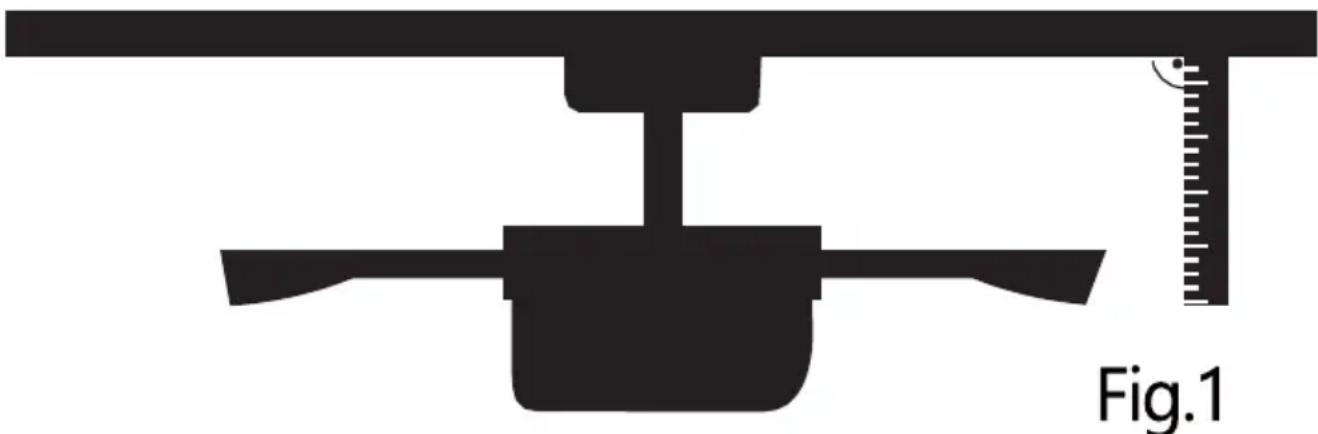
natural_image
Silhouette of a mechanical device with a ruler and scale, labeled Fig.1 (no text or symbols on the diagram itself)If you have completed the previous steps and the wobbling has not resolved, you should apply dynamic balancing with the kit provided, as explained below:
- Turn the fan on to the highest speed so that the greatest amount of wobbling is produced.
- Turn off the fan. Select a blade and place a clip on it (see diagram) halfway between the fastening and the far edge of the blade.
- Turn on the fan and check whether the wobbling has improved or gotten worse. Turn it off once again and if the wobbling has not improved, place the clip on another blade. Repeat this process and determine on which blade it improves the wobbling.
- Leave the clip on the blade that produces the best results. Move the clip forward or backwards on this blade until finding the position that offers the best results.
- Afterwards, remove the clip and place one of the weights on the upper part of the center line of the blade at the position where the clip was located.

natural_image
Simple line drawing of a tool or device with a numbered label (1) and an arrow pointing to a small component on the handle (no text or symbols present)
- Plafondventilator installeren
- Stap 1 - Verlengstang en motor monteren
- Stap 5 - Ventilator inschakelen
- Ventilator trilt of wiebelt
- evolar
- SAFETY TIPS
- Preparing for installation
- Package Lists
- Installing the ceiling fan
- Step 1(Down rod and motor assembling)
- Step 4 ( Blades and Light kit installation)
- Step 5(Switch on and ceiling fan works)
- Remote control (emitter) operation
- If emitter can not control the far
- TroubleShooting
- Fan does not work
- Fan is noisy
- Fan turns but airflow is inadequate
- Fan shakes or wobbles
- Balancing – Wobbling problems during fan operation
Brand : Evolar
Model : EVO-CF52CG
Category : Household Fan