EVO-9000C - Air Conditioning Evolar - Free user manual and instructions
Find the device manual for free EVO-9000C Evolar in PDF.


| Product Type | Split System Air Conditioner |
| Indoor Unit Dimensions (W x H x D) | 900 mm x 300 mm x 200 mm |
| Outdoor Unit Dimensions (W x H x D) | 800 mm x 550 mm x 300 mm |
| Indoor Unit Weight | 12 kg |
| Outdoor Unit Weight | 35 kg |
| Power Supply | 220-240 V ~ 50 Hz |
| Cooling Capacity | 9000 BTU/h |
| Heating Capacity | 9000 BTU/h (Heat Pump) |
| Refrigerant | R32 |
| Main Functions | Cooling, Heating, Dehumidification, Fan, Sleep Mode, Timer |
| Indoor Noise Level | 25 - 45 dB(A) |
| Outdoor Noise Level | 55 dB(A) |
| Energy Efficiency Rating | SEER 6.5 |
| Air Filter | Washable, easy access |
| Maintenance | Clean filter every 2 weeks; professional service yearly |
| Safety Features | Overheat protection, anti-freeze, auto restart |
| Spare Parts Available | Remote control, filters, fan motor, compressor |
| WiFi Connectivity | Optional (compatible with smart home) |
| Warranty | 2 years (parts and labor) |
Frequently Asked Questions - EVO-9000C Evolar
User questions about EVO-9000C Evolar
0 question about this device. Answer the ones you know or ask your own.
Ask a new question about this device
Download the instructions for your Air Conditioning in PDF format for free! Find your manual EVO-9000C - Evolar and take your electronic device back in hand. On this page are published all the documents necessary for the use of your device. EVO-9000C by Evolar.
USER MANUAL EVO-9000C Evolar
natural_image
White portable air conditioner unit with ventilation grilles and control panel (no visible text or symbols)Handleiding mobiele airconditioner:

natural_image
Simple line drawing of an open book with no text or symbols visibleNederlands (NL)
Meaning of the symbols on your device:
- The mobile air conditioner is filled with Propane Gas R290. You must follow the manufacturer's instructions for use and repair.
• Before the installation and use, carefully and completely read the installation and user manual.
• Installation regulations per type: Do not use or store the Evolar EVO-7000C in a room smaller than 4m2 and the Evolar EVO-9000C in a room smaller than 12m2.
Deutsch (DE):
natural_image
Simple line drawing of a container with an arrow and a circular button, no text or symbols present.
natural_image
Simple line drawing of a door with arrows indicating direction and a vertical double-headed arrow pointing to the right side (no text or symbols)natural_image
Symbol of a trash bin with crossed lines indicating no waste or restriction (no text or labels)natural_image
White industrial air conditioner unit with ventilation grilles and control panel (no visible text or symbols)Manual portable air conditioner:
Installation and operation Manual
Evolar EVO-7000C
Evolar EVO-9000C
evolar
Safety precautions

natural_image
Two black-and-white symbols: a triangular warning triangle with a flame and a book with an open (no text or labels)English (EN)
Meaning of the symbols on your device:
- The mobile air conditioner is filled with Propane Gas R290. You must follow the manufacturer's instructions for use and repair.
• Before the installation and use, carefully and completely read the installation and user manual. - Installation regulations by type: Do not use or store the Evolar EVO-7000C in a room smaller than 4m2 and the Evolar EVO-9000C in a room smaller than 12m2.
Deutsch (DE):
Safety instructions:
• You are required to carefully read the operating manual through.
- The portable air conditioner must stand upright during use and transport at all times. If the device has not been fully erect, you must wait 2 hours before the device can be used.
- The unit is suitable for indoor use only.
- The device is intended to assist a flat surface with an area of 50CM around the device for proper operation.
• Use the power outlet that is properly installed and is accessible for use.
- Not use the device in the vicinity of a heat source, flammable or explosive-sensitive substances, or fuels, in a wet space in which water can splash.
- An operating device should not be left unattended.
- Do not place objects on the appliance and do not cover the appliance, this can cause a fire.
- Insert block your fingers or other objects into the unit (the grids / air outlets) may the unit.
- For maintenance and cleaning device is always energized to be made by removing the plug from the socket.
• Always turn the power off or pull the plug from the outlet when moving the air conditioner.
- Outlets of the air conditioner must comply with local electrical safety regulations. If necessary, check these regulations.
- Always supervise children, pets and incapacitated persons to ensure that they do not play with the appliance.
- Check the device, the power cord and plug for damage, the unit yourself is not necessary if you notice any damage. Any evidence of damage should the device for inspection / repair offered by the manufacturer, its service agent or a similarly qualified person to avoid danger. Using original parts at all times.
- The device can be used by children 8 years and older and persons with reduced physical, sensory or mental capabilities or lack of experience and knowledge if they are supervised or instructed on how to use the device safely and the risks involved understand.
- Use of the plug only which is factory-mounted on the apparatus. If possible, avoid the use of extension cords. When using an extension cord it should at least have a capacity of 3x1,5mm2.
Refrigerant R290 (propane) safety:
- When using the device, you must read these warnings
- The unit contains refrigerant R290. R290 is a refrigerant in accordance with European directives. Note that perforate the refrigeration circuit never R290 is flammable (GWP 3).
- Do not use substances other than prescribed / recommended by the manufacturer for the thawing
• The device is to be used and stored standing in a room in which no other sources of ignition. - In an unventilated room should you use or store to take additional measures to prevent fire or explosion by refrigerant leakage.
• Installation rules for each type: use or store the Evolar EVO-7000C not in a space smaller than 4m2 and Evolar EVO-9000C not in a space smaller than 12m2.
• R290 is an odorless refrigerant leak you will not smell.
Description portable air conditioner
Components:
- Air intake
- Air outlet (connection drain hose)
- Control panel (top)
- Power cable with plug
- wheels
- Water tapping point
- Air intake
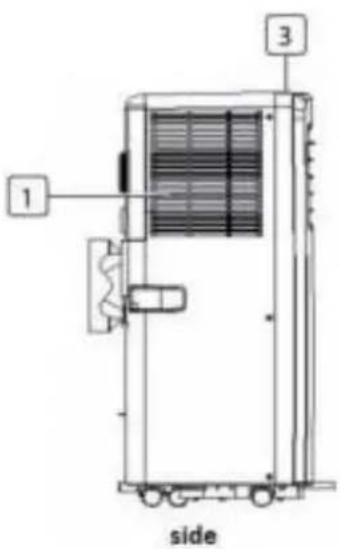
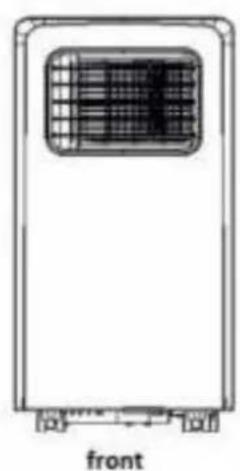
natural_image
Front view of a portable air conditioner unit with ventilation grille and side-mounted buttons (no text or symbols)
Accessories:
| Part | Description |
 | Framework set (rectangular connector) |
 | Hose Connection AC |
 | Drain hose hot air |
 | Hose Connector Framework set |
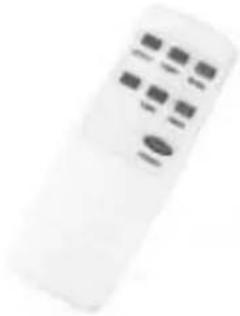 | remote |
Control panel:
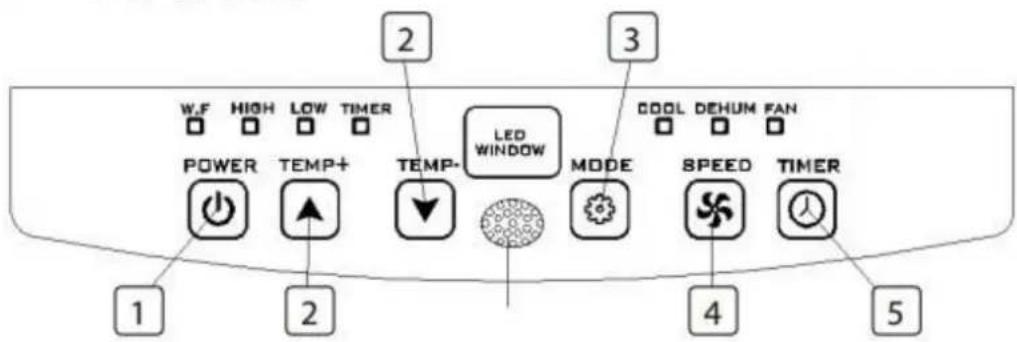
- On / off button
- Temperature button (up / down)
- mode button
-
Ventilator settings button
-
Timer on / off button
Installation
The Evolar EVO-7000C and EVO-9000C are mobile air-conditioning / dehumidifier which can be moved from room to room. Follow the installation instructions on commissioning:
- Remove the packaging and place the device so that it stays upright.
- Check all parts for visible damage. Take the device in use if there are damages and contact your dealer.
- Place the device near a power outlet. Place the device on a flat, solid and stable surface. Keep at least 50CM free space on all sides and observe the safety instructions.
- Install the drain hose, and set the window in position well, avoid kinks or bends in the hose, so that the warm air can be discharged to the outside by means of the enclosed fittings. See picture below.

natural_image
Simple line drawing of a container with an arrow and an oval inside, no text or symbols present.
natural_image
Simple line drawing of a door with arrows indicating direction and a circular button on the right (no text or symbols)- Turn both ends of the drain hose into the square fixing clip and the flat fixing clip. - Place the square fixing clip into openings at the back of the air conditioner.
-
Place the other end of the hose to the nearest window.
-
To dehumidify connect a water hose to the water tap point (number 6). This hose leads into a collection tray. Please note that the hose must not go up.
- To cool you to connect a drain hose.
Use
Cooling mode:
- Press the "Mode" button until the "Cool" icon appears.
- Press on the ▲ or ▼ button to select the desired room temperature. (16°C-31°C) - Press the "Fan Speed" button to select wind speed.
Dehumidification:
- Press the "Mode" button until the "Dehumidification indicator" flashes
- automatically set the selected temperature in the actual room temperature 2 °C min. (16°C31°C)
- automatically adjust the fan motor in a LOW wind speed.
Fan Mode:
- Press the "Mode" button until the "Fan" icon appears.
- Press the "Fan Speed" button to select wind speed.
Operation of the timer:
ON timer setting:
- When the air conditioner is OFF, press the "Timer" button and select a desired ON time through the buttons for the temperature and time setting.
- "Preset ON Time" is displayed on the control panel.
- The ON time can be adjusted at any time between 0-24 hours
OFF Timer setting
- When the air conditioner ON, press "Timer" button and select a desired OFF time using the buttons for the temperature and time settings.
- "Preset OFF Time" appears on the control panel.
- The OFF time can be adjusted at any time between 0-24 hours
Water drainage
- If you plan not to use this unit for a long time, remove the rubber plug from the drain hole at the bottom of the unit and connect a drain hose to the lower fixing clip. All water will be discharged into the water tank.
- When the water pump is damaged, the constant drainage can be used, and the water pump is not activated in these circumstances. The device works just fine.
- When the water pump is damaged, the intermittent drainage can also be used. Under these circumstances, then, a discharge hose to the lower fixing clip when the indicator lamp is lit for 'water filled'.
Alarm function for when the internal water reservoir is full
The internal water reservoir in the air conditioner has a safety switch for the water level, which controls the water level. When the water reaches an anticipated height, light-called 'water-filled' indicator on it. (If the water pump is damaged when the water is full, then removing the rubber stopper from the bottom of the device, and all the water will be discharged.)
Maintenance:
Cleaning the air conditioner:
- To maintain the air conditioner in good condition, it is important to regularly clean the unit.
- Ensure before cleaning for the device is unplugged.
- Clean the surface first with a neutral detergent and wet cloth and dry off with a dry cloth.
- Do not use gasoline or other chemicals to clean the device.
- Wash the device directly.
- If the air conditioner is damaged, please contact the dealer or repair shop.
Air filter:
- If the air filter becomes clogged with dust / dirt, the air filter should be cleaned once every two weeks.
- Open the intake grille and remove the air filter.
- Clean the air filter with a neutral detergent in warm water (40 °C) and allow it to dry in the shade.
- After the air filter is installed in the inlet grille, repositioned the components as they were.
Troubleshooting:
| Issue | Possible causes | Possible solutions |
| Device does not start when the ON / OFF button is pressed | - Water full indicator light flashes- Room temperature is lower than the set temperature- No power | - Empty the water from the water tank- Reset the temperature- stabbing plug in the socket |
| The unit does not cool enough | - Windows and doors are not closed- Heat sources in space- Air outlet hose is not connected or blocked- Temperature setting is too high- Air supply is blocked | - Close all windows and doors- Remove the heat sources, if possible,- Connect the air outlet hose or clean it- Reset the temperature- Clean the air filters |
| Too much noise | - Floor is non-planar (or flat enough)- Sound coming from the flow of the refrigerant in the air conditioner | - Place the device on a flat solid surface- The flowing sound of refrigerant is normal |
| code E0 | - Malfunction of the room temperature sensor, | - Replace the sensor for the room temperature (the device also works without replacement) |
| code E2 | - Water tank full | - Empty the water tank |
| The device switches itself off | - Device is overheated | - Allow sufficient space on all sides of the air conditioner (50CM) |
Guarantee
Evolar offers a 24 month warranty. Your warranty is valid if the product is used in accordance with the instructions and for the purpose for which it was created. The original purchase receipt with the date of purchase, the vendor name and the item number of the product should be submitted. If you require service, and warranty questions on www.evolar.nl
environment:

natural_image
Symbol of a trash bin with crossed lines indicating no waste or restriction (no text or numbers present)This product should not be put into the domestic garbage at the end of his endurance, but should be delivered to a central point for the recycling of electrical and electronic appliances. This symbol on the device, manual and packaging direct your attention to this important issue. The materials can be recycled in this unit. By recycling used domestic appliances you contribute an important step towards protecting our environment. Ask your local government for information about the collection
CE Declaration of Conformity
JagBa BV, Nijmegen, 04-01-2019, declares that the mobile air conditioner / dehumidifier of the brand Evolar, types EVO-7000C and EVO-9000C fulfills the LVD Directive 2014/35 / EU and Directive 2014 ECM / 30 / EU and in accordance with the following standards:
- EN 60335-2-40: 2003 / A13: 2012
- EN 60335-1: 2012 / A11: 2014
- EN 62233: 2008
- EN 55014-1: 2006 / A2: 2011
- EN 55014-2: 2015
- EN 61000-3-2: 2014
- EN 61000-3-3: 2013
Support:
All available information and components can be found at www.evolar.nl
- Nederlands (NL)
- Deutsch (DE):
- Safety precautions
- English (EN)
- Safety instructions:
- Refrigerant R290 (propane) safety:
- Description portable air conditioner
- Components:
- Control panel:
- Installation
- Use
- Cooling mode:
- Dehumidification:
- Fan Mode:
- Operation of the timer:
- ON timer setting:
- OFF Timer setting
- Water drainage
- Alarm function for when the internal water reservoir is full
- Maintenance:
- Cleaning the air conditioner:
- Air filter:
- Guarantee
- CE Declaration of Conformity
- Support:
Brand : Evolar
Model : EVO-9000C
Category : Air Conditioning