
HROP 80 - Remote control Hähnel - Free user manual and instructions
Find the device manual for free HROP 80 Hähnel in PDF.


Pick your language and provide your email: we'll send you a specifically translated version.
| Product Type | Remote Shutter Release |
| Brand | Hähnel |
| Model | HROP 80 |
| Compatibility | Select Canon, Nikon, Sony DSLR and mirrorless cameras (check camera manual for remote port) |
| Connection | Wired, 2.5 mm or 3.5 mm jack (depending on camera) |
| Cable Length | Approx. 0.8 m (31.5 inches) |
| Dimensions (approx.) | 90 x 25 x 15 mm |
| Weight (approx.) | 30 g (1.06 oz) |
| Power Source | No battery required (passive device) |
| Functions | Autofocus, Shutter Release, Continuous Shooting, Bulb Mode |
| Shutter Release Button | Half-press for autofocus, full press for shutter |
| Continuous Shooting | Lock button for continuous shooting |
| Bulb Mode | Lock button for long exposures |
| Material | Plastic body with rubberized grip |
| Color | Black |
| Cleaning | Wipe with a soft, dry cloth. Do not use solvents or liquids. |
| Safety | Keep away from water, extreme temperatures, and strong magnetic fields. |
| Spare Parts / Repairability | Not available; device is non-repairable. Replace entire unit if defective. |
| Warranty | 1 year (check local dealer for details) |
| General Information | Designed for remote camera triggering to reduce camera shake and enable self-portraits or time-lapse. |
Frequently Asked Questions - HROP 80 Hähnel
What cameras is the Hähnel HROP 80 compatible with?
The HROP 80 is compatible with select Canon, Nikon, and Sony cameras that have a wired remote port (usually 2.5 mm or 3.5 mm jack). Check your camera's manual or the Hähnel compatibility list to confirm.
How do I use the autofocus function?
Press the shutter button halfway down to activate autofocus. The camera will focus once the half-press is detected. Press fully to take the picture.
Can I use the HROP 80 for continuous shooting?
Yes, slide the lock button on the remote to the continuous shooting position. The camera will shoot continuously as long as the shutter button is held down (if the camera is set to continuous drive mode).
How do I use bulb mode for long exposures?
Set your camera to bulb (B) mode. Slide the lock button on the remote to the bulb position. Press and hold the shutter button, then lock it to keep the shutter open. Unlock to close.
Does the remote require batteries?
No, the HROP 80 is a passive wired remote and does not require any batteries. It draws power from the camera via the remote port.
What is the cable length of the HROP 80?
The cable length is approximately 0.8 meters (31.5 inches), providing enough reach for typical studio or tripod use.
My camera doesn't have a remote port - can I still use this remote?
No, the HROP 80 requires a compatible wired remote port. For cameras without a port, consider using a wireless remote or an adapter (check compatibility).
How do I clean the remote control?
Use a soft, dry cloth to gently wipe the surface. Do not use any liquids, solvents, or abrasive cleaners, as they may damage the plastic.
What should I do if the remote stops working?
First, check the connection to the camera – ensure the plug is fully inserted. Test with another camera if possible. If the remote still doesn't work, it may be defective; contact Hähnel support or your retailer for replacement under warranty.
Is the HROP 80 compatible with mirrorless cameras?
It is compatible with mirrorless cameras that have a wired remote port (same as DSLRs). Many Sony, Canon, and Nikon mirrorless models are supported. Verify your camera's remote port type before purchasing.
User questions about HROP 80 Hähnel
0 question about this device. Answer the ones you know or ask your own.
Ask a new question about this device
No questions yet. Be the first to ask one.
Download the instructions for your Remote control in PDF format for free! Find your manual HROP 80 - Hähnel and take your electronic device back in hand. On this page are published all the documents necessary for the use of your device. HROP 80 by Hähnel.
USER MANUAL HROP 80 Hähnel
Remote Shutter Release
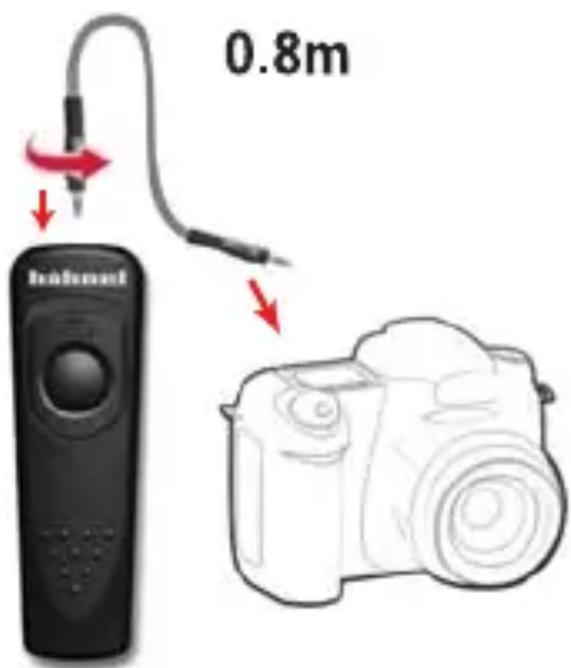
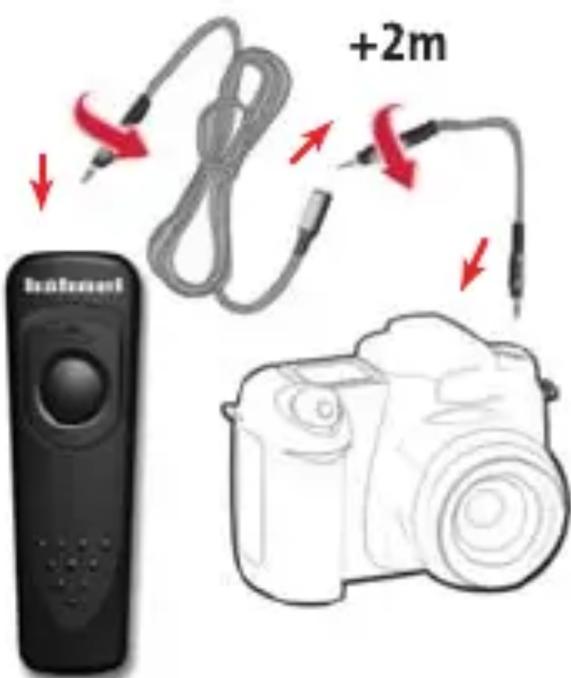

Autofocus
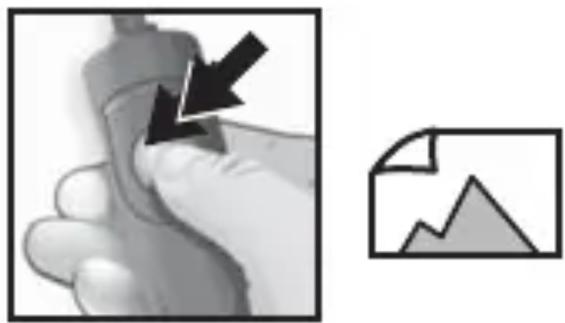
natural_image
Illustration of a hand holding a tool with a black arrow pointing to a document icon (no text or symbols present)Shutter Release

natural_image
Abstract icon set with a document, lock, and upward arrow (no text or symbols)Continuous Shoot
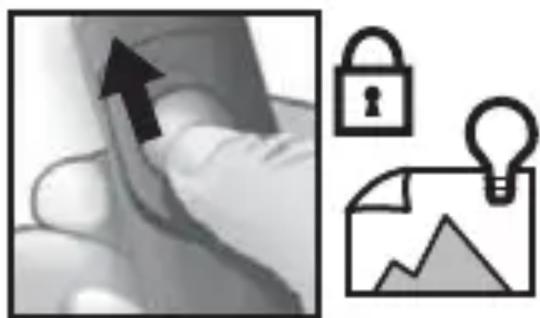
natural_image
Abstract icon set with a hand holding an upward arrow, a lock, and a document with a lightbulb (no text or symbols)Bulb Function

Manual assistant
Powered by Anthropic
Waiting for your message
Product information
Brand : Hähnel
Model : HROP 80
Category : Remote control