
BTW-60 - Loudspeaker BRIGMTON - Free user manual and instructions
Find the device manual for free BTW-60 BRIGMTON in PDF.


| Product Type | Portable Bluetooth Speaker |
| Brand | Brigmton |
| Model | BTW-60 |
| Dimensions (approx.) | 180 x 70 x 70 mm |
| Weight (approx.) | 500 g |
| Power Source | Built-in rechargeable lithium-ion battery |
| Charging | Micro USB cable (included) |
| Battery Life (approx.) | Up to 10 hours at moderate volume |
| Wireless Connectivity | Bluetooth 5.0 |
| Wired Connectivity | 3.5 mm AUX input |
| Speaker Output | 5W RMS |
| Hands-free Calling | Built-in microphone |
| FM Radio | Yes (with antenna) |
| Micro SD Card Slot | Yes, up to 32 GB |
| Water Resistance | Not specified (assume not waterproof) |
| Operating Range | Up to 10 meters (Bluetooth) |
| Care & Cleaning | Wipe with a dry, soft cloth. Do not use liquids or abrasives. |
| Safety | Do not expose to extreme temperatures or moisture. Keep away from children. |
| Spare Parts & Repairability | Contact authorized service center for battery replacement or repairs. |
| Package Contents | Speaker, Micro USB cable, AUX cable, User manual |
Frequently Asked Questions - BTW-60 BRIGMTON
User questions about BTW-60 BRIGMTON
0 question about this device. Answer the ones you know or ask your own.
Ask a new question about this device
Download the instructions for your Loudspeaker in PDF format for free! Find your manual BTW-60 - BRIGMTON and take your electronic device back in hand. On this page are published all the documents necessary for the use of your device. BTW-60 by BRIGMTON.
USER MANUAL BTW-60 BRIGMTON
natural_image
Abstract curved shape with smooth gradient, no text or symbols presentBRIGMTON
surfing technology

natural_image
Black vertical electronic device with a flat top and base, no visible text or symbols on the device itself.natural_image
Technical line drawing of a square frame with four corner brackets and a separate 3D schematic showing a structural assembly (no text or symbols)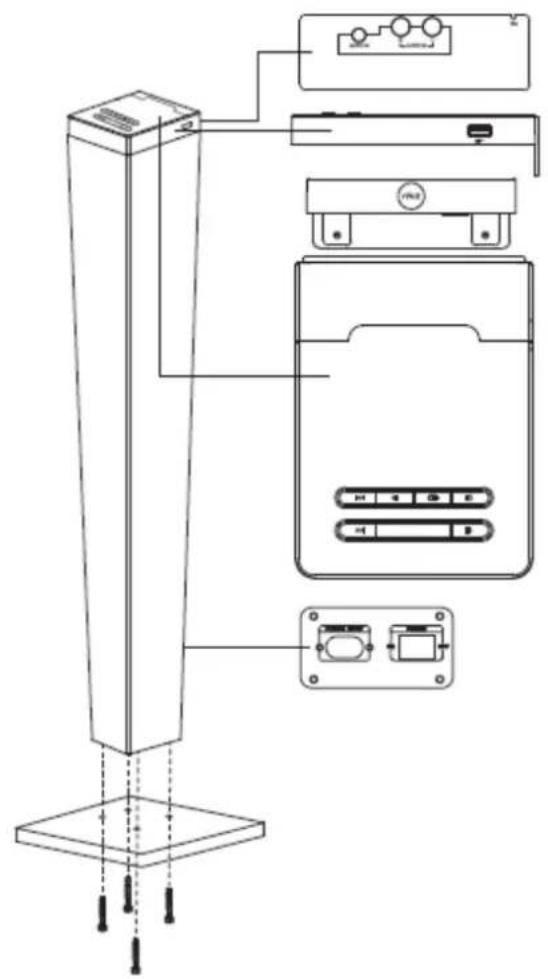
FUNCIONAMIENTO
natural_image
Line drawing of a vertical stand connected to a smartphone via cable (no text or symbols)MANTENIMIENTO
natural_image
Abstract curved shape with no text or symbolsBRIGMTON
surfing technology

natural_image
Black vertical electronic device with a flat base, no visible text or symbols on the bodyINSTRUCTION MANUAL
BTW-60-N
BLUETOOTH SOUND TOWER-RADIO
SAFETY PRECAUTIONS
MAKE SURE TO READ THE INSTRUCTIONS CAREFULLY BEFORE USING THE APPLIANCE FOR THE FIRST TIME AND KEEP THEM TO BE BOUND SEE OTHERWISE.
- Use this appliance as described in these operating instructions. Under no circumstances will the manufacturer assume any responsibility for incorrect handling and use contrary to these instructions.
- Failure to follow safety and usage precautions can result in a risk of electric shock, fire or personal injury.
- Do not use any peripherals that the manufacturer has not recommended; They may damage the unit or cause injury. This appliance is not intended for use by persons (including children) whose physical, sensory or mental capacity is limited, or by persons without experience or knowledge, unless supervised by a person responsible for their safety, or Use of the appliance.
- Check children to ensure that they do not play with the appliance.
• Install the appliance on a stable surface.
- Do not install near naked flame sources, such as lighted candles.
- Do not install the appliance: in places where it can come in direct contact with the sun's rays; Near appliances that emit radiant heat (eg heaters); On or near other equipment that produces a significant amount of heat (audiovisual equipment, stereo, computer equipment, etc.); - in places subject to constant vibration; In places exposed to humidity, inclement weather and in wet places.
- Do not expose the appliance to dripping or splashing. Do not place anything on the apparatus which contains liquid (eg vases).
- Do not obstruct ventilation openings with objects such as magazines, tablecloths, curtains, etc., as this may interfere with the ventilation of the appliance.
- Leave a minimum of space around the appliance to ensure sufficient ventilation.
- The electrical outlet must be easily accessible.
- Before connecting the appliance, check that neither the appliance nor the cable is damaged. The voltage indicated on the rating plate of the appliance corresponds to that of your power supply.
- Do not disassemble the appliance yourself. Any disassembly, repair or verification operation must only be performed by a qualified person.
- If you transport this appliance, place it first in its original packaging. This will reduce the risk of accidents during transport.
- Use a soft, dry cloth to clean your device. Do not use products that could damage your appliance (scrapers, steam cleaners, corrosive products, sprinklers, etc.).
Class II material: The apparatus has a reinforced insulation that does not have any accessible metal parts. The jacks of class 2 equipment do not have a grounding prong.
Safety Precautions for Batteries
- Danger of explosion! Batteries can not be charged, reactivated by other means, disassembled, incinerated or short circuited.
- Do not expose batteries to extreme temperatures, especially caused by sunlight or fire. Do not place the appliance on a heat source. Acid leaking from batteries can cause injury.
- In case of acid leakage, remove the batteries from the compartment using a cloth. Dispose of batteries according to the regulations in force. In case of acid leakage, avoid any contact of the batteries with the skin, eyes and mucous membranes. Immediately clear the areas affected by contact with the acid, and then wash them with plenty of clean water.
Consult a physician.
ATTENTION! Replacing the batteries with an incorrect type of battery can present a risk of explosion.
- Batteries must be replaced by batteries of the same type or equivalent type.
- Ingestion of batteries can cause death. Keep batteries out of the reach of children and pets. Consult a physician immediately if a battery is swallowed.
- Do not allow children to change batteries without adult supervision.
- Used batteries should be removed immediately from the apparatus, and then disposed of properly.
- Remove the batteries if you do not intend to use the appliance for a long period of time.
- Batteries should be stored in a well-ventilated, dry and cool place.
- Dispose of used batteries according to the instructions for use.
CONTROLS

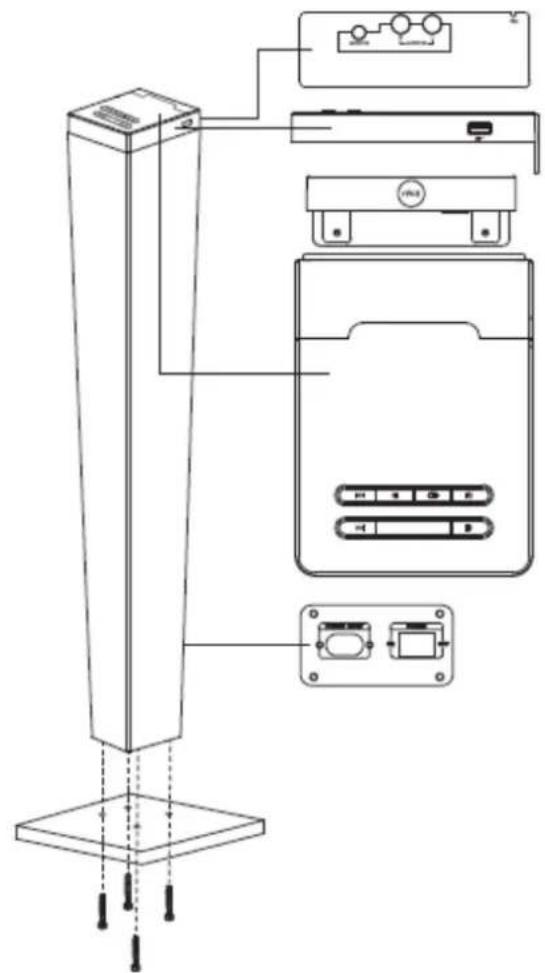
1. USB port
- NFC
- Previous
- Play / Pause
- Entrance6. Volume +
- Volume –
- STANDBY/ON / OFF
- Next
- Audio Input
- Audio Input L / R
- FM Antenna
- Power switch
- Input power cable
- Audio cable
- Power Cord

flowchart
graph TD
    A["17"] --> B["+"]
    C["18"] --> D["+"]
    E["19"] --> F["+"]
    G["20"] --> H["+"]
    I["21"] --> J["DISPLAY"]
    K["22"] --> L["+"]
    M["23"] --> N["+"]
    O["24"] --> P["+"]
    Q["25"] --> R["+"]
    S["26"] --> T["+"]
    U["27"] --> V["+"]
    W["28"] --> X["+"]
- ON / OFF
- Volume +
- Previous
- Volume –
- Display
- Back
- Mute
- Play / Pause / Search
- Next
- Save
- SOURCE
- Advance
MOUNTING
- Remove the protective film before use.
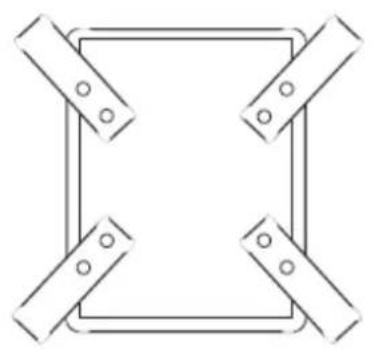
- Use the base fixing screw to secure it to the housing.
natural_image
Pure geometric diagram of a square frame with four corner clips (no text or symbols)
PLAYING
Plug the power cord into the power outlet. Plug the power cord into an appropriate electrical outlet. Press the ON / OFF button to turn on the unit. Press the STANDBY button to switch to standby mode.
1) Please check if all the connections are right and safe. Then connect the main power.
2) Press the POWER ON/OFF button on the rear panel to turn on the main power.
3) Press the STANDBY button to turn on the unit or turn to the standby mode.
FAST FORWARD / FAST REWIND: In USB mode, press and hold the 22 or 28 button on remote control to fast rewind or fast forward the current track.
PREVIOUS / NEXT: Press the 19 or 25 button to skip to the previous or next song.
MUTE: Press the MUTE button on remote control to mute the sound. Press again or press the VOLUME+/- buttons to resume the volume level.
SETTING: Press the VOLUME+/- buttons to turn the volume up or down.
PLAY/PAUSE: Press the PLAY/PAUSE button to pause or play the song.
MODE SELECTION: Press the SOURCE button to enter the wanted mode.
DISPLAY: Press the DISPLAY button on the remote control to turn on or off the display screen.
Note: This appliance is designed to be automatically put on hold after 15 minutes of inactivity. Press the STANDBY button to reactivate the unit.
BLUETOOTH CONNECTION
- Place the Bluetooth device (Smartphone) within 10 meters.
- Activate the Bluetooth function of your phone.
- Press the SOURCE button to select the Bluetooth mode. The indicator flashes at high speed.
- Access the phone's Bluetooth search interface.
- Select the device name from the search list.
- When the docking is complete, a beep will sound and the indicator will light blue.
- On some devices, select OK / YES / PAIR or enter "0000" to pair with the phone.
- To disconnect the device and connect it to another device: deactivate the Bluetooth function of your device and the docking with the Bluetooth device. Follow the steps to attach it to another peripheral.
Note: This device can be connected to only one peripheral at a time and can only memorize the last connected peripheral during the reactivation of the Bluetooth mode.
- If the peripheral is more than 10 m, place it within reach of the search signal and reconnect it manually.
NFC FUNCTION
- Near Field Communication (NFC) technology allows you to establish a fast Bluetooth connection between your device and other Bluetooth devices equipped with the NFC function.
- Activate the function. Consult the technical specifications of your device.
- Turn on the device and select the Bluetooth mode. Place your NFC device (NFC Smartphone) on the NFC sensor for 3 seconds.
- A beep will sound during the coupling of the two devices.
- To disconnect the device from the NFC function, return the phone to the NFC sensor for 3 seconds. Refer to the Basic Operation chapter to control playback in Bluetooth mode.
Note:
- This device can be connected to a single peripheral at a time and can only memorize the last connected device during the reactivation of the Bluetooth mode.
- The NFC function is not compatible with all Bluetooth peripherals. Consult the technical specifications of your device.
- To enable this function, some NFC peripherals require the installation of "NFC APK".
- Always place the NFC peripheral in the correct position of the NFC sensor.
- If the peripheral is more than 10 meters (maximum Bluetooth range), place it within reach of the Bluetooth search signal.
AUDIO
- Disconnect the power cord before removing the connections.
- This unit can be connected to a disc player, MP3 player, smart phone, computer or other music player by means of an audio cable. Select one of the following connections:
- Connect the audio cable to the line out of the MP3 player / headset and the AUDIO L / R jacks.
- Connect the audio cable to the AUDIO IN jack and to the L / R audio output of the disc player.

flowchart
graph TD
    A["Audio IN"] -->|①| B["Device"]
    C["Audio IN"] -->|②| D["Device"]
    B -->|①| E["Table"]
- Press the SOURCE button to switch to audio mode.
- Control playback with the MP3 / CD player only.
- If the AUDIO IN and L/R AUDIO IN jacks are connected at the same time, playback is prioritized from the device connected to the AUDIO IN jack.
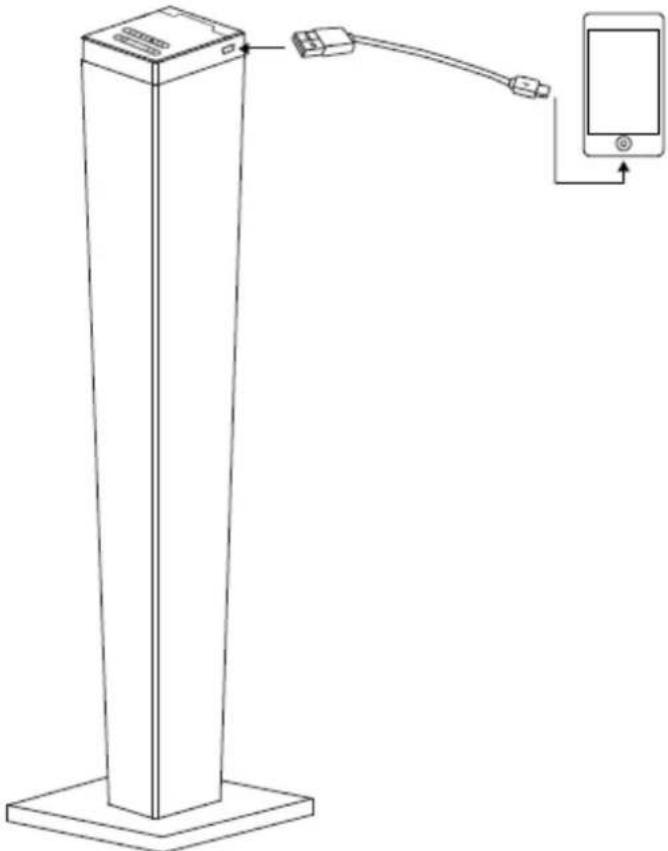
USB LOAD
The USB output port can be used to charge devices equipped with a port or a suitable USB connector, such as MP3 players or phones, depending on the different input sizes.
natural_image
Line drawing of a vertical stand connected to a smartphone via cable (no text or symbols)MAINTENANCE
Your appliance must be properly maintained in order to reduce the risk of accidents and prevent repairs. During maintenance, do not use products that could damage the appliance (eg abrasive products, steam cleaners, etc.).
Recommendations for cleaning:
- The appliance must be switched off, disconnected and cold before being serviced.
- Use a soft dry cloth to clean the casing of the appliance.
- If there are stubborn stains, use a little cleaner and gently rub with a sponge to avoid damaging the appliance.
Storage
- Store the appliance in its original packaging in a dry place, protected from moisture and out of reach of children.
"Features can change without notice"
IMPORTED
FERSON ELECTRÓNICA, S.A.
CIF: A-41111881
SANTA CLARA DE CUBA 12
SEVILLA
ESPAÑA
DECLARATION OF CONFORMITY
Ferson Electrónica, S.A. declares under our responsibility that the equipment meets the requirements indicated in the following directives:
DIRECTIVAS EMC
EN 60065:2002/A12
EN 65013:2013
EN 55020:2007/A11
EN 61000-3-2:2006/A2
EN 61000-3-3:2013
EN 62479:2010
ETSI EN 301 489-1 V 1.9.2
ETSI EN 301 489-17 V 2.2.1
ETSI EN 300 328 V1.8.1
Description of apparatus:
Model BRIGMTON BTW-60
Speaker





Brand : BRIGMTON
Model : BTW-60
Category : Loudspeaker