
BTW-80-CD - Loudspeaker BRIGMTON - Free user manual and instructions
Find the device manual for free BTW-80-CD BRIGMTON in PDF.


| Product Type | Bluetooth Sound Tower with CD, Radio, USB |
| Model | BTW-80-CD |
| Brand | Brigmton |
| Power Supply | AC 100-240V, 50/60Hz (via power input and switch) |
| Functions | CD playback, FM radio, USB MP3 playback, Bluetooth streaming, NFC pairing, AUX input (RCA and 3.5mm), Tone adjustment, Program play, Repeat/Random, Mute |
| Remote Control | Yes, with full function buttons, requires 2 x AAA batteries (not included) |
| Inputs | USB port (up to 32GB, MP3), 3.5mm AUX jack, RCA AUX jack, FM antenna |
| Bluetooth Pairing | Bluetooth 4.0? (not specified, but pairing code 0000) |
| NFC | Yes, on front panel for quick pairing |
| FM Radio | With manual/automatic tuning, store up to 60 presets |
| Speaker Configuration | Built-in speakers (number and power not specified) |
| Safety | Class II equipment; do not disassemble; keep away from water, heat, and direct sunlight; battery safety warnings |
| Maintenance | Clean with soft dry cloth; do not use abrasive cleaners or solvents |
| Spare Parts / Repairability | No user-serviceable parts; contact qualified personnel for repairs |
| Accessories Included | Remote control, FM antenna, 3.5mm-RCA audio cable, screws for base reinforcement |
| Manufacturer | Ferson Electrónica, S.A., Sevilla, Spain |
Frequently Asked Questions - BTW-80-CD BRIGMTON
User questions about BTW-80-CD BRIGMTON
0 question about this device. Answer the ones you know or ask your own.
Ask a new question about this device
Download the instructions for your Loudspeaker in PDF format for free! Find your manual BTW-80-CD - BRIGMTON and take your electronic device back in hand. On this page are published all the documents necessary for the use of your device. BTW-80-CD by BRIGMTON.
USER MANUAL BTW-80-CD BRIGMTON
natural_image
Abstract curved shape with smooth gradient, no text or symbols presentBRIGMTON
surfing technology
natural_image
Exterior view of a black and white electronic device with a blue circular top and control buttons (no visible text or symbols)natural_image
Line drawing of a vertical pole with an attached cable to a smartphone (no text or symbols)MANTENIMIENTO
natural_image
Abstract curved white shape on white background, no text or symbols presentBRIGMTON
surfing technology
natural_image
Exterior view of a black and white electronic device with a blue-lit circular top and control buttons (no visible text or symbols)INSTRUCTION MANUAL
BTW-80-N
BLUETOOTH SOUND TOWER-RADIO-CD
SAFETY PRECAUTIONS
MAKE SURE TO READ THE INSTRUCTIONS CAREFULLY BEFORE USING THE APPLIANCE FOR THE FIRST TIME AND KEEP THEM TO BE BOUND SEE OTHERWISE.
- Use this appliance as described in these operating instructions. Under no circumstances will the manufacturer assume any responsibility for incorrect handling and use contrary to these instructions.
- Failure to follow safety and usage precautions can result in a risk of electric shock, fire or personal injury.
- Do not use any peripherals that the manufacturer has not recommended; They may damage the unit or cause injury. This appliance is not intended for use by persons (including children) whose physical, sensory or mental capacity is limited, or by persons without experience or knowledge, unless supervised by a person responsible for their safety, or Use of the appliance.
- Check children to ensure that they do not play with the appliance.
• Install the appliance on a stable surface.
- Do not install near naked flame sources, such as lighted candles.
- Do not install the appliance: in places where it can come in direct contact with the sun's rays; Near appliances that emit radiant heat (eg heaters); On or near other equipment that produces a significant amount of heat (audiovisual equipment, stereo, computer equipment, etc.); - in places subject to constant vibration; In places exposed to humidity, inclement weather and in wet places.
- Do not expose the appliance to dripping or splashing. Do not place anything on the apparatus which contains liquid (eg vases).
- Do not obstruct ventilation openings with objects such as magazines, tablecloths, curtains, etc., as this may interfere with the ventilation of the appliance.
- Leave a minimum of space around the appliance to ensure sufficient ventilation.
- The electrical outlet must be easily accessible.
- Before connecting the appliance, check that neither the appliance nor the cable is damaged. The voltage indicated on the rating plate of the appliance corresponds to that of your power supply.
- Do not disassemble the appliance yourself. Any disassembly, repair or verification operation must only be performed by a qualified person.
- If you transport this appliance, place it first in its original packaging. This will reduce the risk of accidents during transport.
- Use a soft, dry cloth to clean your device. Do not use products that could damage your appliance (scrapers, steam cleaners, corrosive products, sprinklers, etc.).
Class II material: The apparatus has a reinforced insulation that does not have any accessible metal parts. The jacks of class 2 equipment do not have a grounding prong.
Safety Precautions for Batteries
- Danger of explosion! Batteries can not be charged, reactivated by other means, disassembled, incinerated or short circuited.
- Do not expose batteries to extreme temperatures, especially caused by sunlight or fire. Do not place the appliance on a heat source. Acid leaking from batteries can cause injury.
- In case of acid leakage, remove the batteries from the compartment using a cloth. Dispose of batteries according to the regulations in force. In case of acid leakage, avoid any contact of the batteries with the skin, eyes and mucous membranes. Immediately clear the areas affected by contact with the acid, and then wash them with plenty of clean water.
Consult a physician.
ATTENTION! Replacing the batteries with an incorrect type of battery can present a risk of explosion.
- Batteries must be replaced by batteries of the same type or equivalent type.
- Ingestion of batteries can cause death. Keep batteries out of the reach of children and pets. Consult a physician immediately if a battery is swallowed
- Do not allow children to change batteries without adult supervision.
- Used batteries should be removed immediately from the apparatus, and then disposed of properly.
- Remove the batteries if you do not intend to use the appliance for a long period of time.
- Batteries should be stored in a well-ventilated, dry and cool place.
- Dispose of used batteries according to the instructions for use.
CONTROLS

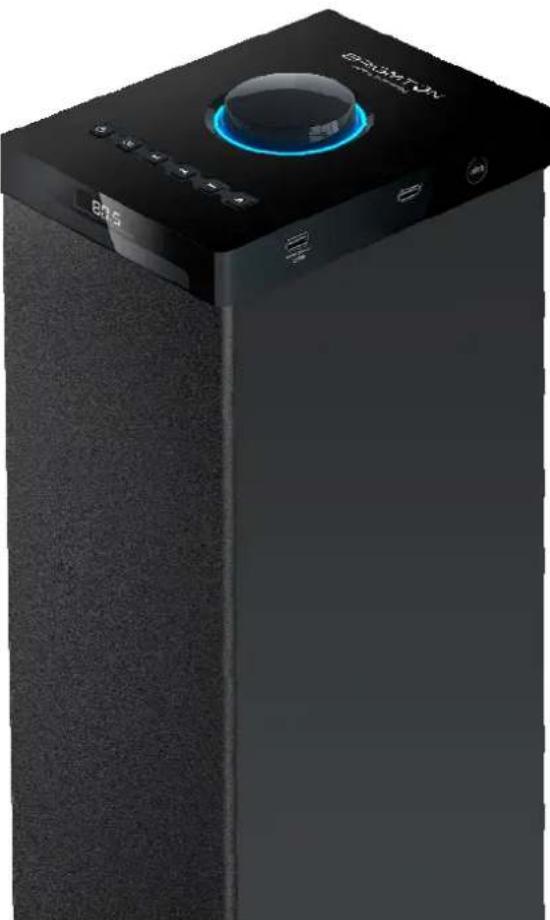
TOP
- Volume+/-
- Standby
- Mode
- Previous/Next
- Eject (Open or close the disc tray)
- Play/Pause
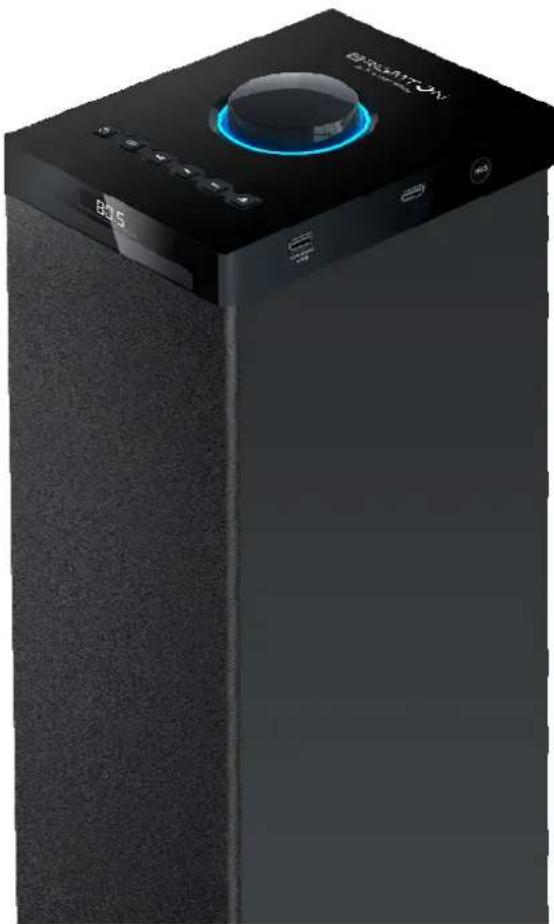
FRONT/SIDE

- Display screen
- Remote sensor
- Indicator
- Disc tray
- USB port for playing MP3
- USB port for charging
- NFC sensor
- Speakers
BACK

- FM antenna
- 3.5mm Aud-2 in Jack
- R/L RCA Aud-1 in Jack
- Power input
- Power switch
REMOTE CONTROL
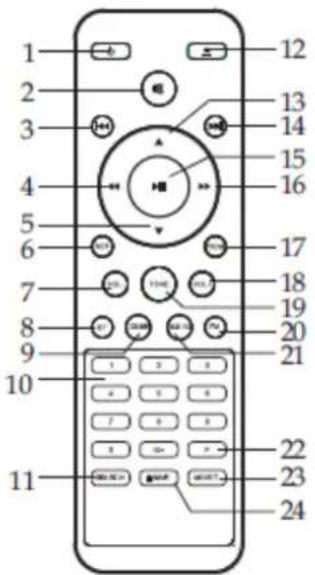
- Standby 13. Up
- Mute 14. Next
- Previous 15. Play/Pause
- Fast rewind 16. Fast forward
- Down 17. Program
- Repeat/ Random 18. Volume+
- Volume- 19. Tone
- Bluetooth 20. FM
- CD/USB 21. AUX 1/2
10.Numbers 22.Frequency - Search 23. Mono/Stereo
- Eject 24. Save
INSTALLATION
Please install the machine as below (do not connect to power):

To stand the unit more stable, use the provided Screws to mount the Reinforcing bars on the bottom of the Tower BasePlate.

GENERAL OPERATION
STANDBY MODE: Press the STANDBY button to wake up the unit or turn to standby mode.
SELECT MODE: Press the MODE 🎨 button to switch to one of the modes: CD, USB, FM, Bluetooth, or Aux1/2. Press the CD/USB button on remote to select CD or USB mode, press the AUX1/2 button on remote to select Aud-1 or Aud-2 mode.
VOLUME SETTING: Press the VOLUME+/- buttons or rotate the volume knob to adjust the volume.
MUTE THE SOUND: Press the MUTE ✗ button on remote control to mute the sound. Press again or press the VOLUME+/- buttons to resume the volume level.
SKIP TRACKS: Press the PREVIOUS /NEXT button on remote control or on TOP panel to skip to the previous or next track.
PLAY/PAUSE: Press the PLAY/PAUSE ▶ button to pause the playback, press again to resume.
ACCELERATE THE MUSIC: In USB or CD mode, press the ◀ button on remote control to forward or reward the music. Press repeatedly to resume the normal speed.
REPEAT MODE: Press the REP. button on remote control to repeat the song by once, press again to repeat all songs, press the third time to resume normal.
PROGRAM: In CD mode, press the PROG. button on remote control to enter the program setting interface, "P :0100", use the digit NUMBER buttons to select the song you want to program,(for store track 4 it has to press "0" + "4"). Then press the button ▶ to confirm and start playing the music in the programmed order.
GENERAL OPERATION
MO/ST BUTTON: In FM mode, press MO/ST button switch from stereo mode to mono mode. Press again to switch back to stereo mode.
TONE ADJUSTMENT: Press TONE button on the remote control to select bass and treble. When the display screen shows "TRB", use VOL+/- buttons to adjust the effect of treble. When the display screen shows "BS", use VOL+/- buttons to adjust the effect of bass.
SAVE BUTTON: In FM mode, press SAVE button to save the current frequency to a preset position.
RANDOM: In CD or USB mode, press and hold the REPEAT button to select the music into random playback mode.
DISCONNECT THE BLUETOOTH: In Bluetooth mode, press and hold the PLAY/PAUSE button to disconnect the Bluetooth connection.
BLUETOOTH OPERATION
- Press the MODE button to switch to the Bluetooth mode.
- The previous paired device will connect to speaker tower automatically when each time changing to Bluetooth mode.
- Turn on the Bluetooth device (e.g. phone) and enter the Bluetooth searchinterface.
- Search unit name and pair it, input the password "0000" if necessary. If paired, the display will blink steadily.
- If it still doesn't work, reset the Bluetooth and follow above steps again.
NFC OPERATION
- Press the MODE button to enter the Bluetooth mode.
- Place the back of phone (with NFC function) on the position of word "NFC" on the front panel of the unit for 3 seconds, the Bluetooth function of the phone is activated automatically.
- When the indicator lights steadily and you can hear an audible signal, they are paired.
- To disconnect NFC Bluetooth connection, place the back of the phone on the position of the word "NFC" on the front panel of the unit. When there comes an audible signal, they are disconnected.
- Some devices of Android system 4.0 or below need to install the NFC.apk to enable the NFC function. Some devices may be in a weak compatibility for NFC function, that may relate to the NFC software.

USB OPERATION
- Power on the unit and insert a USB Flash Drive (not supplied) into the USB Port, ensuring the plug is fully inserted at the correct way.
- Press the MODE button to switch to the USB mode.
- The tower will play music from the USB automatically.
- The maximum size of Flash Drive that can be connected is 32GB max.
- The supported format for USB play is MP3.
AUDIO OPERATION
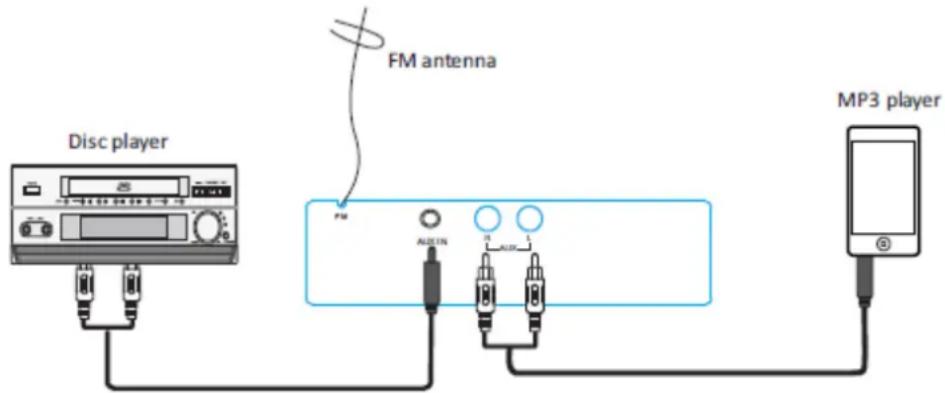
Use the 3.5mm-RCA Audio cable (included) to connect the unit with Disc player/MP3 player/phone/computer or other music device.
- Connect one end of the Audio cable to the R/L Audio-in Jack on the back panel of the unit, then connect the other end to the MP3 player.
- Press the MODE button on the top panel or press the AUX1/2 button on remote to switch to Aux in mode (Aud-1/ Aud-2).
- Press the AUX1/2 button to enter the Aud-1 mode and start playback by the device connected to the R/L RCA Jack.
- Press the AUX1/2 button to enter the Aud-2 mode and start playback by the device connected to the 3.5mm Aux in Jack.
FM OPERATION
- Adjust the FM antenna to get the best reception.
- Press the MO/ST button to turn stereo on.
- Press the MODE button to switch to the FM mode.
- Press the ◀◀ / ▶▶ button to skip to the previous or next station.
- Press the button on remote to tune the frequency by 0.05MHz.
- Press and hold the ◀◀/▶ button on remote to skip to strongest station.
- Press the SEARCH button on the remote control or ▶ on unit to search the stations, press again to stop searching.
- Save (60) stations: Press the NUMBER buttons to select the preset number, then press the F button and input the frequency, at last press the SAVE button to save the station. E.g. to save the 107.5MHz into preset 36. Press the NUMBER button 10+, 6, then press F and input 1, 7, 5, 0, at last press the SAVE button.
"Features can change without notice"
BRIGMTON
surfing technology
IMPORTED
FERSON ELECTRÓNICA, S.A.
CIF: A-41111881
SANTA CLARA DE CUBA 12
SEVILLA
ESPAÑA
DECLARATION OF CONFORMITY
Ferson Electrónica, S.A. declares under our responsibility that the equipment meets the requirements indicated in the following directives:
DIRECTIVAS EMC
2014/35/EC
2014/30/EU
2009/125/EC
2011/65/EU
1999/5/EC
EN 60065:2002/A12
EN 55013:2013
EN 55020:2007 /A11
EN 61000-3-2:2006/A2
EN61000-3-3:2013
EN62479:2010
ETSI EN 300 328 V1.8.1 (2012-06)
ETSI EN 301 489 V1.9.2 (2011-09)
ETSI EN 301 489 V2.2.1 (2012-09)
Description of apparatus:
Model BRIGMTON BTW-80-CD
Speaker

BRIGMTON
surfing technology



Brand : BRIGMTON
Model : BTW-80-CD
Category : Loudspeaker