
BAP-750 - Loudspeaker BRIGMTON - Free user manual and instructions
Find the device manual for free BAP-750 BRIGMTON in PDF.


| Product Type | Portable speaker with FM radio, Bluetooth, and karaoke |
| Brand | Brigmton |
| Model | BAP-750 |
| Power Source | Rechargeable battery (12V DC input) |
| Battery | High capacity rechargeable with full charge indicator |
| Audio Output | Powerful loudspeaker with high sensitivity magnetic circuit; low, mid, and high frequencies |
| FM Radio | Automatic station search and storage of up to 60 stations |
| Bluetooth | Bluetooth connectivity for wireless audio streaming (password: 0000) |
| Media Playback | MP3 playback from USB and MicroSD cards up to 32GB |
| Audio Input | AUX 3.5mm line input |
| Recording | Audio recording to USB or TF card in AUX or FM mode |
| Microphone | Microphone input with priority mode, volume and reverb control |
| Headphone Output | 3.5mm headphone/microphone jack (EAR/MIC) |
| Equalizer | EQ modes: Square, Meeting, Home, Hall, Personal |
| Playback Modes | All, Random, One repeat, Folder repeat |
| Remote Control | Includes remote control with numeric keypad for direct track/radio selection |
| Display | LED display |
| Treble/Bass Control | Dedicated treble and bass adjustment knobs |
| Portability | Easy to transport |
| Charging Indicator | Red light when charging |
| Power Switch | On/Off ignition switch |
| Light Control | Switch for light (if applicable) |
| Compliance | CE marked, conforms to EMC and safety directives |
Frequently Asked Questions - BAP-750 BRIGMTON
User questions about BAP-750 BRIGMTON
0 question about this device. Answer the ones you know or ask your own.
Ask a new question about this device
Download the instructions for your Loudspeaker in PDF format for free! Find your manual BAP-750 - BRIGMTON and take your electronic device back in hand. On this page are published all the documents necessary for the use of your device. BAP-750 by BRIGMTON.
USER MANUAL BAP-750 BRIGMTON
natural_image
Abstract black circular logo design with curved and angular elements (no text or symbols)BRIGMTON
surfing technology
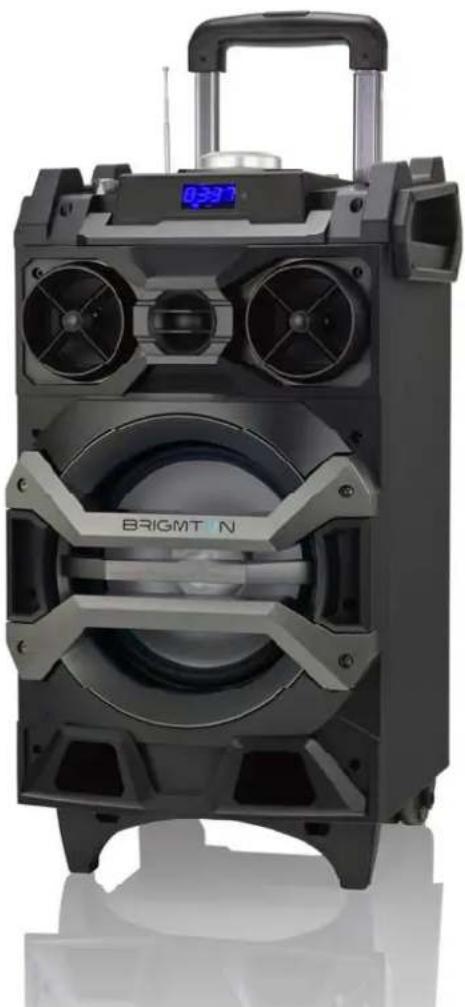
natural_image
Exterior view of a bright outdoor electronic device with visible speaker grille and control panel (no text or symbols)natural_image
Abstract black circular logo design with curved and angular elements (no text or symbols)BRIGMTON
surfing technology
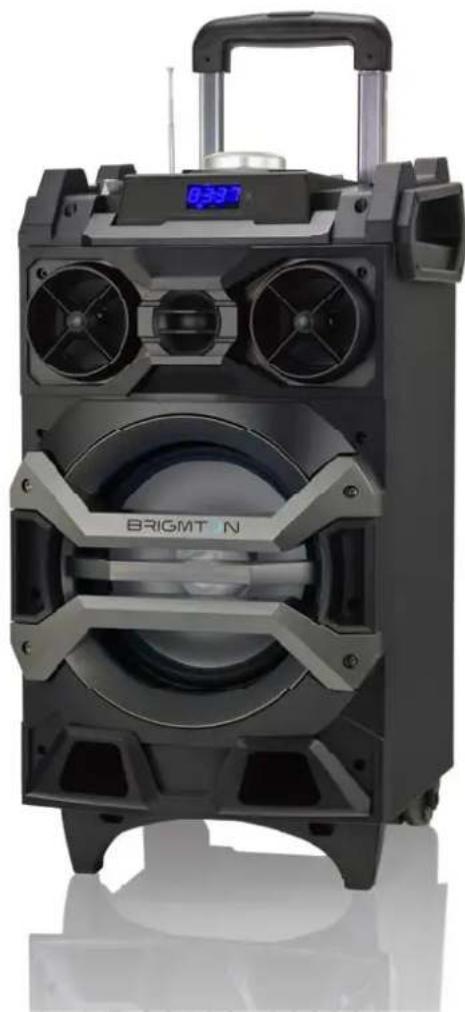
natural_image
Exterior view of a BRIGHT N portable electronic device with dual speakers and a digital display (no text or symbols on the device itself)INSTRUCTION MANUAL
FM PORTABLE RADIO - AMPLIFIER -BT
BAP 750
FEATURES
- Powerful loudspeaker with high sensitivity magnetic circuit with high penetration power, low frequency shock and high and medium frequency.
- MP3 playback up to 32GB cards.
- FM radio reception with automatic station search and storage of up to 60 stations.
- AUX 3.5 mm audio input for each connection to a wide range of sound sources.
- High capacity battery.
- microphone-karaoke function.
- Rechargeable battery.
- Battery with indication of full recharge.
- Easy to transport.
- Outputs for headphones or external sound sources.
- Audio recording.
- BLuetooth connection.
RECORDING
Recording in AUX mode: Connect a storage device (USB / TF card) and press Mode to enter AUX mode.
Briefly press the Record button to start recording depending on the storage capacity. During recording, the input signal must be appropriate to your liking.
BLUETOOTH CONNECTION
- ON / OFF: Press the power switch to ON, press the "MODE" key to enter the BT connection mode.
- Turn on the BT function of the mobile phone and search for the device and connect it. If a password is requested, enter "0000"
- Play music from your mobile phone directly and it will be heard on the speaker. Penetration, low frequency shock and high and medium
CONTROLS
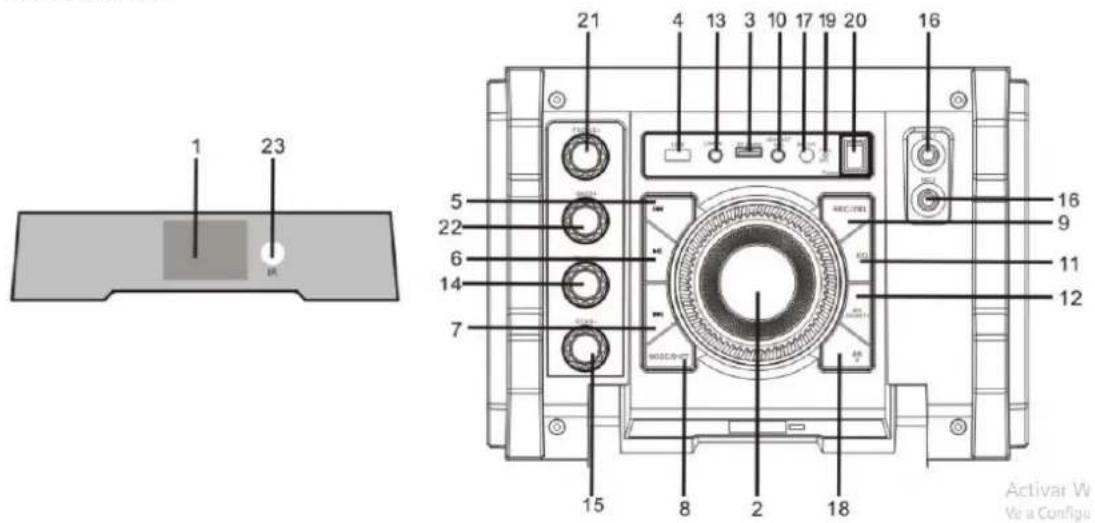
- LED display
- Master Volume: In FM, MP3, AUX mode, use it to control the volume.
- MicroSD input up to 32GB
- USB input
- In FM mode, press briefly to select the previous station after a full station search.
- In card / USB mode, press briefly to play / pause, or press and hold to select one of the four playback sequence modes (All / ONE). In FM mode, press briefly to execute a full search
- In card mode, press briefly to go to the previous track. In FM mode, press briefly to select the next station after a complete station search has been executed.
- SHIFT mode: press briefly to toggle between FM USB / TF reception modes and press and hold to toggle between recording folder and MP3 folder.
- Recording / DEL: Press briefly to allow recording (on USD device or card) Press and hold to erase a recording file Recording in AUX or FM mode is available.
- EAR MIC: headphones / microphone
- EQ: In USB card mode, press briefly to select a mode (Square, Meeting, Home, Hall and Personal).
- MIC PRIORITY: Connect the microphone, briefly press the button in microphone priority mode
- LINE IN: Connector external sound sources.
-
Volume of the Microphone volume
-
Reverberation: Regulation of the reverb of the.
- Microphone input jack.
- DC 12V charging port.
- It allows to control the light switch.
- Charge Indicator Light: When the charger is connected, the red light will turn on.
- Ignition switch
- Treble: Treble control
- BASS: Bass control
- IR: infrared receiver module
CAUTION:
Please be sure to charge the entire battery if the sound is distorted.
REMOTE CONTROL
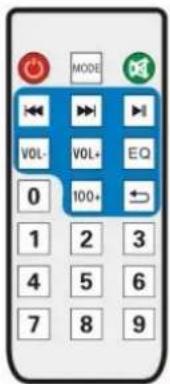
-
Power Button: Short press it to enter standby mode; short press it again to resume. If no device is connected, the system goes to "-NO-".
-
←: Functions as on the master device.
-
:Functions as on the master device.
-
▶: Functions as on the master device.
-
Mode: Functions as "Mode" on the master device.
-
V+/V- Keys: In USB/TF/FM/AUX mode, press them to volume up/down.
-
Numeric Keys 0\~9: In USB/TF card reading status, to play Track 12, just input numbers "1" and "2", and in 2 seconds the system will go to Track 12 and start playback. Any input of number larger than number of the total available tracks is invalid. In FM status, to listen to channel 107.5MHZ, just input "1075".
-
Environment Key: In USB/TF card reading status, short press it to toggle among Square, Meeting, Home, Hall and Personal modes.
- Sequencing Key: In USB/TF card reading status, short press it to toggle among four playback sequencing modes (All - play all tracks in sequence; RAND - play in random; ONE - repeat one track; FOL - repeat all tracks in a folder).
- In USB/TF/FM/AUX mode, short press it to mute the device.
- 100+: Number selection key - in MP3 mode (USB/TF card), short press it to add "100" to current track number.
"Features can change without notice"
BRIGMTON
surfing technology
IMPORTED
FERSON ELECTRÓNICA, S.A.
CIF: A-41111881
SANTA CLARA DE CUBA 12
SEVILLA
ESPAÑA
DECLARATION OF CONFORMITY
Ferson Electrónica, S.A. declares under our responsibility that the equipment meets the requirements indicated in the following directives:
EMC DIRECTIVES
ETSI EN 300 328 V1.8.1 (2012-06)
ETSI EN 301 489-1V1.9.2 (2011-09)
ETSI EN 301 489-17V2.2.1 (2012-09)
EN 62479: 2010
EN 60950-1:2006+A11:2009+A1:2010+A12:2011+A2:2013
Description of apparatus:
BRIGMTON Model BAP-750
Radio with built-in speaker
CE

BRIGMTON
surfing technology
Brand : BRIGMTON
Model : BAP-750
Category : Loudspeaker