
BTW-41-N - Loudspeaker BRIGMTON - Free user manual and instructions
Find the device manual for free BTW-41-N BRIGMTON in PDF.


| Brand | Brigmton |
| Model | BTW-41-N |
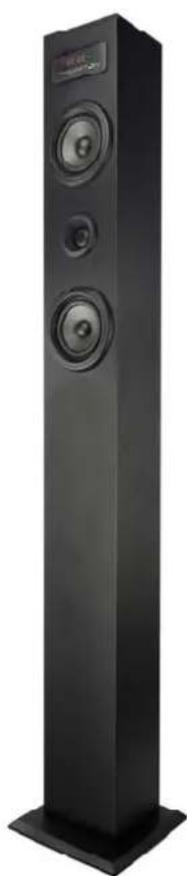
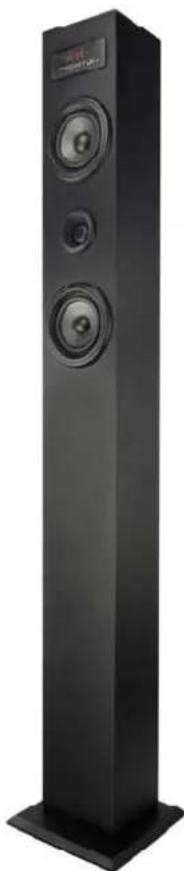
| Product Type | Bluetooth Sound Tower with FM Radio |
| Color | Black |
| Connectivity | Bluetooth, AUX (3.5mm), USB, Micro SD card, FM radio |
| Bluetooth Range | Approximately 10 meters (33 feet) |
| Audio Inputs | USB port, Micro SD card slot, 3.5mm AUX input |
| Speaker Configuration | 3 speakers (tweeter, midrange, woofer) – typical |
| Display | Digital LED display |
| Controls | Top panel buttons (Power/Play-Pause, Volume+/-, Track +/-/Skip, Mode selector) and remote control |
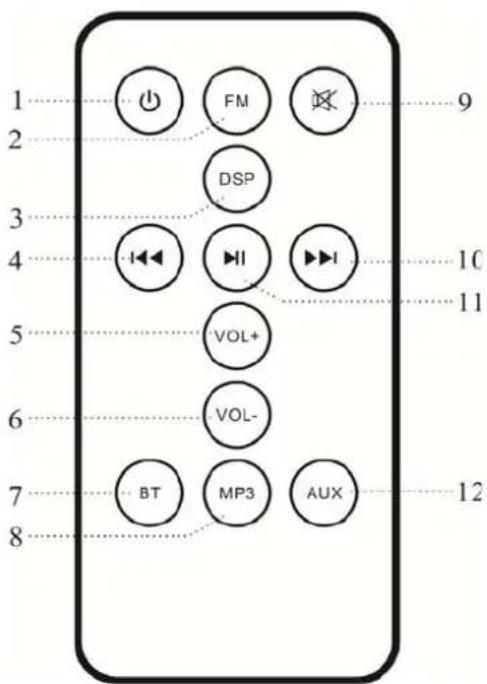
| Remote Control Functions | ON/OFF, FM mode, DSP equalizer (Rock/Jazz/Classical/Cinema/Popular), Previous/Next track, Volume +/-, Bluetooth, MP3, Mute, Play/Pause, AUX |
| DSP Modes | Rock, Jazz, Classical, Cinema, Popular (selectable) + Normal mode |
| Power Source | AC 100-240V, 50/60Hz (internal power supply) |
| Dimensions (approx.) | Height: 110 cm, Width: 30 cm, Depth: 30 cm (typical tower) |
| Weight (approx.) | 7.5 kg (16.5 lbs) |
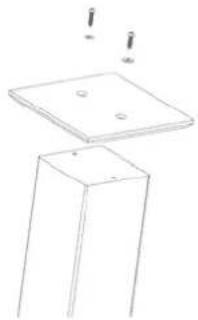
| Mounting | Requires assembly: align screws and tighten evenly; do not overtighten |
| Radio | FM tuner with automatic search and station memory (up to 20 stations) |
| USB Playback | Supports MP3 files from USB flash drives (FAT32 format) |
| Micro SD Playback | Supports MP3 files from Micro SD cards (FAT32 format) |
| Compliance | CE, EMC directives (EN 60065, EN 62479, EN 301 489-1/17, EN 300 328) |
| Safety | Do not expose to moisture; disconnect power when cleaning; use dry cloth; avoid heat sources |
| Cleaning | Wipe with a soft, dry cloth; do not use harsh chemicals or water |
| Spare Parts / Repairability | Contact manufacturer or authorized service; not user-serviceable |
Frequently Asked Questions - BTW-41-N BRIGMTON
User questions about BTW-41-N BRIGMTON
0 question about this device. Answer the ones you know or ask your own.
Ask a new question about this device
Download the instructions for your Loudspeaker in PDF format for free! Find your manual BTW-41-N - BRIGMTON and take your electronic device back in hand. On this page are published all the documents necessary for the use of your device. BTW-41-N by BRIGMTON.
USER MANUAL BTW-41-N BRIGMTON
natural_image
Abstract curved shape with smooth gradient, no text or symbols presentBRIGMTON
surfing technology
natural_image
Black vertical electronic speaker tower with three speakers and a digital display on top (no visible text or symbols)natural_image
Simple line drawing of a square base with two small holes and a flat top, no text or symbols present.MANDO A DISTANCIA
natural_image
Abstract white circular shape with curved edges, no text or symbols presentBRIGMTON
natural_image
Black vertical electronic speaker tower with two speakers and a digital display (no visible text or symbols)INSTRUCTION MANUAL
BTW-41-B-N
BLUETOOTH SOUND TOWER-RADIO
MOUNTING
-
Align the screws and tighten evenly.
-
Do not force too much because it could cause irreparable damage to the speaker box.
natural_image
Simple line drawing of a square base with two small holes and a flat top, no text or symbols present.REMOTE CONTROL
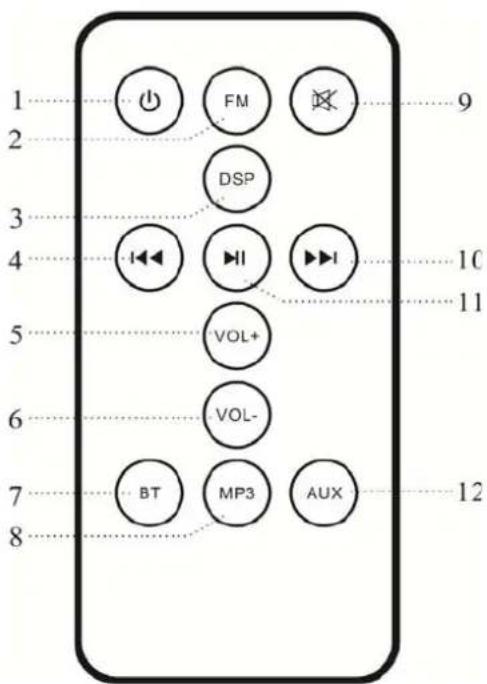
- ON / OFF
- FM Mode
- DSP. Press repeatedly to select each Rock / Jazz / Classical / Cinema / Popular mode. Hold to return to normal mode.
- Previous track
- Volume +
- Volume -
- Bluetooth mode
- MP3 mode: To play USB and cards
- Mute: silence
- Next Track
- Play / Pause
- AUX mode
TOP PANEL
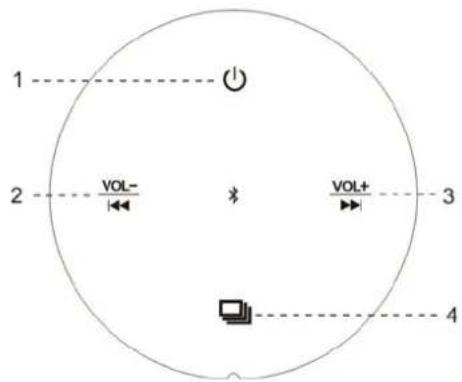
- Long press: ON / OFF. Short press: Play / Pause
- Long press: Volume -. Short press: Previous Track
- Long press Volume +. Short press: Next track.
- Mode selector: MP3 / AUX / Bluetooth
REAR PANEL
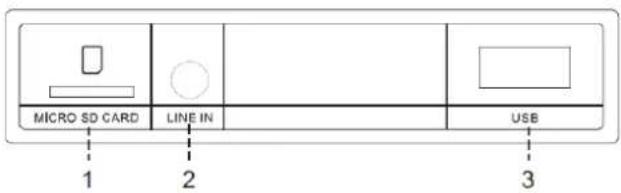
- Input Micro SD cards
- Input Jack 3.5 mm.
- USB Input
BLUETOOTH MODE
- Turn on the speakerphone, switch to Bluetooth mode. THE indicator will flash.
- Keep the speaker and the Bluetooth device nearby during the pairing process.
- Set your mobile phone or Bluetooth-enabled device to search for Bluetooth devices.
- Select the device from the list of available devices.
- If necessary, enter the password "0000".
AUX MODE
- Turn on the speaker and plug one end of the cable to the speaker 3.5 mm and the other to the headphone jack of your device.
- Use audio controls connected to music playback device.
USB
- Turn on the speaker, insert a USB device with music on the unit (rear). It will change the playback mode USB and start playing automatically.
CARDS
Insert a Micro SD card into the unit (rear), and automatically start playback.
RADIO
- Press the FM button on the remote control.
- Briefly press the ON / OFF button on the speaker or the PLAY / PAUSE button on the remote control and start an automatic station search.
Press again to store.
- Press the "VOL +" "VOL-" to increase or decrease the volume. Press "PREV" or "NEXT" on the remote control to select a radio station.
- To delete a saved station, hold the FM button on the remote control and then automatically jump to the next station.
"Features can change without notice"
BRIGMTON
surfing technology
IMPORTED
FERSON ELECTRÓNICA, S.A.
CIF: A-41111881
SANTA CLARA DE CUBA 12
SEVILLA
ESPAÑA
DECLARATION OF CONFORMITY
Ferson Electrónica, S.A. declares under our responsibility that the equipment meets the requirements indicated in the following directives:
DIRECTIVAS EMC
EN 60065:2014
EN 62479:2010
EN 301 489-1 V1.9.2
EN 301 489-17 V2.2.1
EN 300 328 V1.9.1
Description of apparatus:
Model BRIGMTON BTW-41
Speaker

BRIGMTON
surfing technology
Brand : BRIGMTON
Model : BTW-41-N
Category : Loudspeaker