CA-3092BT - Loudspeaker Cyber Acoustics - Free user manual and instructions
Find the device manual for free CA-3092BT Cyber Acoustics in PDF.


| Product Type | Bluetooth Speaker |
| Brand | Cyber Acoustics |
| Model | CA-3092BT |
| Dimensions (W x D x H) | 6.5 x 3.5 x 2.5 inches (16.5 x 8.9 x 6.4 cm) |
| Weight | 0.7 lbs (317 g) |
| Power Source | Built-in rechargeable lithium-ion battery |
| Charging | Micro USB, 5V DC 1A |
| Battery Life | Up to 6 hours at moderate volume |
| Bluetooth Version | 4.0 with A2DP, AVRCP |
| Bluetooth Range | Up to 33 feet (10 meters) |
| Audio Input | 3.5mm auxiliary input |
| Microphone | Built-in for hands-free calling |
| Controls | Power, Volume +/-, Play/Pause, Skip Tracks |
| LED Indicator | Blue (connected), Red (charging) |
| Cleaning | Wipe with a soft, dry cloth |
| Safety | Keep away from water and extreme temperatures |
| Spare Parts | Not available; speaker is non-repairable |
| General Information | Portable speaker for music and calls |
Frequently Asked Questions - CA-3092BT Cyber Acoustics
User questions about CA-3092BT Cyber Acoustics
0 question about this device. Answer the ones you know or ask your own.
Ask a new question about this device
Download the instructions for your Loudspeaker in PDF format for free! Find your manual CA-3092BT - Cyber Acoustics and take your electronic device back in hand. On this page are published all the documents necessary for the use of your device. CA-3092BT by Cyber Acoustics.
USER MANUAL CA-3092BT Cyber Acoustics
Cyber Acoustics


CA-3092BT
Owner's Guide
Bluetooth Wireless Speaker System
Bluetooth®





1


FCC Information
This equipment has been tested and found to comply with the limits for a Class B digital device, pursuant to Part 15 of the FCC Rules. These limits are designed to provide reasonable protection against harmful interference in a residential installation. This equipment generates, uses and can radiate radio frequency energy and, if not installed and used in accordance with the instructions, may cause harmful interference to radio communications.
However, there is no guarantee that interference will not occur in a particular installation. If this equipment does cause harmful interference to radio or television reception, which can be determined by turning the equipment off and on, the user is encouraged to try to correct the interference by one or more of the following measures:
- Reorient or relocate the receiving antenna.
- Increase the separation between the equipment and receiver.
- Connect the equipment into an outlet on a circuit different from that to which the receiver is connected.
- Consult the dealer or an experienced radio/TV technician for help.
Warning: Changes or modifications to this unit not expressly approved by the party responsible for compliance could void the user's authority to operate the equipment.
This device complies with Part 15 of the FCC Rules. Operation is subject to the following two conditions: (1) this device may not cause harmful interference, and (2) this device must accept any interference received, including interference that may cause undesired operation.




Information FCC
Bluetooth Wireless Speaker System
Congratulations
Your CA-3092BT speaker contains Bluetooth® technology, allowing you to wirelessly play music from nearly any Bluetooth enabled device. Now you can enter the room, select music to play on most smartphones, tablets, or laptops, and control your listening enjoyment from the comfort of your lap. From your device, you can easily control and change music tracks, playlists, adjust volume up or down, or even listen to podcasts, or many other audio applications available on your device.
Box Contents
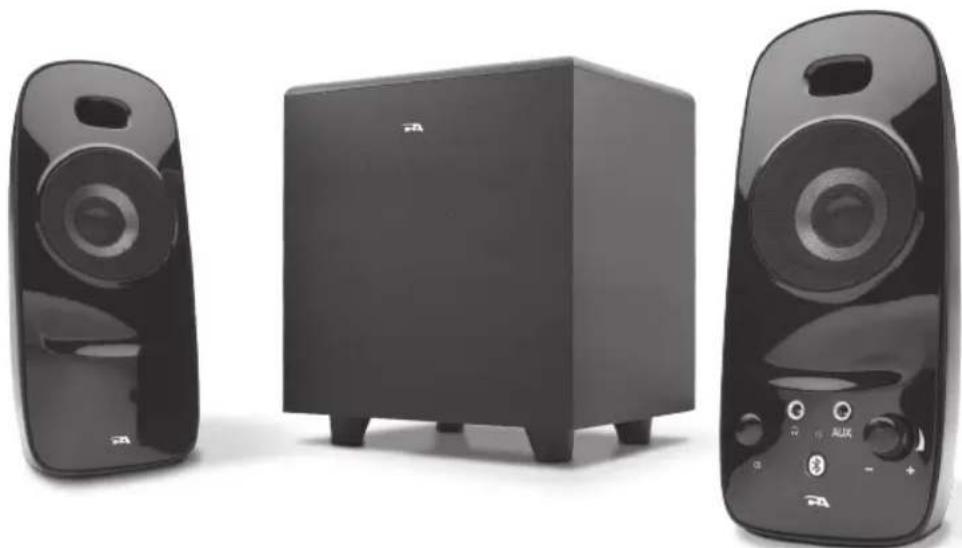
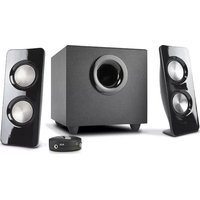
- 2 x satellite speakers
- Subwoofer
- AC Adapter
- Owner's guide with connection diagram
Caution
- Do not plug the power supply in until all connections are made.
- Use only the AC power adapter supplied with these speakers.
- Keep speakers away from sources of extreme heat, such as stereo amplifiers, space heaters, stoves, and heat vents.
- Use a dry cloth for cleaning. Do not wipe any part of the system with cleaning solvents, such as furniture wax, bleach, benzene, acetone, or ammonia.
Speaker Preparation
- Subwoofer—place on the floor near a wall or corner, for optimum performance. Adjust distance from the corner or wall to affect quality of bass performance as desired. Direct open port toward wall to increase bass punch.
- Satellite Speakers—For best stereo separation, place on opposite sides of the listening device, computer, or TV screen (as far apart as possible is usually best). For example, if you are listening to the speakers using a laptop on a desk, place the left satellite speaker on the far left corner of the desk, and the right satellite speaker on the far right corner of the desk.


Speaker Connection
You can connect these speakers to a variety of devices, such as laptop, computer, smartphone, iPod, MP3 player.
• Take the grey plug from the back of right speaker and plug this into the "To Speaker" jack on the back of subwoofer.
• Take the AC power adapter cord and plug the black plug into the back of the right Satellite speaker.
• Take the AC power adapter and plug into wall socket or power strip.

Pairing with the speakers for the first time
Before you start, make sure the Bluetooth capability of your source device is turned on and ready to discover new items. If needed, see your device's instructions to add or setup a Bluetooth device.
When you first turn on the CA-3092BT speaker system, the Bluetooth functionality is not engaged. This is so you can also use your CA-3092BT as a wire connected speaker system.
To wirelessly connect with the Bluetooth function of your speakers:
- Power on the speakers by pressing the power button; blue LED will light up.
- Press and hold the Bluetooth button for approximately 3 seconds, or until you hear an audible melody. The blue LED will start blinking rapidly, letting you know it's ready. At this point, the speaker will make itself discoverable to any Bluetooth device within 30 feet.
- With your audio source (smartphone, tablet, iPod, etc.), find the Bluetooth device list and look for "CA-3092BT." Tap it to pair/connect with the speakers.
- When the device connects, you will hear a short audible beep, the LED will stop blinking and will return to a solid "on" state.
- Now you can go to your music applications; start play and enjoy your music.
Turning off your source device will automatically disconnect your speakers. If you plan on not using your speakers again for several hours or more, we recommend you turn off your CA-3092BT speakers until you are ready to listen again.
Pairing with the speakers after the first time
Once you've successfully paired your speakers, your device will automatically connect with it on successive returns to the room in which they are situated. You will be able to immediately go the audio application of your choice, select your audio tracks, and begin enjoying almost at once.
Powering off the speakers will disconnect from your source device automatically, and will also pause the audio track you are listening to. Turning your speakers back on, while your device is still Bluetooth enabled, will allow your device to reconnect within just a couple of seconds, without any further effort.


Disconnecting and pairing with a new device
- Press and hold the Bluetooth button (with Bluetooth logo) for approximately 3 seconds or until you hear an audible melody; blue LED will start blinking rapidly.
- Go to your new audio source device's system settings and look for the speaker device name "CA-3092BT" to "pair" (connect).
- When new device pairs up successfully, you will hear a short audible beep, the light will stop blinking and return to a solid "on" state.
- Now you can play music on your new paired device.
Playing Audio via AUX
- Power on the device by pressing the power button.
- Plug in a 3.5mm AUX cable (not included) into AUX jack.
- Connect another end of the AUX cable with your secondary audio source.
- Music comes out from the speaker system when you start the playback on the secondary audio source
** AUX input is prioritized (overrides Bluetooth audio source) whenever a 3.5mm cable is plugged in.
Controls and Features
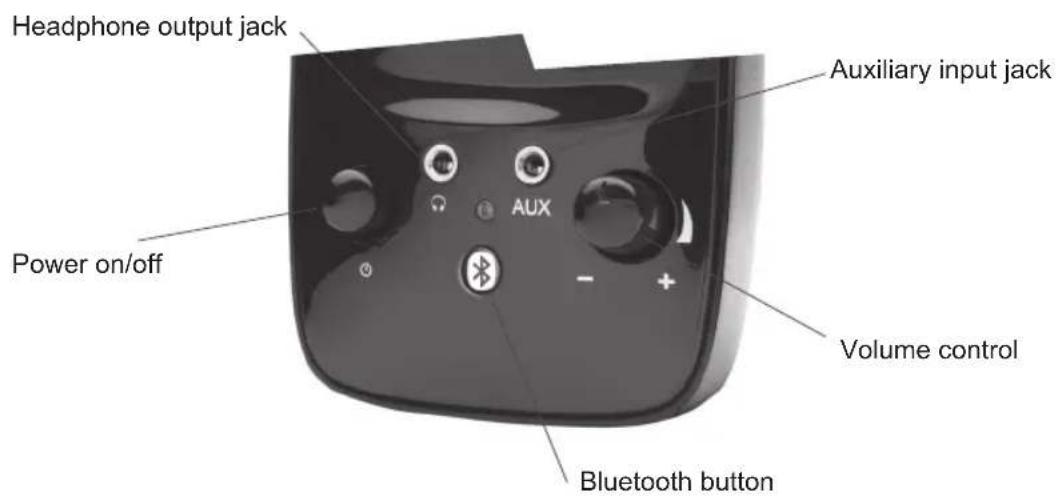
- Power—the on/off control is on the right satellite speaker. Press to turn the speaker on or off.
- Volume Control—this volume is on the right satellite speaker and is indicated by the symbol +/-. Rotate clockwise to turn the volume up, and counter-clockwise to turn the volume down
- Headphone Output Jack—connect your headphones to this jack and they will mute the speaker system automatically. The master volume can then be used to turn the volume up or down to your headphones.
- Auxiliary Input Connection—the auxiliary input jack allows the connection of a second audio source.
- Bluetooth Button—this button is on the right satellite speaker for your pairing process



Troubleshooting
Symptom:
Speaker system will not power on.
Solution:
- Power button is not turned on. Press in and check for the blue LED indicator light to come on.
- Verify the AC power adapter is plugged into the wall outlet.
- Check if the wall outlet or power strip you are using is actually getting power, i.e. not a switched outlet.
Symptom:
Speaker does not produce sound.
Solution:
- Verify the speaker is getting power. Check above steps.
• Make sure the volume is turned up to audible listening level. - Verify that all cables are plugged into the correct jacks.
- Verify that the Pairing process is completed properly
Symptom:
Sound is distorted.
Solution:
- Turn the volume down by 25% or 50%. If this does not work, also check the audio software volume level and decrease it if necessary.
- Adjust the computer's master volume control by balancing the volume until it's at 50% , then adjust the volume levels on the speakers.
- Adjust the bass volume control to test for maximum and minimum output. You may also need to move the subwoofer either closer or farther away from a wall or corner to affect the sound performance.
Trouble shooting Bluetooth connections
Can't connect for the first time
- Try completely turning off the speakers, including removing the power cord. After 5 seconds, reconnect the power cord. Do not turn on your speakers yet.
- Check your Bluetooth source device and be sure you have found the area that allows you to see nearby Bluetooth products. If you see the CA-3092BT on the list, but cannot connect, you may need to try and synch again. To start fresh, use your Bluetooth enabled device to "Forget this device," thus removing the CA-3092BT from your list. You may need to turn off the Bluetooth function on your device to fully clear your list.
- Turn the speakers back on.
- Return to your source device, and re-enable the Bluetooth function. Look for the CA-3092BT speakers to show back up on the list.
- Select the speakers on your screen, and listen for the audible beep to confirm pairing.
Can't connect when returning
- If, for some reason, the CA-3092BT does not automatically connect back with your Bluetooth-enabled device, you may need to physically go into your device's Bluetooth settings and select "CA-3092BT" to reconnect.
- If the above step does not work, see steps 1-5 in the "Can't connect for the first time" section above.



Audio is choppy, has erratic static, or keeps disconnecting
- Be sure to check your room environment. Today's Bluetooth technology has a designed limit of approximately 30 feet, line of sight. This generally means your best results will be limiting your source device and speakers to the same room. Extremely large rooms, or rooms with a lot of wireless electronics, routers, etc, may affect the quality of sound, connection, or connection consistency.
- Check for obstructions, walls or other objects that might impede the Bluetooth signal.
- Try returning to the source device to a closer proximity with your speakers.
Still can't connect
- Be sure to check your room environment. Today's Bluetooth technology has a designed limit of approximately 30 feet, line of sight. This generally means your best results will be limiting your source device and speakers to the same room. Extremely large rooms, or rooms with lots of wireless electronics, wi-fi routers, radio transmitters, etc, may affect your ability to pair.
- Check to see if any other devices are already connected to the CA-3092BT. The speakers can only pair with one device at a time. If you need to unpair, choose "Forget this device" from your source. Then follow the setup pairing options as detailed above.
- Check the battery life of your source device and charge if necessary. Most devices operate best when above 20% battery level.
Additional support
Online...
The latest updated video tutorials, FAQ, and product feature specifications are available online 24/7
In person...
Technical support is also available at 360-883-0333, M-F 8-5 West Coast time.
If you have questions or need assistance with your speakers, we're here to help.
Call 360-883-0333 during the hours of 8 am to 5 pm (United States PST) or send email to support@cyberacoustics.com
iPod, iPhone, iPad, and iPad mini are a trademarks of Apple, Inc.




Amplified Speaker System


- OWNER'S GUIDE
- BLUETOOTH®
- FCC INFORMATION
- INFORMATION FCC
- CONGRATULATIONS
- BOX CONTENTS
- CAUTION
- SPEAKER PREPARATION
- SPEAKER CONNECTION
- PAIRING WITH THE SPEAKERS FOR THE FIRST TIME
- PAIRING WITH THE SPEAKERS AFTER THE FIRST TIME
- DISCONNECTING AND PAIRING WITH A NEW DEVICE
- PLAYING AUDIO VIA AUX
- CONTROLS AND FEATURES
- TROUBLESHOOTING
- TROUBLE SHOOTING BLUETOOTH CONNECTIONS
- CAN'T CONNECT FOR THE FIRST TIME
- CAN'T CONNECT WHEN RETURNING
- AUDIO IS CHOPPY, HAS ERRATIC STATIC, OR KEEPS DISCONNECTING
- STILL CAN'T CONNECT
- ADDITIONAL SUPPORT
- AMPLIFIED SPEAKER SYSTEM
Brand : Cyber Acoustics
Model : CA-3092BT
Category : Loudspeaker