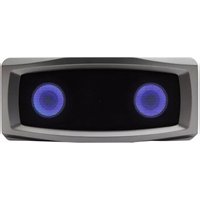
Media.VOX CA-7100BT - Loudspeaker Cyber Acoustics - Free user manual and instructions
Find the device manual for free Media.VOX CA-7100BT Cyber Acoustics in PDF.


| Product Type | Bluetooth Speaker |
| Model | Media.VOX CA-7100BT |
| Brand | Cyber Acoustics |
| Dimensions (W x H x D) | 8.3 x 5.1 x 4.0 in (21 x 13 x 10 cm) |
| Weight | 1.5 lb (0.68 kg) |
| Power Source | Built-in rechargeable lithium-ion battery, USB-C charging |
| Battery Life | Up to 10 hours at moderate volume |
| Charging Time | Approximately 3 hours |
| Bluetooth Version | 5.0 |
| Wireless Range | Up to 33 ft (10 m) |
| Audio Output | Stereo 2.0, 2 x 5W RMS |
| Frequency Response | 80 Hz - 20 kHz |
| Input Interfaces | Bluetooth, AUX 3.5mm, USB playback (via USB port) |
| Controls | Power, Volume +/-, Play/Pause, Next/Previous track, Bluetooth pairing, Hands-free call |
| Built-in Microphone | Yes, for hands-free calling |
| Water Resistance | Not specified (assume no rating) |
| Compatible Devices | Smartphones, tablets, computers, MP3 players with Bluetooth or AUX |
| Color | Black (typical) |
| Maintenance | Clean with a soft dry cloth; do not use liquids or solvents |
| Safety | Avoid exposure to extreme temperatures, moisture, and direct sunlight |
| Spare Parts / Repairability | Battery replacement by qualified technician; other parts not user-serviceable |
| Included Accessories | USB-C charging cable, AUX cable, user manual |
Frequently Asked Questions - Media.VOX CA-7100BT Cyber Acoustics
User questions about Media.VOX CA-7100BT Cyber Acoustics
0 question about this device. Answer the ones you know or ask your own.
Ask a new question about this device
Download the instructions for your Loudspeaker in PDF format for free! Find your manual Media.VOX CA-7100BT - Cyber Acoustics and take your electronic device back in hand. On this page are published all the documents necessary for the use of your device. Media.VOX CA-7100BT by Cyber Acoustics.
USER MANUAL Media.VOX CA-7100BT Cyber Acoustics
CA-7100BT

Bluetooth®

MEDIA.VOX
SPEAKER MANUAL
WARNING
TO PREVENT FIRE OR SHOCK HAZARD, DO NOT USE THE PLUG WITH AN EXTENSION CORD, RECEPTACLE OR OTHER OUTLET UNLESS THE BLADES CAN BE FULLY INSERTED TO PREVENT BLADE EXPOSURE. TO REDUCE THE RISK OF FIRE OR ELECTRIC SHOCK, DO NOT EXPOSE THIS APPLIANCE TO RAIN OR MOISTURE. TO PREVENT ELECTRICAL SHOCK, MATCH WIDE BLADE PLUG TO WIDE SLOT, FULLY INSERT.
The lightning flash with arrowhead symbol, within an equilateral triangle, is intended to alert the user to the presence of uninsulated "dangerous voltage" within the product's enclosure that may be of sufficient magnitude to constitute a risk of electric shock to persons.
CAUTION
RISK OF ELECTRIC SHOCK DO NOT OPEN
WARNING: TO REDUCE THE RISK OF ELECTRIC SHOCK, DO NOT REMOVE COVER (OR BACK). NO USER SERVICEABLE PARTS INSIDE. REFER SERVICING TO QUALIFIED SERVICE PERSONNEL.

The exclamation point within an equilateral triangle is intended to alert the user to the presence of important operating and maintenance (servicing) instructions in the literature accompanying the appliance.
See the bottom of the set
IMPORTANT SAFETY INSTRUCTIONS
- Read these instructions - All the safety and operating instructions should be read before this product is operated.
- Keep these instructions - The safety and operating instructions should be retained for future reference.
- Heed all warnings - All warnings on the appliance and in the operating instructions should be adhered to.
- Follow all instructions. All operating and use instructions should be followed.
- Do not use this apparatus near water. The appliance should not be used near water or moisture, for example, in a wet basement or near a swimming pool, and the like.
- Clean only with dry cloth.
- Do not block any ventilation openings. Install in accordance with the manufacturer's instructions.
- Do not install near any heat sources such as radiators, heat registers, stoves, or other apparatus (including amplifiers) that produce heat.
- Do not defeat the safety purpose of the polarized or grounding plug. A polarized plug has two blades with one wider than the other. A grounding plug has two blades and a third grounding prong. The wide blade or the third prong is provided for your safety. If the provided plug does not fit into your outlet, consult an electrician for replacement of the obsolete outlet.
- Protect the power cord from being walked on or pinched particularly at the plugs, convenience receptacles, and at the point where they exit from the apparatus.
- Only use attachments/accessories specified by the manufacturer.
- Use only with the cart, stand, tripod, bracket, or table specified by the manufacturer, or sold with the apparatus. When a cart or rack is used, use caution when moving the cart/apparatus combination to avoid injury from tip-over.

- Unplug the apparatus during lightning storms or when unused for long periods of time.
- Refer all servicing to qualified personnel. Servicing is required when the apparatus has been damaged in any way, such as power supply cord or plug is damaged, liquid has been spilled or objects have fallen into the apparatus, has been exposed to rain or moisture, does not operate normally, or has been dropped.
- Please keep the unit in a good ventilation environment.
- CAUTION: These servicing instructions are for use by qualified service personnel only. To reduce the risk of electric shock, do not perform any servicing other than that contained in the operating instructions unless you are qualified to do so.
- WARNING: Please refer to the information on the exterior bottom enclosure for electrical and safety information before installing or operating the apparatus.
- WARNING: To reduce the risk of fire or electric shock, do not expose this apparatus to rain or moisture. The apparatus shall not be exposed to dripping or splashing, and no objects filled with liquids, such as vases, shall be placed on the apparatus.
- WARNING: The mains plug is used as the disconnect device. The disconnect device shall remain readily operable.
- This is a CLASS II apparatus with double insulation, and no protective earth is provided.
- Correct Disposal of this product. This marking indicates that this product should not be disposed of with other household wastes throughout the EU. To prevent possible harm to the environment or human health from uncontrolled waste disposal, recycle it responsibly to promote the sustainable reuse of material resources. To return your used device, please use the return and collection systems or contact the retailer where the product was purchased. They can take this product for environmentally safe recycling.
- Do not install this equipment in a confined space such as a book case or similar unit. The ventilation should not be impeded by covering the ventilation openings with items such as newspaper, table-cloths, curtains etc.
- No naked flame sources, such as lighted candles, should be placed on the apparatus.
- Attention should be drawn to environmental aspects of battery disposal.
- Use of the apparatus in moderate climates.
WARNING
NEVER USE AN EXTENSION CORD, OR A PLUG OR OTHER CONNECTORS THAT PREVENT THE COMPLETE INSERTION OF THE PLUG, TO AVOID ANY RISK OF FIRE OR DANGEROUS SHOCK. NEVER LEAVE THIS APPARATUS IN THE RAIN OR HUMIDITY TO AVOID ANY DANGER OF FIRE OR ELECTRIC SHOCK. THE PLUG MUST ALWAYS BE FULLY INSERTED INTO A SUITABLE OUTLET.

3.5mm Headphone/Aux Audio Output
3.5mm Aux Audio Input
Tone – Treble Increase
Tone - Treble Decrease
Volume Increase
Volume Decrease
Speaker Lights On/Off

RF Remote included
Input Switch – Bluetooth Pairing / Aux Audio Source
LED: Blinking Blue = Pairing mode | Solid Blue = Bluetooth Connected | Solid Green = Aux in connected
Power On/Off
Bluetooth Connection
First time connection with new devices
- When the system is switched on it will go into the Bluetooth pairing mode by default.
- Bluetooth LED status light will begin blinking. Search your device's Bluetooth list for "CA-7100BT" and tap to connect/pair.
- After successful connection, a tone will sound, and the Bluetooth LED status light will stop flashing and turn solid blue.
Reconnecting with previous devices
- When the system is on, the speaker system will automatically search and attempt connect with the last paired device.
- Make sure this Bluetooth source is nearby the system to automatically reconnect.
- When the system is on, the speaker system will automatically search and attempt to connect with the last paired device. - Make sure this Bluetooth source is nearby the system to automatically reconnect.
Speakers default to Bluetooth mode when initially turned on. Press the Source button once and you will hear a tone as the system switches to AUX IN mode. The LED status light will change to solid GREEN.
Connect your source device to the AUX IN jacks on the control panel.
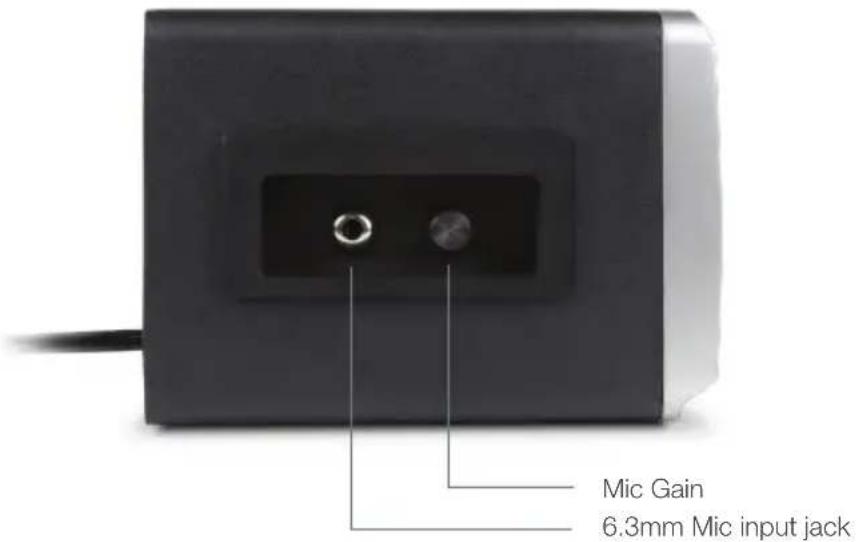
Microphone Control
Left Side View
Bass Port Vent
Right Side View

Optional CVL-1026 Microphone turns speaker into a PA system (mic not included)
Keep bass port unobstructed for best sound quality
Placing speaker near walls, with port facing a wall or corner, can significantly enhance bass response
If possible, adjust speaker proximity to a wall, corner, counter, or other large structure for boosted performance
Adjusting the Tone controls can also increase or decrease bass presence (see page 5 for page controls)
Included Audio Cables
For Aux in connections

RCA to 3.5mm cable
For connecting TV monitors, projectors, SMART Boards™ and other interactive whiteboards
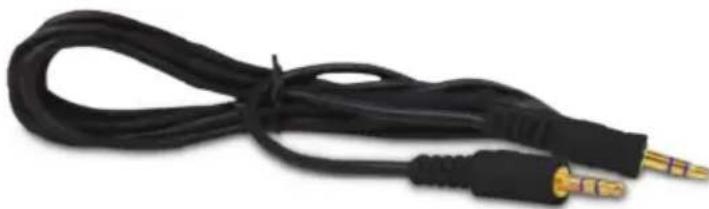
3.5mm to 3.5mm cable
For wired connection to laptops, tablets, smartphones, iPods, DVD and MP3 players
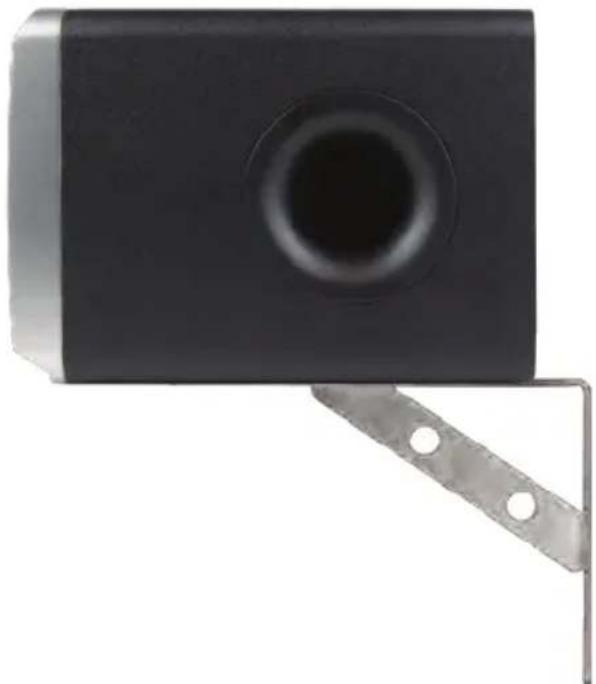
Wall Mount Ready
Embedded bracket mounts for easy wall mounting near projectors and other media gear using optional wall brackets
(wall brackets not included)

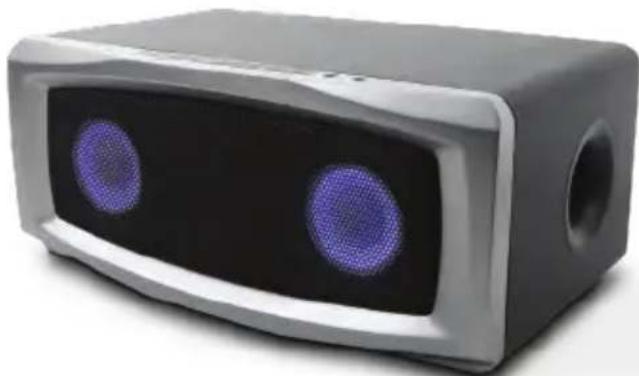
Backlit Front Speakers
In darkened rooms, the speaker lights can be turned on for increased visibility, document lighting, or for visual affect (see page 5 for button controls)

Media Cart Ready
Designed to fit on any size cart for easy rolling room to room (cart not included)
FCC STATEMENT
- This device complies with Part 15 of the FCC Rules. Operation is subject to the following two conditions:
(1) This device may not cause harmful interference. (2) This device must accept any interference received, including interference that may cause undesired operation.
- Changes or modifications not expressly approved by the party responsible for compliance could void the user's authority to operate the equipment.
NOTE: This equipment has been tested and found to comply with the limits for a Class B digital device, pursuant to Part 15 of the FCC Rules. These limits are designed to provide reasonable protection against harmful interference in a residential installation.
This equipment generates, uses and can radiate radio frequency energy and, if not installed and used in accordance with the instructions, may cause harmful interference to radio communications. However, there is no guarantee that interference will not occur in a particular installation. If this equipment does cause harmful interference to radio or television reception, which can be determined by turning the equipment off and on, the user is encouraged to try to correct the interference by one or more of the following measures:
Reorient or relocate the receiving antenna.
Increase the separation between the equipment and receiver.
Connect the equipment into an outlet on a circuit different from that to which the receiver is connected.
Consult the dealer or an experienced radio/TV technician for help.
Canada ICES-003 - This Class B digital apparatus complies with Canadian ICES-003.
MEDIA.VOX
Bluetooth Classroom Speaker
FEATURES AND SPECIFICATIONS
- Powered stereo speaker system with Bluetooth connectivity • Wireless remote control • Tone control to tune audio as needed • Bass port enhances room-filling sound • 60 watts peak power / 30 watts RMS • Lighted 3" speakers behind protective wire mesh grill
- 6.3mm microphone input jack • Mic gain (volume) control
- Wall mount ready
Controls:
- on/off
- Bluetooth pairing
- Volume
- Tone control

Headphone jack
Aux in jack
Also Includes: - 4 foot 3.5mm male to male cable - RCA to 3.5mm Y cable

- WARNING
- CAUTION
- IMPORTANT SAFETY INSTRUCTIONS
- BLUETOOTH CONNECTION
- FIRST TIME CONNECTION WITH NEW DEVICES
- RECONNECTING WITH PREVIOUS DEVICES
- MICROPHONE CONTROL
- BASS PORT VENT
- INCLUDED AUDIO CABLES
- RCA TO 3.5MM CABLE
- 3.5MM TO 3.5MM CABLE
- WALL MOUNT READY
- BACKLIT FRONT SPEAKERS
- MEDIA CART READY
- FCC STATEMENT
- MEDIA.VOX
- BLUETOOTH CLASSROOM SPEAKER
- FEATURES AND SPECIFICATIONS
Brand : Cyber Acoustics
Model : Media.VOX CA-7100BT
Category : Loudspeaker