
DOCHOLDSTND - Support pour écran plat StarTech.com - Free user manual and instructions
Find the device manual for free DOCHOLDSTND StarTech.com in PDF.


| Product Type | Flat Panel Monitor Stand |
| Brand | StarTech.com |
| Model | DOCHOLDSTND |
| Color | Black |
| Material | Steel / Aluminum |
| Maximum Screen Size | 27 inches |
| Weight Capacity | 22 lbs (10 kg) |
| VESA Compatible | 75x75mm and 100x100mm |
| Mounting Type | Desk clamp or grommet mount |
| Height Adjustment | Yes, gas spring |
| Tilt Adjustment | -5° to +15° |
| Swivel Adjustment | ±90° |
| Rotation | 360° (portrait/landscape) |
| Overall Dimensions (W x D x H) | 6.3 x 5.9 x 16.5 in (16 x 15 x 42 cm) |
| Weight | 5.5 lbs (2.5 kg) |
| Cable Management | Integrated cable clips |
| Warranty | 2 years |
| Package Contents | Stand, mounting hardware, manual |
| Recommended Use | Office, home, or commercial |
| Cleaning Instructions | Wipe with dry cloth; avoid solvents |
| Safety Warning | Ensure desk thickness > 0.5 in (13 mm) |
| Spare Parts Availability | Contact StarTech support for replacements |
| Repairability | User-serviceable gas spring and VESA plate |
Frequently Asked Questions - DOCHOLDSTND StarTech.com
User questions about DOCHOLDSTND StarTech.com
0 question about this device. Answer the ones you know or ask your own.
Ask a new question about this device
Download the instructions for your Support pour écran plat in PDF format for free! Find your manual DOCHOLDSTND - StarTech.com and take your electronic device back in hand. On this page are published all the documents necessary for the use of your device. DOCHOLDSTND by StarTech.com.
USER MANUAL DOCHOLDSTND StarTech.com
Document Holder - Angle Adjustment
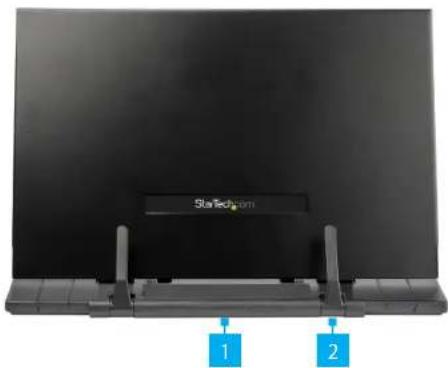
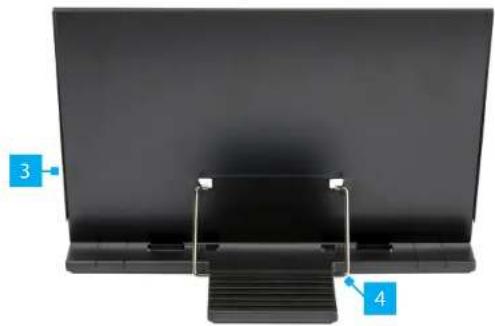
Product Diagram (DOCHOLDSTND)
Front View
Rear View
natural_image
Close-up of a black electronic device with labeled parts (3 and 4), no visible text or symbols on the device itself.| Component Function | ||
| 1 | Page Holder Tray • Rest a Document | on this textured surface |
| 2 | Clips | • Secure a Document in place with the adjustable Clips• Can be used to hold open the pages of a Catalogue or Small Book |
| 3 | Metal Backplate | • Used to prop up a Document, Catalog, Small Book, or Tablet |
| 4 | Prop Bar | • Adjust the Metal Backplate into 1 of the 7 grooves in the rear of the Page Holder Tray for different viewing angles |
Requirements
For the latest requirements, please visit www.startech.com/DOCHOLDSTND.
- Document x 1
• (Optional) Catalogue, Small Book, or Tablet x 1 - Clean, Flat, and Stable Surface x 1
Installation and Operation
Tipping hazard! DOCHOLDSTND is free-standing and when it is loaded with a heavy and/or tall object, you increase the tipping hazard.
- Place the Document Holder on a Clean, Flat, and Stable Surface, with the Clips facing upwards.
- Fold the Clips away from the Document Holder.
- Lift the Metal Backplate and slide the Prop Bar along the grooves until the desired viewing angle is met.
Pinch hazard! Ensure all fingers are removed from any potential pinch points when adjusting the Metal Backplate.
- Lower the Prop Bar into 1 of the 7 grooves on the Page Holder Tray.
- Load your Document into the Document Holder, adjusting the Clips as needed.
Use of Trademarks, Registered Trademarks, and other Protected Names and Symbols
This manual may make reference to trademarks, registered trademarks, and other protected names and/or symbols of third-party companies not related in any way to StarTech.com. Where they occur these references are for illustrative purposes only and do not represent an endorsement of a product or service by StarTech.com, or an endorsement of the product(s) to which this manual applies by the third-party company in question. StarTech.com hereby acknowledges that all trademarks, registered trademarks, service marks, and other protected names and/or symbols contained in this manual and related documents are the property of their respective holders.
Warranty Information
This product is backed by a five-year warranty.
For further information on product warranty terms and conditions, please refer to www.startech.com/warranty.
Limitation of Liability
In no event shall the liability of StarTech.com Ltd. and StarTech.com USA LLP (or their officers, directors, employees or agents) for any damages (whether direct or indirect, special, punitive, incidental, consequential, or otherwise), loss of profits, loss of business, or any pecuniary loss, arising out of or related to the use of the product exceed the actual price paid for the product. Some states do not allow the exclusion or limitation of incidental or consequential damages. If such laws apply, the limitations or exclusions contained in this statement may not apply to you.
StarTech.com Ltd.
45 Artisans Cres
London, Ontario
N5V 5E9
Canada
StarTech.com LLP
2500 Creekside
Parkwy
Lockbourne, Ohio
43137
U.S.A.
StarTech.com Ltd.
Unit B, Pinnacle 15
Gowerton Rd,
Brackmills
Northampton
NN4 7BW
United Kingdom
FR: fr.startech.com
DE: de.startech.com
ES: es.startech.com
NL: hi.startech.com IT: it.startech.com
- It.startech.com IP: in startech.com
JP.jp.startech.com
Brand : StarTech.com
Model : DOCHOLDSTND
Category : Support pour écran plat