WB5500 - Uncategorized AOPEN - Free user manual and instructions
Find the device manual for free WB5500 AOPEN in PDF.


User questions about WB5500 AOPEN
0 question about this device. Answer the ones you know or ask your own.
Ask a new question about this device
Download the instructions for your Uncategorized in PDF format for free! Find your manual WB5500 - AOPEN and take your electronic device back in hand. On this page are published all the documents necessary for the use of your device. WB5500 by AOPEN.
USER MANUAL WB5500 AOPEN
WB5500 series User manual
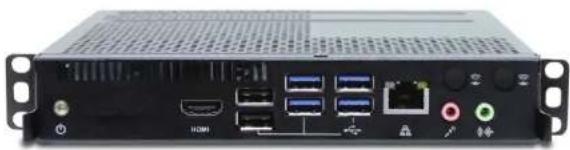
natural_image
Back view of a black server rack with ports and connectors (no visible text or symbols)Safety Instructions
- Please read these safety instructions carefully.
- Please keep this User's Manual for later reference.
- Please disconnect this equipment from correcter before cleaning. Don't use liquid or prayed detergent for cleaning.
Use moisture sheet or cloth for cleaning. - Make sure the equipment is connected to the power source with the correct voltage, frequency, and ampere.
- All cautions and warnings on the equipment should be noted.
- Never poor any liquid into opening, this could cease fire or electrical shock.
- Never open the equipment. For safety reason, the equipment should only be opened by qualified service personnel.
- If one of the following situations arises, get the equipment checked by a service personnel:
a. Liquid has penetrated into the equipment.
b. The equipment has been exposed to moisture.
c. The equipment has not work well or you can not get it work according to user's manual.
d. The equipment has dropped and damaged.
e. If the equipment has obvious sign of breakage.
Disposal Instruction
For better protection of our earth, please don't throw this electronic device into municipal trash bin when discarding.
To minimize pollution and ensure utmost protection of the global environment, please recycle the product. For more information about
the collection and recycling of Waste Electrical and Electronic Equipment (WEEE), you are invited to visit our homepage at
www.aopen.com under "Green Products"
Copyright
Copyright of this publication belongs to AOpen Inc. AOpen reserves the right to change the content of this publication without obligation to notify any party of such changes or revisions. No part of this publication may be reproduced, transcribed, transmitted, translated into any language, stored in a retrieval system in any form or by any means electronically, mechanically, optically without the prior written permission of this company.
Disclaimer
AOpen makes no warranties or representations, either expressed or implied, with respect to the content herein and specifically disclaims any warranties, merchantability of fitness for any particular purpose.
AOpen and AOpen logos used herein are registered trademarks of AOpen Inc.
All other brand names and trademarks are owned by their respective owners. Copyright © 2018 by AOpen Inc.
All rights reserved. http://www.acopen.com
- Citation on use of battery: Use the battery recommended by the manufacturer or the same type of battery installed by the manufacturer and only qualified maintenance personnel can replace it. If incorrect battery is used, it may cause explosion or fire hazard. Recycle or disposed used batteries according to the manufacturer's instruction on your local authority.

-
Ambient operation temperature: 0 \~ 40 degrees C
-
Before removing the cable connected to each socket, please remove the connector on the device side First, and then remove the connector on the box side. When removing the connection cable, please pull it out directly. Do not shake the connector from side to side to avoid damage to the connector and cause short circuit.
Introduction
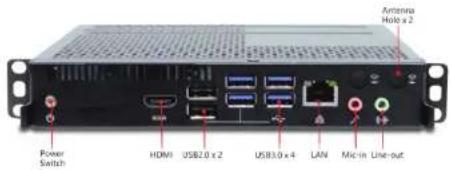
Front I/O
text_image
Power Switch HDMI USB2.0 x 2 USB3.0 x 4 LAN Micro Line-out Antenna Holo x 2Rear I/O
text_image
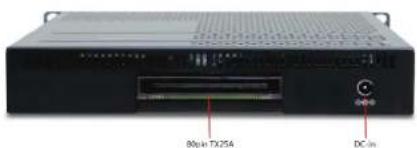
80pin TX254 DC-inPacking List
WB5500

1 x WB5500 system

1 x insert page

2 x L type Holder with M4 screw x 2, M3 HDD screw x 4

1 x User Guide
Product Specification
| CPU | Intel 7th/8th gen, Core U-series processor TDP ±15W |
| Chipset NA | |
| Memory | Dual channel, SO-DIMM DDR4 x 2, 2133MHz, Max memory size: 32GB |
| Graphics | Intel HD Graphics 520 / 620 |
| Expasion Slot | Mini PCIe x 1, M.2 2280 x 1(key M for SSD1, SATA3 x 1 |
| Audio | Realtek ALC269Q HD Audio CODEC on-Board. |
| LAN | Intel 10/100/1000bps LAN x 2 (i219LM) |
| Front Panel I/O | Power Button x 1 (with power indicator (Green) & HDD indicator (Orange)), HDMI 1.4 Port x 1, USB 2.0 x 2, USB 3.0 x 4, RJ45 x 1, Line-out x 1.Mic-in x 1. |
| Rear Panel I/O | DC 19V Jack x 1, TX25A 接口 x 1 |
| Adapter | 65W (19V, 3.42A) 交流电源供不应 (搭配) |
| Input Voltage AC | 100 ~ 240V |
Chassis Dimension
Dimension of WB5500 (Unit: mm)
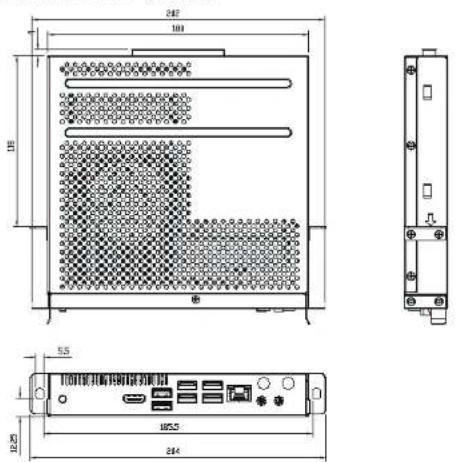
P/N:49.WB501.00x0