WT19M-FKB - Uncategorized AOPEN - Free user manual and instructions
Find the device manual for free WT19M-FKB AOPEN in PDF.


| Product Type | LCD Monitor |
| Model | WT19M-FKB |
| Brand | AOpen |
| Display Size | 19 inches (48.3 cm) |
| Resolution | 1280 x 1024 (SXGA) |
| Aspect Ratio | 5:4 |
| Contrast Ratio | 1000:1 (typical) |
| Brightness | 300 cd/m² |
| Response Time | 5 ms |
| Viewing Angle | 170° horizontal / 160° vertical |
| Power Consumption | 30 W (typical), <1 W (standby) |
| Power Supply | AC 100-240 V, 50/60 Hz |
| Connectivity | VGA (D-Sub), DVI-D |
| VESA Mount | 100 x 100 mm |
| Dimensions (with stand) | 415 x 410 x 200 mm (W x H x D) |
| Weight (with stand) | 4.5 kg |
| Color | Black |
| OSD Languages | English, French, German, Italian, Spanish, Chinese |
| Certifications | CE, FCC, RoHS, TÜV |
| Cleaning | Wipe with a soft dry cloth. Do not use abrasive cleaners. |
| Repairability | User-replaceable stand and cables. Internal components not user-serviceable. |
Frequently Asked Questions - WT19M-FKB AOPEN
User questions about WT19M-FKB AOPEN
0 question about this device. Answer the ones you know or ask your own.
Ask a new question about this device
Download the instructions for your Uncategorized in PDF format for free! Find your manual WT19M-FKB - AOPEN and take your electronic device back in hand. On this page are published all the documents necessary for the use of your device. WT19M-FKB by AOPEN.
USER MANUAL WT19M-FKB AOPEN
natural_image
Blue background with white icon of a hand pressing a button on a computer screen, no text or symbols presenteTILE
WT19M-FKB
Commercial All In One PC
Technical Manual
natural_image
Symbol of a trash bin crossed with no text or labels, accompanied by a black rectangular block below (no text or symbols present)Disposal Instruction (US)
For better protection of our earth, please don't throw this electronic device into municipal trash bin when discarding. To minimize pollution and ensure utmost protection of the global environment, please recycle the product. For more information about the collection and recycling of Waste Electrical and Electronic Equipment (WEEE), you are invited to visit our homepage at www.aopen.com under "Green Products"
廃棄上の指示
Instruction de Disposition (French)
Copyright of this publication belongs to AOpen Inc. AOpen reserves the right to change the content of this publication without obligation to notify any party of such changes or revisions. No part of this publication may be reproduced, transcribed, transmitted, translated into any language, stored in a retrieval system in any form or by any means electronically, mechanically, optically without the prior written permission of this company.
Disclaimer
AOpen makes no warranties or representations, either expressed or implied, with respect to the content herein and specifically disclaims any warranties, merchantability of fitness for any particular purpose.
AOpen and AOpen logos used herein are registered trademarks of AOpen Inc.
All other brand names and trademarks are owned by their respective owners.
Copyright © 2011 by AOpen Inc.
All rights reserved.
AOpen Inc.
http://www.aopen.com.tw
Safety Instructions
- Please read these safety instructions carefully.
- Please keep this User's Manual for later reference.
- Please disconnect this equipment from connector before cleaning. Don't use liquid or prayed detergent for cleaning. Use moisture sheet or cloth for cleaning.
- Make sure the equipment is connected to the power source with the correct voltage, frequency, and ampere.
- All cautions and warnings on the equipment should be noted.
- Never pour any liquid into opening; this could cause fire or electrical shock.
-
Never open the equipment. For safety reason, the equipment should only be opened by qualified service personnel.
-
If one of the following situations arises, get the equipment checked by a service personnel :
a. Liquid has penetrated into the equipment.
b. The equipment has been exposed to moisture.
c. The equipment has not work well or you can not get it work according to user's manual.
d. The equipment has dropped and damaged.
e. If the equipment has obvious sign of breakage.
-
Ambient operation temperature: less than 40 degrees C.
-
Caution on use of battery: Use the battery recommended by the manufacturer or the same type of battery installed by the manufacturer. If incorrect battery is used, it may cause explosion or fire hazard. Recycle or discard used batteries according to the manufacturer's instruction or your local authority.
-
Wall Mounting Holder need to use UL 1678 approved product.
FCC notice
This device has been tested and found to comply with the limits for a Class B digital device pursuant to Part 15 of the FCC Rules. These limits are designed to provide reasonable protection against harmful interference in a residential installation. This device generates, uses, and can radiate radio frequency energy and, if not installed and used in accordance with the instructions, may cause harmful interference to radio communications.
However, there is no guarantee that interference will not occur in a particular installation. If this device does cause harmful interference to radio or television reception, which can be determined by turning the device off and on, the user is encouraged to try to correct the interference by one or more of the following measures:
Reorient or relocate the receiving antenna.
Increase the separation between the device and receiver.
Connect the device into an outlet on a circuit different from that to which the receiver is connected.
Consult the dealer or an experienced radio/television technician for help.
Notice: Shielded cables
All connections to other computing devices must be made using shielded cables to maintain compliance with FCC regulations.
Notice: Peripheral devices
Only peripherals (input/output devices, terminals, printers, etc.) certified to comply with Class B limits may be attached to this equipment. Operation with non-certified peripherals is likely to result in interference to radio and TV reception.
Caution
Changes or modifications not expressly approved by the manufacturer could void the user's authority, which is granted by the Federal Communications Commission, to operate this computer.
Operation conditions
This device complies with Part 15 of the FCC Rules. Operation is subject to the following two conditions: (1) this device may not cause harmful interference, and (2) this device must accept any interference received, including interference that may cause undesired operation.
Notice: Canadian users
This Class B digital apparatus complies with Canadian ICES-003
Table of Contents
1. Packing List....11
1-1. Standard Accessories ...... 11
2. System View....12
2-1. Front View....12
2-2. Rear View....12
2-3. I/O ports....13
2-4. Dimension 14
3. System Assembly ...... 15
3-1. SSD Replacement 16
3-2. RAM Replacement....16
3-3. Power Adapter Replacement....17
3-4. Wireless LAN Installation....17
4. Peripheral Installation....18
4-1. VESA-bracket support....18
5. Specification....19
Appendix A: Drivers Installation....21
Appendix B: Trouble Shotting 22
The logos of Adobe and Acrobat are the registered trademarks of Adobe Systems Incorporated.
The logos of AMD, Athlon, and Duron are the registered trademarks of Advanced Micro Devices, Inc.
The logos of Intel, Intel Celeron and Pentium II&III are the registered trademarks of Intel Corporation.
The logos of nVidia are the registered trademarks of nVidia Corporation.
The logos of Microsoft, Windows are the registered trademarks of Microsoft Corporation in America and other countries.
All the titles of the products and the trademarks mentioned in this manual are for the purpose of illustrative conveniences and are possessed by their respective firms.
We regret not informing about any changes in usage standards and other related information. AOpen Company reserves the right of altering or modifying the content of this manual. In case of any mistakes or incorrect descriptions, which include those on the products, AOpen makes no guarantee or commitments.
This document is based on the copyright laws in order to protect our company and reserve all rights.
Under no circumstances are any types of duplicating and loading this brochure in any databases and media permitted except the permission signed on formal document by AOpen Company.
1996-2008 Copyrights, AOpen Ltd. All rights reserved.
http://www.aopen.com
1. Packing List
1-1. Standard Accessories
a.
natural_image
Blank tablet device with blank screen area (no text or symbols)d.

b.
C.
natural_image
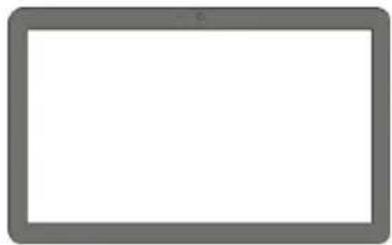
Pure diagram of a connector or connector with no text, numbers, or symbolsa. System
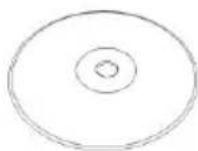
b. Utility and Driver
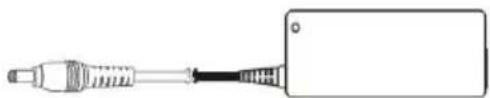
c. Power adapter (90W)
d. Power cord
Notice:
The pictures may look slightly different from the product you purchased, due to our constant product improvement effort.
2. System View
2-1. Front View

text_image
AOPEN Bright Ideas Connected2-2. Rear View
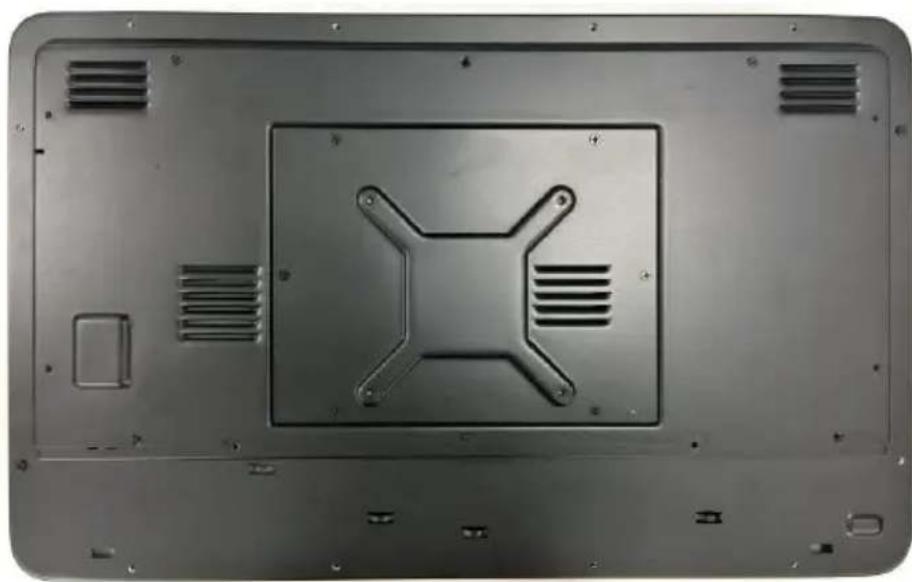
natural_image
Metallic rectangular panel with a central square and four cross-shaped cutouts, mounted on a flanged base (no text or symbols visible)2-3. I/O ports
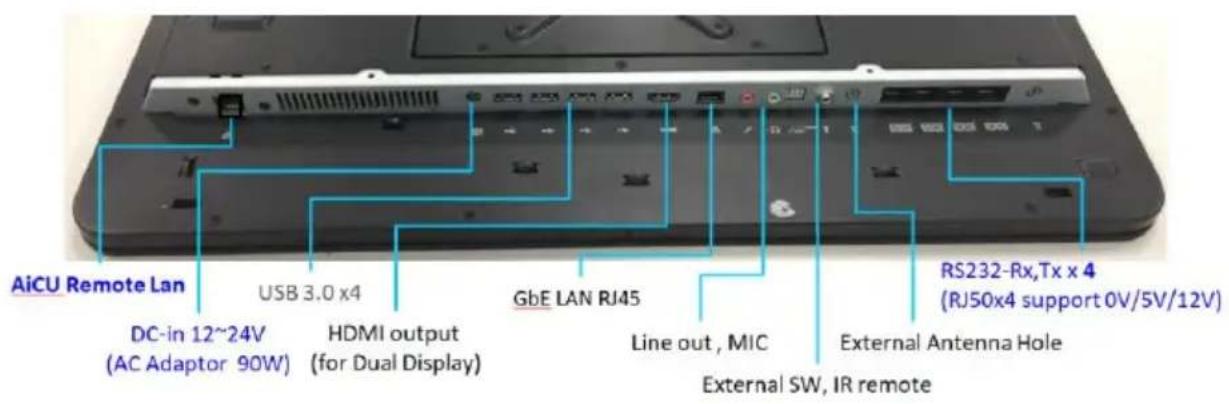
Caution: When you install devices or cables, please removed DC jack at first to prevent inadvertently switched to cause system boot/ damage to system/electric shock. The HDMI connector is output port, not input.
text_image
AiCU Remote Lan DC-in 12~24V (AC Adaptor 90W) USB 3.0 x4 HDMI output (for Dual Display) GbE LAN RJ45 Line out, MIC External SW, IR remote RS232-Rx,Tx x 4 (RJ50x4 support 0V/5V/12V)2-4. Dimension
text_image
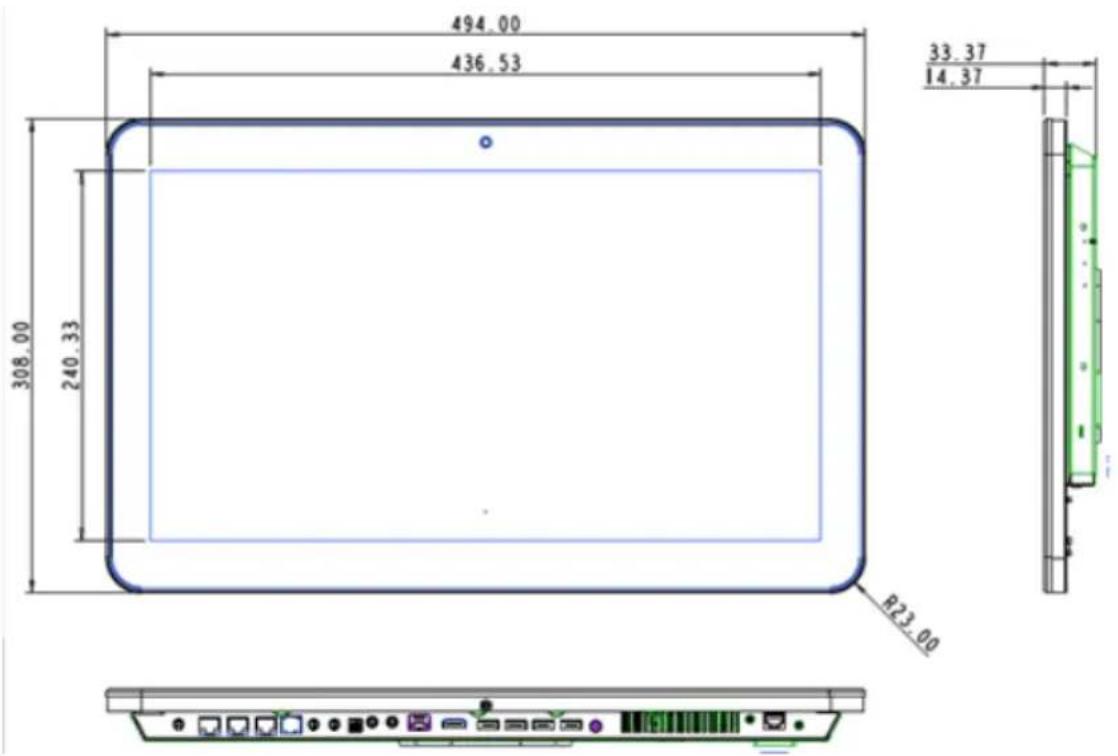
494.00 436.53 33.37 14.37 308.00 240.33 R23.00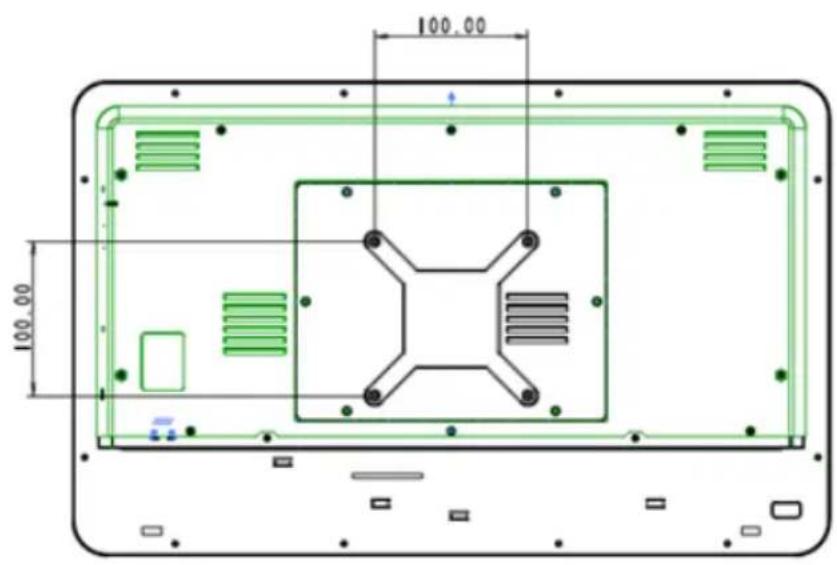
text_image
100.00 100.003. System Assembly
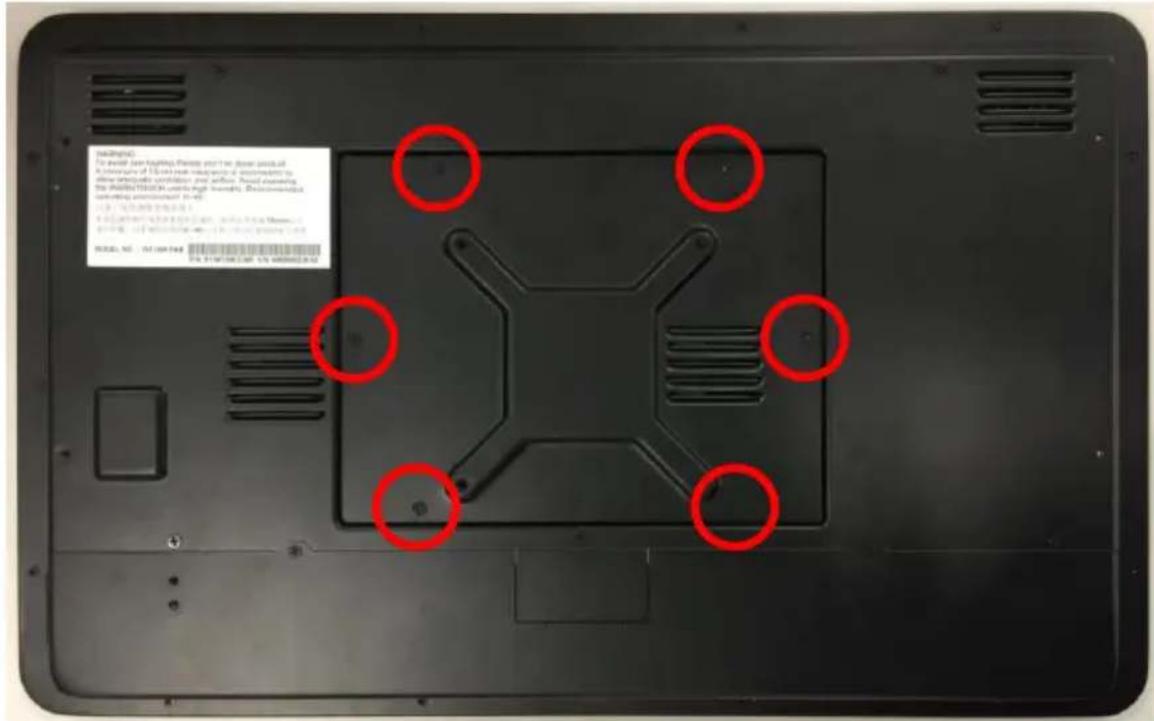
Please remove all screws of Detachable Door
text_image
bad(digit) To avoid your lighting. Prices and I can show prices all Achnments of 100% and not necessary for use. Should examine the double digit(s) in the next month. Therefore, we need to use an app or file (e.g., 123458789). To check it, you need to use this device. © 2023-06-01 File: 123458789.00 / 123458789.00 #1.00/1.00/1.00/1.00/1.00/1.00/1.00/1.00/1.00/1.00/1.00/1.00/1.00/1.00/1.00/1.00/1.00/1.00/1.00/1.00/1.00/ #2.00/1.00/1.00/1.00/1.00/1.00/1.00/1.00/1.00/1.00/1.00/1.00/1.00/1.00/1.00/1.00/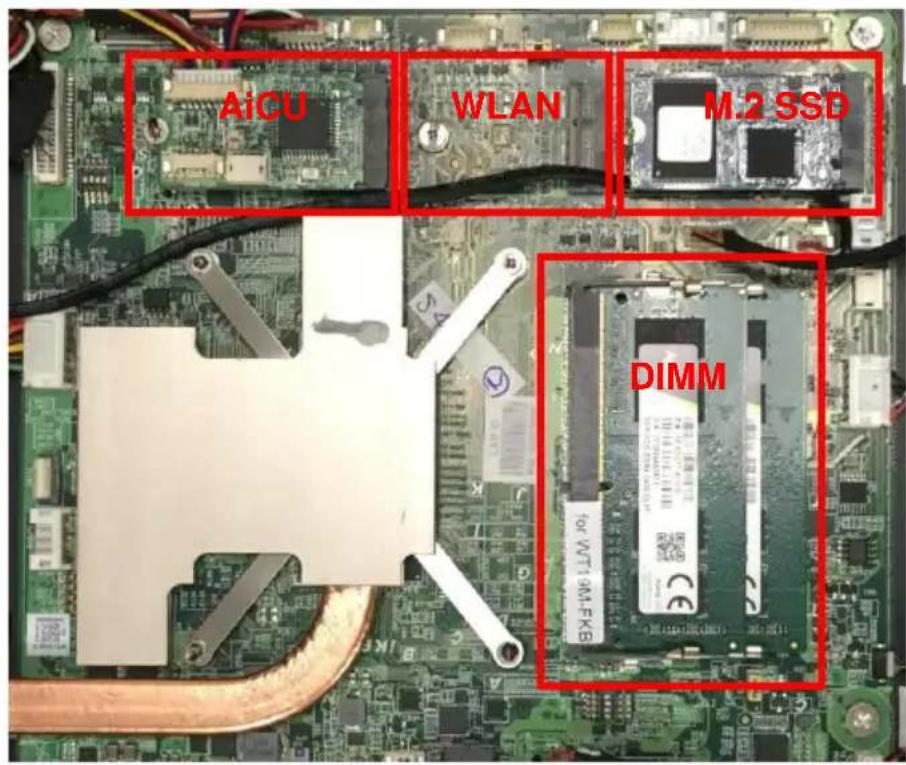
text_image
AICU WLAN M.2 SSD DIMM3-1. SSD module Replacement
Please remove the screw to release SSD, and fix another changed SSD by same screw.
3-2. RAM Replacement
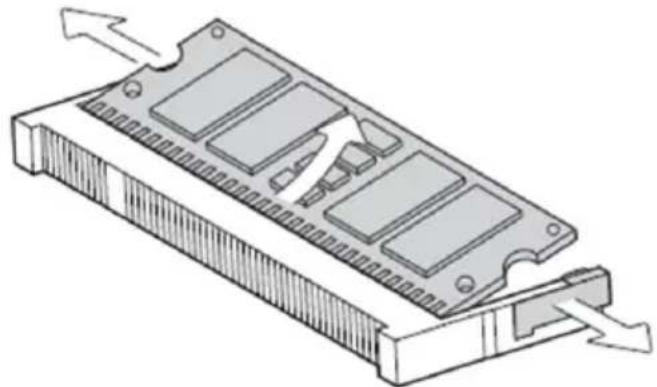
3-2-1. Use both fingers to pull the ejector clips out of the sides of the module.
3-2-2. Slide the memory module out of the memory slot.
natural_image
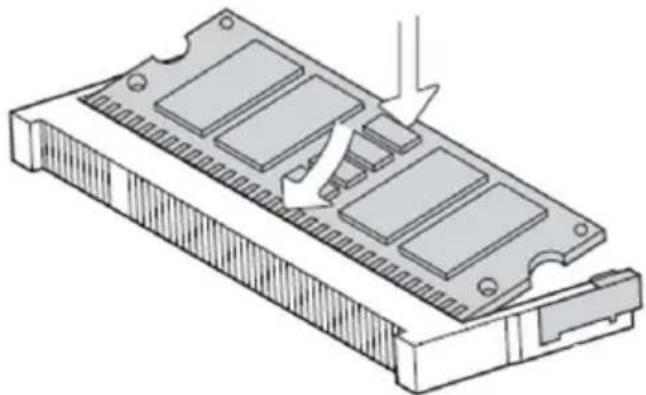
3D diagram of a rectangular electronic component with internal slots and directional arrows indicating movement (no text or symbols)3-2-3. Slide the memory module into the memory slot and press down until the ejector clips click in place.
natural_image
Technical illustration of a computer RAM module with internal components and an arrow indicating assembly (no text or symbols present)3-3. Power Adapter Replacement
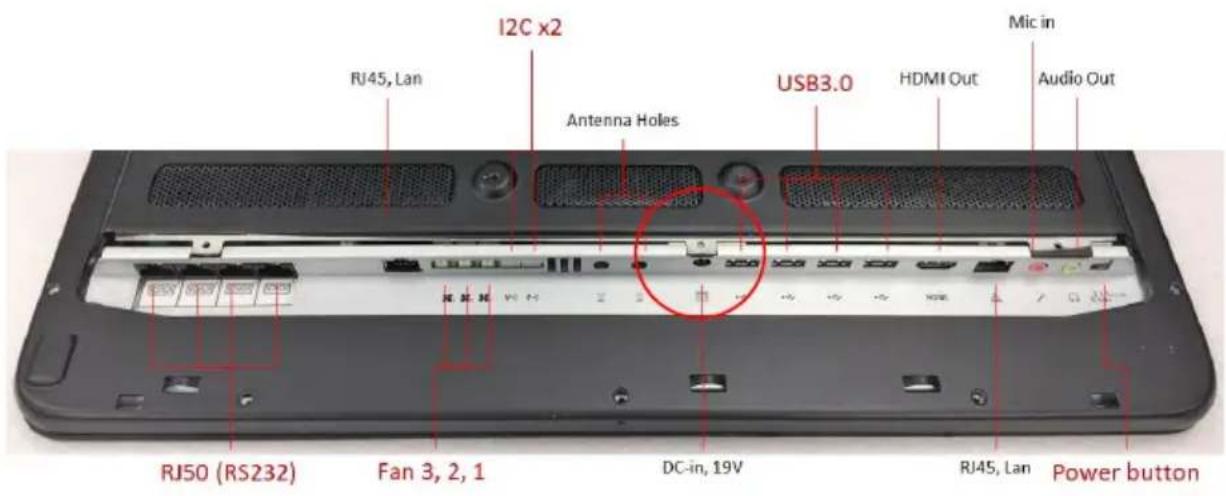
- Please turn off the system
- Disconnect the power cable from the I/O panel (DC IN), then can swap the adapter
text_image
I2C x2 RF45, Lan Antenna Holes USB3.0 HDMI Out Mic in Audio Out RF50 (RS232) Fan 3, 2, 1 DC-in, 19V RF45, Lan Power button3-4. Wireless LAN Installation
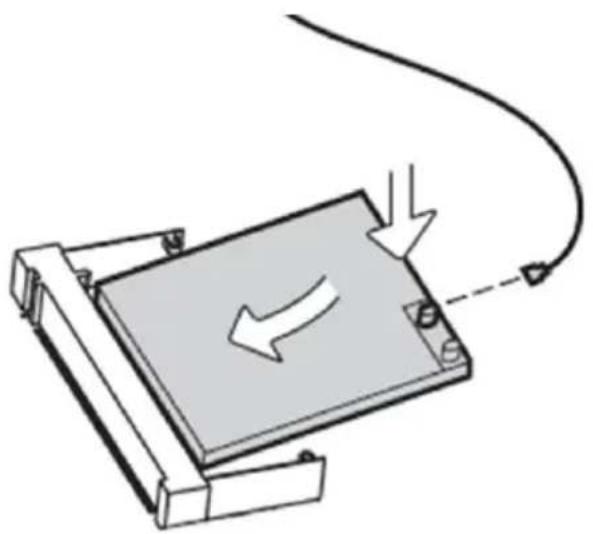
To external antenna
natural_image
Diagram of a mechanical device with a curved cable and directional arrows indicating motion (no text or symbols)4. Peripheral Installation
4-1. VESA-bracket support
The system support standard 100x100mm VESA mount, so other VESA mount bracket followed this standard spec can be assembled. Please use the system attached VESA screw - M4, otherwise will be broken system's VESA screw hole.
5. Specification
CPU
Intel (Kaby Lake CPU TDP 15W)
MEMORY/
Support : SO-DIMM DDR4 x 2 (MAX 32G)
GRAPHICS
Integrated Intel® CPU (GMA HD Graphics 620 series)
LAN
Intel WGI219
Audio
RealTek ALC269Q
Mini-Card slot (Option)
x1 (2242/2280, key B/M for SSD),
x1 (3042, key B for MCU/4G/SSD,
x1 (2230, key E for Wlan)
Storage
M.2 SSD
SYSTEM BIOS
AMI BIOS
Touch Panel
Win 10 support 10 Fingers (PCT Multi Touch)
Surface Pencil Hardness >=7H per ASTM D 3363.
Durability Characteristics, Pen Hitting: more than 20,000,000 times.(Loading 180g)
TN Panel 18.5"(1366x768 250cd/m²) LED Back Light
Another SPEC
Standard VESA Screw Hole (100x100mm), Screw L=3mm
Optional 2W Stereo Speaker
Watchdog Timer: (1sec \~255sec)
System Build-in Embedded Antenna
Not support Monitor OSD function
Optional Wireless KIT
Side I/O – with cover
RS232 x 4 (5V/1A, 12V/0.5A through RJ50, default 0V)
USB 3.0 x 4 (private support 5V/2A/Port)
GbE LAN RJ45 *1
Line out x1
MIC in x1
DC-in 12\~24V (19V/4.74A AC Adaptor 90W)
HDMI output connector x1 (for Dual Display)
External Power Switch (3pins) x1
AiCU Remote Lanx1
Dimension / Weight
494x308x33.4mm (WxHxD) 5Kg
Appendix A: Drivers Installation
The shipping package includes a Driver CD in which you can find every individual driver and utility that enables you to install the drivers on the system.
Please insert the Driver CD into the drive and double click on the "index.htm" to select the models. You can refer to the drivers installation guide for each driver in the "Driver/Manual List".
text_image
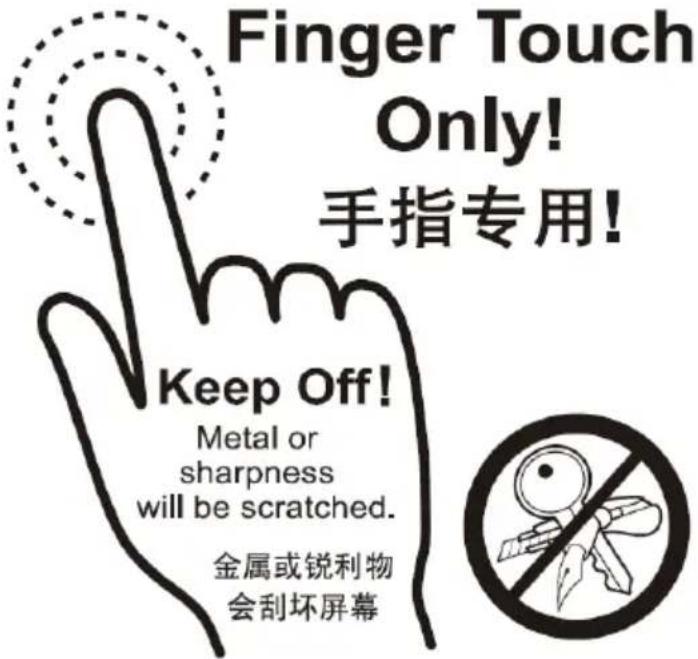
Finger Touch Only! 手指专用! Keep Off! Metal or sharpness will be scratched. 金属或锐利物 会刮坏屏幕Appendix B: Trouble Shotting
No screen
- Check system power line is connected
- Please press power knob again to turn on system (please check the power led at right rear side is turned on)
Motherboard
Can't boot on
- Check the power led at right rear side is turned on, but still no booting screen after 3 minutes.
- Remove power line, after 1 min, connecting power line and power on system again. If still no booting after 10\~30 sec, please contact with Service guys.
Only the blinking cursor at the upper left of the screen
If blinking cursor is kept after 3 minutes, it might be Motherboard issue. Please contact with Service guys.
Hardware Issue
Please clean out the visual dirty of appearance
DRAM issue
- Connection is loose, please reinsert DRAM again
- COMS setting is wrong, please reset as default value
- DRAM performance is getting worse by time. Please swap a new one.
HDD issue
Please reboot from other booting device. If system is booting without any problem, it shows the hard drive may be crashed. Please swap a new one.
System crash issue
-
The additional peripheral may be over loading for adapter, and this will cause system to turn on or turn off sometime. Please check by removing additional peripheral.
-
If thermal air hole is blocked, it will cause the system can't drop out heated air flow, and then system will be crashed. Please keep clean area over 25.4mm(1 inch) around system air hole.