
AOPEN DEV7710 - Computer

DEV7710 - Computer AOPEN - Free user manual and instructions

Find the device manual for free DEV7710 AOPEN in PDF.

📄 1 pages English EN Download 💬 AI Question 10 questions ⚙️ Specs
Notice AOPEN DEV7710 - page 1
Pick your language and provide your email: we'll send you a specifically translated version.
Product Type Digital Signage Player
Brand AOpen
Model DEV7710
Dimensions (W x D x H) 190 mm x 150 mm x 30 mm
Weight 1.2 kg
Power Supply AC 100-240V, 50/60 Hz, 60W external adapter
Processor Intel Celeron N3350 dual-core 1.1 GHz
Memory 4 GB DDR3L RAM
Storage 64 GB eMMC
Operating System Windows 10 IoT Enterprise
Video Output 1 x HDMI 2.0, 1 x DisplayPort 1.2
Audio Output 3.5 mm stereo jack
Networking Gigabit Ethernet, Wi-Fi 802.11ac, Bluetooth 4.2
USB Ports 4 x USB 3.0, 2 x USB 2.0
Main Functions Digital signage playback, video wall support, 4K resolution output
Care and Cleaning Wipe with a dry cloth; avoid liquids and abrasives
Safety Overvoltage protection, fanless design for silent operation
Spare Parts and Repairability Replaceable fan module (if present), RAM and storage upgradeable
General Information Designed for 24/7 operation, VESA mount compatible

Frequently Asked Questions - DEV7710 AOPEN

How do I connect the DEV7710 to a display?
Use an HDMI or DisplayPort cable to connect the device to your monitor or TV. Ensure the display is powered on and set to the correct input source.
Can I install third-party software on this device?
Yes, the device runs Windows 10 IoT Enterprise, so you can install standard Windows applications as needed for digital signage or other purposes.
How do I perform a factory reset?
Go to Settings > Update & Security > Recovery and select 'Reset this PC'. You can choose to keep your files or remove everything.
What is the maximum resolution supported?
The DEV7710 supports 4K resolution (3840x2160) at 60Hz via HDMI 2.0.
Can I use the device for video wall applications?
Yes, with multiple units and appropriate software, you can create a video wall. Each unit can output 4K content.
How do I update the firmware or drivers?
Check AOpen's support website for the latest drivers and BIOS updates. Windows Update can also provide system updates.
The device is not turning on. What should I check?
Ensure the power adapter is securely connected to both the device and a working power outlet. Check if the power LED lights up. If not, try a different outlet.
Does it support Wi-Fi and Bluetooth?
Yes, it has built-in Wi-Fi 802.11ac and Bluetooth 4.2 for wireless connectivity.
How do I mount the device on a wall?
The device is VESA mount compatible (75x75mm). Use a standard VESA bracket and screws (not included) to attach it to a wall or behind a display.
Is the device fanless?
Yes, the DEV7710 uses a fanless design for silent operation, making it suitable for noise-sensitive environments.

User questions about DEV7710 AOPEN

0 question about this device. Answer the ones you know or ask your own.

Ask a new question about this device

The email remains private: it is only used to notify you if someone responds to your question.

No questions yet. Be the first to ask one.

Download the instructions for your Computer in PDF format for free! Find your manual DEV7710 - AOPEN and take your electronic device back in hand. On this page are published all the documents necessary for the use of your device. DEV7710 by AOPEN.

USER MANUAL DEV7710 AOPEN

Dear Valued Customer,

For system drivers and utilities please visit Http://global.aopen.com/download.aspx

Step1: Please select the product name first such as “Digital Engine” or “eTile”.

Step2: Please select the model name. (You can find it at the box and chassis label)

Step3, Please select the categories that you need to download, such as driver or utilities.

Step4, Click the ↓ icon to download.
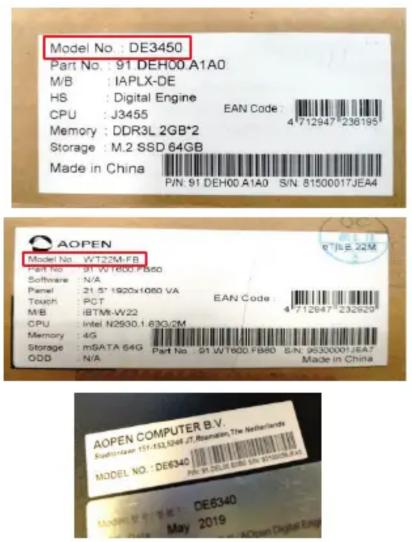
Model No.: DE3450 Part No.: 91 DEH00 A1A0 M/B: IAPLX-DE HS: Digital Engine CPU: J3455 EAN Code: 4712947*238195 Memory: DDR3L 2GB*2 Storage: M.2 SSD 64GB Made in China P/N: 91 DEH00 A1A0 S/N: 81500017JEA4 AOPEN Model No.: WT23M FB Part No.: 91 WT1000 FB60 Software: N/A Panel: 21.5" 1920x1080 VA Touch: RCT EAN Code 4712947*232929 M/B: 8BTM-W22 CPU: Intel N2500.1.630/2M Memory: 4G Storage: mSATA 64G Part No: 91 WT1000 FB60 S/N: 95300001/6A7 ODD: N/A Made in China AOPEN COMPUTER B.V. SUPPORT: 151-332-5048.2.Romainin, The Netherlands MODEL NO.: DE6340 PS: 151000016N 87888844 Model No.: DE6340 May 2019

AOPEN Bright Ideas Connected Downloads Digital Engine > DE3450 > Driver OrderBy: LastUpdated Advanced Search Selection: Digital Engine>>DE3450>>Driver The Latest Releases: 7 records Categories Software / Description Version LastUpdated Download DE3450 Driver R3.1.50.2238v2_PV 9/18/2018 Intel TXE Driver 46128.4 KB OS Support:Win10_64 R30.100.1631.03 2/3/2018 Intel Serial IO Driver 3244.8 KB OS Support:Win10_64 R8176 2/3/2018 Realtek HD Audio 276931.9 KB OS Support:Win10_64

PN:46.DEN01.0010

Manual assistant
Powered by Anthropic
Waiting for your message
Product information

Brand : AOPEN

Model : DEV7710

Category : Computer