CPSPV5000ETL - Solar panel CyberPower - Free user manual and instructions
Find the device manual for free CPSPV5000ETL CyberPower in PDF.


| Product Type | Solar Panel |
| Brand | CyberPower |
| Model | CPSPV5000ETL |
| Technology | Monocrystalline |
| Rated Power (Pmax) | 500 W |
| Module Efficiency | 20.5% |
| Open Circuit Voltage (Voc) | 45 V |
| Short Circuit Current (Isc) | 13.5 A |
| Maximum Power Voltage (Vmp) | 38 V |
| Maximum Power Current (Imp) | 13.2 A |
| Cell Type | 156 x 156 mm |
| Number of Cells | 120 (60 half-cut cells) |
| Dimensions (L x W x H) | 2000 x 1000 x 35 mm |
| Weight | 25 kg |
| Frame | Anodized Aluminum |
| Glass | Tempered Glass (3.2 mm) |
| Junction Box | IP67 |
| Connector Type | MC4 Compatible |
| Operating Temperature Range | -40°C to +85°C |
| Warranty | 25 Years Linear Power Output |
| Certifications | IEC 61215, IEC 61730, TUV, CE |
| Maintenance | Regular cleaning with water and soft cloth; avoid shading |
| Safety Features | Bypass diodes, fire-resistant rating, corrosion-resistant frame |
Frequently Asked Questions - CPSPV5000ETL CyberPower
User questions about CPSPV5000ETL CyberPower
0 question about this device. Answer the ones you know or ask your own.
Ask a new question about this device
Download the instructions for your Solar panel in PDF format for free! Find your manual CPSPV5000ETL - CyberPower and take your electronic device back in hand. On this page are published all the documents necessary for the use of your device. CPSPV5000ETL by CyberPower.
USER MANUAL CPSPV5000ETL CyberPower
Reliability. Quality. Value.
User's Manual
CPSPV5000ETL
CPSPV4000ETL
CyberPower Systems Inc.
www.cpsww.com
IMPORTANT SAFETY INSTRUCTIONS
Save These Instructions! This manual contains important constructions that shall be followed during the installation and maintenance of the CyberPower Grid Tie Solar Inverter.
CAUTION! Before installation and using the Inverter, read all instructions and cautionary markings on the inverter and appropriate sections of this guide.
CAUTION! To reduce risk of fire hazard, do not cover or obstruct the heat sink.
CAUTION! Observe the clearance recommendations. Do not install the Inverter in a zero-clearance or non-ventilated compartment. Overheating may result.
CAUTION! Use only accessories recommended or sold by the manufacturer. Doing otherwise may result in a risk of fire, electric shock, or injury to persons.
CAUTION! To avoid a risk of fire and electric shock, make sure that existing wiring is in good condition and that wire is not undersized. Do not operate the Inverter with damaged or substandard wiring.
CAUTION! Do not operate the Inverter if it has received a sharp blow, been dropped, or otherwise damaged in any way.
CAUTION! Do not disassemble the Inverter. It contains no user-serviceable parts. Attempting to service the Inverter yourself may result in a risk of electrical shock or fire and will void the factory warranty.
CAUTION! To reduce the risk of electrical shock, disconnect both AC and DC power from the Inverter before attempting any, maintenance or cleaning or working on any circuits connected to the inverter. Turning off controls will not reduce this risk. Internal capacitors remain charger for 5 minutes after disconnecting all source of power.
CAUTION! The Inverter must be connected to an equipment-grounding conductor directly or via the AC ground.
ATTENTIO: Risk of burning: During operation the case temperature may exceed 140^ F( 60^ C), do not touch.
HIGH VOLTAGE: Before opening the device, disconnect from the grid and the PV generator. The device may only be opened by an electrician.
The following conventions are used in this guide.

WARNING! Warnings identify conditions that could result in aal injury or loss of life.

CAUTION! Cautions identify conditions or practices that could damage to the unit or other equipment.
IMPORTANT: These notes describe things which are important for you to know, but not as serious as a caution or warning.
About This Manual
This purpose of this Installation & Operation Manual is to provide explanations and procedures for installing, operating, maintaining, and troubleshooting the CyperPower Grid Tie Solar Inverter.
Scope
This manual provides safety guidelines, detailed planning and setup information. It provides procedures for installing the inverter and information about operating and troubleshooting the unit. It does not provide details about particular brands of photovoltaic (PV) panels. You need to consult individual PV manufacturers for this information.
Audience
This manual is intended for anyone who needs to install and operate the inverter. Installers should be fully educated on the hazards of installing electrical equipment. Certified electricians or technicians are recommended.
Abbreviation and Acronyms
AC: Alternating Current
DC: Direct Current
LCD: Liquid Crystal Display
LED: Light Emitting Diode
MPPT: Maximum Power Point Tracking
PC: Personal Computer
PV: Photovoltaic
PWM: Pulse Width Modulation
Vac: Volts AC
Vdc: Volts DC
V_MP : Voltage at Maximum power
V_oc : Open Circuit Voltage
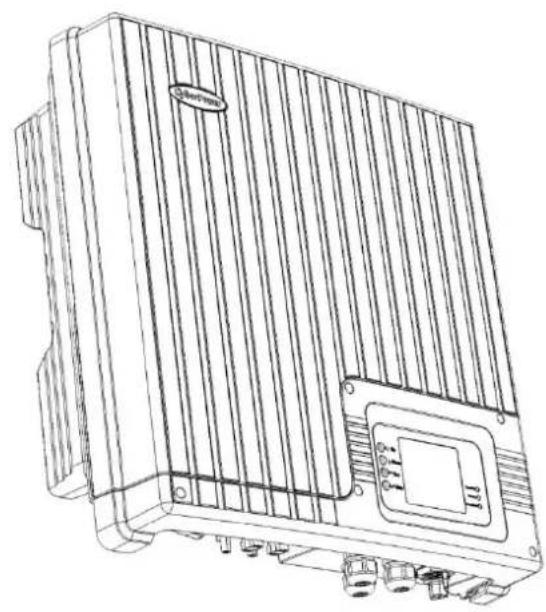
natural_image
Technical line drawing of a rectangular electronic device with vertical fins and mounting ports (no text or symbols)1) CPSPV5000ETL or CPSPV4000ETL module

natural_image
Technical line drawing of a rectangular electronic component with circular holes and a small mechanical component (no text or symbols)2) Stainless wall mount bracket
3) User's manual

4) Warranty card
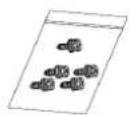
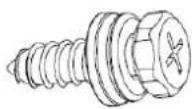
5) Self-tapping screws: M6*30L(5)
CyperPower Grid Tie Solar Inverter
The CyberPower Grid Tie Solar Inverter is designed to convert solar electric (photovoltaic or PV) power into utility-grade electricity that can be used by the home or sold to the local power company.
Installing the inverter consists of mounting it to the wall and connecting the DC input to a PV array and the AC output to the utility. See below figure for a simple diagram of a typical installation.

flowchart
graph LR
    A["Solar Panel"] --> B["Solar Inverter"]
    B --> C["Utility Meter"]
    C --> D["Utility Grid"]
    C --> E["Ground"]
In order to operate, the inverter must have grid power available and connected. It will not provide backup power if the AC grid fails.
Installation Options
The inverter may be installed as a single inverter, or in a multiple inverter configuration.
For CPSPV5000ETL / CPSPV4000 ETL, only one PV array can be connected to the inverter.
Single Inverter Installation
In this configuration, a single inverter collects the harvested solar energy and route the power to the main utility service panel to be used by the loads. Any surplus power not used by the loads will be directed to the utility grid.
Multiple Inverter Installation
If multiple inverters are used, each inverter must be wired to an independent PV array. In this configuration, each inverter collects the harvested solar energy from a separate PV array and routes the power to the main utility service panel to be used by the loads. Any surplus power not used by the loads will be directed to the utility grid.
Planning the Installation
The following issues need to be considered when planning for an installation using the inverter. See the specified sections for more information.
- Inverter Location?
- PV Array Requirements?
- Grounding Requirements?
- Routing the wires?
Ensure that you have obtained all permits required by local authorities or utilities before commencing installation.
Inverter Location

WARNING! Burn hazard
Do not install in a location where people can accidentally come into contact with the inverter. High temperatures can be present on the inverter, causing a potential burn hazard.
In extreme condition, the inverter chassis can reach temperatures over 70^ C ( 158^ F), which can cause skin burns if accidentally touched. Ensure that the inverter is located away from normal traffic areas.
Inverter failure due to improper installation will void the inverter warranty. Consider the following when determining where to install the inverter.
Fire Safety
Do not install anywhere near combustible or flammable materials.
Indoor/Outdoor
The inverter uses a Type IP65-rated enclosure that can be mounted indoors or outdoors.
Orientation
The inverter must be mounted vertically on a wall or pole. Do not mount the inverter horizontally.
Temperature
Ensure that the inverter is mounted in a location where the ambient temperature range is -20^ to +60^ . When the temperature is over +40^ , the inverter may de-rate power.
Ground Clearance
Outdoors, the inverter requires at least 50 cm (19.7 inches) of clearance between the bottom of the unit and the ground.
Indoors, it is recommended that the same clearance between the bottom of the unit and the floor be used.
Distance
To minimize copper losses, ensure that wire lengths between the PV array and the inverter and between the inverter and the Main Utility Service Panel are kept to a minimum.
The maximum distances will depend on wire gauges and PV array output voltages
Debris free
Excessive debris (such as dust, leaves, and cobwebs) can accumulate on the unit, interfering with wiring connections and ventilation. Do not install in a location where debris can accumulate (under a tree, for example).
Installation
PV Array Requirement

WARNING! Shock hazard
Whenever a PV array is exposed to sunlight, a shock hazard exists at the output wires or exposed terminals. To reduce the risk of shock during installation, cover the array with an opaque (dark) material before making any connections.
IMPORTANT:
The PV array should be free of shade. This requirement includes even small obstructions such as vent pipes, chimneys and power lines. A small amount of shade can have a disproportionately high impact on system performance.
General Recommendations
It is important that the PV array is installed correctly to the manufacturer specifications and to local code requirement.
Equipment and Installation Recommendation
Equipment recommendations
- All electric equipment should be listed for the voltage and current ratings necessary for the application.
- All wiring should be sized correctly to minimize voltage drop.
- All required over-current protections should be include the system and accessible for maintenance.
- Integral roofing products should be properly rated.
Installation recommendations
- All electrical terminations should be fully tightened, secured, and strain relieved as appropriate.
- All mounting equipment should be installed according to the manufacturer specifications.
- All roof penetrations should be sealed with an acceptable sealing method that does not adversely impact the roof warranty.
- All wires, conduit, exposed conductors and electrical boxes should be secured and supported according to code requirements.
PV Voltage and MPPT Requirement
MPPT operational window
The MPPT software maximizes the output energy of solar arrays as long as the operating voltage is within the operational window. Ensure that the PV array used in the system operates within the MPPT operational window. Effects of array voltages outside of the MPPT operational window are shown in below Table.
| Voltage (Vdc) | Effect of Array Voltage | Inverter Mode |
| <250 | Will shut down | Shutdown |
| 250~310 | Maximum harvest of solar energy. (limit input max current 17A) | MPPT window |
| 310~750 | Maximum harvest of solar energy. | MPPT window |
| 750~900 | Maximum harvest of solar energy. (limit input max power) | MPPT window |
| >900 | Will shut down and may cause damage to the inverter. | Shutdown |
PV Voltage requirements
The maximum power point voltage of a string connect to the inverter should be a minimum of 320Vdc. If it is less than 320Vdc, the inverter will continue to operate, but it will regulate the PV voltage to 320Vdc. Because the array will not be operating at its maximum power point, this may result in lower than expected energy harvest.
Maximum PV Power
The solar array should be sized such that the maximum power output dose not exceeds the limit of the MPPT operation window. The array voltage should never exceed 900 VOC (open circuit voltage) under any thermal condition. Likewise, ensure that ISC (short circuit current) rating of the array at any temperature does not exceed the short circuit current of the inverter.
Guideline for Matching PV Array Size to Solar Inverter Input
For determining the number of panels required in the PV string (panels connected in series), you must ensure that the following requirements are met:
- To avoid damage to the inverter, ensure that PV array output will never exceed 900Vdc under any conditions.
- Do not exceed the maximum array short circuit current rating marked on the inverter.
- To achieve maximum energy harvest from your array, ensure that the V_MP (voltage at maximum power) dose not drop below 310Vdc under most condition.
| CPSPV5000ETL | CPSPV4000ETL | |
| MPPT tracker | 1 | 1 |
| Input current limitation | 17A | 13.5A |
| Max. Input short circuit current | 20A | 15A |
| MPPT start voltage (Vdc) | 320 | 320 |
| MPPT window (Vdc) | 250~900 | 250~900 |
| Inverter full load range (Vdc) | 310~750 | 310~750 |
| Inverter de-rating range (Vdc) | 250~310 | 250~310 |
| Maximum input voltage (Vdc) | 900 | 900 |
Grounding Requirements

WARNING! Shock hazard
The inverter must be grounded by connection to a grounded permanent wiring system.
AC grounding
The inverter must be connected to a grounded, permanent wiring system via the inverter ground terminal.
The ground terminal must also be connected to the main utility breaker panel ground bar and to the house-grounding rod according to requirement.
Lightning protection
Reduce the risk of lightning damage by using a single-point grounding system. In this system, all ground lines terminate at the same point. This point normally is the main utility ground installed by the utility company to provide a ground for the house wiring. This ground usually consists of a copper rod driven 1.5 to 2.5 meters (6 to 8 feet) into the earth.
Routing the wires
Preparing for the Installation
Ensure your local utility is consulted for any requirements for connecting to or returning power to the grid. Obtain all permits necessary to complete the installation. Consult your local and national electrical codes for more information.
This section includes the following topic:
1. Wiring
- The wires to AC terminal:
Acceptable wire size:
For CPSPV5000ETL: From #10 AWG (4mm² to 6mm²).
For CPSPV4000ETL: From #12 AWG to #10 AWG (3mm² to 6mm²).
- The wires to DC connectors:
Recommended Type:
For PV (+): PV-KBT4/2,5I with 1.5\~2.5mm^2 cable (double-isolation)
For PV (-): PV-KST4/2,5l with 1.5\~2.5mm^2 cable (double-isolation)
IMPORTANT:
Wiring should be not undersized. Undersized wiring can result in significant power losses and reduction in system efficiency.
2. AC Circuit breaker
This breaker must be sized to handle the rated maximum output voltage and current of the inverter. (Please refer to the inverter specification)
Recommended AC Circuit Breaker:
For CPSPV5000ETL: 32 Amps / 250 Vac.
For CPSPV4000ETL: 25 Amps / 250 Vac.
Mounting the inverter

WARNING! Fire · Shock and Energy Hazard
Before installing the inverter, read all instructions and cautionary markings located in this manual, on the PV array, and on the main service panel.
Mount the inverter
Make sure the supporting surface is strong enough to handle 75 kg (160lb) for the inverter.
Step1: Fix the wall mount bracket
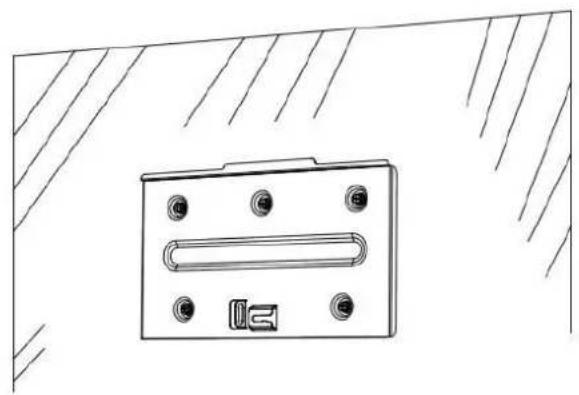
natural_image
Technical line drawing of a rectangular electronic component with mounting holes and a slot, mounted on a base (no text or symbols)Use the attached screws / Self-tapping screws: M6*20L (5pcs)
Step2: Put the inverter on the wall mount bracket
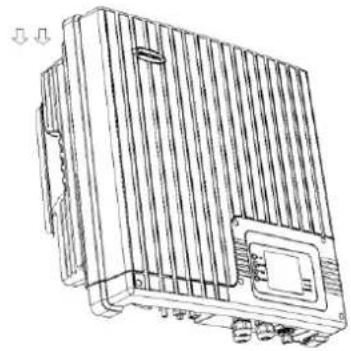
natural_image
Line drawing of a rectangular electronic device with ventilation grilles and mounting holes (no text or symbols)Step3: Make sure the host of inverter on the incision of the wall mount bracket

natural_image
Technical line drawing of a mechanical component with internal channels and mounting holes (no text or symbols)Step4: Move the inverter from right to left side, and make sure the hole is locked with wall mount bracket.

natural_image
Technical line drawing of an electrical component with no visible text or symbols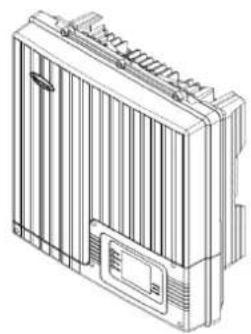
natural_image
Line drawing of a rectangular electronic device with vertical fins and a central display (no text or symbols)Step5: Use cable ties, and fix the inverter with wall mount bracket.
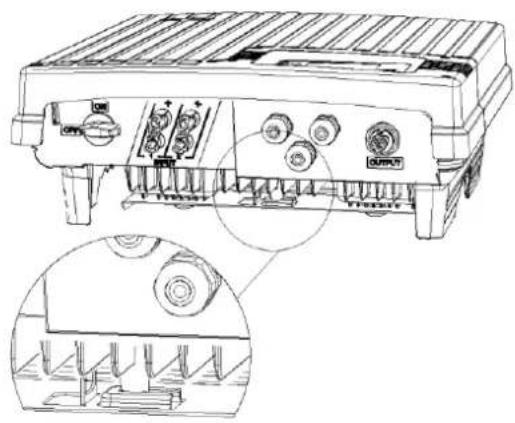
natural_image
Technical line drawing of a mechanical device with ports and a close-up inset showing internal components (no text or symbols)
WARNING! Equipment damage Shock hazard
If your installation location requires that you drill additional conduit holes into the bracket, ensure that there are no metal shavings left inside the unit. These could cause a short circuit when unit is operating.
Standard Feature
- Sealed inverter section protecting power electronic components (IP65)
- Liquid Crystal Display providing easy-to-read system status and daily cumulative energy production information
- Three LED indicator lights providing status, ground fault and other warning indication
Front Panel Feature
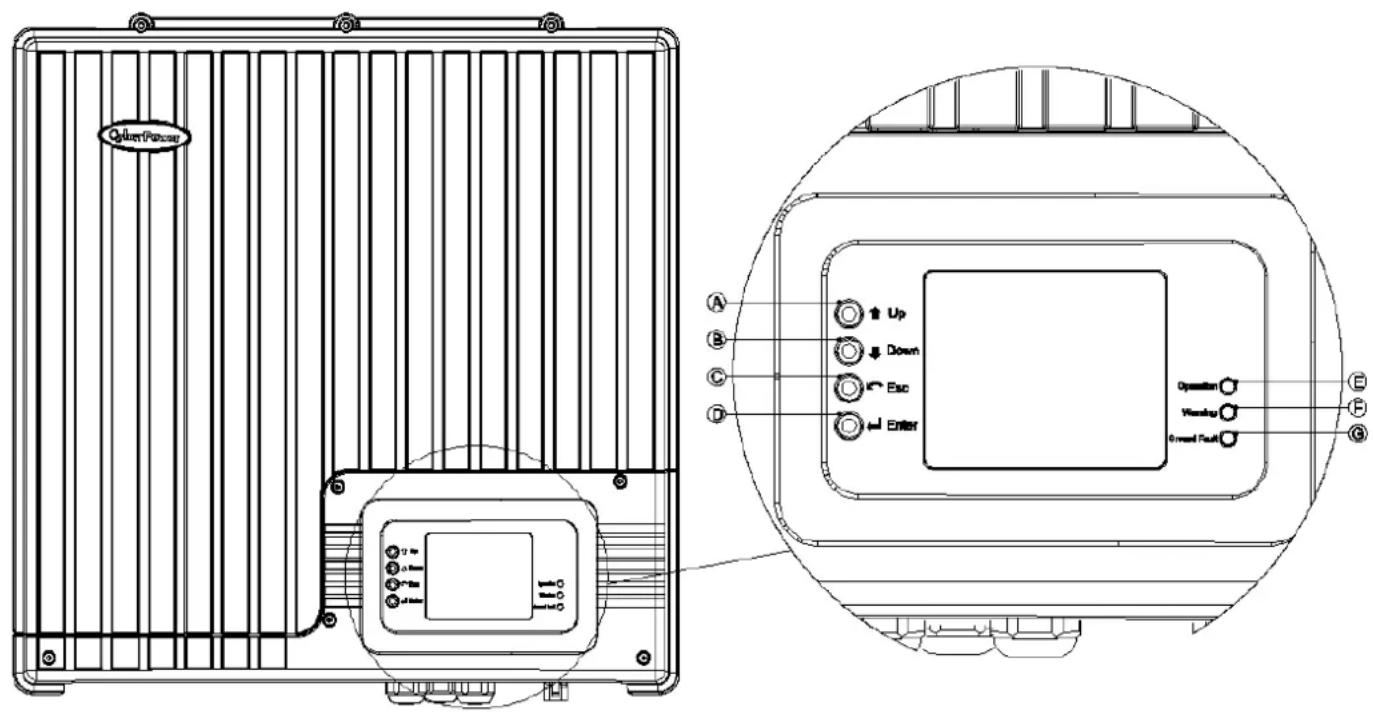
text_image
Qilter Power A B C D Up Down Esc Enter Operation Vishing Ground Fault E F G1. LCD:
Graphic liquid crystal display / "160*128" dots
2. Button:
Ⓐ: Up key: select the display item
(B): Down key: select the display item
©: Esc key: escape to upper level
(D): Enter key: enter into next level
3. LED:
E: LED Indicator Light (Green) – Flash: Standby for reconnection / Solid: Operation
⑤: LED Indicator Light (Red) – Warning condition
G: LED Indicator Light (Yellow) – Ground fault
Inverter Introduction
Rear Panel Feature
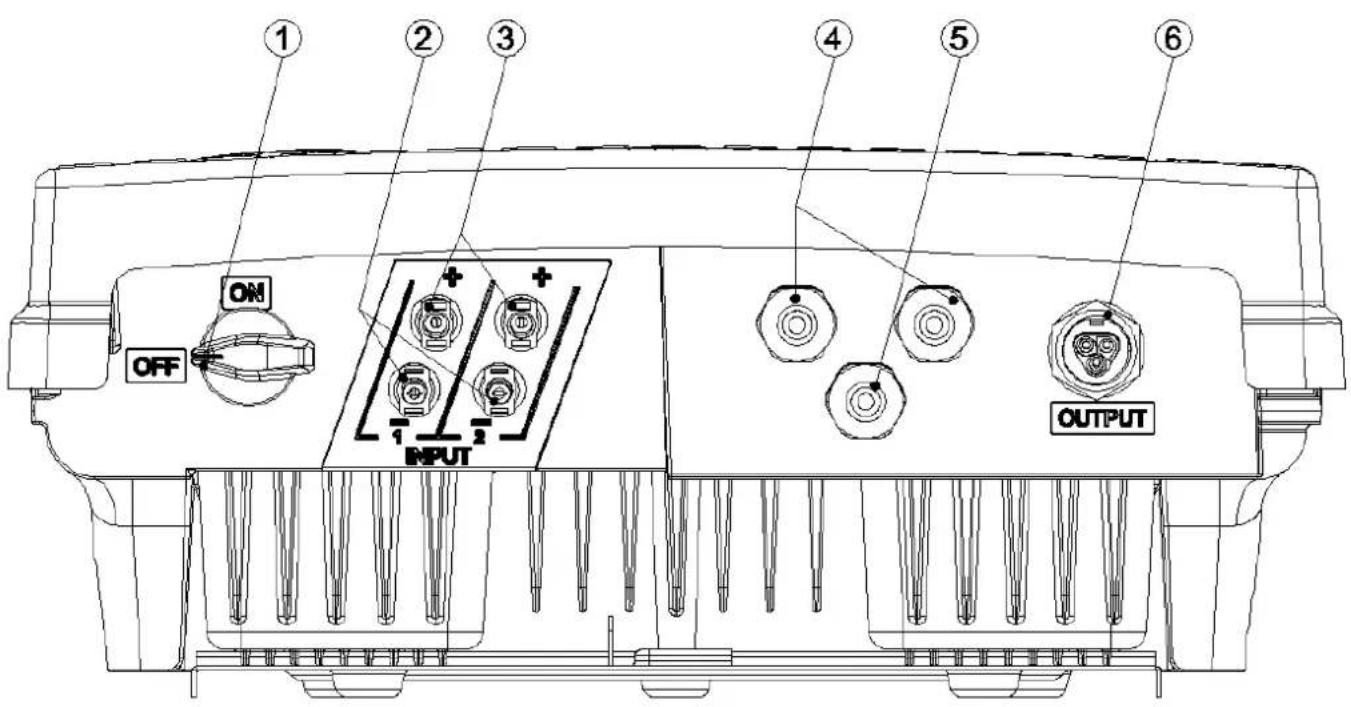
text_image
① ② ③ ④ ⑤ ⑥ ON OFF INPUT OUTPUT①: DC switch: The device which can disconnect the solar input
②: Solar input (- / negative): DC wires connect to solar array negative
- Recommended type: PV-KST4/2,5l with 1.5\~2.5mm^2 cable (double-isolation)
③: Solar input (+ / positive): DC wires connect to solar array positive
- Recommended type: PV-KBT4/2,5l with 1.5\~2.5mm^2 cable (double-isolation)
④: M20*1.5 cable glands * 2pcs: For RS-485 communication
⑤: M20*1.5 cable gland * 1pcs: For RM card communication
⑥: AC connector (male): Connect to the utility output
- Recommended female type: 96.0314154.3 (Wieland)
Startup Procedure
Check the PV Array DC Voltage
- Uncover the PV arrays and expose them to full sunlight. The sunlight must be intense enough to produce the required output voltage.
- Measure the PV array open circuit DC voltage across the DC positive (+) and negative (-) terminals. This voltage must greater than 320 volts DC (to energize the electronics) and less than 900 volts DC (to prevent damage to the inverter).
Check the AC Utility Voltage
- Switch on the main and inverter breakers in the main electrical service panel.
- Using an AC voltmeter, measure the AC open circuit utility voltage between L (L1) and N (L2). Ensure the voltage is at approximately the nominal value. The inverter operates with the voltage range around the nominal value.
See "Electrical Specification", output section for the utility voltage operating range for your inverter model.
Start up the Inverter
- Switch the DC and AC disconnection switches (breakers) to the ON position.
- Check the inverter LCD. The startup screens should appear for several seconds, and then the "Countdown xx:xx" special screen will appear until protection timer countdown is completed.
Disconnect Test
The disconnect test is designed to verify correct operation of the inverter both on initial operation and periodically through its life as required by the utilities. This test ensures that inverter dose not send electricity to the utility grid when local utility has shut off the grid for repairs, or when the utility wiring is damaged.
To run the disconnect test
- Switch off the AC circuit for the inverter
This can be accomplished by switching the breaker on the main panel that feeds the inverter(s). The disconnection for the home or business may be used as well. - Have someone watch the front panel of the inverter to ensure the green light on the front of the inverter goes out.
The green light goes out when AC circuit is switched off, disconnecting the inverter from the AC grid. The front panel display will show an AC voltage and frequency fault display, indicating that the AC is out of the operating range.
3 Switch on the AC circuit for the inverter
The inverter responds by starting it reconnecting protection timer. Ensure that the inverter does not produce power before the countdown is over. After completing the countdown, the green light turns on and the inverter begins to send power to the grid. The display returns to show the power being produced and total kWh produced to date.
IMPORTANT:
The default voltage, frequency and reconnect delay values are programmed into the unit at time of shipment from the factory. No changes to these settings can be made in the field by the user. Only authorized personnel with utility permission may change these settings.
Monitoring the Inverter
After installation, at the first startup, the following setting should be set through the display.
■ Select code
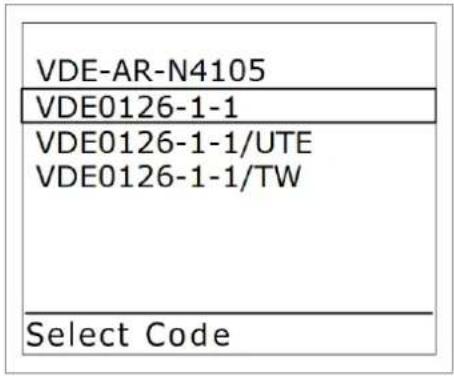
text_image
VDE-AR-N4105 VDE0126-1-1 VDE0126-1-1/UTE VDE0126-1-1/TW Select Code■ Select language

text_image
English French German Italian Spanish Select Language■ Select date & time
| Set Date | 12/01/2012 |
| Date View | dd/mm/yyyy |
| Set Time | 14:59 |
| Time View | 24 |
| Exit | |
| Date & Time |
Aer you select above three items, the display will enter into "Home Page"
- Home page
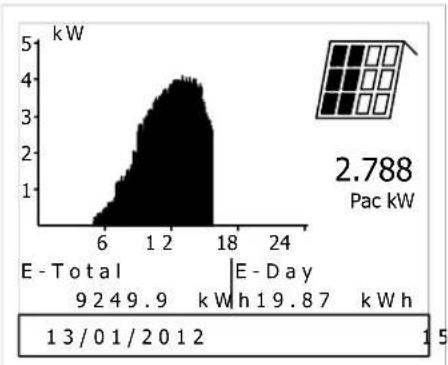
area
| Time Period | E - Total (kW) | E - Day (kW) | | ----------- | -------------- | ------------ | | 13/01/2012 | 9.2 | 9.9 | | 18/01/2012 | 19.8 | 8.7 | | 24/01/2012 | 2.788 | |Pac kW: Right now the inverter provides how much power to the grid.
E-Total: From the installation to now, the inverter provided how much energy to the grid.
E-day: Today the inverter provided how much energy to the grid.
→ Press "Enter" key
- Main menu:
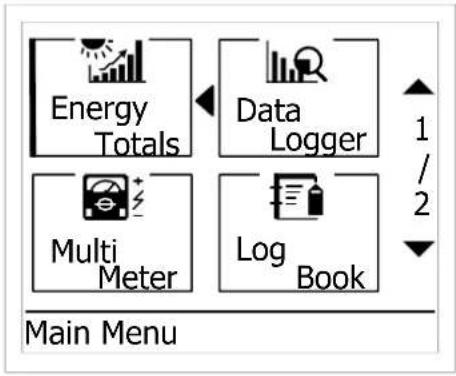
flowchart
graph TD
    A["Energy Totals"] --> B["Data Logger"]
    C["Multi Meter"] --> D["Log Book"]
    style A fill:#f9f,stroke:#333
    style B fill:#ccf,stroke:#333
    style C fill:#cfc,stroke:#333
    style D fill:#fcc,stroke:#333
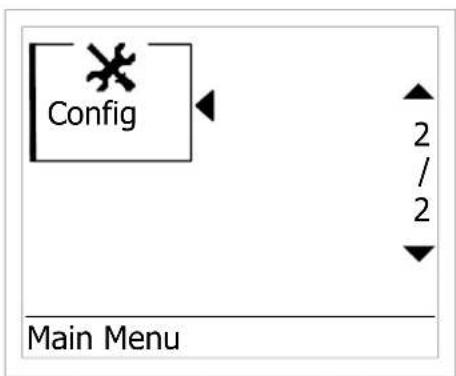
text_image
Config Main MenuMonitoring the Inverter
→ In "Main Menu", select Energy total, then press "Enter" key
2.1 Energy Totals:
| Input | 92 4 9 .9 | k WI |
| Total | 92 4 9 .9 | k WI |
| CO2 | 50 1 3 .4 | Kg |
| Savings | 39 0 3 .4 | E UF |
Energy Totals
→ In "Main Menu", select Multi meter, then press "Enter" key
2.2 Multi meter:
| Input | |||
| Pdc | 3088.1 | W | 1 |
| Vdc | 530.0 | V | / |
| Idc | 5.8 | A | 2 |
| ▼ | |||
| Multimeter | |||
| Output | |||
| Pac | 2988.1 | W | ▲ |
| Vac | 230.1 | V | 1 |
| Iac | 12.9 | A | / |
| Fac | 50.1 | Hz | 2 |
| Multimeter | |||
→ In "Main Menu", select Data Logger, then press "Enter" key 2.3 Data Logger:
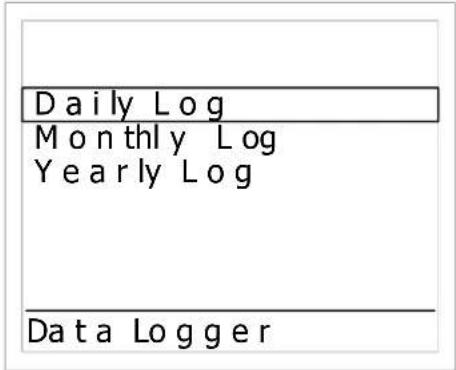
text_image
Daily Log Monthly Log Yearly Log Data Logger→ In "Data Logger", select Daily Log, then press "Enter" key 2.3.1 Daily Log:

area
| Time (E-Day) | Energy Consumption (kW) | | :--- | :--- | | 6 | 0.5 | | 12 | 3.0 | | 18 | 4.5 | | 24 | 0.5 |→ In "Data Logger", select Monthly Log, then press "Enter" key 2.3.2 Monthly Log:
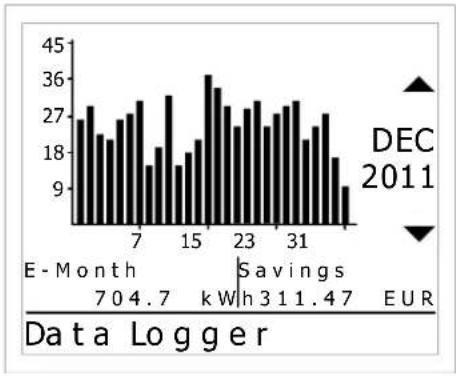
bar
| Month | Value | |-------|-------| | 7 | 27 | | 15 | 36 | | 23 | 27 | | 31 | 27 |Monitoring the Inverter
→ In "Data Logger", select Yearly Log, then press "Enter" key
2.3.3 Yearly Log:
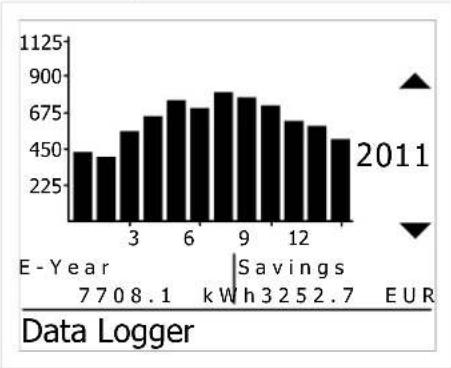
bar
| Year | Value (EUR) | | ---- | ----------- | | 1 | 450 | | 2 | 400 | | 3 | 550 | | 4 | 650 | | 5 | 750 | | 6 | 800 | | 7 | 750 | | 8 | 850 | | 9 | 800 | | 10 | 750 | | 11 | 650 | | 12 | 600 |→ In "Main Menu", select Log Book, then press "Enter" key
2.4 Log Book:
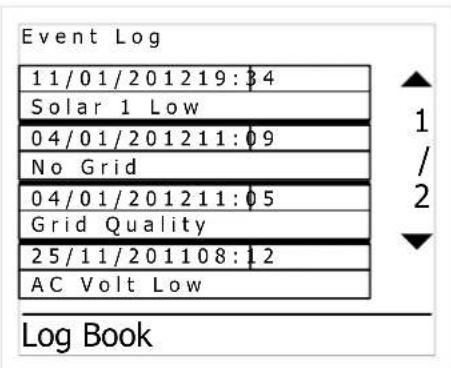
text_image
Event Log 11/01/201219:34 Solar 1 Low 04/01/201211:09 No Grid 04/01/201211:05 Grid Quality 25/11/201108:12 AC Volt Low Log BookIMPORTANT:
There are over last 100 dated failure reports on the NS protection can be read.
→ In "Main Menu", select Config, then press "Enter" key
2.5 Config:
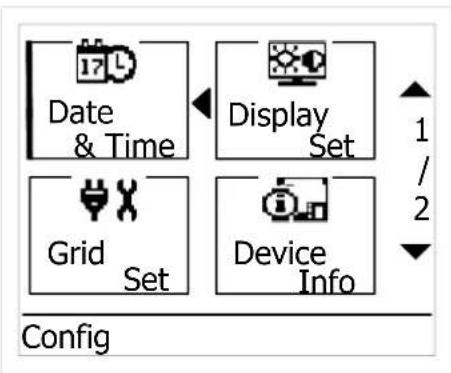
flowchart
graph TD
    A["17 L"] --> B["Date & Time"]
    C["1"] --> D["Display Set"]
    E["Grid Set"] --> F["Device Info"]
    style A fill:#f9f,stroke:#333
    style B fill:#ccf,stroke:#333
    style C fill:#cfc,stroke:#333
    style D fill:#fcc,stroke:#333
    style E fill:#cff,stroke:#333
    style F fill:#ffc,stroke:#333
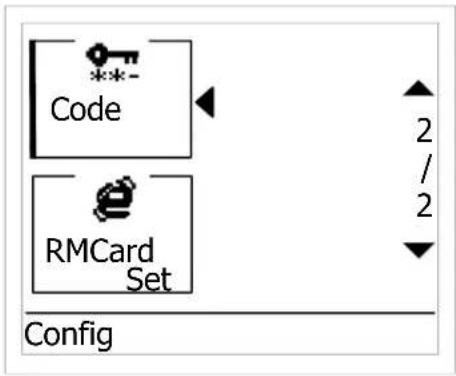
text_image
Code RMCard Set Config 2 / 2 ↓→ In "Config", select Date & Time, then press "Enter" key
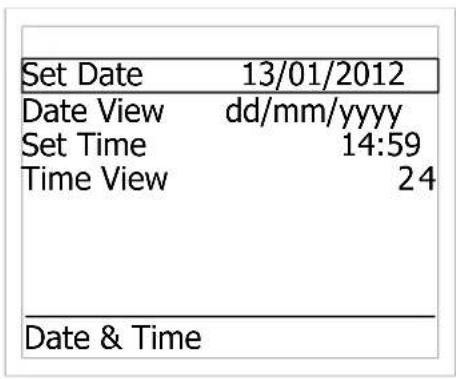
2.5.1 Date & Time:
text_image
Set Date 13/01/2012 Date View dd/mm/yyyy Set Time 14:59 Time View 24 Date & Time→ In "Config", select Grid Set, then press "Enter" key 2.5.2 Grid Settings:

text_image
Code # VDE0126-1-1/UTE Settings Grid SettingsIMPORTANT:
The settings only can be used by authorized personnel with utility permission.
Monitoring the Inverter
→ In "Config", select Display Set, then press "Enter" key
2.5.3 Display Settings:
| Brightness | 5 |
| Contrast | 4 |
| Language | English |
| Currency | EUR |
| Value/kWh | 0.422 |
| Sleep Mode | OFF |
| Demo Mode | OFF |
| Display Settings | |
→ In "Config", select Device Info, then press "Enter" key
2.5.4 Device Info:
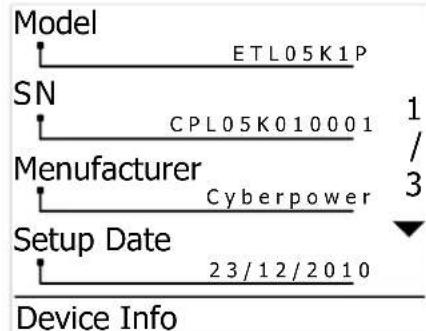
flowchart
graph TD
    A["Model"] --> B["ETL05K1P"]
    C["SN"] --> D["CPL05K010001"]
    E["Manufacturer"] --> F["Cyberpower"]
    G["Setup Date"] --> H["23/12/2010"]
    I["Device Info"] --> J["1/3"]
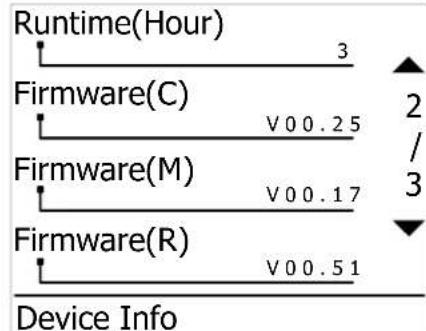
other
| Firmware Type | Duration | Value | | ------------- | -------- | ----- | | Firmware(C) | V00.25 | 3 | | Firmware(M) | V00.17 | 2 | | Firmware(R) | V00.51 | 3 |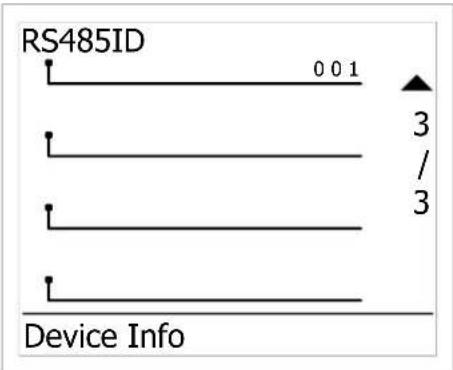
text_image
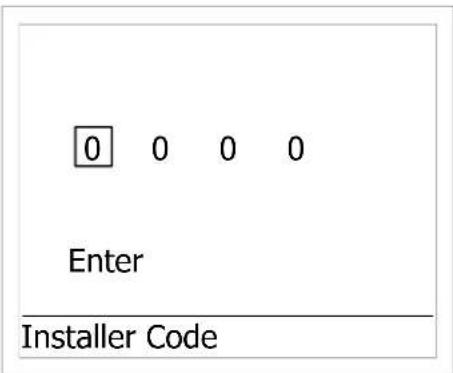
RS485ID 0 0 1 3 / 3 Device Info→ In "Config", select Installer Code, then press "Enter" key
2.5.5 Installer Code:
text_image
0 0 0 0 Enter Installer CodeIMPORTANT:
The settings only can be used by authorized personnel with utility permission.
→ In "Config", select RMCard Set, then press "Enter" key
2.5.6 RMCard Settings:

text_image
Reset Card 🔒 TCP/IP Status RMCard SettingsIMPORTANT:
The settings only can be used by authorized personnel with utility permission.
Warning table
| W00 | Solar input voltage low |
| W04 | Solar input voltage high |
Error table:
| E00 | No Grid |
| E01 | AC frequency high (According to code setting table) |
| E02 | AC frequency low (According to code setting table) |
| E03 | AC voltage high (According to code setting table) |
| E04 | AC voltage low (According to code setting table) |
Fault table
(Usually you need to call service people if there is always fault condition happened)
| F01 | Hardware DC injection of output current (According to code setting table) |
| F05 | Temperature sensor 1 low |
| F06 | Temperature sensor 1 high |
| F07 | Hardware temperature sensor 1 failure |
| F08 | Temperature sensor 2 high |
| F09 | Hardware temperature sensor 2 failure |
| F10 | Temperature sensor 3 high |
| F11 | Hardware temperature sensor 3 |
| failure | |
| F15 | Hardware main DSP ADC1 failure |
| F16 | Hardware main DSP ADC2 failure |
| F17 | Hardware main DSP ADC3 failure |
| F18 | Hardware main DSP ADC4 failure |
| F19 | Hardware redundant MCU ADC1 failure |
| F20 | Hardware efficiency failure |
| F22 | Hardware communication 1 failure |
| F23 | Hardware communication 2 failure |
| F24 | Residual current failure (According to code setting table) |
| F25 | Hardware RCMU failure |
| F26 | Input insulation failure |
| F28 | Hardware relay short |
| F29 | Hardware relay open |
| F31 | Hardware DC Bus 1 OVP |
| F33 | Hardware DC Bus 2 OVP |
| F36 | AC output current high (fast) |
| F37 | AC output current high (slow) |
| F42 | Hardware CT failure |
| F45 | Hardware AC current OCP |
| F60 | DC input current high (slow) |
| F70 | DC input current high (fast) |
| Model | CPSPV4000ETL | CPSPV5000ETL | |
| Feature | |||
| Type of equipment | Grid tied PV inverter | ||
| Non-isolated (transformer-less) | |||
| Adjustable reactive power | |||
| Outdoor enclosure (IP65) | |||
| Input | |||
| Absolute maximum PV input voltage | 900 Vdc | ||
| Operation voltage range | 250 ~ 900 Vdc | ||
| MPP voltage range @nominal power | 310 ~ 750 Vdc | ||
| Input power capture | >99% | ||
| Rating input voltage | 650 Vdc | ||
| Inverter wake up voltage | < 200 Vdc (DC power supply on) | ||
| Start voltage | 320 Vdc | ||
| MPPT tracker | 1 tracker | ||
| Input current limitation | 13.5 Adc | 17 Adc | |
| Max backfeed current | 0 A | ||
| Maximum efficiency@650Vdc | 97.6% | 97.8% | |
| European efficiency@650Vdc | 97.0% | 97.3% | |
| Input protection | Voltage and current limitationArray impedance measurementResidual current measurement | ||
| Input detection tolerance | Input voltage deviation < 2%Input current deviation <3%Input power deviation <3% | ||
| Output | |||
| Output rating power | 4000 Watt | 5000 Watt(For VDE-AR-N 4105: 4600 Watt) | |
| Grid | Single phase | ||
| Grid rating voltage | 230 Vac | ||
| Grid voltage range (Over / under voltage disconnect) | 180 ~ 270 Vac (According to code setting table) | ||
| Over / under voltage disconnect time | According to code setting table | ||
| Grid rating current | 17.4 A | 21.7 A (20 A Germany) | |
| Grid maximum continuous current | 20 A | 24 A | |
| Grid rating frequency | 50 / 60 Hz | ||
| Grid maximum inrush current | <150 A | ||
| Maximum output fault current | >30A | ||
| Maximum output overcurrent protection | 40 A | 50 A | |
| Grid frequency range (Over / under frequency disconnect) | 50 / 60 +/- 5 Hz (According to code table setting) | ||
| Over / under frequency disconnect time | According to code setting table | ||
| Active islanding method | Yes | ||
| Reconnect time (After grid recover) | According to code setting table | ||
| Output current DC component | According to code setting table | ||
| Output current harmonic distortion | < 5% | ||
| Adjustable reactive power range | 0.8 inductive ~0.8 capacitive | ||
| Nighttime power consumption | < 1 Watt | ||
| Output protection | Output AC fuseCurrent limitation and thermal de-ratingOver temperature protection | ||
| Output detection tolerance | Utility voltage deviation < 1% | ||
TECHNICAL SPECIFICATIONS
| Utility frequency deviation < 0.05HzOutput current deviation < 3%Output power deviation < 3%Countdown timer deviation <1 sec | ||
| Power limitation | Temperature sensor on heat-sink & internal air temperatureOutput voltage under 195 Vac | |
| Information | ||
| Communication | RS485 / Ethernet (optional) / WiFi (optional) | |
| LED | Green / Red / Yellow | |
| LCD display | 160 * 128 dots | |
| Control switches | Up / Down / Esc / Enter | |
| Display data | Real-time output powerInverter statusAccumulate today output energyAccumulate lifetime output energyEvent messageUtility voltage, frequencyPV voltage, powerFirmware revisionInverter ID | |
| RTC (Real time counter) | 10 years life | |
| Data storage | Accumulate historical energy | |
| Regulatory | ||
| Safety | IEC 62109-1/2 | |
| Grid interface | VDE-AR-N 4105 / VDE0126-1-1 A1/ UTE C 15-712-1 | |
| Emission | EN 55022:2006 | |
| Harmonic current emissions | EN 61000-3-12:2005 | |
| Voltage fluctuations and flicker | EN 61000-3-11:2001 | |
| Immunity | EN 55024 | |
| Operation Environment | ||
| Operating Temperature | -20°C to 60°C (full power -20°C to 40°C) | |
| Storage temperature | -20°C to 60°C | |
| Relative humidity | 4% ~ 100% | |
| Audible noise | <36dB | |
| Operating elevation | 0 ~ 2000 m (0 ~ 6666 ft) | |
| Vibration / Drop | ISTA_1A standard | |
| Physical | ||
| Dimensions (unit) | L x W x H = 487 x 497 x 191mm | |
| Dimensions (Package) | L x W x H = 615 x 615 x 380 mm | |
| Net Weight | 26 Kg | |
| Gross Weight | 30.5 Kg | |
| Enclosure rating | IP 65 | |
| Installation type | Wall mount | |
| DC connector | 2 pairs of Multi Contact connectors | |
| AC connector | Waterproof AC connector | |
CyberPower Systems Inc.
www.cpsww.com
TECHNICAL SPECIFICATIONS
Explanation of symbols

Beware of dangerous electrical voltage.

Energy storage timed discharge with 1 minutes.

Beware of hot surface.

Observe enclosed documentation.

There are special requirements.

The inverter complies with the requirements of the applicable EC guidelines.

The inverter must not be disposed of together with the household waste.
Code setting table
| Code table number | 2 | 3 | 4 | 5 | ||||
| Code | VDE-AR-N4105 | VDE0126-1-1 | VDE0126-1-1/UTE | VDE0126-1-1/TW | ||||
| Default | ||||||||
| Seng | Trip me | Seng | Trip me | Seng | Trip me | Seng | Trip me | |
| Start up me | 60 | -- | 30 | -- | 30 | -- | 30 | -- |
| Reconnect me (T < 3S) | 60 | -- | 5 | -- | 5 | -- | 300 | -- |
| Reconnect me (normal) | 60 | -- | 30 | -- | 30 | -- | 300 | -- |
| Voltage high OFF (Fast) | 264.5 | 0.08 sec | 264.5 | 0.2 sec | 255.3 | 0.2 sec | 242 | 0.2 sec |
| Voltage high ON (Fast) | 250.7 | -- | 259.5 | -- | 251.3 | -- | 237 | -- |
| Voltage low OFF (Fast) | 184.0 | 0.08 sec | 184 | 0.2 sec | 184 | 0.2 sec | 187 | 0.2 sec |
| Voltage low ON (Fast) | 197.8 | -- | 189 | -- | 189 | -- | 192 | -- |
| Frequency high OFF (Hz) | 51.50 | 0.08 sec | 50.2 | 0.2 sec | 50.2 | 0.2 sec | 60.3 | 0.2 sec |
| Frequency high ON (Hz) | 50.05 | -- | 50.15 | -- | 50.15 | -- | 60.1 | -- |
| Frequency low OFF (Hz) | 47.50 | 0.08 sec | 47.5 | 0.2 sec | 46 | 0.2 sec | 59.7 | 0.2 sec |
| Frequency low ON (Hz) | 47.55 | -- | 47.55 | -- | 46.1 | -- | 59.9 | -- |
| Voltage high OFF (Slow) | 253.0 | 600 sec | 253 | 600 sec | 253 | 600 sec | -- | -- |
| Voltage high ON (Slow) | 250.0 | -- | 250 | -- | 250 | -- | -- | -- |
| Voltage low OFF (Slow) | -- | -- | -- | -- | -- | -- | -- | -- |
| Voltage low ON (Slow) | -- | -- | -- | -- | -- | -- | -- | -- |
| DC Injecon (mA) | -- | -- | 1000 | 0.2 sec | 1000 | 0.2 sec | 0.45% | 0.2 sec |
| Ground Current (mA) | 300 | 0.3 sec | 300 | 0.3 sec | 300 | 0.3 sec | 300 | 0.3 sec |
| Insulaon | Yes | 5 sec | Yes | 5 sec | Yes | 5 sec | Yes | 5 sec |
| Islanding | Yes | Yes | Yes | Yes | ||||
| Islanding Factor | 100 | 100 | 100 | 100 | ||||
| Acve Power | Yes | -- | -- | -- | ||||
| Reactive Power | Yes | -- | -- | -- | ||||
| Frequency de-rang | Yes | -- | -- | -- | ||||
| Power slow-up | Yes | -- | -- | -- | ||||
Reactive power measurement
