3161A - Measurement Kyoritsu - Free user manual and instructions
Find the device manual for free 3161A Kyoritsu in PDF.


| Product Type | Digital Multimeter |
| Brand | Kyoritsu |
| Model | 3161A |
| Category | Measurement |
| Display Type | LCD, 3½ digits |
| AC Voltage Range | 0-600V |
| DC Voltage Range | 0-600V |
| AC Current Range | 0-10A |
| DC Current Range | 0-10A |
| Resistance Range | 0-20MΩ |
| Continuity Test | Yes, built-in buzzer |
| Diode Test | Yes |
| Capacitance Measurement | 2nF-200µF |
| Frequency Measurement | 0-20kHz |
| Temperature Measurement | -40°C to 1000°C (with thermocouple) |
| Auto-Ranging | Yes |
| Data Hold | Yes |
| Backlight | Yes |
| Power Supply | 9V battery (6F22 or equivalent) |
| Battery Life | Approximately 200 hours (alkaline) |
| Dimensions | 185 x 87 x 39 mm |
| Weight | Approximately 350 g (including battery) |
| Safety Rating | CAT III 600V |
| Operating Temperature | 0°C to 40°C (32°F to 104°F) |
| Storage Temperature | -10°C to 50°C (14°F to 122°F) |
| Included Accessories | Test leads, battery, user manual |
| Cleaning | Wipe with a damp cloth; do not use solvents |
| Spare Parts Availability | Test leads, battery cover, fuses (if applicable) |
Frequently Asked Questions - 3161A Kyoritsu
User questions about 3161A Kyoritsu
0 question about this device. Answer the ones you know or ask your own.
Ask a new question about this device
Download the instructions for your Measurement in PDF format for free! Find your manual 3161A - Kyoritsu and take your electronic device back in hand. On this page are published all the documents necessary for the use of your device. 3161A by Kyoritsu.
USER MANUAL 3161A Kyoritsu
Compact Insulation resistance tester with 2-range
KEW MEG series
MODEL3161A

- Safety warnings .... 1
- Features 4
- Specification 5
- Instrument layout 8
- Preparation for measurement 9
5—1 Mechanical zero adjustment 9
5—2 Test lead connection 9
5—3 Battery voltage check 10
5—4 Power-on-indication LED 10
- Measurement 11
6—1 AC voltage measurement ....11
(Mains disconnection check)
6—2 Insulation resistance measurement ……12
6—3 Continuous measurement ……14
6—4 Output voltage characteristics ……14
6—5 Backlight function ……16
-
Battery replacement 16
-
Notes on Housing case and accessories 17
8—1 Case lid 17
8—2 Neck strap and Cord case 18
8—3 Test prods and replacement ……19
8—4 Adaptors for the Earth cord and replacement ……20
8—5 Cleaning Meter cover 21
1. Safety warnings
☐ This instrument has been designed, manufactured and tested according to IEC 61010-1: Safety requirements for Electronic Measuring apparatus, and delivered in the best condition after passed the inspection. This instruction manual contains warnings and safety rules which must be observed by the user to ensure safe operation of the instrument and retain it in safe condition. Therefore, read through these operating instructions before using the instrument.
WARNING
- Read through and understand the instructions contained in this manual before using the instrument.
- Keep the manual at hand to enable quick reference whenever necessary.
● The instrument is to be used only in its intended applications. - Understand and follow all the safety instructions contained in the manual.
Failure to follow the instructions may cause injury, instrument damage and/or damage to equipment under test. Kyoritsu is by no means liable for any damage resulting from the instrument in contradiction to this cautionary note.
○ The symbol ⚠ indicated on the instrument, means that the user must refer to the related parts in the manual for safe operation of the instrument. It is essential to read the instructions wherever the ⚠ symbol appears in the manual.

DANGER
is reserved for conditions and actions that are likely to cause serious or fatal injury.

WARNING
is reserved for conditions and actions that can cause serious or fatal injury.

CAUTION
is reserved for conditions and actions that can cause injury or instrument damage.
⚠️ DANGER
- Never make measurement on a circuit in which the electrical potential exceeds AC/DC600V(Measurement CAT III 300V/CAT II 600V).
- Do not attempt to make measurement in the presence of flammable gasses. Otherwise, the use of the instrument may cause sparking, which can lead to an explosion.
● Never attempt to use the instrument if it's surface or your hand are wet. - Be careful not to short-circuit the power line with the metal part of the test leads when measuring a voltage. It may cause personal injury.
- Do not exceed the maximum allowable input of any measuring range.
● Never open the Battery cover during a measurement. - The instrument should be used only in its intended applications or conditions. Otherwise, safety functions equipped with the instrument do not work, and instrument damage or serious personal injury may be caused.
- Keep your fingers and hands behind the protective fingerguard during measurement.
WARNING
- Never attempt to make any measurement if any abnormal conditions, such as a broken case or exposed metal parts are present on the instrument and test leads.
● Never press the Test button while connecting the test leads. - Never rotate the Range switch with the test leads connected to the equipment under test.
- Do not install substitute parts or make any modification to the instrument. Return the instrument to your local KYORITSU distributor for repair or re-calibration in case of suspected faulty operation.
- Never touch the circuit under test during/immediately after the insulation resistance measurement. The test voltage may cause electrical shock.
- Do not replace batteries if the instrument is wet.
● Ensure that the test leads are firmly inserted into the terminal. - Set the Range switch to OFF position when opening the Battery cover for battery replacement.
- Stop using the test lead if the outer jacket is damaged and the inner metal or color jacket is exposed.
CAUTION
● Always set the Range switch to the appropriate position before making measurement.
- Set the Range switch to "OFF" position after use and remove the test leads. The instrument consume small current at any range other than OFF, and it shortens the battery life. Remove the batteries if the instrument is to be stored and will not be in use for a long period.
- Do not expose the instrument to direct sunlight, high temperatures, humidity or dew.
- Use a damp cloth with neutral detergent for cleaning the instrument. Do not use abrasives or solvents.
- Do not store the instrument if it is wet. Store it after it dries.
Symbols
 | User must refer to the explanation in the instruction manual. |
 | Instrument with double or reinforced insulation. |
 | Earth |
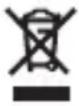 | This instrument satisfies the marking requirement defined in the WEEE Directive (2002/96/EC). This symbol indicates separate collection for electrical and electronic equipment. |
Measurement categories(Over-voltage categories)
To ensure safe operation of measuring instruments, IEC 61010 establishes safety standards for various electrical environments, categorized as o to CAT IV, and called measurement categories. Higher-numbered categories correspond to electrical environments with greater momentary energy. So a measuring instrument designed for CAT III enviroments can endure greater momentary energy than one desired for CAT II.
O(None, Other) Circuits which are not directly connected to the mains power supply.
CAT II Primary electrical circuits of equipment connected to an AC electrical outlet by a power cord.
CAT III Primary electrical circuits of the equipment connected directly to the distribution panel, and feeders from the distribution panel to outlets.
CAT IV The circuit from the service drop to the service entrance, and to the power meter and primary overcurrent protection device (distribution panel).
2. Features
MODEL3161A is a two-range insulation resistance tester for testing various elevators and safety equipments.
- Designed to following safety standards:
IEC 61010-1, IEC 61010-031, IEC 61557 (500V/ 100M Ω only) - Small and light weight.
● Auto-discharge function
When insulation resistance like a capacitive load is measured, electric charges stored in capacitive circuits are automatically discharged after measuring. Discharge can be checked with the meter. - Color-coded scales for easy and correct reading
- Power-on indicator on insulation resistance and battery check ranges.
- Backlight function to facilitate working at dimly illuminated location or at nighttime work.
- AC voltage measurement function
● Measures AC voltage on all ranges without pressing the Test button - Test leads with remote control switch (voltage won't be outputted when the test lead is not connected.)
- Robust housing case
- Neck strap for both hand's operation
- User-changeable test prod
3. Specification
●Applicable standards
IEC 61557 (except for 15V/20MΩ range)
IEC 61010-1, IEC 61010-2-030
Measurement CAT III 300V/ CAT II 600V
Pollution degree2, Protection class II
Location for use: altitude 2000m or less
IEC 61010-031
IEC 60529 IP40
EN 61326-1 EMC
EN 50581 RoHS
●Measuring range and accuracy
| Nominal voltage | 500V | 15V |
| Max. effective scale value | 100MΩ | 20MΩ |
| Mid-scale value | 2MΩ | 0.05MΩ |
| Accuracy in primary effective measuring ranges | 0.1~50MΩ | 0.005~2MΩ |
| within ±5% of indicated value | ||
| Accuracy in secondary effective measuring ranges | Measuring ranges other than above, 0 and∞. within ±10% of indicated value | |
| Accuracy at 0 and∞ | within ±0.7% of scale length | |
| Accuracy at no-load voltage | 0%~+20% of nominal voltage | |
| Nominal current | 1mA 0%~+20% | Not specified |
| Short-circuit current | Approx. 2mA | |
| Response time | Meter reading comes within accuracy within 3 sec. (It may take time when measuring a capacitive load. | |
※ Heavy-line circular arc on the scale indicates the primary effective measuring ranges. (guaranteed accuracy range)
Operating error (B) is an error obtained under the nominal operating conditions, and calculated with the intrinsic error (A), which is an error of the instrument used, and the error (En) due to variations. According to IEC61557, the maximum operating error should be within +/-30%.
$$ B = | A | + 1. 1 5 \times \sqrt {\left(E _ {1} ^ {2} + E _ {2} ^ {2} + E _ {3} ^ {2}\right)} $$
A : Intrinsic error (%)
B : Operating error (%)
E 1: Variation due to changing the temperature (%)
E 2: Variation due to changing the Battery voltage (%)
E 3: Variation due to changing the position (%)
- Nominal operating conditions
Ambient temperature : 0 \~ 40°C
Relative humidity : 90% or less
External magnetic field : 400A/m or less
Position : Horizontal \~ ±90°
Battery voltage : within "BATTERY. GOOD" range
< AC voltage range>
| Measured voltage | 0 ~ 600V |
| Accuracy | within ±3% of the max. scale value |
| Range | at short-circuited | Outputting nominal current | Mid-point measurement | Stand-by |
| 500V/100MΩ | 230mA | 170mA/0.5MΩ | 85mA/2MΩ | 55mA |
| 15V/20MΩ | 230mA | Not specified | Not specified | 55mA |
| BATT.CHECK | 230mA | |||
| Using Back light | Increased by 45mA | |||
Possible number of measurement within the "BATTERY.GOOD" range.(Measure 5 sec., and take pause for 25 sec..)
| Range | Resistor for test | Possible number of measurement |
| 15V/20MΩ | 0.05MΩ | at least 700 times |
| 500V/100MΩ | 0.5MΩ | at least 700 times |
| Temperature & humidity range | : 0°C ~ 40°C (RH: 85% or less)(no condensation) |
| Storage temperature & humidity range | :-20°C ~ +60°C (RH: 75% or less)(no condensation) |
| Insulation resistance | : at least 50MΩ / DC500V between the electrical circuit and the enclosure |
| Withstand voltage | : AC3470V(50/60Hz) for 1 min. between the electrical circuit and the enclosure |
Location for use : Altitude 2000m or less, Indoor use
Overload protection
Insulation resistance range:
15V 100V (50/60Hz) for 10 sec.
500V 600V (50/60Hz) for 10 sec.
AC voltage range: 600V 720V (50/60Hz) for 10 sec.
Dimension : approx. 90(L) x 137(W) x 40(D)mm
Weight : approx. 340g (including batteries)
Power source : R6P (SUM-3), AA, x 4pcs
Nominal power : 1.8VA
Accessories
MODEL7139A Test lead with remote control switch 1 set
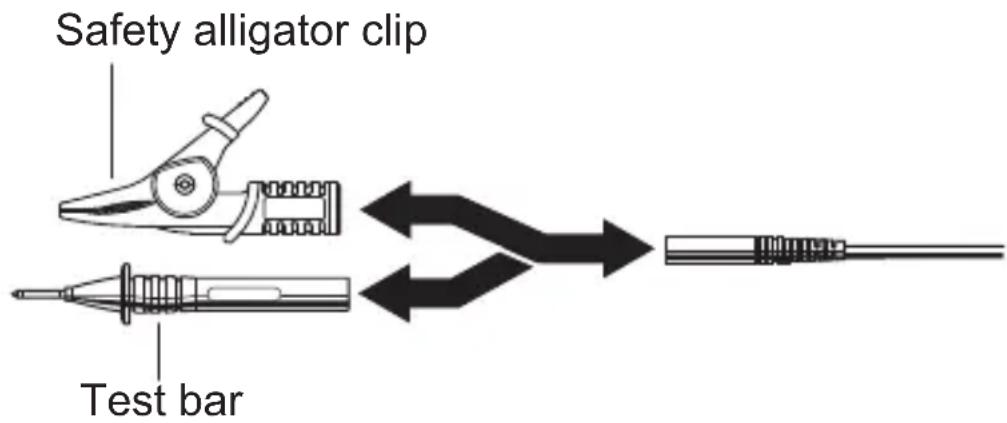
MODEL7161A Flat test bar 1 pce
MODEL7131B Safety alligator clip 1 pce
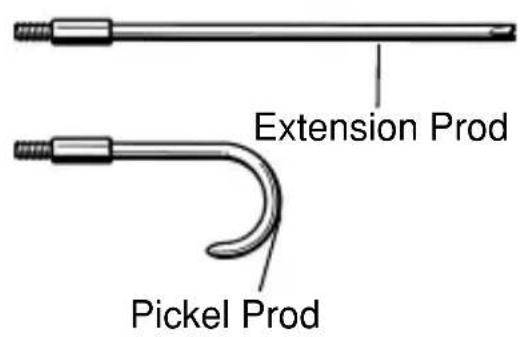
MODEL8017 Extension prod 1 pce
MODEL9123 Shoulder strap 1 pce
MODEL9041 Cord case 1 pce
R6P (SUM-3), size AA 4 pcs
Instruction manual 1 pce
Optional
MODEL7116 Extension probe
MODEL8016 Pickle type prod
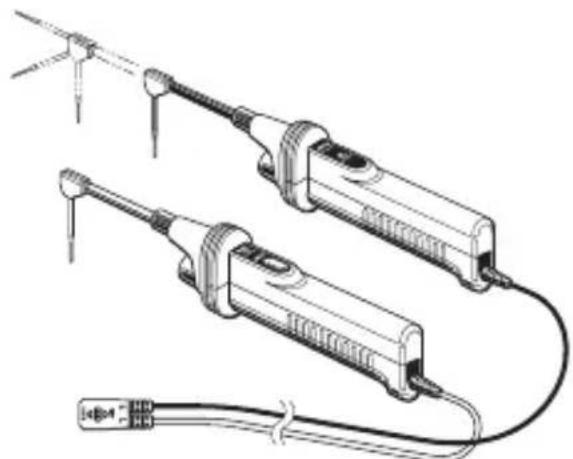
natural_image
Technical line drawing of two electrical ironing tools with wires and connectors (no text or symbols)Extension probe
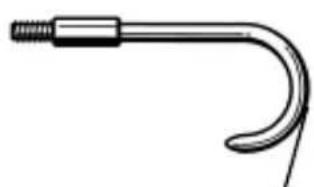
natural_image
Simple line drawing of a curved mechanical or electrical component with a threaded end (no text or symbols)Pickle type prod
4. Instrument layout
Fig. 1 Instrument layout
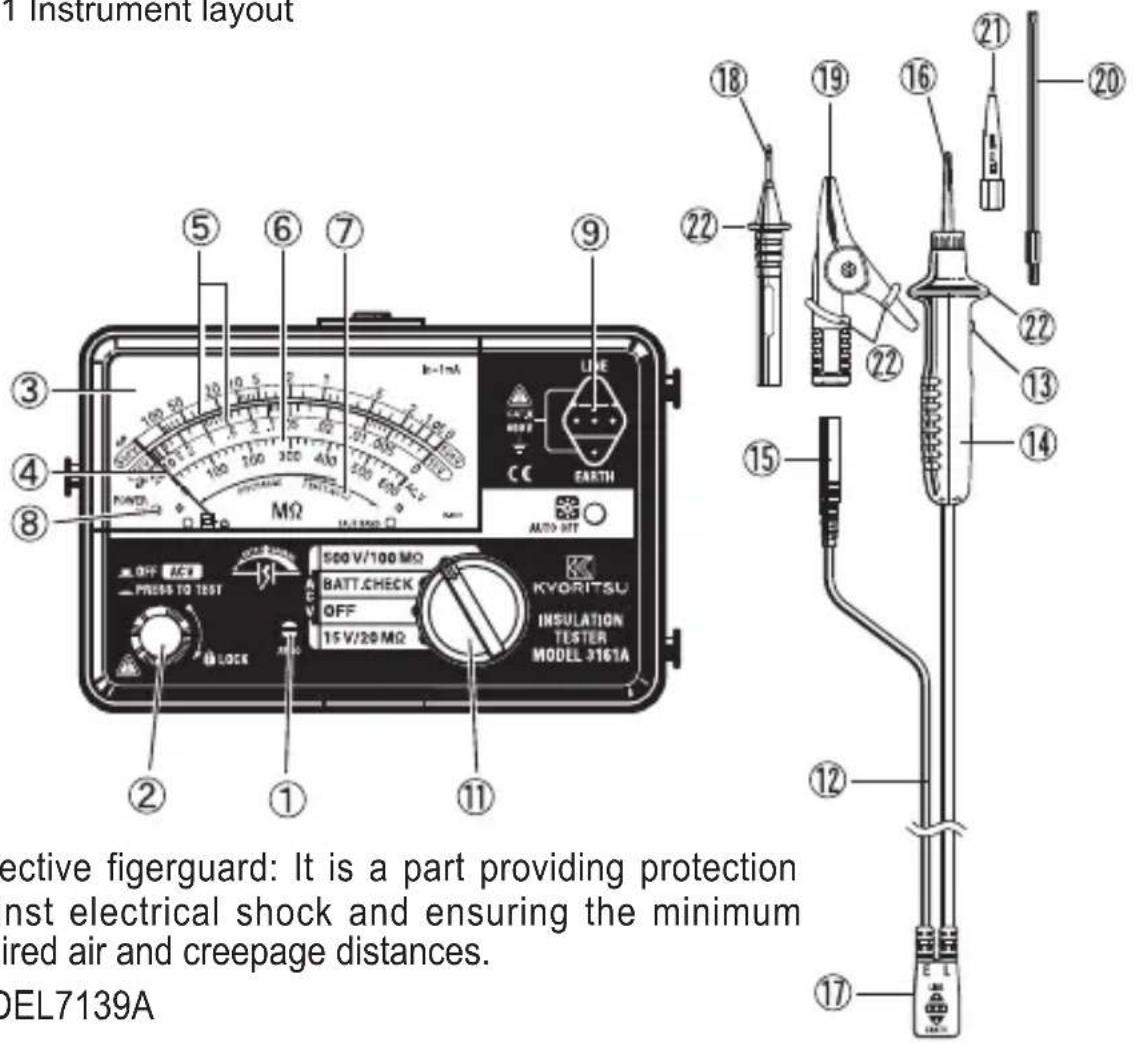
Protective figerguard: It is a part providing protection against electrical shock and ensuring the minimum required air and creepage distances.
MODEL7139A
① Meter zero adjuster ② Test button
③ Scale plate ④ Pointer
⑤ Insulation resistance scale ⑥ AC voltage scale
⑦ "BATTERY-GOOD" range ⑧ Power-on-indication LED
⑨ Probe socket ⑩ Backlight switch
⑪ Range switch
⑫ Test lead with remote control switch (MODEL7139A)
⑬ Remote control switch ⑭ Line probe
⑮ Earth cord ⑯ Standard prod (MODEL8072)
⑰ Probe connector ⑱ Flat test bar (MODEL7161A)
⑲ Safety alligator clip ⑳ Extension prod (MODEL7131B) (MODEL8017)
② Mold prod (MODEL8256) ② Protective fingerguard
5. Preparation for measurement
5-1 Mechanical zero adjustment
With the Range switch set to the OFF position and without pressing the Test button, turn the Zero adjuster with a screwdriver so that the pointer lines up with the "∞" mark on an insulation resistance scale. In case the instrument is used at the sloping place, ensure that the pointer lines up with the "∞" mark tilting the instrument to the necessary angle.
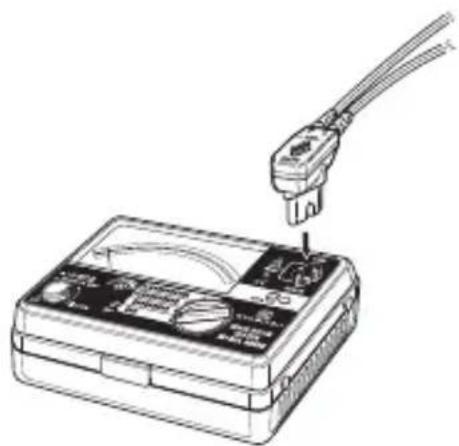
5-2 Test lead connection
Insert the Probe connector into the Probe socket on the instrument correctly as shown below.
natural_image
Line drawing of a multimeter with a power plug inserted into the case (no text or symbols)
DANGER
When the Test button or the Remote control switch is pressed with the Range switch set to an insulation resistance range, take care not to touch the tip of the Test probe where a high voltage is present in order to avoid possible shock hazard.

CAUTION
Instrument doesn't operate without connecting the test lead even if the Test button is pressed down. Battery check and operation check are not available without connecting the test lead. The Backlight function is available at any time.
5-3 Battery voltage check
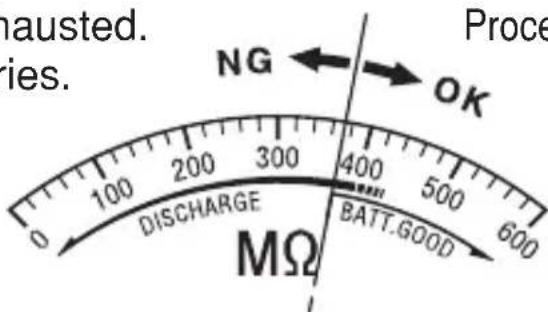
(1) Connect the test lead to the instrument, and set the Range switch to the BATT. CHECK position.
(2) Press the Test button or Remote control switch.
(3) If the meter pointer does not move to BATT GOOD, replace the batteries as shown in Section 7 "Battery replacement".
Batteries have exhausted. Replace the batteries.
Proceed to measurement.

CAUTION
Never keep the Test button pressed or locked during battery check to avoid battery power drain.
5-4 Power-on-indication LED
On an insulation resistance range or BATT. CHECK range, when the Test button or Remote control switch is pressed, the power-on-indication LED (red) lights up, indicating the instrument is in the operation mode.
6. Measurement
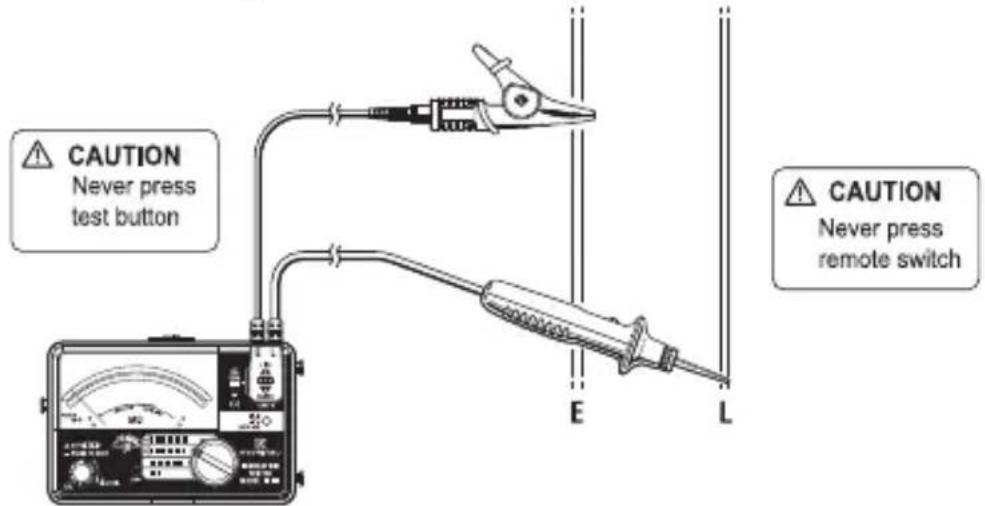
6-1 AC voltage measurement (Mains disconnection check)
The AC voltage measurement function is available on any ranges.
(1) Connect the Earth probe to the earth of the circuit under test and Line probe to the other side. If the circuit is not earthed, connect Earth probe to any appropriate conductor.
(2) Without pressing the Test button or Remote control switch, take the reading on the AC voltage scale.
AC voltage measurement (Mains disconnection check) The AC voltage measurement function is available on any ranges.
! DANGER
- Never make measurement on a circuit in which the electrical potential exceeds AC/DC300V in order to avoid possible shock hazard. (Refer to Section 3. "Specification, AC voltage measurement.)
- When testing installation that has a large current capacity, such as a power line, be sure to make measurement on the secondary side of a circuit breaker in order to avoid personal injury.
- Do not press the Test button or Remote control switch during voltage measurement.
- Never short live conductors with the tip of a probe to avoid personal injury.
- Do not make measurement with the Battery cover removed.
< Simplified measurement of DC voltage >
This instrument also provides simplified measurement of DC voltage. Multiplying 0.9 by the indicated value at AC voltage scale provides the DC voltage value. However, the polarity isn't indicated.
DC voltage (V) = Indicated value at AC voltage scale x 0.9 (V)
6-2 Insulation resistance measurement
Before performing any insulation test, check the maximum voltage that may be applied to the circuit under test.
Note:
- Some circuits have an unstable insulation resistance, which causes the reading to vary during measurement.
- The instrument may generate a high pitch tone during measurement. This is not a failure.
- If the circuit under test has a large capacitive load, it may take some time before the final reading can be obtained.
- On insulation resistance range, DC voltage is supplied through Earth and Line probes, with Earth probe having positive polarity. Earth probe should be connected to the earth conductor in the circuit under test. Such connection is known to be more suitable for insulation tests since an insulation resistance value measured with the positive side connected to earth is typically less than that taken through the reversed connection.

DANGER
- When the Test button or Remote control switch is pressed with the Range switch set to an insulation resistance range position, take care not to touch the tip of the test probe or the circuit under test where a high voltage is present in order to avoid possible shock hazard.
- Do not make measurement with the Battery cover removed.

CAUTION
Ensure that the circuit under test is de-energized prior to any insulation testing.
(1) Check the maximum voltage that may be applied to the circuit under test. Set the Range switch to a desired insulation resistance range.
(2) Connect Earth probe to the earth terminal of the circuit under test. If the circuit is not earthed, connect Earth probe to any appropriate conductor.
(3) Connect Line probe to the circuit under test and press the Test button or Remote control switch.
(4) Take the reading on the scale for the selected insulation resistance range.
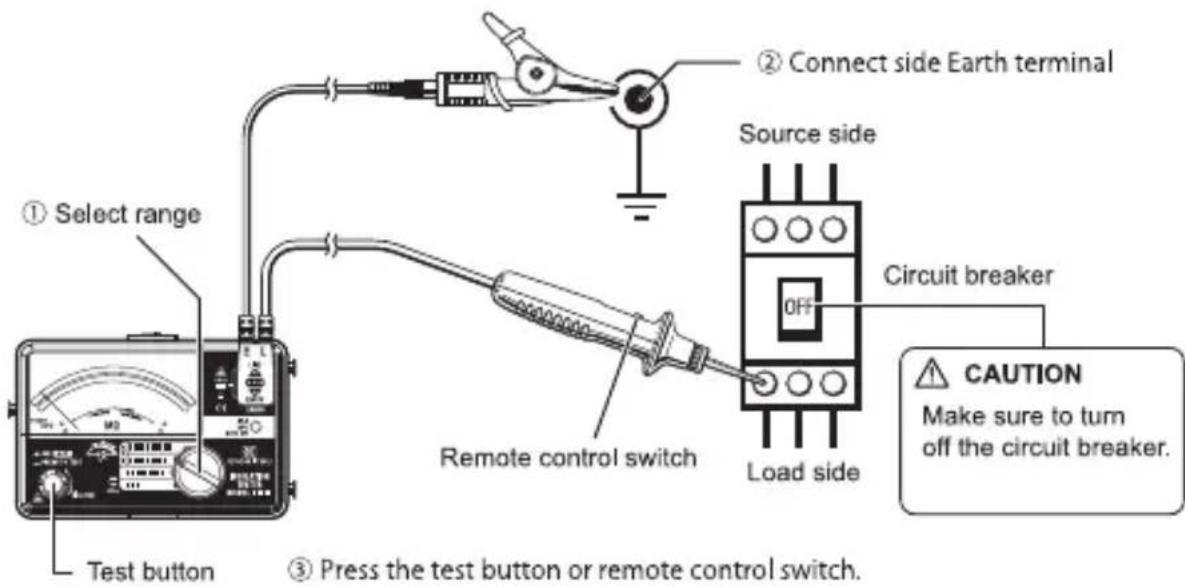
(5) Release the Test button or Remote control switch and leave the probes connected to the circuit under test to discharge charges stored in the capacitance of the circuit.
! DANGER
- Do not touch the circuit under test immediately after testing. Charges stored in the capacitance of the circuit may cause electrical shock.
- Leave the probes connected to the circuit under test until the pointer returns to the left end of the scale. Never touch the circuit before the discharging completes.
This function allows electric charges stored in the capacitance of the circuit under test to be automatically discharged after testing. Discharge can be monitored by the AC voltage reading.
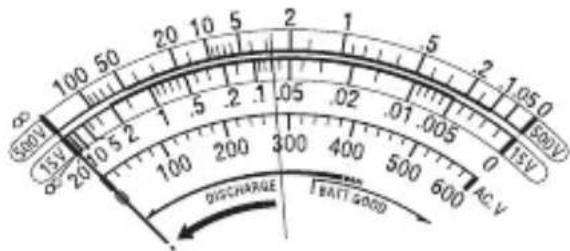
(6) Set the Range switch to the OFF position, and disconnect the probes from the instrument.
6-3 Continuous measurement
For continuous measurement, a lock-down feature is incorporated on the Test button. Pressing and turning clockwise locks the button in the operating position, the button is released by turning it counterclockwise.
! DANGER
While the Test button is locked down, a high voltage is present at the tip of a probe. Attention should be paid to avoid possible shock hazard.
6-4 Output voltage characteristics
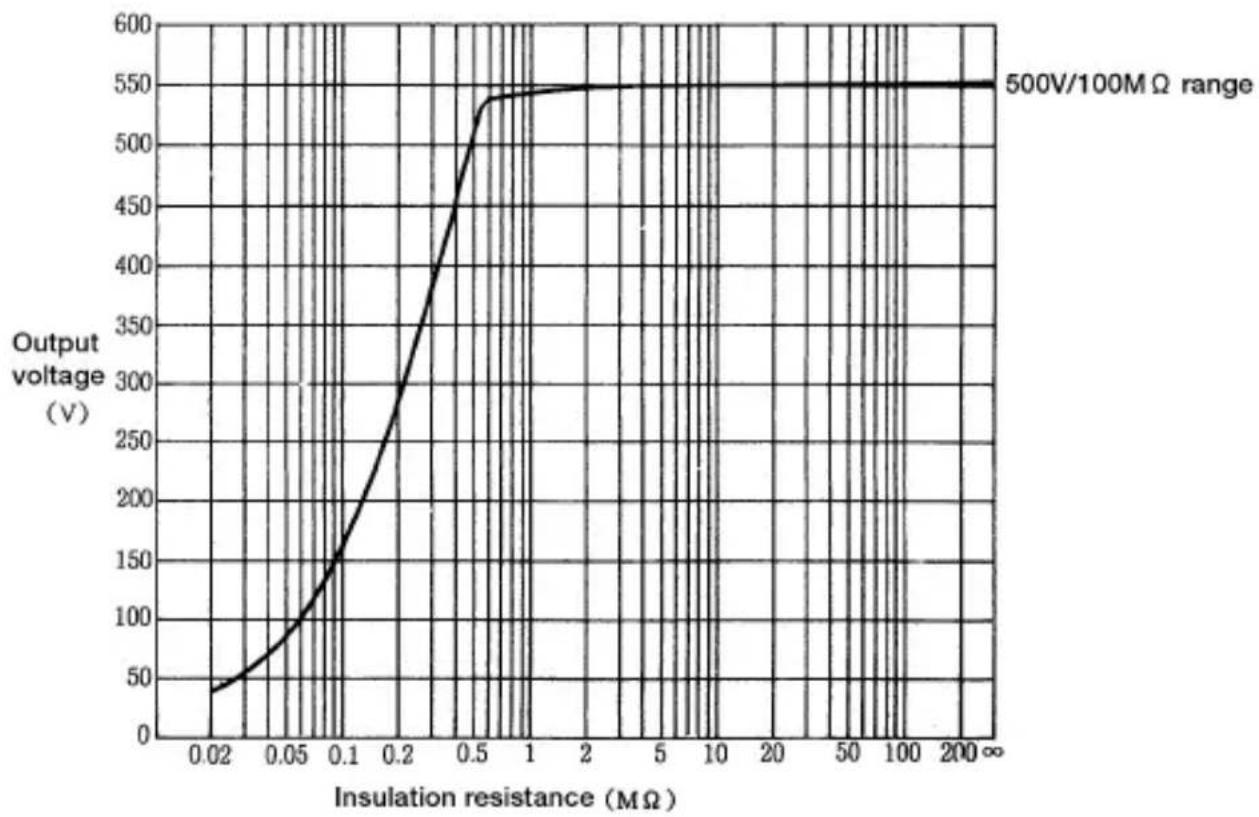
The 500V range of this instrument conforms to IEC61557. This standard defines that the nominal current shall be at least 1mA, and the lower limit of the insulation resistance maintaining the nominal voltage at the measurement terminal. (See the graph below.) This value is calculated by dividing the nominal voltage by nominal current. i.e., in case that the nominal voltage is 500V, the lower limit of the insulation resistance is found as follows.
Divide 500V by 1mA equals 0.5MΩ
That is, insulation resistance of 0.5MΩ or more is required to provide the nominal voltage to the instrument.
Note) The 15V range doesn't conform to this standard.
M-3161A Output characteristics
line
| Insulation resistance (MΩ) | Output voltage (V) | | -------------------------- | ------------------ | | 0.02 | 40 | | 0.05 | 100 | | 0.1 | 160 | | 0.2 | 300 | | 0.5 | 540 | | 1 | 550 | | 2 | 550 | | 5 | 550 | | 10 | 550 | | 20 | 550 | | 50 | 550 | | 100 | 550 | | 200 | 550 |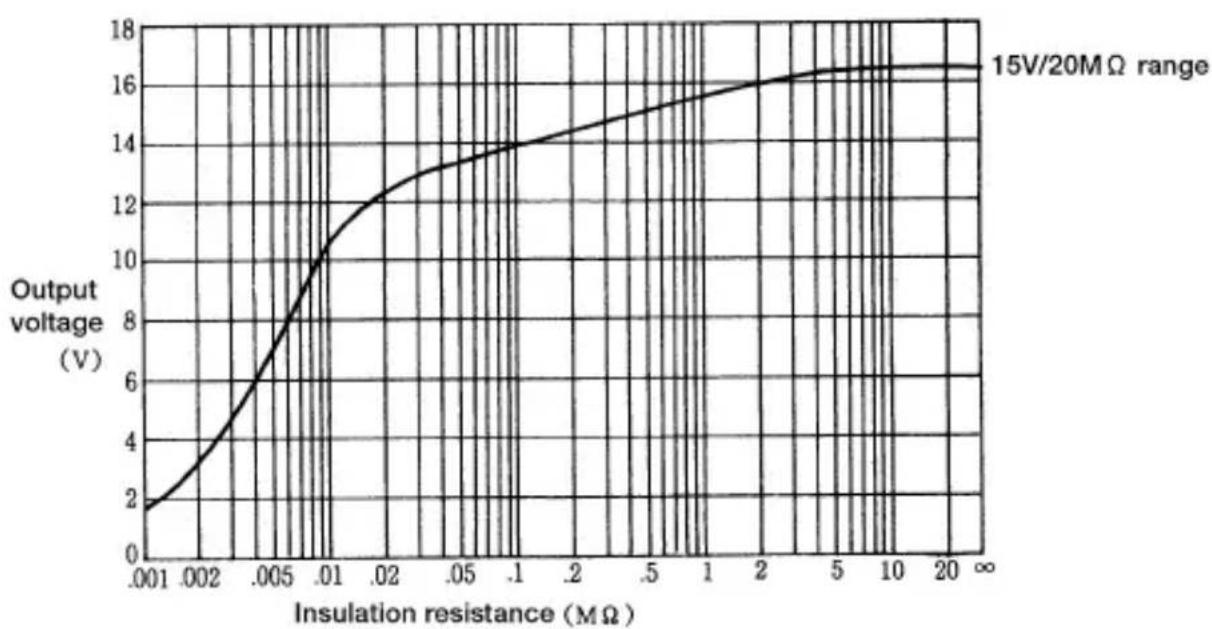
line
| Insulation resistance (MΩ) | Output voltage (V) | | -------------------------- | ------------------ | | 0.001 | 2 | | 0.002 | 4 | | 0.005 | 8 | | 0.01 | 10 | | 0.02 | 12 | | 0.05 | 13 | | 0.1 | 14 | | 2 | 15 | | 5 | 16 | | 10 | 16.5 | | 20 | 17 |6-5 Backlight function
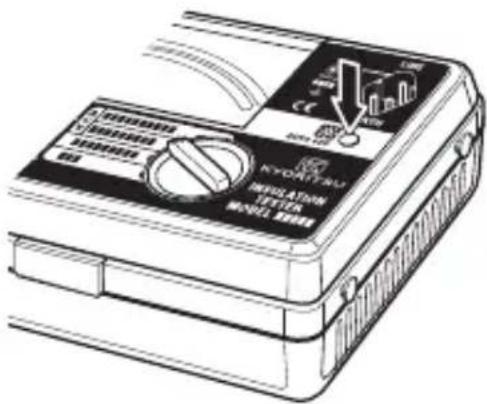
To facilitate working in dimly lit situations, a backlight function is provided which illuminates the scale plate. Press the backlight switch to operate this function. The backlight will light up for about 30 sec., and then turned off automatically.
7. Battery replacement

DANGER
Never open the Battery cover during a measurement.

WARNING
To avoid possible electric shock, remove test leads before opening the Battery cover. After replacing batteries, be sure to tighten up the screws for Battery cover.

CAUTION
Do not mix new and old batteries.
Install batteries in correct polarity as marked inside the Battery compartment.
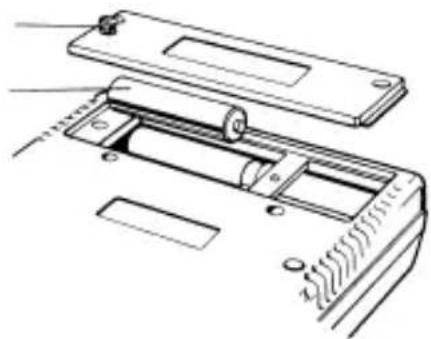
(1) Set the Range switch to "OFF" position, and remove the test leads from the instrument.
(2) Loosen the Battery-cover-fixing screws, and remove the Battery cover. Always replace all 4 batteries with new one at the same time.
(3) After replacing batteries, be sure to tighten up the screws for Battery cover.
Fixing-screws
Install batteries in correct polarity as marked inside the Battery compartment.
natural_image
Technical line drawing of a device with internal components and mounting holes (no text or symbols)8. Notes on Housing case and accessories
8-1 Case lid
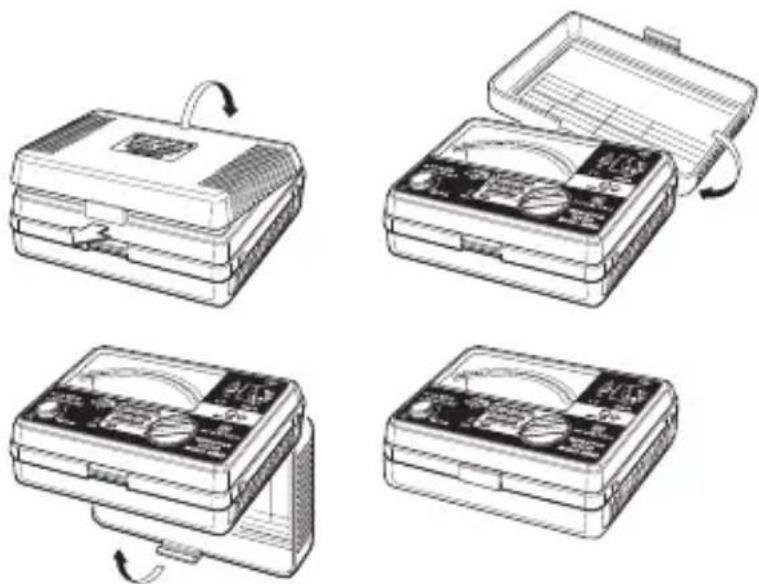
Case lid can be fit under the Housing case while making measurement.
(1) Unhook and open the Case lid.
(2) Turn it 180 degrees.
(3) Put the Case lid under the Housing case.
(4) Hook it on to the Housing case.
natural_image
Four sequential illustrations of a portable electronic device with open case, showing internal components and rotation arrows (no text or symbols)8-2 Neck strap and Cord case
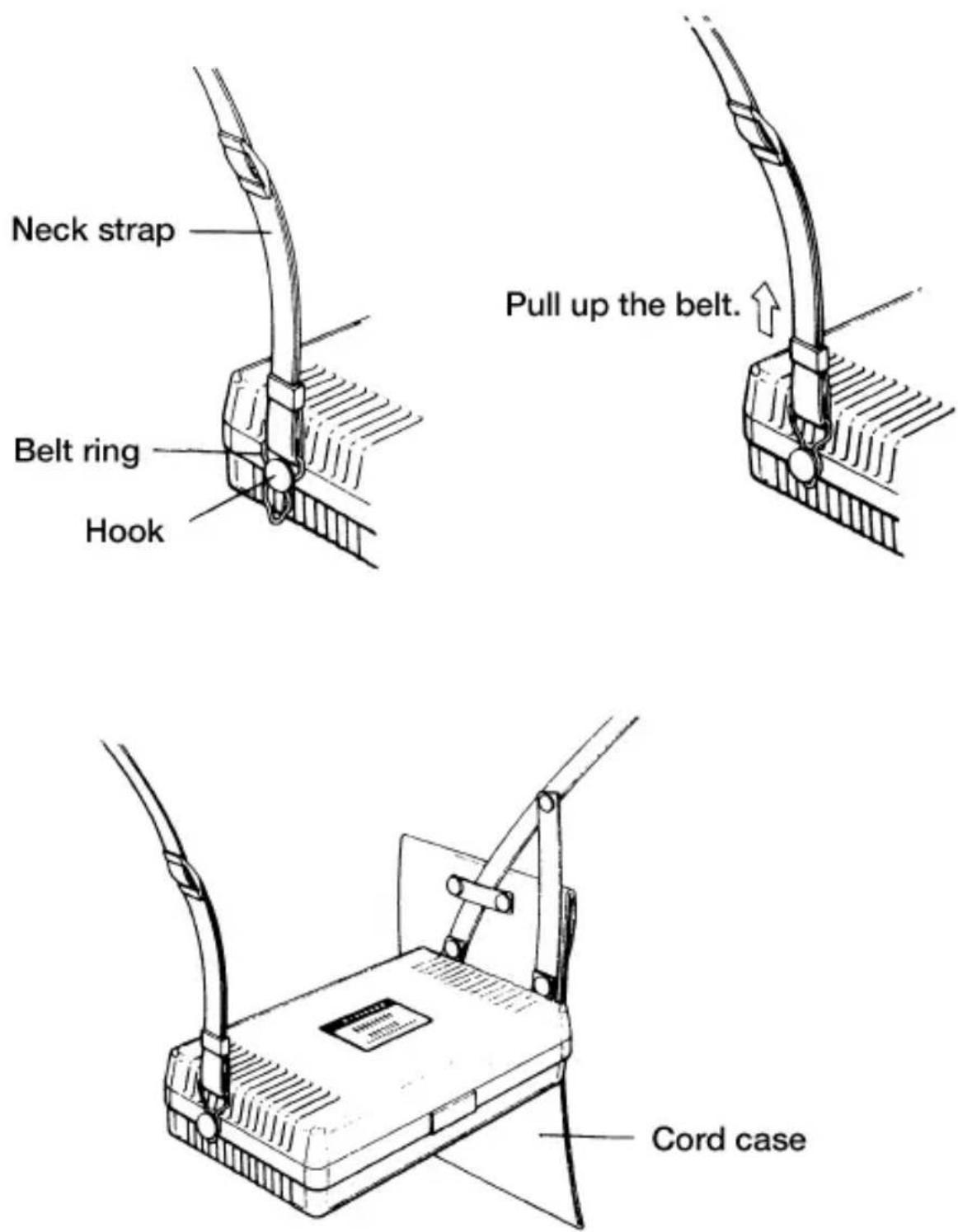
This instrument is equipped with a strap to suspend from the neck to allow both hands to be used freely for easy and safe operation.
8—3 Test prods and replacement
1. Types of Test prods
MODEL8072:Standard Test prod
Used for ordinary measurement.
(Attached to the Line probe at the time of purchase.)
Used in difficult-to-reach situations.
MODEL8016: Pickle prod (Optional)
Used to hook the probe on a conductor.
2. How to replace Test prod
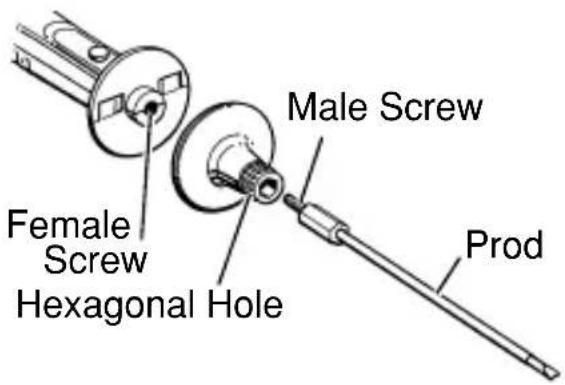
To remove the Test prod, turn the cap of LINE probe counterclockwise. Insert the threaded end of another prod into the hexagonal hole on the probe cap as shown. Then, turn the probe cap clockwise to secure it on the body of the probe.
When the instrument and the test lead are combined and used together, whichever lower category either of them belongs to will be applied.
8-4 Adaptors for the Earth cord and replacement
1. Adaptors
MODEL7131B: Safety alligator clip
Connected to the Earth terminal of the Earth terminal board.
MODEL7161A: Flat test bar
Connected to the earth side of the outlet.
2. How to replace Adaptors
To remove the adaptors, pull them out. Then firmly attach the adaptor as desired to the tip of the Earth cord.
When the instrument and the test lead are combined and used together, whichever lower category either of them belongs to will be applied.
8—5 Cleaning Meter cover
This instrument is managed by our company's quality standard and is delivered in the best condition after passed the inspection. But in the dry time of winter static electricity sometimes builds up on the meter cover due to the characteristic of plastic.
When static builds up on the meter cover and affects the meter reading, use a cloth damped with off-the-shelf anti-static agent or detergent to wipe the meter cover surface.
CAUTION
- When the pointer deflects by touching the surface of this instrument or zero adjustment cannot be made, do not try to make measurement.
- Antistatic agent has been applied to the meter cover of the instrument for electrification prevention, therefore, do not rub it strongly with a dry cloth etc. even if it is dirty.
- To avoid possible deforming or discoloring, do not use solvents.
DISTRIBUTOR

natural_image
Pure directional arrow symbol pointing left, enclosed in a rounded rectangle (no text or numbers)Factory: Ehime, Japan
www.kew-ltd.co.jp