Pro QLC - Hard Drive VisionTek - Free user manual and instructions
Find the device manual for free Pro QLC VisionTek in PDF.


| Product Type | External Solid State Drive (SSD) |
| Brand | VisionTek |
| Model | Pro QLC |
| Capacity | 1 TB (also available in 500 GB, 2 TB) |
| Interface | USB 3.2 Gen 2 Type-C |
| Read Speed | Up to 1050 MB/s |
| Write Speed | Up to 1000 MB/s |
| Dimensions (L x W x H) | 100 x 45 x 10 mm |
| Weight | 50 g |
| Operating Temperature | 0°C to 60°C |
| Storage Temperature | -20°C to 70°C |
| Compatibility | Windows, macOS, Linux, Android, iOS (with adapter) |
| Power Supply | Bus-powered via USB (no external power required) |
| Encryption | Hardware-based AES 256-bit encryption |
| Shock Resistance | Drop resistant up to 2 meters |
| Material | Aluminum enclosure with rubber bumper |
| LED Indicator | Yes (activity light) |
| Warranty | 3 years limited |
| Included Accessories | USB Type-C to Type-C cable, USB Type-C to Type-A adapter, quick start guide |
Frequently Asked Questions - Pro QLC VisionTek
User questions about Pro QLC VisionTek
0 question about this device. Answer the ones you know or ask your own.
Ask a new question about this device
Download the instructions for your Hard Drive in PDF format for free! Find your manual Pro QLC - VisionTek and take your electronic device back in hand. On this page are published all the documents necessary for the use of your device. Pro QLC by VisionTek.
USER MANUAL Pro QLC VisionTek
VisionTek Pro QLC 7mm 2.5" SSD (SATA)
SKU: 901367
MSRP: \$69.99
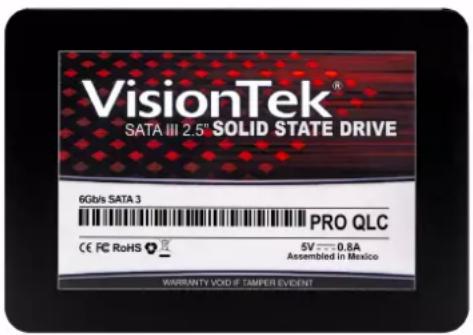
The VisionTek QLC 7mm 2.5" SATA SSD offers speed, reliability and large capacities for professionals, gamers and everyday users. Fully TAA Compliant
• Max Sequential Reads up to 565MB/s
• Max Sequential Writes up to 530MB/s
• Max 4K Random Reads up to 97K IOPS
• Max 4K Random Writes up to 89K IOPS
VisionTek Pro QLC 7mm 2.5" SSD (SATA)
The VisionTek Pro QLC Series 2.5" 7mm SSD is designed to bring fast, reliable storage to PC users. With the shift from the hard disk drive to the solid state drive our 3D MLC Series SSDs are a drop-in replacement option for a hard disk drive (HDD). It delivers superior reliability, durability, power efficiency and performance - keeps your system working reliably in the toughest of conditions.
Conforming to the industry standard SATA connector specification, these SSDs integrate easily into existing storage infrastructures. The VisionTek Pro QLC Series SSDs provide high bandwidth and IOPS while efficiently managing write amplification. Employing SSD technology in a system enables faster boot times, quicker application load times, lower power consumption, and enhanced reliability.

natural_image
Circular icon with a white pen and curved line on dark blue background, no text or symbols present.Speed / Performance
Start your system in seconds, load files almost instantly, and accelerate the most demanding applications with VisionTek solid state drives. With the advancements in SSD technology, you can open a program and have it load immediately. Unlike a mechanical hard drive, an SSD has no moving parts ensuring faster performance, longer device life and more secure data.

natural_image
Circular icon with two crossed screwdrivers (no text or symbols)Easy to Install
A solid state hard drive is easy to install, in just a few minutes time you can upgrade your internal system storage. No need to pay someone else, the installation of an SSD is quick and easy! Consult your system manufacturers documentation for system specific installation instructions.
VisionTek®
Features
• SLC caching accelerates burst performance
- Global wear leveling evens program/erase counts to extend drive lifespan
• StaticDataRefresh technology ensures data integrity
• Data shaping increases endurance
• TRIM command support (OS dependent)
• S.M.A.R.T. support
• LDPC hard and soft decode ECC
- DEVSLP support
- Internal flash RAID-like parity scheme provides an additional layer of error correction
- SATA 3.2 (6Gb/s) interface (backwards compatible with SATA 2.0 (3Gb/s) and SATA 1.0 (1.5Gb/s))
- Industry-standard 512 byte sector support
- Native Command Queuing (NCQ) support with 32 command que depth
• RoHS-compliant package
Technical Specifications
Connection Type
SATA
Form Factor
7mm 2.5"
Controller
Silicon Motion SM2259
Flash Type
3D QLC NAND
Security
Secure Erase support
User selectable ATA password support
Reliability
MTBF: 1.5 million device hours*
End-to-End Data Protection
Built-in LDPC ECC
Static and dynamic wear leveling
Uncorrected Bit Error Rate: ?1 sector per 10^15 bits read
Electrical / Mechanical
+5VDC (±5%) power supply
Power Consumption: up to 2.1W (Active), 0.09W (Idle)
2.5-inch form factor: 100.45 x 69.85 x 7mm
Weight: 60g
Environmental
Operating temperature: 0-70°C
Non-Operating temperature: -40-85°C
Operating humidity: 5-95% relative
Shock: 1500G/0.5ms
Vibration: 2-500Hz, 3.1G
VisionTek®
Performance
| Part # Capacity | Max Sequential Reads | Max Sequential Writes | Max 4K Random Reads | Max 4K Random Writes | Endurance |
| 901367250GB | 550MB/s 445 MB/s 30K IOPS | 60K IOPS | TBW: Up to 380TBDWPD: 0.361TB (3 Year) | ||
| 901368500GB | 560 MB/s 505 MB/s 60K IOPS | 66K IOPS | TBW: Up to 380TBDWPD: 0.361TB (3 Year) | ||
| 9013691TB | 560 MB/s 505 MB/s 75K IOPS | 66K IOPS | TBW: Up to 380TBDWPD: 0.361TB (3 Year) | ||
| 9013702TB | 560 MB/s 505 MB/s 75K IOPS | 66K IOPS | TBW: Up to 380TBDWPD: 0.361TB (3 Year) |
Warranty
Warranty:
3 Year Limited*
Product must be registered within 30 days of purchase to be covered by the 3 Year Limited Warranty*. Products not registered within 30 days of purchase will default to our 1-Year Warranty period.
You may register your product here: www.visiontek.com/support/warranty-registration
For additional warranty information, please see our Warranty Page: www.visiontek.com/support/warranty-information
Support
Spec Sheet
Please Wait...
FAQ
For California Residents Only:
WARNING: Cancer and Reproductive harm. For more information, go to www.p65warnings.ca.gov
* Please, Note that Proposition 65 may be best defined as a “Right To Know” law in California and Prop 65 warning labels are not an indication that a product is violating safety standards or regulations. The Prop 65 warning label does not mean our products inevitably cause cancer or reproductive harm. We do not consider our products harmful when used as intended. However, it is a necessary precaution to provide the warning because of this California law.