IQ-P.I.P.-SMT - Uncategorized CROWN - Free user manual and instructions
Find the device manual for free IQ-P.I.P.-SMT CROWN in PDF.


| Product Type | Soldering Station |
| Brand | Crown |
| Model | IQ-P.I.P.-SMT |
| Dimensions (W x D x H) | 200 x 150 x 80 mm |
| Weight | 1.2 kg |
| Power Supply | 230V AC, 50Hz |
| Power Consumption | 60 W |
| Temperature Range | 150°C - 450°C |
| Temperature Stability | ± 2°C |
| Display | Digital LED |
| Heating Element | Ceramic |
| Tip Compatibility | Standard 900M series |
| Main Functions | Precise temperature control, sleep mode, auto shut-off |
| Maintenance | Clean tip with wet sponge, wipe station with dry cloth |
| Safety Features | Overheat protection, anti-static design |
| Spare Parts | Replacement tips, heating elements, and stands available |
| Repairability | Modular design, easy part replacement |
| General Information | Includes iron stand, sponge, and user manual |
Frequently Asked Questions - IQ-P.I.P.-SMT CROWN
User questions about IQ-P.I.P.-SMT CROWN
0 question about this device. Answer the ones you know or ask your own.
Ask a new question about this device
Download the instructions for your Uncategorized in PDF format for free! Find your manual IQ-P.I.P.-SMT - CROWN and take your electronic device back in hand. On this page are published all the documents necessary for the use of your device. IQ-P.I.P.-SMT by CROWN.
USER MANUAL IQ-P.I.P.-SMT CROWN
REFERENCE MANUAL
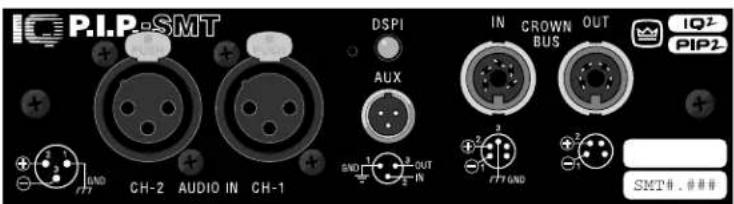
An IQ System® Programmable Input Processor for Crown® P.I.P.®-compatible Power Amplifiers
© 1998 by Crown International, Inc., P.O. Box 1000, Elkhart, Indiana 46515-1000 U.S.A. Telephone: 219-294-8000. The IQ-P.I.P.-SMT is produced by the Professional Audio Division of Crown International, Inc. Trademark Notice: MPX-6™, SMX-6™, SmartAmp™ and Macro Reference™ are trademarks and Amcron®, Crown®, IQ System®, IOC®, ODEP®, Macro-Tech®, Com-Tech® and P.I.P® are registered trademarks of Crown International, Inc. Other trademarks are the property of their respective owners.

Printed on recycled paper.
126821-1 10/98

NORTH AMERICA
SUMMARY OF WARRANTY
The Crown Audio Division of Crown International, Inc., 1718 West Mishawaka Road, Elkhart, Indiana 46517-4095 U.S.A. warrants to you, the ORIGINAL PURCHASER and ANY SUBSEQUENT OWNER of each NEW Crown product, for a period of three (3) years from the date of purchase by the original purchaser (the "warranty period") that the new Crown product is free of defects in materials and workmanship. We further warrant the new Crown product regardless of the reason for failure, except as excluded in this Warranty.
ITEMS EXCLUDED FROM THIS CROWN WARRANTY
This Crown Warranty is in effect only for failure of a new Crown product which occurred within the Warranty Period. It does not cover any product which has been damaged because of any intentional misuse, accident, negligence, or loss which is covered under any of your insurance contracts. This Crown Warranty also does not extend to the new Crown product if the serial number has been defaced, altered, or removed.
WHAT THE WARRANTOR WILL DO
We will remedy any defect, regardless of the reason for failure (except as excluded), by repair, replacement, or refund. We may not elect refund unless you agree, or unless we are unable to provide replacement, and repair is not practical or cannot be timely made. If a refund is elected, then you must make the defective or malfunctioning product available to us free and clear of all liens or other encumbrances. The refund will be equal to the actual purchase price, not including interest, insurance, closing costs, and other finance charges less a reasonable depreciation on the product from the date of original purchase. Warranty work can only be performed at our authorized service centers or at the factory. We will remedy the defect and ship the product from the service center or our factory within a reasonable time after receipt of the defective product at our authorized service center or our factory. All expenses in remedying the defect, including surface shipping costs in the United States, will be borne by us. (You must bear the expense of shipping the product between any foreign country and the port of entry in the United States and all taxes, duties, and other customs fees for such foreign shipments.)
HOW TO OBTAIN WARRANTY SERVICE
You must notify us of your need for warranty service not later than ninety (90) days after expiration of the warranty period. All components must be shipped in a factory pack, which, if needed, may be obtained from us free of charge. Corrective action will be taken within a reasonable time of the date of receipt of the defective product by us or our authorized service center. If the repairs made by us or our authorized service center are not satisfactory, notify us or our authorized service center immediately.
DISCLAIMER OF CONSEQUENTIAL & INCIDENTAL DAMAGES
YOU ARE NOT ENTITLED TO RECOVER FROM US ANY INCIDENTAL DAMAGES RESULTING FROM ANY DEFECT IN THE NEW CROWN PRODUCT. THIS INCLUDES ANY DAMAGE TO ANOTHER PRODUCT OR PRODUCTS RESULTING FROM SUCH A DEFECT. SOME STATEBEST NOT ALLOW THE EXCLUSION OR LIMITATIONS OF INCIDENTAL COORDINSEQUENTIAL DAMAGES, SO THE ABOVE LIMITATION OR EXCLUSION MAY NOT APPLY TO YOU.
WARRANTY ALTERATIONS
No person has the authority to enlarge, amend, or modify this Crown Warranty. This Crown Warranty is not extended by the length of time which you are deprived of the use of the new Crown product. Repairs and replacement parts provided under the terms of this Crown Warranty shall carry only the unexpired portion of this Crown Warranty.
DESIGN CHANGES
We reserve the right to change the design of any product from time to time without notice and with no obligation to make corresponding changes in products previously manufactured.
LEGAL REMEDIES OF PURCHASER
THIS CROWN WARRANTY GIVES YOU SPECIFIC LEGAL RIGHTS, YOU MAY ALSO HAVE OTHER RIGHTS WHICH VARY FROM STATE TO STATE. No action to enforce this Crown Warranty shall be commenced later than ninety (90) days after expiration of the warranty period.
THIS STATEMENT OF WARRANTY SUPERSEDES ANY OTHERS CONTAINED IN THIS MANUAL FOR CROWN PRODUCTS.
9/90
THREE YEAR
FULL WARRANTY
WORLDWIDE
SUMMARY OF WARRANTY
The Crown Audio Division of Crown International, Inc., 1718 West Mishawaka Road, Elkhart, Indiana 46517-4095 U.S.A. warrants to you, the ORIGINAL PURCHASER and ANY SUBSEQUENT OWNER of each NEW Crown ^1 product, for a period of three (3) years from the date of purchase by the original purchaser (the "warranty period") that the new Crown product is free of defects in materials and workmanship, and we further warrant the new Crown product regardless of the reason for failure, except as excluded in this Crown Warranty.
1 Note: If your unit bears the name "Amcron," please substitute it for the name "Crown" in this warranty.
ITEMS EXCLUDED FROM THIS CROWN WARRANTY
This Crown Warranty is in effect only for failure of a new Crown product which occurred within the Warranty Period. It does not cover any product which has been damaged because of any intentional misuse, accident, negligence, or loss which is covered under any of your insurance contracts. This Crown Warranty also does not extend to the new Crown product if the serial number has been defaced, altered, or removed.
WHAT THE WARRANTOR WILL DO
We will remedy any defect, regardless of the reason for failure (except as excluded), by repair, replacement, or refund. We may not elect refund unless you agree, or unless we are unable to provide replacement, and repair is not practical or cannot be timely made. If a refund is elected, then you must make the defective or malfunctioning product available to us free and clear of all liens or other encumbrances. The refund will be equal to the actual purchase price, not including interest, insurance, closing costs, and other finance charges less a reasonable depreciation on the product from the date of original purchase. Warranty work can only be performed at our authorized service centers. We will remedy the defect and ship the product from the service center within a reasonable time after receipt of the defective product at our authorized service center.
HOW TO OBTAIN WARRANTY SERVICE
You must notify us of your need for warranty service not later than ninety (90) days after expiration of the warranty period. All components must be shipped in a factory pack. Corrective action will be taken within a reasonable time of the date of receipt of the defective product by our authorized service center. If the repairs made by our authorized service center are not satisfactory, notify our authorized service center immediately.
DISCLAIMER OF CONSEQUENTIAL & INCIDENTAL DAMAGES
YOU ARE NOT ENTITLED TO RECOVER FROM US ANY INCIDENTAL DAMAGES RESULTING FROM ANY DEFECT IN THE NEW CROWN PRODUCT. THIS INCLUDES ANY DAMAGE TO ANOTHER PRODUCT OR PRODUCTS RESULTING FROM SUCH A DEFECT.
WARRANTY ALTERATIONS
No person has the authority to enlarge, amend, or modify this Crown Warranty. This Crown Warranty is not extended by the length of time which you are deprived of the use of the new Crown product. Repairs and replacement parts provided under the terms of this Crown Warranty shall carry only the unexpired portion of this Crown Warranty.
DESIGN CHANGES
We reserve the right to change the design of any product from time to time without notice and with no obligation to make corresponding changes in products previously manufactured.
LEGAL REMEDIES OF PURCHASER
No action to enforce this Crown Warranty shall be commenced later than ninety (90) days after expiration of the warranty period.
THIS STATEMENT OF WARRANTY SUPERSEDES ANY OTHERS CONTAINED IN THIS MANUAL FOR CROWN PRODUCTS.
9/90

Quick Install Procedure
This procedure is provided for those who are already familiar with Crown's IQ System and who would like to install the IQ-P.I.P.-SMT in the shortest time possible. Less experienced installers or those wishing a full explanation of the installation procedure are encouraged to go to Section 4 where the full installation procedure is described.
Prepare the IQ-P.I.P.-SMT:
-
Set the IQ address switch SW1 (see Figures 4.1 and 4.2) on the IQ-P.I.P.-SMT to an unused IQ address. (Tip: Record the IQ address on the small blank label that is provided on lower right corner of the P.I.P. panel.)
-
Set the input switches S1 and S2 (see Figures 4.3 and 4.4) for the desired input gain and, if a microphone input is desired, phantom power. (Tip: Record the input setting on the small blank label that is provided on lower right corner of the P.I.P. panel.)
-
Set jumpers JP4 and JP5. Set both jumper JP4 and JP5 to the "OUT" position if either a PIP2-compatible amplifier (such as the CT-10 Series or MacroTech 5000VZ) will be used (Figure 2.1 and 4.9). Both JP4 and JP5 should be set to the "IN" position for all other amplifiers.
Prepare the amplifier:
-
Turn down the level controls of the amplifier and turn off the amplifier.
-
Unplug the power cord of the amplifier from the AC mains.
-
Remove the existing P.I.P. or cover panel from the amplifier back panel (two screws).
-
Set the amplifier input sensitivity switch to 0.775 V. (See the Reference or Owner's Manual of the amplifier.)
Install the IQ-P.I.P.-SMT into the amplifier:
-
Carefully ground yourself to the chassis of the amplifier before installing the IQ-P.I.P.-SMT. It is a good idea to maintain ground contact between yourself and the amplifier while inserting the module into the P.I.P. card rails in the next step.
-
Install the IQ-P.I.P.-SMTinto the amplifier: Standard P.I.P. Amplifiers: Align the edges of the IQ-P.I.P.-SMTin the P.I.P. card rails and firmly push the unit in until it is seated against the mounting bracket (Figure 4.6). PIP2 Compatible Amplifiers: Connect the PIP2 input adapter to the amplifier input cables. Plug the IQ-P.I.P.-SMT into the PIP2 input adapter and insert the assembly into the P.I.P. opening in the back of the amplifier (Figure 4.7 and 4.8).
-
Tighten the two P.I.P. mounting screws until it is secured to the amplifier back panel.
Install the wiring:
-
Connect the IQ-P.I.P.-SMT to the IQ System via the Crown Bus (see Section 4.6 if more information is needed).
-
Connect the audio signal wiring to the IQ-P.I.P.-SMT (see Section 4.7 if more information is needed).
-
Connect the amplifier back to the AC receptacle.
Adjust the levels and scale factors:
-
Turn the level controls of the amplifier to their full setting. Use the software-controlled input attenuators on the IQ-P.I.P.-SMT to adjust the input levels down.
-
Standard P.I.P. Amplifiers: Manually configure the scaling factors of the IQ-P.I.P.-SMT with appropriate IQ System software. PIP2 Compatible Amplifiers: The scaling factors will be automatically set.
The information furnished in this manual does not include all of the details of design, production, or variations of the equipment. Nor does it cover every possible situation which may arise during installation, operation or maintenance. If you need special assistance beyond the scope of this manual, please contact our Technical Support Group.
Crown Audio Division Technical Support Group
Plant 2 SW, 1718 W. Mishawaka Rd., Elkhart, Indiana 46517 U.S.A.
Phone: 800-342-6939 (North America, Puerto Rico and Virgin Islands)
or 219-294-8200
Fax: 219-294-8301 Fax Back: 800-294-4094 (North America only) or
219-293-9200
Internet: http://www.crownaudio.com

WARNING
TO REDUCE THE RISK OF ELECTRIC
SHOCK, DO NOT EXPOSE THIS
EQUIPMENT TO RAIN OR MOISTURE!
FCC COMPLIANCE NOTICE
This equipment has been tested and found to comply with the limits for a Class A digital Device, pursuant to Part 15 of the FCC Rules. These limits are designed to provide reasonable protection against harmful interference when the equipment is operated in a commercial environment. This equipment generates, uses and can radiate radio frequency energy and, if not installed and used in accordance with the instruction manual, may cause harmful interference to radio communications. Operation of this equipment in a residential area is likely to cause harmful interference in which case the user will be required to correct the interference at his own expense.
"The user is cautioned that any changes or modifications not expressly approved by Crown International could void the user's authority to operate the equipment."

crown
IQ P.I.P.-SMT
CONTENTS
Quick Install Procedure 3
1 Welcome....8
1.1 Unpacking 8
2 Facilities 9
3 Features 12
3.1 Amplifier Information 12
3.2 Amp Mode 12
3.3 Power Control 12
3.4 Input Signal Level Monitor 12
3.5 Signal Mute 12
3.6 Polarity Inverter 12
3.7 Input Signal Attenuator 12
3.8 Input Signal Compressor/Limiter 13
3.9 Output Signal Level Monitor 13
3.10 Smooth/Output Signal Limiter 13
3.11 IOC Event Monitor.... 14
3.12 Prolonged IOC Warning 14
3.13 ODEPLevel Monitor.... 14
3.14 ODEP Conservation 14
3.15 Excessive ODEPWarning 15
3.16 Fault Warning 15
3.17 Auto Standby 16
3.18 Auto 16
3.19 Crown Bus "Drop Out" Relays 16
3.20 DSPI 16
3.21 AUX Output 17
3.22 Memory Backup 17
3.23 Reset 17
3.24 User Default Settings 17
4 Installation 18
4.1 Prepare the IQ-P.I.P.-SMT.... 18
4.2 Prepare the Amplifier 21
4.3 Install the IQ-P.I.P.-SMTinto the Amplifier 21
4.4 Install the Wiring 22
4.5 Adjust the Levels & Scale Factors 22
4.6 A Closer Look at Crown Bus Wiring 23
4.7 A Closer Look at Audio Signal Wiring 26
4.8 Using the AUX Connector 27
4.8.1 AUX Output 27
Contents continued...
4.8.2 AUX Input.... 27
5 Technical Information 29
5.1 Audio Signals.... 29
5.2 Amplifier Monitoring: "Monitor Inputs" 29
5.3 Amplifier Control 29
5.4 IQ System Communications 30
5.5 Microprocessor and Reset Switch 30
6 Specifications 32
7 IQ Address Tables 34
8 Service 37
8.1 Worldwide Service 37
8.2 North American Service 37
8.2.1 Service at a N. Am. Service Center 37
8.2.2 Factory Service 37
ILLUSTRATIONS
1.1 IQ-P.I.P.-SMT 8
2.1 The IQ-P.I.P.-SMTFacilities 9
4.1 IQ Address Switch (SW1) Location 18
4.2 IQ Address Switch (SW1) Values 19
4.3 Input Switch (S1, S2) Location 20
4.4 Input Switch (S1, S2) Settings 20
4.5 Installation into a Standard P.I.P. Amplifier.... 21
4.6 PIP2 Input Adapter Connection 22
4.7 Installation into a PIP2 Amplifier 22
4.8 Amplifier Scale Factor Values and Output Signal Pad Settings ... 23
4.9 IQ-P.I.P.-SMT Output to IQ Component with DIN 25
4.10 IQ-P.I.P.-SMT Output to IQ Component w/ Screw Term. Plug .... 25
4.11 IQ Component w/ Screw Term. Plug to IQ-P.I.P.-SMT Input..... 25
4.12 Crown Bus Wiring "Loops" from Output to Input 26
4.13 Audio Input Wiring 26
4.14 The Internal AUX Circuit 28
4.15 A Sample AUX Output Circuit 28
5.1 IQ-P.I.P.-SMTCircuit Block Diagram 31
7.1 IQ Address Switch (SW1) Settings from 0 to 83 34
7.2 IQ Address Switch (SW1) Settings from 84 to 167 35
7.3 IQ Address Switch (SW1) Settings from 168 to 250 36
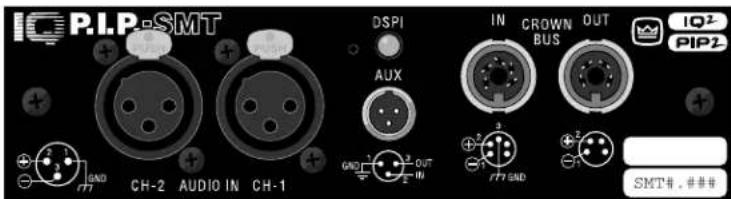
Fig. 1.1 IQ-P.I.P.-SMT
1 Welcome
The IQ-P.I.P.-SMT is a PIP2 input module for Crown P.I.P. (programmable input processor) and PIP2-compatible amplifiers. Because it is also an IQ2-series component, it supports Crown's UCODE protocol and requires an IQ System® with an IQ2-compatible IQ interface. UCODE (universal code) enables users and third parties to develop custom software objects to control and monitor IQ2-compatible components like the IQ-P.I.P.-SMT.
The IQ-P.I.P.-SMT connects the amplifier to the Crown Bus of an IQ System so the amplifier can be controlled and monitored. With its SmartAmp ^™ features, it offers several automation functions such as the ability to automatically turn on an amplifier channel (high voltage supply) when it is needed and then turn it back off when it is no longer needed. This conserves power and saves money.
This manual will help you successfully install your unit. We strongly recommend that you read all the instructions, warnings and cautions contained within. Also for your protection, please send in the warranty registration card today and save the bill of sale since it is your official proof of purchase.
1.1 Unpacking
The unit is shipped in a protective antistatic bag.
CAUTION: STATIC ELECTRICITY MAY DAMAGE THE UNIT. Use caution when handling the unit. Carefully ground yourself BEFORE touching the unit. For added safety, touch the outer metal collar of either Crown Bus connector. Avoid unnecessarily touching the components, edge connector or solder pads on the circuit boards.
Please unpack and inspect the unit for any damage that may have occurred during transit. If damage is found, notify the transportation company immediately. Only you, the consignee, may initiate a claim with the carrier for shipping damage. Crown will be happy to cooperate fully as needed. Save the shipping carton as evidence of damage for the shipper's inspection.
Even if the unit arrived in perfect condition, as most do, save all packing materials. NEVER SHIP THE UNIT WITHOUT THE FACTORY PACK.
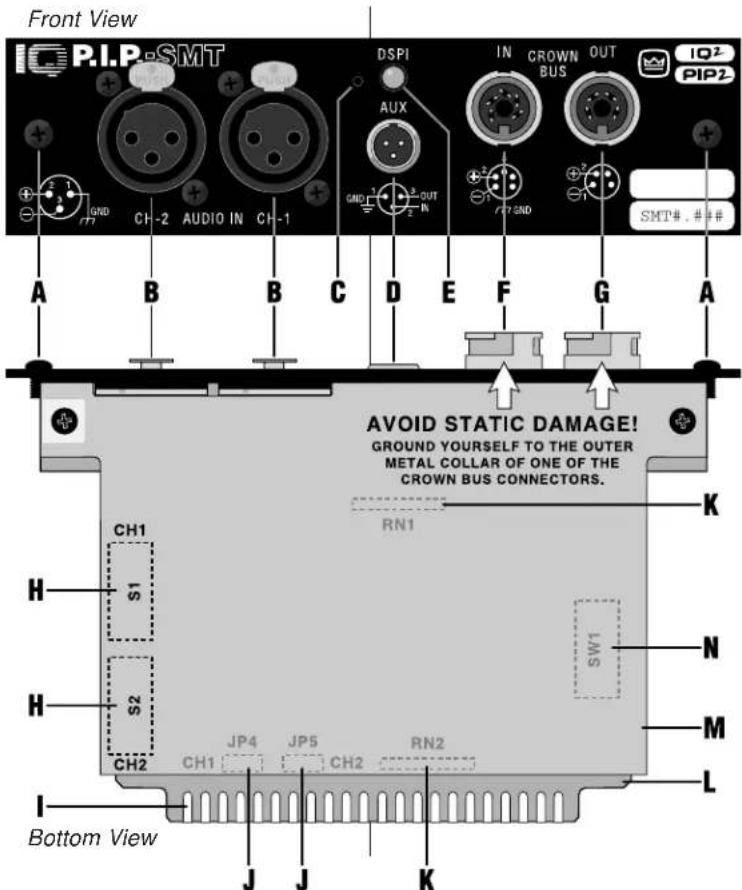
Fig. 2.1 The IQ-P.I.P.-SMT Facilities
2 Facilities
A. Mounting Screws
The IQ-P.I.P.-SMTIs secured to the back panel of the amplifier with two phillips-head screws and star-tooth lock washers. The lock washers are required for proper ground connection.
B. Balanced Audio Inputs
A 3-pin female XLR connector is provided for balanced audio input to each channel of the amplifier. Pin 1 is chassis (gnd); pin 2 is not inverted (+); and pin 3 is inverted (-). Do not use the Ch.2 input if the amplifier is configured in either Bridge or Parallel-Mono mode.
C. Reset Switch
A multifunction reset switch is provided to restore the IQ-P.I.P.-SMTto a prior state. It can be depressed with a straightened paper clip through the small hole in the P.I.P. panel. Press the reset switch for less than 2 seconds and all settings, except the amplifier model scale factors, will be reset with "user default" parameters and the DSPI will flash once. (If no "user default" settings have been stored, the unit will be reset to the "factory default" settings described next.) Press the reset switch for more than 2 seconds and the same settings will be reset with "factory default" parameters and the DSPI will flash twice. After the unit has been reset to the factory default settings, it will behave like a standard P.I.P.-FXuntil it is reprogrammed by an IQ System or it is toggled to the "user default" settings.
D. AUX Connector
A 3-pin male mini XLR connector is provided to control auxiliary equipment. When the AUX feature is turned on, +15 VDC is provided across pin 1 (gnd) and pin 3 (+). A nominal current of 10 mA is available. The AUX connector also includes a high-impedance input that can sense logic signals.
E. DSPI
The DSPI is a Data Signal Presence Indicator which flashes whenever a valid IQ command has been received. The indicator can also be forced to stay on to aid rapid troubleshooting of the Crown Bus wiring.
F. Crown Bus Input Connector
A lockable 5-pin female DIN connector is provided for input connection to the Crown Bus. A mating Switchcraft 502 series connector can be ordered from Crown (part C 7776-5). Pin 1 is negative (-), pin 2 is positive (+), and pin 3 is ground (gnd). Pins 4 and 5 are not used.
G. Crown Bus Output Connector
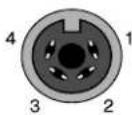
A lockable 4-pin female DIN connector is used for output connection to the Crown Bus. A mating Switchcraft 502 series connector can be ordered from Crown (part C 7777-3). Pin 1 is negative (-) and pin 2 is positive (+). Pins 3 and 4 are not used.
H. Input Switches (S1, S2)
An 8-section DIP switch is used to configure each input. These switches are located on the bottom circuit board. S1 configures the input of Channel 1 and S2 configures the input of Channel 2. The switches activate a microphone preamp and enable phantom power. The preamp can be turned off (0 dB gain) or set to either 20 or 40 dB of gain. See Section 4.1.
I. P.I.P. Edge Connector
The gold-plated edge connector of the top IQ circuit board inserts into the P.I.P. connector inside the back of the amplifier. Use care when installing a P.I.P. module to be certain that the edge connector is properly inserted into the amplifier's P.I.P. connector.
J. Amplifier Output Pad Jumpers (JP4, JP5)
These jumpers enable the circuitry that pads the output signal feeding the IQ-P.I.P.-SMT so it can be properly scaled. They should be set to the "IN" position as marked on the digital
circuit board for MA-600 - 3600VZ and SR I & II. Use the "OUT" position whenever the unit is installed into a PIP2-compatible. (CT "10" Series or MA 5000VZ)
K. PIP2 SIP Sockets (RN1, RN2)
These eight-pin SIP (single in-line package) sockets are provided for full PIP2 compatibility. IQ-P.I.P.-SMT-PIP2 modules (required for PIP2-compatible amplifiers) should come with the SIP networks already installed. The SIP networks are not required and should be absent on standard IQ-P.I.P.-SMTmodules.
L. IQ Circuit Board (Top)
The top circuit board contains the IQ communication circuitry, including the IQ address switch (SW1), amplifier output pad jumpers (JP4, JP5), PIP2 SIP sockets (RN1, RN2) and the P.I.P.edge connector.
M. Audio Circuit Board (Bottom)
The bottom circuit board contains the audio analog circuitry, including the input switches (S1, S2).
N. IQ Address Switch (SW1)
An 8-section DIP (dual in-line package) switch is used to set the IQ address of the unit (see Section 4.1). This switch is located on the top circuit board. Each IQ component on a Crown Bus is given a unique IQ address so it can be independently controlled and monitored. Two or more IQ components of the same type should NEVER have the same address on the same Crown Bus loop.
3 Features
With an IQ-P.I.P.-SMT module a Crown amplifier can be monitored and controlled by an IQ System. And the module has SmartAmp ^™ features which enable the amplifier to function automatically. For example, an IQ-P.I.P.-SMT can automatically turn off the high voltage supplies of the amplifier when no input signal is present. This can lower electrical usage and provide long-term cost savings. And it can automatically limit the audio signal and detect and report various problems.
Most of the features can be either controlled or configured by a host computer attached to the IQ System via an IQ interface. The host computer is usually a PC and must be running some kind of IQ software. Please contact your Crown representative or Crown's Technical Support Group if you are unfamiliar with IQ software.
3.1 Amplifier Information
(PIP2 amplifiers only.) Several items of information about an amplifier can be displayed by the IQ software. These include the manufacturer, model, date code, serial number and revision level. Which items are available depends on both the amplifier and the IQ software used.
3.2 Amp Mode
The stereo/mono mode of the amplifier can be stored into the unit's memory so the IQ System is aware of the amplifier's stereo/mono switch setting. Storing this setting serves as an "electronic reminder" to the system—however, the stereo/mono mode cannot be controlled with this setting. The modes are Stereo (Dual), Bridge-Mono and Parallel-Mono. This software amp mode setting is controlled by the IQ System.
3.3 Power Control
Each channel's high-voltage supply can be independently turned on and off with the Power control. The IQ System is used to set this control.
3.4 Input Signal Level Monitor
The input signal level of each channel can be monitored by IQ software. This monitor feature has a range from +16 dBu to -40 dBu in 12 dB steps.
3.5 Signal Mute
The output signal of each channel can be independently muted by the IQ System. The function typically provides 80 dB or more of attenuation.
3.6 Polarity Inverter
The polarity of the input signal of each channel can be independently inverted by the IQ System.
3.7 Input Signal Attenuator
An attenuator is available at the input of each channel to control the input signal level. These attenuators are controlled and monitored by the IQ System. They may appear to move like "flying faders" on some IQ software screens because they reflect all reductions in gain that are dynamically applied by the input compressor/limiter, smooth/output signal limiter and ODEP conservation functions. Each input attenuator has a range from 0 dB to -80 dB in 12 dB steps. (Zero equals no attenuation.)
3.8 Input Signal Compressor/ Limiter
An input signal compressor/limiter is available for each channel. Each one is controlled by the IQ System and has five parameters:
Input Compressor: Turns this function on/off.
Threshold: Sets the threshold, in dB, above which the compressor acts. The level is measured at the input to the P.I.P. and corresponds to the level shown on an input meter. The compressor is “feed-forward,” meaning that the level detection point is located before the gain control stage. The range is from +16 dBu to -40 dBu.
Attack Time: Sets the attack time of the compressor. The attack time is the time it takes the compressor to attenuate the input signal by 10 dB. The range is from 1 millisecond to 2 seconds.
Release Time: Sets the release time of the compressor. The release time is the time it takes the compressor to increase the input gain by 10 dB. The range is 100 milliseconds to 30 seconds.
Ratio: Sets the compression ratio for the compressor. The range is 1, 2, 4, 8, 16, 32, ∞ to 1. Note: 1:1 is the same as "off."
3.9 Output Signal Level Monitor
The output signal level of each channel of the amplifier can be monitored by the IQ System. This monitor feature has a range from -40 dB to 0 dB where 0 dB is referenced to the rated output voltage of the amplifier model. (This is assumed to be 70-V or the rated 8 ohm output for Com-Tech amplifiers or the rated 8 ohm output voltage for all other amplifiers.)
The output signal of some amplifiers must be padded before the IQ-P.I.P.-SMT can scale them. This is accomplished by setting jumpers JP4 and JP5 on the IQ circuit board to the "IN" position. PIP2-compatible amplifiers such as the MA 5000VZ and ComTech "10" Series do not require these pads. Set jumpers JP4 and JP5 to the "OUT" position for them (see Figure 4.8).
The output signals of all amplifiers must be scaled in order to "calibrate" the 0 dB level. (See Section 4.5.) This is accomplished with either an am-amplifier ID codeifier US-scale factor. The factory default setting for this is an amplifier ID code of "CT-70V" which assumes that the output level is that of a Com-Tech amplifier (any model) with both channels in the 70-V output mode. Note: PIP2-compatible amplifiers are automatically scaled by the IQ-P.I.P.-SMT.
3.10 Smooth/Output Signal Limiter
An output signal limiter is available for each channel. They can be used either as "smooth" output levelers (similar to older IQ P.I.P.s with SmartAmp features) or they can be used as fast output limiters to protect drivers and other system components from large transient signals. The output voltage of the amplifier is limited (within 1 dB) based on real-time sampling of the actual amplifier output. The output limiters are controlled by the IQ System and have five parameters:
Output Limiter: Turns this function on/off.
Threshold: Sets the threshold, in dB, above which the limiter acts. The level is based on the scaled output voltage monitors (see Section 3.9). The range is from 0 dB to -40 dB.
Attack Time: Sets the attack time of the limiter. The attack time is defined as the time it takes the limiter to attenuate the input signal by 10 dB. The range is from 10 milliseconds to 30 seconds.
Release Time: Sets the release time of the limiter. The release time is defined as the time it takes the limiter to increase the input gain by 10 dB. The range is 100 millisecond to 30 seconds.
Ratio: The compression ratio is fixed at :1 .
3.11 IOC Event Monitor
The Input/Output Comparator (IOC ^® ) of each channel of the amplifier can be monitored by the IQ System. The IOC circuitry acts as a sensitive distortion meter to provide you proof of distortion-free performance. If distortion of any kind equals or exceeds 0.05%, the IOC circuit will cause an indicator on the front of the amplifier to flash. By monitoring these events, the IQ System can flash an indicator on the screen of the host computer to alert a user that distortion is occurring.
3.12 Prolonged IOC Warning
A "trigger" can be set that will cause a warning message to appear on the host computer's screen if too many IOC events occur over a specified length of time. Three parameters control this feature:
IOC Error Detect: Turns this function on/off.
IOC Error Time: Sets the time interval over which IOC events will be counted. The range is from 1 to 10 seconds.
IOC Error Count: Sets the number of IOC events that must occur during the preceding time interval before a warning message is displayed. Note: An "IOC event" is one complete on-off-on cycle. The range is from 1 to 100 events per unit time.
3.13 ODEP Level Monitor
The Output Device Emulation Protection (ODEP®) level of each channel of the amplifier can be monitored by the IQ software. This level represents the percent of available thermodynamic energy that is currently being used. When the ODEP level reaches 100%, the amplifier cannot produce any more power and "ODEP limiting" will begin to limit the drive level to the output devices, thereby protecting them from too much stress. (See the amplifier's Reference or Owner's Manual for more information about ODEP.)
3.14 ODEP Conservation
The effects of "ODEP limiting" the drive level of the output devices as described in Section 3.13 above are very audible. To overcome this, an ODEP conservation limiter is available to proportionally limit the input audio signal as the thermodynamic energy reserve of the amplifier is consumed. This helps to prevent the am-
plifier from "ODEP limiting" the drive level of the output devices as described earlier. In the majority of cases, limiting the input signal produces a very smooth sound. And since the input signal is only limited when and to the degree necessary, it is very difficult to detect. There are four parameters which control this feature:
ODEP Conservation: Turns this function on/off.
Trigger Level: Sets the ODEP level, in percent, above which the conservation limiting will begin. The range is from 1 to 100%.
Amount: Sets the amount, in dB, that the input signal level will be attenuated for each percentage point that the ODEP level exceeds the trigger level. The settings for this parameter are: 0.5 to 6.0 dB in 12 dB steps.
Release Time: Sets the release time of the conservation limiter. The release time is based on 10 dB of attenuation. For example, a setting of 10 seconds will result in the IQ-P.I.P.-SM taking 10 seconds to release 10 dB of attenuation. The settings for this parameter are: 0.2, 0.4, 0.6, 0.8, 1.0, 1.5, 2.0, 3.0, 4.0, 6.0, 8.0, 10, 12, 15, 20 and 30 seconds.
3.15 Excessive ODEP Warning
The user can set a "trigger" that will cause a warning message to appear on the host computer's screen if the ODEP level ever rises above a predetermined level. It is generally assumed that a sudden rise in the ODEP level would indicate a sudden decrease in the load impedance— such as a shorted speaker cable or shorted loudspeaker. There are two parameters which control this feature:
ODEP Short Detect: Turns this function on/off.
ODEP: Sets the ODEP level above which a short is presumed to have occurred in the load resulting in a warning message being displayed. The range is from 1 to 100%.
3.16 Fault Warning
Fault conditions can be monitored by the IQ System and a warning message displayed on the host computer's screen if they occur. If desired, the AUX port can also be used to signal the presence of a "fault" condition. An amplifier "fault" condition occurs when a channel fails. The symptoms are a normal input signal, an IOC condition that is "locked" on, a high voltage supply (VCC) that reports a normal condition and no signal at the output of the amplifier. PIP2-compatible amplifiers monitor a "fault" signal from the amplifier while standard P.I.P-compatible amplifiers deduce a "fault" condition from the aforementioned symptoms. There are two parameters which control this feature:
Fault: Turns this function on/off.
Input Drive Level: Sets the threshold below which a fault condition is presumed to exist in a standard P.I.P. amplifier. This parameter is necessary because it may be normal for an IOC error to persist if the audio input signal level is high. Monitoring the input level can help determine whether a fault condition really exists or

crown
IQ P.I.P.-SMT
whether the amplifier output is distorted simply because of an excessive input level. The range is from +16 dBu to -40 dBu.
Report Via Aux: Enables or disables a feature which causes the AUX port output to stay on during normal operation and turn off whenever a fault condition exists (see Sections 3.21 and 4.8).
3.17 Auto Standby
The Auto Standby feature automatically turns off the high-voltage supplies of the amplifier when no audio signal is detected at the input for a predetermined period of time. The channels are controlled independently. Using it, many IQ Systems can pay for themselves in just a few years due to reduced energy costs. There are four parameters which control this feature:
Auto Standby: Turns this function on/off.
Standby Level: Sets the level, in dB, below which an amplifier channel's high voltage supply will be turned off. The range is from +16 dBu to -40 dBu.
Standby Time: Sets the time, in minutes, that the input signal must remain below the Standby Level before the channel's high-voltage supply is turned off. The range is from 0 to 255 minutes. A setting of 0 (zero) yields a turn-off delay of approximately 2 seconds to facilitate setup of the function.
Use Turn-On Delay: Enables or disables the IQ address turn-on delay. This is a delay that prevents all the amplifiers from
turning on at the same instant and tripping power breakers when an "all amps on" command is issued by the IQ System. The turn-on delay is calculated by: 10 msec x IQ address value. It may be desirable to disable this turn-on delay when using the Auto Standby feature so that the first syllable of speech is not missed when a voice page suddenly causes the Auto Standby function to turn a high-voltage supply back on.
3.18 Auto
An Auto function is available to provide consistency with other IQ components in the IQ System. It is controlled by the IQ System and it serves as a toggle to quickly enable or disable many of the functions in a SmartAmp IQ-P.I.P.-SMT The functions that are enabled/disabled by the Auto control are: smooth/output signal limiter, auto standby and all error reporting functions (prolonged IOC warning, excessive ODEP warning and fault warning). Please refer to the documentation for your IQ software for more information about Auto.
3.19 Crown Bus "Drop Out" Relays
"Drop out" relays are provided on the Crown Bus ports to maintain the continuity of the IQ communication loop even if the IQ-P.I.P.-SMT loses power.
3.20 DSPI
A Data Signal Presence Indicator (DSPI) is provided on the front panel. It flashes whenever commands addressed to the IQ-P.I.P.-SMT are re-
ceived. It can be forced to stay on by IQ software to assist with trouble-shooting of an IQ System.
3.21 AUX Output
A 3-pin male mini XLR connector is provided to control auxiliary equipment. When the AUX feature is turned on, +15 VDC is provided across pin 1 (gnd) and pin 3 (+). A nominal current of 10 mA is available. The IQ System is used to control the AUX output.
3.22 Memory Backup
A memory backup feature is provided which can be disabled, if desired. The factory default setting is "enabled." When enabled, it stores all run-time parameters that can be controlled by the IQ software into nonvolatile memory (EEPROM) at approximately one second intervals. When disabled, all run-time parameters are returned to the factory defaults whenever the unit loses power.
CAUTION:CAUTION! to turn on the memory backup feature if the input attenuators will be used to set critical levels. If the memory backup feature is turned off and the IQ-P.I.P.-SMT loses power, the attenuators will be reset to 0 dB, resulting in the loudest possible signal.
3.23 Reset
A recessed reset switch, accessible from outside the IQ-P.I.P.-SMT enables it to be restored to one of two sets of default settings. A straightened paper clip or similar small object is required to press the reset switch.
Press the reset switch for less than 2 seconds and all settings, except the
amplifier ID code or user scale factors, will be reset with "user default" parameters and the DSPI will flash once. This feature is only available if "user default" settings have been previously established. If none have, pressing the reset switch for any length of time will cause the unit to be reset to the "factory default" settings as described below.
Press the reset switch for more than 2 seconds and the same settings will be reset with "factory default" parameters and the DSPI will flash twice. After the unit has been reset to the factory default settings, it will behave like a standard P.I.P.-FX until it is reprogrammed by an IQ System or it is toggled to the "user default" settings.
3.24 User Default Settings
The parameters for all functions, except the amplifier ID code or user scale factors, can be saved as "user default" parameters. Then, pressing the reset switch for less than 2 seconds will restore all settings to the "user default" values. Please consult the documentation of your IQ software for instructions on setting the "user default" values.
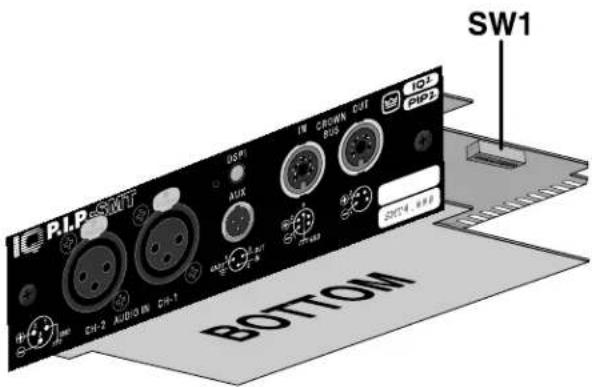
Fig. 4.1 IQ Address Switch (SW1) Location
4 Installation
Before beginning, please carefully note:
CAUTION: STANOTEDICITYTIC MAY DAMAGE THE XODAMAGE/THE MODULE.MODulation when handling the unit. Carefully ground yourself BEFORE touching the IQ-P.I.P.-SMT module. For added safety, touch the outer metal collar of either Crown Bus connector (see Figure 2.1). This should safely discharge any static electricity through the ground plane of the module. Avoid unnecessarily touching the components, edge connector or solder pads on the circuit boards.
NOTE — Amplifier Compatibility
The version of the IQ-P.I.P.-SMTcard you received will vary depending on whether you indicated the card will be installed on a PIP2-compatible amplifier (such as the Crown MA-5000VZ or CT-10 Series amplifiers). The correct card to install in a PIP2-compatible amplifier is the IQ-P.I.P.-
SMT-PIP2. The standard IQ-P.I.P.-SMT should be ordered for non-PIP2-compatible amplifiers.
The following wish to change the amplifier you are using for your IQ-P.I.P.-SMT installation, it is possible to alter the card's configuration by simply removing or installing two SIPS from the card's circuit boards'. For instructions on installing or removing these SIPS, contact Crown Technical Support.
4.1 Prepare the IQ-P.I.P.-SMT
1. Set the IQ address switch
SW1. By giving each IQ component a unique address, it can be individually controlled and monitored. Whenever the IQ System wants to send a command to just one IQ component, it first sends its address and then the command down the Crown Bus.
The 8-segment DIP switch (SW1) shown above is used
^1 IQ-P.I.P.-SMT-PIP2has SIPS installed; IQ-P.I.P.-SMThas SIPS removed.
to set the IQ address of the IQ-P.I.P.-SMT. No two IQ components of the same type which are connected to the same Crown Bus can have the same address. Suppose, for example, the IQ System has two Crown Bus loops and this IQ-P.I.P.-SMT is installed into loop 1 and given address 77. No other IQ-P.I.P.-SMT can have the same address in loop 1. However, an IQ-P.I.P.-SMT in loop 2 can have the same address.
Different IQ components in the same Crown Bus loop can have the same address. For example, both an SMX-6 mixer and an IQ-P.I.P.-SMT can use address 77 in the same loop.
A valid IQ address is any number from 1 to 250. Do not use a number higher than 250 since they are reserved for special use. An address of "0" (zero) should never be used except to put the IQ-P.I.P.-SMT into a stand-alone mode where it is invisible to the IQ System and acts as a "dumb" balanced audio input.
Switch SW1 is located on the right side on the underside of the top circuit board (Figure 4.1). It has eight segments because it actually contains eight tiny switches inside. There is an arrow printed on the switch along its left side that points to the "ON" position and the switches are numbered along the bottom (Figure 4.2).
SW1
bar
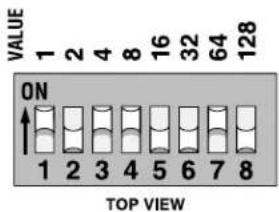
| VALUE | 1 | 2 | 4 | 8 | 16 | 32 | 64 | 128 | |---|---|---|---|---|---|---|---|---| | ON | 1 | 2 | 3 | 4 | 5 | 6 | 7 | 8 | TOP VIEWFig. 4.2 IQ Address Switch (SW1) Values
Each of the eight switches in SW1 has a value which doubles as the switch number increases. For example switch 1 has a value of 1; switch 2 has a value of 2; switch 3 has a value of 4; switch 4 has a value of 8 and so on.
The address is determined by adding the values of all switches which are turned on. In Figure 4.2 switches 1, 3, 4 and 7 are on. Simply add the values to find the address: 1+4+8+64=77 .
A convenient series of IQ address tables are included in Section 7. The tables show the switch settings for all 250 addresses.
- Set the input switches S1 and S2. Each input can be configured for either line-level or microphone-level signals with an 8-segment DIP switch. Phantom power is also available. Switches S1 and S2 (see Figure 4.3) are located on the left side of the lower circuit board. The table in Figure 4.4 shows how to set each switch.
IMPORTANT: Two switch
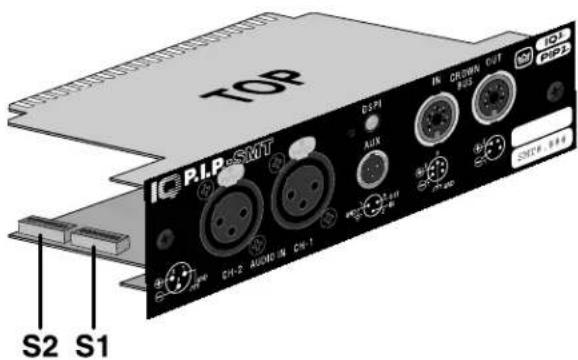
Fig. 4.3 Input Switch (S1, S2) Location
| Function | Input Switch (S1, S2) | |||||||
| 1 | 2 | 3 | 4 | 5 | 6 | 7 | 8 | |
| Phantom Power OFF | OFF | OFF | ||||||
| Phantom Power ON | ON | ON | ||||||
| Set Preamp to 0 dB Gain | ON | OFF | OFF | ON | ||||
| Set Preamp to 20 dB Gain | OFF | ON | ON | OFF | ||||
| Set Preamp to 40 dB Gain | OFF | OFF | OFF | OFF | ||||
Note: DIP switch segments 7 and 8 are not used.
Fig. 4.4 Input Switch (S1, S2) Settings
segments (S1, S2) are required for each setting. Be careful to use both segments or improper operation will result.
Switch S1 configures the input to Channel 1 and switch S2 configures the input to Channel 2.
CAUTION: The IQ-P.I.P.-SMT input preamplifiers should only be used with microphone or low-level signals. Once the P.I.P. is in-
stalled, there will be no outward indication of the input preamplifier gain setting. The protection circuitry of the amplifier will probably be activated if the preamplifier gain is set to 40 dB and a line-level signal is connected to the input. If your amplifier appears to "cut out" when you drive it with a strong input signal, check to see if the input preamplifier gain is set too high.
Recommendations: Attach a small label to the back of the P.I.P. to identify whether it has been set for microphone or line-level input signals. And keep the output levels low if you are uncertain of the preamplifier settings. Remember, Crown is not liable for damage due to overpowering other components.
- Set the jumpers JP4 and JP5. If the IQ-P.I.P.-SMT is being installed into a PIP2-compatible or Macro-Tech 5000VZ amplifier, move both jumper JP4 and JP5 on the IQ circuit board to the "OUT" position (Figures 2.1 and 4.8). Set both JP4 and JP5 to the "IN" position for all other amplifiers.
4.2 Prepare the Amplifier
- Turn down the level controls (full counterclockwise) and turn off the amplifier.
- Disconnect the amplifier's power cord.
- Remove the existing P.I.P or cover panel from the amplifier back panel (two screws). For PIP2 amplifiers, this may involve disconnecting the P.I.P. from a PIP2 input adapter (Figure 4.6). If a PIP2 input adapter is already present, do not remove the ribbon cables from the adapter. Otherwise you will have to reconnect them in Step 10.
- Set the amplifier input sensitivity to 0.775 V. (See the amplifier's Reference Manual.)
4.3 Install the IQ-P.I.P.-SMT into the Amplifier
- Carefully ground yourself to the chassis of the amplifier before installing the IQ-P.I.P.-SMT. It is a good idea to maintain ground contact between yourself and the amplifier while inserting the module into the P.I.P. card rails (standard P.I.P-compatible amplifiers) or the PIP2 connector (PIP2-compatible amplifiers).
9. Install the IQ-P.I.P.-SMT into the amplifier:
Standard P.I.P. Amplifiers: Align the edges of the IQ-P.I.P.-SMT in the P.I.P. card rails and firmly push the unit in until it is seated against the mounting bracket (see Figure 4.5).
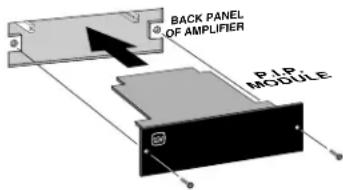
Fig. 4.5 Installation into a Standard P.I.P. Amplifier
PIP2 Amplifiers: Connect the PIP2 input adapter to the two input cables of the amplifier (Figure 4.6). Notice that the PIP2 input adapter should be positioned with the P.I.P. edge connector on top facing away from the amplifier. The 20 pin cable (A) is connected first then the 18 pin cable (B) is connected. Both ribbon
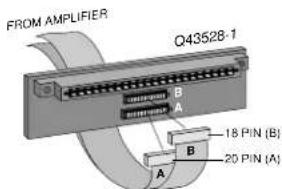
Fig. 4.6 PIP2 Input Adapter Connection
cables should extend below the PIP2 input adapter.
Next, insert the edge connector of the IQ-P.I.P.-SMT into the PIP2 input adapter (see Figure 4.7) and insert the assembly into the P.I.P. opening in the back of the amplifier.
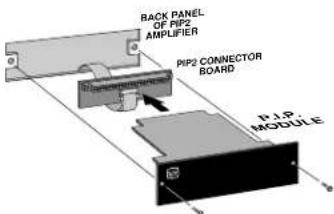
Fig. 4.7 Installation into a PIP2 Amplifier
- Tighten the two P.I.P. mounting screws until the P.I.P. is secured to the amplifier back panel.
4.4 Install the Wiring
-
Connect the IQ-P.I.P.-SMT to the IQ System via the Crown Bus. See Section 4.6 for full instructions.
-
Connect the audio signal wiring to the IQ-P.I.P.-SMT This includes the XLR input
wiring and, if desired, the phone jack daisy chain wiring. See Section 4.7 for full instructions.
- Reconnect amplifier to the AC receptacle.
4.5 Adjust the Levels & Scale Factors
-
Turn the level controls of the amplifier to their full or maximum setting. This is required by the IQ-P.I.P.-SMT. If needed, use the software-controlled input attenuators on the IQ-P.I.P.-SMT to reduce the audio levels.
-
Configure the amplifier scale factors. (Standard P.I.P-compatible amplifiers only—the scale factors for PIP2-compatible amplifiers are set automatically.) It is necessary to configure software scale factors in the microprocessor of the IQ-P.I.P.-SMTin order for it to properly interpret the output signal level of the amplifier model in which it is installed. This is easily done by connecting a host computer to the IQ-P.I.P.-SMTvia an IQ interface and the Crown Bus and running the appropriate software (see the IQ software User's Manual for details). The software will prompt you for the amplifier model and send the appropriate scale factors to the P.I.P. The scale factor values are listed in Figure 4.8 along with the settings of jumpers JP4 and JP5.
Note: Since it is possible to configure one channel of a
| Amplifier Model | Scale Values (Decimal) | Output Signal Pads (JP4, JP5) | |
| Channel 1 | Channel 2 | ||
| Com-Tech 200 (8 ohm) | 57 | 57 | IN |
| Com-Tech 400 (8 ohm) | 45 | 45 | IN |
| Com-Tech 800 (8 ohm) | 40 | 40 | IN |
| Com-Tech 1600 (8 ohm) | 30 | 30 | IN |
| All Com-Tech (70-volt) | 27 | 27 | IN |
| Macro-Tech 600 | 44 | 44 | IN |
| Macro-Tech 1200 | 39 | 39 | IN |
| Macro-Tech 2400 | 30 | 24 | IN |
| Macro-Tech 24x6 | 30 | 44 | IN |
| Macro-Tech 3600VZ | 14 | 14 | IN |
| Macro-Tech 36x12 | 14 | 39 | IN |
| Macro-Tech 5000VZ | 30 | 30 | OUT |
| Macro-Tech 10000 | 24 | 24 | IN |
| Reference I | 17 | 17 | IN |
| Reference II | 30 | 30 | IN |
| PIP2-Compatible (Auto) | 51 | 51 | OUT |
Fig. 4.8 Amplifier Scale Factor Values and Output Signal Pad Settings
Com-Tech amplifier in the 8-ohm output mode and the other channel in the 70-volt output mode, it may be necessary to configure the scale factors differently for each channel.
4.6 A Closer Look at Crown Bus Wiring
The IQ-P.I.P.-SMT must be connected to a Crown Bus loop having an IQ2-compatible IQ interface in order for the IQ System to control or monitor it. The Crown Bus is a serial communication loop designed to transmit IQ commands and data. As implemented in the IQ-P.I.P.-SMT, it is a 20 milliamp current loop operating at a BAUD rate of 38.4 K. The loop must be unbroken.
If the system includes an IQ-INT II interface, it can accept eight different Crown Bus loops or zones. Dividing the sound system into different zones, each with its own Crown Bus loop, can have several advantages. The following list contrasts those advantages with those of a single loop.
Multiloop Advantages
- A break in communication in one loop does not affect other loops.
• Over 250 IQ components of the same type can be used in a system. - The same IQ address can be used more than once (once per loop per model).
Single Loop Advantages (with IQ-INT II interfaces)
- The IQ System can send and retrieve data faster in a single loop.
- "Real time" level display of a greater number of units is possible.
The IQ-P.I.P.-SMT can be connected
to the Crown Bus with inexpensive twisted-pair wiring (shielded or unshielded). If fiber optic wiring is required contact the Crown Technical Support Group (see page 4).
Here are some guidelines for twisted-pair wiring:
- Use shielded twisted-pair wire at least 26 AWG in size when interference is a problem. The wire should be of good quality and should have low capacitance—30 picofarads/foot or less is good. (West Penn 452 or an equivalent wire works well.) The shield serves two purposes: First, it helps prevent the IQ data signal from transmitting to nearby audio wiring. Second, it helps prevent outside RF from interfering with the data signal. However, in most cases interference is not a problem and, since unshielded wire has lower capacitance, it is a better choice.
- Minimize the total capacitance of each Crown Bus loop. The total capacitance should be less than 30 nanofarads. Allow for approximately 60 picofarads for each IQ component in a loop. This accounts for a slight delay which occurs as data signals pass through a component.
- Add an IQ Repeater for very long loops—greater than 1,000 feet (305 m)—or when required by high-capacitance wire. Although we recommend a repeater for loops longer than 1,000 feet, it is of-
ten possible to go 2,000 feet (610 m) or more. The most significant characteristic of the wire is its capacitance. Lower capacitance allows longer loops. Unshielded wire usually has less capacitance.
- Never use the ground wire in a mic snake line. It may sometimes be convenient to run Crown Bus data signals to and from stage monitor amplifiers along unused wire pairs in a mic snake. Do not use the ground wire which is normally connected to pin 1 on an XLR connector or data noise will be added to the audio lines. Use only the signal lines which normally connect to pins 2 and 3 of the XLRs. Note: Because typical mic cables have high capacitance, the maximum possible Crown Bus loop distance will be less.
Outside RF interference is seldom a problem for a Crown Bus loop—especially if shielded twisted-pair wire is used. However, there are extreme situations when fiber optic wiring is recommended. For example, locating a Crown Bus loop next to an AM radio transmission line may require fiber optic cabling. An extremely long Crown Bus loop distance may also require fiber optic cabling.
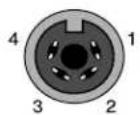
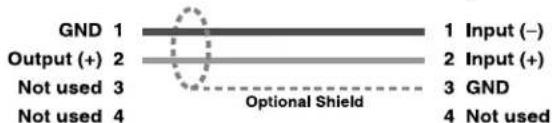
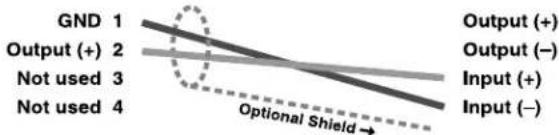
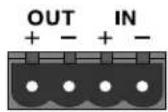
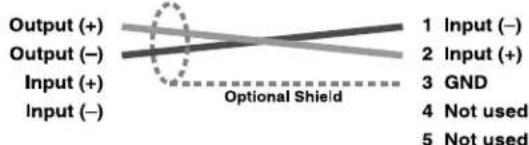
There are two different types of connectors used for Crown Bus wiring: DIN connectors and screw terminal plugs. The IQ-P.I.P.-SMT uses a 5-pin DIN connector for input and a 4-pin DIN connector for output. Figure 4.11 shows how they should be wired.
IQ-P.I.P.-SMT Output
IQ Component Input
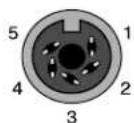
Figure 4.9 IQ-P.I.P.-SMT Output Connection to Another IQ Component with DIN Connectors
IQ-P.I.P.-SMT Output
line
| GND | Output (+) | Output (-) | Input (+) | Input (-) | | --- | --- | --- | --- | --- | | 1 | 2 | 2 | 3 | 3 | | 2 | 2 | 2 | 3 | 3 | | 3 | 2 | 2 | 3 | 3 | | 4 | 2 | 2 | 3 | 3 |IQ Mixer
Output (+)
Output (−)
Input (+)
Input (−)
Figure 4.10 IQ-P.I.P.-SMT Output Connection to an IQ Component with a Screw Terminal Plug Connector
IQ Mixer
IQ-P.I.P.-SMT Input
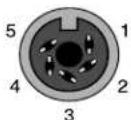
Figure 4.11 An IQ Component with Screw Terminal Plug Connected to the IQ-P.I.P.-SMT Input

crown
IQ P.I.P.-SMT
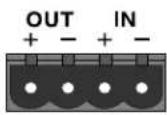
The next two figures show how to connect the IQ-P.I.P.-SMT to other IQ components with different connectors. Figure 4.10 shows how the Crown Bus output of the IQ-P.I.P.-SMT should be connected to an IQ component with a screw terminal plug. Figure 4.11 shows how the Crown Bus input of the IQ-P.I.P.-SMT should be connected to an IQ component with a screw terminal plug.
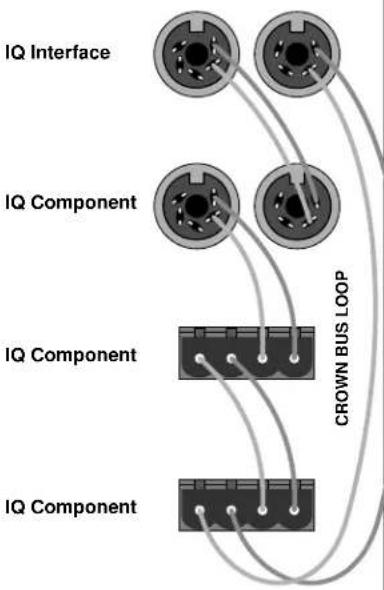
The IQ components in a Crown Bus loop are wired sequentially. The loop begins and ends with the IQ interface. The output of one IQ component "loops" to the input of the next and so on as shown in Figure 4.12.
flowchart
graph TD
    A["IQ Interface"] --> B["CROWN BUS LOOP"]
    C["IQ Component"] --> B
    D["IQ Component"] --> B
    E["IQ Component"] --> B
Fig. 4.12 Crown Bus Wiring "Loops" from the Output to the Input of Each IQ Component
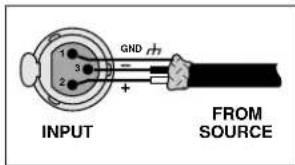
BALANCED
UNBALANCED
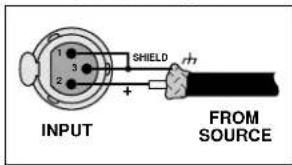
Figure 4.13 Audio Input Wiring
4.7 A Closer Look at Audio Signal Wiring
Balanced 3-pin female XLR connectors are provided for audio input connection. The audio cables should be wired in one of the following manners:
We strongly recommend that balanced wiring be used if possible. Some important guidelines follow:
• Always use shielded wire. The higher the density of the shield (the outer conductor), the better. Spiral wrapped shield is not recommended.
- When using unbalanced lines, keep the cables as short as possible. Avoid lengths greater than 10 feet (3 meters).
- Do not run audio input cables together with high-level wiring such as loudspeaker wires or AC cords. (This lessens the chance of hum or noise being induced into the input cables.)
- Do not connect audio and data grounds together. For example, do not connect the audio ground to the Crown Bus ground.
- Turn the entire sound system off before changing any connections. Turn the level controls down before powering the system back up. Crown is not liable for damage incurred when any transducer or component is overdriven.
IMPORTMORANT not feed a signal into the phone jacks on the back panel of the amplifier (if provided). The phone jacks are wired in parallel with the output of the P.I.P. connector inside the amplifier. Any audio signal fed into the phone jacks could feed back into the output of the IQ-P.I.P.-SMT and generate a distorted input signal. The phone jacks can be used to "daisy chain" the post-processed signal from the IQ-P.I.P.-SMT to the inputs of other amplifiers.
DO NOT USE THE CHANNEL 2 INPUT if the amplifier is used in either Bridge-Mono or Parallel-Mono mode.
For additional information on audio input connection please refer to the amplifier's Reference or Owner's Manual. It contains helpful information on preventing unwanted subsonic frequencies, radio frequency interference, ground loops, and feedback oscillation.
4.8 Using the AUX Connector
The IQ System offers tremendous flexibility and the auxiliary feature connector provides a means of tapping into it. It can be used to turn something on/off, send a signal to another component and receive a signal from another component. The AUX connector is a 3-pin male mini XLR connector. Pins 1 and 3 are used to send a signal and pins 1 and 2 are used to receive a signal.
4.8.1 AUX Output
When the auxiliary feature is turned on by the IQ System software +15 VDC is supplied across pins 1 (ground) and 3 (+). A total of 10 milliamps of current is available. A 1.5 k ohm resistor protects against shorts.
There are many possible uses for the AUX output. For example, it can be used to turn on auxiliary cooling fans. To do this the AUX connector would be used to close a relay. The relay would then turn the fans on or off. This is shown in Figure 4.15.
Note: A Crown part number is provided in the above illustration for a suitable solid-state relay (C 7308-7). Contact your local Crown representative or the Crown factory Parts Department (219-294-8200) to order.
By monitoring the operating condition of amplifiers with the IQ System software, the need for additional cooling will be apparent. The same software could then be used to turn on the appropriate AUX connector. (For more information about turning the auxiliary feature on/off, consult the IQ software Online Help System.)
In addition to the preceding examples, the AUX ports of more than one IQ component can be used to send binary codes to auxiliary equipment. For example, eight AUX ports can be used to send 8-bit binary codes to external equipment.
4.8.2 AUX Input
Depending on the IQ software being used, the AUX connector can be
used to sense the presence of an input signal across pins 1 (ground) and 2 (+). A 2.5 to 15 VDC signal at the input will be interpreted as a logic "high" and will be communicated to the Crown Bus where a host computer or drone can act upon it. A signal less than 2.5 VDC is interpreted as a logic "low." Note: A negative signal can also be used as a logic low because the signal is internally clamped to protect the internal circuitry.
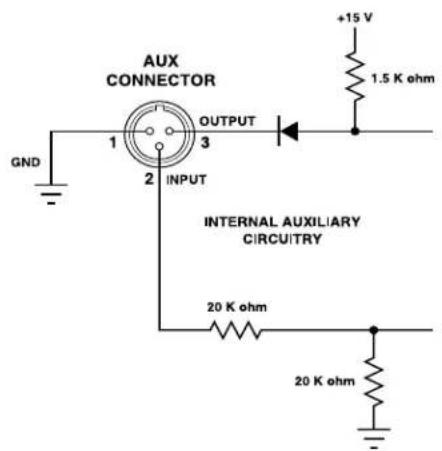
Fig. 4.14 The Internal AUX Circuit
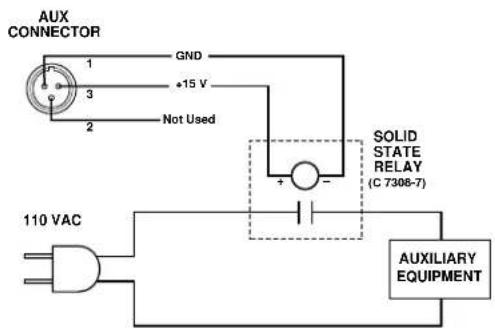
Fig. 4.15 A Sample AUX Output Circuit
5 Technical Information
The purpose of the IQ-P.I.P.-SMT is to enable an IQ System to control and monitor a P.I.P-compatible amplifier. The exact features of your unit are determined by the firmware in its microprocessor. Here is a typical list of features:
□ Control the audio signal polarity.
□ Control the high-voltage power supplies.
□ Control the DSPI LED.
□ Control and monitor the AUX port.
In addition, all units can monitor these parameters:
□ Monitor the input level to the IQ-P.I.P.-SMT.
□ Monitor the output level from the amplifier.
□ Monitor the ODEP level.
□ Monitor the IOC.
5.1 Audio Signals
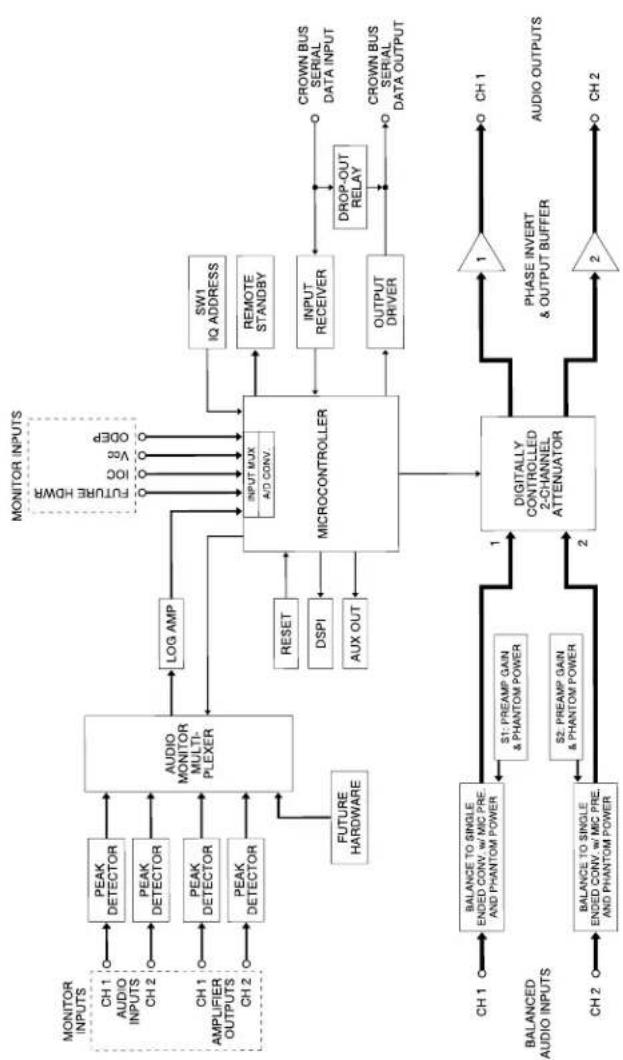
Balanced and unbalanced audio signals enter the module at the XLR connectors. From these connectors, the signals are RFI filtered and fed into a balanced to single-ended conversion stage. Additional gain and/or phantom power for a microphone are also provided in this stage. From this point, the audio signal is sent to a monitor input (discussed below) and also to a digitally controlled attenuator. Following the attenuator, the signals pass through a final output buffer stage, which also can invert the polarity of the signal when required. The audio signal is then fed through the P.I.P. edge card connector and into the amplifier.
5.2 Amplifier Monitoring:
"Monitor Inputs"
The IQ-P.I.P.-SMT can monitor the status of the amplifier using a number of "monitor inputs." There are two types of signals—audio and status.
The audio signals that are monitored are the input to the P.I.P. and the output of the amplifier. These signals enter the P.I.P. and are fed into a precision peak detector which insures that instantaneous signal peaks are not "missed" by the P.I.P. The detector outputs are then fed through a multiplexer into a logarithmic conversion circuit for dynamic range scaling. The output of this circuit is then fed into the A/D converter on the microprocessor, where the signal is converted and sent to the host computer via the Crown Bus.
The status signals that are monitored are ODEP level, IOC status and VCC status. These signals enter the P.I.P, pass through a buffer stage, and are fed into the A/D converter on the microprocessor. The signals are then converted and sent to the host computer via the Crown Bus.
5.3 Amplifier Control
The IQ-P.I.P.-SMT can control the following functions: audio level, audio polarity, high-voltage power supplies, DSPI and the AUX port. These functions are controlled using ports on the microprocessor and some external support circuitry. The audio level is controlled by the microprocessor through a digitally controlled analog attenuator. The DSPI LED flashes whenever a valid IQ command has been received and can be forced to stay on to facilitate diagnosis of Crown Bus wiring problems.
5.4 IQ System Communications
The IQ-P.I.P.-SMT communicates with the host computer via the Crown Bus. Connections to the Crown Bus are made via the 4 and 5-pin locking DIN connectors on the rear panel. IQ commands entering the P.I.P. are fed into an input receiver circuit that converts the 20mA current loop signal into a standard logic signal that the microprocessor can understand. This signal is also passed directly to the Crown Bus for output where it is passed on to the remainder of the loop. Data sent in response to IQ commands is also sent through the Crown Bus output where it passes through the remainder of the loop and back to the host computer. A "drop out" relay is also present which makes a physical contact between the Crown Bus input and output connectors in the event of a power failure. This means that as long as the Crown Bus cables are connected to the P.I.P., the Crown Bus will remain unbroken—even if power to the P.I.P. is lost.
5.5 Microprocessor and Reset Switch
The "brains" of the IQ-P.I.P.-SMT are contained in the microprocessor. It interprets commands
received from the Crown Bus and responds accordingly. The IQ-P.I.P.-SMT is designed to provide an "automatic reset" in the event of a power failure, but the rear reset switch has also been added. Pressing this switch restores all P.I.P. settings to the "user defaults" if it is pressed for less than 2 seconds or to the factory defaults if it is pressed for more than 2 seconds. The only exception is the initialization data which can only be changed with IQ System software on the host computer.
flowchart
graph TD
    A["MONITOR INPUTS"] --> B["PEAK DETECTOR"]
    A --> C["PEAK DETECTOR"]
    A --> D["PEAK DETECTOR"]
    A --> E["PEAK DETECTOR"]
    B --> F["AUDIO MONITOR MULTI-PLEXER"]
    C --> F
    D --> F
    E --> F
    F --> G["LOG AMP"]
    G --> H["MICROCONTROLLER"]
    H --> I["INPUT AUX A/D CONV."]
    I --> J["SW1 IQ ADDRESS"]
    I --> K["REMOTE STANDBY"]
    I --> L["INPUT RECEIVER"]
    I --> M["OUTPUT DRIVER"]
    L --> N["CROWN BUS SERIAL DATA INPUT"]
    M --> O["CROWN BUS SERIAL DATA OUTPUT"]
    P["FUTURE HARDWARE"] --> F
    Q["RESET"] --> H
    R["DSPI"] --> H
    S["AUX OUT"] --> H
    T["DIPOLATE CONTROLLED 2-CHANNEL ATTENUATOR"] --> H
    U["S1: PREAMP GAIN & PHANTOM POWER"] --> H
    V["S2: PREAMP GAIN & PHANTOM POWER"] --> H
    W["PHASE INVERT & OUTPUT BUFFER"] --> H
    X["AUDIO OUTPUTS"] --> Y["CH 1"]
    Z["BALANCED AUDIO INPUTS"] --> AA["BALANCE TO SINGLE ENDED CONV w/ MIC PRE AND PHANTOM POWER"]
    AA --> AB["S1: PREAMP GAIN & PHANTOM POWER"]
    AC["BALANCED AUDIO INPUTS"] --> AD["BALANCE TO SINGLE ENDED CONV w/ MIC PRE AND PHANTOM POWER"]
    AE["BALANCED AUDIO INPUTS"] --> AF["S1: PREAMP GAIN & PHANTOM POWER"]
    AG["BALANCED AUDIO INPUTS"] --> AH["S2: PREAMP GAIN & PHANTOM POWER"]
    AI["CROWN BUS SERIAL DATA INPUT"] --> AJ["CROWN BUS SERIAL DATA OUTPUT"]
    AK["CROWN BUS SERIAL DATA OUTPUT"] --> AL["CROWN BUS SERIAL DATA INPUT"]
Fig. 5.1 IQ-P.I.P.-SMT Circuit Block Diagram
6 Specifications
General
Internal Controls: An 8-segment DIP switch is used to set the IQ address (decimal range: 1–250). Note: If address "0" is selected, the IQ-P.I.P.-SMT will operate in stand-alone mode. Two additional 8-segment DIP switches (one for each channel) set the preamp gain of each input and turn phantom power on and off. A Reset switch, accessible with a straightened paper clip through the P.I.P. panel, resets all settings (except the amplifier initialization data) to the "user defaults" if it is pressed for less than 2 seconds or the factory defaults if it is pressed for more than 2 seconds.
Connectors: Crown Bus Input: Locking 5-pin female DIN connector. Crown Bus Output: Locking 4-pin female DIN connector. Audio Input: Balanced 3-pin female XLR connector for each channel. AUX: A 3-pin male mini connector.
Indicators: A yellow DSPI (Data Signal Presence Indicator) flashes when a valid IQ command is received from the IQ System via the Crown Bus. Depending upon the firmware version in your unit, the DSPI can be forced on to facilitate rapid troubleshooting of Crown Bus wiring.
Auxiliary Feature: +15 VDC is supplied across pins 1 (ground) and 3 (+) of the AUX connector when turned on by the IQ System software.
Power Requirements: When installed into a Crown P.I.P-compatible amplifier, the unit receives ±24 VDC.
Crown Bus Data Communication
Protection: If communication is lost, the unit will continue to function with the last commands received.
Data Rate: 38.4 K BAUD.
Data Format: Serial, binary, asynchronous; 1 start bit; 1 stop bit; 8 data bits; no parity.
Crown Bus Interface Type: Optically isolated 20 milliamp serial loop.
Operation: Half duplex.
Intelligence: 8-bit microprocessor with 12 K byte control program.
Transmission Distance: Variable from 200 to 3000 feet (61 to 914 m), depending upon wire capacitance. Typically 1000 feet (305 M) using shielded twisted-pair wire, #26 AWG or larger. Can be extended with an IQ Repeater.
Audio
Please note: The audio specifications are referenced to 0.775 V (0 dBu). Measurements were made at the output of the IQ-P.I.P.-SMTmodule, itself.
Input Impedance: Nominally 24 k ohms balanced and 12 k ohms unbalanced.
Phantom Power: Nominally +15 VDC, 1.5 mA.
Microphone Preamp: Adds +20 or +40 dB of gain.
Maximum Input Level: +12 dBu.
Signal-to-Noise Ratio: >90 dB from 20 Hz to 20 kHz.
Frequency Response: ±0.1 dB from 20 Hz to 20 kHz.
Crosstalk Ratio: >75 dB at 1 kHz. >65 dB at 20 kHz.
Common Mode Rejection (CMR): >70 dB at 60 Hz with +10 dBu input.
Total Harmonic Distortion (THD): <0.05% from 20 Hz to 20 kHz.
IQ System Data Acquisition Input/Output Monitor Accuracy: Typically ±1 dB. ±2 dB maximum.
7 IQ Address Tables
This section contains lookup tables for every valid IQ address. The valid addresses are 1 to 250. Remember that address "0" (zero) will put the IQ-
P.I.P.-SMTinto a stand-alone mode where it is invisible to the IQ System and acts like a "dumb" balanced audio input. Do not note an addressean addr number higher than 250!nAohber higher than 250! dresses above 250 are reserved for
Fig. 7.1 IQ Address Switch (SW1) Settings from 0 to 83
special system use.
Remember: Remismod components of the same type which are connected to the same Crown Bus loop can have the same address.
To use the IQ address tables, simply find the address you want and set the IQ address switch of the IQ-P.I.P.-SMT as shown. See Section 4.1 also.
Fig. 7.2 IQ Address Switch (SW1) Settings from 84 to 167
Fig. 7.3 IQ Address Switch (SW1) Settings from 168 to 250
8 Service
This unit has very sophisticated circuitry which should only be serviced by a fully trained technician.
8.1 Worldwide Service
Service may be obtained from an authorized service center. (Contact your local Crown/Amcron representative or our office for a list of authorized service centers.) To obtain service, simply present the bill of sale as proof of purchase along with the defective unit to an authorized service center. They will handle the necessary paperwork and repair.
Remember to transport your unit in the original factory pack.
8.2 North American Service
Service may be obtained in one of two ways: from an authorized service center or from the factory. You may choose either. It is important that you have your copy of the bill of sale as your proof of purchase.
8.2.1 Service at a North American Service Center
This method usually saves the most time and effort. Simply present your bill of sale along with the defective unit to an authorized service center to obtain service. They will handle the necessary paperwork and repair. Remember to transport the unit in the original factory pack. A list of authorized service centers in your area can be obtained from our Technical Support Group.
8.2.2 Factory Service
To obtain factory service, fill out the service Information page to page lows and send it along with proof of purchase and the defective unit to the Crown factory. For warranty service, we will pay for ground shipping both ways in the United States after receiving copies of the shipping receipts. Shipments should be sent "UPS ground." (If the unit is under warranty, you may send it C.O.D. for the cost of freight via UPS ground.) The factory will return it via UPS ground. Please contact us if other arrangements are required.
Always use the Always use the original factory original factor pack to transport a unit in a unit.
Factory Service Shipping Instructions:
- When sending a Crown product to the factory for service, be sure to fill out the service information form that follows and enclose it inside your unit's shipping pack. Do not send the service information form separately.
- To ensure the safe transportation of your unit to the factory, ship it in an original factory packing container. If you don't have one, call or write Crown's Parts Department. With the exception of polyurethane or wooden crates, any other packing material will not be sufficient to withstand the stress of shipping. Do notDo not use loose, small size packing ma-use loose, small size packing materials.terials.
- Do not ship the unit in any kind of cabinet (wood or metal). Ignoring this warning may result in extensive damage to the unit and the cabinet.

crown
IQ P.I.P.-SMT
Accessories are not needed—do not send the Reference or Owner's Manual, cables and other hardware.
If you have any questions, please call or write the Crown Technical Support Group.
Crown Audio Division
Technical Support / Factory Service Plant 2 SW, 1718 W. Mishawaka Rd., Elkhart, Indiana 46517 U.S.A.
Telephone: 219-294-8200 800-342-6939 (North America, Puerto Rico, and Virgin Islands only)
Facsimile: 219-294-8301
Fax Back: 219-293-9200 800-294-4094 (North America only)
Internet: http://www.crownaudio.com
Crown Factory Service Information
Shipping Address: Crown International, Inc., Factory Service,
Plant 2 SW, 1718 W. Mishawaka Rd., Elkhart, IN U.S.A. 46517
Phone: 1-800-342-6939 or 1-219-294-8200 Fax: 1-219-294-8124
Owner's Name:
Shipping Address:
Phone Number: ____
Fax Number:
Model:
Serial Number:
Purchase Date:
NATURE OF PROBLEM
(Be sure to describe the conditions that existed when the
problem occurred and what attempts were made to correct it.)
Other equipment in your system:
If warranty has expired, payment will be:
□ Cash/Check □ VISA □ MasterCard □ C.O.D.
Card Number: ____
Exp. Date: ____ Signature:
ENCLOSE THIS PORTION WITH THE UNIT.
DO NOT MAIL SEPARATELY.