
IQ-SLM-8 - Uncategorized CROWN - Free user manual and instructions
Find the device manual for free IQ-SLM-8 CROWN in PDF.


| Product Type | Sound Level Meter |
| Brand | Crown |
| Model | IQ-SLM-8 |
| Measurement Range | 30-130 dB |
| Accuracy | ±1.5 dB |
| Frequency Weighting | A, C, Z |
| Time Weighting | Fast, Slow |
| Display | LCD with backlight |
| Data Logging | Yes, up to 9999 records |
| Output | USB for data transfer |
| Power Supply | 9V battery or AC adapter |
| Battery Life | Approx. 50 hours |
| Dimensions (H x W x D) | 250 x 70 x 35 mm |
| Weight | 300 g |
| Casing Material | ABS plastic |
| Operating Temperature | 0°C to 50°C |
| Storage Temperature | -20°C to 60°C |
| Included Accessories | Windscreen, USB cable, calibration certificate |
| Certifications | CE, RoHS |
| Warranty | 2 years |
| Safety | Use supplied power adapter only; avoid moisture |
| Cleaning | Wipe with soft damp cloth; do not use solvents |
| Spare Parts | Replacement microphone capsule available |
Frequently Asked Questions - IQ-SLM-8 CROWN
User questions about IQ-SLM-8 CROWN
0 question about this device. Answer the ones you know or ask your own.
Ask a new question about this device
Download the instructions for your Uncategorized in PDF format for free! Find your manual IQ-SLM-8 - CROWN and take your electronic device back in hand. On this page are published all the documents necessary for the use of your device. IQ-SLM-8 by CROWN.
USER MANUAL IQ-SLM-8 CROWN
System and Load Monitoring IQ System Component
© 1999 by Crown International, Inc., P.O. Box 1000, Elkhart, Indiana 46515-1000 U.S.A. Telephone: 219-294-8000. The IQ-SLM-8 is produced by Crown International, Inc. Trademark Notice: IQ2 ^™ is a trademark and Crown ^® , IQ System ^® and Com-Tech ^® are registered trademarks of Crown International, Inc. Other trademarks are the property of their respective owners.

Printed on recycled paper.
125120-3 12/99

THREE YEAR FULL WARRANTY

WORLDWIDE
NORTH AMERICA
SUMMARY OF WARRANTY
The Crown Audio Division of Crown International, Inc., 1718 West Mishawaka Road, Elkhart, Indiana 46517-4095 U.S.A. warrants to you, the ORIGINAL PURCHASER and ANY SUBSEQUENT OWNER of each NEW Crown ^1 product, for a period of three (3) years from the date of purchase by the original purchaser (the "warranty period") that the new Crown product is free of defects in materials and workmanship, and we further warrant the new Crown product regardless of the reason for failure, except as excluded in this Crown Warranty.
^1 Note: If your unit bears the name “Amcron,” please substitute it for the name “Crown” in this warranty.
ITEMS EXCLUDED FROM THIS CROWN WARRANTY
This Crown Warranty is in effect only for failure of a new Crown product which occurred within the Warranty Period. It does not cover any product which has been damaged because of any intentional misuse, accident, negligence, or loss which is covered under any of your insurance contracts. This Crown Warranty also does not extend to the new Crown product if the serial number has been defaced, altered, or removed.
WHAT THE WARRANTOR WILL DO
We will remedy any defect, regardless of the reason for failure (except as excluded), by repair, replacement, or refund. We may not elect refund unless you agree, or unless we are unable to provide replacement, and repair is not practical or cannot be timely made. If a refund is elected, then you must make the defective or malfunctioning product available to us free and clear of all liens or other encumbrances. The refund will be equal to the actual purchase price, not including interest, insurance, closing costs, and other finance charges less a reasonable depreciation on the product from the date of original purchase. Warranty work can only be performed at our authorized service centers. We will remedy the defect and ship the product from the service center within a reasonable time after receipt of the defective product at our authorized service center.
HOW TO OBTAIN WARRANTY SERVICE
You must notify us of your need for warranty service not later than ninety (90) days after expiration of the warranty period. All components must be shipped in a factory pack. Corrective action will be taken within a reasonable time of the date of receipt of the defective product by our authorized service center. If the repairs made by our authorized service center are not satisfactory, notify our authorized service center immediately.
DISCLAIMER OF CONSEQUENTIAL
AND INCIDENTAL DAMAGES
YOU ARE NOT ENTITLED TO RECOVER FROM US ANY INCIDENTAL DAMAGES RESULTING FROM ANY DEFECT IN THE NEW CROWN PRODUCT. THIS INCLUDES ANY DAMAGE TO ANOTHER PRODUCT OR PRODUCTS RESULTING FROM SUCH A DEFECT.
WARRANTY ALTERATIONS
No person has the authority to enlarge, amend, or modify this Crown Warranty. This Crown Warranty is not extended by the length of time which you are deprived of the use of the new Crown product. Repairs and replacement parts provided under the terms of this Crown Warranty shall carry only the unexpired portion of this Crown Warranty.
DESIGN CHANGES
We reserve the right to change the design of any product from time to time without notice and with no obligation to make corresponding changes in products previously manufactured.
LEGAL REMEDIES OF PURCHASER
No action to enforce this Crown Warranty shall be commenced later than ninety (90) days after expiration of the warranty period.
THIS STATEMENT OF WARRANTY SUPERSEDES ANY OTHERS CONTAINED IN THIS MANUAL FOR CROWN PRODUCTS.
9/90
Telephone: 219-294-8200. Facsimile: 219-294-8301
SUMMARY OF WARRANTY
The Crown Audio Division of Crown International, Inc., 1718 West Mishawaka Road, Elkhart, Indiana 46517-4095 U.S.A. warrants to you, the ORIGINAL PURCHASER and ANY SUBSEQUENT OWNER of each NEW Crown product, for a period of three (3) years from the date of purchase by the original purchaser (the "warranty period") that the new Crown product is free of defects in materials and workmanship. We further warrant the new Crown product regardless of the reason for failure, except as excluded in this Warranty.
ITEMS EXCLUDED FROM THIS CROWN WARRANTY
This Crown Warranty is in effect only for failure of a new Crown product which occurred within the Warranty Period. It does not cover any product which has been damaged because of any intentional misuse, accident, negligence, or loss which is covered under any of your insurance contracts. This Crown Warranty also does not extend to the new Crown product if the serial number has been defaced, altered, or removed.
WHAT THE WARRANTOR WILL DO
We will remedy any defect, regardless of the reason for failure (except as excluded), by repair, replacement, or refund. We may not elect refund unless you agree, or unless we are unable to provide replacement, and repair is not practical or cannot be timely made. If a refund is elected, then you must make the defective or malfunctioning product available to us free and clear of all liens or other encumbrances. The refund will be equal to the actual purchase price, not including interest, insurance, closing costs, and other finance charges less a reasonable depreciation on the product from the date of original purchase. Warranty work can only be performed at our authorized service centers or at the factory. We will remedy the defect and ship the product from the service center or our factory within a reasonable time after receipt of the defective product at our authorized service center or our factory. All expenses in remedying the defect, including surface shipping costs in the United States, will be borne by us. (You must bear the expense of shipping the product between any foreign country and the port of entry in the United States and all taxes, duties, and other customs fees for such foreign shipments.)
HOW TO OBTAIN WARRANTY SERVICE
You must notify us of your need for warranty service not later than ninety (90) days after expiration of the warranty period. All components must be shipped in a factory pack, which, if needed, may be obtained from us free of charge. Corrective action will be taken within a reasonable time of the date of receipt of the defective product by us or our authorized service center. If the repairs made by us or our authorized service center are not satisfactory, notify us or our authorized service center immediately.
DISCLAIMER OF CONSEQUENTIAL AND INCIDENTAL DAMAGES
YOU ARE NOT ENTITLED TO RECOVER FROM US ANY INCIDENTAL DAMAGES RESULTING FROM ANY DEFECT IN THE NEW CROWN PRODUCT. THIS INCLUDES ANY DAMAGE TO ANOTHER PRODUCT OR PRODUCTS RESULTING FROM SUCH A DEFECT. SOME STATES DO NOT ALLOW THE EXCLUSION OR LIMITATIONS OF INCIDENTAL OR CONSEQUENTIAL DAMAGES, SO THE ABOVE LIMITATION OR EXCLUSION MAY NOT APPLY TO YOU.
WARRANTY ALTERATIONS
No person has the authority to enlarge, amend, or modify this Crown Warranty. This Crown Warranty is not extended by the length of time which you are deprived of the use of the new Crown product. Repairs and replacement parts provided under the terms of this Crown Warranty shall carry only the unexpired portion of this Crown Warranty.
DESIGN CHANGES
We reserve the right to change the design of any product from time to time without notice and with no obligation to make corresponding changes in products previously manufactured.
LEGAL REMEDIES OF PURCHASER
THIS CROWN WARRANTY GIVES YOU SPECIFIC LEGAL RIGHTS, YOU MAY ALSO HAVE OTHER RIGHTS WHICH VARY FROM STATE TO STATE. No action to enforce this Crown Warranty shall be commenced later than ninety (90) days after expiration of the warranty period.
THIS STATEMENT OF WARRANTY SUPERSEDES ANY OTHERS CONTAINED IN THIS MANUAL FOR CROWN PRODUCTS.
Telephone: 219-294-8200. Facsimile: 219-294-8301
9/90
Important Safety Instructions
1) Read these instructions.
2) Keep these instructions.
3) Heed all warnings.
4) Follow all instructions.
5) Do not use this apparatus near water.
6) Clean only with a dry cloth.
7) Do not block any ventilation openings. Install in accordance with the manufacturer's instructions.
8) Do not install near any heat sources such as radiators, heat registers, stoves, or other apparatus that produce heat.
9) Do not defeat the safety purpose of the polarized or grounding-type plug. A polarized plug has two blades with one wider than the other. A grounding-type plug has two blades and a third grounding prong. The wide blade or the third prong is provided for your safety. If the provided plug does not fit into your outlet, consult an electrician for replacement of the obsolete outlet.
10) Protect the power cord from being walked on or pinched, particularly at plugs, convenience receptacles, and the point where they exit from the apparatus.
11) Only use attachments/accessories specified by the manufacturer.
12) Use only with a cart, stand, bracket, or table specified by the manufacturer, or sold with the apparatus. When a cart is used, use caution when moving the cart/apparatus combination to avoid injury from tip-over.
13) Unplug this apparatus during lightning storms or when unused for long periods of time.
14) Refer all servicing to qualified service personnel. Servicing is required when the apparatus has been damaged in any way, such as power-supply cord or plug is damaged, liquid has been spilled or objects have fallen into the apparatus, the apparatus has been exposed to rain or moisture, does not operate normally, or has been dropped.
Quick Install Procedure
This procedure is provided for those who are already familiar with Crown's IQ System and who would like to install the IQ-SLM-8 in the shortest time possible. Less experienced installers or those wishing a full explanation of the installation procedure are encouraged to go to Section 4 where the full installation procedure is described.
Prepare the IQ-SLM-8:
1 Set the IQ address switch (Figures 4.1 and 4.2) on the IQ-SLM-8 to an unused IQ address.
Mounting:
2 Mount the unit (Figure 4.3). It can be mounted into a standard 19-inch (48.3-cm) equipment rack or cabinet, or it can be stacked.
Install the wiring:
3 Connect the IQ-SLM-8 to the IQ System via the Crown Bus (see Section 4.6 if more information is needed). ^1
4 Turn off all amplifiers or other equipment that will either feed or be connected to the IQ-SLM-8.
5 Connect the IQ-SLM-8 signal generator to the audio system upstream of the monitor points (Figure 4.5). ^1
6 Connect the audio wiring to the IQ-SLM-8 inputs and outputs.
Prepare the audio system:
7 Set all equalizers, filters, delays and any other processing equipment between the test signal insertion point and the monitor points.
8 Set and verify all level and gain settings between the test signal insertion point and the monitor points.
Configure the IQ-SLM-8:
9 Use IQ software to perform and verify reference tests with the IQ-SLM-8 connected to an IQ System. Remember to allow for the natural variations in your system and try to obtain reference measurements that are typical.
10 After determining the normal variations in the audio system, set the tolerance levels which will determine when a test passes or fails.
^1 In order to comply with FCC regulations, an EMI suppression core should be added to the (1) Crown Bus input and output wiring, (2) the generator output wiring, and (3) the AUX input and output wiring. Three EMI suppression cores are provided. See Section 4.9.
The information furnished in this manual does not include all of the details of design, production, or variations of the equipment. Nor does it cover every possible situation which may arise during installation, operation or maintenance. If you need special assistance beyond the scope of this manual, please contact our Technical Support Group.
Crown Audio Division Technical Support Group
Plant 2 SW, 1718 W. Mishawaka Rd., Elkhart, Indiana 46517 U.S.A.
Phone: 800-342-6939 (North America, Puerto Rico and Virgin Islands) or 219-294-8200
Fax: 219-294-8301 Fax Back (North America only): 800-294-4094 or 219-293-9200
Fax Back (International): 219-294-8100 Internet: http://www.crownaudio.com email: iqsupport@crownintl.com

WARNING
TO REDUCE THE RISK OF ELECTRIC SHOCK, DO NOT EXPOSE THIS EQUIPMENT TO RAIN OR MOISTURE!
PLEASE NOTE
The following universal symbols may appear on your product and/or in various sections of this manual. Wherever they appear, they are to be interpreted as follows:

Lightning Bolt Symbol:
This symbol is used to alert the user to the presence of dangerous voltages and the possible risk of electric shock.

Exclamation Mark Symbol:
This symbol is used to alert the user to refer to the instruction manual for important operating or maintenance instructions.
FCC Class A Compliance
This equipment has been tested and found to comply with the limits for Class A Digital Device, pursuant to Part 15 of the FCC rules. These limits are designed to provide reasonable protection against harmful interference when the equipment is operated in a commercial environment. This equipment generates, uses and can radiate radio frequency energy and, if not installed and used in accordance with the instruction manual, may cause harmful interference to radio communications. Operation of this equipment in a residential area is likely to cause harmful interference in which case the user will be required to correct the interference at his own expense.
The user is cautioned that any changes or modifications not expressly approved by the party responsible for compliance could void the user's authority to operate the equipment.
Note: For a system to comply with FCC rules, all components in the system must be in compliance. Please consult the instruction manuals of all components in an IQ System for FCC compliance.
CONTENTS
Quick Install Procedure ....4
1 Welcome ....7
1.1 Unpacking ......7
2 Facilities ....8
3 Features....10
3.1 Signal Generator 10
3.2 Load/Output Monitoring 10
3.3 Fused Loudspeaker Monitor .....11
3.4 Stand-alone Operation .....11
3.5 Local Memory 11
3.6 Synchronous Operation .....11
3.7 Data Indicator .....11
3.8 Power Indicator 11
3.9 AUX Port 11
3.10 "No-Fault" Warranty....11
4 Installation ....12
4.1 Prepare the SLM-8 12
4.2 Mounting....12
4.3 Install the Wiring....13
4.4 Prepare the Audio System......14
4.5 Configure the SLM-8 14
4.6 A Closer Look at Crown Bus Wiring.....14
4.7 Using an Audio Monitor....16
4.8 Using the AUX Connector .....17
4.8.1 Triggering a Test (AUX Input) .....17
4.8.2 Signaling a Failed Test (AUX Output) ......17
4.8.3 Controlling External Devices (AUX Output) 17
4.9 EMI Suppression....18
4.10 Synchronous Setup 18
5 Technical Information ....20
5.1 Load Monitor Data Acquisition .....20
5.2 Signal Generator 20
5.3 Loudspeaker Monitor 20
5.4 Crown Bus I/O....20
5.5 Microprocessor and Memory .....20
5.6 Power Supplies 20
6 Specifications....21
7 IQ Address Tables 22
8 Service....24
8.1 Worldwide Service ......24
8.2 North American Service ....24
8.2.1 Factory Service 24
ILLUSTRATIONS
1.1 The IQ-SLM-8 7
2.1 The Front Facilities 8
2.2 The Rear Facilities....9
4.1 IQ Address Switch Location .....12
4.2 IQ Address Switch Values .....12
4.3 Mounting Dimensions .....12
4.4 SLM-8 Crown Bus Wiring 13
4.5 Generator Wiring....13
4.6 Audio Input/Output Wiring 13
4.7 A Screw-Terminal Plug 15
4.8 Crown Bus Wiring for Removable Barrier Blocks ....15
4.9 Crown Bus Wiring for 5-pin DIN Input .....15
4.10 Crown Bus Wiring for RJ-45 Input......15
4.11 Crown Bus Wiring for 4-pin DIN Output .....16
4.12 Crown Bus Wiring for RJ-45 Output .....16
4.13 Crown Bus Wiring "Loops" from Output to Input 16
4.14 Monitor Loudspeaker Wiring .....16
4.15 The Internal AUX Circuit 17
4.16 A Sample AUX Output Circuit 17
5.1 SLM-8 Circuit Block Diagram .....19
7.1 IQ Address Switch Settings from 0 to 125....22
7.2 IQ Address Switch Settings from 126 to 250 ....23

Fig. 1.1 The IQ-SLM-8
1 Welcome
The IQ-SLM-8 System and Load Monitor is a versatile eight-channel monitoring device with a built-in test signal generator. It can monitor the impedance response of eight different loads (such as loudspeakers) and/or the frequency response of eight line-level or high-level outputs. When a load or output is tested, the unit will compare the results to a reference measurement stored inside its memory and display either a pass or fail signal with its two-color indicators on the front panel. The unit also sends pass/fail information to an IQ System if one is connected. The pass/fail tolerance of each channel is set individually.
The IQ-SLM-8 (we'll shorten the name to SLM-8 for the rest of this manual) can serve as a valuable trouble-shooting tool to help you identify problems before they become severe. For example, with an impedance test, you may be able to locate a damaged loudspeaker before it fails completely. In addition, the SLM-8 can serve as a powerful security tool to help you prevent unauthorized changes to an audio system. For example, you can monitor the frequency response of an output to verify that both level and equalization settings have not been changed.
The SLM-8 is also an IQ2-compatible component. This means it can be both monitored and controlled by a Crown IQ System. However, with its front-panel pass/fail indicators and its ability to initiate a test with an external switch, it can also be used in a stand-alone mode after it has been configured by an IQ System (a host computer running appropriate IQ software and an IQ interface is required for setup).
This manual will help you successfully install your unit. Please read all the instructions, warnings and cautions contained within it. Also, for your protection, please send in the warranty registration card today. And save the bill of sale—it is your official proof of purchase.
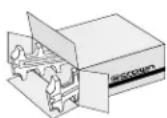
1.1 Unpacking
Please inspect the unit for any damage that may have occurred during transit. If damage is found, notify the transportation company immediately. Only you, the consignee, may initiate a claim with the carrier for shipping damage. Crown will cooperate fully as needed. Save the shipping carton as evidence of damage for the shipper's inspection.
Please save all packing materials. NEVER SHIP THE UNIT WITHOUT THE FACTORY PACK.
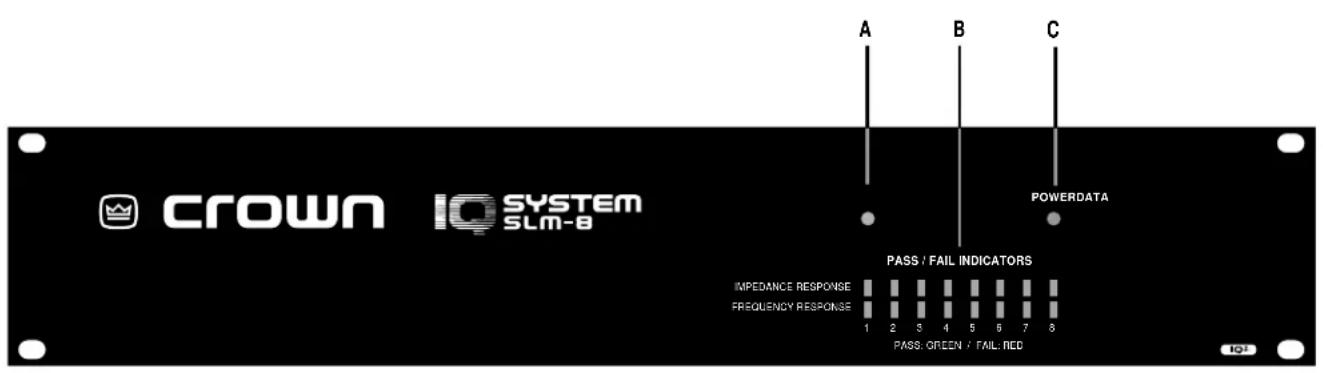
Fig. 2.1 The Front Facilities
2 Facilities
A. Data Indicator
The Data LED flashes yellow when the unit is actively communicating (transmitting data) via the Crown Bus. It may also be forced to stay on by IQ software.
B. Pass/Fail Indicators
Two rows of eight two-color LEDs light solid green/red to indicate pass/fail status for each monitor channel within the unit. LEDs in the upper row indicate impedance response test status; LEDs in lower row indicate frequency response test status. Alternate red/green flashing indicates that testing is in progress.
C. Power Indicator
The Power LED lights amber to indicate the presence of AC mains power.
D. IQ Address Switch
An 8-section DIP switch is used to set the IQ address of the unit. It must have a unique IQ address so it can be independently controlled and monitored by the system. Two or more IQ components of the same type should NEVER have the same address on the same Crown Bus loop (See Section 4.1). Important: The IQ address should only be set with the power cord disconnected from the AC supply.
E. Crown Bus Ground Connector
A chassis ground stud is provided to connect an optional shield for the Crown Bus cable. Only the shield of the input cable should be connected. Shielded wire may reduce the total distance a Crown Bus loop can be run (because shielded wire usually has higher capacitance), but shielding may be necessary to reduce interference with certain types of audio cables. (See Sections 4.3 and 4.6)
F. Crown Bus Input/Output Connector
A 4-pin male "Euro-style" connector which accepts a screw terminal plug is used for input and output connection to the Crown Bus. The pins are numbered from right to left (as you face the back panel of the unit). Pin 1 is input negative (−), and pin 4 is output positive (+). (See Sections 4.3 and 4.6)
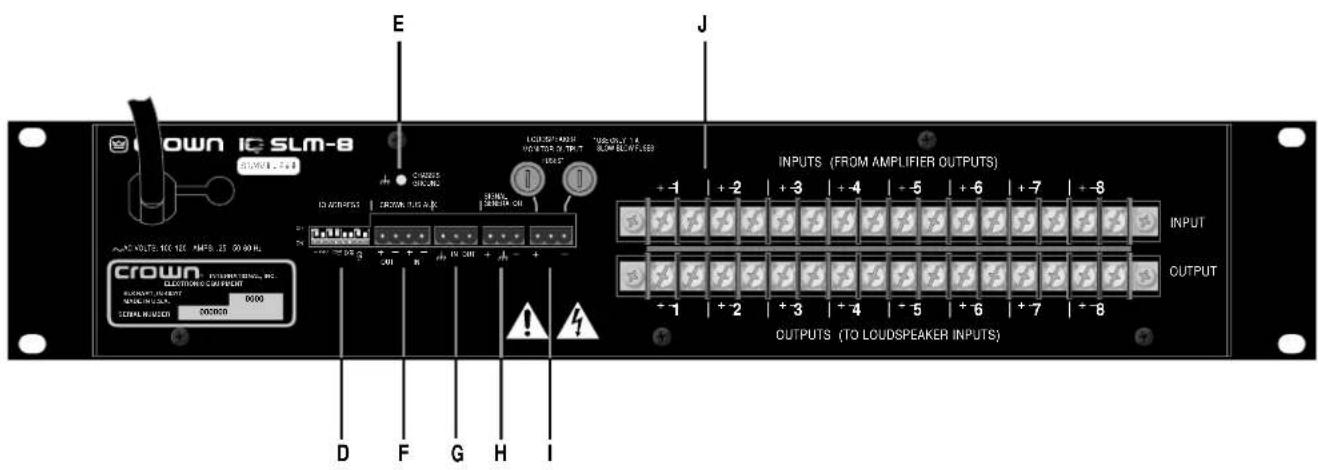
Fig. 2.2 The Rear Facilities
G. AUX Input/Output Connector
A 3-pin male "Euro-style" connector which accepts a screw terminal plug is used for input and output connection. The AUX output delivers 15 VDC at 15 mA maximum output when switched on and may be controlled via software or may be programmed to switch when a fail condition is present on any channel. ^1 The AUX input has a high-impedance (10 kohm) and can be programmed to trigger a test when a control voltage (logic high) is present. In this case, the sweep is leading-edge triggered and may be aborted during a test by sending a second leading-edge trigger.
H. Signal Generator
A 3-pin male "Euro-style" connector which accepts a screw terminal plug is used for connection to the signal generator. This processor-controlled digital signal generator provides a sine-wave output with variable frequency from 20Hz to 22kHz and is selectable in increments from 1 octave to 124 octave. The generator output level (amplitude) range is -40 dBu to +10 dBu in 1 dB steps via a digitally controlled attenuator. Normally, the generator provides the swept sine wave signal that is required for an impedance/frequency test. The duration of a sweep will be determined by the sweep resolution setting and the number of channels being tested. The generator can also be turned on manually with IQ software to provide a steady sine wave output (test tone) at a fixed frequency.
I. Loudspeaker Monitor Output
A fused, 3-pin male "Euro-style" connector which accepts a screw terminal plug provides a relay contact to any of the audio inputs (J). The relay is a break-before-make type to prevent two channels from being momentarily shorted together.
J. Audio Input/Output Connectors
Sixteen pairs of screw terminals are provided for input and output connection to the SLM-8. Heavy-duty terminals are provided to handle high-level wiring such as loudspeaker cables.
3 Features
Many of the features of the SLM-8 must be configured with IQ software while the unit is connected to an IQ System. Please consult your Crown representative or Crown's Technical Support Group if you are unfamiliar with IQ software or IQ Systems. Once the SLM-8 is configured, it can function as a stand-alone device without an IQ System. This will require the use of the unit's AUX input for manually triggering tests.
3.1 Signal Generator
The SLM-8 includes its own internal signal generator to provide the required swept sine wave signal for the tests. When a test is not being conducted, the signal generator can also be used to produce a steady sine wave signal for other applications. The signal generator is configured by the IQ System and has the following parameters:
Sweep Enable: Enables or disables the generator.
Amplitude: Sets the output level of the generator. Its range is -40 dBu to +10 dBu.
Osc Enable: Immediately turns on or off the signal generator when a test is not being performed. When turned on with this control, the generator will output a fixed sine wave at the frequency specified by the Osc Frequency parameter.
Osc Frequency: Sets the frequency in hertz for the above function. It does not affect the generator when a test is in progress.
Sweep Resolution: Sets the frequency step size of the test sweeps. It can be set to 124 , 112 , 16 , 13 , 12 , 23 , and 1 octave steps. If multiple units are synchronized, their Resolution settings must match.
Sweep Start Freq: Sets the frequency at which the generator will start the test sweeps. Although you can set this parameter in 1 Hz steps, the actual starting frequency will be equal to the closest octave setting as determined by the Sweep Resolution parameter. The lowest possible setting is 20 Hz. Note: The Sweep Start and Stop Frequencies of synchronized units must be set to the same values (see Section 4.10).
Sweep Stop Freq: Sets the frequency at which the generator will stop the test sweeps. Although you can set this parameter in 1 Hz steps, the actual stopping frequency will be equal to the closest octave setting as determined by the Sweep Resolution parameter. The highest possible setting is 22000 Hz (22 kHz). Note: The Sweep Start and Stop Frequencies of synchronized units must be set to the same values (see Section 4.10).
Sweep Sync: Forces the test generator duration to be the equivalent of an eight-channel test regardless of the number of channels actually being tested so multiple units can be synchronized together. (See Section 4.10.)
3.2 Load/Output Monitoring
The SLM-8 can monitor both the impedance response of a load and the frequency response of an output. The load is usually a loudspeaker. The output can be any line-level or high-level output. This means you can monitor the frequency response of a main mixer output, equalizer output or the loudspeaker output of the amplifier, itself.
These capabilities make it possible to monitor an audio system in several different ways. The most obvious is to monitor each amplifier output and each loudspeaker load to make sure that the loudspeakers are functioning normally and that they are being fed a correct signal at a correct level. However, with its ability to also monitor line-level outputs, you can monitor the outputs of each component in your audio chain, from the mixer's main output(s) to the equalizer, compressor/limiter and crossover network outputs. In this way you can pinpoint exactly where a change has occurred and greatly speed system troubleshooting.
To prepare the SLM-8 to monitor a load or an output, you first determine what the load and output should normally look like by making a series of tests under a variety of “normal” operating conditions. Its up to you to decide what these conditions are. Bear in mind that some audio systems may measure differently depending on environmental conditions such as temperature, humidity, wind and ambient noise. This is noted in the installation instructions in Section 4.
After determining what measurements of the audio system should “normally” look like and what the normal variation in impedance and frequency response should be, it is time to make some reference measurements and set the pass/fail tolerance for future tests. This must be done with an IQ System using the following parameters:
Acquire Mode: Determines which test(s) will be performed for each channel. The choices are:
Off-Pass: Do not test the channel but report a "passed" status.
Off-Report: Do not test the channel but continue to report the status from the previous test.
Impedance: Test only the impedance response of the channel.
Frequency: Test only the frequency response of the channel.
Imp/Freq: Test both the impedance response and frequency response of the channel.
Reference: Measure the reference impedance and frequency response for the channel.
Start (Hz): Sets both the beginning frequency of a test and the beginning frequency of the returning data.
Stop (Hz): Sets both the ending frequency of a test and the ending frequency of the returning data.
Test Impedance Tolerance: Sets the criteria by which impedance test data will be evaluated to determine if the load should pass or fail a test. It simply compares the impedance test data to the reference impedance data to see how much they differ. If the difference is greater than the Impedance Tolerance setting, the load has failed the test. The range is ±1% to ±100% . Be careful not to set the tolerance too tightly. Allow for the normal variations in your system.
Test Frequency Tolerance: Sets the criteria by which frequency test data will be evaluated to determine if the output should pass or fail a test. It simply compares the frequency test data to the reference frequency data to see how much they differ. If the difference is greater than the Frequency Tolerance setting, the output has failed the test. The range is ±1 dB to ±25 dB. Be careful not to set the tolerance too tightly. Allow for the normal variations in your system.
A failed impedance test usually indicates that there is something wrong with the load or its wiring. A failed frequency test usually indicates a problem in the electronics between the points where the test signal is inserted and the measurement is made.
3.3 Fused Loudspeaker Monitor
A fused loudspeaker monitor output is provided. Connect a monitor loudspeaker to it and you can audibly monitor the signal of any channel. It is capable of driving the monitor loudspeaker with up to 10 watts of power. The fuses protect both the output and the monitor loudspeaker from too much power.
The monitor output is switched by a DPST (break-before-make) relay and it requires an IQ System for control. When the monitor channel selection is changed, the IQ software will first turn off the monitor outputs of all other SLM-8s in the IQ System and then switch on the selected channel of the selected SLM-8. In this way, you can safely connect the monitor loud-speaker outputs of multiple SLM-8s to the same monitor bus without fear of their being shorted together.
3.4 Stand-alone Operation
Stand-alone operation is possible after the unit has been configured. Sixteen two-color LEDs quickly display the individual pass/fail status for each test (impedance and frequency response) for each channel. Note: Stand-alone operation requires that the AUX input be used to manually trigger tests. See Sections 4.8.1 and 4.9 for additional details.
3.5 Local Memory
Local EEPROM memory provides secure, nonvolatile storage of all measurements and settings. This means that the generator settings and test data will not be lost when power is removed from the unit.
3.6 Synchronous Operation
Multiple units can be configured for synchronous operation where they share a common test signal. This requires that several parameters be set to the same value in each SLM-8. See Sections 3.1, 4.8.1 and 4.10.
3.7 Data Indicator
A Data indicator is provided on the front panel to show when the unit receives a data signal from the IQ System. The Data indicator can be forced to stay on to serve as a troubleshooting aid for Crown Bus communication. Note: The Data indicator is similar to the DSPI (Data Signal Presence Indicator) LED on other IQ components.
3.8 Power Indicator
A Power indicator is provided on the front panel to show when the unit has power.
3.9 AUX Port
A standard IQ AUX port is provided with both input and output capability. The output can be used to signal a failed test. When used in this mode, it uses reverse logic (high = pass; low = fail) so the unit will not give a false pass signal when it is has no power. The AUX output can also be used to signal or switch external equipment like other IQ AUX ports.
The AUX input can be used to manually trigger a test. This is required when the unit is used in stand-alone mode. See Sections 4.8.1 and 4.10.
3.10 "No-Fault" Warranty
A three year “No-Fault” full warranty is provided to guarantee the specifications and protect your investment.
4 Installation
The installation of an SLM-8 consists of two major parts: installing the hardware and configuring the unit with IQ software. This manual deals with hardware installation. Please refer to an appropriate IQ software User Manual for software instructions.
4.1 Prepare the SLM-8
Step 1: Set the IQ address switch. By giving each IQ component a unique address, it can be individually controlled and monitored. Whenever the IQ System wants to send a command to just one IQ component, it first sends its address and then the command down the Crown Bus.
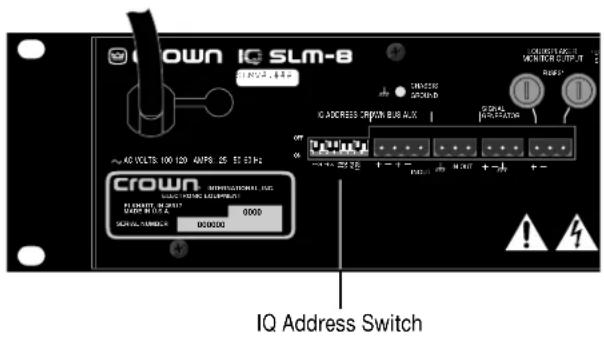
Fig. 4.1 IQ Address Switch Location
The 8-segment DIP switch shown in Figures 4.1 and 4.2 is used to set the IQ address of the SLM-8. No two IQ components of the same model which are connected to the same Crown Bus can have the same address. Suppose, for example, an IQ System has two Crown Bus loops, and this SLM-8 is to be installed into Loop 1 and given an address of 77. No other SLM-8 can be given the same address in Loop 1. However, an SLM-8 in Loop 2 can have the same address.
Different IQ components in the same Crown Bus loop can have the same address. For example, both an AMB-5 mixer and an SLM-8 can use address 77 in the same loop.
A valid IQ address is any number from 1 to 250. Do not use a number higher than 250 since they are reserved for special use.
The IQ address switch is located on the back panel of the unit (Figure 4.1). It has eight segments because it actually contains eight tiny switches inside. Flipping them down, turns them on and flipping them up turns them off.
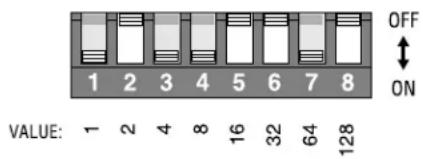
Fig. 4.2 IQ Address Switch Values
Each of the eight segments has a value which doubles as the segment number increases. For example, segment 1 has a value of 1; segment 2 has a value of 2; segment 3 has a value of 4; segment 4 has a value of 8; and so on.
The address is determined by adding the values of all "ON" segments. In Figure 4.2 switches 1, 3, 4 and 7 are on. Simply add the values to find the address: 1 + 4 + 8 + 64 = 77 .
A convenient series of IQ address tables are included in Section 7. The tables show the settings for all 250 addresses.
4.2 Mounting
Step 2: Mount the unit. The SLM-8 is designed to be mounted in a standard 19-inch (48.3-cm) equipment rack or cabinet. Only two vertical rack spaces are required and its 16-inch (40.6-cm) depth matches the depth of most Crown amplifiers, making it easier to wire. It can also be “stack” mounted outside of a cabinet. The mounting dimensions are shown below in Figure 4.3:
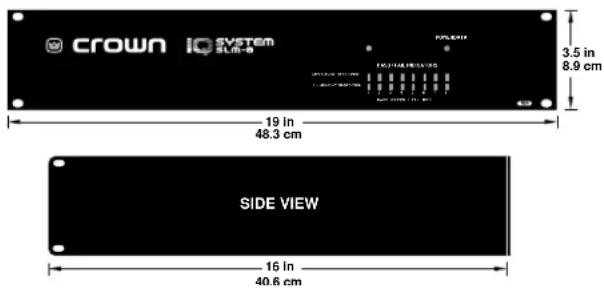
Fig. 4.3 Mounting Dimensions
4.3 Install the Wiring
Step 3: Connect the SLM-8 to the IQ System via the Crown Bus. See Figure 4.4 below. To comply with FCC regulations, an EMI suppression core should be added (Section 4.9). See Section 4.6 if additional Crown Bus wiring instructions are needed.
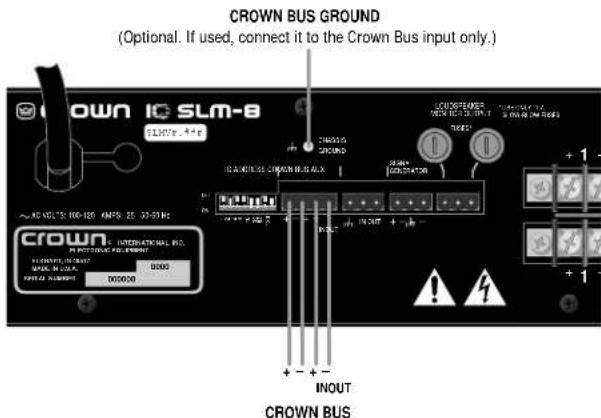
(Connect the Crown Bus output of a previous IQ component to the SLM-8 Crown Bus input. Connect the SLM-8 Crown Bus output to the Crown Bus input of the next IQ component.)
Fig. 4.4 SLM-8 Crown Bus Wiring
Step 4: Turn off the amplifiers or other equipment that you plan to connect to the audio inputs and outputs of the SLM-8.
Step5: Connect the SLM-8 signal generator to the audio system upstream of the monitor points. The SLM-8 contains a state-of-the-art direct digital synthesis generator to produce the high-quality, low distortion sine waves required for impedance and frequency response tests. The signal from the generator needs to be inserted into the system at some point upstream of the monitor points. For example, the generator needs to be connected upstream of the amplifier inputs if amplifier outputs and loudspeaker loads will be monitored. See Figure 4.5 below:
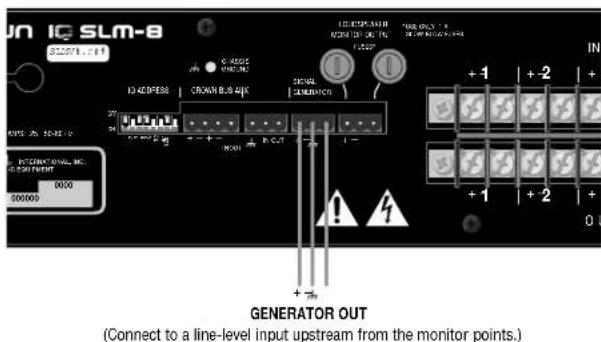
Fig. 4.5 Generator Wiring
Notice that the generator output is balanced for low-noise connection. To comply with FCC regulations, an EMI suppression core should be added (Section 4.9).
Step 6: Connect the audio wiring to the SLM-8 inputs and outputs. The most common application of the SLM-8 is to monitor the impedance of loudspeaker loads and to monitor the frequency response and overall level of amplifier outputs. With eight channels, an SLM-8 can accommodate up to four two-channel amplifiers. A sample is shown below in Figure 4.6:
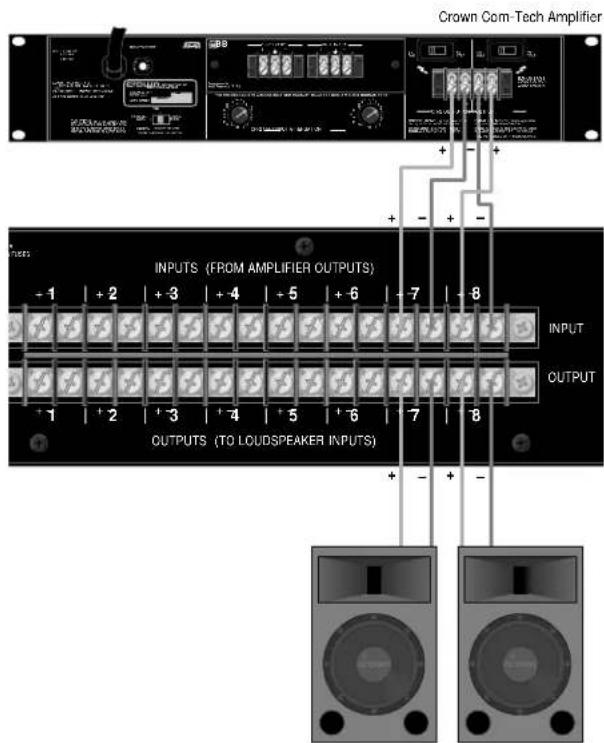
Fig. 4.6 Audio Input/Output Wiring
Notice that each channel has two connections for each input and output. Also note that the terminals for each output are always located directly below the terminals for each corresponding input.
4.4 Prepare the Audio System
Since the SLM-8 will be used to verify that the system is working properly, the "normal" condition of the audio system must be established before the SLM-8 can be configured. This involves the next two steps:
Step 7: Set all equalizers, filters and delays. If you plan to use the SLM-8 to monitor the frequency response of the audio system, you will first need to adjust and verify the setting of all equalizers, filters, delays and any other processing gear that will affect the monitor points.
Step 8: Set and verify all levels. You will also need to adjust and verify the gain structure of your audio system. This means adjusting all levels to the optimal setting for your system. For example, determine the master volume setting for your mixer or preamps and adjust your compressors, limiters and other processing gear with gain controls to their optimal setting.
Steps 7 and 8 are included so you will understand that your audio system must be prepared before the SLM-8 can be configured. However, a full description of these steps is beyond the scope of this manual.
4.5 Configure the SLM-8
Once the SLM-8 has been installed and the audio system has been properly prepared, it is time to configure the SLM-8. This will require that the SLM-8 be connected to an IQ System. The minimum required equipment is an IQ interface and a host computer running appropriate IQ software. Once the SLM-8 has been configured, it can be disconnected from the IQ System for stand-alone operation. See Section 4.8.1 for instructions on how to use the AUX input to manually trigger a test without an IQ System.
Step 9: Perform and verify reference tests. Using the IQ software, make a reference measurement for each channel that you plan to use. The reference measurements will be used for comparison with all future measurements to determine if the system is still within tolerance. Note: Reference measurements include both impedance and frequency response.
Remember that environmental conditions can cause natural variations in any audio system. Make several preliminary measurements before the final reference measurements in order to determine how the system varies under normal operating conditions. For example, temperature, humidity, wind and ambient noise levels can all have a significant effect on loudspeakers. Try to obtain reference measurements that reflect the average response of your system.
Step 10: Set the tolerance levels. After the natural system variations have been determined in Step 9, use the IQ software to set the tolerance of each channel's impedance and frequency response measurements. The tolerance of the impedance measurements is set as a ± percent range (%) and the tolerance of the frequency response is set as a ± decibel range (dB).
In the future you will need to use either IQ software or the AUX input to trigger a test. The SLM-8 will turn the appropriate Pass/Fail LED on the front panel to a green color if the new measurement falls within the tolerance of the reference measurement. If the new measurement falls outside the tolerance of the reference measurement at any point, the appropriate Pass/Fail LED on the front panel will be turned to a red color. The pass/fails status of each channel will also be communicated to the IQ System, if one is connected.
Finally, we suggest that you establish a schedule for making tests on a regular basis.
4.6 A Closer Look at Crown Bus Wiring
The Crown Bus is a serial communication loop designed to transmit IQ commands and data. As implemented in the SLM-8, it is a 20 mA current loop operating at a baud rate of 38.4 K.
The SLM-8 must be connected to a Crown Bus loop having an IQ2-compatible interface. The Crown Bus connection can use inexpensive twisted-pair wiring (shielded or unshielded) and it must be unbroken. If fiber optic cabling is required, contact the Crown Technical Support Group (see page 5).
Here are some guidelines for twisted-pair wiring:
- When interference is a problem, use shielded twisted-pair wire at least 26 AWG in size. The wire should be of good quality and should have low capacitance—30 pF/foot or less is good. The shield serves two purposes: First, it helps prevent the IQ data signal from transmitting to nearby audio wiring. Second, it helps prevent outside RF from interfering with the data signal. However, in most cases interference is not a problem and, since unshielded wire has lower capacitance, it is a better choice.
- Minimize the total capacitance of a Crown Bus loop. The total capacitance should be less than 30 nF. Allow approximately 60 pF for each IQ component in a loop. This accounts for a slight signal degradation which occurs as data signals pass through a component.
- Add an IQ Repeater for very long loops—greater than 1,000 feet (305 m)—or when required by high-capacitance wire. Although we recommend adding a repeater for loops longer than 1,000 feet, it is often possible to go 2,000 feet (610 m) or more. The most significant characteristic of the wire is its capacitance. Lower capacitance allows longer loops. Unshielded wire usually has less capacitance.
- Never use the ground wire in a mic snake line. It may sometimes be convenient to run Crown Bus data signals to and from stage monitor amplifiers along unused wire pairs in a mic snake. Do not use the ground wire which is normally connected to pin 1 on an XLR connector or data noise will be added to the audio lines. Use only the signal lines which normally connect to pins 2 and 3 of the XLRs. Note: Because typical mic cables have high capacitance, the maximum possible Crown Bus loop distance will be less.
Outside RF interference is seldom a problem for a Crown Bus loop—especially if shielded twisted-pair wire is used. However, there are extreme situations when fiber optic wiring is recommended. For example, locating a Crown Bus loop next to an AM radio transmission line may require fiber optic cabling. An extremely long Crown Bus loop distance may also require fiber optic cabling.
There are three different types of connectors used for Crown Bus wiring on IQ components. These include DIN connectors, RJ-45 connectors and "Euro-style" removable barrier strip plugs. The SLM-8 uses a four-terminal removable barrier strip connector that accepts a complementary screw-terminal plug like the one shown in Figure 4.7.
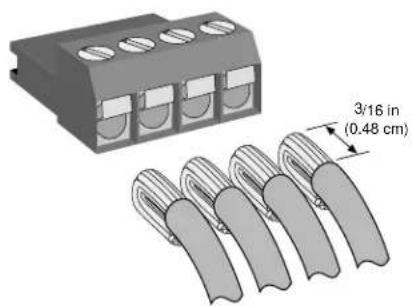
natural_image
Diagram of a connector housing with four slots and five terminal clips, showing a 3/16 inch measurement dimension (0.48 cm) — no text or symbols present.Fig. 4.7 A Screw-Terminal Plug
The following examples show how to connect the SLM-8 to other IQ components on the Crown Bus:
4-pin Removable Barrier Block (IQ-SLM-8)
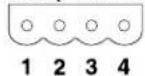
4-pin Removable Barrier Block Input (IQ Component)
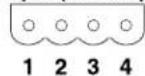
Cable connectors are numbered as they appear from the front.
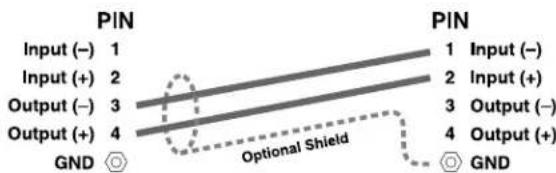
Fig. 4.8 Crown Bus Wiring for Removable Barrier Blocks
4-pin Removable Barrier Block (IQ-SLM-8)
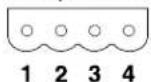
5-pin DIN Input (IQ Component)
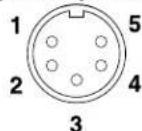
Cable connectors are numbered as they appear from the front.
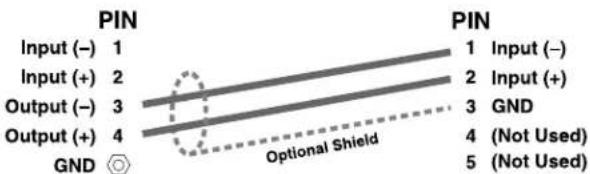
Fig. 4.9 Crown Bus Wiring for 5-pin DIN Input
4-pin Removable Barrier Block (IQ-SLM-8)
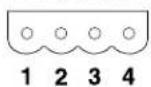
RJ-45 Input (IQ Component)
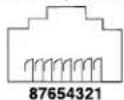
Cable connectors are numbered as they appear from the front.
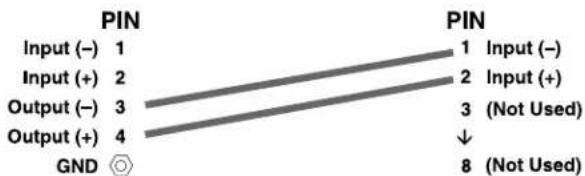
Fig. 4.10 Crown Bus Wiring for RJ-45 Input
4-pin DIN Output (IQ Component)
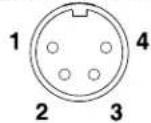
4-pin Removable Barrier Block (IQ-SLM-8)
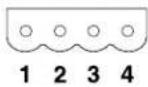
Cable connectors are numbered as they appear from the front.
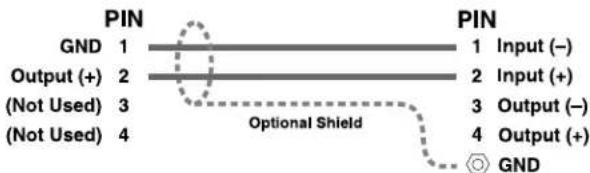
Fig. 4.11 Crown Bus Wiring for 4-pin DIN Output
RJ-45 Output (IQ Component)
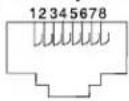
4-pin Removable Barrier Block (IQ-SLM-8)
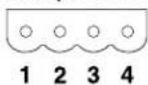
Cable connectors are numbered as they appear from the front.
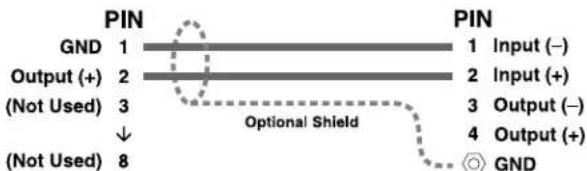
Fig. 4.12 Crown Bus Wiring for RJ-45 Output
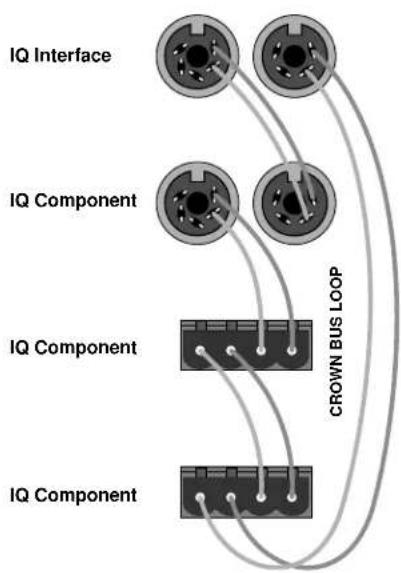
The IQ components in each Crown Bus loop are wired sequentially. The loop begins and ends with the IQ interface. The output of one IQ component "loops" to the input of the next and so on as shown in Figure 4.13.
4.7 Using an Audio Monitor
If desired, you can audibly monitor the audio signal of any channel with the Loudspeaker Monitor Output shown in Figure 4.14:
Each of the SLM-8's audio input channels connects to a relay. The output of each relay is connected to the fused Loudspeaker Monitor Output "bus." Break-before-make relays are used to prevent two input channels from being shorted together.
Any of the eight channels can be connected to the monitor output but they can only be connected one at a time. The selection is made with IQ software. Up to 10 watts of power is available at the output connector,
flowchart
graph TD
    A["IQ Interface"] --> B["CROWN BUS LOOP"]
    C["IQ Component"] --> B
    D["IQ Component"] --> B
    E["IQ Component"] --> B
Fig. 4.13 Crown Bus Wiring "Loops" from the Output to the Input of Each IQ Component
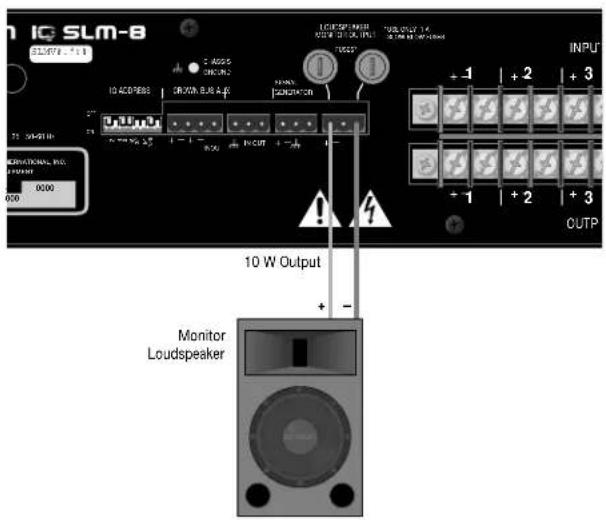
Fig. 4.14 Monitor Loudspeaker Wiring
so you will probably not need an additional amplifier. Each leg of the output is protected with a 1 A slow-blow fuse (20-mm European type). Although a three-pin screw-terminal plug connector is provided, only the outer two pins are used (see Figure 4.14).
The channel to monitor can only be selected with IQ software while the unit is connected to an IQ System. When a selection is made, the IQ software will first turn
off the monitor outputs of all SLM-8s in the IQ System before it selects the desired channel. In this way multiple SLM-8s can be connected to the same monitor loudspeaker.
4.8 Using the AUX Connector
The AUX port can be used simultaneously for input and output. For example, the AUX input can be used to trigger a test and the AUX output can be used to signal that one or more channels have failed an impedance and/or frequency response test. Both of these features must be configured from an IQ System.
The AUX port can also function like a traditional IQ AUX port. For example, the AUX output can be used to switch a relay that can turn on/off other non-IQ components in the system.
The internal AUX circuit is shown in Figure 4.15:
To comply with FCC regulations, an EMI suppression core should be added (Section 4.9).
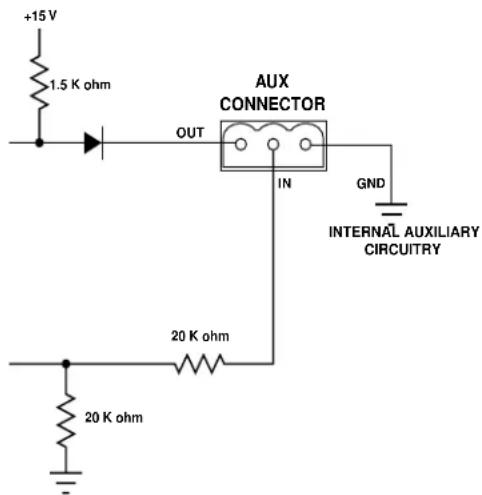
Fig. 4.15 The Internal AUX Circuit
4.8.1 Triggering a Test (AUX Input)
The AUX input is a high impedance (10 kohm) input. To trigger a test with it you must do two things: 1) Use IQ software to set the SLM-8 to respond to a logic "high" at the AUX input; and 2) Connect an external voltage (TTL level) to the AUX input across pins 1 (ground) and 2 (+). A +5 to +15 VDC signal will be recognized as a logic high. A signal less than +1.6 VDC or an electrical open will be interpreted as a logic "low." See the IQ software User Manual for instructions on configuring the SLM-8 to respond to the AUX input.
Note: A negative signal can also be used as a logic low because the signal is internally clamped to protect the internal circuitry.
4.8.2 Signaling a Failed Test (AUX Output)
When the AUX output is turned on, +15 VDC is supplied across pins 1 (ground) and 3 (+). A total of 15 milliamps of current is available. A 1.5 kohm resistor protects against shorts.
The SLM-8 can be configured by the IQ software to signal a failed test via the AUX output. It does this with reverse logic. The AUX port will be turned on to indicate that all channels have passed the most recent test and turned off to indicate that one or more channels have failed a test. By reversing the logic, the AUX output will not send a pass signal when the unit it turned off or has no power.
4.8.3 Controlling External Devices (AUX Output)
There are many other possible uses for the AUX output. For example, it can be used to turn on auxiliary cooling fans. To do this the +15 VDC AUX output would be used to close a relay. The relay would then turn the fans on or off. This principal is illustrated in Figure 4.16 below:
Note: A Crown part number is provided in Figure 4.16 for a suitable solid-state relay (C 8063-3). Contact your local Crown representative or the Crown factory Parts Department (219-294-8200) to order.
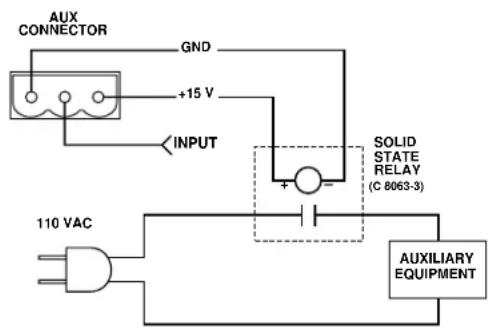
Fig. 4.16 A Sample AUX Output Circuit
4.9 EMI Suppression
In order to comply with FCC regulations, it is necessary to add an external EMI (electro-magnetic interference) suppression core to the wiring in three locations. These locations are:
1 Crown Bus input and output wiring (Section 4.3)
2 Generator output wiring (Section 4.3)
3 AUX input and output wiring (Section 4.8)
Three cores are provided which are designed to easily snap over the wiring at these locations. The cores are large enough to snap over two cables to accommodate the Crown Bus and AUX wiring which often use two cables each.
4.10 Synchronous Setup
In a large audio system it may be desirable to use more than one SLM-8 so that more than eight outputs and/or loads can be monitored. When this is done, the SLM-8s can be synchronized so they function in unison as a group. Here are the steps for synchronizing multiple SLM-8s:
1 Select one of the SLM-8s and use its Generator Out to insert the test signal upstream of all SLM-8
monitor points in the audio system.
2 Set the "Generator" and "Sweep" settings of all SLM-8s so they are all the same.
3 Turn on the "Sync" control of each unit.
After the above preparations have been made, there are two ways to generate a synchronized test. The first way is to use the IQ software's "All Start" command to simultaneously initiate a test with all units. Of course, this requires that all units be connected to an IQ System. Incidentally, you can stop a test that is in progress with the "All Abort" command.
The second way to generate a synchronized test is with the AUX input. This enables you to perform synchronized testing with stand-alone units that are no longer connected to an IQ System. To use this method you will need to turn on the AUX In Trigger setting when the units are being configured before they are disconnected from the IQ System. Then you will need to connect the AUX inputs of all units to the same trigger circuit (a +5 to +15 VDC logic circuit as described in Section 4.8.1). When the AUX inputs sense a logic high, the units will start a test. To abort a test, simply send a second logic high.
flowchart
graph TD
    A["+ IN 1"] --> B["CH 1 VOLTAGE AND CURRENT SENSING CIRCUITRY"]
    C["- IN 1"] --> B
    D["+ IN 2"] --> E["CH 2 VOLTAGE AND CURRENT SENSING CIRCUITRY"]
    F["- IN 2"] --> E
    G["+ IN 3"] --> H["CH 3 VOLTAGE AND CURRENT SENSING CIRCUITRY"]
    I["- IN 3"] --> H
    J["+ IN 4"] --> K["CH 4 VOLTAGE AND CURRENT SENSING CIRCUITRY"]
    L["- IN 4"] --> K
    M["+ IN 5"] --> N["CH 5 VOLTAGE AND CURRENT SENSING CIRCUITRY"]
    O["- IN 5"] --> N
    P["+ IN 6"] --> Q["CH 6 VOLTAGE AND CURRENT SENSING CIRCUITRY"]
    R["- IN 6"] --> Q
    S["+ IN 7"] --> T["CH 7 VOLTAGE AND CURRENT SENSING CIRCUITRY"]
    U["- IN 7"] --> T
    V["+ IN 8"] --> W["CH 8 VOLTAGE AND CURRENT SENSING CIRCUITRY"]
    X["- IN 8"] --> W
    Y["+ OUT 1"] --> Z["+ OUT 2"]
    AA["- OUT 1"] --> Z
    AB["K1"] --> AC["+ MONITOR OUT - MONITOR OUT"]
    AD["K2"] --> AE["+ OUT 3"]
    AF["K3"] --> AG["+ OUT 4"]
    AH["K4"] --> AI["+ OUT 5"]
    AJ["K5"] --> AK["+ OUT 6"]
    AL["K6"] --> AM["+ OUT 7"]
    AN["K7"] --> AO["+ OUT 8"]
    AP["K8"] --> AQ["+ OUT 8"]
    AR["VOLTAGE AND CURRENT DATA ACQUISITION MULTIPLEXER"] --> AS["18 BIT ANALOG TO DIGITAL CONVERTER"]
    AS --> AT["MICROCONTROLLER"]
    AT --> AU["INPUT RECEIVER"]
    AT --> AV["OUTPUT DRIVER"]
    AT --> AW["CROWN BUS SERIAL DATA INPUT"]
    AT --> AX["CROWN BUS SERIAL DATA OUTPUT"]
    AT --> AY["CROWN BUS SERIAL DATA INPUT"]
    AT --> AZ["CROWN BUS SERIAL DATA OUTPUT"]
    AT --> BA["CROWN BUS SERIAL DATA INPUT"]
    AT --> BB["CROWN BUS SERIAL DATA OUTPUT"]
    AT --> BC["CROWN BUS SERIAL DATA INPUT"]
    AT --> BD["CROWN BUS SERIAL DATA OUTPUT"]
    AT --> BE["CROWN BUS SERIAL DATA INPUT"]
    AT --> BF["CROWN BUS SERIAL DATA OUTPUT"]
    AT --> BG["CROWN BUS SERIAL DATA INPUT"]
    AT --> BH["CROWN BUS SERIAL DATA OUTPUT"]
    AT --> BI["CROWN BUS SERIAL DATA INPUT"]
    AT --> BJ["CROWN BUS SERIAL DATA OUTPUT"]
    AT --> BK["CROWN BUS SERIAL DATA INPUT"]
    AT --> BL["CROWN BUS SERIAL DATA OUTPUT"]
    AT --> BM["CROWN BUS SERIAL DATA INPUT"]
    AT --> BN["CROWN BUS SERIAL DATA OUTPUT"]
    AT --> BO["CROWN BUS SERIAL DATA INPUT"]
    AT --> BP["CROWN BUS SERIAL DATA OUTPUT"]
    AT --> BQ["CROWN BUS SERIAL DATA INPUT"]
    AT --> BR["CROWN BUS SERIAL DATA OUTPUT"]
    AT --> BS["CROWN BUS SERIAL DATA INPUT"]
    AT --> BT["CROWN BUS SERIAL DATA OUTPUT"]
    AT --> BU["CROWN BUS SERIAL DATA INPUT"]
    AT --> BV["CROWN BUS SERIAL DATA OUTPUT"]
    AT --> BW["CROWN BUS SERIAL DATA INPUT"]
    AT --> BX["CROWN BUS SERIAL DATA OUTPUT"]
    AT --> BYC["CROWN BUS SERIAL DATA INPUT"]
    AT --> BZ["CROWN BUS SERIAL DATA OUTPUT"]
    AT --> CA["CROWN BUS SERIAL DATA INPUT"]
    AT --> CB["CROWN BUS SERIAL DATA OUTPUT"]
    AT --> CC["CROWN BUS SERIAL DATA INPUT"]
    AT --> CD["CROWN BUS SERIAL DATA OUTPUT"]
    AT --> DEC["CROWN BUS SERIAL DATA INPUT"]
    AT --> DF["CROWN BUS SERIAL DATA OUTPUT"]
    AT --> DG["CROWN BUS SERIAL DATA INPUT"]
    AT --> DH["CROWN BUS SERIAL DATA OUTPUT"]
    AT --> DI["CROWN BUS SERIAL DATA INPUT"]
    AT --> DJ["CROWN BUS SERIAL DATA OUTPUT"]
    AT --> DK["CROWN BUS SERIAL DATA INPUT"]
    AT --> DL["CROWN BUS SERIAL DATA OUTPUT"]
    AT --> DM["CROWN BUS SERIAL DATA INPUT"]
    AT --> DEC
    AT --> DF
    AT --> DG
Fig. 5.1 SLM-8 Circuit Block Diagram
5 Technical Information
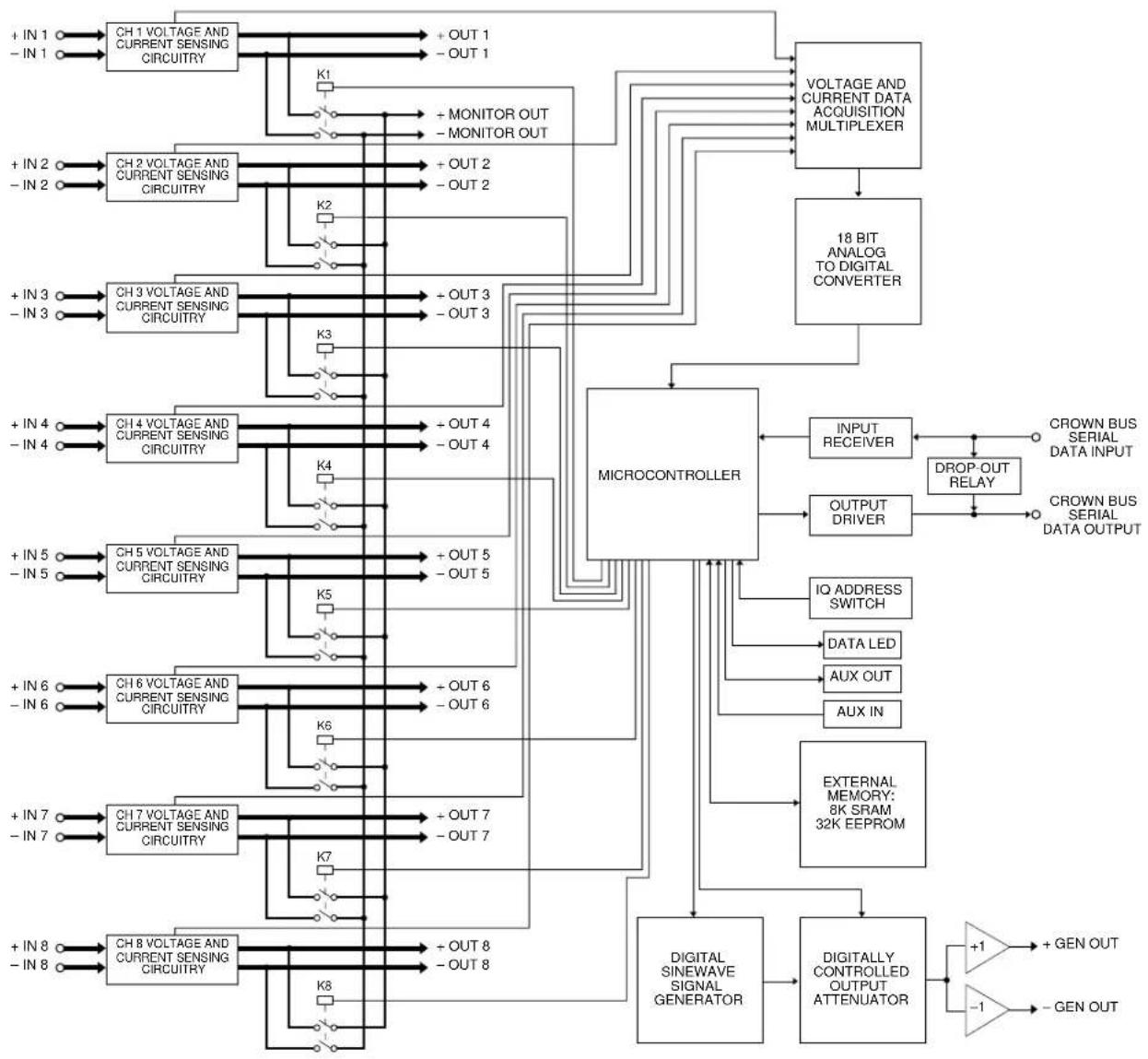
The SLM-8 provides accurate testing and recording of two critical system parameters: impedance and frequency response. See Sections 1 and 2 for a list of features and facilities. Figure 5.1 shows the block diagram of the unit.
5.1 Load Monitor Data Acquisition
The Load Monitor inputs are connected to current and voltage sensing circuitry. Current sensing is performed by an isolated, wide bandwidth, toroidal wound current transformer. The output of the transformer is amplified and converted to the DC equivalent of RMS current and then sent to the data acquisition multiplexer. Voltage sensing is performed by high input impedance, balanced differential input amplifiers. The output of each differential amplifier is converted to the DC equivalent of an RMS voltage and sent to the data acquisition multiplexer. The data acquisition multiplexer is controlled by a 6811 microprocessor to select the channel for Analog to Digital conversion. The A-to-D conversion is accomplished by an 18-bit integrating ADC. The digital output of the ADC is sent to the microprocessor for subsequent calculations. The microprocessor divides the voltage data by the current data to calculate impedance for a given frequency. This calculation is performed for each frequency of interest.
5.2 Signal Generator
The required test signal is generated by a Direct Digital Synthesis IC. The frequency of oscillation is controlled by the microprocessor. The DDS output is sent through a digitally controlled attenuator. The attenuator is also controlled by the microprocessor. The output of the attenuator is converted to a balanced signal by the output line driver.
5.3 Loudspeaker Monitor
Each Load Monitor input is directly connected to a relay. The relay output is connected to a fused "bus" and made available at the back panel of the SLM-8. The relays are controlled by the microprocessor and thus are available for user control via an IQ System. Any of the eight channels may be connected to the output terminals for external remote loudspeaker monitoring.
5.4 Crown Bus I/O
The Crown Bus loop input is received by an opto-isolated 20 mA current loop to TTL receiver. The output of the receiver is connected to a UART within the microprocessor which qualifies incoming messages. If an incoming message is determined to be for the SLM-8, appropriate action and response is calculated and sent out the Crown Bus loop output via a Crown Bus output driver circuit. Note: The Crown Bus loop input is logically or'd with the output. This connection allows any signal at the receiver to be transmitted through the SLM-8 and out of the Crown Bus loop output. Bypass relays short the Crown Bus input to output terminals if AC power is removed from the SLM-8. This ensures communication through the loop even if the SLM-8 is not connected to AC power.
The AUX input is monitored by the microprocessor. The input is protected by overvoltage diodes and has an input impedance of 10 kohms.
The AUX output is controlled by the microprocessor. The output is an open collector with a 1 kohm series resistor for current limit. Max voltage out is +15 VDC. Max current out is 15 mA.
The IQ device address is set by an eight position DIP switch which is monitored by the microprocessor. Incoming messages are compared to the switch setting for qualification that the message is for the specific SLM-8 and not for some other device on the loop.
5.5 Microprocessor and Memory
The 6811 microprocessor is the central controller for the SLM-8. It uses internal and external memory resources for program and data operations. It performs all IQ communication as well as data acquisition calculations. It also controls the test signal generator and loudspeaker monitor relays. Internal memory is 32 K x 8 EEPROM for memory backup, 8 K x SRAM for runtime parameter storage.
5.6 Power Supplies
Unregulated power is supplied by the power transformer. The power transformer can be wired in series or parallel for 120/240 VAC operation. The unregulated power is regulated by five separate voltage regulators. Power for analog circuitry is via linear ±15 VDC and ±5 VDC regulators. The digital circuitry is powered by a monolithic switching regulator at +5 VDC.
6 Specifications
General
Controls: An 8-segment DIP switch sets the IQ address (decimal range: 1–250).
Connectors: Crown Bus: 4-pin male "Euro-style" connector and a mating screw-terminal plug. AUX, generator and loudspeaker monitor connections: 3-pin male "Euro-style" connectors and mating screw-terminal plugs. Audio line input and output connectors: #8 screw terminals. Standard 3-pin AC power cord plug on all US models.
Indicators: An amber Power LED on the front panel is lit whenever the unit is powered from the AC mains. A yellow Data LED flashes when data is received from the Crown Bus, or it may be forced on via software control to facilitate rapid troubleshooting of Crown Bus wiring. Sixteen two-color LEDs, one per channel for Impedance Response and one for Frequency Response; red indicates fail, green indicates pass, flashing alternately indicates test in progress.
Memory Backup: EEPROM capable of 75,000 typical writes (10 writes per day for 20 years). 20-year static retention.
AUX Port: Output: +15 V, 15 mA (max), referenced to AUX ground; high impedance when switched off. Input: logic level > 5 V = high, 20 V max, 10 kilohm input impedance.
Power Requirements: 0.20 amp draw at 120 VAC, 0.12 amp draw at 230 VAC; 0.25 amp AC fuse (20-mm European-style).
Dimensions: Standard 19-inch (48.3 cm) rack width, 3.5 inches (8.9 cm) high, 16 inches (40.6 cm) deep behind mounting surface.
Finish: Black powder-coat front panel and baked screen print.
Crown Bus Data Communication
Protection: If communication is lost, the unit will continue to function with the last commands received.
Data Rate: 38.4 K BAUD.
Data Format: Serial, binary, asynchronous; 1 start bit; 1 stop bit; 8 data bits; no parity.
Crown Bus Interface Type: Optically isolated 20 milliamp serial loop; 12 mA minimum logic high, 4 mA maximum logic low.
Operation: Half duplex.
Intelligence: 8-bit, 8-MHz, 2-MIPS Motorola 6811 microprocessor.
Transmission Distance: Variable from 200 to 3,000 feet (61 to 914 m), depending upon wire capacitance. Typically 1000 feet (305 M) using shielded twisted-pair wire, #26 AWG or larger. Can be extended with an IQ Repeater.
Load Monitoring
Maximum Input-to-Output Current: 20 A RMS.
Maximum Input Voltage: 200 V peak.
Maximum Measurements: Current: 200 mA RMS. Voltage: 7.75 V RMS (+20 dBu). Impedance: 1000 ohms, typical.
Minimum Measurements: Current: 5 mA RMS. Voltage: 7.75 mV RMS (-40 dBu). Impedance: 1 ohm, typical.
Measurement Response: Impedance: ±10% at 50 Hz through 20 kHz at 0 dBu with a nominal 8 ohm load. Voltage: ±1 dB from 20 Hz through 20 kHz at 0 dBu. Note: The bandwidth decreases at the minimum and maximum current and voltage levels.
Test Repeatability: Impedance: Typically better than 3% at midrange of measurable frequency and level with an 8-ohm load. Voltage: Typically better than 1 dB at midrange of measurable frequency and level with an 8-ohm load.
Loudspeaker Monitor: Maximum power: 10 W RMS. Relays: DPST break-before-make. Fuses: 1 A slow-blow (20-mm European-style fuse).
Signal Generator
Maximum Output: +10 dBu balanced.
Distortion: Typically less than 0.5%.
Frequency: Adjustable in 124 -octave steps from 20 Hz to 22 kHz.
Level: Adjustable in 1 dB steps from -40 to +10 dBu.
Output Impedance: 100 ohms balanced, AC coupled.
7 IQ Address Tables
This section contains lookup tables for every valid IQ address. The valid addresses are 1 to 250. Do not use an address number higher than 250! Addresses above 250 are reserved for special system use.
Remember: No two IQ components of the same type which are connected to the same Crown Bus loop can have the same address.
To use the IQ address tables, simply find the address you want and set the IQ address switch of the SLM-8 as shown. See Section 4.1 also.
Fig. 7.1 IQ Address Switch Settings from 0 to 125
Fig. 7.2 IQ Address Switch Settings from 126 to 250
8 Service
This unit has very sophisticated circuitry which should only be serviced by a fully trained technician.
8.1 Worldwide Service
Service may be obtained from an authorized service center. (Contact your local Crown/Amcron representative or our office for a list of authorized service centers.) To obtain service, simply present the bill of sale as proof of purchase along with the defective unit to an authorized service center. They will handle the necessary paperwork and repair.
Remember to transport your unit in the original factory pack.
8.2 North American Service
Service may be obtained from the factory. It is important that you have your copy of the bill of sale as your proof of purchase.
8.2.1 Factory Service
To obtain factory service, fill out the service information page found in the back of this manual and send it along with your proof of purchase and the defective unit to the Crown factory.
For warranty service, we will pay for ground shipping both ways in the United States. Contact Crown Factory Service or Technical Support to obtain prepaid shipping labels prior to sending the unit. Or, if you prefer, you may prepay the cost of shipping, and Crown will reimburse you. Send copies of the shipping receipts to Crown to receive reimbursement.
Your repaired unit will be returned via UPS ground. Please contact us if other arrangements are required.
Factory Service Shipping Instructions:
- When sending a Crown product to the factory for service, be sure to fill out the service information form that follows and enclose it inside your unit's shipping pack. Do not send the service information form separately.
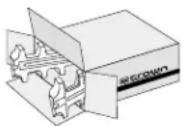
Always use the original factory pack to transport the unit.
-
To ensure the safe transportation of your unit to the factory, ship it in an original factory packing container. If you don't have one, call or write Crown's Parts Department. With the exception of polyurethane or wooden crates, any other packing material will not be sufficient to withstand the stress of shipping. Do not use loose, small size packing materials.
-
Do not ship the unit in any kind of cabinet (wood or metal). Ignoring this warning may result in extensive damage to the unit and the cabinet. Accessories are not needed—do not send the Reference or Owner's Manual, cables and other hardware.
If you have any questions, please call or write the Crown Technical Support Group.
Crown Audio Division
Technical Support / Factory Service Plant 2 SW, 1718 W. Mishawaka Rd., Elkhart, Indiana 46517 U.S.A.
Telephone: 219-294-8200
800-342-6939 (North America,
Puerto Rico, and Virgin Islands only)
Fax: 219-294-8124 (Factory Service)
219-294-8301 (Tech Support)
Fax Back: 219-293-9200 (North America only)
800-294-4094 (North America only)
219-294-8100 (International)
Internet: http://www.crownaudio.com
Crown Factory Service Information
Shipping Address: Crown International, Inc., Factory Service, Plant 2 SW, 1718 W. Mishawaka Rd., Elkhart, IN 46517
Phone: 1-800-342-6939 or 1-219-294-8200 Fax: 1-219-294-8124
Owner's Name:
Shipping Address:
Phone Number: ____ Fax Number:
Model: ____ Serial Number: ____ Purchase Date:
NATURE OF PROBLEM
(Be sure to describe the conditions that existed when the problem occurred and what attempts were made to correct it.)
Other equipment in your system:
If warranty has expired, payment will be: ☐ Cash/Check ☐ VISA ☐ MasterCard ☐ C.O.D.
Card Number: ____ Exp. Date: ____ Signature: ____
ENCLOSE THIS PORTION WITH THE UNIT. DO NOT MAIL SEPARATELY.
- THREE YEAR FULL WARRANTY
- WORLDWIDE
- NORTH AMERICA
- SUMMARY OF WARRANTY
- ITEMS EXCLUDED FROM THIS CROWN WARRANTY
- WHAT THE WARRANTOR WILL DO
- HOW TO OBTAIN WARRANTY SERVICE
- DISCLAIMER OF CONSEQUENTIAL
- AND INCIDENTAL DAMAGES
- WARRANTY ALTERATIONS
- DESIGN CHANGES
- LEGAL REMEDIES OF PURCHASER
- THIS STATEMENT OF WARRANTY SUPERSEDES ANY OTHERS CONTAINED IN THIS MANUAL FOR CROWN PRODUCTS.
- DISCLAIMER OF CONSEQUENTIAL AND INCIDENTAL DAMAGES
- Important Safety Instructions
- Quick Install Procedure
- Prepare the IQ-SLM-8:
- Mounting:
- Install the wiring:
- Prepare the audio system:
- Configure the IQ-SLM-8:
- Crown Audio Division Technical Support Group
- WARNING
- PLEASE NOTE
- Lightning Bolt Symbol:
- Exclamation Mark Symbol:
- FCC Class A Compliance
- CONTENTS
- Quick Install Procedure ....4
- Welcome ....7
- Facilities ....8
- Features....10
- Installation ....12
- Technical Information ....20
- Specifications....21
- IQ Address Tables 22
- Service....24
- ILLUSTRATIONS
- Welcome
- Unpacking
- Facilities
- Data Indicator
- Pass/Fail Indicators
- Power Indicator
- IQ Address Switch
- Crown Bus Ground Connector
- Crown Bus Input/Output Connector
- AUX Input/Output Connector
- Signal Generator
- Loudspeaker Monitor Output
- Audio Input/Output Connectors
- Features
- Signal Generator
- Load/Output Monitoring
- Fused Loudspeaker Monitor
- Stand-alone Operation
- Local Memory
- Synchronous Operation
- Data Indicator
- Power Indicator
- AUX Port
- "No-Fault" Warranty
- Installation
- Prepare the SLM-8
- Mounting
- Install the Wiring
- Prepare the Audio System
- Configure the SLM-8
- A Closer Look at Crown Bus Wiring
- Using an Audio Monitor
- Using the AUX Connector
- Triggering a Test (AUX Input)
- Signaling a Failed Test (AUX Output)
- Controlling External Devices (AUX Output)
- EMI Suppression
- Synchronous Setup
- Technical Information
- Load Monitor Data Acquisition
- Signal Generator
- Loudspeaker Monitor
- Crown Bus I/O
- Microprocessor and Memory
- Power Supplies
- Specifications
- General
- Crown Bus Data Communication
- Load Monitoring
- Signal Generator
- IQ Address Tables
- Service
- Worldwide Service
- North American Service
- Factory Service
- Factory Service Shipping Instructions:
- Crown Audio Division
- Crown Factory Service Information
- NATURE OF PROBLEM
Brand : CROWN
Model : IQ-SLM-8
Category : Uncategorized