180MAx - Uncategorized CROWN - Free user manual and instructions
Find the device manual for free 180MAx CROWN in PDF.


User questions about 180MAx CROWN
0 question about this device. Answer the ones you know or ask your own.
Ask a new question about this device
Download the instructions for your Uncategorized in PDF format for free! Find your manual 180MAx - CROWN and take your electronic device back in hand. On this page are published all the documents necessary for the use of your device. 180MAx by CROWN.
USER MANUAL 180MAx CROWN
Commercial Audio Series
180MAx and 180MAx Pack
Operation Manual
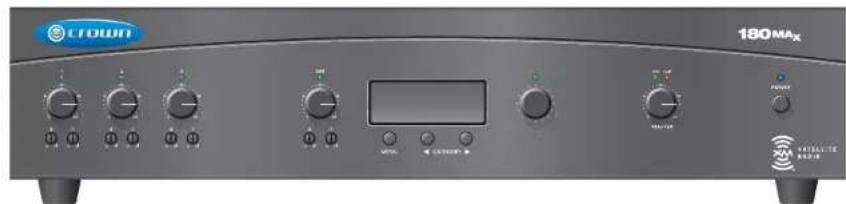
Crown 180MAx

natural_image
Illustration of a speaker with dual circular buttons and a central knob (no text or symbols)
natural_image
Illustration of a speaker with a circular dial and button (no text or symbols)
natural_image
Illustration of a speaker with a circular dial and central button (no text or symbols)
natural_image
Illustration of a speaker with a circular button and central speaker (no text or symbols)Four JBL
Control 1ST
20W-tapped,
70V speakers
(part of 180MAx Pack)
Obtaining Other Language Versions: To obtain information in another language about the use of this product, please contact your local Crown Distributor. If you need assistance locating your local distributor, please contact Crown at 574-294-8000.
This manual does not include all of the details of design, production, or variations of the equipment. Nor does it cover every possible situation which may arise during installation, operation or maintenance.
The information provided in this manual was deemed accurate as of the publication date. However, updates to this information may have occurred. To obtain the latest version of this manual, please visit the Crown website at www.crownaudio.com.
Trademark Notice: Crown, Crown Audio and Amron are registered trademarks of Crown International. Other trademarks are the property of their respective owners.
Some models may be exported under the name Amcron.*
©2008 by Crown Audio Inc., 1718 W. Mishawaka Rd., Elkhart, Indiana 46517-9439 U.S.A. Telephone: 574-294-8200
Important Safety Instructions
1) Read these instructions.
2) Keep these instructions.
3) Heed all warnings.
4) Follow all instructions.
5) Do not use this apparatus near water.
6) Clean only with a dry cloth.
7) Do not block any ventilation openings. Install in accordance with the manufacturer's instructions.
8) Do not install near any heat sources such as radiators, heat registers, stoves, or other apparatus (including amplifiers) that produce heat.
9) Do not defeat the safety purpose of the polarized or grounding-type plug. A polarized plug has two blades with one wider than the other. A grounding-type plug has two blades and a third grounding prong. The wide blade or the third prong is provided for your safety. If the provided plug does not fit into your outlet, consult an electrician for replacement of the obsolete outlet.
10) Protect the power cord from being walked on or pinched, particularly at plugs, convenience receptacles, and the point where they exit from the apparatus.
11) Only use attachments/accessories specified by the manufacturer.
12) Use only with a cart, stand, tripod, bracket, or table specified by the manufacturer, or sold with the apparatus. When a cart is used, use caution when moving the carl/apparatus combination to avoid injury from tip-over.
13) Unplug this apparatus during lightning storms or when unused for long periods of time.
14) Refer all servicing to qualified service person net. Servicing is required when the apparatus has been damaged in any way, such as power-supply cord or plug is damaged, liquid has been spilled or objects have fallen into the apparatus, the apparatus has been exposed to rain or moisture, does not operate normally, or has been dropped.

15) WARNING: TO REDUCE THE RISK OF FIRE OR ELECTRIC SHOCK, DO NOT EXPOSE THIS APPARATUS TO RAIN OR MOISTURE. 16) DO NOT EXPOSE TO DRIPPING OR SPLASHING. DO NOT PLACE OBJECTS FILLED WITH LIQUID, SUCH AS VASES, ON THIS APPARATUS.
TO COMPLETELY DISCONNECT THIS EQUIPMENT FROM THE AC MAINS, DISCONNECT THE POWER SUPPLY CORD PLUG FROM THE AC RECEPTA CLE. THE MAINS PLUG OF THE POWER SUPPLY CORD SHALL REMAIN READILY OPERABLE.



TO PREVENT ELECTRIC SHOCK DO NOT REMOVE TOP OR BOTTOM COVERS. NO USER SERVICE-ABLE PARTS INSIDE. REFER SERVICING TO QUALIFIED SERVICE PERSONNEL.

À PRÉVENIR LE CHOC ÉLECTRIQUE N'ENLEVEZ PAS LES COUVERCLES. IL NY A PAS DES PARTIES SERVICEABLE À L'INTÉRIEUR. TOUS REPARATIONS DOIT ETRE FAIRE PAR PERSONNEL QUALIFIÉ SEULMENT.

WATCH FOR THESE SYMBOLS:
The lightning bolt triangle is used to alert the user to the risk of electric shock.
The exclamation point triangle is used to alert the user to important operating or maintenance instructions.
IMPORTANT
Commercial Audio Series tuner-mixer-amplifiers require Class 2 output wiring.


MAGNETIC FIELD

CAUTION! Do not locate sensitive high-gain equipment such as preamplifiers or tape decks directly above or below the unit. Because this amplifier has a high power density, it has a strong magnetic field which can induce hum into unshielded devices that are located nearby. The field is strongest just above and below the unit.
If an equipment rack is used, we recommend local ing the amplifier(s) in the bottom of the rack and the preamplifi er or other sensitive equipment at the top.
FCC COMPLIANCE NOTICE
This device complies with part 15 of the FCC rules. Operation is subject to the following two conditions: (1) This device may not cause harmful interference, and (2) this device must accept any interference received, including interference that may cause undesired operation.
CAUTION: Changes or modifications not expressly approved by the party responsible for compliance could void the user's authority to operate the equipment.
NOTE: This equipment has been tested and found to comply with the limits for a Class B digital device, pursuant to part 15 of the FCC Rules. These limits are designed to provide reasonable protection against harmful interference in a residential installation. This equipment generates, use, and can radiate radio frequency energy and, if not installed and used in accordance with the instruction manual, may cause harmful interference to radio communications. However, there is no guarantee that interference will not occur in a particular installation. If this equipment does cause harmful interference to radio or television reception, which can be determined by turning the equipment off and on, the user is encouraged to try to correct the interference by one or more of the following measures:
• Reorient or relocate the receiving antenna.
- Increase the separation between the equipment and receiver.
- Connect the equipment into an outlet on a circuit different from that to which the receiver is connected.
- Consult the dealer or an experienced radio/TV technician for help.

| Crown International, Inc. | DECLARATION of CONFORMITY | |
| Issued By: Crown International, Inc.1718 W. Mishawaka RoadElkhart, Indiana 46517 U.S.A. | FOR COMPLIANCE QUESTIONS ONLY: Sue Whitfield574-294-8289swhitfield@crownintl.com | |
| European Representative's Name and Address:David J. Budge10 Harvest CloseYateleyGU46 6YSUnited KingdomEquipment Type: Commercial Audio Tuner-Mixer-AmplifiersFamily Name: Tuner-Mixer-AmplifiersModel Names: 180MAXEMC Standards:EN 55103-1:1997 Electromagnetic Compatibility - Product Family Standard for Audio, Video, Audio-Visual and Entertainment Lighting Control Apparatus for Professional Use, Part 1: EmissionsEN 55103-1:1997 Magnetic Field Emissions-Annex A @ 10 cm and 1 MEN 61000-3-2:2001 Limits for Harmonic Current Emissions (equipment input current 16A per phase)EN 61000-3-3:2002 Limitation of Voltage Fluctuations and Flicker in Low-Voltage Supply Systems Rated Current 16AEN 55022:2003 Limits and Methods of Measurement of Radio Disturbance Characteristics of ITE: Radiated, Class B Limits: Conducted, Class BEN 55103-2:1997 Electromagnetic Compatibility - Product Family Standard for Audio, Video, Audio-Visual and Entertainment Lighting Control Apparatus for Professional Use, Part 2: ImmunityEN 61000-4-2:2001 Electrostatic Discharge Immunity (Environment E2-Criteria B, 4kV Contact, 8kV Air Discharge)EN 61000-4-3:2001 Radiated, Radio-Frequency, Electromagnetic Immunity (Environment E2, Criteria A)EN 61000-4-4:2001 Electrical Fast Transient/Burst Immunity (Criteria B)EN 61000-4-5:2001 Surge Immunity (Criteria B)EN 61000-4-6:2003 Immunity to Conducted Disturbances Induced by Radio-Frequency Fields (Criteria A)EN 61000-4-11:2001 Voltage Dips, Short Interruptions and Voltage VariationSafety Standard:IEC 60065: 2002 7th Ed. Safety Requirements - Audio Video and Similar Electronic ApparatusCAN/CSA-E60065-03 7th Ed. Audio, Video and Similar Electronic Apparatus-Safety RequirementsUL 60065 7th Ed. Audio /Video and Musical Instrument Apparatus for Household, Commercial and Similar General Use.I certify that the product identified above conforms to the requirements of the EMC Council Directive 89/336/EEC as amended by 92/31/EEC, and the Low Voltage Directive 73/23/EES as amended by 93/68/EEC.SignedLarry CoburnTitle: Senior Vice President of ManufacturingDate of Issue: Feb. 1, 2006 | ||
Table of Contents
Important Safety Instructions....2
Declaration of Conformity 3
1 Welcome 5
1.1 Features 5
1.2 Front Panel Controls and Indicators 6
1.3 Back Panel Controls and Connectors 7
2 Setup 8
2.1 Installation 8
2.2 How to Attach Rack Ears....8
2.3 Choose Input Wire and Connectors....9
2.4 Choose Output Wire and Connectors 10
2.5 Wire Your System.... 11
2.6 Phantom Power 11
2.7 Link In/Out Switches 11
2.8 Remote Volume Control 12
2.9 Mounting the Speakers (180MAx Pack Only) ..... 12
3 Operation ....13
3.1 Powering Up 13
3.2 Priority Ducking 13
3.3 Music-On-Hold 13
3.4 XM Satellite Radio Operation 14
4 Troubleshooting ....18
5 Specifications 19
6 Service 20
6.1 Worldwide Service 20
6.2 US and Canada Service 20
6.2.1 Service at a US or Canada Service Center .....20
6.2.2 Factory Service 20
6.2.3 Factory Service Shipping Instructions .....20
6.2.4 Packing Instruction 20
6.2.5 Estimate Approval 20
6.2.6 Payment of Non-Warranty Repairs 20
7 Warranty 21
Product Registration....23
Crown Factory Service Information Form 25
180MAx
*1 kHz
Power
Minimum guaranteed power
into 4 ohms or 25V/70V output
80W
*1 kHz Power refers to maximum power in watts at 1 kHz with 0.5% THD.
1 Welcome
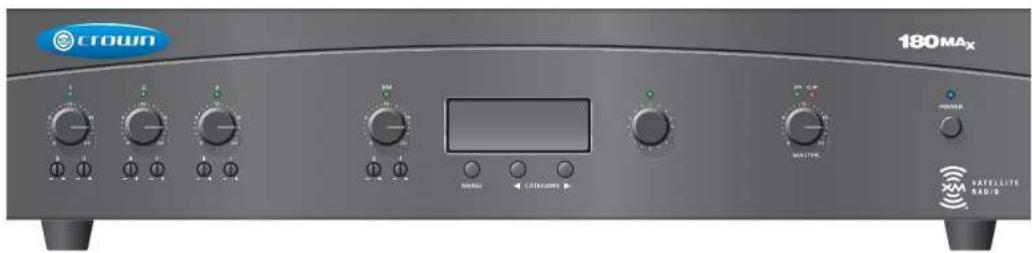
You have purchased the Crown® 180MAx tuner-mixer-amplifi er either by itself, or as part of a sys tom that includes loudspeakers. This manual covers the system and also applies to the 180MAx.
The Crown 180MAx System is the first integrated tuner-mixer-amplifier and loudspeaker system designed for commercial use. It is designed for easy installation by the user. Applications include restaurants, retail stores, coffee shops and other commercial establishments.
The system includes the Crown 180MAx tuner-mixer-amplifier, four JBI ^® Control ^® 1ST 2-way loudspeakers with built-in 70V transformers, an XM antenna and a wireless remote control.
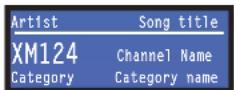
Built into the 180MAx is an XM Radio that receives satellite radio stations with digital sound quality. A front-panel LCD screen displays XM channel data (channel number, channel name, artist name, song title), 16 station presels and signal strength.
The unit also accepts signals from line, telephone, or microphone (phantom power included). Bass and treble controls allow the user to tailor the tone quality of the sound system. The priority ducking feature drops the volume of the background music when a microphone is used. A VOX threshold setting controls how loud the voice must be before ducking occurs.
Units can be linked to increase the number of input and output channels.
The built-in power amplifier provides 80 walls into 4-ohm outputs for 4-ohm or 8-ohm loudspeakers, and 80 watts into 25V/70V outputs. Current and thermal limiting protect the amplifier or and loud speakers from accidental overload.
1.1 Features
- Ideal for commercial use; can be installed by the user
• 4 inputs (each with a volume control) and one 80W amplifier output channel - Independent bass and treble controls
- Balanced Phoenix-type micr-line input; dual RCA stereo music inputs, touch-proof screw-terminal speaker outputs
• Programmable XM tuner with XM channel data display
• Priority ducking
• XM Tuner Music-On-Hold output - 180MAx System only: Four JBL Control 1ST 2-way loudspeakers with built-in 70V transformers, an XM antenna and a wireless remote control included
• Three-Year, No-Fault, Fully Transferable Warranty completely protects your Investment and guarantees its specifications
1 Welcome
1.2 Front Panel Controls and Indicators
A. Input Section
Tap to bottom
Input Signal Presence Indicator: Green LED, one for each input channel, illuminates when input signal exceeds -24 dBu (line) or -70 dBu (mic).
Input Volume Controls: Three detanted potentiometers with knobs. Input 1: Microphone/line (switchable): Inputs 2 and 3: Line.
Tone Controls: Bass and Treble non-detented recessed potentiometers on each input channel. Bass ± 10 dB at 100 Hz, Treble ± 10 dB at 10 kHz.
B. XM Tuner Input Section
Top to bottom:
Signal Presence Indicator (same as in Input section)
Input Volume Control (XM tuner volume)
Bass and Treble Controls (same as in Input section)
C. XM Tuner Display
LCD screen displays XM channel data (channel number, channel name, artist name, song title), 16 station presets and signal strength.
D. XM Tuner Scroll Knob
Lets you scroll through channels and select them.
E. Master Output Section
Top to bottom:
Output Signal Presence Indicator: Green LED Illuminales when output signal level exceeds 100 mV (45 dB below full power) from the 4-chm tap.
Clip Indicator: Red LED on output illuminates at threshold of audible distortion.
Output Volume Control: Delented potentiometer with knob.
F. AC Power Section
Top to bottom:
Power Indicator: Blue LED indicates power on. Power Switch: Pushbutton on-off switch.
G. XM Tuner Menu Controls
Left to right:
Menu Button: Selects Preset or Category mode (see Section 3.4).
Category Buttons: Scrolls through Categories (rock, classical, news, country, etc.).
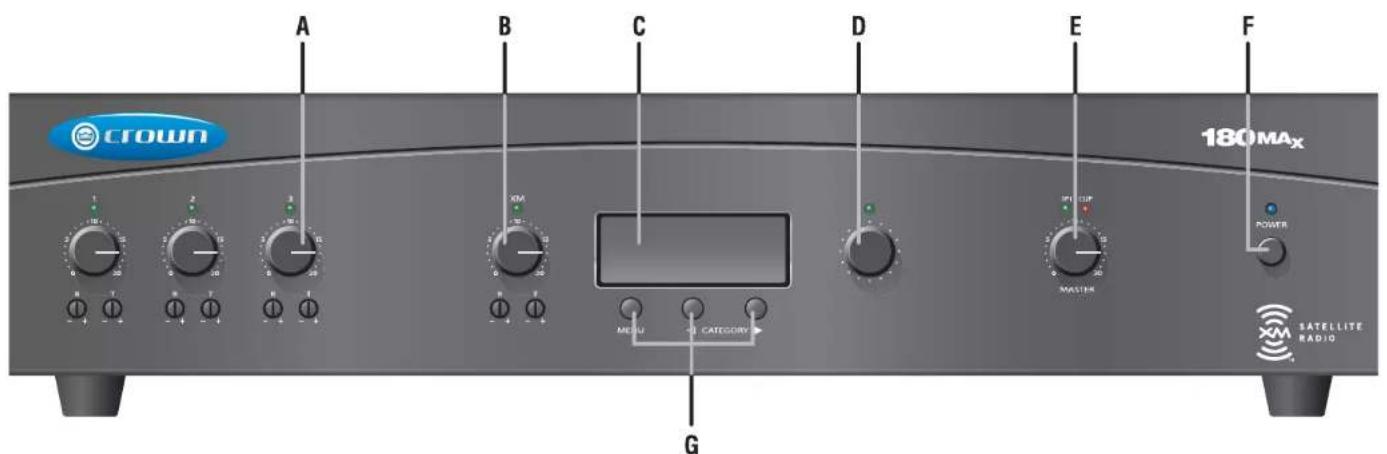
Figure 1.1 Front Panel Controls and Indicators
1 Welcome
1.3 Back Panel Controls and Connectors
H. Reset Switch
Resets the circuit breaker that protects the power supply.
I. Amplifier Output Connector
4-position terminal strip with COM (Common), 4 chms, 25V and 70V terminals. Use either 4-chms or constant-voltage terminals, but not both. Accepts up to 10 AWG crimp-on terminal forks. Non-touch cover included.
J. Preamp Line Out Connector
3-pin balanced Phoenix-type connector. Post master, pre-VCA. Level controlled by master volume control.
K. Link In/Dut Switch
With the Link Switch IN, any signal applied to the Amp Input con nector will be mixed with the input signal(s). With the Link Switch OUT, only the signal from the Amp Input Connector will appear at the amplifier output.
L. Amp Input Connector
3-pin Phoenix-type, high-impedance balanced. Used to link an additional mixer to the mixer-amplifier. Can be used to connect an external processor (see Section 2.9).
M. Output VCA Connector
3-pin Phoenix-type connector for one VCA control line of +10 VDC and ground. Compatible with Crown 1-VCAP module.
N. Music On Hold Section
Top to bottom, left half:
Source Switch: Switches between Input 3 or XIV, and routes the source to MOH 1V Line Out and MOH 1W connectors.
1V Level Control and Signal Presence Indicator: Trim pot adjusts level for Music-On-Hold 1V output. SPI II ashes when MOH signal is present.
IV Output (Isolated) Connector 3-pin Phoenix connector, 600-chm transformer-isolated output, provides Music-On-Hold signal of approximately y 1 volt.
Top to bottom, right half
1W Select Switch: Feeds 1W MOH signal either to 1 wall output or internal speaker.
1W Level Control: Trim pot adjusts level for Music-On-hole 1W output.
1W Output Connector: 3-pin Phoenix connector provides Music-On-Hold signal of approximately 1 watt.
0. Input 3 Section
Input Connector: 3-pin Phoenix-type, line level, balanced, one per input channel.
Dual BGA Input Connector
For stereo music signals, unbalanced, summed together, two connectors per input for inputs 1, 2 and 3. If required, both the mic/ line and RCA inputs may be used at the same time. The mic/ line gain switch does not affect the RCA gain, which is fixed relative to mic/ line. The mic/ line and RCA signals are mixed. Note: Other equip more connected to the RCA jacks should be connected to the same AC power source as the mixer-amp to avoid hum.
P. Input 2 Section
Same as Input 3 Section.
Q: Input 1 Section
Top to bottom
Phantom Power Switch: Turns phantom power on or off for Input 1.
Input Connector: 3-pin Phoenix-type, micro line level, balanced
Mic/line Switch: Selects mic-level or line-level signal for Input 1.
Dual RCA Input Connector: Same as Input 3 Section.
Tel Connector: Transformer-isolated 600-chm input, summed into Input 1 for paging from a telephone system.
R. AC Power Inlet
Detachable IEC.
S. Priority Ducking Section
Active Indicator: LED illuminates when VOX ducking is active.
VOX Threshold. Trim pot controls how loud the voice must be before ducking occurs. Can be set for no ducking.
Priority Connector: 3-pin Phoenix-type connector for push-to-talk mic switch. Contact closure activates ducking. Ducking does not affect Music-On-Hold outputs or stereo line out.
Priority Release Control: Trim pot adjusts release time of VOX ducking.
T. XM Radio Stereo Line Out Connector.
Dual RCA jacks for stereo music out of XM Radio tuner
U. XM Input Section
RS-232 Connector: Currently inactive, will be used for diagnostics.
XM Radic Antenna Input: Connects to the XM antenna cable.
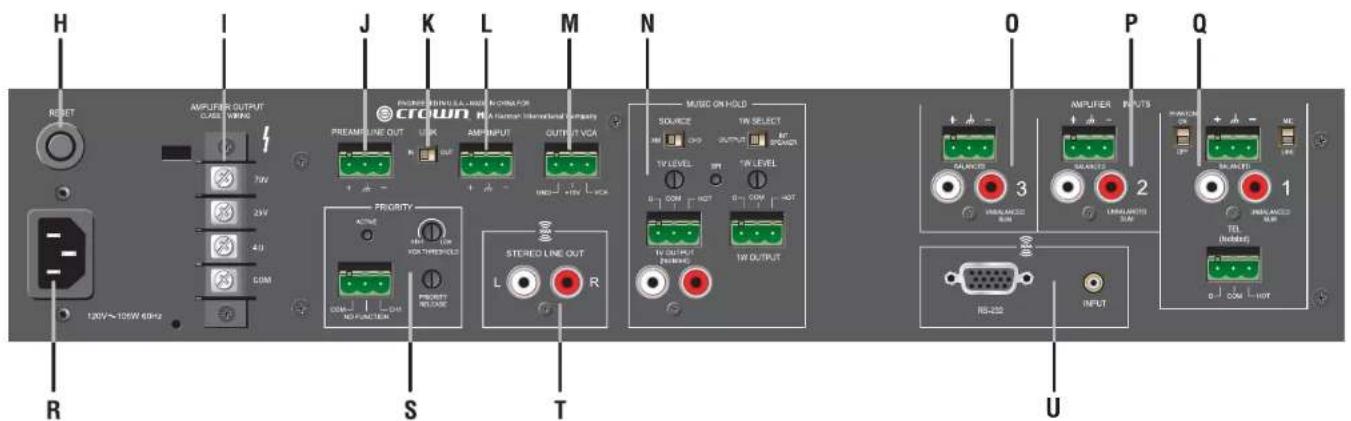
Operation Manual
Figure 1.2 Back Panel Controls,
Connectors and Indicators
2 Setup
2.1 Installation
CAUTION: Before you begin, make sure your 180MAx is disconnected from the power source, with the power switch in the "off" position and all level controls turned completely down (counterclockwise).
Use a standard 19-inch (48.3 cm) equipment rack (EIA RS-310B). See Figure 2.1 for amplifier dimensions.
You may also stack mixer-amps without using a cabinet, or you may place a single mixer-amp on a surface with 12 inches of air space around the unit for convection cooling.
NOTE: When transporting in a rack, mixer-amps should be supported at the front and back.
When using an equipment rack, do not mount units directly on top of each other. Allow 2 rack units (3.5 inches) between units for convection cooling. The side walls of the rack should be a minimum of two inches (5.1 cm) away from the amplifier sides, and the back of the rack should be a minimum of four inches (10.2 cm) from the amplifier back panel.
2.2 How to Attach Rack Ears
-
Locate the two rack cars and two rack-car screws supplied.
-
See Figure 2.2. Remove the two screws from each side of the chassis near the front.
-
Place a rack ear flush with the right front of the chassis.
-
Insert a screw that you removed into the bottom hole of the rack ear and chassis. Screw it in.
-
Insert a screw that you removed into the center hole of the rack ear and chassis. Screw it in.
-
Insert one of the supplied screws into the top hole of the rack ear and chassis. Screw it in.
-
Repeat steps 3-6 for the left side of the chassis.
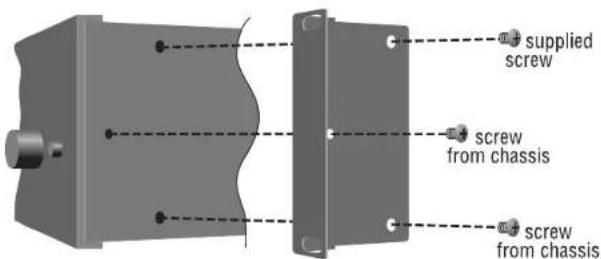
Figure 2.2 How to Connect Rack Ears
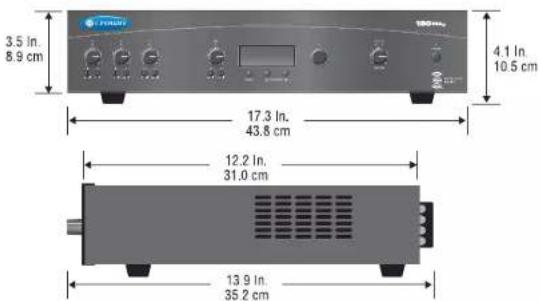
Figure 2.1 Dimensions
2 Setup
2.3 Choose Input Wire and Connectors
Crown recommends using pre-built or professionally wired balanced line (two-conductor plus shield), 22-24 gauge cables and connectors. Unbalanced line may also be used but may result in noise over long cable runs.
The 180MAx has two types of input connectors: Phoenix-type and RCA.
- Mic/Line Connectors and Amp Input Connectors: 3-pin Phoenix-type, balanced, one per input channel (Figure 2.3).
- Dual RCA Input Connector: For stereo music signals, unbalanced, summed together, two connectors per input for inputs 1, 2 and 3 (Figure 2.4).
- Transformer-isolated 600-ohm input: 3-pin Phoenix-type. Summed into Input 1 for paging from a telephone system. See Figure 2.5.
The 180MAx also has an XM antenna connector for use with the supplied XM radio antenna.
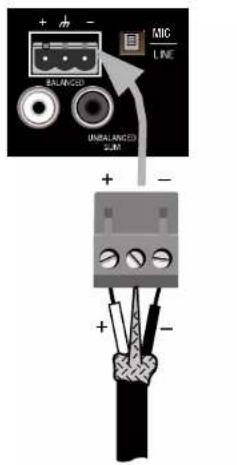
To mic or line-level source
Figure 2.3 Mic/Line Connectors and Amp Input Connectors
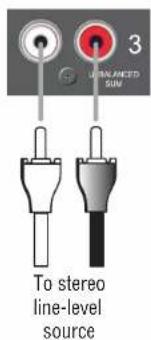
Figure 2.4 Dual RCA Input Connectors
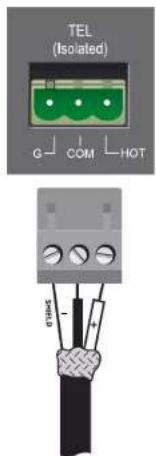
To telephone system interface/PBX output
Figure 2.5 Tel (Isolated) Connector Wiring to Telephone System Interface or PBX
2 Setup
2.4 Choose Output Wire and Connectors
Amplifier Output Connections: Crown recommends using pre-built or professionally wired, high-quality, two-conductor, heavy gauge speaker wire and connectors. You may use crimp-on spade lugs for your output connectors. Slip the cable lugs under the output screw terminals and tighten (Figure 2.7). To prevent the possibility of short-circuits, wrap or otherwise insu late exposed loudspeaker cable connectors. Cover the output connections with the supplied non-touch cover.
Using the guidelines below, select the appropriate size of wire based on the distance from amplifier to speaker. The wire sizes apply to the 4-ohm tap.
| Distance up to 25 ft. | Wire Size 16 AWG |
| 25-40 ft. | 14 AWG |
| 41-60 ft. | 12 AWG |
| 61-100 ft. | 10 AWG |
| 101-150 ft. | 8 AWG |
| 151-250 ft. | 6 AWG |
NOTE: Custom wiring should only be performed by qualified personnel. Class 2 wiring is required.
CAUTION: Never use shielded cable for output power wiring.
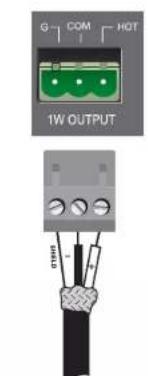
Use 2-conductor shielded cable and a 3-pin Phoenix-type connector for Preamp Line Output (Figure 2.7), and for MOH 1V or 1W output (Figure 2.8).
Use 1-conductor shielded cable and RCA plugs for the Stereo Line Out connector and the MOH 1V Line Output RCA Connector (Figure 2.9).
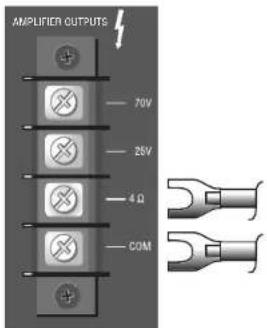
Figure 2.6 Amplifier Output Connections
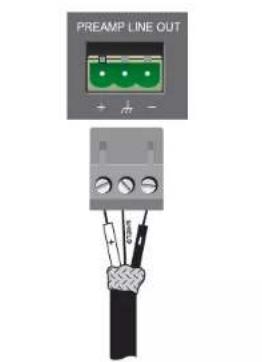
Figure 2.7 Connections to the Preamp Line Out Connector
To telephone system interface/PBX input
Figure 2.8 Connections to the MOH Line Output Phoenix Connector (1V or 1W Con nector)

Music-On-Hold Connections
You can play music from the XM radio over your phone line while the caller is on hold. Use one of the connectors below to connect the 180MAx to the Music-On-Hold input on your telephone system interface/PBX.
- MOH 1V Line Output Connector: 3-pin Phoenix connector, 600-ohm transformer-isolated output, provides Music-On-Hold signal of approximately 1 volt. See Figure 2.9.
- MOH 1W Line Output Connector: 3-pin Phoenix connector provides Music-On-Hold signal of approximately 1 watt. See Figure 2.9.
- MOH 1V Line Output RCA Connectors: Two RCA connectors (mono) for 1-volt Music-On-Hold output (in parallel with 600-ohm connectors, so they are isolated). See Figure 2.10.
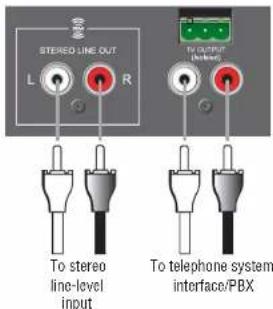
Figure 2.9 Connections to the Stereo Line Out Connector and the MOH Stereo Line Out Connector
2 Setup
2.5 Wire Your System
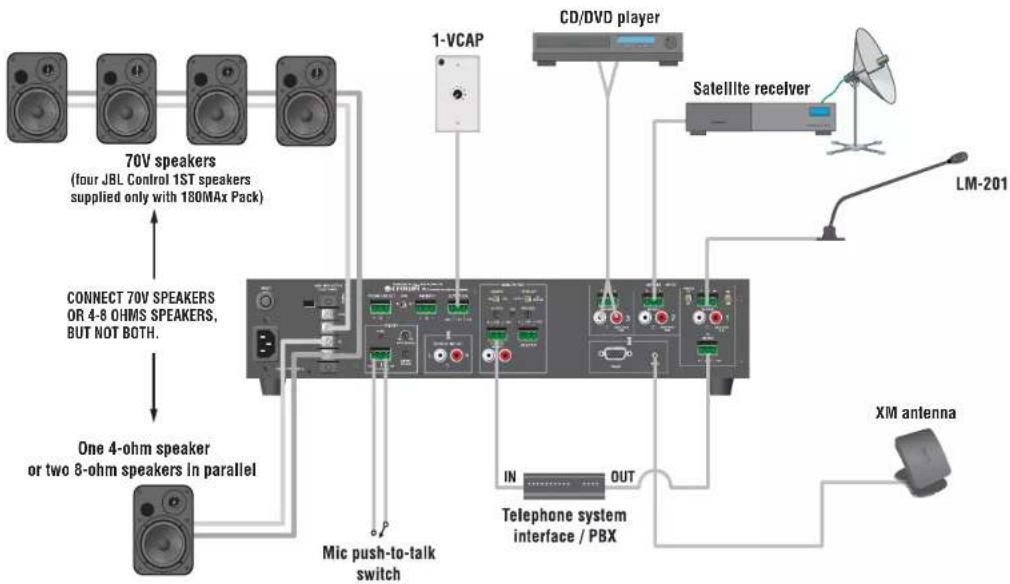
Typical input and output wiring is shown in Figure 2.11.
INPUTS: Connect microphones or balanced line-level sources to mixer-amplifier balanced inputs. Set Mic/Line switches accordingly. Connect unbalanced line-level signals to RCA input connectors.
OUTPUTS: Maintain proper polarity (+/-) on amplifier output connectors.
Connect the Amplifier or Output screw terminals to loudspeakers. Use terminals marked COM and 25V or 70V for constant-voltage loudspeaker loads, such as the JBL Control 1ST speaker included with the 180MAX Pack. Use terminals marked 4-ohms for one 4-ohm speaker or two 8-ohm speakers in parallel. Connect 70V speakers or 4-8 ohm speakers to the 180MAX, but not both, as this would over drive the amplifier.
Connect the COM terminal to speaker negative (−) lead; connect one of the other terminals to speaker positive (+) lead.
2.6 Phantom Power
Condenser mics require phantom power to operate. If you are using a condenser microphone with the 180MAx on input 1, turn on the Phantom Power Switch on the back of the mixer-amplifier. The microphone must be able to work on 15V phantom power, which the 180MAx mic input connector provides.
2.7 Link In/Out Switch
This switch (Figure 2.11) affects which signals are heard when another mixer is wired to the mixer-amplifier.
IN: Any signal applied to the AMP INPUT connector will be mixed with the input signal(s).
OUT: Only the signal from the AMP INPUT connector will appear at the amplifier output.
How to link another mixer to your mixer-amplifier:
Connect the extra mixer's LINE OUT connector to the mixer-amplifier's AMP INPUT connector. Set the Link switch to IN.
How to set up Music-On-Hold output:
Connect mixer-amp LINE OUT to Music-On-Hold input on telephone system Interface/PBX. Set the LINK SWITCH to IN.
How to set up a processing loop:
Connect mixer-amp LINE OUT to processor input. Connect processor output to mixer-amp AMP INPUT connector. Set the Link switch to OUT.
flowchart
graph TD
    A["70V speakers (four JBL Control 1ST speakers supplied only with 180MAx Pack)"] --> B["Connect 70V SPEAKERS OR 4-8 OHMS SPEAKERS, BUT NOT BOTH."]
    B --> C["One 4-ohm speaker or two 8-ohm speakers in parallel"]
    C --> D["Mic push-to-talk switch"]
    D --> E["Telephone system interface / PBX"]
    E --> F["IN"]
    E --> G["OUT"]
    F --> H["CD/DVD player"]
    G --> I["Satellite receiver"]
    H --> J["Satellite receiver"]
    I --> K["LM-201"]
    J --> L["XM antenna"]
Figure 2.10 Input and Output Wiring
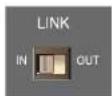
Figure 2.11 Link In/Out Switch
2 Setup
2.8 Remote Volume Control
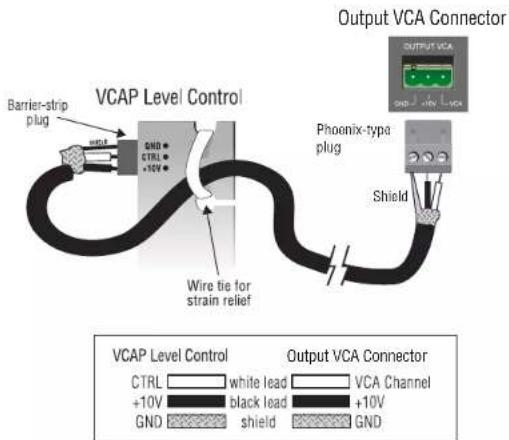
You can control the volume of each amplifier or channel remotely. To do so, locale the OUTPUT VCA connector on the back panel. Insert a 4-pin Phoenix-type cable connector into the OUTPUT VCA connector. Wire a Crown 1-VCAP or 4-VCAP level control to the Phoenix-type cable connector terminals as shown in Figure 2.12.
1-VCAP controls one channel; 4-VCAP controls up to four channels.
2.9 Mounting the Speakers (180MAx Pack Only)
JBL supplies a variety of wall mounts and ceiling mounts for the Control 1ST loudspeaker:
- MTC-1A Wall/Ceiling Mount (included with 180MAx Pack)
• MTC-2 Plus Wall/Ceiling Mount
• TC-7 American Microphone Stand Adapter
• MTC-B Wall Mount Bracket
For details, see http://www.jb/pro.com/pages/ricording/control.htm#Control1.
Figure 2.12 Wiring a 1-VCAP or 4-VCAP Level Control to the Output VCA Connector
3 Operation
3.1 Powering Up
- Turn off any equipment connected to the Line Out connectors.
- Plug the amplifier's power cord into a 3-wire grounded AC outlet.
- Turn down the input volume controls.
- Turn down the master volume control.
- Turn on the Power switch. The Power indicator should glow.
- Turn the input volume controls in use about 3/4 up.
- Turn up the master volume control(s) until the desired loudness or power level is achieved.
- Touch up the input levels as needed for equal loudness from each
microphone. - Turn on any equipment connected to the Line Out connectors.
If you ever need to make any wiring or installation changes, disconnect the
power cord.
3.2 Priority Ducking
If you want a microphone to duck (turn down) the background music, follow this procedure. On the back of the 180MAx,
- Connect a push-to-talk mic switch to the Priority Connector (Figure 3.1).
- While talking into a microphone, adjust the VOX Threshold control on the back of the unit. It controls how loud the voice must be before ducking occurs. The control can be set for no ducking. The Active Indicator will flash when ducking is active.
- Adjust the Priority Release control on the back of the unit. It adjusts the release time of the VOX ducking.
3.3 Music-On-Hold
On the back of the unit, adjust either the 1V or 1W MOH Level Control to obtain the desired level of Music-On-Hold on your phone system.
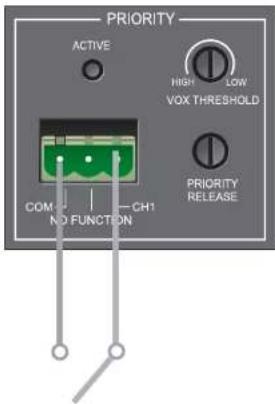
Figure 3.1 Priority Ducking Controls and Connectors
3 Operation
3.4 XM Satellite Radio Operation
COPYRIGHT NOTICE
It is prohibited to copy, decompile, disassemble, reverse engineer, or manipulate any technology incorporated in receivers compatible with the XM Satellite Radio system. Furthermore, the AMBE (R) voice compression software included in this product is protected by intellectual property rights including patent rights, copyrights, and trade secrets of Digital Voice Systems, Inc. The user of this or any other software contained in an XM Radio is explicitly prohibited from attempting to copy, decompile, reverse engineer, or disassemble the object code, or in any other way convert the object code into human-readable form. The software is licensed solely for use within this product.
OVERVIEW OF XM SATELLITE RADIO
Your 180MAx tuner-mixer-amplifier includes a high-fidelity, commercial XM satellite radio receiver. More than 160 channels of music, news, sports, comedy, talk, and entertainment are available with digital quality sound. XM offers 100% commercial-free music channels and over 2 million titles. For an up-to-date channel lineup, please visit www.xmra.dio.com.
The required basic monthly subscription is sold separately. Premium Channel is available at additional monthly cost. Installation costs and other fees and taxes, including a one-time activation fee may apply. The subscription fee is commercial only. All fees and programming subject to change. Channels with frequent explicit language are indicated by "XL." Channel blocking is available for XM radio receivers by calling 1-800-XMRADIO. Subscriptions subject to Customer Agreement available at xradio.com. XM is available only in the 48 contiguous United States. XM® is a registered trademark of XM Satellite Radio Inc. ©2005 XM Satellite Radio Inc. All rights reserved.
Using XM radio requires a monthly subscription from XM Satellite Radio. To subscribe, contact XM on the Web at www.xmradio.com or by phone at 1-800-XM-RADIO (or 1-800-967-2346).
3 Operation
INSTALLING THE ANTENNA
1. Connect the antenna.
Connect the included XM antenna to the XM antenna input on the back of the 150MAx.
You will be mounting the antenna near a south-facing wall. The antenna comes with 20 foot of cable. If that is net suffi client to reach the 180MAX, purchase a 50-foot cable extension kit. Up to two extensions can be used together for up to 120 total feet of cable. Alternatively, you can use custom lengths of 50 ohm RG58U, or obtain extension kits from third-party sources. For outdoor antenna installation options, go to www.xmradic.com
2. Turn on the 180MAx.
Verify the power indicator is illuminated and the display backlight is on.
If the message "CHECK ANTENNA" appears, check that the antenna con nector is tightly connected and that the antenna cable is not shorted.
3. Align the antenna.
For indoor installation on a fl at surface:
Set the antenna on its base on a 11 at horizontal surface, ideally near a south-facing wall, and near a window if possible.
Turn the base of the antenna so that the XM logo is lacing to the south if you are in the eastern half of the U.S. and to the south/southeast if you are in the western half of the U.S.
For outdoor installation:
See www.xmradio.com for third-party outdoor installation options.
For indoor wall mounting:
You will mount the antenna near a south-facing wall, and near a window if possible.
-
Insert four screws (not supplied) in the wall so they align with the holes in the base of the antenna.
-
Tilt the antenna fully back on the base.
-
Place the antenna base on the four screw heads with the antenna pivot at the top.
-
Pull down the base approximately 1/4 inch until the base is firmly secured. The XM logo will be upside down when the antenna is properly installed.
Operation Manual
4. Optimize the signal strength.
Have someone hold the antenna as you optimize the signal strength (described next).
A display will appear similar to the one below:
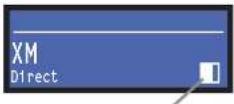
Signal-strength indicator
At the bottom right of the screen is a small box that indicates signal strength. Orient the antenna to achieve maximum signal strength (fi ll the box as much as possible).
If the antenna does not have a clear path to the satellites, the display will read "NO SIGNAL".
5. Sel the listening volume.
Turn up the XM input volume control until you hear the XM radio signal at a low volume. If the system is working, you will hear XM programming on channel 1 and you can proceed to activate the 180MAx.
6. Activate your XM account.
After verifying channel 1 audio, you must activate your XM account to access all XM channels. Commercial accounts must sign up for and activate under the terms of XM's Commercial Service.
First obtain the XM Radio ID number of your unit. Turn the Scroll knob until you see channel 0 on the LCD display and press the Scroll knob to select this channel, or press Direct Entry then 0 and OK on the remote control. The 8-digit XM Radio ID will appear in the top section of the display.
Record the 8-character ID in the space below, noting that letters I, O, S and F are not used and that the number zero has a line running diagonally through it.
XM Radio ID:
Activate your XM radio service by calling XM at 1-800-XM RADIO (1-800-967-2345). Commercial accounts cannot be activated via the Internet. A listener care representative will help you activate your unit. Customers should have their Radio ID ready; the Radio ID can be found by selecting channel C on the tuner with the Scroll Knob to the right of the LCD Display.
You can control the XM tuner by the 150MAX front-panel buttons or by the included remote control. If the power fails, the tuner will automatically return to its slate before power loss.
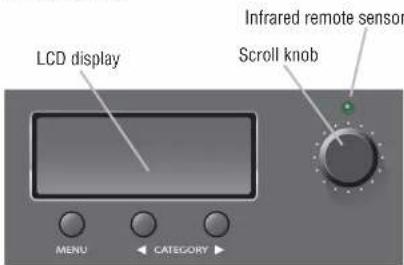
The XM tuner display and controls are shown below.
• The LCD display shows channel information.
- The Menu button selects Direct, Preset, or Category mode (explained later).
- The Category < > buttons select Categories (rock, country, jazz, news, etc.)
- The Scroll knob lets you scroll through the XM channels and select them (explained later).
Default Display
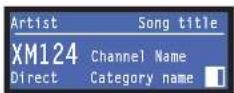
The default display shows the current channel number, channel name, Category name, artist name and song title. The word "Direct" appears at the bottom left of the screen. That means the tuner is in Direct mode: you can select channels directly from the remote control if you wish. You can also select channels using the front-panel controls.
3 Operation
To listen to a channel
- Turn the Scroll knob until you see the channel you want.
- Push the Scroll knob to listen to that channel.
To listen to a Preset channel
- Push the Menu button until you see "Presel" in the bottom left of the display.
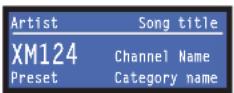
- Using the Scroll knob, scroll through presets 1-16. Press the Scroll Knob to select the desired preset.
To select channels by categories (musical genres)
*Category* means the type of programming offered on a channel, such as rock, country, jazz, news, etc.
- Press the Menu button until you see "Category" in the bottom left of the display.
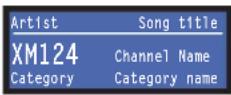
- In the bottom-right corner of the screen is the name of the current Category.
- Press a Category < or > button. The tuner will scroll through the Categories. When you see a Category that you want, press the Scroll knob.
- Turn the Scroll knob until you see a channel that you want to listen to. All the scrolling channels are in that same Category. Press the Scroll knob to listen to the channel.
XM front panel lock-out
- To activate front panel lock-out, press Category < and > buttons at the same time and release.
- "Lockout Enabled" will appear to confirm that the XM feature is locked on the front panel. You still can operate the remote control.
- To deactivate front panel lock-out, press Category < and > buttons at the same time and release.
- "Lockout Disabled" will appear to confirm that the XM feature is unlocked on the front panel.
XM Diagnostics mode
The diagnostic mode is useful for antenna installation and optimization of signal strength.
- Press Menu and Category < buttons at the same time and release.
- Scroll through the diagnostic mode using the Category < and > buttons.
3 Operation
To listen to a channel by direct entry
- Press the Direct Entry button on the remote control.
- Using the Digits 0-9, select the 1-, 2-, or 3-digit channel number you would like to access.
- Press OK.
To listen to a channel by scrolling through channels
- Press CH + to go to higher channels.
- Press CH - to go to lower channels.
- Press OK to confirm your channel selection.
To set up Preset channels
- Using direct entry or CH +/-, find the channel you would like to set as a preset, and press OK.
- For presets 0-9, hold the desired preset digit for 2 seconds. For presets 10-16, press 1, then hold the second digit (0 through 6) of the preset for 2 seconds.
- Repeat Steps 1-2 for the remaining Presets.
To listen to a Preset channel by direct entry
- For presets 0-9, press the desired preset digit you would like to recall.
- For presets 10-16, press 1, then the desired preset digit you would like to recall.
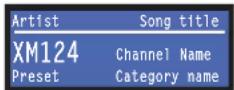
- The station will change.
To listen to a Preset channel by pressing Preset +/-
- Press PSET + or PSET - to go through presets 1 through 16.
- Press OK to listen to preset desired
To select channels by categories (musical genres)
"Category" means the type of programming offered on a channel, such as rock, country, jazz, news, etc.
- Press Category < or > on the remote to select the next or prior category. You will see "Category" in the bottom left of the display.
- Press CH+ or CH− to cycle through the channels.
- Press OK to select the desired channel.
To adjust XM radio volume
Press volume up or volume down to achieve the desired XM volume level. Note: MOH level, XM Stereo outputs, and XM input volume controls are affected by this volume control. The overall amplifier or volume is not affected by this volume control.
To mute the XM signal
Press Mute. "Mule" will flash in the display to notify you that audic is muted.
To adjust the LCD screen contrast
- On the remote, hold Volume down and press the Category > button.
- Adjust contrast up and down using the Scroll encoder.
- Press Menu to exit.
4 Troubleshooting
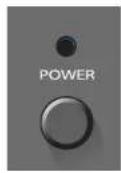
CONDITION: No power.
POSSIBLE REASON:
• The mixer-amplifier's Power switch is off.
- The mixer-amplifier is not plugged into the power receptacle.
- The mixer-amplifier's high-voltage power supply circuit breaker has tripped. Verify that the AC mains voltage is correct, then press the Reset button on the back panel.
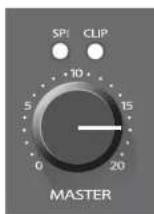
CONDITION: Distorted sound.
POSSIBLE REASON:
- Input signal level is too high. Turn down your input volume controls. NOTE: Your mixer-amplifi or should never be operated at a level which causes the Clip LED to illuminate constantly.
• Master volume level is too high. Turn it down to about 3/4 of maximum level.
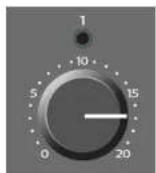
CONDITION: No sound.
POSSIBLE REASON:
- The amplifier or is in "fault" mode. A Fault status can be triggered when one of the amplifier's protection circuits is activated. First disconnect your speakers from the affected channel(s) one by one to determine if one of the loads is shorted. If an amplifier channel has a thermal fault, there will be no indication on the front panel, but the amp will recover after cooling. If operation does not return to normal after restarting your amp, press the Reset button on the back panel, or return mixer-amp to Crown or an authorized Crown Service Center for servicing.
- No input signal.
• Input signal level is very low.
Key:
LED OFF

LED ON

5 Specifications
| Minimum Guaranteed Power 180MAx | |
| 1 kHz with 0.5% THDMinimum guaranteed power per channel into 4 ohms or 25V/70V output 80W | |
| Performance | |
| Number of input channels 4 | |
| Number of power amplifiers 1 | |
| Input Sensitivity (volts RMS) for full output at maximum gainBalanced mic inputsBalanced line inputsRCA connectorsIsolated to telephone input | 3 mV800 mV400 mV75 mV |
| Frequency Response (at 1 watt from 4-ohm tap, 70 Hz - 19 kHz) ± 1 dB | |
| Frequency Response (at line out, 20 Hz to 20 kHz) ± 1 dB | |
| Power Bandwidth (at 4-ohm tap, 2 dB below maximum 1 kHz power) 50 Hz to 20 kHz with < 0.5% THD | |
| Signal to Noise Ratio (rel. to rated power, master volume at minimum) 85 dB | |
| Total Harmonic Distortion (THD) at rated power at 1 kHz < 0.5% | |
| DC Output Offset < ± 5 mV | |
| Input Impedance (nominal) Mic: 400 ohms. Line: 100 kilohms, | RCA: 50 kilohms, Telephone: 600 ohms |
| Crosstalk (all controls at '10') -70 dB at 1 kHz | |
| Line Output Level (nominal) | 1V into 10 kilohms |
| Phantom Power | 15 VDC |
| AC Line Voltages Available | 120V, 60 HzLine voltage tolerance +15%, -20% |
| Operating Temperature/Humidity | 0°C to 40°C at 95% relative humidity(non-condensing) |
| Storage Temperature | -20°C to 85°C |
| Construction | |
| Cooling | Convection cooled |
| Dimensions: Width, Height, Depth | Width (without rack ears): 17.3 in.(43.8 cm). Width(with rack ears): EIA Standard 10 in. W (EIA RS-310-B).Height (front panel): 3.5 in. (8.9 cm). Height (includinglee): 4.1 in. (10.5 cm). Depth (front panel to backpanel): 12.2 in. (31.0 cm). Depth (front of knobs to backof non-touch cover): 13.9 in. (35.2 cm). |
| Net Weight (180MAx tuner-mixer-amplifier only), Shipping Weight (complete system) | 20 lb (9.07 kg), 55 lb (24.8 kg) |
| JBL Control 1ST Loudspeaker Specifications | |
| Frequency Range | 80 Hz - 20 kHz |
| Recommended Power Range | 10-80W continuous average power. |
| Sensitivity | 89 dB/1W/1m. |
| Crossover Frequency | 4 kHz. |
| Low-Frequency Driver | 4 in. (100 m), shielded. |
| High-Frequency Driver | 0.5 in. (12 mm), titanium laminate, shielded. |
| 70V Tap | 20W |
| Finish | Black, Gray or White. |
| Dimensions (HxWxD) | 9 in. x 6-1/6 in. x 5-7/16 in. (228 mm x 155 mm x 139 mm). |
| Net Weight (each) | 6.1 lb (2.8 kg) |
6 Service
Crown amplifiers are quality units that rarely require servicing. Before returning your unit for servicing, please contact Crown Technical Support to verify the need for servicing.
This unit has very sophisticated circuitry which should only be serviced by a fully trained technician. This is one reason why each unit bears the following label:
CAUTION: To prevent electric shock, do not remove covers. No user serviceable parts Inside. Refer servicing to a qualified technician.
Complete the Crown Audio Factory Service Information form, in the back of this manual, when returning a Crown product to the factory or authorized service center. The form must be included with your product inside the box or in a packing slip envelope securely attached to the outside of the shipping carlon. Do not send this form separately.
Warranty is only valid within the country in which the product is purchased.
6.1 Worldwide Service
Service may be obtained from an authorized service center. (Contact your local Crown/Amron representative or our office for a list of authorized service centers.) To obtain service, simply present the bill of sale as proof of purchase along with the defective unit to an authorized service center. They will handle the necessary paperwork and repair.
Remember to transport your unit in the original factory pack.
6.2 US and Canada Service
Service may be obtained in one of two ways: from an authorized service center or from the factory. You may choose either. It is important that you have your copy of the bill of sale as your proof of purchase.
6.2.1 Service at a US or Canada Service Center
This method usually saves the most time and effort. Simply present your bill of sale along with the defective unit to an authorized service center to obtain service. They
will handle the necessary paperwork and repair. Remember to transport the unit in the original factory pack. A list of authorized service centers in your area can be obtained from Crown Factory Service, or online from http://www.crownaudio.com/support/servcent.htm.
6.2.2 Factory Service
Crown accepts no responsibility for non-serviceable product that is sent to us for factory repair. It is the owner's responsibility to ensure that their product is ser viceable prior to sending it to the factory. Serviceable product list is available at http://crownweb.crownintl.com/crownrma/. For more information, please contact us direct.
A Service Return Authorization (SRA) is required for product being sent to the factory for repair. An SRA can be completed online at www.crownaudio.com/support/factserv.htm. If you do not have access to the web, please call Crown's Customer Service at 574.294.8200 or 800.342.6939 extension 8205 in North America, Puerto Rico and the Virgin Islands only.
For warranty service, we will pay for ground shipping both ways in the United States. Contact Crown Customer Service to obtain prepaid shipping labels prior to sending the unit. Or, if you prefer, you may prepay the cost of shipping, and Crown will reimburse you. Send copies of the shipping receipts to Crown to receive reimbursement.
Your repaired unit will be returned via UPS ground. Please contact us if other arrangements are required.
6.2.3 Factory Service Shipping Instructions:
-
Service Return Authorization (SRA) is required for product being sent to the factory for service. Please complete the SRA by going to www.crownau.dio.com/support/factserv.htm. If you do not have access to our website, call 1.800.342.6939, exten sion 8205 and we'll create the SRA for you.
-
See packing instructions that follow.
-
Ship product to: CROWN AUDIO FACTORY SERVICE 1718 W MISHAWKA RD. ELKHART, IN 46517
-
Use a bold black marker and write the SRA number on three sides of the box.
- Record the SRA number for future reference. The SRA number can be used to check the repair status.
6.2.4 Packing Instructions
Important: These instructions must be followed. If they are not followed, Crown Audio, Inc. assumes no responsibility for damaged goods and/or accessories that are sent with your unit.
- Fill out and include the Crown Audio Factory Service Information sheet in the back of this manual.
- Do not ship any accessories (manuals, cords, hard ware, etc.) with your unit. These items are not needed to service your product. We will not be responsible for these items.
- When shipping your Crown product, it is important that it has adequate protection. We recommend you use the original pack material when returning the product for repair (Figure 9.1). If you do not have the original box, please call Crown at 800.342.6939 or 574.294.8210 and order new pack material. (Do not ship your unit in a wood or metal cabinet.)
- If you provide your own shipping pack, the mini mum recommended requirements for materials are as follows:
a. 275 P.S.I. burst test, Double-Wall carton that allows for 2-inch solid Styrofoam on all six sides of unit or 3 inches of plastic bubble wrap on all six sides of unit.
b. Securely seal the package with an adequate cartonscalingtape.
c. Do not use light boxes or "peanuts". Damage caused by poor packaging will not be covered under warranty.
Enclose the completed Crown Audio Factory Service Information form (or securely attach it to the outside of carton) and re-scal the shipping pack with a sturdy carton sealing tape.
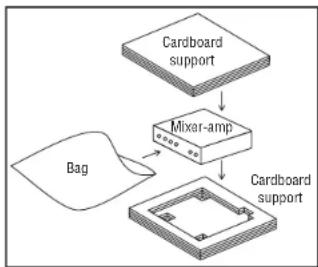
flowchart
graph TD
    A["Cardboard support"] --> B["Mixer-amp"]
    B --> C["Cardboard support"]
    D["Bag"] --> B
Figure 6.1 Packing. Put this assembly in carton.
6.2.5 Estimate Approval
Approval of estimate must be given within 30 days after being notified by Crown Audio Inc. Units still in the post session of Crown after 30 days of the estimate will become the property of Crown Audio Inc.
6.2.6 Payment of Non-Warranty Repairs
Payment on out-of-warranty repairs must be received within 30 days of the repair date. Units unclaimed after 30 days become the property of Crown Audio Inc.
If you have any questions, please contact Crown Factory Service.
Crown Factory Service
1718 W. Mishawaka Rd., Elkhari, Indiana 46517 U.S.A.
Telephone: 574.294.8200
800.342.6939 (North America, Puerto Rico, and Virgin Islands only)
Facsimile:
574.294.8301 (Technical Support) 574.294.8124 (Factory Service)
Internet:
http://www.crownaudio.com
7 Warranty

UNITED STATES & CANADA
SUMMARY OF WARRANTY
Crown International, 1718 West Mishawaka Road. Elkhart, Indiana 43517-4095 U.S.A. warrants to you, the ORIGINAL PURCHASER and ANY SUB SEQUENT OWNER of each NEW Crown product, for a period of three (3) years from the date of purchase by the original purchaser (the "warranty period") that the new Crown product is free of defects in materials and workmanship. We further warrant the new Crown product regardless of the reason for failure, except as excluded in this Warranty.
Warranty is only valid within the country in which the product was purchased.
ITEMS EXCLUDED FROM THIS CROWN WARRANTY
This Crown Warranty is in effect only for failure of a new Crown product which occurred within the Warranty Period. It does not cover any product which has been damaged because of any intentional misuse, accident, negligence, or loss which is covered under any of your insurance contracts. This Crown Warranty also does not extend to the new Crown product if the serial number has been defaced, altered, or removed.
WHAT THE WARRANTOR WILL DO
We will remedy any defect, regardless of the reason for failure (except as excluded), by repair, replacement, or refund. We may not elect refund unless you agree, or unless we are unable to provide replacement, and repair is not practical or cannot be timely made. If a refund is elected, then you must make the defective or malfunctioning product available to us free and clear of all hens or other encumbrances. The refund will be equal to
the actual purchase price, not including interest, insurance, closing costs, and other finance charges less a reasonable depreciation on the product from the date of original purchase. War ranty work can only be performed at our authorized service centers or at the factory. Warranty work for some products can only be performed at our factory. We will remedy the defect and ship the product from the service center of our factory within a reasonable time after receipt of the defective product at our authorized service center or our factory. All expenses in remedying the defect, including surface shipping costs in the United States, will be borne by us. (You must bear the expense of shipping the product between any for eign country and the port of entry in the United States including the return shipment, and all taxes, duties, and other customs fees for such for eign shipments.)
HOW TO OBTAIN WARRANTY SERVICE
You must notify us of your need for warranty service within the warranty period. All components must be shipped in a factory pack, which, if needed, may be obtained from us free of charge. Corrective action will be taken within a reasonable time of the date of receipt of the defective product by us or our authorized service center. If the repairs made by us or our authorized service center are not satisfactory, notify us or our authorized service center immediately.
DISCLAIMER OF CONSEQUENTIAL AND INCIDENTAL DAMAGES
YOU ARE NOT ENTITLED TO RECOVER FROM US ANY INCIDENTAL DAMAGES RESULTING FROM ANY DEFECT IN THE NEW CROWN PRODUCT.
THIS INCLUDES ANY DAMAGE TO ANOTHER PRODUCT OR PRODUCTS RESULTING FROM SUCH A DEFECT, SOME STATES DO NOT ALLOW THE EXCLUSION OR LIMITATIONS OF INCIDENTAL OR CONSEQUENTIAL DAM AGES, SO THE ABOVE LIMITATION OR EXCLUSION MAY NOT APPLY TO YOU.
WARRANTY ALTERATIONS
No person has the authority to enlarge, amend, or modify this Crown Warranty. This Crown Warranty is not extended by the length of time which you are deprived of the use of the new Crown product. Repairs and replacement parts provided under the terms of this Crown Warranty shall carry only the unexpired portion of this Crown Warranty.
DESIGN CHANGES
We reserve the right to change the design of any product from time to time without notice and with no obligation to make corresponding changes in products previously manufactured.
LEGAL REMEDIES OF PURCHASER
THIS CROWN WARRANTY GIVES YOU SPECIFIC LEGAL RIGHTS, YOU MAY ALSO HAVE OTHER RIGHTS WHICH VARY FROM STATE TO STATE. No action to enforce this Crown Warranty shall be commenced after expiration of the warranty period.
THIS STATEMENT OF WARRANTY SUPERSEDES ANY OTHERS CONTAINED IN THIS MANUAL FOR CROWN PRODUCTS. 9/07
7 Warranty

WORLDWIDE EXCEPT USA & CANADA
SUMMARY OF WARRANTY
Crown International, 1718 West Mishawaka Road, Elkhart, Indiana 46517-4095 U.S.A. warrants to you, the ORIGINAL PURCHASER and ANY SUB SEQUENT OWNER of each NEW Crown1 product, for a period of three (3) years from the date of purchase by the original purchaser (the "warranty period") that the new Crown product is free of defects in materials and workmanship, and we further warrant the new Crown product regardless of the reason for failure, except as excluded in this Warranty
Warranty is only valid within the country in which the product is purchased.
1 Note: If your unit bears the name "American," please substitute it for the name "Crown" in this warranty.
ITEMS EXCLUDED FROM THIS CROWN-WARRANTY
This Crown Warranty is in effect only for failure of a new Crown product which occurred within the Warranty Period. It does not cover any product which has been damaged because of any intentional misuse, accident, negligence, or loss which is covered under any of your insurance contracts. This Crown Warranty also does not extend to the new Crown product if the serial number has been delaced, altered, or removed.
WHAT THE WARRANTOR WILL DO
We will remedy any defect, regardless of the reason for failure (except as excluded). by repair, replacement, or refund. We may not elicit refund unless you agree, or unless we are unable to provide replacement, and repair is not practical or cannot be timely made. If a refund is elected, then you must make the defective or malfunctioning product available to us free and clear of all items or other encumbrances. The refund will be equal to the actual purchase price, not including interest, Insurance, closing costs, and other finance charges less a reasonable depreciation on the product from the date of original purchase. War rantly work can only be performed at our authorized service centers. We will remedy the defect and ship the product from the service center within a reasonable time after receipt of the defect five product at our authorized service center.
HOW TO OBTAIN WARRANTY SERVICE
You must notify your local Crown importer of your need for warranty service within the warranty period. All components must be shipped in the original box. Corrective action will be taken within a reasonable time of the date of receipt of the defective product by our authorized service center. If the repairs made by our authorized service center are not satisfactory, notify our authorized service center immediately.
DISCLAIMER OF CONSEQUENTIAL AND INCIDENTAL DAMAGES
YOU ARE NOT ENTITLED TO RECOVER FROM US ANY INCIDENTAL DAMAGES RESULTING FROM ANY DEFECT IN THE NEW CROWN PRODUCT. THIS INCLUDES ANY DAMAGE TO ANOTHER PRODUCT OR PRODUCTS RESULTING FROM SUCH A DEFECT.
WARRANTY ALTERATIONS
No person has the authority to enlarge, amend, or modify this Crown Warranty. This Crown Warranty is not extended by the length of time which you are deprived of the use of the new Crown product. Repairs and replacement parts provided under the terms of this Crown Warranty shall carry only the unexpired portion of this Crown Warranty.
DESIGN CHANGES
We reserve the right to change the design of any product from time to time without notice and with no obligation to make corresponding changes in products previously manufactured.
LEGAL REMEDIES OF PURCHASER
No action to enforce this Crown Warranty shall be commenced after expiration of the warranty period. THIS STATEMENT OF WARRANTY SUPERSEDES ANY OTHERS CONTAINED IN THIS MANUAL FOR CROWN PRODUCTS. 9/07

crown
PRODUCT REGISTRATION
Crown Audio, Inc.
1718 W. Mishawaka Rd
Elkhart, IN 46517-9439
Phone: 574-294-8000
Fax: 574-294-8329
www.crownaudio.com
Online registration is also available at http://crownweb.crownintl.com/webregistration.
Warranty is only valid within the country in which the product is purchased.
When this form is used to register your product, it may be mailed or faxed.
Crown Audio, Inc.
Fax: 574-294-8329
1718 W Mishawaka Rd
Elkhart IN 46517
Please note that some information is required. Incomplete registrations will not be processed. * Indicates required information.
OWNER'S INFORMATION - PLEASE PRINT
* First name: ____ Middle initial: ____ * Last name: ____
Company:
* Mailing address:
* City: ____ * State: ____ * Zip Code: ____
* Country: ____ E-mail address: ____
* Phone # (include area code): ____ Fax #: ____
PRODUCT INFORMATION
\* MODEL
e.g. IT8000, CDi1000, PCC160
\* SERIAL #
e.g. 8000000000
\* PURCHASE DATE
mo/day/yr
Product purchased from: *(Business/Individual) ____ Country: ____
Comments:
THIS PAGE INTENTIONALLY LEFT BLANK
Crown Audio Factory Service Information
Shipping Address: Crown Audio Factory Service, 1718 W. Mishawaka Rd., Elkhart, IN 46517
PLEASE PRINT CLEARLY
SRA #: (If sending product to Crown factory service.)
Model:
Serial Number:
Purchase Date:
PRODUCT RETURN INFORMATION
Individual or Business Name:
Phone 7: ____
Fax #:
E-Mail:
Street Address (please, no P.O. Boxes):
City:
State/Prov:
Postal Code:
Country:
Nature of problem
Other equipment in your system:
If warranty is expired, please provide method of payment. Proof of purchase may be required to validate warranty.
PAYMENT OPTIONS
☐ I have open account payment terms. Purchase order required. PO#: ____
□ COD
□ Credit Card (Information below is required; however if you do not want to provide this information at this time, we will contact you when your unit is repaired for the information.) Credit card information:
Type of credit card:
□ MaslerCard
□ Visa
□ American Express
□Discover
Type of credit card account:
□ Personal/Consumer
□ Business/Corporate
Card
Exp. date:
* Card ID #:
* Card ID # is located on the back of the card following the credit card #, in the signature area. On American Express, it may be located on the front of the card. This number is required to process the charge to your account. If you do not want to provide it at this time, we will call you to obtain this number when the repair of your unit is complete.
Name on credit card:
Billing address of credit card:
THIS PAGE INTENTIONALLY LEFT BLANK
THIS PAGE INTENTIONALLY LEFT BLANK

CROWN

A Harman International Company