Letter Band Phonics Jam - Educational toy Leap Frog - Free user manual and instructions
Find the device manual for free Letter Band Phonics Jam Leap Frog in PDF.


| Product Type | Educational Toy |
| Model | Letter Band Phonics Jam |
| Brand | LeapFrog |
| Recommended Age | 2-5 Years |
| Battery Requirements | 3 AA Batteries (not included) |
| Battery Life | Approximately 6 hours of continuous play |
| Dimensions (L x W x H) | 10.2 x 8.1 x 1.8 inches |
| Weight | 1.1 lbs (500 g) |
| Material | Plastic, ABS |
| Learning Modes | Phonics, Letter Names, Music, Quiz |
| Letters Included | 26 Letter Buttons A-Z |
| Music Styles | Rock, Pop, Jazz, Classical |
| Volume Control | 3 Levels (Low, Medium, High) |
| Auto Shut-off | Yes, after 60 seconds of inactivity |
| Cleaning Instructions | Wipe with a damp cloth; do not submerge |
| Safety Certifications | ASTM F963, CPSIA, CE |
| Language | English |
| Spare Parts Availability | Contact LeapFrog customer support |
| Repairability | Not user-serviceable; refer to manual |
Frequently Asked Questions - Letter Band Phonics Jam Leap Frog
User questions about Letter Band Phonics Jam Leap Frog
0 question about this device. Answer the ones you know or ask your own.
Ask a new question about this device
Download the instructions for your Educational toy in PDF format for free! Find your manual Letter Band Phonics Jam - Leap Frog and take your electronic device back in hand. On this page are published all the documents necessary for the use of your device. Letter Band Phonics Jam by Leap Frog.
USER MANUAL Letter Band Phonics Jam Leap Frog
text_image
Leap Frog®Letter Band Phonics Jam

text_image
LETTER BAND FRENCHA VAM ABELEDG HJKLMNO RSTUVX BORNAT LADY BARBERRYParent's Guide
This guide contains important information. Please keep it for future reference.
91-003480-005 US
INTRODUCTION
Thank you for purchasing the Letter Band Phonics Jam™! As your child explores the letter buttons in five different activities, they will learn about letters, the sounds these letters make, and words that start with these letters. Activities also build early spelling skills, introduce musical instruments and foster creativity.
26 Letter
Buttons
Carrying
Handle
Off/Low/High
Volume Switch
Mode Switch
Light-Up
Instrument Buttons
Light-Up Tad
Button
INCLUDED IN THIS PACKAGE
• One Letter Band Phonics Jam™
• One parent's guide
WARNING:
All packing materials, such as tape, plastic sheets, packaging locks, removable tags, cable ties and packaging screws are not part of this toy, and should be discarded for your child's safety.
NOTE:
Please keep this parent's guide as it contains important information.
ATTENTION.
Unlock the packaging locks:
① Rotate the packaging locks 90 degrees counterclockwise.
② Pull out the packaging locks and discard.

text_image
Diagram illustrating two directional arrows labeled ① and ②, indicating a process or movement in a mechanical or electrical component.GETTING STARTED
BATTERY INSTALLATION
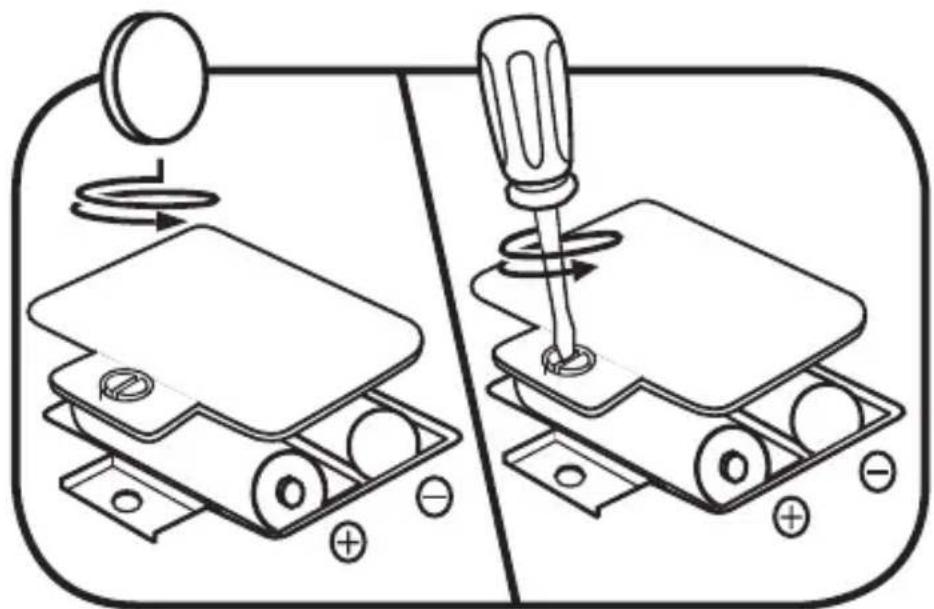
- Make sure the unit is turned OFF.
- Locate the battery cover on the back of the unit.
- Use a screwdriver to loosen the screw and open the battery cover.
- Install 2 new AA (AM-3/LR6) batteries into the battery box as illustrated. (The use of new alkaline batteries is recommended for maximum performance.)
- Replace the battery cover and tighten the screw to secure.
natural_image
Diagram showing two mechanical assembly steps: one with a rotating knob and the other with a screwdriver inserted into a housing (no text or symbols)
BATTERY NOTICE
- Use new alkaline batteries for maximum performance.
- Use only batteries of the same or equivalent type as recommended.
- Do not mix different types of batteries: alkaline, standard (carbon-zinc) or rechargeable, or new and used batteries.
- Do not use damaged batteries.
- Insert batteries with the correct polarity.
- Do not short-circuit the battery terminals.
- Remove exhausted batteries from the toy.
- Remove batteries during long periods of non-use.
- Do not dispose of batteries in fire.
- Do not charge non-rechargeable batteries.
- Remove rechargeable batteries from the toy before charging (if removable).
- Rechargeable batteries are only to be charged under adult supervision.
MISE EN GARDE
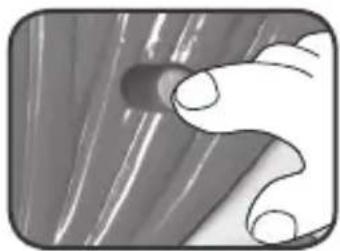
1. Off/Low/High Volume Switch
Slide from the OFF ( Ⓤ position to either Low ( Ⓤ ) or High ( Ⓤ ) to start playing and adjust volume.
natural_image
Close-up of a hand holding a small cylindrical object against a textured background (no text or symbols visible)2. Mode Switch
Move the switch to any position to play one of five activities.

text_image
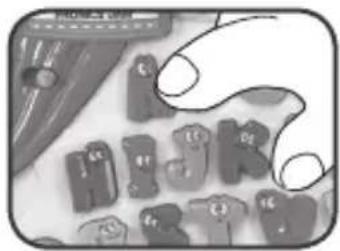
Hand interacting with a touchscreen control panel displaying icons for 'Mobile', 'Credit', and 'Affordable'3. Letter Buttons
Press the Letter Buttons to hear letters and letter sounds.
natural_image
Illustration of a hand holding a small object with multiple 3D letters (no text or symbols visible)4. Light-Up Instrument Buttons
Press the Light-Up Instrument Buttons to hear instrument sounds and music.

natural_image
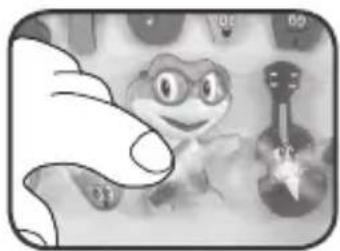
Close-up of a hand holding small transparent objects with no visible text or symbols5. Light-Up Tad Button
Press the Light-Up Tad Button for a fun phonics challenge or to hear phrases, guitar sounds and the ABC song.
natural_image
Illustration of a smiling frog character with a small dog nearby (no text or symbols)ACTIVITIES
1. Letters and Phonics
Press the Letter Buttons to learn letters and letter sounds. Press the Light-up Tad Button for a letters and phonics challenge.

natural_image
Close-up of a hand holding a computer mouse with control buttons (no readable text or symbols)2. Spelling
Follow along with Tad and press the correct Letter Buttons to spell three-letter words.
3. Game
Follow along with Tad to test letter and phonics skills.
4. Music
Press the Light-Up Instrument Buttons to hear how they sound and press the Letter Buttons to hear them sing their letter names and sounds.
5. Jukebox
Press the Light-Up Instrument Buttons to start their melodies and press the Letter Buttons to hear them sing along.
CARE & MAINTENANCE
- Keep the unit clean by wiping it with a slightly damp cloth.
- Keep the unit out of direct sunlight and away from any direct heat sources.
- Remove the batteries when the unit is not in use for an extended period of time.
- Do not drop the unit on a hard surface and do not expose the unit to excess moisture.
TROUBLESHOOTING
If for some reason the program/activity stops working, please follow these steps:
- Turn the unit OFF.
- Interrupt the power supply by removing the batteries.
- Let the unit stand for a few minutes, then replace the batteries.
- Turn the unit back ON. The unit will now be ready to play again.
- If the unit still does not work, replace with an entire set of new batteries.
Environmental Phenomena
The unit may malfunction if subjected to radio-frequency interference. It should revert to normal operation when the interference stops. If not, it may become necessary to turn the power OFF and back ON, or remove and reinstall the batteries. In the unlikely event of an electrostatic discharge, the unit may malfunction and lose memory, requiring the user to reset the device by removing and reinstalling the batteries.
If the problem persists, please call our Consumer Services Department at 1-800-701-5327 in the U.S. or email support@leapfrog.com. Creating and developing LeapFrog® products is accompanied by a responsibility that we take very seriously. We make every effort to ensure the accuracy of the information, which forms the value of our products. However, errors sometimes can occur. It is important for you to know that we stand behind our products and encourage you to contact us with any problems and/or suggestions you might have. A service representative will be happy to help you.
NOTE:
This equipment has been tested and found to comply with the limits for a Class B digital device, pursuant to Part 15 of the FCC Rules. These limits are designed to provide reasonable protection against harmful interference in a residential installation. This equipment generates, uses and can radiate radio frequency energy and, if not installed and used in accordance with the instructions, may cause harmful interference to radio communications. However, there is no guarantee that interference will not occur in a particular installation. If this equipment does cause harmful interference to radio or television reception, which can be determined by turning the equipment off and on, the user is encouraged to try to correct the interference by one or more of the following measures:
- Reorient or relocate the receiving antenna.
- Increase the separation between the equipment and receiver.
- Connect the equipment into an outlet on a circuit different from that to which the receiver is connected.
- Consult the dealer or an experienced radio/TV technician for help.
THIS DEVICE COMPLIES WITH PART 15 OF THE FCC RULES. OPERATION IS SUBJECT TO THE FOLLOWING TWO CONDITIONS: (1) THIS DEVICE MAY NOT CAUSE HARMFUL INTERFERENCE, AND (2) THIS DEVICE MUST ACCEPT ANY INTERFERENCE RECEIVED, INCLUDING INTERFERENCE THAT MAY CAUSE UNDESIRED OPERATION.
CAN ICES-3 (B)/NMB-3(B)
Supplier's Declaration of Conformity
Trade Name: LeapFrog
Model:
®
6033
Product name: Letter Band Phonics Jam ^TM
Responsible Party: LeapFrog Enterprises, Inc.
Address: 6401 Hollis Street, Suite 100,
Emeryville, CA 94608
Website: leapfrog.com
Caution: Changes or modifications not expressly approved by the party responsible for compliance could void the user's authority to operate the equipment.
CLASS 1 LED PRODUCT
Read our complete warranty policy online at leapfrog.com/warranty.
LeapFrog Enterprises, Inc., a subsidiary of VTech Holdings Limited.
TM & © 2018 LeapFrog Enterprises, Inc.
All rights reserved.



text_image
Leap Frog®Visit our website for more information about our products, downloads, resources and more.
leapfrog.com