LeapPad Jr. - Tablet Leap Frog - Free user manual and instructions
Find the device manual for free LeapPad Jr. Leap Frog in PDF.


| Product Type | Children's Learning Tablet |
| Brand | Leap Frog |
| Model | LeapPad Jr. |
| Dimensions (W x H x D) | 6.5 x 8.5 x 1.2 inches (165 x 216 x 30 mm) |
| Weight | 1.2 lbs (544 g) |
| Power Source | 4 AA batteries (not included) or optional AC adapter |
| Battery Life | Up to 6 hours of continuous play |
| Display | 5-inch color touchscreen with stylus |
| Storage | 1 GB internal memory |
| Connectivity | USB 2.0 for computer connection |
| Age Range | 3 to 6 years |
| Main Functions | Educational games, e-books, learning apps, art studio, music player |
| Content | Pre-loaded with 10+ learning apps and e-books; expandable via cartridge slot |
| Safety Features | BPA-free materials, rounded edges, parental controls for screen time |
| Maintenance | Clean with a soft, dry cloth. Do not use liquids or abrasive cleaners. |
| Spare Parts Available | Replacement stylus, screen protector, carrying case |
| Warranty | 1-year limited warranty |
| Included in Box | LeapPad Jr. tablet, stylus, USB cable, quick start guide |
| Repairability | User-replaceable batteries; other repairs by qualified service center |
| Environmental | RoHS compliant, recyclable packaging |
Frequently Asked Questions - LeapPad Jr. Leap Frog
User questions about LeapPad Jr. Leap Frog
0 question about this device. Answer the ones you know or ask your own.
Ask a new question about this device
Download the instructions for your Tablet in PDF format for free! Find your manual LeapPad Jr. - Leap Frog and take your electronic device back in hand. On this page are published all the documents necessary for the use of your device. LeapPad Jr. by Leap Frog.
USER MANUAL LeapPad Jr. Leap Frog
Get Started and Download Your Included Learning Apps
Read all the Operating & Important Safety Instructions before using LeapPad® Jr.
Get started in 6 easy steps!
- Pull out the strip from the backup battery located on the bottom of product to enable the real-time clock.
- POWER UP and turn on your LeapPad® Jr. by inserting batteries and creating your player profiles (up to 3).
- SET UP your device by installing the LeapFrog Connect Application at leapfrog.com/connect.
- REGISTER your device by creating a LeapFrog parent account.
- DOWNLOAD your included learning games and apps.
- PLAY & LEARN! Your child's LeapPad® Jr. is now ready.
NOTE: The LeapFrog Connect application and download apps may take 20-30 minutes to download with a high-speed Internet connection.
Get your included learning apps when you complete device set-up! Visit leapfrog.com/support for additional tips and FAQs.

Important Safety Instructions:
Please read all the Important Safety Instructions prior to using LeapPad® Jr.. Failure to follow these safety instructions could result in fire, electric shock, or other injury or damage to LeapPad® Jr. or other property.
! ACCESSORIES: Please read all safety instructions for any accessories or other products before using with LeapPad® Jr.. LeapFrog is not responsible for the operation of third-party accessories or their compliance with safety and regulatory standards.
CAUTION: Routinely check this toy for proper and safe condition. If there is any damage or broken parts, remove toy from use.
WARNING: The USB Cord or AC Adapter could be a strangulation hazard. Not for children under 3 years.
CAUTION: If for any reason the screen (display) is fractured or cracked, immediately remove this product from use.
PROTECT YOUR HEARING: Long-term exposure to loud sounds, at high volume, may result in permanent hearing loss. When using headphones or ear buds, it is recommended that the product is listened to at lower volumes for shorter periods of time. Set the volume while in a quiet environment; turn the volume down if you cannot hear people speaking near you. Limit the listening time to 90 minutes, followed by a quiet period. The louder the volume, the less time required before your hearing may be affected. If you experience ringing in your ears or hear muffled speech, stop listening and have your hearing checked.
WARNING: It is rare but possible for seizures to be triggered by light flashes or patterns. Play/watch in a well-lit room and take 10- to 15-minute breaks every hour.
BATTERY NOTICE
- Use new alkaline batteries for maximum performance.
- Use only batteries of the same or equivalent type as recommended.
- Do not mix different types of batteries: alkaline, standard (carbon-zinc) or rechargeable, or new and used batteries.
- Do not use damaged batteries.
- Insert batteries with the correct polarity.
- Do not short-circuit the battery terminals.
- Remove exhausted batteries from the toy.
- Remove batteries during long periods of non-use.
- Do not dispose of batteries in fire
- Do not dispose of batteries in fire.
- Do not charge non-rechargeable batteries.
- Remove rechargeable batteries from the toy before charging (if removable).
- Rechargeable batteries are only to be charged under adult supervision.
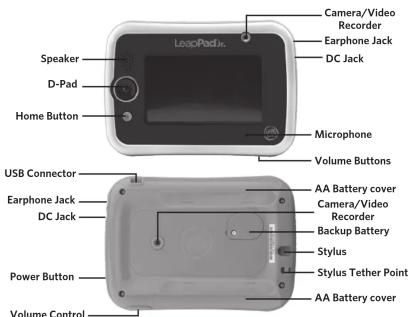
Parent Settings
Parent Settings allows you to control your child's play on these interactive LeapPad® Jr. features:
- Child profile—Easily manage permissions and profile information or add a new profile. - Device Settings—Manage settings like time, date and more.
If you change your 4-digit parent lock-code, please connect the device to LeapFrog Connect so your changes can be saved to your account. Parent Settings can be accessed from the Sign In screen by pressing the Parent Settings icon to log in with your parent lock. Alternatively, you can log in via the Settings icon on the Home Bar of the child's Home Screen.
Forgetting or resetting your parent lock code
If you have forgotten your 4-digit parent lock code you can look it up in the leapfrog.com Parent Account you created during device set-up and registration. If you need to reset your parent lock, you can do it from the device or reference the FAQ section for more information.
Operating Instructions
For indoor, dry-location use only. Do not use the product near a sink or other wet locations. Take care not to spill food or any kind of liquid on this product as it may render it inoperable and not serviceable. In case the unit does get wet, unplug all cables and turn it OFF. Allow to dry thoroughly before reusing. Do not attempt to dry with a hair dryer or other heat source. Do not re-connect to the AC outlet if wet or damaged.
WARNING: This product contains a Button or Coin Cell Battery. A swallowed Button or Coin Cell Battery can cause internal chemical burns in as little as two hours and lead to death. Dispose of used batteries immediately. Keep new and used batteries immediately. Keep new and used batteries away from children. If you think barriers might have been swallowed or placed inside any part of the body, seek immediate medical attention.
Repairing or Modifying LeapPad ^® Jr.
Never attempt to repair or modify as LeapPad ^® Jr. does not contain any user-serviceable parts. Service should only be provided by LeapFrog Enterprises, Inc.
If the product has been in contact with liquids, punctured, or subjected to a severe impact or fall, immediately remove this product from use and contact LeapFrog Consumer Services.
For service information, go to: www.leapfrog.com/support
AC Adapter Safety
CAUTION: Use AC Adapter with 6V DC output, center positive, with suitable plug.
WARNING: Not suitable for children under 3 years. Misuse any transformer/AC Adapter can cause electric shock.
(Note: The word "transformer" is sometimes substituted for the word "adapter."
Use AC Adapter with 5 - 6V DC output with 3.5mm/1.3mm and center positive DC plug.) Connection of the transformer to the wall outlet should be performed only by an adult or child 8+ years of age.
- The transformer is not intended to be used as a toy, and the use of the transformer shall be under the full supervision of parents.
- As with all electrical products, precautions should be observed during handling and use to prevent electrical shock.
- The power adapter may become warm during normal use. Always allow adequate ventilation and use care when handling the power adapter.
- Do not connect or disconnect with wet hands.
- The transformer should be periodically examined for conditions that may result in the risk of fire, electrical shock or injury to persons, such as damage to the cord, plug, blades, housing or other parts, and in the event of such conditions, the transformer must not be used until the damage is repaired. The cord of this transformer cannot be replaced; if the cord is damaged, dispose of the transformer in accordance with your local electrical product recycling regulations.
Unplug the USB Cord or the AC Adapter if any of the following conditions exist:
- The USB cord or the power cord or plug has become frayed or damaged.
- It is exposed to rain, liquid, or excessive moisture.
• Enclosure has become damaged. - The toy is only to be connected to Class II equipment bearing the following symbol ☐
Avoid prolonged exposure to extreme temperatures and direct sunlight. Operate in places with temperatures ranging from 5°C (40°F) and 38°C (100°F). Do not leave the product in your car as the temperatures in parked cars can exceed the acceptable storage temperature. Exposure to extreme temperatures can result in shortened battery life or cause the product to temporarily stop working.
Handle with care. To avoid injury, damage to this product or other property, avoid dropping and never disassemble, crush, puncture, microwave, incinerate, insert foreign objects or paint the product. Clean your hands before handling the product if they have been exposed to suntan lotions or other chemicals.
Cleaning. Disconnect all cords before cleaning. Clean the product with a slightly damp cloth (cold water). Do not use soap, detergent or other chemicals. Never submerge the unit in water. Allow to dry thoroughly before re-use.
Do not connect to computer or the AC Wall outlet if wet or damaged.
Battery Installation
• Make sure the tablet is turned off.
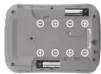
- Slide the battery covers to open the battery door,
then remove the covers.
- Insert 4 AA alkaline batteries as shown in image2, batteries not included
- Make sure to replace the battery covers.
1

2
Backup Battery Replacement
• Make sure the tablet is turned off.
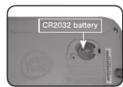
- Locate the backup battery cover on the back of the tablet,
then open it with a screwdriver as shown on the image to the right.
- Insert one CR2032 battery in the battery compartment with the + side facing up.

③
4
- Make sure to securely replace the backup battery cover.
To clean USB cord or disconnect it from computer or wall and clean with a cloth dampened with water. Do not immerse in water or use soap or other chemicals. Allow to dry before reusing, Do not connect USB cord to computer or to outlet if wet or damaged.
FCC Compliance Statement
This device complies with part 15 of the FCC rules. Operation is subject to the following two conditions: (1) this device may not cause harmful interference, and (2) this device must accept any interference received, including interference that may cause undesired operation.
Supplier's Declaration of Conformity
Trade Name
LeapFrog®
6053
Product name:
LeapPad® Jr.
Responsible party.
6401 Hollis Street Suite 100 Emeryville CA 94608
leapfrog.com
Note: This equipment has been tested and found to comply with the limits for a Class B digital device, pursuant to part 15 of the FCC Rules.
These limits are designed to provide reasonable protection against harmful interference in a residential installation.
This equipment generates, uses and can radiate radio frequency energy and, if not installed and used in accordance with the instructions, may cause harmful interference to radio communications. However, there is no guarantee that interference will not occur in a particular installation. If this equipment does cause harmful interference to radio or television reception, which can be determined by turning the equipment off and on, the user is encouraged to try to correct the interference by one or more of the following measures:
- Reorient or relocate the receiving antenna.
- Increase the separation between the equipment and receiver.
- Connect the equipment to an outlet on a circuit different from that to which the receiver is connected.
- Consult the dealer or an experienced radio/TV technician for help.
Caution: Changes or modifications not expressly approved by the party responsible for compliance could void the user's authority to operate the equipment.
This product demonstrated EMC compliance using compliant peripheral devices and shielded cables between system components. It is important that you use compliant peripheral devices and shielded cables to reduce the possibility of causing interference to radios, televisions, and other electronic devices.
USB Cable. The USB cable provided with this product complies with FCC and other regulatory Emission limits. If using other than the provided USB cable, please note that in order not to exceed FCC and other regulatory emissions limits, a shielded cable must be used.
Environmental Phenomena
The unit may malfunction if subjected to radio-frequency interference. It should revert to normal operation when the interference stops. If not, it may become necessary to turn the power OFF and then back ON.
In the unlikely event of an electrostatic discharge, the unit may malfunction and lose memory, requiring the user to reset the device by turning the power OFF and then back ON.
Recycling
For information on how this product might be recycled, visit www.leapfrog.com/recycle or call (800) 701-5327.
Copyrighted Software
Certain software included in this product contains copyrighted software that is licensed under the General Public License (GPL). A copy of that license is included below in this document. Anyone may obtain from us the complete corresponding source code for the software covered by the GPL for a period of three years after our last shipment of this product by contacting LeapFrog customer service at support@leapfrog.com.
Please write "GPL source code for LeapPad® Jr." in the subject line of your email. We reserve the right to charge a reasonable fee to cover the costs of shipping and the physical media on which the source code is loaded.
GNU GENERAL PUBLIC LICENSE
Version 2 June 1991
Copyright © 1989, 1991 Free Software Foundation, Inc.
SI Franklin Street, Fifth Floor, Boston, MA 0210-1301, USA
Everyone is permitted
The licenses for most software are designed to take away your freedom to share and change it. By contrast, the GNU General Public License is intended to guarantee your freedom to share and change free software—to make sure the software is free for all its users. This General Public License applies to most of the Free Software Foundation's software and to any other program whose authors commit to using it. (Some other Free Software Foundation software is covered by the GNU Lesser General Public License instead,) You can apply it to your programs, too. When we speak of free software, we are referring to freedom, not price. Our General Public Licenses are designed to make sure that you have the freedom to distribute copies of free software (and charge for this service if you wish), that you receive source code or can get it if you want it, that you can change the software or use pieces of it in new free programs and that you know you can do these things.
To protect your rights, we need to make restrictions that forbid anyone to deny you these rights or to ask you to surrender the rights. These restrictions translate to certain responsibilities for you if you distribute copies of the software, or if you modify it. For example, if you distribute copies of such a program, whether gratis or for a fee, you must give the recipients all the rights that you have. You must make sure that they too receive or can get the source code. And you must show them these terms so they know their rights.
We protect your rights with two steps: (1) copyright the software, and (2) offer you this license which gives you legal permission to copy, distribute and/or modify the software. Also, for each author's protection and ours, we want to make certain that everyone understands that there is no warranty for this free software. If the software is modified by someone else and passed on, we want its recipients to know that what they have is not the original, so that any problems introduced by others will not reflect on the original authors' reputations. Finally, any free program is threatened constantly by software patents. We wish to avoid the danger that redistributors of a free program will individually obtain patent licenses, in effect making the program proprietary. To prevent this, we have made it clear that any patent must be licensed for everyone's free use or not licensed at all.
The precise terms and conditions for copying, distribution and modification follow.
TERMS AND CONDITIONS FOR COPYING, DISTRIBUTION AND MODIFICATION
-
This License applies to any program or other work which contains a notice placed by the copyright holder saying it may be distributed under the terms of this General Public License. The "Program," below, refers to any such program or work, and a "work based on the Program" means either the Program or any derivative work under copyright law: that is to say, a work containing the Program or a portion of it, either verbatim or with modifications and/or translated into another language. (Hereinafter, translation is included without limitation in the term "modification"). Each licensee is addressed as "you." Activities other than copying, distribution and modification are not covered by this License; they are outside its scope. The act of running the Program is not restricted, and the output from the Program is covered only if its contents constitute a work based on the Program (independent of having been made by running the Program). Whether that is true depends on what the Program does.
-
You may copy and distribute verbatim copies of the Program's source code as you receive it, in any medium, provided that you conspicuously and appropriately publish on each copy an appropriate copyright notice and disclaimer of warranty; keep intact all the notices that refer to this License and to the absence of any warranty; and give any other recipients of the Program a copy of this License along with the Program. You may charge a fee for the physical act of transferring a copy, and you may at your option offer warranty protection in exchange for a fee.
-
You may modify your copy or copies of the Program or any portion of it, thus forming a work based on the Program, and copy and distribute such modifications or work under the terms of Section 1 above, provided that you also meet all of these conditions: a) You must cause the modified files to carry prominent notices stating that you changed the files and the date of any change
b) You must cause any work that you distribute or publish, that in whole or in part contains or is derived from the Program or any part thereof, to be licensed as a whole at no charge to all third parties under the terms of this License.
c) If the modified program normally reads commands interactively when run, you must cause it, when started running for such interactive use in the most ordinary way, to print or display an announcement including a concurrent copyright notice and a notice that there is no warranty (or else, saying that you provide a warranty) and that users may redistribute the program under these conditions, and telling the user how to view a copy of this License. (Exception: if the Program itself is interactive but does not normally print such an announcement, your work based on the Program is not required to print an announcement.) These requirements apply to the modified work as a whole. If identifiable sections of that work are not derived from the Program, and can be reasonably considered independent and separate works with respect to the same section of the project. The implementation of the modified program is not recommended to distribute the same sections as part of a whole which is a complete basis based on the Program, the distribution of the whole must be on the terms of this License, whose permissions for other licenses extend to the entire whole, and thus to each and every part regardless of who wrote it.
Thus, it is not the intent of this section to claim rights or contest your rights to work written entirely by you; rather, the intent is to exercise the right to control the distribution of derivative or collective works based on the Program. In addition, mere aggregation of another work not based on the Program with the Program (or with a work based on the Program) on a volume of a storage or distribution medium does not bring the other work under the scope of this License.
- You may copy and distribute the Program (or a work based on it, under Section 2) in object code or executable form under the terms of Sections 1 and 2 above provided that you also do one of the following:
a) Accompany it with the complete corresponding machine-readable source code, which must be distributed under the terms of Sections 1 and 2 above on a medium customarily used for software interchange; or.
b) Accompany it with a written offer, valid for at least three years, to give any third party, for a charge no more than your cost of physically performing source distribution, a complete machine-readable copy of the corresponding source code, to be distributed under the terms of Sections 1 and 2 above on a medium customarily used for software interchange; or c) Accompany it with the information you received as to the offer to distribute corresponding source code. (This alternative is allowed only for noncommercial distribution and only if you received the program in object code or executable form with such an offer, in accord with Subsection b above.)
The source code for a work means the preferred form of the work for making modifications to it. For an executable work, complete source code means all the source code for all modules it contains, plus any associated interface definition files, plus the scripts used to control compilation and installation of the executable. However, as a special exception, the source code distributed need not include anything that is normally distributed (in either source or binary form) with the major components (compiler, kernel, and so on) of the operating system on which the executable runs, unless that component itself accompanies the executable.
If distribution of executable or object code is made by offering access to copy from a designated place, then offering equivalent access to copy the source code from the same place counts as distribution of the source code, even though third parties are not compelled to copy the source along with the object code.
-
You may not copy, modify, sublicense or distribute the Program except as expressly provided under this License. Any attempt otherwise to copy, modify, sublicense or distribute the Program is void, and will automatically terminate your rights under this License. However, parties who have received copies, or rights, from you under this License will not have their licenses terminated so long as such parties remain in full compliance.
-
You are not required to accept this License, since you have not signed it. However, nothing else grants you permission to modify or distribute the Program or its derivative works. These actions are prohibited by law if you do not accept this License. Therefore, by modifying or distributing the Program (or any work based on the Program), you indicate your acceptance of this License to do so, and all its terms and conditions for copying, distributing or modifying the Program or works based on it.
-
Each time you redistribute the Program (or any work based on the Program), the recipient automatically receives a license from the original licensor to copy, distribute or modify the Program subject to these terms and conditions. You may not impose any further restrictions on the recipients' exercise of the rights granted herein. You are not responsible for enforcing compliance by third parties to this License.
-
If, as a consequence of a court judgment or allegation of patent infringement or for any other reason (not limited to patent issues), conditions are imposed on you (whether by court order agreement or otherwise) that contradict the conditions in this License, they do not excuse you from the conditions of this License. If you cannot distribute so as to satisfy simultaneously your obligations under this License and/or otherwise, you should not apply to the provisions of the rights of any such authority. If you may not permit royalty-free redistribution of the Program by all those who receive copies directly or indirectly through you, then the only way you could satisfy both it and this License because to be transferred entirely from distribution of the Program. If any portion of this section is held invalid or未能forable under any particular circumstance, the balance of the section is intended to apply and the section as a whole of the rights of any such authority. If you may have a copy of such authority, you shall not apply to the provisions of any such authority, or any other party's rights claim or to context validity of any such claims; this section has the sole purpose of protecting the integrity of the free software distribution system, which is implemented by public license practices. Many people have made generous contributions to the wide range of software distributed through that system in reliance on consistent application of that system; it is up to the author/Donor to decide if the company holds a majority share in this document will not conform to its own permission to change. This section is intended to make completely clearly clear what is believed to be a consequence of the rest of this License.
-
If the distribution and/or use of the Program is restricted in certain countries either by patents or by copyrighted interfaces, the original copyright holder who places the Program under this License may add an explicit geographical distribution limitation excluding those countries, so that distribution is permitted only in or among countries not thus excluded. In such case, this License incorporates the limitation as if written in the body of this License.
-
The Free Software Foundation may publish revised and/or new versions of the General Public License from time to time. Such new versions will be similar in spirit to the present version, but may differ in detail to address new problems or concerns. Each version is given a distinguishing version number. If the Program specifies a version number of this License which applies to it and "any later version", you have the option of following the terms and conditions either of that version or of any later version published by the Free Software Foundation. If the Program does not specify a version number of this License, you may choose any version ever published by the Free Software Foundation.
-
If you wish to incorporate parts of the Program into other free programs whose distribution conditions are different, write to the author to ask for permission. For software which is copyrighted by the Free Software Foundation, write to the Free Software Foundation: we sometimes make exceptions for this. Our decision will be guided by the two goals of preserving the free status of all derivatives of our free software and of promoting the sharing and reuse of software generally.
NO WARRANTY 11. BECAUSE THE PROGRAM IS LICENSED FREE OF CHARGE. THERE IS NO WARRANTY FOR THE PROGRAM, TO THE EXTENT PERMITTED BY APPLICABLE LAW. EXCEPT WHEN OTHERWISE STATED IN WRITING THE COPYRIGHT HOLDERS AND/OR OTHER PARTIES PROVIDE THE PROGRAM 'AS IS WITHOUT WARRANTY OF ANY KIND, EITHER EXPRESSED OR IMPLIED, INCLUDING, BUT NOT LIMITED TO, THE IMPLIED WARRANTIES OF MERCHANTABILITY AND FITNESS FOR A PARTICULAR PURPOSE. THE ENTIRE RISK AS TO THE QUALITY AND PERFORMANCE OF THE PROGRAM IS WITH YOU. SHOULD THE PROGRAM PROVE DEFECTIVE, YOU ASSUME THE COST OF ALL NECESSARY SERVICING, REPAIR OR CORRECTION.
- IN NO EVENT UNLESS REQUIRED BY APPLICABLE LAW OR AGREED TO IN WRITING WILL ANY COPYRIGHT HOLDER, OR ANY OTHER PARTY WHO MAY MODIFY AND/OR REDISTRIBUTE THE PROGRAM AS PERMITTED ABOVE, BE LIABLE TO YOU FOR DAMAGES, INCLUDING ANY GENERAL, SPECIAL, INCIDENTAL OR CONSEQUENTIAL DAMAGES ARISING OUT OF THE USE OR INABILITY TO USE THE PROGRAM (INCLUDING BUT NOT LIMITED TO LOSS OF DATA OR DATA BEING RENDERED INACCURATE OR LOSSES SUSTAINED BY YOU OR THIRD PARTIES OR A FAILURE OF THE PROGRAM TO OPERATE WITH ANY OTHER PROGRAMS), EVEN IF SUCH HOLDER OR OTHER PARTY HAS BEEN ADVISED OF THE POSSIBILITY OF SUCH DAMAGES.
LeapFrog Enterprises Inc., a subsidiary of VTech Holdings Limited.
TM & © 2018 LeapFrog Enterprises, Inc. All rights reserved. Printed in China.
leapfrog.com/leappad
Recommended for children ages 3+ years.
LeapFrog Enterprises, Inc.
6401 Hollis Street, Suite 100, Emeryville, CA 94608
510-420-5000
TM & © 2018 LeapFrog Enterprises, Inc.
All rights reserved.
Printed in China.
91-003547-003
- Get Started and Download Your Included Learning Apps
- Get started in 6 easy steps!
- Important Safety Instructions:
- BATTERY NOTICE
- Parent Settings
- Parent Settings allows you to control your child's play on these interactive LeapPad® Jr. features:
- Forgetting or resetting your parent lock code
- Operating Instructions
- Repairing or Modifying LeapPad ® Jr.
- AC Adapter Safety
- Unplug the USB Cord or the AC Adapter if any of the following conditions exist:
- Battery Installation
- Backup Battery Replacement
- To clean USB cord or disconnect it from computer or wall and clean with a cloth dampened with water. Do not immerse in water or use soap or other chemicals. Allow to dry before reusing, Do not connect USB cord to computer or to outlet if wet or damaged.
- FCC Compliance Statement
- Environmental Phenomena
- Recycling
- Copyrighted Software
- GNU GENERAL PUBLIC LICENSE
- Everyone is permitted
- TERMS AND CONDITIONS FOR COPYING, DISTRIBUTION AND MODIFICATION
- Recommended for children ages 3+ years.
Brand : Leap Frog
Model : LeapPad Jr.
Category : Tablet