GH705 - Headphones Mad Dog - Free user manual and instructions
Find the device manual for free GH705 Mad Dog in PDF.


| Product Type | Wired Over-Ear Headphones |
| Model | GH705 |
| Brand | Mad Dog |
| Dimensions (approx.) | 18 × 15 × 7 cm (folded) |
| Weight | 250 g |
| Connectivity | 3.5 mm wired jack |
| Frequency Response | 20 Hz – 20 kHz |
| Impedance | 32 Ω |
| Sensitivity | 100 dB |
| Cable Length | 1.2 m |
| Microphone | Built-in, omnidirectional |
| Controls | Volume, play/pause, call |
| Design | Foldable, adjustable headband, padded ear cups |
| Color Options | Black |
| Care & Cleaning | Wipe with soft dry cloth; clean ear pads with mild soap |
| Safety | Do not use at high volume for prolonged periods; avoid traffic |
| Spare Parts & Repairability | Replaceable ear pads and cable; contact manufacturer |
| General Information | User manual available in PDF; 9 pages |
Frequently Asked Questions - GH705 Mad Dog
User questions about GH705 Mad Dog
0 question about this device. Answer the ones you know or ask your own.
Ask a new question about this device
Download the instructions for your Headphones in PDF format for free! Find your manual GH705 - Mad Dog and take your electronic device back in hand. On this page are published all the documents necessary for the use of your device. GH705 by Mad Dog.
USER MANUAL GH705 Mad Dog
natural_image
Black and white photo of a headboard headphones with foam cover (no visible text or symbols)SŁUCHAWKI
GH705
Instrukcja obsługi
i warunki gwarancji
GH705
HEADPHONES
Operating Manual
& Warranty Terms

MAD DOG
WPROWADZENIE
INSTALACJA
OBSŁUGA
UWAGA! JAKOŚĆ REDUKCJI HAŁASU UZALEŻNIONA JEST OD USTAWIEŃ DŹWIĘKU NA KOMPUTERZE I KOMUNIKATORZE.
UWAGA! W CELU OCHRONY SŁUCHU, PRZED ZAŁOŻENIEM SŁUCHAWEK UPEWNIJ SIĘ, ŻE GŁOŚNOŚĆ JEST USTAWIONA NA ODPOWIEDNIM, KOMFORTOWYM POZIOMIE.
Thank you for the trust you have placed in us when you purchased your Mad Dog device.
We are convinced that this high quality device will provide you with a lot of joy and satisfaction during its use.
PLEASE CAREFULLY READ AND FOLLOW THE OPERATING MANUAL!
This device is intended for domestic or other non-commercial use.
The manufacturer will not be held liable for damages resulting from improper or non-compliant use.
MAIN FEATURES
- Self-adjusting headband
- LED backlight
- Sensitive, length-adjustable mic
- Vibration function
- Sound 7.1 via
- USB 2.0 Compatibility
SPECIFICATION
- Microphone: Yes
• Speaker impedance: 20Ω±15%
• Frequency response: 20Hz - 20KHz - Membrane diameter: 50mm
• Volume: 115 +/-3dB - Connectivity: USB
CONTENTS OF THE BOX
- MAD DOG GH705 headphones
- User manual and warranty conditionsi
• Device with USB 2.0 port
- OS Windows 10; 11
REQUIREMENTS
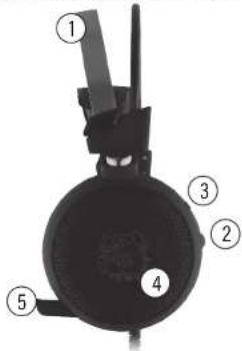
PRODUCT DESCRIPTION
- Self-adjusting headband
- +/- Volume control
- Vibration function button
- LED backlight
- Microphone
INSTALLATION
- Plug the USB plug into the USB socket of the computer. The device should be detected automatically.
- In order to use the full functionality of the headphones, you need to download the driver, which can be found at our website at: https://maddog.pl/wsparcie
-
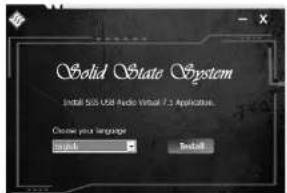
After downloading the driver, double-click the installation file: "USB_Virtual7_1_Setup_x32".
-
Select e.g. English, connect the headphones to the USB port on your computer and select "Install":
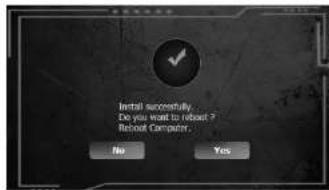
- After installation, you will be asked whether to restart the computer - "Do you want to reboot?, select 'Yes" to restart the computer and turn on the headphone driver.
OPERATION
- Launch the driver using the icon in the bottom taskbar, recently added programs or shortcut: The interface with default settings will appear:
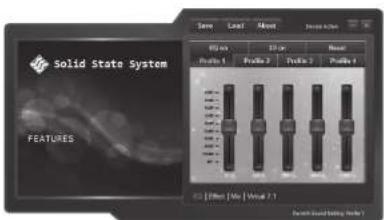
- Click "EQ on" to enable/disable Equalizer (sound frequency changes).
- Click "3D on" to enable/disable the 3D sound effect.
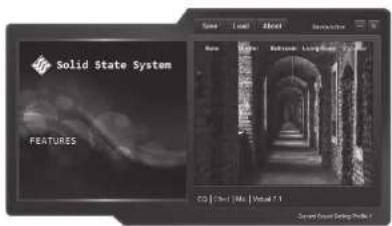
- Click "SoundField" to enable /disable the sound effect of different environments: None; Theater; Bathroom; Living Room; Corridor.
-
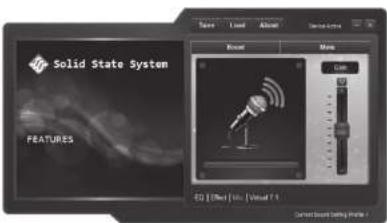
Click "mic" to go to the microphone settings:
-
Gain.
- Mute.
- Custome.
- Click "Virtual" 7.1 to set the surround sound function:
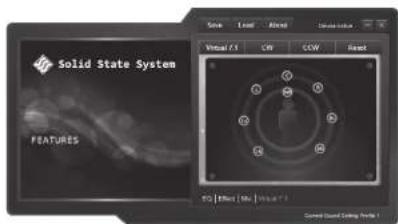
- CW: the virtual speakers rotate clockwise.
- CCW: the virtual speakers rotate counterclockwise.
- Reset: Resets the position of the virtual speakers to the default settings.
- Save: Saves the current settings in INI format.
- Load: Loads an INI file with previously saved settings.
Click "ENC" - (Environment voice cancelling) to reduce ambient noise during the conversation using the slider:
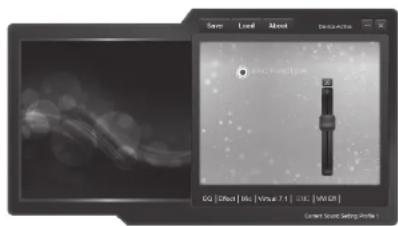
CAUTION! THE QUALITY OF NOISE REDUCTION DEPENDS ON THE SOUND SETTINGS ON THE COMPUTER AND THE COMMUNICATOR.
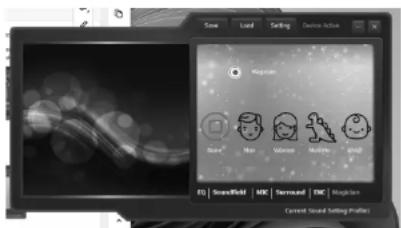
- Click „Magician“ to change the voice sound effect to the following during the call:
- None.
- Monster.
- Man.
- Child.
- Girl.
CAUTION! TO PROTECT YOUR HEARING, MAKE SURE THE VOLUME IS SET TO A COMFORTABLE LEVEL BEFORE PUTTING THE HEADPHONES ON.
ECO-FRIENDLY AND ENVIRONMENTALLY
This device is marked, in accordance with Directive 2012/19/EU of the European Parliament and of the Council of 4 July 2012 on waste electrical and electronic equipment (WEEE), with the symbol of a crossed-out waste container:

Do not dispose of the device marked with this symbol together with household waste.14 For disposal return the device to your local waste treatment and disposal facility or contact your local authorities.
YOU CAN HELP PROTECT THE ENVIRONMENT!
Proper handling of waste electrical and electronic equipment contributes to avoiding harmful consequences for human health and the environment resulting from the presence of hazardous components and improper storage and processing of such equipment.
HEADPHONES WARRANTY CONDITIONS
- ART-DOM Sp. z o.o. with its registered office in Łódź (92-402) at ul. Zakładowa 90/92 National Court Register Number 0000354059 (Guarantor) guarantees that the purchased device is free from physical defects. The warranty covers only defects resulting from the causes inherent in the item sold (manufacturing defects).
- A disclosed defect will be removed at the Guarantor's expense within 14 days from the date of reporting the damage to the authorized service or point of sale.
- In exceptional cases, e.g. the need to import spare parts from their manufacturer, the repair period may be extended up to 30 days.
- The warranty period for the user is 24 months from the date of delivery of the goods.
- The goods are intended for use only in the conditions of an individual household.
- The present warranty does not cover:
a. damage caused by using the device in a manner inconsistent with the user manual,
b. mechanical, chemical or thermal damage,
c. repairs and modifications made by companies or persons that were not authorized to do so by the manufacturer,
d. parts that are easy to use or consumables such as: batteries, bulbs, fuses, filters, knobs, shelves, accessories,
e. installation, maintenance, inspection, cleaning, unlocking, removal of contaminants and instruction.
-
The Guarantor will select the mode of defect removal at its own discretion. Removal of a confirmed defect of the device will take place through warranty repair or replacement of the device. The Guarantor may perform repairs when the buyer requests replacement or the Guarantor may perform replacements when the buyer requests repair, if bringing the goods (device) into conformity in accordance with the granted warranty in the manner selected by the buyer is impossible or would require excessive costs at the part of Guarantor. In particularly justified cases, if both repair and replacement are impossible or would require excessive costs for the Guarantor, the Guarantor may refuse to bring the goods into compliance with the granted warranty and propose another way to settle the warranty claim.
-
The exchange of goods is made at the point of sale at which the goods were purchased (replacement or refund) or an authorized service point, if it offers such service (replacement). The returned device must be complete, without mechanical damage. Failure to comply with these conditions may result in failure to accept the warranty claim.
-
In the event of non-compliance of the goods with the sales contract, the buyer is entitled by law to legal protection measures on the part and at the expense of the seller, and the warranty does not affect these legal protection measures.
- The warranty is valid in Poland.
- The condition for the warranty repair or replacement of the device is the presentation of proof of purchase and the use of the goods in accordance with the information contained in the user manual.
CAUTION! DAMAGE OR REMOVAL OF THE RATING PLATE FROM THE DEVICE MAY RESULT IN WARRANTY BEING DEEMED VOID.