GK910W - Keyboard Mad Dog - Free user manual and instructions
Find the device manual for free GK910W Mad Dog in PDF.


| Product Type | Keyboard |
| Model | GK910W |
| Brand | Mad Dog |
| Connection Type | Wired USB |
| Dimensions (L x W x H) | 440 x 130 x 25 mm |
| Weight | 600 g |
| Power Source | USB bus power |
| Key Type | Membrane |
| Number of Keys | 104 (US layout) |
| Multimedia Keys | Yes, dedicated keys for media control |
| Compatible Operating Systems | Windows 7/8/10/11, macOS, Linux |
| Cable Length | 1.5 m |
| Wrist Rest | Not included |
| Backlight | None |
| Usage | Office, home, daily typing |
| Maintenance & Cleaning | Use a soft, dry cloth to clean the surface. Avoid liquid cleaners. |
| Safety | Keep away from liquids and extreme temperatures. Unplug before cleaning. |
| Spare Parts & Repairability | Not repairable by user; contact Mad Dog support for issues. |
Frequently Asked Questions - GK910W Mad Dog
User questions about GK910W Mad Dog
0 question about this device. Answer the ones you know or ask your own.
Ask a new question about this device
Download the instructions for your Keyboard in PDF format for free! Find your manual GK910W - Mad Dog and take your electronic device back in hand. On this page are published all the documents necessary for the use of your device. GK910W by Mad Dog.
USER MANUAL GK910W Mad Dog
natural_image
Stylized white dog head logo on black background, no text or symbols presentMAD DOG
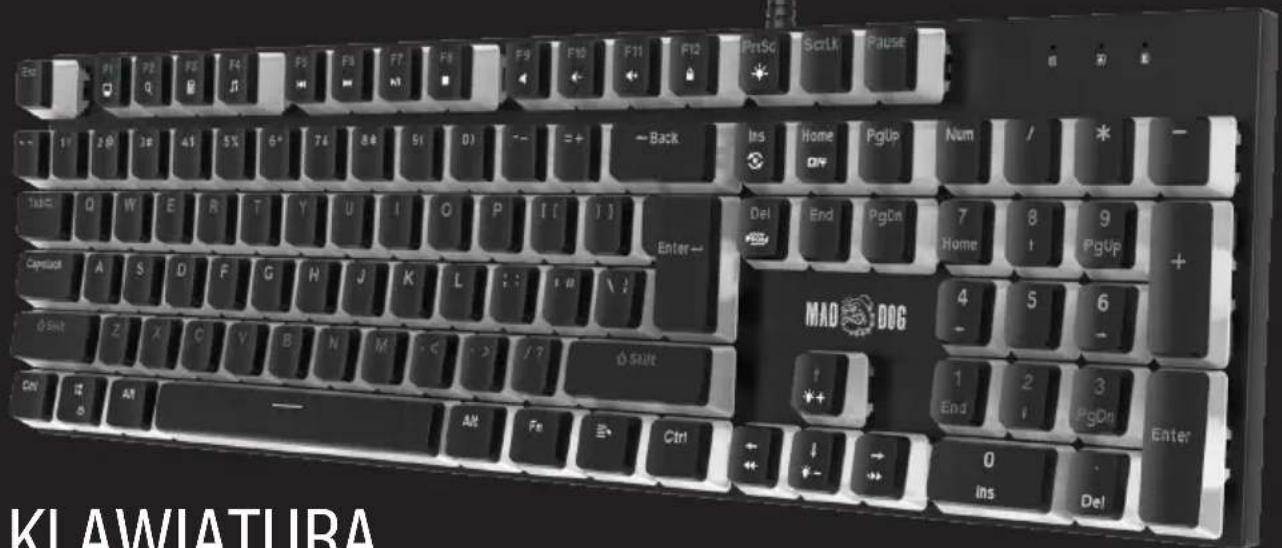
KLAWIATURA
GAMINGOWA RGB
GK910K/GK910W
Instrukcja obsługi
i warunki gwarancji
RGB GAMING
KEYBOARD
GK910K/GK910W
Operating manual
and warranty conditions
WARUNKI BEZPIECZEŃSTWA I ZAGROŻENIA
| Fn+1= (FPS) ASDW ↑↓←→ ESC | |
| Fn+2= (CF) | ASDWRGQEB 1-5 PrtSc Ctrl Shift Alt Space Tab F1-F3 Home End PgUp PgDn |
| Fn+3= (COD) QWERTASDFGCV 1-7 Ctrl Shift | |
| Fn+4= (LOL) QWERASDF 1-7 | |
| Fn+5= (QQ race) WRASD Ctrl Alt Shift ↑↓←→ |
SAFETY AND HAZARD CONDITIONS
Please carefully read the present operating manual before using the device.
- Do not interfere with the design of the device.
- Do not expose the device to excessively high or low temperatures: below 0^ C or above 40^ C.
- One shall not use the device in dusty rooms and do not store it near or on hot surfaces.
- Do not expose the device to severe shocks.
- Any repairs should be ordered from the manufacturer, an authorized service centre or a person with appropriate qualifications.
- To prevent damage to the keyboard, it is not recommended to consume food and beverages directly above the device.
- Do not use the keyboard with excessive force, as this may shorten its service life.
- Do not immerse the device in water.
FOREWORD
Thank you for the trust you have placed in us by purchasing the Mad Dog brand device.
We are convinced that it is a high quality device and will provide you with a lot of joy and satisfaction during its use.
PLEASE CAREFULLY READ AND FOLLOW THE OPERATING MANUAL!
This device is intended for domestic or other use, not related to commercial purposes.
The manufacturer will not be held liable for damages resulting from improper use or misuse.
MAIN PRODUCT CHARACTERISTICS
- GK910K - black/GK910W - white
- USB-A connector
- RGB backlight
- Changing key functions
- N-key Rollover: no limit on the number of keys pressed simultaneously
- Compatible with Windows 7/8/10/11
- Dimensions: 471 × 214 × 32 ± 0.5mm
- Gateron G Pro 3.0 RED switches
DESCRIPTION AND FUNCTION
1. Installation
Connect the keyboard directly to the computer's USB-A port. The computer will automatically configure the device and the basic functions of the keyboard should work properly. In order to take advantage of the full functionality of the keyboard, download and install the software from the following website: https://maddog.pl/sterowniki/
2. Entering hotkeys
Multimedia key functions
| Fn+F1 My Computer | |
| Fn+F2 Searching | |
| Fn+F3 Calculator | |
| Fn+F4 Media player | |
| Fn+F5 Previous track | |
| Fn+F6 Next track | |
| Fn+F7 Pause | |
| Fn+F8 Stop | |
| Fn+F9 Mute | |
| Fn+F10 Volume Down | |
| Fn+F11 Volume Up | |
| Fn+F12 Lock/Unlock the keyboard |
Setting of backlight modes and functions
| Fn+Printscreen On/Off brightness | |
| Fn+CapsLock All letters in pink backlit / back to previous backlit mode | |
| Fn+Ins Change of the backlight mode (20 options) | |
| Fn+Del Change of the backlight colour (up to 8 colours) | |
| Fn+Win WIN key lock | |
| Fn+↑ Backlight brightness + (5 levels) | |
| Fn+↓ Backlight brightness - (5 levels) | |
| Fn+← Backlight speed - | |
| Fn+→ Backlight speed + | |
| Fn+Esc (3 sekundy) Return to factory defaults | |
Default key backlight settings for games (the option to edit colors and keys in the software)
| Fn+1= (FPS) ASDW ↑↓←→ ESC | |
| Fn+2= (CF) | ASDWRGQEB 1-5 PrtSc Ctrl Shift Alt Space Tab F1-F3 Home End PgUp PgDn |
| Fn+3= (COD) QWERTASDFGCV 1-7 Ctrl Shift | |
| Fn+4= (LOL) QWERASDF 1-7 | |
| Fn+5= (QQ race) WRASD Ctrl Alt Shift ↑↓←→ |
3. Installation and operation of the driver
Search for and download the installation file from the website https://maddog.pl/sterowniki/. Run the installation file and install the software. Open the program using the desktop shortcut.
4. Profile reset
The keyboard has built-in internal memory, so disconnecting it or connecting it to another computer does not reset the settings. Click "Restore" and confirm to return to the factory default settings of the keyboard. You can also reset the settings without software by pressing and holding the Fn+Esc buttons at the same time, for 3 seconds.
CLEANING & MAINTENANCE
The keyboard must be regularly cleaned of dust and debris.
- Disconnect the keyboard from the computer before cleaning.
- Wipe the keyboard with a dry cloth.
- In order to extend the life of the keyboard, regularly blow the keyboard with compressed air..
TROUBLESHOOTING
| Problem Possible cause Solution | ||
| The keyboard does not work. | The keyboard has not been connected properly. | Connect the keyboard to a working USB-A port of your computer. |
| Keyboard locked. Unlock the shortcut | keyboard with the keyboard shortcut Fn+F12 | |
| Keyboard incompatible with the operating system. | Connect the keyboard to a computer with a compatible operating system. | |
| The backlight of the keys does not work. | The backlight has been extinguished with a keyboard shortcut. | Press the FN+↑, keys several times to backlight the keyboard. |
| The key extinguishing mode has been switched on. | Change the key illumination mode by pressing the FN+Ins keys several times. | |
| Key functions do not work correctly (in a standard manner). | The functions of the keys have been changed using the driver. | Turn on the driver and change the key functions in accordance with the „Key Setting" section or restore the keyboard to factory defaults by pressing Fn + Esc for 3 seconds. |
| The keys jam. The keyboard | has been fouled. | Clean the keyboard of dirt in accordance with the „CLEANING & MAINTENANCE" section. |
| The keyboard backlight is pale pink and it is not possible to change the backlight mode. | Continuous backlight mode selected. | Switch mode by pressing Fn+Capslock. |
ECOFRIENDLY AND ENVIRONMENTALLY
This device is marked, in accordance with Directive 2012/19/EU of the European Parliament and of the Council of 4 July 2012 on waste electrical and electronic equipment (WEEE), with the symbol of a crossed-out waste container:
Do not dispose of the device marked with this symbol together with household waste.14
For disposal return the device to your local waste treatment and disposal facility or contact your local authorities.
YOU CAN HELP PROTECT THE ENVIRONMENT!
Proper handling of waste electrical and electronic equipment contributes to avoiding harmful consequences for human health and the environment resulting from the presence of hazardous components and improper storage and processing of such equipment.
WARRANTY CONDITIONS FOR KEYBOARD
- ART-DOM Sp. z o.o. with its registered o ice in Łódz (92-402) at ul. Zakładowa 90/92 National Court Register Number 0000354059 (Guarantor) guarantees that the purchased device is free from physical defects. The warranty covers only defects resulting from the causes inherent in the item sold (manufacturing defects).
- A disclosed defect will be removed at the Guarantor's expense within 14 days from the date of reporting the damage to the authorized service or point of sale.
- In exceptional cases, e.g. the need to import spare parts from their manufacturer, the repair period may be extended up to 30 days.
- The warranty period for the user is 24 months from the date of delivery of the goods.
- The goods are intended for use only in the conditions of an individual household.
- The present warranty does not cover:
a. damage caused by using the device in a manner inconsistent with the user manual,
b. mechanical, chemical or thermal damage,
c. repairs and modifications made by companies or persons that were not authorized to do so by the manufacturer,
d. parts that are easy to use or consumables such as: batteries, bulbs, fuses, filters, knobs, shelves, accessories,
e. installation, maintenance, inspection, cleaning, unlocking, removal of contaminants and instruction.
-
The Guarantor will select the mode of defect removal at its own discretion. Removal of a confirmed defect of the device will take place through warranty repair or replacement of the device. The Guarantor may perform repairs when the buyer requests replacement or the Guarantor may perform replacements when the buyer requests repair, if bringing the goods (device) into conformity in accordance with the granted warranty in the manner selected by the buyer is impossible or would require excessive costs 20 at the part of Guarantor. In particularly justified cases, if both repair and replacement are impossible or would require excessive costs for the Guarantor, the Guarantor may refuse to bring the goods into compliance with the granted warranty and propose another way to settle the warranty claim.
-
The exchange of goods is made at the point of sale at which the goods were purchased (replacement or refund) or an authorized service point, if it o ers such service (replacement). The returned device must be complete, without mechanical damage. Failure to comply with these conditions may result in failure to accept the warranty claim.
-
In the event of non-compliance of the goods with the sales contract, the buyer is entitled by law to legal protection measures on the part and at the expense of the seller, and the warranty does not act these legal protection measures.
-
The warranty is valid in Poland.
-
The condition for the warranty repair or replacement of the device is the presentation of proof of purchase and the use of the goods in accordance with the information contained in the user manual..
CAUTION!
Damage or removal of the rating plate from the device may result in warranty being deemed void.
We are constantly improving our products, so they may differ slightly from the images presented on the packaging and in the user manual.
Please read the user manual before operating the appliance
ART-DOM Sp. z o.o., ul. Zakładowa 90/92, 92-402 Łódź. National Court Register number 0000354059.