MD-305 - Microphone Oktava - Free user manual and instructions
Find the device manual for free MD-305 Oktava in PDF.


| Product Type | Dynamic Microphone |
| Brand | Oktava |
| Model | MD-305 |
| Polar Pattern | Cardioid |
| Frequency Response | 50 Hz – 16,000 Hz |
| Sensitivity | -53 dB (1 mW/Pa) |
| Impedance | 600 ohms |
| Connector | XLR-3 (balanced) |
| Dimensions (Length x Diameter) | 165 mm x 50 mm |
| Weight | 300 g |
| Material | Metal body with black finish |
| Magnet Type | Neodymium |
| Phantom Power Required | No (dynamic) |
| On/Off Switch | None |
| Operation | Connects via XLR cable to mixer/interface |
| Cleaning Instructions | Wipe with a soft, dry cloth; avoid moisture |
| Storage | In a dry, dust-free case |
| Safety Warnings | Keep away from liquids and extreme temperatures |
| Spare Parts Availability | Contact Oktava authorized service centers |
| Repairability | Replaceable capsule and cable |
Frequently Asked Questions - MD-305 Oktava
User questions about MD-305 Oktava
0 question about this device. Answer the ones you know or ask your own.
Ask a new question about this device
Download the instructions for your Microphone in PDF format for free! Find your manual MD-305 - Oktava and take your electronic device back in hand. On this page are published all the documents necessary for the use of your device. MD-305 by Oktava.
USER MANUAL MD-305 Oktava
natural_image
Close-up of a black Octava microphone with visible grille and branding (no text or symbols on body)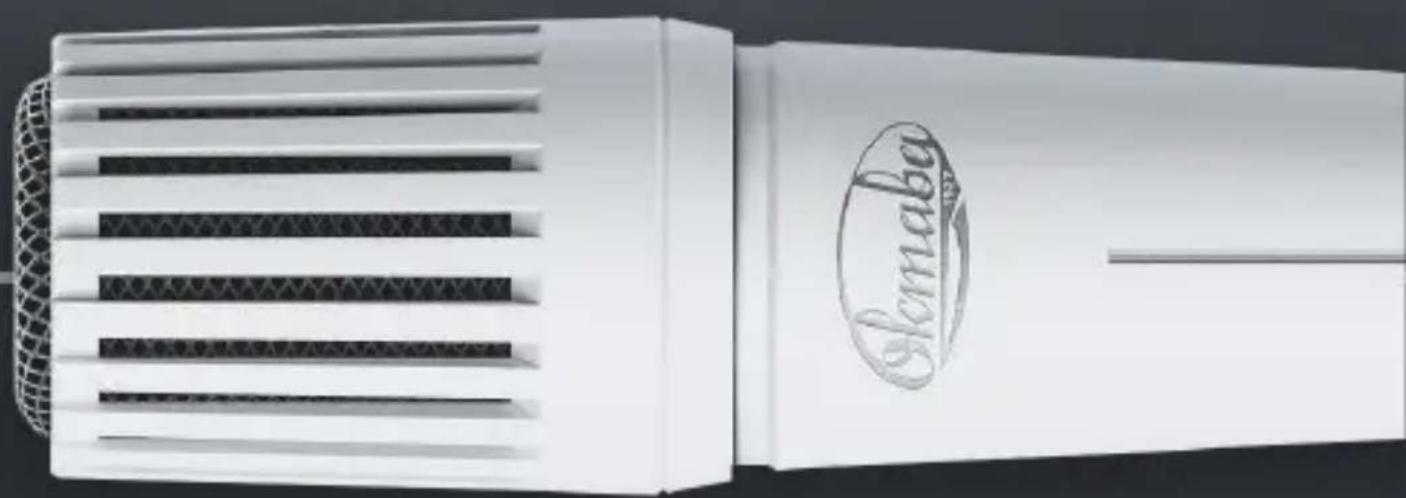
natural_image
White plastic device with mesh grille and embossed 'Sloma' logo (no readable text or symbols beyond branding)natural_image
Technical line drawing of a mechanical component with a downward arrow indicating a process or assembly (no text or symbols present)рис. 1
text_image
рис. 2рис. 3
ПОДКЛЮЧЕНИЕ
natural_image
Two identical hand-drawn diagrams of a device with a central component and an arrow pointing to it (no text or symbols)рис. 5
SAFETY INSTRUCTIONS 25
FUNCTION 26
SCOPE OF SUPPLY 27
PRE-STARTING PROCEDURE 28
CONNECTION 29
APPLICATION FEATURES 30
Oktava is a legendary brand, a leader in the production of unique electroacoustic equipment. The company develops and serially produces products for both civil and military-technical purposes, has many years of experience in the production of microphone equipment, headsets, and telephone equipment.
Founded in 1927 in the city of Tula, Oktava has become the iconic brand known all over the world. It was the Oktava microphone that Yuri Gagarin said his famous «Poyekhali!» (Let's go!) into. Products are popular worldwide and even such masters as U2, Sting, Iron Maiden, and Radiohead use the Oktava microphone equipment in their work.
SAFETY INSTRUCTIONS
- Please read the operation manual carefully before using the microphone.
- Keep the manual in a safe place that is accessible to all users.
- Give the microphone to third parties always with operation manual.
- Use the microphone only for its intended purpose in accordance with this manual.
- Keep liquid away from the microphone, it may cause a short circuit in electronic components or damage mechanical components.
- Clean the microphone only with a soft, slightly moistened cloth. Solvents or cleaning agents may damage the surface or get inside the product.
- Do not expose the microphone to extremely low or extremely high temperatures.
- Do not open the microphone case by yourself. Microphones opened by customers themselves are not covered by the guarantee.
FUNCTION
MD-305 is a dynamic microphone developed to mic up and record vocal, speech, musical instruments at concert venues, karaoke, rehearsals and other events.
SPECIAL FEATURES
- realistic voice transmission;
- durable metal case;
- built-in shock mount;
- made in Russia.
APPLICATIONS\*
- voice/vocal;
- concert venues;
- rehearsal rooms;
- home recording studios.
*Creativity has no borders - find your solution!
SCOPE OF SUPPLY
- MD-305 microphone
- Microphone clip
- Storage bag
- Operation manual
- Package
PRE-STARTING PROCEDURE
INSTALLING THE MICROPHONE INTO THE HOLDER
- Fix the microphone holder on a microphone stand (fig 6)
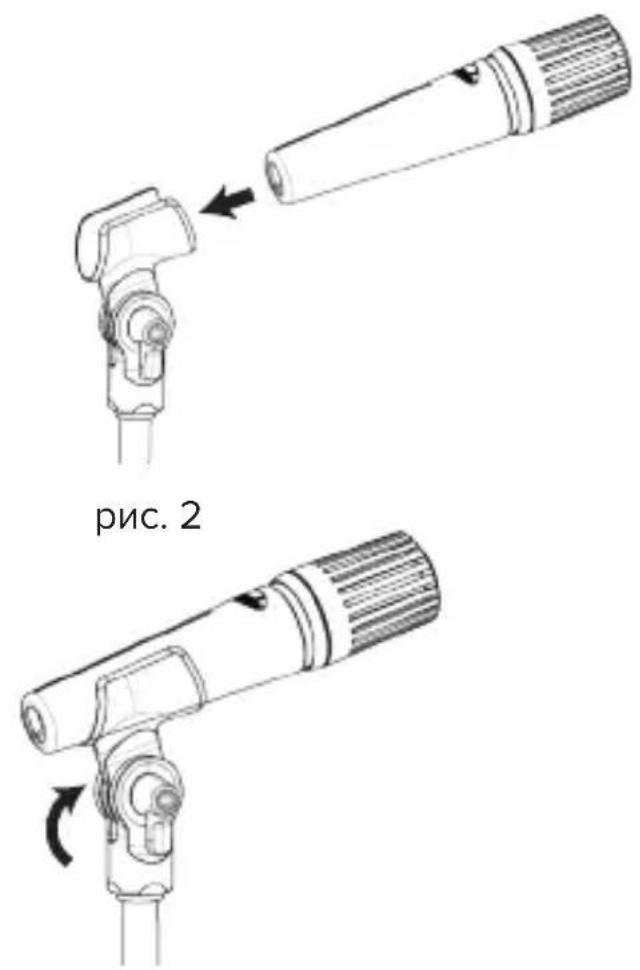
- Install the microphone into the clip according to the scheme (fig. 7)
- Install the microphone under required angle and tighten it by leafed clamping screw (fig. 8)

natural_image
Technical line drawing of a mechanical component with a downward arrow indicating assembly or adjustment (no text or symbols)fig. 6

natural_image
Diagram of a handheld device with an arrow pointing to a cylindrical component (no text or symbols present)fig. 7

natural_image
Technical line drawing of a mechanical device with rotational arrow indicating motion (no text or symbols)fig. 8
CONNECTION
MICROPHONE CONNECTION
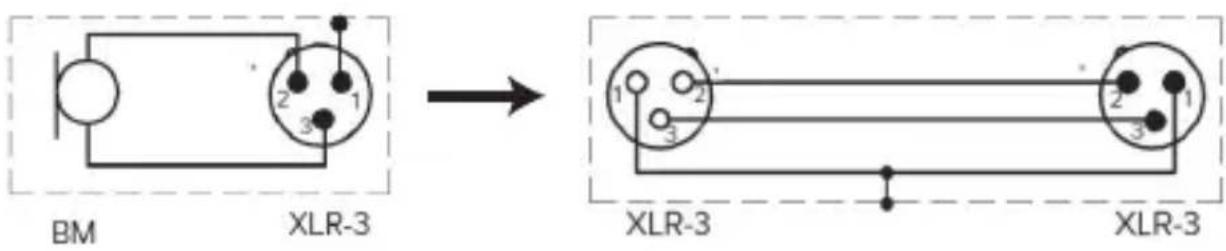
- Connect the microphone to the mixing console or audio interface by XLR-3 microphone cable (fig. 9)
- Make sure that phantom power at the mixing console is turned off
text_image
BM XLR-3 → XLR-3 XLR-3fig. 9
APPLICATION FEATURES
- Install the microphone on the microphone stand using the holder
- Connect microphone to the equipment using the microphone cable
- Point microphone at the sound source
- To ensure external noise cancelling, make sure that there are no external sound sources in the active zone of the microphone
- To increase the service life of the microphone when working with vocalists, it is recommended to use a windscreen (Fig. 10)

natural_image
Two identical hand-drawn diagrams of a device with a central component and an arrow pointing to it (no text or symbols)fig. 10
- The microphone is designed for indoor use at ambient temperatures from 10°C to 40 °C and relative humidity up to 93% at 25 °C.
- Do not expose the microphone to sharp shocks or impacts.
- Keep liquid away from the microphone.
- Do not use organic solvents (gasoline, dichloroethane, alcohol, etc.) to wipe the microphone.
- Do not use or store the microphone in rooms that contain acidic or other aggressive substances in the air.
- Store the microphone in a dry, clean, and dust-free room at room temperature using the packing or case provided.
SPECIFICATIONS
| Conversion principle | Dynamic |
| Polar pattern | Cardioid |
| Frequency range | 50 Hz – 16 000 Hz |
| Sensitivity at 1000 Hz | 1.5 mV/Pa |
| Impedance | 260 Ohm |
| Diameter | 41 mm |
| Length | 182 mm |
| Weight | 250 g |
TYPICAL FREQUENCY RANGE

line
| Frequency | 25 mm50 mm1m (dB) | 25 mm50 mm1m (dB) | | --------- | ----------------- | ----------------- | | 20 | ~12 | ~26 | | 50 | ~18 | ~30 | | 100 | ~24 | ~32 | | 200 | ~28 | ~36 | | 500 | ~30 | ~34 | | 1k | ~30 | ~30 | | 2k | ~30 | ~30 | | 5k | ~32 | ~30 | | 10k | ~30 | ~28 | | 20k | ~20 | ~20 |POTENTIAL FAILURES
| Problem Potential | reason | Troubleshooting recommendations |
| Microphone is not working | Mixing console is not connected to the network. | Check your network connection. |
| Power supply on the mixing console is turned off. | Check the corresponding buttons on the mixing console. | |
| Sound distortions | Input sensitivity or preamplification of the subsequent amplifier are adjusted incorrectly. | Reduce the input sensitivity or preamplification of the next device so that there is enough modulation reserve. |
| Transmission of structure-borne noise. | Use appropriate fastening for microphone boom (see page 28). | |
| A dull sound | Polar pattern is not taken into account. | Check if microphone is installed correctly. |
MANUFACTURER'S GUARANTEE
- The manufacturer guarantees compliance with the technical characteristics of the microphone if the consumer complies with the conditions and rules of operation and storage set out in this manual.
- The product guarantee period is 24 months from the date of purchase to the consumer.
- During the guarantee period, the manufacturer guarantees free replacement or repair of the microphone that does not meet the requirements of this manual due to the fault of the manufacturer.
- Claims for the microphone are accepted only with sale certificate.
- Please dispose of the microphone at your local recycling center after the end of its service life.
PJSC OKTAVA
Russia, 24 Kaminskogo St.,
Tula 300000
e-mail: info@oktavatula.ru
en.oktavatula.ru
NOTES
ACCEPTANCE CERTIFICATE
item brand
serial number
Manufactured and classified as fit for service
Chief controller
personal signature
clarification of signature
L.S.
year, month, day
SALE CERTIFICATE
item brand
serial number
name of the trade organization
seller's signature
clarification of signature
L.S.
year, month, day
GUARANTEE PROVISIONS ARE AGREED AND ACCEPTED
customer's signature
clarification of signature
GUARANTEE CARD
Guarantee service (repair) No 1
MD-305 dynamic microphone
No
product serial number
date of receipt for repair
person responsible for the repair full name
L.S. signature
GUARANTEE CARD
Guarantee service (repair) No 1
MD-305 dynamic microphone
No
product serial number
date of receipt for repair
person responsible for the repair full name
L.S. signature
GUARANTEE CARD
Guarantee service (repair) No 1
MD-305 dynamic microphone
No
product serial numbe
date of receipt for repair
repair reason
sold by
signatureL.S.
information about repair perfomed
L.S.
repair contractor
signature, description
owner's address
owner's name and signaturer
GUARANTEE CARD
Guarantee service (repair) No 2
MD-305 dynamic microphone
No
product serial numbe
date of receipt for repair
repair reason
sold by
signatureL.S.
information about repair perfomed
L.S.
repair contractor
signature, description
owner's address
owner's name and signaturer

text_image
QR code image containing encoded data, no visible human-readable textOKTAVATULA.RU