MK-103 - Microphone Oktava - Free user manual and instructions
Find the device manual for free MK-103 Oktava in PDF.


User questions about MK-103 Oktava
0 question about this device. Answer the ones you know or ask your own.
Ask a new question about this device
Download the instructions for your Microphone in PDF format for free! Find your manual MK-103 - Oktava and take your electronic device back in hand. On this page are published all the documents necessary for the use of your device. MK-103 by Oktava.
USER MANUAL MK-103 Oktava
natural_image
Close-up of a metallic cylindrical device with engraved logo and 'OKOBER' text, no readable modern text or symbols beyond branding.PROFESSIONAL MICROPHONE MK-103
OPERATION MANUAL
CONTENT
ABOUT FACTORY 4
SAFETY INFORMATION 5
OVERVIEW 6
DELIVERY INCLUDES 7
SETUP 8
INSTALLATION 10
MANUFACTURER WARRANTY 15
ABOUT FACTORY
The Public Joint Stock Company Oktava is the leading Russian manufacturer of studio microphones, telephone and microphone capsules, headsets and hearing aids. The company has long-term experience and has taken a leading position in the field of development and manufacturing of acoustic equipment in Russia.
Being established at the dawn of development of broadcast networks in 1927 in the city of Tula, Oktava became an iconic brand known throughout the world. Gagarin said his famous “Let's go!” in the Oktava microphone. The products are popular all over the world, and even such masters as U2, Sting, Iron Maiden and Radiohead use Oktava microphone products in their work.
SAFETY INFORMATION
- Before using the microphone, carefully read the operation manual.
- Keep the manual in a safe place, accessible for all users.
- Always handover the operation manual to third parties together with the microphone.
- Use the microphone only for its intended purpose in accordance with this manual.
- The liquid can get into the microphone, cause a short circuit in the electronic components or damage the mechanical components.
- Clean the microphone only with a soft, slightly moistened cloth. Solvents or cleaning agents may damage the surface or enter the product.
- Do not expose the microphone to extremely low and extremely high temperatures.
- Do not open the microphone body by yourself. The warranty does not apply to microphones, opened by customers themselves.
OVERVIEW
The MK-103 is a condenser microphone small-sized condenser microphones, designed for professional studio recordings.
FEATURES
- modular design in the form of a microphone preamplifier and a capsule;
- attenuator is used to work with high levels of sound pressure;
- low level of self-noise and high level of maximum sound pressure;
- made in Russia.
APPLICATION
- speech/vocal;
electric guitar; - acoustic guitar;
- percussion instruments;
- wind instruments;
■ professional recording studios; - home recording studios.
DELIVERY INCLUDES
- Capsule with cardioid polar pattern.
- Capsule with omni polar pattern.
- Capsule with hypercardioid polar pattern.
- Preamplifier.
- -10 dB attenuator.
- Microphone clip.
- Packing.
- Operation manual.
SETUP
MICROPHONE INSTALLATION INTO CLIP
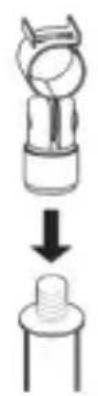
- Screw the microphone clip onto robust, stable stand (Fig. 1).
- Draw the clip clamps apart and insert the microphone (Fig. 2).
- In order to rotate the microphone, use the screw on the clip (Fig. 3).

natural_image
Diagram showing a mechanical component with arrows indicating motion or assembly (no text or symbols)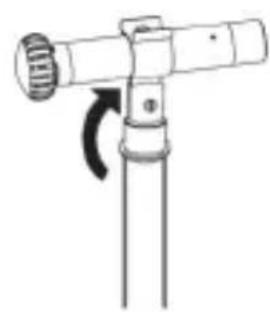
natural_image
Simple line drawing of a mechanical device with a rotating lever (no text or symbols)- Screw the microphone shock mount AM-20M (Oktava) onto robust, stable stand (Fig. 4).
- Insert the microphone on the side of the shock mount inner ring (Fig. 5).
- In order to rotate the microphone, use the nut and the wing screw (Fig. 6).
- Connect the microphone only to microphone inputs or power supply units that provide 48 V phantom power according to IEC 61938.
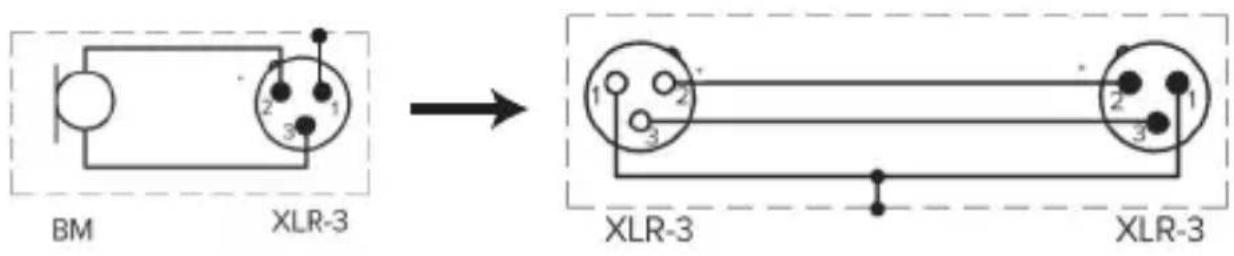
- Connect the microphone to the XLR-3 socket of the mixing console, microphone amplifier or power supply unit with the XLR-3 microphone cable (Fig. 7).
text_image
BM XLR-3 XLR-3 XLR-3Fig. 7
CAUTION! UNSUITABLE POWER SUPPLY MAY RESULT IN DAMAGE TO THE PRODUCT!
INSTALLATION
- Install the microphone on the stand with a microphone clip or shock mount.
- Connect the microphone to the equipment using a microphone cable.
- Point the microphone toward the sound source.
- In order to suppress external noise, make sure that there are no sources of parasitic noise in the microphone active zone (for example, computer fans).
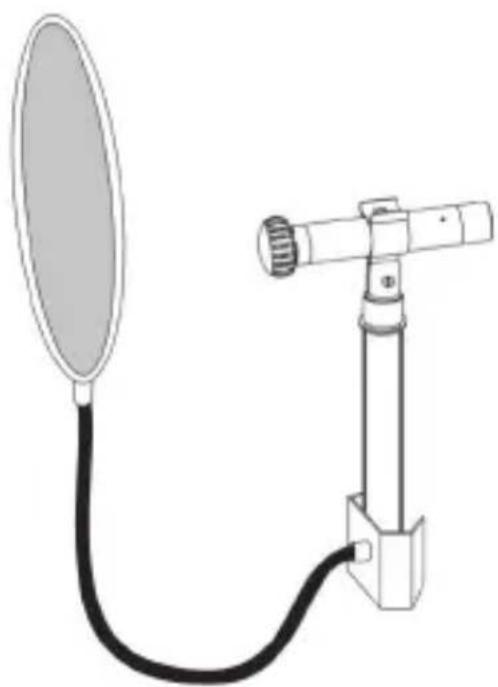
- In order to extend the life of the microphone, it is recommended to use a pop screen when working with vocalists (Fig. 8).
natural_image
Technical line drawing of a mounted device with a circular fan and cable (no text or symbols)Fig. 8
- The microphone is designed for application in enclosed spaces at an ambient temperature of 5 °C to 45 °C and a relative humidity of 93% at an temperature 25 °C.
- Do not subject the microphone to sudden shocks or impacts.
- Do not allow water to enter the microphone.
- Do not use organic solvents (gasoline, dichloroethane, alcohol, etc.) to clean the microphone.
- Do not use or store the microphone in rooms containing acidic or other aggressive impurities in the air.
- Store the microphone in a dry, clean and dust-free room at room temperature, using the packing included in the package.
TECHNICAL DATA
| Transducer type | Pressure receiver (omni). Pressure gradient receiver (cardioid, hypercardioid) |
| Polar patterns | Cardioid |
| Acoustic principle | Pressure gradient receiver |
| Maximum sound pressure level | 140 dB |
| Frequency range | 40 Hz - 20 000 Hz |
| Sensitivity at 1000 Hz | 7 mV/Pa |
| Equivalent sound pressure level due to self-noise | 18 dBA |
| Impedance | 300 Ohm |
| Power requirements | 3.5 mA |
| Diameter | 31 mm |
| Length | 126 mm |
| Weight | 100 g |
FREQUENCY RESPONSE
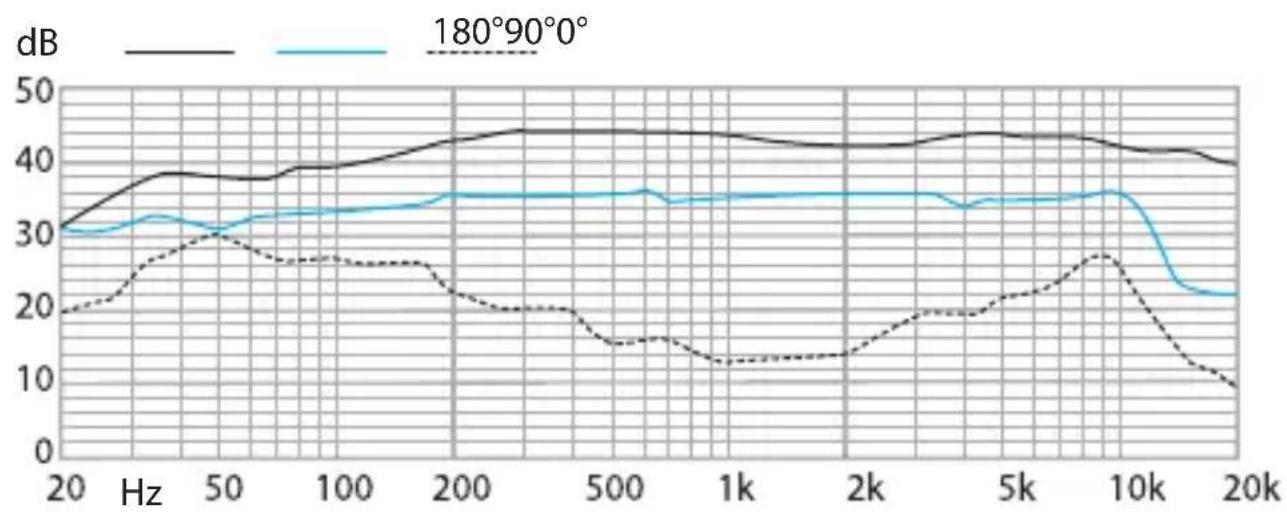
line
| Hz | 180°90°0° (dB) | Solid Line (dB) | Dashed Line (dB) | |------|----------------|-----------------|------------------| | 20 | 30 | 30 | 20 | | 50 | 38 | 38 | 30 | | 100 | 38 | 38 | 26 | | 200 | 42 | 42 | 25 | | 500 | 44 | 44 | 15 | | 1k | 44 | 44 | 12 | | 2k | 42 | 42 | 13 | | 5k | 44 | 44 | 19 | | 10k | 42 | 42 | 27 | | 20k | 39 | 39 | 9 |TROUBLE AND COUNTERMEASURE
| Condition | Causes Corrective action | |
| Microphone does not work | The power supply unit or mixing console is not connected to the mains. | Check the connection to the mains. |
| The mixing console or the power supply unit is not turned on. | Check the corresponding buttons of the mixing console and power supply unit. | |
| The microphone is not connected to the power supply unit or the power supply unit is not connected to the mixing console. | Check that the cables are correctly connected from the microphone to the power supply unit and from the power supply unit to the mixing console (see page 9). | |
| Sound distortions | The input sensitivity or preamplification of the subsequent amplifier is incorrectly adjusted. | Decrease the input sensitivity or preamplification of the subsequent amplifier in such a way that there is enough modulation reserve. |
| Transmission of the body noise. | Use a suitable shock mount (page 9). | |
| Dull sound | The polar pattern is not taken into account. | Check that the microphone is installed correctly. The microphone must be pointed at the sound source. |
MANUFACTURER WARRANTY
- The manufacturer guarantees compliance of the microphone technical characteristics, if the user observes the conditions and rules of operation and storage specified in this manual.
The warranty — 24 months from the date of sale. - The manufacturer guarantees a free replacement or repair of a microphone during the warranty period, if it does not comply with the requirements of this manual through the manufacturer's fault.
- No claim for a microphone will be accepted without certificate of sale.
- Please, dispose of the microphone at the local collection point for recyclable materials or at the recycling center after the end of its service life.
Oktava PJSC
Russia, 300000,
Tula, Kaminsky str., 24
E-mail: service@oktavatula.ru
en.oktavatula.ru
NOTES
ACCEPTANCE CERTIFICATE
unit type
serial number
Manufactured and approved
Chief controller
personal signature
printed name
L.S.
year, month, day
CERTIFICATE OF SALE
unit type
serial number
dealer
signature of seller
printed name
L.S.
year, month, day
THE GUARANTEE CONDITIONS ARE ACKNOWLEDGED AND ACCEPTED
signature of buyer
printed name
WARRANTY CARD
For warranty service (repair) No. 1
Professional microphone MK-103
No.
product serial number
date of receipt for repair
full name of a person responsible for repairs
L.S. signature
WARRANTY CARD
For warranty service (repair) No. 2
Professional microphone MK-103
No.
product serial number
date of receipt for repair
full name of a person responsible for repairs
L.S. signature
WARRANTY CARD
For warranty service (repair) No. 1
Professional microphone MK-103
No.
product serial numbe
date of receipt for repair
reason for repair
seller
signature of sellerL.S.
information on performed repairs
L.S.
of repair organization
signature, printed name
address of owner
full name and signature of owner
WARRANTY CARD
For warranty service (repair) No. 2
Professional microphone MK-103
No.
product serial numbe
date of receipt for repair
reason for repair
seller
signature of sellerL.S.
information on performed repairs
L.S.
of repair organization
signature, printed name
address of owner
full name and signature of owner
text_image
QR code image containing encoded data, no visible human-readable textOktava PJSC
Russia, 300000,
Tula, Kaminsky str., 24
E-mail: service@oktavatula.ru
en.oktavatula.ru