MKL-5000 - Microphone Oktava - Free user manual and instructions
Find the device manual for free MKL-5000 Oktava in PDF.


User questions about MKL-5000 Oktava
0 question about this device. Answer the ones you know or ask your own.
Ask a new question about this device
Download the instructions for your Microphone in PDF format for free! Find your manual MKL-5000 - Oktava and take your electronic device back in hand. On this page are published all the documents necessary for the use of your device. MKL-5000 by Oktava.
USER MANUAL MKL-5000 Oktava
natural_image
Close-up of a black audio recording device with attached microphone and connector (no visible text or symbols)MKL-5000 PROFESSIONAL MICROPHONE
OPRATION MANUAL

CONTENT
ABOUT FACTORY 4
SAFETY INFORMATION 6
OVERVIEW 8
DELIVERY INCLUDES 9
SETUP 10
INSTALLATION 13
TECHNICAL DATA 14
TROUBLE AND COUNTERMEASURE 17
MANUFACTURER WARRANTY 19
NOTES 20
ABOUT FACTORY
The Public Joint Stock Company Oktava is the leading Russian manufacturer of studio microphones, telephone and microphone capsules, headsets and hearing aids. The company has long-term experience and has taken a leading position in the field of development and manufacturing of acoustic equipment in Russia.
Being established at the dawn of development of broadcast networks in 1927 in the city of Tula, Oktava became an iconic brand known throughout the world. Gagarin said his famous “Let's go!” in the Oktava microphone. The products are popular all over the world, and even such masters as U2, Sting, Iron Maiden and Radiohead use Oktava microphone products in their work.
LET'S GO >>

natural_image
Close-up of a black studio microphone with metallic grille and cap, against a blue background (no text or symbols visible)SAFETY INFORMATION
- Before using the microphone, carefully read the operation manual.
- Keep the manual in a safe place, accessible for all users.
- Always handover the operation manual to third parties together with the microphone.
- Use the microphone only for its intended purpose in accordance with this manual.
- The liquid can get into the microphone, cause a short circuit in the electronic components or damage the mechanical components.
- Clean the microphone only with a soft, slightly moistened cloth. Solvents or cleaning agents may damage the surface or enter the product.
- Do not expose the microphone to extremely low and extremely high temperatures.
- Do not open the microphone body by yourself. The warranty does not apply to microphones, opened by customers themselves.
CAUTION!
Before switching on the power supply unit, please, ensure that the power supply unit switch 110 V/220 V is switched to the position corresponding to the mains supply voltage!
It is prohibited to open the microphone and the power supply unit! The warranty does not apply to items, opened by customers themselves.
It is prohibited to connect or disconnect the microphone to/from the power supply if it is energized!
It is prohibited to handle the powered power supply unit by wet hands!
OVERVIEW
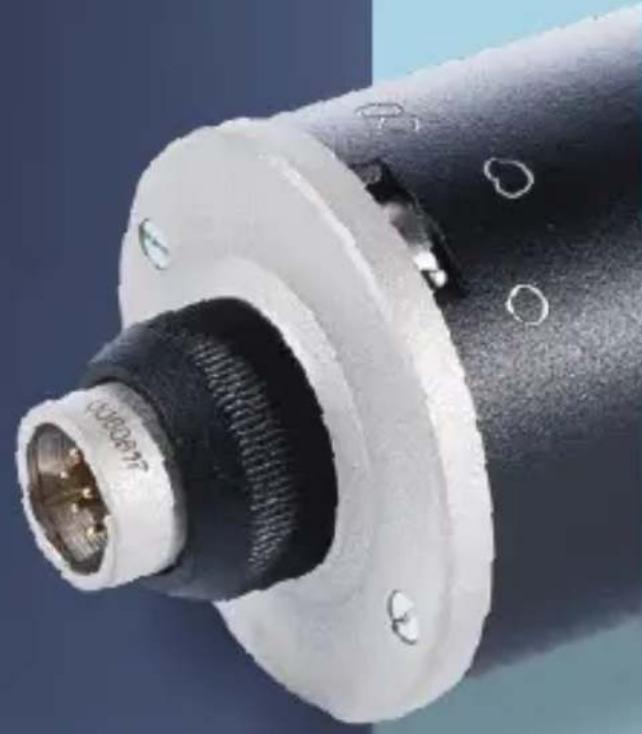
Microphone MKL-5000 is wide-diaphragm capacitor microphone with lamp preamplifier designed for professional studio recordings.
FEATURES
- 1" large-diaphragm condenser capsule:
- 2 gold-plateds diaphragms;
- microphone pre-amplifier, made on the radio tube;
- variable stepped polar response curve; type "circle", "cardioid", "figure-eight";
- robust metal body;
- external power supply included in delivery;
made in Russia.
APPLICATION
- voice/vocal/chorus;
. recording of solo instruments;
. professional recording studios;
. home recording studious.
natural_image
Close-up of a black mechanical connector with a threaded end and flange (no visible text or symbols)DELIVERY INCLUDES
- Microphone MKL-5000.
- Power supply unit PSU-103.
3.Shock damper AM-65/27. - Cable (5 m).
- Operation manual.
- Packing.

natural_image
Close-up of a black studio microphone with metallic grille and a white head (no visible text or symbols)SETUP
MICROPHONE INSTALLATION INTO SHOCK MOUNT
- Screw the microphone shock absorber onto a sturdy, stable stand (Fig. 1).
- Insert the microphone from above in the inner shock absorber ring and fasten it to the ring with a nut on bottom. To turn the microphone, use the butterfly thumb screw (Fig. 2).

text_image
Technical diagram showing mechanical assembly steps with labeled components and directional arrowsFig. 2 Fig. 1
POWER SUPPLY PREPARATION
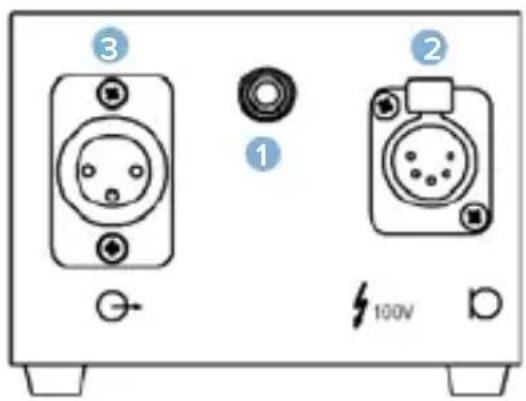
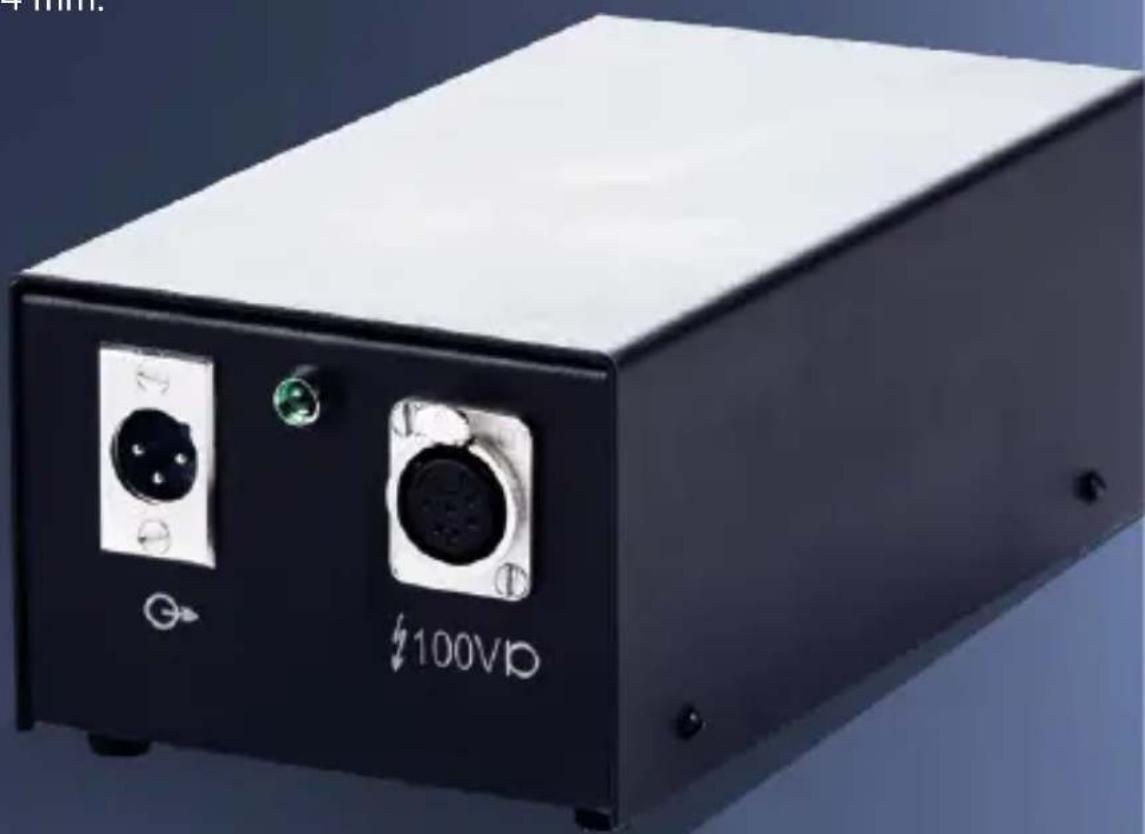
- In the front panel, there are the indicator lamp (1), the input connector (2), the output connector (3), on the back panel, there are the mains connector (4) and the mains switch (5).
text_image
③ ① ② 100V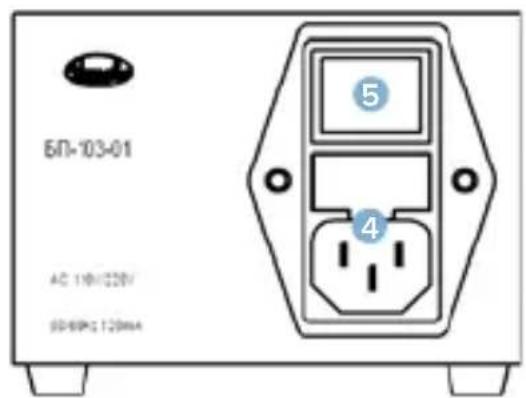
text_image
БП-103-01 AC 11Ф/220V 90-60Hz 120mAFig. 3
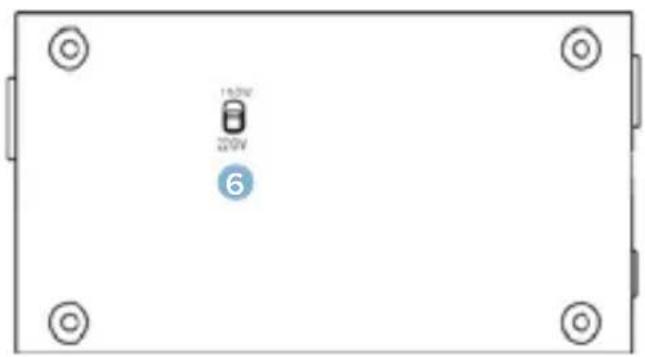
- The mains voltage selector 110V/220V (6) is located on the bottom panel.
text_image
150V 200V 6Fig. 4
- The power supply unit PSU-103 is designed for conversion of the mains voltage 220 V or 110 V into the voltage supplying capacitor microphones with lamp prime amplifier.
- The electric safety of the power supply unit meets the requirements of IEC 60065-2011 for devices of I class.
DO NOT NETWORK THE POWER SUPPLY UNIT WITHOUT CONNECTING THE WHOLE EQUIPMENT SET WITH CABLES AND EARTHING IT.
CONNECTION
- Set the switch (6) to the position corresponding to the voltage of the network used.
- Insert the pin plug into the power filter unit (4).
- Connect the input terminal (2) to the microphone using the supplied XLR-5 - XLR-6 cable.
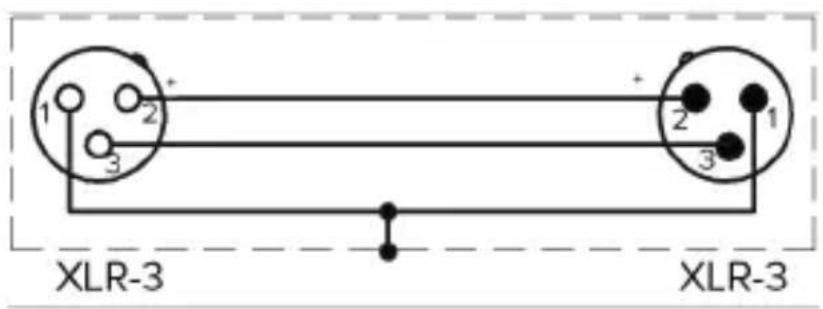
- To connect the output terminal of the power supply unit to the mixing console use any XLR-3 microphone cable (Fig. 5).
- Connect the power supply unit to the mains by plugging the pin plug into a power outlet.
- Turn on the power switch (5). The alarm indicator (1) will light up on the panel.
- Wait 15 minutes before starting work to warm up the lamp in the microphone.
text_image
1 2 + 3 + 2 1 3 XLR-3 XLR-3Fig.5
WARNING! IMPROPER POWER SUPPLY MAY CAUSE DAMAGE OF THE PRODUCT!
INSTALLATION
-
Install the microphone on the stand with a microphone clip or shock mount.
-
Connect the microphone to the equipment using a microphone cable.
-
Point the microphone toward the sound source.
-
In order to suppress external noise, make sure that there are no sources of parasitic noise in the microphone active zone (for example, computer fans).
-
In order to extend the life of the microphone, it is recommended to use a pop screen when working with vocalists (Fig. 6).

natural_image
Line drawing of a mechanical device with a circular component and connecting rod (no text or symbols)Fig. 6
TECHNICAL DATA
TECHNICAL DATA OF MICROPHONE
| Transducer type | Condenser microphone with lamp preamp |
| Polar patterns | Circle, cardioid, figure-eight |
| Acoustic principle | Pressure gradient receiver |
| Diaphragm diameter | 25,4 mm / 1" |
| Maximum sound pressure level | 125 dB |
| Frequency range | 20 Hz - 20 000 Hz |
| Sensitivity at 1000 Hz | 18 mV/Pa |
| Equivalent sound pressure level due to self-noise | 25 dBA |
| Impedance | 600 Ohm |
| Diameter | 64 mm |
| Length | 255 mm |
| Weight | 1,1 kg |
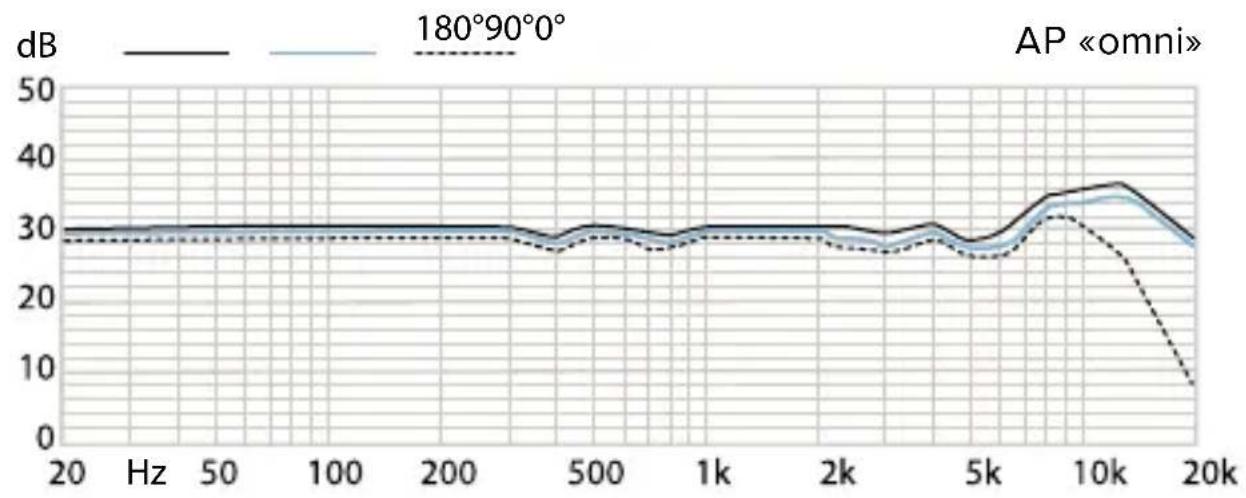
FREQUENCY RESPONSE
line
| Frequency | dB (Solid Line) | dB (Dashed Line) | | --------- | --------------- | ---------------- | | 20 Hz | ~30 | ~29 | | 50 Hz | ~30 | ~29 | | 100 Hz | ~30 | ~29 | | 200 Hz | ~30 | ~29 | | 500 Hz | ~30 | ~29 | | 1k Hz | ~30 | ~29 | | 2k Hz | ~30 | ~29 | | 5k Hz | ~30 | ~29 | | 10k Hz | ~35 | ~32 | | 20k Hz | ~30 | ~7 |
line
| Frequency | 180°90° (dB) | 20° (dB) | 30° (dB) | | --------- | ------------ | -------- | -------- | | 20 | 30 | 30 | 30 | | 50 | 30 | 30 | 30 | | 100 | 30 | 30 | 30 | | 200 | 30 | 30 | 30 | | 500 | 30 | 30 | 30 | | 1k | 30 | 30 | 30 | | 2k | 30 | 30 | 30 | | 5k | 30 | 30 | 30 | | 10k | 30 | 30 | 30 | | 20k | 30 | 30 | 30 |
line
| Hz | 180°90°0° (dB) | 180°90°0° (dB) | |------|----------------|----------------| | 20 | ~32 | ~31 | | 50 | ~29 | ~28 | | 100 | ~31 | ~30 | | 200 | ~34 | ~33 | | 500 | ~36 | ~35 | | 1k | ~37 | ~36 | | 2k | ~38 | ~37 | | 5k | ~39 | ~38 | | 10k | ~37 | ~36 | | 20k | ~34 | ~33 |TECHNICAL DATA OF POWER SUPPLY UNIT
OUTPUT VOLTAGE
- The anode voltage is (100+5) V at the ripple ratio of 0.01% at most.
- The filament voltage is (6+0.25) V at the ripple ratio of 0.01% at most.
LOAD CURRENT
3 mA for anode supply and 0.4 A for filament supply.
RATED INPUT
The rated input is 10 W at most, the input current does not exceed 50 mA.
INSTABILITY FACTOR
The voltage regulation at supply voltage variation within 187-242 V or within 93-121 V at 50 Hz AC does not exceed: 8% for anode, 5% for filament.
DIMENSIONS
116 x 216 x 84 mm.
natural_image
Black industrial electronic device with two ports labeled '100Vp' and a green indicator light, shown against a blue background (no readable text beyond labels)TROUBLE AND COUNTERMEASURE
| Problem | Possible reason | Elimination recommendations |
| Microphone is not working | Power supply unit or mixing console is not connected to the power line. | Check your power supply network connection. |
| Power is not turned on on the mixing console or on the power supply unit. | Check the corresponding buttons on the mixing console and power supply unit. | |
| Microphone is not connected to the power supply unit or the power supply unit is not connected to the mixing console. | Check that the cables from the microphone to the power supply unit and from the power supply unit to the mixing console are connected correctly (see page 12). | |
| The 110V/220V switch is in a position that does not match the line voltage. | Check that the switch (6) is in the correct position (see page 11). | |
| Sound distortion | Input sensitivity or preamplification of the subsequent amplifier are adjusted incorrectly. | Reduce the input sensitivity or preamplification of the next device so that there is enough modulation reserve. |
| Transmission of structure-borne noise. | Use a suitable shock absorber (see page 10). | |
| Unvoiced sound | Polar response curve is not taken into account. | Check that microphone is installed correctly. Microphone should be directed to the sound source with the side with Oktava logo. |
- The microphone is designed for application in enclosed spaces at an ambient temperature of 5 °C to 45 °C and a relative humidity of 93% at an temperature 25 °C.
Do not subject the microphone to sudden shocks or impacts.
Do not allow water to enter the microphone.
Do not use organic solvents (gasoline, dichloroethane, alcohol, etc.) to clean the microphone.
Do not use or store the microphone in rooms containing acidic or other aggressive impurities in the air.
Store the microphone in a dry, clean and dust-free room at room temperature, using the packing included in the package.
MANUFACTURER WARRANTY
- The manufacturer guarantees compliance of the microphone technical characteristics, if the user observes the conditions and rules of operation and storage specified in this manual.
- The warranty — 24 months from the date of sale.
- The manufacturer guarantees a free replacement or repair of a microphone during the warranty period, if it does not comply with the requirements of this manual through the manufacturer's fault.
- No claim for a microphone will be accepted without certificate of sale.
- Please, dispose of the microphone at the local collection point for recyclable materials or at the recycling center after the end of its service life.
Oktava PJSC
Russia, 300000,
Tula, Kaminsky str., 24
E-mail: service@oktavatula.ru
en.oktavatula.ru
NOTES
ACCEPTANCE CERTIFICATE
unit type
serial number
Manufactured and approved
Chief controller
personal signature
printed name
L.S.
year, month, day
CERTIFICATE OF SALE
unit type
serial number
dealer
signature of seller
printed name
L.S.
year, month, day
THE GUARANTEE CONDITIONS ARE ACKNOWLEDGED AND ACCEPTED
signature of buyer
printed name
WARRANTY CARD
For warranty service (repair) No. 1
Professional microphone MKL-5000
No.
product serial number
date of receipt for repair
full name of a person responsible for repairs
L.S. signature
WARRANTY CARD
For warranty service (repair) No. 2
Professional microphone MKL-5000
No.
product serial number
date of receipt for repair
full name of a person responsible for repairs
L.S. signature
WARRANTY CARD
For warranty service (repair) No. 1
Professional microphone MKL-5000
No.
product serial numbe
date of receipt for repair
reason for repair
seller
signature of sellerL.S.
information on performed repairs
L.S.
of repair organization
signature, printed name
address of owner
full name and signature of owner
WARRANTY CARD
For warranty service (repair) No. 2
Professional microphone MKL-5000
No.
product serial numbe
date of receipt for repair
reason for repair
seller
signature of sellerL.S.
information on performed repairs
L.S.
of repair organization
signature, printed name
address of owner
full name and signature of owner
text_image
QR code image containing encoded data, no visible human-readable textПАО «Октава»
8 800 775 3 559