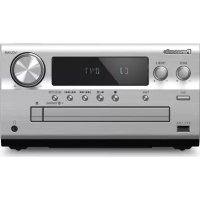
SCEN25 - Hi-Fi System PANASONIC - Free user manual and instructions
Find the device manual for free SCEN25 PANASONIC in PDF.

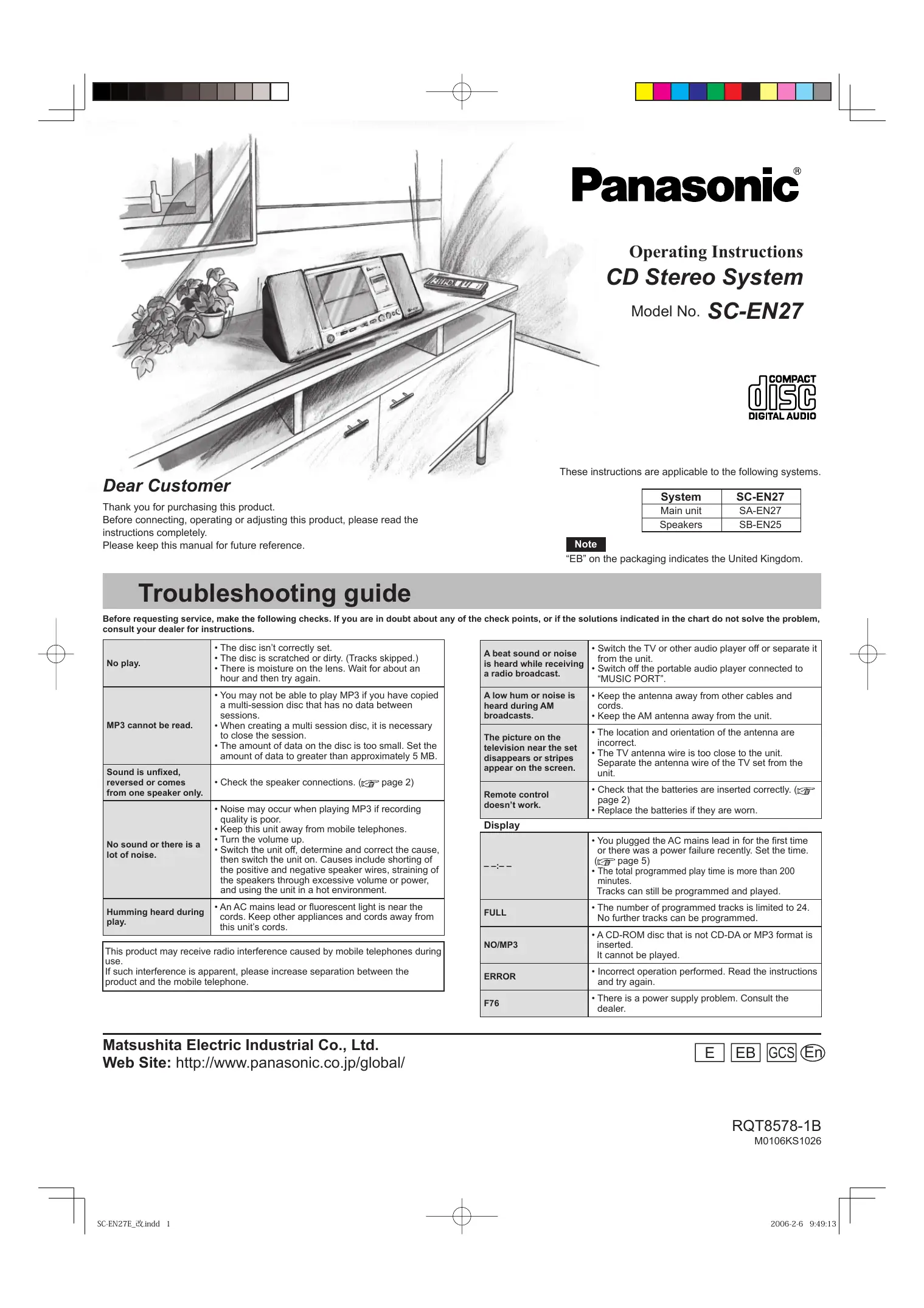

| Product Type | Stereo hi-fi system with CD player and FM/AM tuner |
| Dimensions (W × H × D) | 241 mm × 206 mm × 206 mm (main unit) |
| Weight | 3.1 kg with speakers, 1.8 kg without speakers |
| Power supply | AC 230-240 V, 50 Hz (Continental Europe and UK); AC 220-240 V, 50/60 Hz (other regions) |
| Power consumption | 15 W (standby: 1.6 W) |
| Speakers | Full range 8 cm, 6 Ω × 2 |
| Radio frequency ranges | FM: 87.50–108.00 MHz (50 kHz steps); AM: 522–1629 kHz (9 kHz steps) or 520–1630 kHz (10 kHz steps) |
| Compatible CD formats | CD-DA, CD-R, CD-RW, MP3 |
| Number of channels | 2 (stereo) |
| Auxiliary input | MUSIC PORT: 3.5 mm stereo jack (33 kΩ) |
| Headphone output | 3.5 mm stereo jack (32 Ω) |
| Main functions | Sleep timer, play timer, radio presets (20 FM + 12 AM), track programming, sound modes (XBS, Clear, Soft, Vocal), Live Virtualizer |
| Care and cleaning | Clean with a soft, dry cloth; for the CD lens, use a blower (recommended kit: SZZP1038C) |
| Safety | Do not open the casing (laser radiation), avoid exposure to rain or moisture, do not block ventilation openings |
| Supplied accessories | Remote control (N2QAGB000038), batteries (R6, AA), power cord, FM/AM antenna (N1DADYY00003), Music Port cable (K2KC39A00002) |
Frequently Asked Questions - SCEN25 PANASONIC
User questions about SCEN25 PANASONIC
0 question about this device. Answer the ones you know or ask your own.
Ask a new question about this device
Download the instructions for your Hi-Fi System in PDF format for free! Find your manual SCEN25 - PANASONIC and take your electronic device back in hand. On this page are published all the documents necessary for the use of your device. SCEN25 by PANASONIC.
USER MANUAL SCEN25 PANASONIC
natural_image
Pencil sketch of a modern kitchen appliance with a microwave, a refrigerator, and a potted plant (no text or symbols)Panasonic®
Operating Instructions CD Stereo System
Model No. SC-EN27

Dear Customer
Thank you for purchasing this product.
Before connecting, operating or adjusting this product, please read the instructions completely.
Please keep this manual for future reference.
These instructions are applicable to the following systems.
| System | SC-EN27 |
| Main unit | SA-EN27 |
| Speakers | SB-EN25 |
Note
“EB” on the packaging indicates the United Kingdom.
Troubleshooting guide
Before requesting service, make the following checks. If you are in doubt about any of the check points, or if the solutions indicated in the chart do not solve the problem, consult your dealer for instructions.
| No play. | The disc isn’t correctly set.The disc is scratched or dirty. (Tracks skipped.)There is moisture on the lens. Wait for about an hour and then try again. |
| MP3 cannot be read. | You may not be able to play MP3 if you have copied a multi-session disc that has no data between sessions.When creating a multi session disc, it is necessary to close the session.The amount of data on the disc is too small. Set the amount of data to greater than approximately 5 MB. |
| Sound is unfixed,reversed or comes from one speaker only. | Check the speaker connections. (page 2) |
| No sound or there is a lot of noise. | Noise may occur when playing MP3 if recording quality is poor.Keep this unit away from mobile telephones.Turn the volume up.Switch the unit off, determine and correct the cause, then switch the unit on. Causes include shorting of the positive and negative speaker wires, straining of the speakers through excessive volume or power, and using the unit in a hot environment. |
| Humming heard during play. | An AC mains lead or fluorescent light is near the cords. Keep other appliances and cords away from this unit’s cords. |
| This product may receive radio interference caused by mobile telephones during use.If such interference is apparent, please increase separation between the product and the mobile telephone. | |
| A beat sound or noise is heard while receiving a radio broadcast. | Switch the TV or other audio player off or separate it from the unit.Switch off the portable audio player connected to “MUSIC PORT”. |
| A low hum or noise is heard during AM broadcasts. | Keep the antenna away from other cables and cords.Keep the AM antenna away from the unit. |
| The picture on the television near the set disappears or stripes appear on the screen. | The location and orientation of the antenna are incorrect.The TV antenna wire is too close to the unit.Separate the antenna wire of the TV set from the unit. |
| Remote control doesn’t work. | Check that the batteries are inserted correctly.(page 2)Replace the batteries if they are worn. |
Display
| --:-- | ·You plugged the AC mains lead in for the first time or there was a power failure recently. Set the time.(page 5)·The total programmed play time is more than 200 minutes.Tracks can still be programmed and played. |
| FULL | ·The number of programmed tracks is limited to 24. No further tracks can be programmed. |
| NO/MP3 | ·A CD-ROM disc that is not CD-DA or MP3 format is inserted.It cannot be played. |
| ERROR | ·Incorrect operation performed. Read the instructions and try again. |
| F76 | ·There is a power supply problem. Consult the dealer. |
Supplied accessories
Use the numbers indicated in parentheses when asking for replacement parts.
As of December 2005

1 Remote control
(N2QAGB000038)

2 Batteries

1 AC mains lead
For continental Europe (RFA2699)
For the United Kingdom (RFA2700)
For other areas (RJA0019-D)

1 FM/AM antenna (N1DADYY00003)

1 Music port cable
For continental Europe and the United Kingdom (K2KC39A00002)
Note
The included AC mains lead is for use with this unit only. Do not use it with other equipment.
Do not use an AC mains lead from any other type of equipment with this unit.
The remote control

Batteries
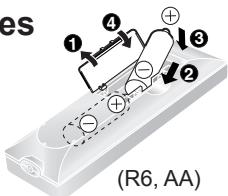
text_image
es ① ④ ③ ② (R6, AA)
Use
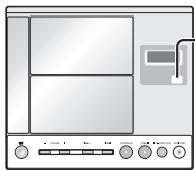
- Remote control signal sensor
- Aim at the sensor, avoiding obstacles, at a maximum range of 7m directly in front of the unit.
- Operation can be affected by strong light sources, such as direct sunlight, and the glass doors on cabinets.
Placement of speakers
natural_image
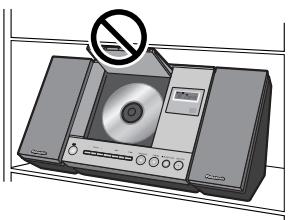
Illustration of a CD or DVD device with a prohibition symbol above it (no text or labels)Place this unit in an area with more than 240 mm of vertical space.
The CD lid may become damaged if it cannot open completely.
Placement of speakers
Left and right speakers are exactly the same.
Note
- Keep your speakers at least 10 mm away from the system for proper ventilation.
• These speakers do not have magnetic shielding. Do not place them near televisions, personal computers or other devices easily influenced by magnetism. - To avoid damage to the speakers, do not touch the speaker cones if you have taken the nets off.

Caution
- Use the speakers only with the recommended system. Failure to do so may lead to damage to the amplifier and/or the speakers, and may result in the risk of fire. Consult a qualified service person if damage has occurred or if you experience a sudden change in performance.
- Do not attach these speakers to walls or ceilings.
Connections
1 Speakers
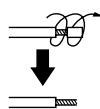
If the speaker cords have tips, twist the tips and pull them off.
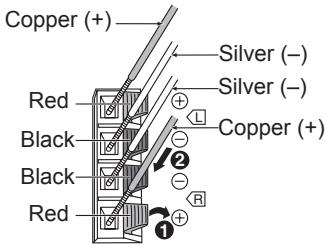
text_image
Copper (+) Silver (−) Silver (−) Red L Copper (+) Black 2 - - R Black Red 12 FM/AM antenna
Stand the antenna up on its base.
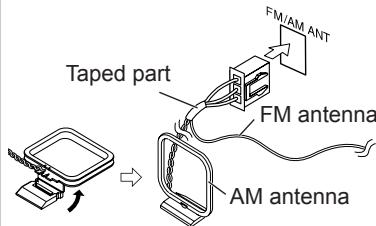
text_image
Taped part FM/AM ANT FM antenna AM antennaUnplug the antenna connector by holding the taped part.
3 AC mains lead
FOR THE UNITED KINGDOM ONLY READ THE CAUTION FOR THE AC MAINS LEAD ON PAGE 7 BEFORE CONNECTION.
Connect the AC mains lead only after all other connections have been made.
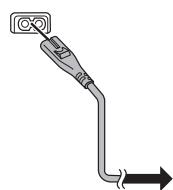
Note
If the unit is left unplugged for longer than approximately two weeks, all settings will revert to the factory settings.
Remember to reset the radio stations and any other memory items before using the unit again.
Portable audio equipment
(Cable included for continental Europe and the United Kingdom.)
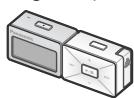
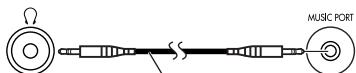
Music port cable
Portable audio player
Use
Remote control
MUSIC PORT
Select
"MUSIC P"
Plug type:
∅ 3.5 mm stereo
mini plug
Start Playback from the
Portable audio source.
Note
- Adjust the volume and sound quality of this unit and the other equipment.
- For details, refer to the instruction manual of the other equipment.
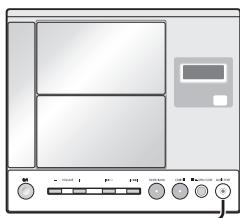
natural_image
Front view of a kitchen appliance with control buttons and a display (no visible text or symbols)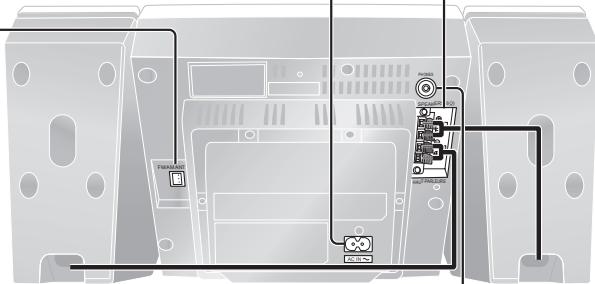
text_image
Diagram of a device rear panel with labeled components and wiring connectionsHeadphones
(Not included)

Reduce the volume before connection.
Avoid listening for prolonged periods of time to prevent hearing damage.
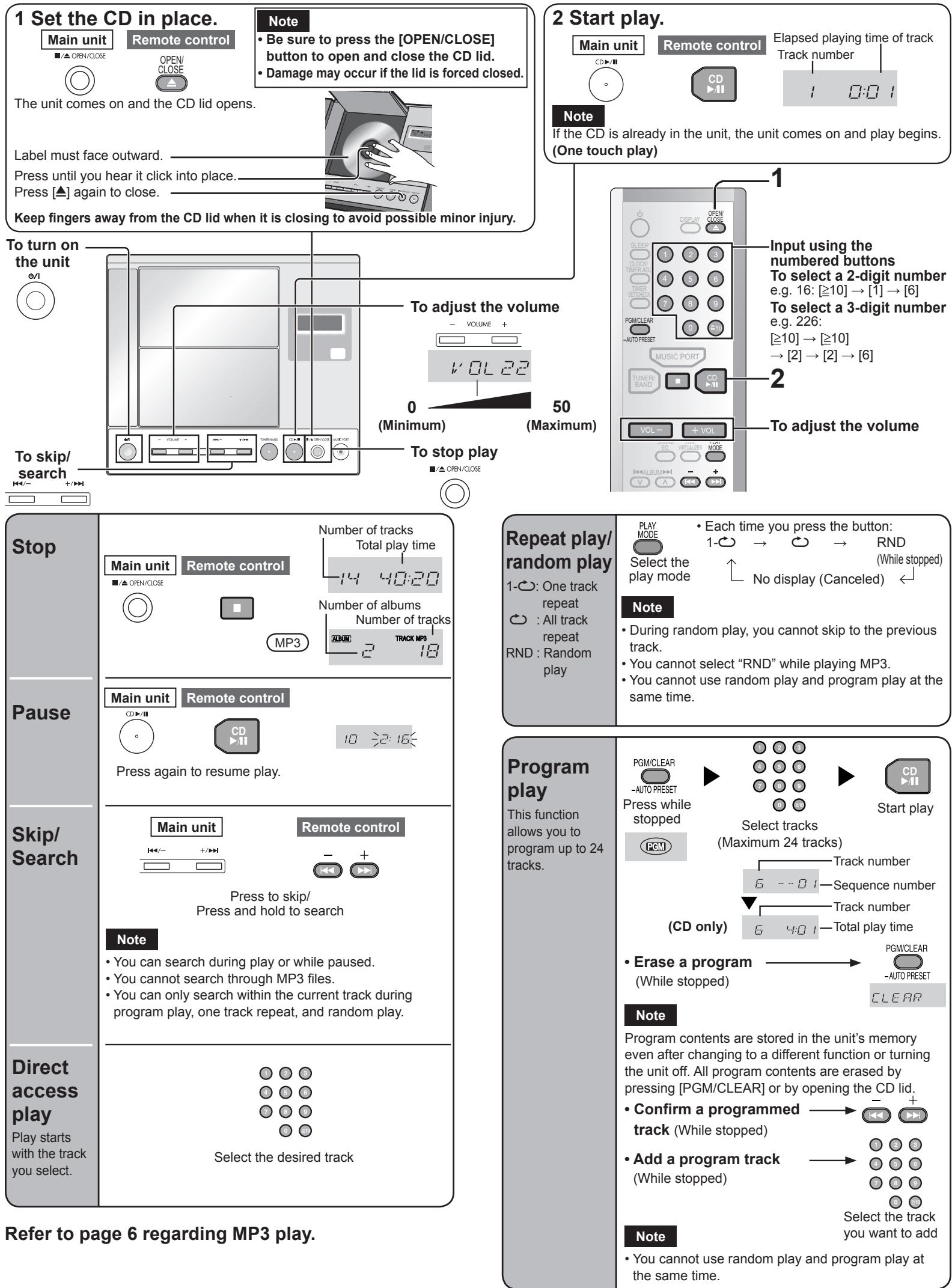
The unit comes on and the CD lid opens.
Note
- Be sure to press the [OPEN/CLOSE] button to open and close the CD lid. - Damage may occur if the lid is forced closed.
Label must face outward.
Press until you hear it click into place.
Press [▲] again to close.
Keep fingers away from the CD lid when it is closing to avoid possible minor injury.
Note
If the CD is already in the unit, the unit comes on and play begins. (One touch play)
Refer to page 6 regarding MP3 play.
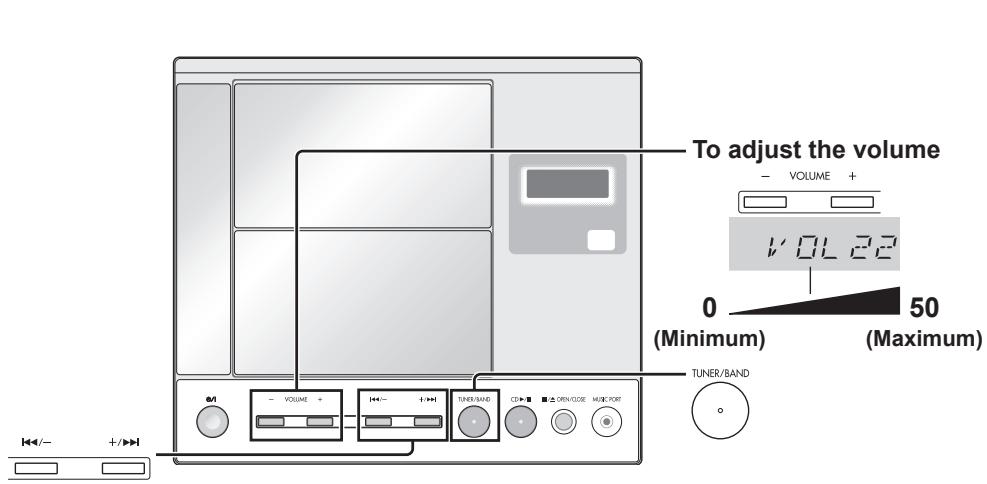
Radio stations can be tuned manually by selecting the station's frequency or they can be preset into channels to make it easy to tune. You can preset up to 20 FM channels and up to 12 AM channels.
text_image
To adjust the volume - VOLUME + VOL 22 0 (Minimum) 50 (Maximum) TUNER/BAND +/- +/▶+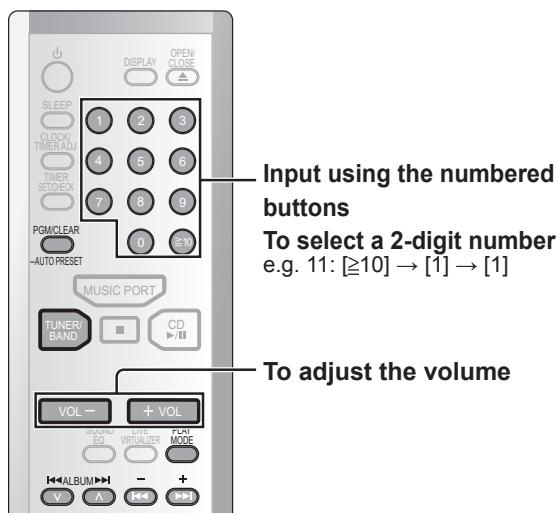
text_image
SLEEP CLOCK/ TIMER ADU TIMER STITCHED PGM/CLEAR AUTO PRESET MUSIC PORT TUNER/ BAND CD VOL- + VOL CPU/DVD EQ VIRTUALizer COM MODE V A + - + - Input using the numbered buttons To select a 2-digit number e.g. 11: [≥10] → [1] → [1] To adjust the volumeAllocation settings
Each country allocates broadcast bands according to their particular system. You can change the AM step. The step is factory-set to 9 kHz, but you can change it to receive broadcasts allocated 10-kHz steps. Any AM frequencies preset in channels will be changed by this procedure. Preset them again.

- Select the FM band with [TUNER/BAND].
- Press and hold [TUNER/BAND] on the unit.
After a few seconds the display changes to show the current minimum frequency. Continue to hold the button down. The minimum frequency changes and the step is changed.
To return to the original step, repeat the above steps.
Note
The preset memory will be initialized when you change the frequency step.
To improve reception

natural_image
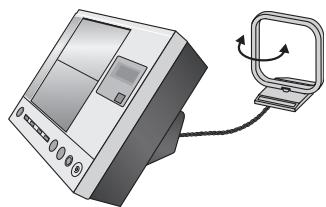
Illustration of a FM ATM machine with control panel and vertical door (no text or symbols)Receive the radio stations after connecting the antenna. Then attach the antenna code on the wall or pillar in the good reception.
AM
natural_image
Illustration of a computer monitor connected to a smartphone via a scroll (no text or symbols)Change the direction and location of the antenna.
If noise is excessive in FM
You can improve FM reception by switching reception to monaural.

Press to turn the MONO mode ON/OFF

text_image
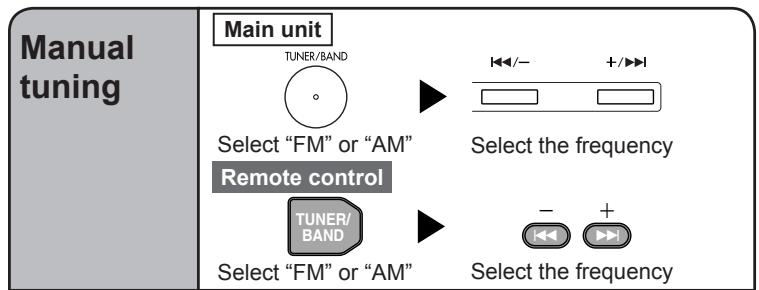
Manual tuning Main unit TUNER/BAND Select "FM" or "AM" Remote control TUNER/ BAND Select "FM" or "AM" Select the frequency +/-▶ Select the frequencyAuto tuning
Main unit

Select "FM" or "AM"

Press and hold until the frequency starts changing rapidly
Remote control

Select "FM" or "AM"


Press and hold until the frequency starts changing rapidly
• Auto tuning stops when it finds a station.
- To cancel auto tuning press the same button again.
Note
- Auto tuning may not function when there is excessive interference.
Perform once for FM stations and once for AM stations.

Select "FM" or "AM"


Press and hold until "AUTO" appears
Note
During automatic presetting, the memory indicator (PGM) flashes and the frequency scrolls. The memory indicator and channel numbers are displayed for a second when a station is preset. The first station to be preset is displayed when presetting finishes.
Automatic presetting
The tuner presets the stations it can receive into channels in ascending order.
Tune to
the station
you want to
set as the
preset.
The Ground Truth image displays a single, solid horizontal line. According to Rule 2 (UNDERSCORE & LINE RULES), this is a stylistic or background line, not a placeholder underscore. Therefore, the OCR result must ignore it. The provided OCR content is "____", which consists of four underscores. This is an incorrect interpretation of the line as a placeholder, violating the rule that stylistic lines must be ignored. The OCR has hallucinated text (underscores) where none should exist. Hence, the result is inconsistent with the Ground Truth.


-AUTO PRESET
Enter preset mode
Within 10 seconds


Select a channel
Note
The station occupying a channel is erased if another station is preset over that channel.
Selecting channels


Select "FM" or "AM"
Select a channel


Select "FM" or "AM"
Select a channel
text_image
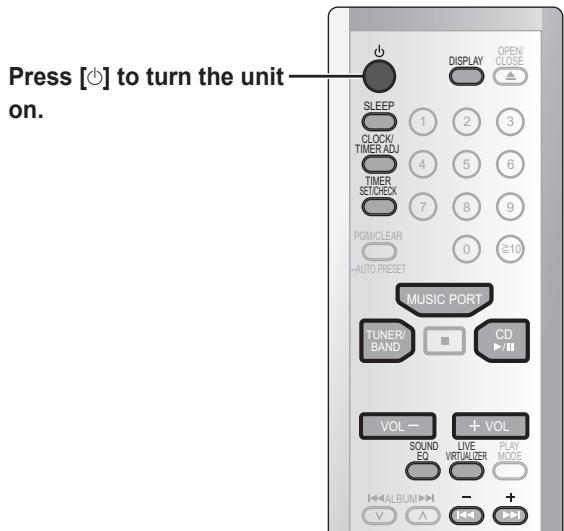
Press [↑] to turn the unit on. SLEEP CLOCK/ TIMER ADJ TIMER SETCHECK PGM/CLEAR AUTO PRESET MUSIC PORT TUNER/ BAND CD VOL - + VOL SOUND EQ LIVE VIRTUALIZER PLAY MODE ALBUM - + V ASetting the time
This is a 24-hour clock.
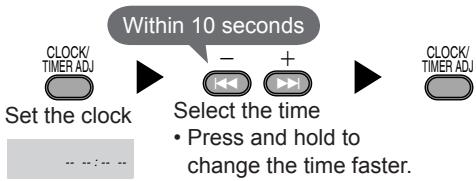
flowchart
graph LR
    A["Set the clock"] --> B["Select the time"]
    B --> C["Press and hold to change the time faster."]
    D["CLOCK/TIMER ADJ"] --> E["Within 10 seconds"]
    E --> F["+"]
    F --> G["+"]
    G --> H["CLOCK/TIMER ADJ"]
• To display the clock when the unit is on
• To check the time when the unit is off
Note
The clock is accurate to within ±60 seconds a month. Readjust if necessary.
Set again after disconnecting the AC mains lead or power failure.
SLEEP timer
The SLEEP timer can turn the unit off after a set time.

• Each time you press the button:

• To check the remaining time
Note
The play timer and sleep timer can be used together. The sleep timer always has priority. Be sure not to overlap timer settings.
Sound quality
You can choose one of four types of sound quality.
Live Virtualizer
You can create a three-dimensional sound field when listening to stereo sound.

Select the sound quality
• Each time you press the button:
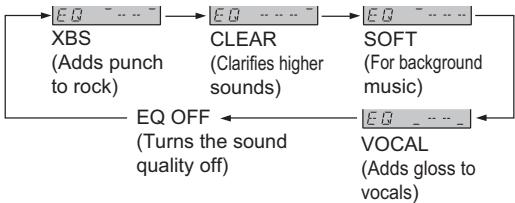
flowchart
graph LR
    A["XBS (Adds punch to rock)"] --> B["EQ OFF (Turns the sound quality off)"]
    B --> C["CLEAR (Clarifies higher sounds)"]
    C --> D["SOFT (For background music)"]
    D --> E["VOCAL (Adds gloss to vocals)"]

Press to turn the Live Virtualizer ON/OFF
Note
The actual effect depends on the source played.
Play timer
This timer starts play of the selected source at the selected time.
Preparation: Set the clock (← left).
1 Perform timer settings
① Set the start time
While the time is displayed
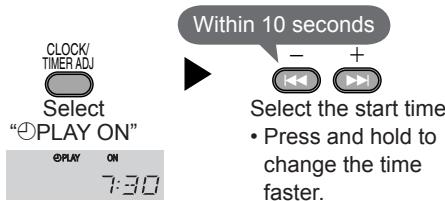
text_image
CLOCK/ TIMER ADJ Select "⊕PLAY ON" PLAY ON 7:30 Within 10 seconds - + Select the start time • Press and hold to change the time faster.② Set the end time
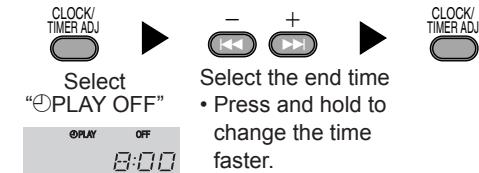
text_image
CLOCK/ TIMER ADJ Select "⊕PLAY OFF" @PLAY OFF 8:00 - + CLOCK/ TIMER ADJ Select the end time • Press and hold to change the time faster.2 Select the source and adjust the volume
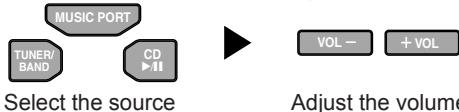
flowchart
graph LR
    A["MUSIC PORT"] --> B["TUNER/BAND"]
    B --> C["CD"]
    C --> D["Select the source"]
    D --> E["VOL -"]
    E --> F["+VOL"]
    F --> G["Adjust the volume"]
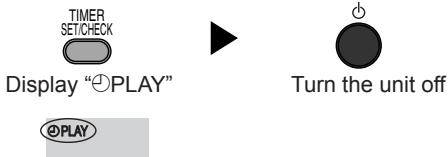
3 Turn the timer on
text_image
TIMER SET/CHECK Display "PLAY" PLAY Turn the unit offThe unit must be off for the timer to be operated.
Note
You can enjoy any sources while the play timer is set. The timer function will be canceled when you change the frequency step. Follow the step 3 again while the unit is on.
• To cancel the timer while the unit is on
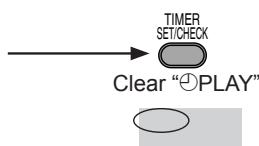
Note
The timer function will be canceled, but the settings stay in the memory.
The timer comes on every day if the timer is on.
• To change the timer

• To check the setting while the unit is off
Note
- If you turn the unit off and on again while the timer is functioning, the finish time setting will not be activated.
- When the “MUSIC P” source is selected, set the timer on the connected equipment to the same time.
Display
You can change the display.

The following types of information are displayed.
- Original display
- Time display
text_image
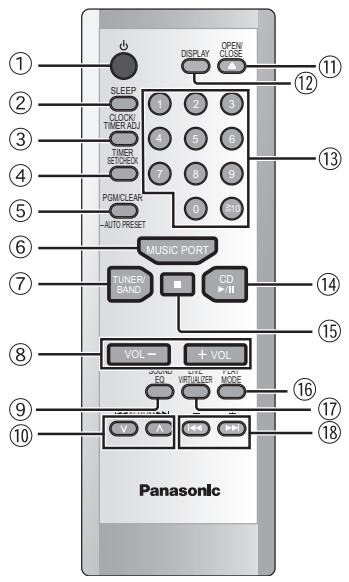
SLEEP 1 2 3 CLOCK TIMER ADJ 5 6 TIMER SETBOX 7 8 9 POMICLEAR 0 1 -AUTO RESET MUSIC PORT TUNER BAND CD +II VOL → + VOL WINDI ED WRIPLER VOUT V A + - PanasonicThe shaded buttons, such as 1, function in the same way as the buttons on the remote control.
text_image
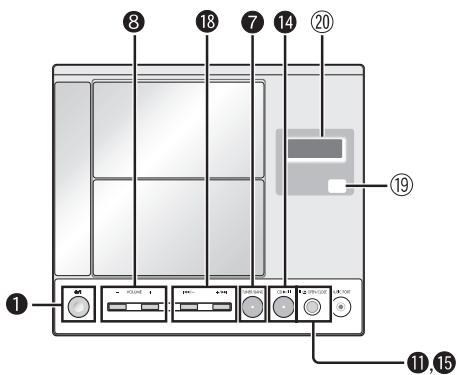
① ② ③ ④ ⑤ ⑥ ⑦ ⑧ ⑨ ⑩ ⑪ ⑫ ⑬ ⑭ ⑮ ⑯ ⑰ ⑱ ⑲ ㉑ ㉒ ㉓ ㉔ ㉕ ㉖ ㉗ ㉘ ㉙ ㉚ ㉛ ㉜ ㉝ ㉟ ㉳ ㉟ ㉟ ㉟ ㉟① Standby/on switch [∅, ⊕/I].... 3
Press to switch the unit from on to standby mode or vice versa. In standby mode, the unit is still consuming a small amount of power.
② SLEEP timer button [SLEEP]...... 5
③ Clock/timer adjust button [CLOCK/TIMER ADJ]...... 5
④ Timer set/check button [TIMER SET/CHECK]....5
⑤ CD program/clear, tuner preset button
[PGM/CLEAR, -AUTO PRESET].... 3, 4
⑥ MUSIC PORT button [MUSIC PORT]....2
⑦ Tuner/band select button [TUNER/BAND]...... 4
⑧ Volume buttons [VOL -, + VOL, - VOLUME +].... 3
⑨ Sound EQ button [SOUND EQ] 5
⑩ Album skip, preset channel select buttons
[∨, ∧, ◀◀ ALBUM ▶▶].... 4, 6
⑪ CD open/close button [▲, OPEN/CLOSE].... 3
⑫ Display button [DISPLAY] 5
⑬ Numbered buttons [1-9, 0, ≥10] .... 3
⑭ CD play/pause button [CD ▶/□].... 3
⑮ CD stop button [■] 3
⑯ Play mode button [PLAY MODE].... 3, 4, 6
⑰ Live virtualizer button [LIVE VIRTUALIZER]...... 5
⑱ CD skip/search, frequency select, time adjust buttons
[|◀◀, ▶▶|, -, +, |◀◀/−, +/▶▶|].... 3, 4, 5
⑲ Remote control signal sensor
⑳ Display
MP3 operations
This unit can play MP3, a method of compressing audio without overly hurting audio quality.
When creating MP3 files to play on this unit
• Maximum number of tracks and albums: 999 tracks and 256 albums.
- Compatible compression rate: Between 64 kbps and 320 kbps (stereo). 128 kbps (stereo) is recommended.
- Disc formats: ISO9660 level 1 and level 2 (except for extended formats).
- It is better not to create folders (album) within folders (004album below).
- The time for reading TOC depends on the number of the tracks, the folders or folder structures.
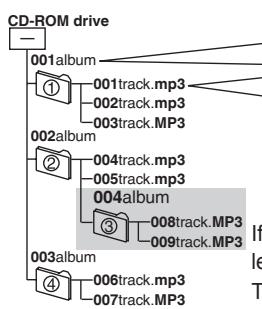
flowchart
graph TD
    A["CD-ROM drive"] --> B["001album"]
    A --> C["002album"]
    A --> D["003album"]
    B --> E["001track.mp3"]
    B --> F["002track.mp3"]
    B --> G["003track.mp3"]
    C --> H["004track.mp3"]
    C --> I["005track.mp3"]
    C --> J["004album"]
    D --> K["006track.mp3"]
    D --> L["007track.mp3"]
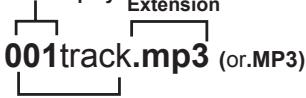
Naming tracks and albums
Prefix with 3-digit numbers in the order you want to play Extension
If you created an album such as 004album on the left, the files may not play in order.
The albums would play in the order ①, ②, ③, ④.
Title names and album names are not
displayable on this unit.
text_image
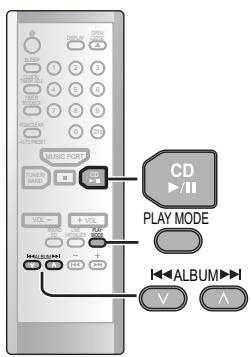
CD PLAY MODE H ALBUM H V AAlbum play
You can listen to tracks within albums.
ALBUM :
Album play
ALBUM
Album repeat
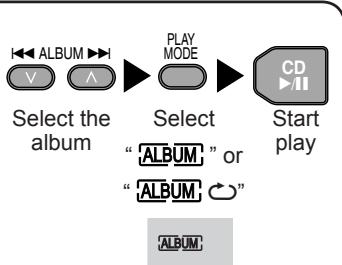
flowchart
graph LR
    A["Select the album"] --> B["Select"]
    B --> C["Start play"]
    D["ALBUM"] --> E["ALBUM"]
    F["ALBUM"] --> G["ALBUM"]
    H["ALBUM"] --> I["ALBUM"]
    J["PLAY MODE"] --> K["CD"]

Limitations on MP3
- This unit is compatible with multi-session but if there are a lot of sessions it takes more time for play to start. Keep the number of sessions to a minimum to avoid this.
- This unit cannot play files recorded using packet write.
- If the disc includes both MP3 and normal audio data (CD-DA), the unit plays the type recorded in the inner part of the disc. If the disc includes both MP3 and other types of audio data (e.g. WMA or WAV), the unit plays only the MP3.
- Depending on how you create MP3 files, they may not play in the order you numbered them or may not play at all.
Regarding CDs
Note on CD-R and CD-RW
This unit can play CD-R and CD-RW recorded with CD-DA or MP3. Use an audio recording disc for CD-DA and finalize* it when you finish recording.
The unit may not be able to play some discs due to the condition of the recording.
* A process performed after recording that enables CD-R/CD-RW players to play audio CD-R and CD-RW.
Caution
Choose discs with this mark:
Do not;
- use irregularly shaped CDs.
- attach extra labels and stickers.
- use CDs with labels and stickers that are coming off or with adhesive exuding from under labels and stickers.
- attach scratch-proof covers or any other kind of accessory.
• write anything on the CD. - clean CDs with liquids (Wipe with a soft, dry cloth.).

Safety precautions
Placement
Set the unit up on an even surface away from direct sunlight, high temperatures, high humidity, and excessive vibration. These conditions can damage the cabinet and other components, thereby shortening the unit's service life.
Do not place heavy items on the unit.
Voltage
Do not use high voltage power sources. This can overload the unit and cause a fire.
Do not use a DC power source. Check the source carefully when setting the unit up on a ship or other place where DC is used.
AC mains lead protection
Ensure the AC mains lead is connected correctly and not damaged. Poor connection and lead damage can cause fire or electric shock. Do not pull, bend, or place heavy items on the lead.
Grasp the plug firmly when unplugging the lead. Pulling the AC mains lead can cause electric shock.
Do not handle the plug with wet hands. This can cause electric shock.
Foreign matter
Do not let metal objects fall inside the unit. This can cause electric shock or malfunction.
Do not let liquids get into the unit. This can cause electric shock or malfunction. If this occurs, immediately disconnect the unit from the power supply and contact your dealer.
Do not spray insecticides onto or into the unit. They contain flammable gases which can ignite if sprayed into the unit.
Service
Do not attempt to repair this unit by yourself. If sound is interrupted, indicators fail to light, smoke appears, or any other problem that is not covered in these instructions occurs, disconnect the AC mains lead and contact your dealer or an authorized service center. Electric shock or damage to the unit can occur if the unit is repaired, disassembled or reconstructed by unqualified persons.
Extend operating life by disconnecting the unit from the power source if it is not to be used for a long time.
(Back of product)
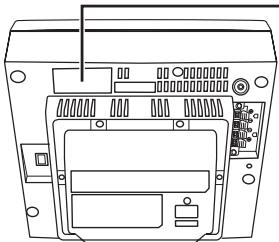
natural_image
Line drawing of a television set back panel with no visible text or symbolsCLASS 1 LASER PRODUCT
LUOKAN 1 LASERLAITE KLASS 1 LASER APPARAT
| CAVAREL | INVISIBLE LASER RADIATION WHEN OPEN AND INTERLOCKS DFEATED,AVOID EXPOSURE TO BEAM. (IEC60825-11Class 3b) |
| ATTENTION | RAYONNEMENT LASER INVISIBLE DANGEREUX EN CAS D'OUVERTURE ET.LORSQUE LA SÉCURITE EST NEUTRALÉESE, EXPOSITION DANGERELGE AU FANSCEAUX |
| USYNUG LASERSTRÄLUNG VED ÅBNING, NÄR SKIKERHEDSAFBERYDERE ERUDE AF FUNKTION, UNIGA USDETTELSE FOR STRÄLING. | |
| VARO! | AVATTAESSA A SUJOUALKITUS OHITTTEASSA OLET ALTTINA NAKYMÄTÖNTÄ LASERSTÄTEKILLLE, ÄLA KATSÖ SÄTEESEEEN. |
| VARNING | OSYNUG LASERSTRÄLNING NÄR DENNA DEL ÄR ÖPPNAD OCH SPÄRRENÄR URKOPPLAD, BETRAKTA EJ STRÄLEN. |
| VORSICHT | UNSICHTBARE LASERSTRÄHLUNG, WEWIN ABDECKUNG GEÖFFNET UNDSICHERHETSVERMIEGELUNG UBERBRÜCKT, NICHT DEM STRÄHL ASSETZEN. |
| ADVARSEL | USYNUG LASERSTRÄLNING NÄR DEKSEL ÅPNES OG SKIKERHEDS LÄS BRYTES.UNNGÅ ENSPONERING FOR STRÄLEN. RQLXS0053 |
Except continental Europe and the United Kingdom
Inside of product
Tuotteen sisällä
Produktets innside
For the United Kingdom and Republic of Ireland
Sales and Support Information
Customer Care Centre
• For customers within the UK: 08705 357357
• For customers within the Republic of Ireland: 01 289 8333
- Visit our website for product information
• E-mail: customer.care@panasonic.co.uk
Direct Sales at Panasonic UK
- Order accessory and consumable items for your product with ease and confidence by phoning our Customer Care Centre Monday - Thursday 9:00am - 5:30pm, Friday 9:30am - 5:30pm (Excluding public holidays).
- Or go on line through our Internet Accessory ordering application at www.panasonic.co.uk.
- Most major credit and debit cards accepted.
- All enquiries transactions and distribution facilities are provided directly by Panasonic UK Ltd.
- It couldn't be simpler!
- Also available through our Internet is direct shopping for a wide range of finished products, take a browse on our website for further details.
Caution for AC Mains Lead
(For United Kingdom)
("EB" area code model only)
For your safety, please read the following text carefully.
This appliance is supplied with a moulded three pin mains plug for your safety and convenience.
A 5-ampere fuse is fitted in this plug.
Should the fuse need to be replaced please ensure that the replacement fuse has a rating of 5-ampere and that it is approved by ASTA or BSI to BS1362.
Check for the ASTA mark 📍 or the BSI mark 🍽 on the body of the fuse.
If the plug contains a removable fuse cover you must ensure that it is refitted when the fuse is replaced.
If you lose the fuse cover the plug must not be used until a replacement cover is obtained.
A replacement fuse cover can be purchased from your local dealer.
CAUTION!
IF THE FITTED MOULDED PLUG IS UNSUITABLE FOR THE SOCKET OUTLET IN YOUR HOME THEN THE FUSE SHOULD BE REMOVED AND THE PLUG CUT OFF AND DISPOSED OF SAFELY.
THERE IS A DANGER OF SEVERE ELECTRICAL SHOCK IF THE CUT OFF PLUG IS INSERTED INTO ANY 13-AMPERE SOCKET.
If a new plug is to be fitted please observe the wiring code as stated below. If in any doubt please consult a qualified electrician.
IMPORTANT
The wires in this mains lead are coloured in accordance with the following code: Blue: Neutral, Brown: Live.
As these colours may not correspond with the coloured markings identifying the terminals in your plug, proceed as follows:
The wire which is coloured Blue must be connected to the terminal which is marked with the letter N or coloured Black or Blue.
The wire which is coloured Brown must be connected to the terminal which is marked with the letter L or coloured Brown or Red.
WARNING: DO NOT CONNECT EITHER WIRE TO THE EARTH TERMINAL WHICH IS MARKED WITH THE LETTER E, BY THE EARTH SYMBOL 12 OR COLOURED GREEN OR GREEN/YELLOW.
THIS PLUG IS NOT WATERPROOF-KEEP DRY.
Before use
Remove the connector cover.
How to replace the fuse
The location of the fuse differ according to the type of AC mains plug (figures A and B). Confirm the AC mains plug fitted and follow the instructions below. Illustrations may differ from actual AC mains plug.
- Open the fuse cover with a screwdriver.
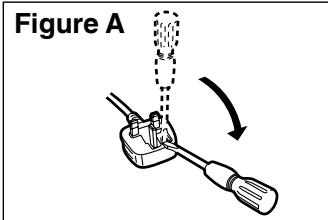
text_image
Figure A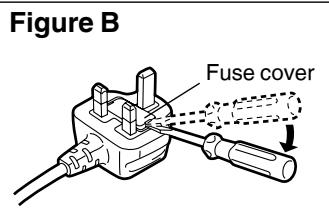
text_image
Figure B Fuse cover- Replace the fuse and close or attach the fuse cover.
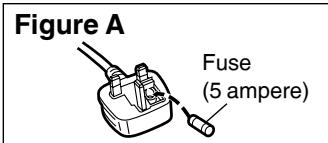
text_image
Figure A Fuse (5 ampere)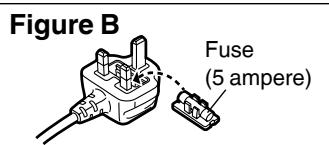
text_image
Figure B Fuse (5 ampere)-If you see this symbol-
Information on Disposal for Users of Waste Electrical & Electronic Equipment (private households)

This symbol on the products and/or accompanying documents means that used electrical and electronic products should not be mixed with general household waste.
For proper treatment, recovery and recycling, please take these products to designated collection points, where they will be accepted on a free
of charge basis. Alternatively, in some countries you may be able to return your products to your local retailer upon the purchase of an equivalent new product. Disposing of this product correctly will help to save valuable resources and prevent any potential negative effects on human health and the environment which could otherwise arise from inappropriate waste handling. Please contact your local authority for further details of your nearest designated collection point.
Penalties may be applicable for incorrect disposal of this waste, in accordance with national legislation.
For business users in the European Union
If you wish to discard electrical and electronic equipment, please contact your dealer or supplier for further information.
Information on Disposal in other Countries outside the European Union
This symbol is only valid in the European Union.
If you wish to discard this product, please contact your local authorities or dealer and ask for the correct method of disposal.
CAUTION!
THIS PRODUCT UTILIZES A LASER.
USE OF CONTROLS OR ADJUSTMENTS OR PERFORMANCE OF PROCEDURES OTHER THAN THOSE SPECIFIED HEREIN MAY RESULT IN HAZARDOUS RADIATION EXPOSURE. DO NOT OPEN COVERS AND DO NOT REPAIR YOURSELF. REFER SERVICING TO QUALIFIED PERSONNEL.
CAUTION!
- DO NOT INSTALL OR PLACE THIS UNIT IN A BOOKCASE, BUILT-IN CABINET OR IN ANOTHER CONFINED SPACE. ENSURE THE UNIT IS WELL VENTILATED. TO PREVENT RISK OF ELECTRIC SHOCK OR FIRE HAZARD DUE TO OVERHEATING, ENSURE THAT CURTAINS AND ANY OTHER MATERIALS DO NOT OBSTRUCT THE VENTILATION VENTS.
- DO NOT OBSTRUCT THE UNIT'S VENTILATION OPENINGS WITH NEWSPAPERS, TABLECLOTHS, CURTAINS, AND SIMILAR ITEMS.
- DO NOT PLACE SOURCES OF NAKED FLAMES, SUCH AS LIGHTED CANDLES, ON THE UNIT.
- DISPOSE OF BATTERIES IN AN ENVIRONMENTALLY FRIENDLY MANNER.
WARNING:
TO REDUCE THE RISK OF FIRE, ELECTRIC SHOCK OR PRODUCT DAMAGE, DO NOT EXPOSE THIS APPARATUS TO RAIN, MOISTURE, DRIPPING OR SPLASHING AND THAT NO OBJECTS FILLED WITH LIQUIDS, SUCH AS VASES, SHALL BE PLACED ON THE APPARATUS.
The socket outlet shall be installed near the equipment and easily accessible or the mains plug or an appliance coupler shall remain readily operable.
(For continental Europe and the United Kingdom)
THIS UNIT IS INTENDED FOR USE IN MODERATE CLIMATES.
(For other areas)
THIS UNIT IS INTENDED FOR USE IN TROPICAL CLIMATES.
SUOMI
TÄMÄ LAITE ON TARKOITETTU KÄYTETTÄVÄKSI LEUDOSSA ILMASTOSSA.
NORSK
DETTE APPARATET ER BEREGNET TIL BRUK UNDER MODERATE KLIMAFORHOLD.
Maintenance
To clean this unit, wipe with a soft, dry cloth.
- Never use alcohol, paint thinner or benzine to clean this unit.
- Before using chemically treated cloth, read the instructions that came with the cloth carefully.
Care of the CD lens
- Clean the lens regularly to prevent malfunctions. Use a blower to remove dust and a cotton swab if it is extremely dirty.
Recommended product: Lens cleaner kit (part no. SZZP1038C).
- Do not use the lens cleaner of the CD type.
SUOMI
VAROITUS!
LAITTEEN KÄYTTÄMINEN MUULLA KUIN TÄSSÄ KÄYTTÖOHJEESSA MAINITULLA TAVALLA SAATTAA ALTISTAA KÄYTTÄJÄN TURVALLISUUSLUOKAN 1 YLITTÄVÄLLE NÄKYMÄTTÖMÄLLE LASERSÄTEILYLLE.
VAROITUS!
- ÄLÄ ASENNA TAI LAITA TÄTÄ LAITETTA KABINETTITYYPPISEEN KIRJAKAAPPIIN TAI MUHUN SULJETTUUN TILAAN, JOTTA TUULETUS ONNISTUISI. VARMISTA, ETTÄ VERHO TAI MIKÄÄN MUU MATERIAALI EI HUONONNA TUULETUSTA, JOTTA VÄLTETTÄISIIN YLIKUUMENEMISESTA JOHTUVA SÄHKÖISKU-TA TULIPALOVAARA.
- ÄLÄ PEITÄ LAITTEEN TUULETUSAUKKOJA SANOMALEHDELLÄ, PÖYTÄLIINALLA, VERHOLLA TAI MUULLA VASTAAVALLA ESINEELLÄ.
- ÄLÄ ASETA PALAVAA KYNTTILÄÄ TAI MUUTA AVOTULEN LÄHDETTÄ LAITTEEN PÄÄLLE.
- HÄVITÄ PARISTOT LUONTOA VAHINGOITTAMATTOMALLA TAVALLA.
VAROITUS:
TULIPALO-, SÄHKÖISKUVAARAN TAI TUOTETTA KOHTAAVAN MUUN VAHINGON VÄHENTÄMISEKSI EI LAITETTA SAA ALTISTAA SATEELLE, KOSTEUDELLE, VESIPISAROILLE TAI ROISKEELLE, EIKÄ NESTETTÄ SISÄLTÄVIÄ ESINEITÄ, KUTEN ESIMERKIKSI MALJAKOITA, SAA ASETTAA LAITTEEN PÄÄLLE.
FM 87.50 MHz to 108.00 MHz (50 kHz steps)
522 kHz to 1629 kHz (9 kHz steps)
520 kHz to 1630 kHz (10 kHz steps)
CD player
Sampling frequency 44.1 kHz
Decoding 16 bit linear
Beam source
Semiconductor laser (wavelength 795 nm)
(For Norge)
Bølgelengde 795 nm
Number of channels 2 channel, stereo
Wow and flutter
Less than possible measurement data
D/A converter MASH(1 bit DAC)
Terminals
Input MUSIC PORT: ∅ 3.5 mm stereo (33 kΩ)
Output PHONES: ∅ 3.5 mm stereo (32 Ω)
General
Power supply
(For continental Europe and the United Kingdom)
AC 230 V to 240 V, 50 Hz
(For other areas) AC 220 V to 240 V, 50/60 Hz
Power consumption 15 W
Dimensions (W×H×D)
Power consumption in standby mode: 1.6 W
Note
Specifications are subject to change without notice. Mass and dimensions are approximate.
MPEG Layer-3 audio decoding technology licensed from Fraunhofer IIS and Thomson multimedia.