AER5845QAB17 - Cooker AMANA - Free user manual and instructions
Find the device manual for free AER5845QAB17 AMANA in PDF.


| Product Type | Freestanding Electric Range |
| Brand | Amana |
| Model | AER5845QAB17 |
| Color | White / Black / Stainless Steel (depending on configuration) |
| Width | 76.2 cm (30 inches) |
| Depth | 71.1 cm (28 inches) |
| Height | 119.4 cm (47 inches) |
| Weight | 68 kg (150 lb) |
| Power Supply | 240 V / 40 A, single phase |
| Cooking Type | Electric Radiant Burners |
| Number of Burners | 4 (including one dual) |
| Oven Type | Electric with Self-Cleaning Function |
| Oven Capacity | 141 L (5.0 ft³) |
| Main Functions | Convection cooking, timer, child lock |
| Cleaning | Pyrolytic self-cleaning cycle |
| Safety | Automatic shut-off, control lock, residual heat indicator |
| Spare Parts | Heating elements, racks, bulbs, resistors available |
| Repairability | Repairability index of 7.8/10 (estimate) |
Frequently Asked Questions - AER5845QAB17 AMANA
User questions about AER5845QAB17 AMANA
0 question about this device. Answer the ones you know or ask your own.
Ask a new question about this device
Download the instructions for your Cooker in PDF format for free! Find your manual AER5845QAB17 - AMANA and take your electronic device back in hand. On this page are published all the documents necessary for the use of your device. AER5845QAB17 by AMANA.
USER MANUAL AER5845QAB17 AMANA
Electric Smoothtop - Easy Touch Control 800
Amana®
Range
Use & Care Guide

Safety.... 1-3

Surface Cooking 4-7
Controls
Smoothtop Surface
Oven Cooking 8-18
Baking
Cook & Hold
Delay
Keep Warm
Broiling
Warming Drawer
Oven Racks

Care & Cleaning 19-22
Self-Clean Oven
Cleaning Procedures
Maintenance 23-24
Oven Light & Window
Warming Drawer

Troubleshooting 25-26

Warranty & Service....27
Installer: Please leave this manual with this appliance.
Consumer: Please read and keep this manual for future reference. Keep sales receipt and/or canceled check as proof of purchase.
Model Number
Serial Number
Date of Purchase ____
If you have questions, call:
Customer Assistance
1-800-688-9900 USA
1-800-688-2002 Canada
Internet: http://www.amana.com
In our continuing effort to improve the quality and performance of our cooking products, it may be necessary to make changes to the appliance without revising this guide.
For service information, see page 27.

Important Safety Instructions
Warning and Important Safety Instructions appearing in this guide are not meant to cover all possible conditions and situations that may occur. Common sense, caution, and care must be exercised when installing, maintaining, or operating the appliance.
Always contact your dealer, distributor, service agent, or manufacturer about problems or conditions you do not understand.
Recognize Safety Symbols, Words, Labels

WARNING
WARNING – Hazards or unsafe practices which COULD result in severe personal injury or death.

CAUTION
CAUTION – Hazards or unsafe practices which COULD result in minor personal injury.
Read and follow all instructions before using this appliance to prevent the potential risk of fire, electric shock, personal injury or damage to the appliance as a result of improper usage of the appliance. Use appliance only for its intended purpose as described in this guide.
To ensure proper and safe operation: Appliance must be properly installed and grounded by a qualified technician. Do not attempt to adjust, repair, service, or replace any part of your appliance unless it is specifically recommended in this guide. All other servicing should be referred to a qualified servicer.
Always disconnect power to appliance before servicing.

WARNING
• ALL RANGES CAN TIP AND CAUSE INJURIES TO PERSONS
• INSTALL ANTI-TIP DEVICE PACKED WITH RANGE
• FOLLOW ALL INSTALLATION INSTRUCTIONS
WARNING: To reduce risk of tipping of the appliance from abnormal usage or by excessive loading of the oven door, the appliance must be secured by a properly installed anti-tip device.


To check if device is properly installed, look underneath range with a flashlight to make sure one of the rear leveling legs is properly engaged in the bracket slot. The anti-tip device secures the rear leveling leg to the floor when properly engaged. You should check this anytime the range has been moved.
To Prevent Fire or Smoke Damage
Be sure all packing materials are removed from the appliance before operating it.
Keep area around appliance clear and free from combustible materials. Flammable materials should not be stored in an oven.
Many plastics are vulnerable to heat. Keep plastics away from parts of the appliance that may become warm or hot.
To prevent grease fires, do not let cooking grease or other flammable materials accumulate in or near the appliance.
In Case of Fire
Use dry chemical or foam-type extinguisher or baking soda to smother fire or flame. Never use water on a grease fire.
- Turn off appliance to avoid spreading the flame.
- NEVER pick up or move a flaming pan.
- Smother fire or flame by closing the oven door.
Turn off appliance and ventilating hood to avoid spreading the flame. Extinguish flame then turn on hood to remove smoke and odor.
Child Safety

CAUTION
NEVER store items of interest to children in cabinets above an appliance. Children climbing on the appliance or on the appliance door to reach items could be seriously injured.
NEVER leave children alone or unsupervised near the appliance when it is in use or is still hot. Children should never be allowed to sit or stand on any part of the appliance as they could be injured or burned.
Children must be taught that the appliance and utensils in it can be hot. Let hot utensils cool in a safe place, out of reach of small children. Children should be taught that an appliance is not a toy. Children should not be allowed to play with controls or other parts of the appliance.
About Your Appliance

CAUTION
NEVER use an appliance as a step to reach cabinets above. Misuse of appliance door, such as stepping, leaning or sitting on the door, may result in possible tipping of the appliance, breakage of door, and serious injuries.
To prevent potential hazard to the user and damage to the appliance, do not use appliance as a space heater to heat or warm a room. Also, do not use the oven as a storage area for food or cooking utensils.
Do not obstruct the flow of air by blocking the oven vent.
DO NOT TOUCH HEATING ELEMENTS OR INTERIOR SURFACES OF OVEN. Heating elements may be hot even though they are dark in color. Interior surfaces of any oven become hot enough to cause burns. During and after use, do not touch, or let clothing or other flammable materials contact heating elements or interior surfaces of oven until they have had sufficient time to cool. Other surfaces of the appliance may become hot enough to cause burns – among these surfaces are: oven vent opening and surface near this opening, oven door, window of oven door.
Do not touch a hot oven light bulb with a damp cloth as the bulb could break. Should the bulb break, disconnect power to the appliance before removing bulb to avoid electrical shock.
NEVER use aluminum foil to cover an oven rack or oven bottom. Misuse could result in risk of electric shock, fire, or damage to the appliance. Use foil only as directed in this guide.
Cooking Safety
Never heat an unopened food container in the oven. Pressure build-up may cause container to burst resulting in serious personal injury or damage to the appliance.
Use dry, sturdy potholders. Damp potholders may cause burns from steam. Dish towels or other substitutes should never be used as potholders because they can trail across hot elements and ignite or get caught on appliance parts.
Wear proper apparel. Loose fitting or long hanging-sleeved apparel should not be worn while cooking. Clothing may ignite and cause burns if garment comes in contact with heating elements.
Always place oven racks in the desired positions while oven is cool. Slide oven rack out to add or remove food, using dry, sturdy potholders. Always avoid reaching into the oven to add or remove food. If a rack must be moved while hot, use a dry potholder. Do not let potholder contact hot element in oven.
Use racks only in the oven in which they were shipped/purchased.
Use care when opening the oven door. Let hot air or steam escape before removing or replacing food.
PREPARED FOOD WARNING: Follow food
manufacturer's instructions. If a plastic frozen food container and/or its cover distorts, warps, or is otherwise damaged during cooking, immediately discard the food and its container. The food could be contaminated.
Do not allow aluminum foil or meat probe to contact heating element.
Always turn off all controls when cooking is completed.
Utensil Safety
Follow the manufacturer's directions when using oven cooking bags.
This appliance has been tested for safe performance using conventional cookware. Do not use any devices or accessories that are not specifically recommended in this guide. Do not use add-on oven convection systems. The use of devices or accessories that are not expressly recommended in this guide can create serious safety

Important Safety Instructions
hazards, result in performance problems, and reduce the life of the components of the appliance.
If pan is smaller than element, a portion of the element will be exposed to direct contact and could ignite clothing or potholder.
Only certain types of glass, glass/ceramic, ceramic, earthenware, or other glazed utensils are suitable for cooktop or oven service without breaking due to the sudden change in temperature. Follow utensil manufacturer's instructions when using glass.
Turn pan handle toward center of cooktop, not out into the room or over another surface element. This reduces the risk of burns, ignition of flammable materials, or spillage if pan is accidentally bumped or reached by small children.
Cooktop
NEVER leave surface units unattended especially when using high heat. An unattended boilover could cause smoking and a greasy spillover can cause a fire.
This appliance is equipped with different size surface elements. Select pans with flat bottoms large enough to cover element. Fitting pan size to element will improve cooking efficiency.
GLASS-CERAMIC SURFACE: NEVER cook on broken cooktop. If cooktop should break, cleaning solutions and spillovers may penetrate the broken cooktop and create a risk of electric shock. Contact a qualified technician immediately.
Deep Fat Fryers
Use extreme caution when moving the grease pan or disposing of hot grease. Allow grease to cool before attempting to move pan.
Ventilating Hoods
Clean range hood and filters frequently to prevent grease or other flammable materials from accumulating on hood or filter and to avoid grease fires.
When flaming foods under the hood, turn the fan on.
Cleaning Safety
Clean cooktop with caution. Turn off all controls and wait for appliance parts to cool before touching or cleaning.
Clean with caution. Use care to avoid steam burns if a wet sponge or cloth is used to wipe spills on a hot surface.
Some cleaners can produce noxious fumes if applied to a hot surface.
Clean only parts listed in this guide.
Self-Clean Oven
CAUTION
Before self-cleaning the oven, remove the oven racks, broiler pan, food and any other utensils. Wipe spillovers to prevent excessive smoke and flare-ups.
Do not clean door gasket. The door gasket is essential for a good seal. Care should be taken not to rub, damage, or move the gasket.
Do not use oven cleaners or oven liners of any kind in or around any part of the self-clean oven.
Important Safety Notice and Warning
The California Safe Drinking Water and Toxic Enforcement Act of 1986 (Proposition 65) requires the Governor of California to publish a list of substances known to the State of California to cause cancer or reproductive harm, and requires businesses to warn customers of potential exposures to such substances.
Users of this appliance are hereby warned that when the oven is engaged in the self-clean cycle, there may be some low-level exposure to some of the listed substances, including carbon monoxide. Exposure to these substances can be minimized by properly venting the oven to the outdoors by opening the windows and/or door in the room where the appliance is located during the self-clean cycle.
IMPORTANT NOTICE REGARDING PET BIRDS: Never keep pet birds in the kitchen or in rooms where the fumes from the kitchen could reach. Birds have a very sensitive respiratory system. Fumes released during an oven self-cleaning cycle may be harmful or fatal to birds. Fumes released due to overheated cooking oil, fat, margarine and overheated non-stick cookware may be equally harmful.
Save These Instructions for Future Reference
Surface Controls
Use to turn on the surface elements. An infinite choice of heat settings is available from Low to High. The knobs can be set on or between any of the settings.
Setting the Controls
-
Place pan on surface element.
-
Push in and turn the knob in either direction to the desired heat setting.
- The control panel is marked to identify which element the knob controls. For example, the graphic at right indicates left front element.

- There is an element indicator light on the control panel. When any surface control knob is turned on, the light will turn on. The light will turn off when all the surface elements are turned off.
When a control is turned on, a glow can be seen through the smoothtop surface. The element will cycle on and off to maintain the preset heat setting, even on High.
- After cooking, turn knob to Off. Remove pan.
Dual Elements
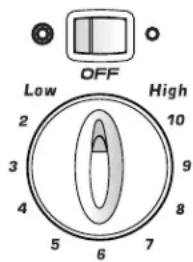
The cooking surface has two dual elements located in the right front and left front of the smoothtop. This allows you to change the size of these elements.
Press the switch to the left to use the large element or to the right to use the small element. The selection should be made prior to turning on the element.
text_image
OFF Low High 2 10 3 9 4 8 5 6 7Suggested Heat Settings
The size, type of cookware and cooking operation will affect the heat setting. For information on cookware and other factors affecting heat settings, refer to Cookware Recommendations on page 7.
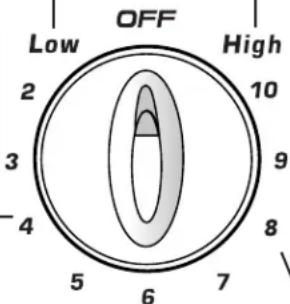
Low (2): Use to keep foods warm and melt chocolate and butter.
High (10): Use to bring liquid to a boil. Always reduce setting to a lower heat when liquids begin to boil or foods begin to cook.
Med. Low (3-4): Use to continue cooking covered foods or steam foods.
text_image
OFF Low High 2 10 3 9 -4 8 5 6 7Medium (5-7): Use to maintain slow boil for large amounts of liquids and for most frying operations.
Med. High (8-9): Use to brown meat, heat oil for deep fat frying or sauteing. Maintain fast boil for large amounts of liquids.

CAUTION
BEFORE COOKING
- Always place a pan on the surface unit before you turn it on. To prevent damage to range, never operate surface unit without a pan in place.
- NEVER use the cooktop as a storage area for food or cookware.
DURING COOKING
- Be sure you know which knob controls which surface unit. Make sure you turned on the correct surface unit.
- Begin cooking on a higher heat setting then reduce to a lower setting to complete the operation. Never use a high heat setting for extended cooking.
- NEVER allow a pan to boil dry. This could damage the pan and the appliance.
- NEVER touch cooktop until it has cooled. Expect some parts of the cooktop, especially around the surface units, to become warm or hot during cooking. Use potholders to protect hands.
AFTER COOKING
- Make sure surface unit is turned off.
- Clean up messy spills as soon as possible.
OTHER TIPS
- If cabinet storage is provided directly above cooking surface, limit it to items that are infrequently used and can be safely stored in an area subjected to heat. Temperatures may be unsafe for items such as volatile liquids, cleaners or aerosol sprays.
- NEVER leave any items, especially plastic items, on the cooktop. The hot air from the vent may ignite flammable items, melt or soften plastics, or increase pressure in closed containers causing them to burst.
- NEVER allow aluminum foil, meat probes or any other metal object, other than a pan on a surface element, to contact heating elements.
- NEVER store heavy items above the cooktop that could fall and damage it.
Smoothtop Surface
Smoothtop Surface Notes:
- Cooktop may emit light smoke and odor the first few times the cooktop is used. This is normal.
- Smoothtop cooktops retain heat for a period of time after the element is turned off. Turn the elements off a few minutes before food is completely cooked and use the retained heat to complete cooking. When the hot surface light turns off, the cooking area will be cool enough to touch. Because of the way they retain heat, the smoothtop elements will not respond to changes in settings as quickly as coil elements.
- In the event of a potential boilover, remove the pan from the cooking surface.
- Never attempt to lift the cooktop.
- The smoothtop surface may appear discolored when it is hot. This is normal and will disappear when the surface cools.
Cooking Areas
The cooking areas on your range are identified by permanent circles on the smoothtop surface. For most efficient cooking, fit the pan size to the element size.
Pans should not extend more than 12 to 1-inch beyond the cooking area.
When a control is turned on, a glow can be seen through the smoothtop surface. The element will cycle on and off to maintain the preset heat setting, even on Hi.
For more information on cookware, refer to Cookware
Recommendations on page 7.
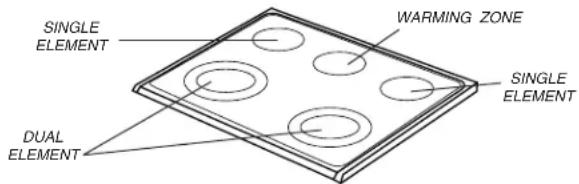
text_image
SINGLE ELEMENT WARMING ZONE SINGLE ELEMENT DUAL ELEMENTHot Surface Light
The Hot Surface indicator light is located on the control panel. The light will be illuminated

when any cooking area is hot. It will remain on, Hot Surface even after the control is turned off, until the area has cooled.
Warming Zone
Use the Warming Zone to keep hot cooked foods warm, such as vegetables, gravies and oven-safe dinner plates.
Setting the Control:
- Push in and turn the knob. Warming temperatures are approximate and are indicated on the control as Min, 2-7 and Max. However, the control can be set to any position between Min and Max.
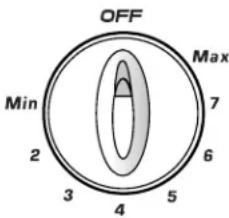
text_image
OFF Max Min 2 3 4 5 6 7- When done, turn the control to OFF and remove food. The Hot Surface indicator light will go off when the Warming Zone surface has cooled.
Notes:
- Never warm food for longer than one hour (eggs for 30 minutes), as food quality may deteriorate.
- Do not heat cold food on the Warming Zone.
- Heat settings will vary depending on type and amount of food. Always hold food at proper food temperatures. USDA recommends food temperatures between 140^ - 170^ F.
Suggested Settings
| Setting Type of food | |
| Min - 2 Breads/Pastries GraviesCasseroles Eggs | |
| 2 - 5 Dinner Plate with Food SaucesSoups (Cream) StewsVegetables Meats | |
| 5 - Max Fried Foods Hot BeveragesSoups (Liquid) |
Warming Zone Notes:
- Use only cookware and dishes recommended as safe for oven and cooktop use.
• Always use oven mitts when removing food from the Warming Zone as cookware and plates will be hot. - All foods should be covered with a lid or aluminum foil to maintain food quality.
- When warming pastries and breads the cover should have an opening to allow moisture to escape.
- Do not use plastic wrap to cover foods. Plastic may melt on to the surface and be very difficult to clean.
Tips to Protect the Smoothtop Surface
Cleaning (see page 21 for more information)
- Before first use, clean the cooktop.
- Clean your cooktop daily or after each use. This will keep your cooktop looking good and can prevent damage.
- If a spillover occurs while cooking, immediately clean the spill from the cooking area while it is hot to prevent a tough cleaning chore later. Using extreme care, wipe spill with a clean dry towel.
- Do not allow spills to remain on the cooking area or the cooktop trim for a long period of time.
- Never use abrasive cleansing powders or scouring pads which will scratch the cooktop.
- Never use chlorine bleach, ammonia or other cleansers not specifically recommended for use on glass-ceramic.
To Prevent Marks & Scratches
- Do not use glass pans. They may scratch the surface.
- Never place a trivet or wok ring between the surface and pan. These items can mark or etch the top.
- Do not slide aluminum pans across a hot surface. The pans may leave marks which need to be removed promptly. (See Cleaning, page 21.)
- Make sure the surface and the pan bottom are clean before turning on to prevent scratches.
- To prevent scratching or damage to the glass-ceramic top, do not leave sugar, salt or fats on the cooking area. Wipe the cooktop surface with a clean cloth or paper towel before using.
- Never slide heavy metal pans across the surface since these may scratch.
To Prevent Stains
- Never use a soiled dish cloth or sponge to clean the cooktop surface. A film will remain which may cause stains on the cooking surface after the area is heated.
- Continuously cooking on a soiled surface may/will result in a permanent stain.
To Prevent Other Damage
- Do not allow plastic, sugar or foods with high sugar content to melt onto the hot cooktop. Should this happen, clean immediately. (See Cleaning, page 21.)
- Never let a pan boil dry as this will damage the surface and pan.
- Never use cooktop as a work surface or cutting board.
- Never cook food directly on the surface.
- Do not use a small pan on a large element. Not only does this waste energy, but it can also result in spillovers burning onto the cooking area which requires extra cleaning.
- Do not use non-flat specialty items that are oversized or uneven such as round bottom woks, rippled bottom and/or oversized canners and griddles.
- Do not use foil or foil-type containers. Foil may melt onto the glass. If metal melts on the cooktop, do not use. Call an authorized Amana Servicer.
Cookware Recommendations
Using the right cookware can prevent many problems, such as food taking longer to cook or achieving inconsistent results. Proper pans will reduce cooking times, use less energy, and cook food more evenly.
Flat Pan Tests
See if your pans are flat.
The Ruler Test:
- Place a ruler across the bottom of the pan.
- Hold it up to the light.
- Little or no light should be visible under the ruler.
The Bubble Test:
- Put 1 inch of water in the pan. Place on cooktop and turn control to High.
- Watch the formation of the bubbles as the water heats. Uniform bubbles mean good performance, and uneven bubbles indicate hot spots and uneven cooking.
| Select Avoid | |
| Flat, smooth-bottom pans. Pans with uneven bottoms. Pans with uneven efficiency and sometimes may not boil liquid. | Pans with grooved or warped bottoms. |
| Heavy-gauge pans. Very thin-gauge metal or glass pans. | |
| Pans that are the pans smaller or larger than the same size as the element by 1 inch. element. | |
| Secure handles. Cookware with loose or broken handles. Heavy handles that tilt the pan. | |
| Tight-fitting lids. Loose-fitting lids. | |
| Flat bottom woks. Woks with a ring-stand bottom. | |

Surface Cooking
Canning and Oversize Cookware
All canners and large pots must have flat bottoms and must be made from heavy-gauge materials. This is critical on smoothtop surfaces. The base must not be more than 1 inch larger than the element.
When canners and pots do not meet these standards, cooking times may be longer, and cooktops may be damaged.
Some canners are designed with smaller bases for use on smoothtop surfaces.
When canning, use the High heat setting only until the water comes to a boil or pressure is reached in the canner. Reduce to the lowest heat setting that maintains the boil or pressure. If the heat is not turned down, the cooktop may be damaged.
Control Panel

text_image
A B C D E F G H Bake Broil Convect Cancel Cook& Keep Hold Warm Delay 1 2 3 4 5 6 7 8 9 0 Autoset I J K L M NThe control panel is designed for ease in programming. The display window on the control shows time of day, timer and oven functions. Control panel shown includes Convect and other model specific features. (Styling may vary depending on model.)
| A | Convect Use for convection baking and roasting. | |
| B | Bake Use for baking and roasting. | |
| C | Broil Use for broiling and top browning. | |
| D | Cancel Cancels all operations except Timer and Clock. | |
| E | Clock Use to set time of day clock. | |
| F | Oven Light Use to turn the oven light on or off. | |
| G | Favorite Use to set and save a specific Cook & Hold procedure. | |
| H | Clean Use to set self-clean cycle. | |
| I | Cook & Hold | Bakes for a preset time, then holds food warm for 1 hour. |
| J | Keep Warm | Use to keep cooked food warm in oven. |
| K | Delay Programs the oven to start baking at a later time. | |
| L | Number Pads | Use to set time and temperature. |
| M | Autoset Use to quickly set temperatures. | |
| N | Timer Sets Timer. | |
Using the Touchpads
- Press the desired pad.
- Press the number pads to enter time or temperature.
- Press the Autoset 0 pad to enter temperature.
- A beep will sound when any pad is touched.
- A double beep will sound if a programming error occurs.
Note: Four seconds after pressing the number pads or the Autoset pad, the time or temperature will automatically be entered. If more than 30 seconds elapse between touching a function pad and the number pads or the Autoset pad, the function will be canceled and the display will return to the previous display.
Clock
The clock can be set to display time in a 12-hour or 24-hour format. The clock is set at the factory for the 12-hour format.
To change the clock to 24-hour format:
- Press and hold the Cancel and Favorite pads for three seconds.
• 12 Hr flashes in the display. - Press the Autoset 0 pad to select 24 Hr; press again to select 12 Hr.
- Set the time of day following the directions in the To set the Clock section.
To set the Clock:
- Press the Clock pad.
- The time of day flashes in the display.
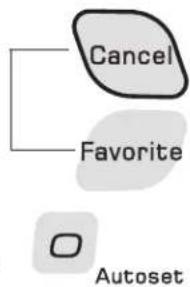
flowchart
graph TD
    A["Cancel"] --> B["Favorite"]
    C["Autoset"] --> D["Next Step"]
- Press the appropriate number pads to set the time of day.
- Colon flashes in the display.
- Press the Clock pad again or wait four seconds.
• The colon will remain on.
When electrical power is supplied or after a power interruption, the last clock time before power was interrupted will flash.
cont.

Oven Cooking
To recall the time of day when another time function is showing, press the Clock pad.
Clock time cannot be changed when the oven has been programmed for Delay cook or clean or Cook & Hold.
To cancel the Clock display:
If you do not want the time of day to display:
Press and hold the Cancel and Clock pads for three seconds. The time of day will disappear from the display.
When the clock display is canceled, press the Clock pad to briefly display the time of day.

When the clock display is canceled, after 15 minutes, the oven control will go into Standby Mode to save energy. The display will be blank and the oven light will not operate. To "wake up" the control from Standby Mode, press any touchpad. A double beep will sound.
To restore the Clock display:
Press and hold the Cancel and Clock pads for three seconds. The time of day will reappear in the display.
Timer
The timer can be set from one minute (0:01) up to 99 hours and 59 minutes (99:59).
The timer can be used independently of any other oven activity. It can also be set while another oven function is operating.
The Timer does not control the oven. It only controls a beeper.
To set the Timer:
- Press the Timer pad.
Timer
• 0:00 and TIMER flash in the display.
- Press the appropriate number pads until the correct time appears in the display.
- The colon and TIMER will continue to flash.
-
Press Timer pad again or wait four seconds.
-
The colon stops flashing and the time begins counting down.
-
The last minute of the timer countdown will be displayed in seconds.
-
At the end of the set time, one long beep will sound and "End" will be displayed.
- Press the Timer pad to clear the display.
To cancel the Timer:
- Press and hold the Timer pad for three seconds.
OR
- Press the Timer pad and press '0' using the number pads.

Locking the Control and Oven Door
The touchpad and oven door can be locked for safety, cleaning, or to prevent unwanted use. The touchpads will not function when locked.
If the oven is currently in use, the touchpads and door cannot be locked.
The current time of day will remain in the display when the touchpads and door are locked.
To lock:
Press and hold the Cancel and Cook & Hold pads for three seconds. (Press Cancel pad first.)
- OFF appears in the display
- LOCK flashes while the door is locking.
To unlock:
Press and hold the Cancel and Cook & Hold pads for three seconds. (Press Cancel pad first.) OFF disappears from the display.
Note: The touchpads and oven door cannot be locked if the oven temperature is 400^ F or above.
Fault Codes
BAKE or LOCK may flash rapidly in the display to alert you if there is an error or a problem. If BAKE or LOCK flash in the display, press Cancel pad. If BAKE or LOCK continue to flash, disconnect power to the appliance. Wait a few minutes, and then reconnect power. If the flashing still continues, disconnect power to the appliance and call an authorized servicer.
Baking
To set Bake:
- Press the Bake pad.
Bake
- BAKE will flash.
• 000 will flash in the display.
- Select the oven temperature. Press the Autoset 0 pad for 350°F or the appropriate number pads.

Autoset
• Each additional press of the Autoset 0 pad will increase the temperature by 25^ .
- The oven temperature can be set from 170^ to 550^ .
- Press Bake pad again or wait four seconds.
- BAKE will stop flashing and light in the display.

- 100^ or the actual oven temperature if over 100^ F will display. It will rise in 5^ increments until the preset temperature is reached.
- Allow the oven to preheat for 8-15 minutes.
- When the set oven temperature is reached, one long beep will sound.
• The set temperature will display.
• To recall set temperature during preheat, press Bake pad.
-
Place food in the oven.
-
Check cooking progress at the minimum cooking time. Cook longer if needed.
-
When cooking is finished, press Cancel pad.
-
Remove food from the oven.

Baking Notes:
- To change the oven temperature during cooking, press Bake pad, then press the Autoset 0 pad or appropriate number pads until the desired temperature is displayed.
- To change the oven temperature during preheat, press the Bake pad twice, then press the Autoset 0 pad or appropriate number pads until the desired temperature is displayed.
- If you forget to turn off the oven, it will automatically turn off at the end of 12 hours. If you wish to deactivate this feature, see page 14.
Baking Differences Between Your Old and New Oven
It is normal to notice some baking time differences between a new oven and an old one. See "Adjusting the Oven Temperature" on page 15.
Baking and Roasting with Convection
When using convection, enter your normal baking temperature. The control will automatically reduce the set oven temperature by 25^ . The entered temperature will be displayed.
To set Convect Bake:
-
Press the Convect pad.
-
BAKE and the FAN icon will flash.
• 000 will flash in the display. -
Select the oven temperature. Press the Autoset 0 pad for 350°F or the appropriate number pads.


- Each additional press of the Autoset 0 pad will increase the temperature by 25 degrees. The oven temperature can be set from 170^ to 550^ .
cont.

Oven Cooking
-
Press Convect pad again or wait four seconds.
-
BAKE will stop flashing.
- 100^ or the actual oven temperature if over 100^ will display. It will rise in 5^ increments until the preset temperature is reached.
-
The FAN icon will start to rotate.
-
Allow the oven to preheat for 8-15 minutes.
-
When the set oven temperature is reached, one long beep will sound.
- The set temperature will display.
- To recall the set temperature during preheat, press the Convect pad.

-
Place food in the oven.
-
Check cooking progress at the minimum cooking time. Cook longer if needed.
-
When cooking is finished, press Cancel pad.
-
Remove food from the oven.

Convect Notes:
- Roasting times can vary with different cuts of meat.
- It is not necessary to preheat when convect roasting large cuts of meat.
Cook & Hold
When using the Cook & Hold option, the oven begins to heat immediately after the control has been set. Then, the oven cooks for a specified length of time. When that time has elapsed, the oven will keep the food warm for up to an hour then automatically turn off.
To set Cook & Hold:
- Press the Cook & Hold pad.
Cook& Hold
-
HOLD will flash to indicate that you are in Cook & Hold programming.
• 00:00 will flash in the display. -
Select the amount of time you want to cook by using the number pads.
• HOLD continues to flash.
• The time will light in the display.
- Time can be set from ten minutes (00:10) to 11 hours, 59 minutes (11:59).
-
While HOLD is still flashing, press Bake or Convect pad and select the oven temperature. Press the Autoset 0 pad for 350^ F or the appropriate number pads.
-
The desired function word will flash.
- The oven temperature can be set from 170^ to 550^ .
Bake

-
Press the desired function pad again OR wait four seconds.
-
The desired function word will remain lit.
• The cooking time will show in the display. - The actual oven temperature will be displayed during preheat.
- The set temperature will display when the oven is preheated.
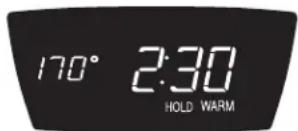
When the cooking time has elapsed:
- Four beeps will sound.
- HOLD and WARM will light.
- 170^ will display.
- Time of day will display.
text_image
170° 2:30 HOLD WARMAfter one hour in HOLD WARM:
• The oven turns off automatically.
- HOLD and WARM go off.
- Remove food from oven.
To cancel Cook & Hold at any time:
Press the Cancel pad. Remove food from oven.

Delay Cook & Hold

CAUTION
Do not use delayed baking for highly perishable foods such as dairy products, pork, poultry, or seafood.
When using Delay, the oven begins to cook later in the day. Set the amount of time that you want to delay before the oven turns on and how long you want to cook. The oven begins to heat at the selected time and cooks for the specified length of time.
Delay time can be set from 10 minutes (00:10) to 11 hours, 59 minutes (11:59).
To set a Delayed Cook & Hold cycle:
- Press the 1 Delay pad.
Delay
1
-
DELAY flashes in the display.
• 00:00 flashes in the display. -
Using the appropriate number pads, enter the amount of time you want to delay the start of the Cook & Hold cycle.
-
Press the Cook & Hold pad.
• HOLD and DELAY flash in the display.
• 00:00 flashes in the display.
-
Enter the amount of time you want to cook using the number pads.
-
Press Bake or Convect pad.
-
Set the oven temperature desired by pressing the Autoset 0 pad or the appropriate number pads.
-
350^ will light when Autoset 0 pad is pressed.
• After four seconds, the entered delay time will appear in the display. - HOLD turns off.
- BAKE and DELAY remain lit to remind you that a delayed Cook & Hold cycle has been programmed.
Notes:
- Do not use Delayed Cook & Hold for items that require a preheated oven, such as cakes, cookies, and breads.
- Do not use Delayed Cook & Hold if oven is already hot.
Keep Warm
For safely keeping hot foods warm in the oven or for warming breads and plates.
To set Keep Warm:
-
Press the Keep Warm pad.
-
WARM flashes.
-
000 flashes in the display.
-
Select the Keep Warm temperature by pressing the Autoset 0 pad or the appropriate number pads.
Keep Warm

- 170^ will light when the Autoset 0 pad is pressed.
• Each press of the Autoset 0 pad will increase the temperature by 5^ .
The Keep Warm temperature can be set from 145^ to 190^ .
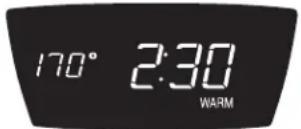
WARM and the temperature will be displayed while the function is active.
To cancel Keep Warm:
- Press the Cancel pad.
- Remove food from the oven.

Keep Warm Notes:
- For optimal food quality, oven cooked foods should be kept warm for no longer than 1 to 2 hours.
- To keep foods from drying, cover loosely with foil or a lid.
• To warm dinner rolls:
- cover rolls loosely with foil and place in oven.
- press Keep Warm and Autoset 0 pads.
- warm for 15-20 minutes.
- To warm plates:
- place 2 stacks of up to four plates each in the oven.
- press Keep Warm and Autoset 0 pads.
- warm for five minutes, turn off the oven and leave plates in the oven for 15 minutes more.
- use only oven-safe plates, check with the manufacturer.
- do not set warm dishes on a cold surface as rapid temperature changes could cause crazing or breakage.
Broiling
To set Broil:
-
Press the Broil pad.
-
BROIL flashes.
-
SET flashes.
-
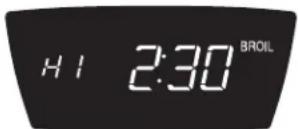
Press the Autoset 0 pad once to set HI broil or twice to set LO broil.
Autoset
• HI or LO will be displayed.
- Select HI broil (550° F) for normal broiling. Select LO broil (450° F) for low-temperature broiling of longer cooking foods such as poultry.
-
After four seconds, the oven will start.
-
BROIL will remain lit.
• HI or LO will remain lit.
-
For optimum browning, preheat broil element for 3-4 minutes before adding food.
-
Place food in the oven. Leave oven door open about four inches (the first stop).
- Turn meat once about halfway through cooking.
- When food is cooked, press the Cancel pad. Remove food and broiler pan from the oven.
- The time of day will reappear in the display.

Broil Notes:
- For best results when broiling, use a pan designed for broiling.
- Expect broil times to increase and browning to be slightly lighter if appliance is installed on a 208-volt circuit.
- HI is used for most broiling. Use LO broil when broiling longer cooking foods. The lower temperature allows food to cook to the well done stage without excessive browning.
- Broil times may be longer when the lower broiling temperature is selected.
- Most foods should be turned halfway through broiling time.
Broiling Chart
| FOODS POSITION FIRST SIDE SECOND SIDE | |||
| BeefSteak, 1" thick, Medium 6 8 minutes 7 - 12 minutesWell 6 10 minutes 8 - 14 minutesHamburgers, 3/4" thick, Well 6 or 7 9 minutes 6 - 9 minutes | |||
| PorkBaconChops, 1"Ham Slice | 6 6 - 10 minutes (no turning)6 10 - 11 minutes 12 - 14 minutes6 5 minutes 3 - 7 minutes | ||
| PoultryBreast Halves | LO Broil4 15 minutes 15 - 25 minutes | LO Broil | |
| SeafoodFish Steaks, buttered, 1" thickLobster Tails, 3-4 oz. each | 6 10 - 15 minutes (no turning)5 7 - 10 minutes | (no turning) | |
Note: This chart is a suggested guide. The times may vary with the food being cooked.
Automatic Shut-Off/Sabbath Mode
The oven will automatically turn off after 12 hours if you accidentally leave it on. This safety feature can be turned off.
To cancel the 12-hour shut-off and run the oven continuously for 72 hours:
- Press and hold the Clock pad for five seconds.
Clock
- "SAb" will be displayed and flash for five seconds.
- "SAb" will then be displayed continuously until turned off or until the 72-hour time limit is reached.
- BAKE will also be displayed if a bake cycle is in use while the oven is in Sabbath Mode.
- All other functions EXCEPT BAKE (Timer, Keep Warm, Clean, etc.) are locked out during the Sabbath Mode.
- A Cook & Hold can be programmed during the Sabbath Mode, however a Delay Cook & Hold is not allowed.
To cancel the Sabbath Mode:
- Press the Clock pad for five seconds.
Clock
- "SAb" will flash for five seconds.
-
The time of day will return to the display. OR
-
After 72 hours, the Sabbath Mode will end.
-
"SAb" will flash for five seconds.
- The time of day will return to the display.
Sabbath Mode Notes:
- Sabbath Mode can be turned on at any time with or without the oven on.
- Sabbath Mode cannot be turned on if the touchpads are locked out or when the door is locked.
- Most prompts and messages and all beeps are deactivated when Sabbath Mode is active.
- If the oven is baking when Sabbath Mode is set, BAKE will go out when bake is canceled. There will be no audible beeps.
- The oven light will not automatically come on when the oven door is opened while the oven is in Sabbath Mode. If the oven light is desired while in Sabbath Mode, it must be turned on before the Sabbath Mode is started.
- When the Sabbath Mode is started, the temperature display will immediately show the set temperature, rather than the actual oven cavity temperature. No preheat beep will sound.
- The self-clean cycle and automatic door lock do not operate during the Sabbath Mode.
- Pressing Cancel pad will cancel a Bake cycle, however the control will stay in the Sabbath Mode.
- If power fails, the oven will power up in Sabbath Mode with 72 hours remaining and no cycle active.
Adjusting the Oven Temperature
Oven temperatures are carefully tested for accuracy at the factory. It is normal to notice some baking or browning differences between a new oven and an old one. As ovens get older, the oven temperature can shift.
You may adjust the oven temperature if you think the oven is not baking or browning correctly. To decide how much to change the temperature, set the temperature 25^ higher or lower than your recipe recommends, then bake. The results of the “test” should give you an idea of how much to adjust the temperature.
To adjust the oven temperature:
Bake
- Press the Bake pad.
- Enter 550^ by pressing the appropriate number pads.
- Press and hold the Bake pad for several seconds or until 0^ appears in the display.
If the oven temperature was previously adjusted, the change will be displayed. For example, if the oven temperature was reduced by 15^ the display will show “ -15^ ”.
- Press the Autoset 0 pad to adjust the temperature.
Each time the Autoset 0 pad is pressed, the temperature changes by 5°. The oven temperature can be increased or decreased by 5° to 35°.
Pressing the Autoset 0 pad will first cycle through increasing the oven temperature (5, 10, . . . 35). Continuing to press the Autoset 0 pad will then cycle through decreasing the oven temperature (-35, -30, . . . -5).
- The time of day will automatically reappear in the display.
You do not need to readjust the oven temperature if there is a power failure or interruption. Temperature adjustment applies to Bake and Convect only. Broiling and cleaning temperatures cannot be adjusted.
Changing Temp °F/°C
- The factory default setting for temperature is Fahrenheit.
- To change the setting, press and hold the CANCEL and Bake pads at the same time for three seconds.
- A single beep will sound and the current setting will be displayed ( ^ F or ^ C). (If no change is made, the range will return to the existing setting after 30 seconds.)
- To change the setting, press the Autoset 0 pad. Press again to return to existing setting. Wait five seconds and the setting will be complete.
Favorite
The Favorite pad allows you to save the time and temperature from Cook & Hold function.
To set a Favorite cycle, a Cook & Hold function must be either active or just programmed.
To set a new Favorite cycle or to save a currently running Cook & Hold as a Favorite:
- Program a Cook & Hold cycle as described in the Cook & Hold section on page 12.
- Press and hold the Favorite pad for three seconds.
Favorite
- The newly set or currently running Cook & Hold cycle will be saved.
- A beep will sound to indicate that the control has accepted the Favorite setting.
To start a cycle programmed into Favorite:
- Press the Favorite pad.
- Time and temperature for the set Cook & Hold cycle will be displayed. (If no Cook & Hold cycle has been programmed, "nonE" is displayed.)
-
Press Bake or Convect.
-
The Favorite cycle will begin immediately.
- The selected cycle word will light in the display.
• The cooking time will light in the display.
When the cooking time has elapsed:
- The selected cycle word will turn off.
- HOLD and WARM will light.
- 170^ will display.
To cancel a Favorite cycle in progress:
- Press the Cancel pad.
- The stored Favorite cycle will not be affected.
- Remove food from the oven.

Warming Drawer
The Warming Drawer is used for keeping hot foods at serving temperature. It may also be used for warming breads and pastries.
Operating the Controls:
-
If using the rack, position it where needed.
-
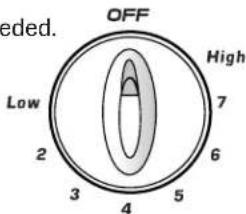
Push in and turn the control knob to the desired setting.
-
Allow the drawer to preheat for ten minutes.
-
Place food in warming drawer.
-
When finished, turn the knob to OFF. Remove food from the drawer.
text_image
OFF High Low 2 3 4 5 6 7Warming Chart
| SUGGESTED SETTINGS | |
| Setting Type of Food | |
| Med - High (4 - High) | Bacon Beef - Rare Casseroles Cooked Cereals Dinner Plate Eggs Enchiladas Fish/Seafood Fried Food Gravy, Cream Sauces Ham Hamburger Patties Hors d'oeuvres Lamb Pancakes Pizza Pork Potatoes - Baked Potatoes - Mashed Poultry Vegetables Waffles |
| Low - Med (Low - 3) | Biscuits Coffee Cake Pies Warming - Plates |
Warming Drawer Notes:
- Do not warm food for more than one hour (eggs 30 minutes) after cooking.
- Food must be at serving temperature before being placed in the drawer.
- Breads, pastries and fruit pies may be warmed from room temperature on High setting.
- Use only oven-safe cookware.
- Remove food from plastic bags and place in oven-safe cookware.
- Serving dishes and plates can be warmed while preheating the drawer.
- Cover food with a lid or aluminum foil. Do not use plastic wrap. (Fried foods do not need to be covered.)
Oven Fan
A convection fan is used to circulate hot air in the oven when the convection feature is selected.
Note: The convection fan will automatically stop when the oven door is opened.
Oven Vent
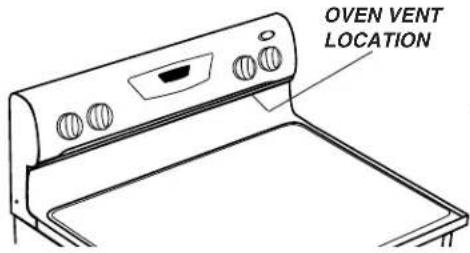
When the oven is in use the area near the vent may become hot enough to cause burns. Never block the vent opening.
The oven vent is located below the backguard vent shield on your range.
text_image
OVEN VENT LOCATIONDo not place plastics near the vent opening as heat from the vent could distort or melt the plastic.
Oven Light
The oven light automatically comes on when the door is opened. When the door is closed, press the Oven Light pad to turn the oven light on and off. A beep will sound every time the Oven Light pad is pressed.
Oven Light
Oven Bottom
Protect oven bottom against spillovers, especially acidic or sugary spills, as they may discolor the porcelain enamel. Use the correct pan size to avoid spillovers and boilovers. Do not place utensils or aluminum foil directly on the oven bottom.
Oven Racks
CAUTION
- Do not attempt to change the rack position when the oven is hot.
- Do not use the oven for storing food or cookware.
The oven has three racks. All racks are designed with a lock-stop edge.
To remove:
- Pull rack straight out until it stops at the lock-stop position.
- Lift up on the front of the rack and pull out.

natural_image
Diagram of a hand placing a component into a washing machine (no text or symbols present)To replace:
- Place rack on the rack support in the oven
- Tilt the front end up slightly. Slide rack back until it clears the lock-stop position.
- Lower front and slide back into the oven.
Never cover an entire rack with aluminum foil or place foil on the oven bottom. Baking results will be affected and damage may occur to the oven bottom.
Rack Positions
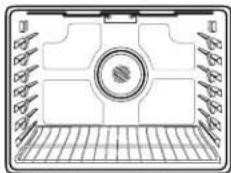
RACK 7 (highest position): For toasting bread or broiling thin, non-fatty foods.
RACK 6: Used for most broiling.
RACK 5: For multiple rack baking.

text_image
Three Rack Convection BakingRACK 4: Used for most baked goods on a cookie sheet or jelly roll pan, fruit pies, or frozen convenience foods. Also use for broiling chicken pieces.
RACK 3: For casseroles, baking loaves of bread, bundt cakes or custard pies.
RACK 2: Used for roasting small cuts of meat, frozen pies, dessert souffles or angel food cake. Also use for multiple rack baking.
RACK 1: Used for roasting large cuts of meat and poultry.
Oven Cooking
Oven Bottom: Place oven rack on raised sides of oven bottom. Use for additional space when cooking large oven meals.
natural_image
Technical diagram of a mechanical component with grid base and central circular feature (no text or symbols)MULTIPLE RACK COOKING: Two rack: Use rack positions 2 and 5.
Three rack (convection only): Use rack positions 2, 4 and 6 (see illustration).
Note: When Convect baking on two or three racks, check foods at the minimum suggested time to avoid over-browning or over-cooking.
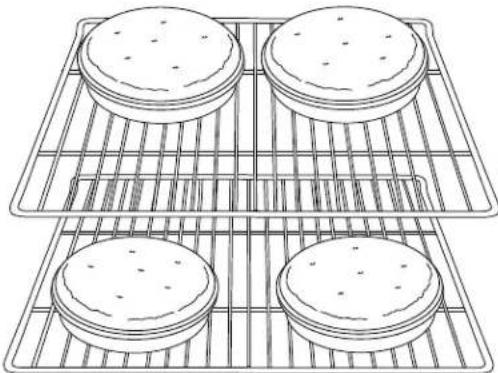
Baking Layer Cakes on Two Racks
For best results when baking cakes on two racks, use racks 2 and 4 for regular baking and racks 2 and 5 for convection baking. Place the cakes on the rack as shown.
natural_image
Line drawing of four identical rectangular kitchen grates with side buns, arranged in a grid (no text or symbols)EasyRack™
The EasyRack ^™ offers a convenient place to grasp bakeware when taking it out of the oven.

natural_image
Line drawing of a rectangular metal grate with vertical slats and a central slot (no text or symbols)
natural_image
Line drawing of a hand placing a baking tray with pastries (no text or symbols)Notes:
- The EasyRack™ is to be used in ovens with a hidden bake element only. Do not use the EasyRack™ if your oven has an exposed bake element.
- Use the EasyRack™ only in the oven in which it was purchased.
Self-Clean Oven

CAUTION
- It is normal for parts of the range to become hot during a self-clean cycle.
- To prevent damage to oven door, do not attempt to open the door when LOCK is displayed.
- Avoid touching cooktop, door, window or oven vent area during a clean cycle.
- Do not use commercial oven cleaners on the oven finish or around any part of the oven. They will damage the finish or parts.
The self-clean cycle uses above-normal cooking temperatures to automatically clean the oven interior.
The oven should be cleaned regularly by wiping up spillovers to prevent excessive smoke and flare-ups. Do not allow a heavy build-up of soil to accumulate in the oven.
During the cleaning process, the kitchen should be well ventilated to get rid of normal odors associated with cleaning.
Before Self-Cleaning
- Turn off the oven light before cleaning. The light may burn out during the clean cycle.
-
Remove broiler pan, all pans, and oven racks from the oven. The oven racks will discolor and may not slide easily after a self-clean cycle if they are not removed.
-
Clean oven frame, door frame, area outside of gasket, and around the opening in the door gasket with a nonabrasive cleaner such as Bon Ami* or detergent and water. The self-cleaning process does not clean these areas. They should be

natural_image
Line drawing of a hand pressing down on a surface with abstract patterns (no text or symbols)cleaned to prevent soil from baking on during the clean cycle. (The gasket is the seal around the oven door and window.)
-
To prevent damage, do not clean or rub the gasket around the oven door. The gasket is designed to seal in heat during the clean cycle.
-
Wipe up excess grease or spillovers from the oven bottom. This prevents excessive smoking, flare-ups or flaming during the clean cycle.
-
Wipe up sugary and acidic spillovers such as sweet potatoes, tomato, or milk-based sauces. Porcelain enamel is acid-resistant, not acid-proof. The porcelain finish may discolor if acidic spills are not wiped up before a self-clean cycle.
To set Self-Clean:
Note: Oven temperature must be below 400^ F to program a clean cycle.
- Close the oven door.
- Press the Clean pad.
- CLEAN flashes.
- SET flashes in the display.
- Press the Autoset 0 pad.
- MEd (Medium Soil, 3 hours) is displayed.
- Press the Autoset 0 pad to scroll through the self-cleaning settings.
HVy (Heavy Soil, 4 hours)
MEd (Medium soil, 3 hours)
LITE (Light Soil, 2 hours)
Choosing the soil level of the oven automatically programs the self-cleaning time.
-
After four seconds, the oven will start cleaning.
-
If the door is not closed, beeps will sound and “door” will display. If the door is not closed within 30 seconds, the self-cleaning operation will be canceled and the display will return to the time of day.
- CLEAN will appear in the display.
- LOCK will flash in the display. Once the door locks, the word will remain steady.
- The cleaning time will start counting down in the display.
To Delay a Self-Clean Cycle:
-
Press the 1 Delay pad.
-
DELAY flashes.
- 00:00 will flash in the display.
Delay
1
-
Enter the amount of time you want to delay the cycle using the appropriate number pads.
-
Press the Clean pad.
- SET flashes in the display.
- Press the Autoset 0 pad.
- LITE (Light soil level) is displayed.
Clean
□
Autoset
Care & Cleaning
- Press the Autoset 0 pad to scroll through the self-cleaning settings.
HVy (Heavy Soil, 4 hours)
MEd (Medium Soil, 3 hours)
LITE (Light Soil, 2 hours)
Choosing the soil level of the oven automatically programs the self-cleaning time.
- After four seconds, CLEAN and DELAY will light and LOCK will flash in the display. When the oven door latches, LOCK will stop flashing and light continuously to show that the oven is set for a delayed clean operation. The delay time will display.

During the Self-Clean Cycle
When LOCK shows in the display, the door cannot be opened. To prevent damage to the door, do not force the door open when LOCK is displayed.
Smoke and Smells
You may see some smoke and smell an odor the first few times the oven is cleaned. This is normal and will lessen in time.
Smoke may also occur if the oven is heavily soiled or if a broiler pan was left in the oven.
Sounds
As the oven heats, you may hear sounds of metal parts expanding and contracting. This is normal and will not damage the oven.

Autoset
After Self-Cleaning
About one hour after the end of the self-clean cycle, LOCK will turn off. The door can then be opened.
Some soil may leave a light gray, powdery ash. Remove it with a damp cloth. If soil remains after wiping, that means the clean cycle was not long enough. The soil will be removed during the next clean cycle.
If oven racks were left in the oven and do not slide smoothly after a clean cycle, wipe racks and rack supports with a small amount of vegetable oil to make them easier to move.
Fine lines may appear in the porcelain because it went through heating and cooling. This is normal and will not affect performance.
A white discoloration may appear after cleaning if acidic or sugary foods were not wiped up before the self-clean cycle. This discoloration is normal and will not affect performance.
Notes:
- If the oven door is left open, "door" will flash in the display and a signal will beep until the door is closed and the Clean pad is pressed again.
- If more than five seconds elapse between pressing the Clean pad and the Autoset 0 pad, the program will automatically return to the previous display.
- The oven door will be damaged if the oven door is forced to open when LOCK is still displayed.
Cleaning Procedures

CAUTION
- Be sure appliance is off and all parts are cool before handling or cleaning. This is to avoid damage and possible burns.
- To prevent staining or discoloration, clean appliance after each use.
- If a part is removed, be sure it is correctly replaced.
* Brand names are registered trademarks of the respective manufacturers.
** To order call 1-877-232-6771 USA or 1-800-688-8408 Canada.
| PART PROCEDURE | |
| Backguard and Cooktop - Porcelain Enamel | Porcelain enamel is glass fused on metal and may crack or chip with misuse. It is acid resistant, not acid proof. All spillovers, especially acidic or sugary spillovers, should be wiped up immediately with a dry cloth.When cool, wash with soapy water, rinse and dry.Never wipe off a warm or hot surface with a damp cloth. This may cause cracking or chipping.Never use oven cleaners, abrasive or caustic cleaning agents on exterior finish of range. |
| Broiler Pan and Insert • Place soapy | Never cover insert with aluminum foil as this prevents the fat from draining to the pan belowcloth over insert and pan; let soak to loosen soil.Wash in warm soapy water. Use scouring pad to remove stubborn soil.Broiler pan and insert can be cleaned in dishwasher. |
| Clock and • To activate “Control Lock” for cleaning, see page 9.Control Pad Area | Wipe with a damp cloth and dry. Do not use abrasive cleaning agents as they may scratch the surface.Glass cleaners may be used if sprayed on a cloth first.DO NOT spray directly on control pad and display area. |
| Control Knobs • Remove knobs in the OFF position by pulling forward.Wash, rinse and dry. Do not use abrasive cleaning agents as they may scratch the finish.Turn on each element to be sure the knobs have been correctly replaced. | |
| Cooktop - Glass-Ceramic | Never use oven cleaners, chlorine bleach, ammonia or glass cleaners with ammonia. NOTE: Call an authorized servicer if the glass-ceramic top should crack, break or if metal or aluminum foil should melt on the cooktop.Allow the cooktop to cool before cleaning.General - Clean cooktop after each use, or when needed, with a damp paper towel and Cooktop Cleaning Creme* (Part No. 20000001)**. Then, buff with a clean dry cloth.NOTE:Permanent stains will develop if soil is allowed to cook on by repeatedly using the cooktop when soiled.Heavy Soils or Metal Marks - Dampen a “scratchless” or “never scratch” scrubber sponge. Apply Cooktop Cleaning Creme* (Part No. 20000001)** and scrub to remove as much soil as possible. Apply a thin layer of the creme over the soil, cover with a damp paper towel and let stand 30 to 45 minutes (2-3 hours for very heavy soil). Keep moist by covering the paper towel with plastic wrap. Scrub again, then buff with a clean dry cloth.NOTE:Only use a CLEAN, DAMP “scratchless” pad that is safe for non-stick cookware. The pattern and glass will be damaged if the pad is not damp, if the pad is soiled, or if another type of pad is used.Burned-on or Crusty Soils - Scrub with a “scratchless” or “never scratch” scouring pad and Cooktop Cleaning Creme*.NOTE:Hold a razor blade scraper at 30° angle and scrape any remaining soil. Then, clean as described above.Do not use the razor blade for daily cleaning as it may wear the pattern on the glass.Melted Sugar or Plastic - Immediately turn element to LOW and scrape sugar or plastic from hot surface to a cool area. Then turn element OFF and allow to cool. Clean residue with razor blade scraper and Cooktop Cleaning Creme*. |
| Oven Window and Door - Glass | · Avoid using excessive amounts of water which may seep under or behind glass causing staining.· Wash with soap and water. Rinse with clear water and dry. Glass cleaner can be used if sprayed on a cloth first.· Do not use abrasive materials such as scouring pads, steel wool or powdered cleaners as they will scratch glass. |
| Oven Interior · Follow instructions on pages 19-20 to set a self-clean cycle. | |
| Oven Racks · Clean with soapy water.· Remove stubborn soil with cleansing powder or soap-filled scouring pad. Rinse and dry.· Racks will permanently discolor and may not slide smoothly if left in the oven during a self-clean operation. If this occurs, wipe the rack edge and rack support with a small amount of vegetable oil to restore ease of movement, then wipe off excess oil. | |
| Stainless Steel (select models) · DO NOT USE ANY CLEANING PRODUCT CONTAINING CHLORINE BLEACH.· NOT USE ABRASIVE OR ORANGE CLEANERS.· ALWAYS WIPE WITH THE GRAIN WHEN CLEANING.· Daily Cleaning/Light Soil -- Wipe with one of the following - soapy water, white vinegar/water solution, Formula 409 Glass and Surface Cleaner* or a similar glass cleaner - using a sponge or soft cloth. Rinse and dry. To polish and help prevent fingerprints, follow with Stainless Steel Magic Spray (Part No. 20000008)**.· Moderate/Heavy Soil -- Wipe with one of the following - Bon Ami, Smart Cleanser, or Soft Scrub* - using a damp sponge or soft cloth. Rinse and dry. Stubborn soils may be removed with a damp multi-purpose Scotch-Brite* pad; rub evenly with the grain. Rinse and dry. To restore luster and remove streaks, follow with Stainless Steel Magic Spray*.· Discoloration -- Using a damp sponge or soft cloth, wipe with Cameo Stainless Steel Cleaner*. Rinse immediately and dry. To remove streaks and restore luster, follow with Stainless Steel Magic Spray*. | |
| Storage Drawer, Door Handle, cloth Side Panels - Painted Enamel | · When cool, wash with warm soapy water, rinse and dry. Never wipe a warm or hot surface with a damp as this may damage the surface and may cause a steam burn.· For stubborn soil, use mildly abrasive cleaning agents such as baking soda paste or Bon Ami.* Do not use abrasive, caustic or harsh cleaning agents such as steel wool pads or oven cleaners. These products will scratch or permanently damage the surface.NOTE: Use a dry towel or cloth to wipe up spills, especially acidic or sugary spills. Surface may discolor or dull if soil is not immediately removed. This is especially important for white surfaces. |
Oven Door

CAUTION
Do not place excessive weight on or stand on an open oven door. This could cause the range to tip over, break the door, or injure the user.
Note: The oven door on a new range may feel “spongy” when it is closed. This is normal and will decrease with use.
Oven Window
To protect the oven door window:
- Do not use abrasive cleaning agents such as steel wool scouring pads or powdered cleansers as they may scratch the glass.
- Do not hit the glass with pots, pans, furniture, toys, or other objects.
- Do not close the oven door until the oven racks are in place.
Scratching, hitting, jarring or stressing the glass may weaken its structure causing an increased risk of breakage at a later date.
Leveling Legs

CAUTION
Be sure the anti-tip bracket secures one of the rear leveling legs to the floor. This bracket prevents the range from accidentally tipping.
Be sure the range is leveled when installed. If the range is not level, turn the leveling legs, located at each corner of the range, until range is level.

text_image
installed. If ling legs, e, until ANTI-TIP BRACKET LEVELING LEGOven Light

CAUTION
- Disconnect power to range before replacing light bulb.
- Allow oven to cool before replacing light bulb.
- Make sure bulb cover and bulb are cool before touching.
To replace oven light bulb:
- When oven is cool, hold bulb cover in place, then slide wire retainer off cover. NOTE: Bulb cover will fall if not held in place while removing wire retainer.
- Remove bulb cover and light bulb.
- Replace with a 40-watt appliance bulb.
- Replace bulb cover and secure with wire retainer.
- Reconnect power to range. Reset clock.

text_image
over er BULB COVER WIRE RETAINERWarming Drawer

CAUTION
- NEVER store plastic, paper products or flammable materials in this drawer. The drawer may become too warm for these items when the oven is in use or the warming drawer is preheated.
- To avoid contact with the warming drawer heating element, pull drawer all the way out to add or remove food.
- Never use oven cleaners to clean the warming drawer.
To remove warming drawer:
- Empty drawer and pull out until it is fully open.
- Locate the black triangle lever on each side of the drawer.
- Press the lever down on the right side and lift the lever up on the left side at the same time. Then pull drawer out another inch.
- Carefully pull the drawer all the way out holding on to the sides, not the drawer front.

natural_image
Illustration of two hands installing or adjusting a mechanical component with arrows indicating motion (no text or symbols present)To replace warming drawer:
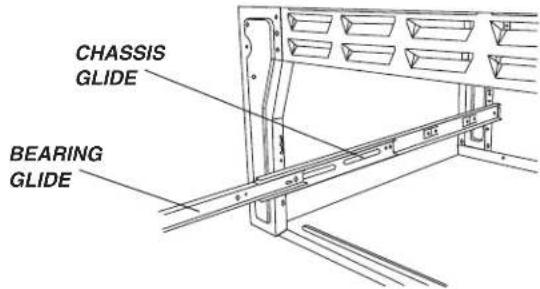
- Pull the bearing glides to the front of the chassis glide. (See picture below.)
- Align the glide on each side of the drawer with the glide slots on the range.
- Push the drawer into the range until levers "click" (approximately 2"). Pull the drawer open again to seat bearing glides into position. If you do not hear the levers "click" or the bearing glides do not feel seated, remove the drawer and repeat steps 1 through 3. This will minimize possible damage to the bearing glides.
text_image
CHASSIS GLIDE BEARING GLIDE| PROBLEM SOLUTION | |
| For most concerns, try these first. | Check if oven controls have been properly set.Check to be sure plug is securely inserted into receptacle.Check or re-set circuit breaker. Check or replace fuse.Check power supply. |
| Part or all of appliance does not work.·Check if oven door is unlocked | ·Check if surface and/or oven controls have been properly set. See pages 4 & 10. after self-clean cycle. See page 20.Check if oven is set for a delayed cook or clean program. See pages 12 & 19.Check if Control Lock is activated. See page 9.Check if control is in Sabbath Mode. See page 14. |
| Clock, indicator words, and/or ·Oven lights operate but oven does·The Control Lock may have been set. See page 9. | |
| Baking results are not as expected or differ from·Check to make sure range is level.previous oven. | Make sure the oven vent has not been blocked. See page 17 for location.Temperatures often vary between a new oven and an old one. As ovens age, the oven temperature often “drifts” and may become hotter or cooler. See page 15 for instructions on adjusting the oven temperature.NOTE:It is not recommended to adjust the temperature if only one or two recipes are in question. |
| Food is not broiling properly or smokes excessively.·Broil element | Check oven rack positions. Food may be too close to element.was not preheated.Aluminum foil was incorrectly used. Never line the broiler insert with foil.Oven door was closed during broiling. Leave the door open to the first stop position (about 4 inches).Trim excess fat from meat before broiling.A soiled broiler pan was used.Voltage in house may be low. |
| Oven will not self-clean. | Check to make sure the cycle is not set for a delayed start. See page 19.Check if door is closed.Check if control is in Sabbath Mode. See page 14.Oven may be over 400°F. Oven temperature must be below 400°F to program a clean cycle. |
| Oven did not clean properly.·Longer cleaning time may be needed.Excessive spillovers, especially sugary and/or acidic foods, were not removed prior to the self-clean cycle. | |
| Oven door will not unlock after self-clean cycle. | Oven interior is still hot. Allow about one hour for the oven to cool after the completion of a self-clean cycle. The door can be opened when the LOCK indicator word is not displayed.The control and door may be locked. See page 9. |
cont.
| PROBLEM SOLUTION | |
| Smoohtop surface shows 1. Tiny scratches or abrasions.wear. • Make sure cooktop and pan bottom are clean. Do not slide glass or metal pans across top. Make sure pan bottom is not rough. Use the recommended cleaning agents. See page 21.2. Metal marks.Do not slide metal pans across top. When cool, clean with Cooktop Cleaning Creme. See page 21.3. Brown streaks and specks.Remove spills promptly. Never wipe with a soiled cloth or sponge. Make sure cooktop and pan bottom are clean.4. Areas with a metallic sheen.Mineral deposits from water and food. Use recommended cleaning agents. See page 21.5. Pitting or flaking.Remove sugary boilovers promptly. See page 21. | |
| Moisture collects on oven • This is normal when cooking foods high in moisture.window or steam comes from • Excessive moisture was used when cleaning the window.oven vent. | |
| There is a strong odor or light smoke when oven is turned on. cycle will “burn off” the odors more quickly.Turning on a ventilation fan will help remove the smoke and/or odor.Excessive food soils on the oven bottom. Use a self-clean cycle. | |
| Fault Codes | BAKE or LOCK may flash rapidly in the display to alert you if there is an error or a problem. If BAKE or LOCK appear in the display, press Cancel pad.If BAKE or LOCK continue to flash, disconnect power to the appliance.Wait a few minutes, and then reconnect power. If the flashing still continues, disconnect power to the appliance and call an authorized servicer.If the oven is heavily soiled, excessive flareups may result in a fault code during cleaning. Press the Cancel pad and allow the oven to cool completely, wipe out excess soil, then reset the clean cycle. If the fault code reappears, contact an authorized servicer. |
| Noises may be heard. | The oven makes several low level noises. You may hear the oven relays as they go on and off. This is normal.As the oven heats and cools, you may hear sounds of metal parts expanding and contracting. This is normal and will not damage your appliance. |
| There are no beeps and • Oven may no display. | be in Sabbath Mode. See page 14. |
| “SAb” flashing and then displayed continuously. seconds. | Oven is in Sabbath Mode. To cancel, press and hold the Clock pad for five |
Warranty
Limited One Year Warranty - Parts and Labor
For one (1) year from the original retail purchase date, any part which fails in normal home use will be repaired or replaced free of charge.
Canadian Residents
The above warranties only cover an appliance installed in Canada that has been certified or listed by appropriate test agencies for compliance to a National Standard of Canada unless the appliance was brought into Canada due to transfer of residence from the United States to Canada.
The specific warranties expressed above are the ONLY warranties provided by the manufacturer. These warranties give you specific legal rights, and you may also have other rights which vary from state to state.
CUSTOMER'S SOLE AND EXCLUSIVE REMEDY UNDER THIS LIMITED WARRANTY SHALL BE PRODUCT REPAIR AS PROVIDED HEREIN. IMPLIED WARRANTIES, INCLUDING WARRANTIES OF MERCHANTABILITY OR FITNESS FOR A PARTICULAR PURPOSE, ARE LIMITED TO ONE YEAR OR THE SHORTEST PERIOD ALLOWED BY LAW. MAYTAG CORPORATION SHALL NOT BE LIABLE FOR INCIDENTAL OR CONSEQUENTIAL DAMAGES. SOME STATES AND PROVINCES DO NOT ALLOW THE EXCLUSION OR LIMITATION OF INCIDENTAL OR CONSEQUENTIAL DAMAGES, OR LIMITATIONS ON THE DURATION OF IMPLIED WARRANTIES OF MERCHANTABILITY OR FITNESS, SO THESE EXCLUSIONS OR LIMITATIONS MAY NOT APPLY TO YOU. THIS WARRANTY GIVES YOU SPECIFIC LEGAL RIGHTS AND YOU MAY ALSO HAVE OTHER RIGHTS, WHICH VARY STATE TO STATE OR PROVINCE TO PROVINCE.
What is Not Covered By These Warranties
- Conditions and damages resulting from any of the following:
a. Improper installation, delivery, or maintenance.
b. Any repair, modification, alteration, or adjustment not authorized by the manufacturer or an authorized servicer.
c. Misuse, abuse, accidents, or unreasonable use, or acts of God.
d. Incorrect electric current, voltage, electrical and/or gas supply.
e. Improper setting of any control.
2 Warranties are void if the original serial numbers have been removed, altered, or cannot be readily determined.
3. Light bulbs, water filters and air filters.
4. Products purchased for commercial or industrial use.
5. The cost of service or service call to:
a. Correct installation errors. For products requiring ventilation, rigid metal ducting must be used.
b. Instruct the user on the proper use of the product.
c. Transport the appliance to and from the servicer.
- Any food loss due to refrigerator or freezer product failures.
- Expenses for travel and transportation for product service in remote locations.
- Outside of the United States and Canada this warranty does not apply. Contact your dealer to determine if another warranty applies.
- Consequential or incidental damages sustained by any person as a result of any breach of these warranties. Some states do not allow the exclusion or limitation of consequential or incidental damages, so the above exclusion may not apply.
If You Need Service
First see the Troubleshooting section in your Use and Care Guide or call the dealer from whom your appliance was purchased or call Maytag Services, LLC, Customer Assistance at 1-800-688-9900 USA and 1-800-688-2002 Canada to locate an authorized servicer.
- Be sure to retain proof of purchase to verify warranty status. Refer to WARRANTY for further information on owner's responsibilities for warranty service.
- If the dealer or service company cannot resolve the problem, write to Maytag Services, LLC, Attn: CAIR® Center, P.O. Box 2370, Cleveland, TN 37320-2370, or call 1-800-688-9900 USA and 1-800-688-2002 Canada. U.S. customers using TTY for deaf, hearing impaired or speech impaired, call 1-800-688-2080.
- User's guides, service manuals and parts information are available from Maytag Services, LLC, Customer Assistance.
Notes: When writing or calling about a service problem, please include:
a. Your name, address and telephone number;
b. Model number and serial number;
c. Name and address of your dealer or servicer;
d. A clear description of the problem you are having;
e. Proof of purchase (sales receipt).
text_image
A B C D E F G H Bake Broil Convect Cancel Cook& Keep Warm Delay 350° 10:00 1 2 3 4 5 6 7 8 9 0 Autoset I J K L M N Oven Light Favorite Clock Clean Timertext_image
OFF High Low 2 3 4 5 6 7natural_image
Line drawing of an oven with a hand placing a tray, showing internal compartments and a central fan (no text or symbols)Réinstallation :
natural_image
Top-down schematic of a mechanical component with no visible text or symbolsnatural_image
Line drawing of four round food items on a cooling rack (no text or symbols)Grille Easy Rack ^MC
natural_image
Line drawing of a rectangular metal grate or container with vertical slats and a central slot (no text or symbols)
natural_image
Line drawing of a hand placing decorative buns on a baking tray (no text or symbols)Remarque :
natural_image
Line drawing of a hand pressing down on a surface with abstract patterns (no text or symbols)natural_image
Two-step diagram showing hands holding a metal frame with arrows indicating rotation (no text or symbols)text_image
A B C D E F G H Bake Broil Convect Cancel Cook& Keep Warm Delay 350° 10:00 1 2 3 4 5 6 7 8 9 0 Autoset I J K L M N Oven Light Favorite Clock Clean TimerPara programar 'Bake' (Hornear):
- Oprima la tecla 'Bake'.
text_image
170° 2:30 WARMPara cancelar 'Keep Warm':
text_image
OFF High Low 2 3 4 5 6 7natural_image
Line drawing of an oven interior with a hand pointing to the lid (no text or symbols)natural_image
Top-down technical diagram of a mechanical component with no visible text or symbolsnatural_image
Line drawing of four round cookies arranged on a grid-lined rack (no text or symbols)Parrilla 'Easy Rack'MR
natural_image
Line drawing of a rectangular metal grate with vertical slats (no text or symbols)