
HFS1442AE - Camcorder PANASONIC - Free user manual and instructions
Find the device manual for free HFS1442AE PANASONIC in PDF.
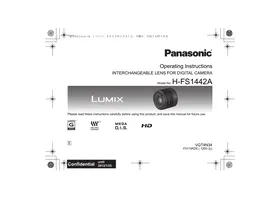


| Product type | Interchangeable lens for digital camera |
| Brand | Panasonic |
| Model | HFS1442AE (LUMIX G VARIO 14-42 mm/F3.5-5.6 II ASPH./MEGA O.I.S.) |
| Focal length | 14-42 mm (35 mm equivalent: 28-84 mm) |
| Maximum aperture | F3.5 (wide-angle) to F5.6 (telephoto) |
| Minimum aperture | F22 |
| Optical construction | 9 elements in 8 groups (2 aspherical lenses) |
| Minimum focusing distance | 0.2 m (14-20 mm) / 0.3 m (21-42 mm) |
| Maximum magnification | 0.17× (35 mm equivalent: 0.34×) |
| Optical stabilizer | Yes (MEGA O.I.S.) |
| Mount | Micro Four Thirds |
| Angle of view | 75° (wide-angle) to 29° (telephoto) |
| Filter diameter | 46 mm |
| Maximum diameter | Approx. 56 mm |
| Total length | Approx. 49 mm |
| Weight | Approx. 110 g |
| Supplied accessories | Lens hood, lens cap, rear cap |
| Care and cleaning | Wipe with a soft, dry cloth; avoid solvents and chemicals |
| Usage precautions | Avoid magnetic fields, condensation, shocks, and exposure to water or sand |
| Compatibility | Digital cameras with Micro Four Thirds mount |
Frequently Asked Questions - HFS1442AE PANASONIC
User questions about HFS1442AE PANASONIC
0 question about this device. Answer the ones you know or ask your own.
Ask a new question about this device
Download the instructions for your Camcorder in PDF format for free! Find your manual HFS1442AE - PANASONIC and take your electronic device back in hand. On this page are published all the documents necessary for the use of your device. HFS1442AE by PANASONIC.
USER MANUAL HFS1442AE PANASONIC
Operating Instructions
INTERCHANGEABLE LENS FOR DIGITAL CAMERA
Model No. H-FS1442A
LUMIX
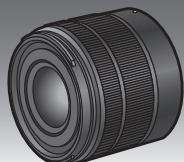
Please read these instructions carefully before using this product, and save this manual for future use.

MICRO FOURTHIRDS
MEGA
0.1.S.


Contents
Information for Your Safety 2
Precautions 4
Supplied Accessories 5
Attaching/Detaching the Lens 5
Names and Functions of Components 8
Cautions for Use 8
Troubleshooting 9
Specifications 10
Information for Your Safety
Keep the unit as far away as possible from electromagnetic equipment (such as microwave ovens, TVs, video games, radio transmitters, high-voltage lines, etc.).
- Do not use the camera near cell phones because doing so may result in noise adversely affecting the pictures and sound.
- If the camera is adversely affected by electromagnetic equipment and stops functioning properly, turn the camera off and remove the battery and/or the connected AC adaptor. Then reinsert the battery and/or reconnect the AC adaptor and turn the camera on.
The lens can be used with a digital camera compatible with the lens mount standard for the "Micro Four Thirds™ System".
- It cannot be mounted on the Four Thirds™ mount specification camera.
- The digital camera illustrations in these operating instructions show DMC-G5 as an example.
- The appearance and specifications of products described in this manual may differ from the actual products you have purchased due to later enhancements.
- Micro Four Thirds™ and Micro Four Thirds Logo marks are trademarks or registered trademarks of Olympus Imaging Corporation, in Japan, the United States, the European Union and other countries.
- Four Thirds™ and Four Thirds Logo marks are trademarks or registered trademarks of Olympus Imaging Corporation, in Japan, the United States, the European Union and other countries. G MICRO SYSTEM is an interchangeable lens type digital camera system of LUMIX based on a Micro Four Thirds System standard.
- Other names of systems and products mentioned in these instructions are usually the registered trademarks or trademarks of the manufacturers who developed the system or product concerned.
Information on Disposal for Users of Waste Electrical & Electronic Equipment (private households)


This symbol on the products and/or accompanying documents means that used electrical and electronic products should not be mixed with general household waste.
For proper treatment, recovery and recycling, please take these products to designated collection points, where they will be accepted on a free of charge basis.
Alternatively, in some countries you may be able to return your products to your local retailer upon the purchase of an equivalent new product.
Disposing of this product correctly will help to save valuable resources and prevent any potential negative effects on human health and the environment which could otherwise arise from inappropriate waste handling. Please contact your local authority for further details of your nearest designated collection point.
Penalties may be applicable for incorrect disposal of this waste, in accordance with national legislation.
For business users in the European Union
If you wish to discard electrical and electronic equipment, please contact your dealer or supplier for further information.
Information on Disposal in other Countries outside the European Union
This symbol is only valid in the European Union.
If you wish to discard this product, please contact your local authorities or dealer and ask for the correct method of disposal.
Precautions
Lens Care
- Sand and dust can damage the lens. Make sure that no sand or dust gets inside the lens or the terminals when using the lens on a beach, etc.
- This lens is not waterproof. If drops of water get onto the lens, wipe the lens with a dry cloth.
- Do not press the lens with excessive force.
- When there is dirt (water, oil, and fingerprints, etc.) on the surface of the lens, the picture may be affected. Lightly wipe the surface of the lens with a soft, dry cloth before and after taking pictures.
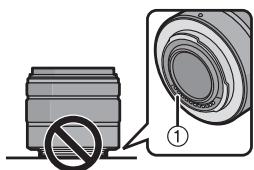
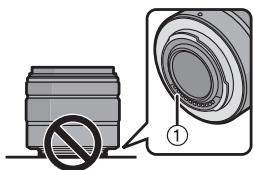
- Do not place the lens mount facing downwards. Do not allow the lens contact points ① to become dirty.
About Condensation (Fogging of the Lens)
- Condensation occurs when there are differences in temperature and humidity as described below. Condensation can cause the lens to become dirty and lead to mold and malfunctioning, so exercise caution in the following situations:
- When the camera is brought indoors from outside during cold weather
- When the camera is brought into an air-conditioned car
- When cold air from an air conditioner is directly blown onto the lens -In humid places
- Put the camera into a plastic bag to allow it to acclimatize to the surrounding temperature in order to prevent condensation. If condensation occurs, turn the power off and leave it for about two hours. Once the camera acclimatizes to the surrounding temperature the condensation will go away naturally.
Supplied Accessories
[Inspection to be performed when you unpack the unit]
When removing the unit from its packing box, check that the main unit and the supplied accessories are there and also check their external appearance and functions to verify that they have not sustained any damage during distribution and transportation. If you discover any trouble, contact your vendor before using the product.
Product numbers correct as of January 2013. These may be subject to change.
| 1 VYC1113 | 2 VYF3510 | 3 VFC4605 |
1 Lens Hood 2 Lens Cap 3 Lens Rear Cap
(The lens rear cap and lens cap are attached to the interchangeable lens at the time of purchase.)
Attaching/Detaching the Lens
Attaching the Lens
Refer also to the camera's operating instructions for attaching and detaching the lens. - Check that the camera is turned off.
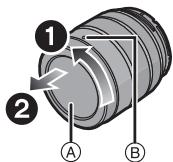
1 Turn the lens rear cap to detach it.
A: Lens Rear Cap
2 Align the lens fitting marks (red marks) on the camera body and the lens and then rotate the lens in the direction of the arrow until it clicks.
- Do not press the lens release button ⑥ when you attach a lens.
- Do not try to attach the lens when holding it at an angle to the camera body as the lens mount may get scratched.
- Check that the lens is attached correctly.
Detaching the Lens
- Check that the camera is turned off.
While pressing on the lens release button ①, rotate the lens toward the arrow until it stops and then remove.
- Attach the lens rear cap so that the lens contact point does not get scratched.
- Attach the body cap to the camera so no dirt or dust will get inside the main unit.
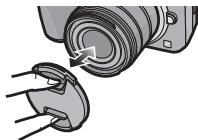
- Attaching and Detaching the Lens Cap Pinch the lens cap as shown in the figure to attach or detach.
- Be careful not to lose the lens cap.
■ Attaching the Lens Hood (Supplied Accessory)
Hold the lens hood with your fingers placed as shown in the picture.
- Do not hold the lens hood in a way that twists or bends it.


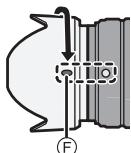
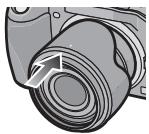
1 Align the fitting mark ⑥ on the short side of the lens hood with the mark on the tip of the lens.
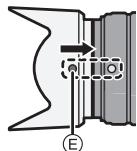
2 Turn the lens hood in the direction of the arrow until it stops, and align the stop mark ① on the long side of the lens hood with the mark on the tip of the lens.
■ Temporarily Storing the Lens Hood
1 Turn the lens hood in the direction of the arrow to detach it.
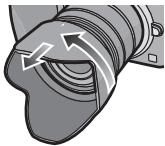
2 Reverse the lens hood and then attach it in the same way as shown previously.

Note
- When taking pictures with the flash with the lens hood attached, the lower portion of the screen may turn dark (vignetting effect) and the control of the flash may be disabled because the photo flash may be obscured by the lens hood. We recommend detaching the lens hood.
- When using the AF assist lamp in the dark, detach the lens hood.
■ Attaching Filters
- Vignetting may occur if using 2 or more MC protectors (optional: DMW-LMC46), PL filters (optional: DMW-LPL46) or ND filters (optional: DMW-LND46), or if using thick protectors and/or filters.
- The filter may become impossible to remove if excessively tightened, so please refrain from tightening it too strongly.
- It is possible to attach the lens cap with the filter already attached.
- You cannot attach a conversion lens or adaptor to this lens. A filter may be used, but attaching any other element may cause damage to the lens.
Names and Functions of Components
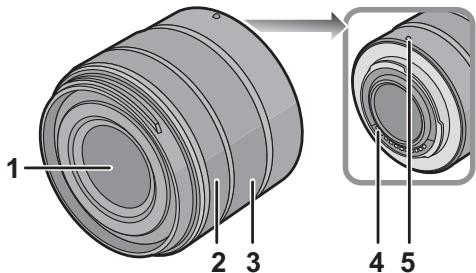
1 Lens surface 2 Focus ring
Rotate to focus when taking pictures with manual focus. 3 Zoom ring
Rotate the zoom ring when you wish to take large (tele) or wide (wide angle) pictures. (35 mm film camera equivalent: 28 mm to 84 mm)
4 Contact points 5 Lens fitting mark 8
VQT4N34

Note
- When flash recording with a close subject, the light of the flash will be blocked by the lens and part of the picture may be dark. Check the distance from the subject when recording.
- If you zoom after focusing, focusing errors may occur. After zooming, please perform the focusing again.
Cautions for Use
Take care not to drop or knock the lens. Also take care not to put a lot of pressure on the lens.
- Take care not to drop the bag that you inserted the lens in as it may strongly shock the lens. The camera may stop operating normally and pictures may no longer be recorded. Also, the lens may be damaged.
When using pesticides and other volatile substances around the camera, make sure they do not get onto the lens.
- If such substances get onto the lens, they can damage the exterior case or cause the paint to peel.
Do not carry the unit when it is still attached to the camera body.
- Under no circumstances should the unit be stored in any of the following locations, as doing so may cause operational problems or malfunction.
- In direct sunlight or on a beach in summer.
- In locations with high temperatures and humidity levels, or where changes in temperature and humidity are acute. In locations with high concentrations of sand, dust, or dirt. Where there is fire.
- Near heaters, air conditioners, or humidifiers. Where water may make the unit wet. Where there is vibration.
- Inside a vehicle.
Refer also to the operating instructions of the digital camera. When the unit is not going to be used for a prolonged period, we recommend storing it with a desiccant (silica gel). Failure to do so may result in performance failure caused by mold, etc. It is recommended that you check the unit's operation prior to use. Do not leave the lens in contact with rubber or plastic products for extended periods of time. Do not touch the lens contact point, as doing so can cause failure of the unit. Do not disassemble or alter the unit.
Do not use benzine, thinner, alcohol, or other similar cleaning agents to clean the lens glass or exterior cabinet.
- Using solvents can damage the lens or cause the paint to peel.
- Wipe off any dust or fingerprints with a soft, dry cloth.
- Use a dry, dust cloth to remove dirt and dust on the zoom ring and the focus ring.
- Do not use a household detergent or a chemically treated cloth.
Troubleshooting
A sound is heard when the camera is turned on or off.
- This is the sound of lens or aperture movement and is not a malfunction.
When this lens is attached to a digital camera, the stabilizer function cannot be turned off or does not work.
- The Optical Image Stabilizer function of this lens only works correctly with supported cameras.
When older Panasonic digital cameras (DMC-GF1, DMC-GH1, DMC-G1) are used, [Stabilizer] in the [Rec] mode menu cannot be set to [OFF]. It is recommended to update the firmware of the digital camera at the following website: http://panasonic.jp/support/global/cs/dsc/download/ When using this lens with another make of digital cameras, contact the respective company about details.
Specifications are subject to change without notice.
INTERCHANGEABLE LENS FOR DIGITAL CAMERA
"LUMIX G VARIO 14-42 mm/F3.5-5.6 II ASPH/MEGA O.I.S."
| Focal length | f=14 mm to 42 mm (35 mm film camera equivalent: 28 mm to 84 mm) |
| Aperture type | 7 diaphragm blades/circular aperture diaphragm |
| Aperture range | F3.5 (Wide) to F5.6 (Tele) |
| Minimum aperture value | F22 |
| Lens construction | 9 elements in 8 groups (2 aspherical lenses) |
| In focus distance | 0.2 m to ∞ (focal length 14 mm to 20 mm) [from the focus distance reference line], 0.3 m to ∞ (focal length 21 mm to 42 mm) [from the focus distance reference line] |
| Maximum image magnification | 0.17× (35 mm film camera equivalent: 0.34×) |
| Optical image stabiliser | Available |
| [O.I.S.] switch | None (Setting of the [Stabilizer] is done in [Rec] mode menu by LUMIX digital cameras.) |
| Mount | “Micro Four Thirds Mount” |
| Angle of view | 75° (Wide) to 29° (Tele) |
| Filter diameter | 46 mm |
| Max. diameter | Approx. 56 mm |
| Overall length | Approx. 49 mm (from the tip of the lens to the base side of the lens mount) |
| Mass | Approx. 110 g |
Panasonic Warranty
- The product is warranted for 12 months from the date of purchase. Subject to the conditions of this warranty, Panasonic or its Authorised Service Centre will perform necessary service on the product without charge for parts or labour, if in the opinion of Panasonic, the product is found to be faulty within the warranty period.
- This warranty only applies to Panasonic products purchased in Australia and sold by Panasonic-Australia or its Authorised Distributors or Dealers, and only where the products are used and serviced within Australia or its territories. Warranty cover only applies to service carried out by a Panasonic Authorised Service Centre and only if valid proof of purchase is presented when warranty service is requested.
- This warranty only applies if the product has been installed and used in accordance with the manufacturer's recommendations (as noted in the operating instructions) under normal use and reasonable care (in the opinion of the manufacturer). The warranty covers normal domestic use only and does not cover damage, malfunction or failure resulting from use of incorrect voltages, incorrect installation, accident, misuse, neglect, build-up of dirt or dust, abuse, maladjustment of customer controls, main supply problems, thunderstorm activity, infestation by insects or vermin, tampering or repair by unauthorised persons (including unauthorised alterations), introduction of sand, humidity or liquids, commercial use such as hotel, office, restaurant, or other business or rental use of the product, exposure to abnormally corrosive conditions or any foreign object or matter having entered the product.
- This warranty does not cover the following items unless the fault or defect existed at the time of purchase: (a) Cabinet Part(s) (e) DVD, Blu-ray or Recordable Discs (b) Video or Audio Tapes (f) Video / Audio Heads from wear and tear in normal use (c) SD cards or USB devices (g) Information stored on Hard Disk Drive, USB stick or SD card (d) User replaceable Batteries (h) DTV reception issues caused by TV Aerial / Cableing / Wall socket(s) etc
- Some products may be supplied with Ethernet connection hardware. The warranty is limited on such products and will not cover (a) Internet and/or DLNA connection/setup related problems; (b) Access fees and/or charges incurred for internet connection; (c) The use of incompatible software or software not specifically stipulated in the product operations manual; (d) Any indirect or consequential costs associated with the incorrect use or misuse of the hardware, its connection to the internet or any other device. 6. To claim warranty service, when required, you should: Telephone Panasonic's Customer Care Centre on 132600 or visit our website referred to below and use
- Send or take the product to a Panasonic Authorised Service Centre together with your proof of purchase receipt as proof of purchase date. Please note that freight and insurance to and/or from your nearest Authorised Service Centre must be arranged by you.
- Note that home or pick-up/delivery service is available for the following products in the major metropolitan areas of Australia or the normal operating areas of the nearest Authorised Service Centres:
- Plasma/LCD televisions / displays (screen size greater than 103 cm)
- The warranties hereby conferred do not extend to, and exclude, any costs associated with the installation, de-installation or re-installation of a product, including costs related to the mounting, de-mounting or remounting of any screen, (and any other ancillary activities), delivery, handling, freight, transportation or insurance of the product or any part thereof or replacement of and do not extend to, and exclude, any damage or loss occurring by reason of, during, associated with, or related to such installation, de-installation, re-installation or transit. Panasonic Authorised Service Centres are located in major metropolitan areas and most regional centres of Australia, however, coverage will vary dependant on product. For advice on exact Authorised Service Centre locations for your product, please telephone our Customer Care Centre on 132600 or visit our website and use the Service Centre Locator. In addition to your rights under this warranty, Panasonic products come with consumer guarantees that cannot be excluded under the Australian Consumer Law. If there is a major failure with the product, you can reject the product and elect to have a refund or to have the product replaced or if you wish you may elect to keep the goods available for sale. This means that you can drop in value of the goods. You are also entitled to have the product repaired or replaced if the product fails to be of acceptable quality and the failure does not amount to a major failure. If there is a major failure in regard to the product which cannot be remedied then you must notify us within a reasonable period by contacting the Panasonic Customer Care Centre. If the failure in the product is not a major failure then Panasonic may choose to repair or replace the product and will do so in a reasonable period of time from receiving notice from you.
If you require assistance regarding warranty conditions or any other enquiries, please visit the
www.panasonic.com.au or contact by phone on 100sure you have your operating instructions available.
Panasonic Australia Pty. Ltd
ACN001592187 ABN 83001592187
Panasonic Australia Pty. Limited
Contents
Names and functions of parts 67
Precautions when using the camera 68
Troubleshooting 69
Specifications 70
Information for your safety
Keep the device away from sources of electromagnetic radiation (e.g., microwave ovens, televisions, video equipment, radio transmitters, high-voltage lines, etc.).
- Do not use the camera near mobile phones, as they may cause interference that adversely affects the quality of images and sound.
- If the camera is adversely affected by electromagnetic radiation and stops operating normally, turn off the camera, remove the battery and/or disconnect the AC adapter. Then reinsert the battery and/or reconnect the AC adapter and turn on the camera.
The lens can be used with digital cameras that are compatible with the Micro Four Thirds™ System lens mount standard.
It is not designed for installation on cameras with the Four Thirds™ lens mount.
- The illustrations of the camera in these operating instructions are shown as an example using the DMC-G5. The appearance and specifications of the products described in this manual may differ from the actual products you have purchased due to later improvements.
- Micro Four Thirds™ and the Micro Four Thirds logo are trademarks or registered trademarks of Olympus Imaging Corporation in Japan, the United States, the European Union, and other countries. Four Thirds™ and the Four Thirds logo are trademarks or registered trademarks of Olympus Imaging Corporation in Japan, the United States, the European Union, and other countries. G MICROSYSTEM is a lens interchange system for digital cameras LUMIX, developed based on the Micro Four Thirds System standard. Other system and product names mentioned in these operating instructions are usually trademarks or registered trademarks of their respective manufacturers, who developed the system or product.
-If you see this symbol
Information on disposal for countries outside the European Union


The effect of this symbol applies only within the European Union. If you intend to dispose of this product, please contact your local authorities or dealer and ask for the correct method of disposal.
Operating instructions
Lens care
- Sand and dust may cause damage to the lens. When using the lens at the beach or similar, make sure that no sand or dust gets inside the lens or its mount. -This lens is not waterproof. If water droplets get on the lens, wipe the lens dry with a soft cloth.
- Do not press hard on the lens. If dirt (water, oil, fingerprints, etc.) gets on the lens surface, the image quality may deteriorate. Gently wipe the lens surface with a soft dry cloth before shooting.
- Do not place the lens with the mount surface facing down. Do not allow dirt to get on the mounting surfaces of the lens.
About condensation (lens fogging)
Condensation occurs when there is a difference in temperature and humidity, as described below. Condensation can cause the lens to fog, leading to reduced clarity and malfunction, so caution is necessary in the following situations:
- When bringing the camera indoors from the cold outdoors - When bringing the camera into a car where the air conditioner is running - If the cold air flow from the air conditioner is directed straight at the lens - In humid places
To prevent condensation, place the camera in a plastic bag so that its temperature stabilizes with the ambient temperature. If condensation occurs, turn off the camera and leave it for about two hours. When the camera temperature matches the ambient temperature, the condensation will disappear naturally.
5 Mounting surface

Note
- When shooting with a flash close to the subject, the flash light may be blocked by the lens, and part of the image may be darkened. Check the distance to the subject.
- If you use the zoom function after focusing, the focus may be incorrect. After zooming, perform focusing again.
Precautions for using the camera
Try not to drop or hit the lens. Also, try not to subject the lens to excessive pressure.
Be careful not to spill liquid on the bag in which you placed the lens, as this may cause damage to the lens. The camera may stop working properly, and further recording may become impossible.
When using pesticides or other volatile substances near the camera, make sure they do not get on the lens.
- If such substances get on the lens, they may damage the lens or cause the paint to peel off.
Do not carry the device by the part attached to the camera body.
It is strictly forbidden to use or store the camera in the following conditions, as this may cause malfunctions or incorrect operation. - Under direct sunlight on the beach in summer
- In places with high humidity and high temperatures, or with sudden temperature changes and humidity - In places with high concentrations of sand, dust, or dirt - When the flash fires - Near heaters, air conditioners, or humidifiers - Where the device may get wet - Where there is vibration - In a car (see also the instruction manual for the digital camera). - If the camera will not be used for an extended period, it is recommended to store it with a desiccant (silica gel). Failure to follow this recommendation may lead to deterioration of technical characteristics due to the formation of mold, etc. Before using again, it is recommended to check the device's functionality after such long storage. Do not leave the lens in contact with rubber or plastic products for extended periods. Do not touch the electrical contacts of the device. This may cause malfunctions.
It is forbidden to disassemble or modify the device.
Do not use benzine, solvents, alcohol or abrasive cleaning agents to clean the device.
Using solvents may damage the object or cause paint to peel off. - Wipe off dust and dirt with a soft dry cloth. - Wipe off dirt and dust from the conveyor belt and the focusing ring with a dry cloth to remove dust. - Do not use cleaning agents for chemical fabrics.
Troubleshooting
When turning the camera on or off, a sound is heard.
The sound is caused by the movement of the aperture blades of the object and is not a malfunction.
When the object data is connected to the camera, the stabilizer function cannot be turned off, or the stabilizer function will not work.
- OPERATING INSTRUCTIONS
- INTERCHANGEABLE LENS FOR DIGITAL CAMERA
- MODEL NO. H-FS1442A
- CONTENTS
- INFORMATION FOR YOUR SAFETY
- INFORMATION ON DISPOSAL FOR USERS OF WASTE ELECTRICAL & ELECTRONIC EQUIPMENT (PRIVATE HOUSEHOLDS)
- FOR BUSINESS USERS IN THE EUROPEAN UNION
- INFORMATION ON DISPOSAL IN OTHER COUNTRIES OUTSIDE THE EUROPEAN UNION
- PRECAUTIONS
- LENS CARE
- ABOUT CONDENSATION (FOGGING OF THE LENS)
- SUPPLIED ACCESSORIES
- [INSPECTION TO BE PERFORMED WHEN YOU UNPACK THE UNIT]
- ATTACHING/DETACHING THE LENS
- ATTACHING THE LENS
- TURN THE LENS REAR CAP TO DETACH IT
- ALIGN THE LENS FITTING MARKS (RED MARKS) ON THE CAMERA BODY AND THE LENS AND THEN ROTATE THE LENS IN THE DIRECTION OF THE ARROW UNTIL IT CLICKS
- DETACHING THE LENS
- ATTACHING THE LENS HOOD (SUPPLIED ACCESSORY)
- TEMPORARILY STORING THE LENS HOOD
- NOTE
- ATTACHING FILTERS
- NAMES AND FUNCTIONS OF COMPONENTS
- CAUTIONS FOR USE
- DO NOT USE BENZINE, THINNER, ALCOHOL, OR OTHER SIMILAR CLEANING AGENTS TO CLEAN THE LENS GLASS OR EXTERIOR CABINET
- TROUBLESHOOTING
- A SOUND IS HEARD WHEN THE CAMERA IS TURNED ON OR OFF
- WHEN THIS LENS IS ATTACHED TO A DIGITAL CAMERA, THE STABILIZER FUNCTION CANNOT BE TURNED OFF OR DOES NOT WORK
- PANASONIC WARRANTY
- PANASONIC AUSTRALIA PTY. LIMITED
- IF YOU SEE THIS SYMBOL
- INFORMATION ON DISPOSAL FOR COUNTRIES OUTSIDE THE EUROPEAN UNION
- ABOUT CONDENSATION (LENS FOGGING)
- MOUNTING SURFACE
- PRECAUTIONS FOR USING THE CAMERA
- WHEN TURNING THE CAMERA ON OR OFF, A SOUND IS HEARD
Brand : PANASONIC
Model : HFS1442AE
Category : Camcorder