Modena 29003 - Coffee maker Mellerware - Free user manual and instructions
Find the device manual for free Modena 29003 Mellerware in PDF.


| Product type | Coffee maker |
| Brand | Mellerware |
| Model | Modena 29003 |
| Water tank capacity | 1.25 L (about 12 cups) |
| Number of cups | 12 cups |
| Power | 900 W |
| Power supply | 220-240 V ~ 50/60 Hz |
| Dimensions (L x W x H) | 240 x 200 x 310 mm |
| Weight | 1.4 kg |
| Housing material | Plastic and stainless steel |
| Coffee type | Ground coffee |
| Filtration system | Fine mesh permanent filter (reusable) |
| Functions | Auto shut-off, keep warm |
| Water tank | Removable with level indicator |
| Hot plate | Yes, with non-stick coating |
| Carafe | Graduated glass, capacity 1.25 L |
| Care and cleaning | Unplug before cleaning. Wash the carafe, filter, and basket with warm soapy water. Descale regularly with white vinegar or descaling product. |
| Safety | Auto shut-off in case of overheating and dry operation |
| Spare parts available | Permanent filter, carafe, water tank, lid gasket |
| Repairability | Repairability index not communicated |
| General information | For household use only. Do not immerse the body in water. |
Frequently Asked Questions - Modena 29003 Mellerware
User questions about Modena 29003 Mellerware
0 question about this device. Answer the ones you know or ask your own.
Ask a new question about this device
Download the instructions for your Coffee maker in PDF format for free! Find your manual Modena 29003 - Mellerware and take your electronic device back in hand. On this page are published all the documents necessary for the use of your device. Modena 29003 by Mellerware.
USER MANUAL Modena 29003 Mellerware
natural_image
Modern coffee maker with water dropers and coffee cup, no visible text or symbols on main subjectFilter coffee, cappuccino and espresso
Milk Frother
Keep warm function

text_image
2YEAR WARRANTY 1 YEAR RETAIL+1 YEAR EXTENDED Register Online: www.mellerware.co.zacompliance with
INTERNATIONAL
IEC60335
SABETTE, 2017.10.18
m
1700W
2 YEAR
WARRANTY
Model:
29003
Dear customer,
Thank you for choosing to purchase a Mellerware brand product. Thanks to its technology, design and operation and the fact that it exceeds the strictest quality standards, a fully satisfactory use and long product life can be assured.

text_image
Labeled diagram of a coffee maker with numbered parts for identification and assembly reference.1. Parts description
- Boiler unit cover (water for espresso coffee)
- Coffee/steam selector
- Steam control knob
- Steam pipe
- Drip tray cover
- Steam nozzle
- On/Off Switch (for espresso coffee)
- Espresso jug cover
- Small jug for espresso
- Portafilter
- Filter lock
- Water tank cover (for drip coffee)
- Removable drip tray
- On/Off Switch (for drip filter coffee)
- Warming plate
- Large jug Lid
- Large glass jug for drip filter coffee
- Removable espresso filter
2. Safety advice and warnings!
Read these instructions carefully before switching on the appliance and keep them for future reference. Failure to follow and observe these instructions could lead to an accident. Clean all the parts of the product that will be in contact with food, as indicated in the cleaning section, before use.
2.1. Use or working environment:
2.1.1. Keep the working area clean and well lit. Cluttered and dark areas invite accidents.
2.1.2. Use the appliance in a well ventilated area.
2.1.3. Do not place the appliance on hot surfaces, such as cooking plates, gas burners, ovens or similar items.
2.1.4. Keep children and bystanders away when using this appliance.
2.1.5. Place the appliance on a horizontal, flat, stable surface suitable for withstanding high temperatures and away from other heat sources and contact with water.
2.1.6. Keep the appliance away from flammable material such as textiles, curtains, cardboard or paper, etc.
2.1.7. Do not place flammable material near the appliance.
2.1.8. Do not use the appliance in association with a programmer, timer or other device that automatically switches it on.
2.1.9. Do not use the appliance if the cable or plug is damaged.
2.1.10. Ensure that the voltage indicated on the rating label matches the mains power supply voltage before plugging in the appliance.
2.1.11. Connect the appliance to the mains power supply with an earth socket withstanding a minimum of 10 amperes.
2.1.12. The appliance's plug must fit into the mains power supply socket properly. Do not alter the plug.
2.1.13. If using a multi plug check ratings carefully as the current used by several appliances could easily exceed the rating of the multi plug.
2.1.14. If any of the appliance casings breaks, immediately disconnect the appliance from the mains power supply to prevent the possibility of an electric shock.
2.1.15. Do not use the appliance if it has fallen on the floor or if there are visible signs of damage.
2.1.16. Do not force the power cord. Never use the power cord to lift up, carry or unplug the appliance.
2.1.17. Do not wrap the power cord around the appliance.
2.1.18. Do not clip or crease the power cord.
2.1.19. Do not allow the power cord to hang or to come into contact with the hot surfaces of the appliance.
2.1.20. Check the state of the power cord. Damaged or tangled cables increase the risk of electric shock.
2.1.21. The appliance is not suitable for outdoor use.
2.1.22. Power cord should be regularly examined for signs of damage, and if the cord is damaged, the appliance must not be used.
2.1.23. Do not touch the plug with wet hands.
2.2. Personal safety:
2.2.1. CAUTION: Do not leave the appliance unattended during use as there is a risk of an accident.
2.2.2. Do not touch the heated parts of the appliance, as it may cause serious burns.
2.2.3. This appliance is only for domestic use, not for industrial or professional use. It is not intended to be used by guests in hospitality environments such as bed and breakfast, hotels, motels, and other types of residential environments, even in farm houses, areas of the kitchen staff in shops, offices and other work environments.
2.2.4. This appliance is not intended for use by persons (including children) with reduced physical, sensory or mental capabilities, or lack of experience and knowledge, unless they have been given supervision or instruction concerning use of the appliance by a person responsible for their safety.
2.2.5. This appliance is not a toy. Children should be supervised to ensure that they do not play with the appliance.
2.3. Use and care:
2.3.1. Fully unroll the appliance's power cable before each use.
2.3.2. Do not use the appliance if the parts or accessories are not properly fitted.
2.3.3. Do not use the appliance when empty.
2.3.4. Do not turn the appliance over while it is in use or connected to the mains power supply.
2.3.5. Do not cover the cooking surface or food with aluminium foil and other similar materials.
2.3.6. Unplug the appliance from the mains power supply when not
in use and before undertaking any cleaning task.
2.3.7. This appliance should be stored out of reach of children.
2.3.8. Do not store the appliance if it is still hot.
2.3.9. Never leave the appliance unattended when in use and keep out of the reach of children.
2.3.10. If, for some reason, the appliance were to catch fire, disconnect the appliance from the mains power supply and DO NOT USE WATER TO PUT THE FIRE OUT.
2.3.11. Use only cold water to fill the water tank!
2.3.12. Ensure the glass jug is placed properly in its position when brewing coffee.
2.3.13. Between the brewing processes switch off the appliance and let it cool down for about 5 minutes. Then refill with cold water.
2.3.14. The control lamp going out indicates when the machine is off.
2.4. Service:
2.4.1. Make sure that the appliance is serviced only by suitably qualified technician, and that only original spare parts or accessories are used to replace existing parts/accessories.
2.4.2. If the power cord is damaged, the manufacturer or its service agent or a similarly qualified person must
replace it in order to avoid a hazard.
2.4.3. Any misuse or failure to follow the instructions for use renders the guarantee and the manufacturer's liability null and void.
3. Instructions for use
3.1. Before use:
3.1.1. Remove the appliance's protective film (if applicable).
3.1.2. Before using the product for the first time, clean the parts that will come into contact with coffee in the manner described in the cleaning section.
3.1.3. Before making coffee you should use the coffee maker once with water only (without coffee or filter paper).
3.1.4. Insert the plug into the wall socket.
3.2 Use and care:
3.2.1. Making an Espresso
- Unscrew the water boiler unit cover.
- Fill the water reservoir with the desired amount of cold water.
- Screw the water reservoir cap back on and ensure that it has been closed tightly.
- Place the espresso filter into the portafilter.
- Add the desired amount of ground coffee using the measuring spoon provided with the coffee machine (follow the markings inside the coffee filter). Ensure that you use an espresso grind (fine grind) coffee for making an espresso.
- Place the portafilter back in position by inserting it underneath the water outlet (Ensure the filter lock is in an upward position) and turning it anti-clockwise until it is firmly locked in place.
- Place the small jug onto the drip tray.
- Plug the appliance into a wall socket and switch the wall socket on.
- For espresso, turn the small knob on the top of the appliance to the left (until the knob is pointing to the coffee sign).
- Push the ON/OFF switch (for espresso).
- As the boiler reaches the desired temperature, espresso will flow into the small jug.
- Once you have enough, switch the (ON/OFF) switch (espresso) to the off position.
- Remove the small jug and allow excess water to collect in the drip tray.
3.2.2. Frothing milk
- Pour milk into the small jug (no more than half full) and immerse the steam nozzle into the milk. Turn the small knob on the top of the appliance to the right (until the knob is pointing to the steam sign).
- Switch on the ON/OFF espresso switch.
- Turn the steam control knob anti-clock wise to control the amount of steam released.
- Close the steam control knob by turning it clockwise when frothing is complete.
- This can be used for frothing milk and heating up beverages.
- We recommend that you clean the steam nozzle immediately after each use to prevent the build up of deposits.
- Allow appliance to cool down. Release excess steam by placing the steam nozzle in a jug of cold water and turning the knob anti-clockwise. (With the
unit off)
3.2.3. Making filter coffee
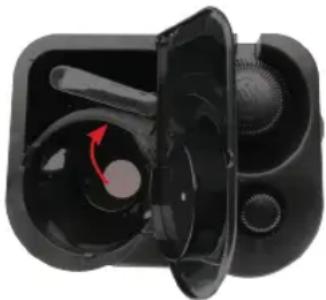
- Open the cover of the water tank on the top left of the appliance.
- Move the steam lever back into the position shown in the image:
natural_image
Close-up of a black electronic device with visible internal components and a red arrow indicating rotation (no text or symbols)-
Pour in the desired amount of water into the water tank.
-
Using the measuring spoon, add the desired amount of ground coffee into the filter. (One spoon per cup)
-
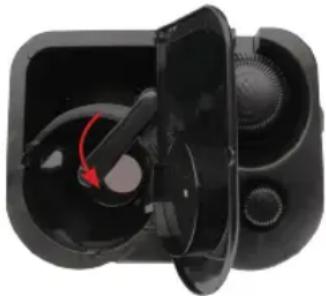
Move the steam lever into the position over the drip filter as shown in the image:
natural_image
Close-up of a black VR headset with open lid and red arrow indicating rotation (no text or symbols)-
Close the cover and place the jug on the heating base.
-
Switch the appliance on by using the ON/OFF switch (for drip filter).
-
The coffee will start dripping into the jug.
-
The coffee will continue dripping until the water is empty. Thereafter the keep warm function will set in.
-
You may remove the jug at any time as this coffee maker has an anti-drip feature. (Note, if the jug is left out of position for too long, the filter could overflow.)
NOTE: The keep warm function will stay on until you switch off the ON/OFF switch (for drip filter).
- After use, switch off the appliance and unplug it, allow it to cool down to room temperature before undertaking any cleaning task.
4. Cleaning and Maintenance
4.1.1. DESCALING
To ensure a long lifespan of the coffee maker, you will need to de-scale it from time to time. Frequency will depend on how hard the water is in your area, and how often you use the coffee maker. If you use your coffee maker once or twice a day, the following guidelines for de-scaling should be used:
- Soft water, every 6 months.
• Medium water, every 2-3 months.
• Hard water, every 6-8 weeks.
If the time it takes to brew a cup of coffee is suddenly increased, it is recommended that the coffee maker be de-scaled. The harder the water is in your area, the more often the coffee maker needs to be de-scaled. The hardness of the water can be advised at your local waterworks.
5. Anomalies and repair
5.1. Take the appliance to an authorised support centre if product is damaged or other problems arise.
5.2. If the connection to the mains has been damaged, it must be replaced and you should proceed as you would in the case of damage.
TROUBLESHOOTING GUIDE
| Symptom Cause | Corrections | |
| Water leaking out of the Glass Jug. | The glass jug is not situated properly. | Place the glass jug correctly under the brewing unit. |
| The level of water in the tank exceeds the MAX indicator. | Remove sufficient water from the tank so that the water level is inline with the MAX mark. | |
| Espresso coffee drips to slowly. | Ground coffee is too fine. | Use a courser grind of coffee. |
| Water leaks from the bottom of coffee maker. | There is too much water in the drip tray. | Clean and empty the drip tray. |
| Acid (vinegar) taste exists in Espresso coffee. | The coffee maker was not rinsed correctly after descaling. | Refer to step 6 in the Descaling section of the instruction manual. |
| The coffee maker does not switch on. | The plug is not inserted correctly into the wall socket. | Insert the plug correctly into the wall socket. If the problem persists contact your nearest authorised service centre for repair. |
| The appliance cannot froth. | The steam pipe may be blocked. | Use a pin to clear any residue from the pipe. Follow steps 5-6 under HOW TO DESCALE MY COFFEE MAKER (For the section of making espresso coffee). |
| There might be an air pocket in the boiler assembly, resulting in weak steam dispersion(milk is not frothed correctly). | While the espresso toggle switch is turned on, gradually turn the small knob on the top of the appliance counter-clockwise until it points to the coffee symbol.Once the water flows freely, turn the knob back to the steam symbol by rotating clockwise.Slowly adjust the steam flow using the Steam Control knob on the side of the appliance(take precaution against dispersed steam). The steam velocity should have returned to normal. If problem persists, please contact us. |
Geagte Klient
text_image
Labeled diagram of a coffee maker with numbered parts for identification and assembly reference.1. Parte Beskrywing
1 - Ketel dekking (water vir espresso koffie)
2 - Brou sterkte beheer knop
3 - Stoom beheer knop
4 - Stoom pyp
5 - Lekbak dekking
6 - Stoom mondstuk
7 - Aaan/af skakelaar (vir espresso koffie
8 - Espresso beker dekking
9 - Klein beker vir espresso
10 - Portafilter
11 - Filter sluit
12 - Water tenk dekking (vir drip koffie)
13 - Verwyderbare lekbak
14 - Aan/af skakelaar (vir drip filter koffie)
15 - Verwarming plaat
16 - Groot beker deksel
17 - Groot beker vir drip filter koffie
2. Belangrike veiligheidsvoorsorg
natural_image
Close-up of a black plastic electronic device with internal components (no visible text or symbols)natural_image
Black and white photo of a VR headset with exposed internal components (no text or symbols visible)text_image
Labeled diagram of a coffee maker with numbered parts for identification and assembly reference.natural_image
Close-up of a black VR headset with visible internal components and ventilation slots (no text or symbols)natural_image
Interior view of a black VR headset with exposed internal components (no text or symbols visible)text_image
Technical diagram of a coffee maker with numbered parts for identification and assembly reference.natural_image
Black and white photo of a compact electronic device with visible internal components (no text or symbols)natural_image
Black VR headset with open lid and visible sensor array (no text or symbols)text_image
Technical diagram of a coffee maker with numbered parts for identification and assembly reference.natural_image
Close-up of a black plastic mechanical component with internal cavities and a central hub (no text or symbols visible)natural_image
Close-up of a black VR headset with open lid and visible buttons (no text or symbols)Thank you for purchasing a Mellerware product. Mellerware guarantees that your product has been thoroughly inspected and tested before being dispatched and is free from mechanical and electrical defects and complies with the applicable safety standards. With every Mellerware product purchased you get a 2 year warranty as detailed in the terms and conditions below.
First Year – 1 Year Retail Warranty:
Should defects due to faulty parts or workmanship develop, under normal use, within 12 months from the original purchase date, please return the product to the store from where it was purchased for repair free of charge. However, for the customer's convenience we will replace products where the purchase price is equal to or less than R750 incl. VAT
Second Year – 1 Year Extended Warranty
Mellerware takes pride in their product quality and therefore offer an extended 12 month warranty over and above the 1 Year Retail Warranty. Should defects due to faulty material or workmanship develop, under normal domestic use, after the 12 month period and within 24 months from the original date of purchase, please return the product postage pre-paid to Mellerware for repair. Mellerware will repair the product free of charge and return it to you directly. Mellerware will replace a product with a similar product in the same or better condition, if the repair cannot be conducted for whatever reason.
NB: The 1 Year Extended Warranty is only valid for customers who have registered their warranty online at www.mellerware.co.za within the first year after making their purchase. See overleaf for details and instructions.
Before returning your product, check the following:
- Your household mains supply socket is in good condition, working and switched on.
- The mains supply circuit is not overloaded (White trip switch on your DB board is off).
- You have read the trouble shooting guide in your Instructions for Use.
- All accessories and parts are present.
The following conditions apply:
-
Please ensure you retain your receipt as this must be presented when making a claim under the terms of the guarantee. It is impossible to determine the guarantee period without proof of purchase, so please keep this in a safe place. (NB. Your guarantee can be scanned onto the Mellerware web site for safe storage – see reverse side for details.)
-
If a refund or exchange is required the product must be complete with all accessories, parts and packaging. Missing parts will render the guarantee void.
-
Upon receipt of your appliance, check it for any transport damage to ensure it is safe for use. Return it to the store as soon as possible for exchange if damaged. The guarantee is void if products are damaged after use, so please do not use the damaged product.
-
Your product is designed for normal domestic household use. Failure to read and comply with the instructions for use, cleaning and maintenance will render your guarantee void, so please read these instructions carefully to ensure your safety, and to get the most effective use from the product. (e.g. not removing lime scale; water deposits; insect infestation, and/or burnt products)
- Any abuse, negligent, improper or accidental use or care will render the guarantee void and Creative Housewares (Pty) Ltd will not be liable for any loss or damage.
- Any attempted repair, or replacement of unauthorised parts will render the guarantee void, so please contact an authorised service centre or service agent for any service or repair requirements.
- NB: The guarantee on replaced products will be from the original date of purchase and not from when the date replacement was made.
- All repairs carry a 3 month guarantee even if this falls outside of the 2 year guarantee period.
- Mellerware will attempt to conduct repairs within reasonable time in line with industry standards but cannot be held responsible or liable for any circumstances not under our control.
- Terms and Conditions are subject to change without prior notice.
Repairs Out of the Warranty Period
If service or repair becomes necessary outside the warranty period, this service is still available however all transport/postage, spares and labour costs will be for the customers' account. All chargeable repairs will require the customers' written acceptance of the quote. Once the go-ahead has been received Mellerware will undertake to conduct the repair within a reasonable time and maintain the condition of the product as received. All repairs are guaranteed for 3 months from the date of the repair.
For any service, enquiries and complaints please contact our Customer Care on 086 111 5006 or e-mail help@creativehousewares.co.za from 08h00 to 15h00 Monday to Friday excluding public holidays. Please also note that the company is normally closed for 2 weeks around Christmas and New Year.
Please send all products for repair postage pre-paid to one of the service centres listed on the back of this page.
ONLINE WARRANTY REGISTRATION
Why register your warranty?
We at Mellerware pride ourselves on bringing premium quality appliances to market, and as a commitment to this level of quality we offer a 2 year warranty (1 Year Retail + 1 Year Extended) on all of our products. We often hear that our customers lose their receipts and can therefore no longer claim if they have a problem. To take advantage of the 1 Year Extended Warranty you will need to register your warranty online within the first year of purchase in order to make a valid claim. Now you can register your product, upload your warranty online, never have to worry about losing your receipt again and enjoy the benefit of your 2 year warranty.
Added Benefits
In addition to providing you with an online profile of your registered products we will also provide a host of value added benefits:
• Incentives and Competitions for registered users
- New recipes or ideas for your products
- New product developments – be the first to get the latest appliances
• Special offers on promotional items
How to Register your Online Warranty?
STEP1 Create your user profile:
If you haven't done so already, simply visit www.mellerware.co.za, click on the "Product Registration" link and follow the easy instructions. You will receive a username and password once registered. This will give you access to your user profile.

text_image
QR code image containing encoded data, no visible human-readable textSTEP2 Pick a registration method:

DESKTOP/LAPTOP
- Open your internet browser and visit www.mellerware.co.za
- Click on the "Registration" link and login using your user name and password.
- Click on "Register your products and upload receipts" and follow the easy instructions.
- Scan and upload your receipt

SMART PHONE/ TABLET
- Scan the QR code above or visit www.mellerware.co.za
- Click on the "Registration" link and login using your user name and password.
- Click on "Register your products and upload receipts" and follow the easy instructions.
- Scan or take a photo and upload your receipt.

FAX
• Fax the following to 021 931 4058
- First Name and Surname
- Contact telephone and fax number.
• Product Model number and Type.
- Traceability Code (found on a label on the product)
• A clear and legible copy of your receipt.
Notes:
- The online warranty system is a safe storage facility for your receipt.
- You will be required to register on the Mellerware website. You will receive a username and password once registered. This will give you access to your profile.
- From your profile you will be able to load products that you have purchased. In order to successfully register your warranty you will need to either scan and upload, or fax through your receipt to us.
- All instructions on how to load your products are available
inside your profile.
- Please note that you must check that your receipt has been uploaded correctly. Creative Housewares cannot be held responsible for faxes or files not received.
- For assistance with registration please email: marketing@creativehousewares.co.za.
NB: Your 1 year extended warranty is only valid if your product is registered online within the first year after purchasing your Mellerware product. Failure to register your product on-line within the first year will render the extended warranty as void.
creative housewares
National Service Centre: 086 111 5006
e-mail: help@creativehousewares.co.za
www.creativehousewares.co.za
Cape Town
20 Tekstiel Street, Parow, Cape Town, 7493,
South Africa • P.O. Box 6156 Parow East, 7501,
South Africa Tel: +27 21 931 8117
Fax: +27 21 931 4058
Durban
35 Adrain Road, Windermere,
Durban, South Africa, 4001
Tel: +27 31 303 3465
Fax: +27 31 303 8259
Johannesburg
Unit 25 & 26 San Croy Office Park
Die Agora Road, Cróydon, 1619
Tel:+27 11 392 5652
Fax:+27 11 392 1694
mellerware®
makes life easier

text_image
2YEAR WARRANTY 1 YEAR RETAIL+1 YEAR EXTENDED Register Online: www.mellerware.co.zatext_image
QR code image containing encoded data, no visible human-readable textSTAP 2 Kies 'n registrasie metode:

REKENAAR/ SKOOTREK- ENAAR
- Maak u internet snuffelgids oop en besoek www.mellerware.co.za
- Klik op die "Registrasie" skakel en teken in met u gebruikersnaam en wagwoord.
- Klik op "Register your products" en laai kwitansies en volg die maklike instruksies.
- Skandeer en laai u strokie

SMART-FOON / TABLET
35 Adrian Road, Windermere,
Durban, South Africa, 4001
Tel: +27 31 303 3465
Fax: +27 31 303 8259
Johannesburg
Unit 25 & 26 San Croy Office park
Die Agora Road, Cróydon, 1619
Tel: +27 11 392 5652
Fax: +27 11 392 1694



Durban
35 Adrain Road, Windermere,
Durban, South Africa, 4001
Tell: +27 31 303 3465
Fax: +27 31 303 8259
creative housewares
20 Tekstiel Street, Parow, Cape Town, 7493, South Africa
P.O. Box 6156 Parow East, 7501, South Africa
+27 21 931 8117 +27 21 931 4058
Service Centre Helpline: 086 111 5006
www.creativehousewares.co.za
Johannesburg
Unit 25 & 26 San Croy Office Park
Die Agora Road, Croydon, 1619
Tell: +27 11 392 5652
Fax: +27 11 392 1694