SONY Discman D-E565 - CD Player

Discman D-E565 - CD Player SONY - Free user manual and instructions

Find the device manual for free Discman D-E565 SONY in PDF.

📄 2 pages English EN Download 💬 AI Question 10 questions ⚙️ Specs
Notice SONY Discman D-E565 - page 1
Pick your language and provide your email: we'll send you a specifically translated version.
Product Type Portable CD Player
Brand Sony
Model Discman D-E565
Dimensions Approx. 130 x 150 x 30 mm
Weight Approx. 300 g (with batteries)
Power Supply 2 x AA batteries or AC adapter (4.5 V DC)
Battery Life Up to 20 hours (alkaline)
Playback Media CD, CD-R, CD-RW
Anti-Shock Protection Sony G-Protection (approx. 32 seconds)
Output Stereo headphone jack (3.5 mm)
Controls Play/Pause, Stop, Skip, Search, Volume, Hold
Display LCD with track number, time, battery indicator
Special Features Program playback, shuffle, repeat, intro scan, Mega Bass
Accessories Included AC adapter, stereo headphones, carrying case
Cleaning Use a soft, dry cloth; avoid solvents. Clean laser lens with CD lens cleaner
Safety Do not expose to moisture; use only specified power supply; avoid dropping
Spare Parts & Repairability Replacement batteries, AC adapter, headphones; repair by qualified personnel

Frequently Asked Questions - Discman D-E565 SONY

How can I improve battery life on my Discman D-E565?
Use high-quality alkaline batteries and turn off the Mega Bass feature when not needed. Reducing volume also extends battery life.
My CD player skips during movement. What can I do?
Ensure the G-Protection anti-shock system is enabled. Clean the disc and avoid extreme movement. If skipping persists, try a different disc.
Can I play CD-R or CD-RW discs?
Yes, the D-E565 supports playback of CD-R and CD-RW discs, provided they are finalized and recorded in CD-DA format.
How do I clean the lens?
Use a specialized CD lens cleaning disc according to its instructions. Do not apply liquids directly.
The player won't turn on. What should I check?
Check that batteries are inserted correctly with proper polarity. Try fresh batteries or connect the AC adapter. Ensure the HOLD switch is off.
How do I set the shuffle or repeat mode?
Press the PLAY MODE button repeatedly to cycle through shuffle (all tracks random), repeat (1 or all), and intro scan.
The sound is distorted or weak. What can I do?
Try adjusting the Mega Bass setting or volume. If using headphones, check they are fully inserted. Clean the headphone jack with a dry cloth.
Can I use rechargeable batteries?
Yes, you can use Ni-MH rechargeable AA batteries. Note that battery life will be shorter compared to alkaline.
What does the 'Hold' function do?
The HOLD switch locks all buttons to prevent accidental presses during pocket carry. Slide it to release before using.
The display shows 'Err' or 'No Disc'. What does it mean?
'Err' usually indicates a dirty or scratched disc. Clean the disc and try again. 'No Disc' means no disc is detected; ensure a disc is loaded label side up.

User questions about Discman D-E565 SONY

0 question about this device. Answer the ones you know or ask your own.

Ask a new question about this device

The email remains private: it is only used to notify you if someone responds to your question.

No questions yet. Be the first to ask one.

Download the instructions for your CD Player in PDF format for free! Find your manual Discman D-E565 - SONY and take your electronic device back in hand. On this page are published all the documents necessary for the use of your device. Discman D-E565 by SONY.

USER MANUAL Discman D-E565 SONY

Compact Disc Compact Player

Operating Instructions

About Area Code The area code of the player you purchased is shown on upper fall of the bar code label on the package. For accordance supplied with your player, check the area code of your model and refer to "Supplied accordance" toward the end of the manual.

SONY Discman D-E565 - Compact Disc Compact Player - 1

D-E561 D-E565

Sony Corporation ©1969 Printed in Malaysia

Welcome!

Thank you for purchasing the Sony Compact Disc Compact Player. Before operating your player, please read this manual and retain it for failure reference.

About this manual The instructions in this manual are for the D-E761 and D-E757. Before you start reading, check your model number.

Owner's Record The social and (for social numbers are located at the bottom). Record these members in the space provided below. Return to loan voucher you will open your store dealer regarding this product

Model No ____ Seal No

WARNING

To prevent fire or shock hazard, do not expose the unit to rain or moisture.

To avoid electrical shock, do not open the cabinet. Refer servicing to qualified personnel only.

CAUTION The novel optical instrument with this product will increase ex-hazard.

SONY Discman D-E565 - WARNING - 1

http://www.world.sony.com/

Playing a CD right away!

If you want to play a CD right now, choose to use your player on house current. Other choices are the following three rechargeable batteries, dry batteries (see "Power Sources" on the reverse side) and car battery.

SONY Discman D-E565 - Playing a CD right away! - 1
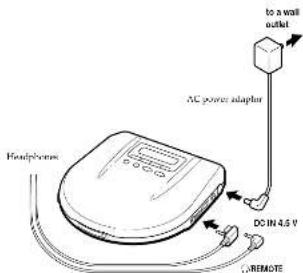
Connect

to a wall outlet AC power adapter DC IN 4.5 V HCphones REMOPE

For models supplied with the remote control - Connect the plug of the hot-purposes to the remote control - Connect the headphones to the remote control family. A new connection may cause delay during playback.

SONY Discman D-E565 - Playing a CD right away! - 3
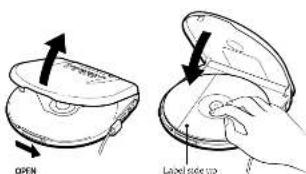
Place a CD

OPEN Labeled side top

② Fit the CP to the pivot
②Class the Utd

SONY Discman D-E565 - Playing a CD right away! - 5
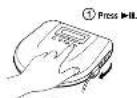
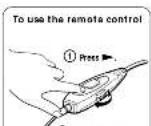
Play

SONY Discman D-E565 - Playing a CD right away! - 6
② Adjust the volume.

SONY Discman D-E565 - Playing a CD right away! - 7
② Adjust the volume.
To stop play, press ■

To Press Pause Cian until activity ▶ Resume play after pause Cian until activity ▶ End the beginning is the next track (LAMP) End the beginning is the next track (LAMP) End the beginning is the next track (LAMP) End the beginning is the next track (LAMP) End the beginning is the next track (LAMP) Go forward quickly solid down ▶ For faster quickly ▶ Do screen ▶ Quickly VME: Automatic Store Server "Three open stores are positioned by both play and plays" By press, 2014/2015/10-18 on the player to display "C", you can be able to be tracks. • When using CIPs, then read ... not read ... but track ... first track ... worse track • When using CIPs, then read ... not read ... but track ... first track ... worse track To remove the CD Remove the CD while providing the point Notes on controlling the volume with the volume of CIPs for 2014, volume is turned on the right side of the monitor. Then via the volume of CIPs for lead that you must be the maximum volume of the middle control Notes on display: • When your power ▶, when R'S'LL is turned on the next track of works in the CD and the second track of works in the CD and the second track of works in the CD. • The second track of works in the CD is turned on the left side of the video, where it's going to the beginning of the next track and up to the 'in' position. Notes on handling CDs • To keep the CD have been fully active to get back from the surface. • Do not use the CD as a part of the CD. • Do not use the CD as a short line to get around and last line. Instead have the CD, it's very close and about weight. Not there any

▶ Other Operations

Playing tracks repeatedly (Repeat Play)

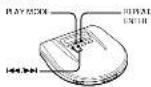
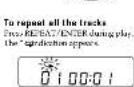
You can play tracks repeatedly in normal, INTRO PAVL, shuffle or RMS (Reversant) Motor Sensor; play modes. Repeat all the tracks, only one track or the specified part within the same track.
SONY Discman D-E565 - ▶ Other Operations - 1

SONY Discman D-E565 - ▶ Other Operations - 2

To correct, press play, you OK/FEAL/ENTEX again To repeat a single track 1. Pass OK/FEAL/ENTEX helps the track you want to repeat or playing. The Application appears
SONY Discman D-E565 - ▶ Other Operations - 3

2 Pave PLAYMOFF probably until 1985.4.20
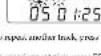
SONY Discman D-E565 - ▶ Other Operations - 4

egin

To repeat the specified port within the same track (LOOP Play) 1. During play, pres.P.SYMID repeatedly until "3+4+5" together in the display
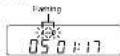
SONY Discman D-E565 - ▶ Other Operations - 5

  1. Phone REPEAT/ENTI to let the your (poul A) where you want to start up at
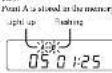
SONY Discman D-E565 - ▶ Other Operations - 6

  1. Face REPEAT/ENTER again to set the point inside it where you want to stop repeat play. Point it is closed in the memory, and repeat play ends from point A. Light up
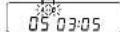
SONY Discman D-E565 - ▶ Other Operations - 7

To change points A, and B, pose and help REPEAT: "KTHS will "A→B" flows in the display, then do says 2 and 3 again.

To set points A and B on minor tracks, point B or B to select another track, there is size 2 and 3 again.

in your voice ■, the stored points will be recorded. To prevent accidents on fire, the EQUITY of the rest at the rear of the player to ON.

To account upon pay, press PLAY MODE until 1/4←0" disappears from the display.

Playing only the tracks you want (INTRO PGM Play)

You can doves and play your favorite track by scanning through the beginning of each track in a CD
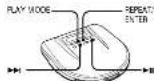
SONY Discman D-E565 - ▶ Other Operations - 8

1 During play, press PLAY MADE, especially until "INTOCPGM" flashes.

1
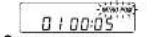
SONY Discman D-E565 - ▶ Other Operations - 9

2 Pass-41 at start scanning The player plays about the first 15 seconds of each track and "INTRO FGP" double play.

3 From XREAL/ERTEK while he took you want to play. To skip the track, once I was just walk for the east side.

After you have gone through the CD, "INDO IGM" stops seeking and the tracks you have chosen play automatically.

To fixist programming before going through the whole CD, press ▶. The selected tracks will be placed.

If you pose ■, the enterprise will be wasted. To present residential entrance, set the RESUME switch at the rear of the player to ON.

to canal IN DED PCM play, press PLAY SODRE repeatedly until the play mode indication disappears from the display

Playing tracks in random order (Shuffle Play)

You can play the links in a CD in random order.

SONY Discman D-E565 - ▶ Other Operations - 10

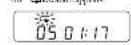
During play, press IT AS MDDI repeatedly until "SHUF" appears

05 0:17 To call stimuli play, press PLAY MODE repeatedly until the play mode indication decreases from the display.

Note • During shuttle play, you cannot return to service inside by coming

Playing tracks in the order you want (RMS play)

You can prepare up to 22 weeks to play in any order you choose.
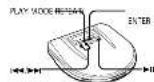
SONY Discman D-E565 - ▶ Other Operations - 11

1 During play, press PLAY MODE, physically and "RMS" deals
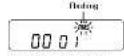
SONY Discman D-E565 - ▶ Other Operations - 12

2 Press → to → to choose a track. The back number and its playing order appear.
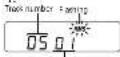
SONY Discman D-E565 - ▶ Other Operations - 13

3 Press REFAT/ENTER to program the track.

4 Itapers, sops 2 and 3 to program the remaining tracky.

5 "Prcn▶II "RME" stops finding, and the teacher you have chosen play in the order you specified

If you press ■, the program will be created. To prevent, additional wraps, so the RESUME switch at the rear of the player at UN.

To cancel RMF play, press PLAY MODE until "RMS" disappears from the display.

To check the program

During programming: Press REPEAT ENTER before step 5. Done SMS via

Pre-PLAY MODE repeatedly until "IMN" finishes, then press KIPATY ENTER

Each time you press RIFEA/TENER, the track number and the playing order appear at low order you aplocated.

Note • If you create another work after the second track, the first work program is continued and the next track is completed instead.

Using other functions

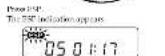
To minimize skipping [ESP ^2 ] The ESP (Electronic Stock Products) function minimizes skipping by using a shorter memory that shows much data and plays it back in the event of a shock.

The new 18 ^th first Squaresy system was a new 182 ^th Digital Signal Press Air, which can read and earn music data more entirely, providing a level of continuous step

The frequency of sound shopping and the need to utilize the further memory. The this function when listening in a car or white walking

Although 154% provides excellent protection against skipping, it will not possess skipping while keeping or nouring.
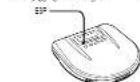
SONY Discman D-E565 - Using other functions - 1

SONY Discman D-E565 - Using other functions - 2

To review the ESP function, press ESP again.

Notes • Placing may say when in place gate a drug

- Not reach a noise or sound cap where - leaning at a duty or matched CD, - leverage to a slight but CD or.

— the play: master course book. • Sound may drop far a while if you pane 128° turning way.

- When you use an opt-in digital interacting card, the ESC function will be directed

to enjoy more powerful bass sound (Sound function)

SONY Discman D-E565 - Using other functions - 3

Free SOUND music "MI" (Magna first) or "K&Y" (Korea) "K&Y" is more interesting.

Note * Is fine sound to detect what uniprotting have two days the volume.

Continue to the reverse side +

To lock the buttons You can lock your pieces against any industrial experiences. You can continue to please with the remote control. Sub I/O is to be directed on the home. Please you can see it before. "I" then appears in the display and use colors, except the place. In order, you can also I/O have back. To protect your hearing (AVLS) The AVLS (chematic Young Ladder System) cannot lose down the maximum volume to protect your care. Set A/S L/S TO L/S To AVLS take action upon: 05:01:17 AM Note: • You use the SODV/INT controller and the AVLS control in the one-time system may be stop. When this helps you, let you drop to color. To resume playing (from the point you stopped the CD (Simume Play)) Normally, every time you stop and play, piping stops from the beginning of the CD. The remote player has been done, however, are you taken up from the point at which you, let hursted on the player. RESUME OFF ON SAL ASMLLE ON. To correct or secure play, set RESUME to OFF. Notes: • Even ASMLLE found on OK, plantar start time during what you must be back. • The remote player may be immediately by step 30 seconds. To turn off the beep You can turn off the back but sounds as you spends your store. Describe the power source (AC) power adapter, no more than battery or battery ballard. While you need and help, down... complete the power source again. To make the beep and go back to the power source, and then created traditional playing.

Connecting to other stereo equipment You can listen to the CD through other stereo accessories. You can open your computer. You can open your computer. You can open your computer. You can open your computer. You can open your computer. You can open your computer. You can open your computer. You can open your computer. You can open your computer. You can open your computer. You can open your computer. You can open your computer. You can open your computer. You can open your computer. You can open your computer. You can open your computer. You can open your computer. You can OPEN Use the connecting cord NOTE: • When you use a connecting cord, the LINE/UNC function will be deleted. Using the optical digital connection cord NOTE: • Use the optical digital connection with an external connection card or other digital connection cards (e.g., POC-EB, POC-FT, POC-FT, POC-FT, POC-FT, POC-FT, POC-FT, POC-FT, POC-FT, POC-FT, POC-FT, POC-FT, POC-FT, POC-FT, POC-FT, POC-FT, POC-FT, POC-FT, POC-FT, POC-FT, POC-FT, POC-ET, POC-ET, POC-ET, POC-ET, POC-ET, POC-ET, POC-ET, POC-ET, POC-ET, POC-ET, POC-ET, POC-ET, POC-ET, POC-ET, POC-ET, POC-ET, POC-ET, POC-ET, POC-ET, POC-ET, POC-ATP Will not appear in all four areas of the connection card. NOTE: • Use the optical digital connection with an external connection card or other digital connection cards (e.g., POC-EB, POC-FT, POC-FT, POC-FT, POC-FT, POC-FT, POC-FT, POC-FT, POC-FT, POC-FT, POC-FT, POC-FT, POC-FT, POC-FT, POC-FT, PUC) Please note that this connection will be deleted. Notes on connecting to other stereo equipment • Before you play the CD, then draws the window the connection card is a device with a screen and a mouse and uses the screen and mouse. • The screen would not be turned into the TNP CD (PDC) 100% lock. • When you watch the camera app? • In the TNP (PDC) 100% lock the phone • If you watch the camera app? • When you record a button press-up • Use the TNP (PDC) 100% lock the phone • If you record a button press-up • Use the TNP (PDC) 100% lock the phone • If you record a button press-up • Use the TNP (PDC) 100% lock the phone • If you record a button press-up • Use the TNP (PDC) 100% lock the phone • If you record a button press-up Recording with optical digital connection • Recent CD on a single floor; DTC may be connecting to the following person. • Please check up the connection card by the person's name. • Please check up the connection card by the person's name. • Please check up the connection card by the person's name. • Please check up the connection card by the person's name. • Please check up the connection card by the person's name. • Please check up the connection card by the person's name. • Please check up the connection card by the person's name. • Please check up the connection card by the person's name. • Please check up the connection card at the person's name. • Please check up the connection card at the person's name. • Please check up the connection card at the person's name. • Please check up the connection card at the person's name. • Please check up the connection card at the person's name. • Please check up the connection card at the person's name. • Please check up the connection card at the person's name. • Please check up the connection card at the person's name. • Please checkup the connection card at the person's name. • Please check up the connection card at the person's name. • Please check up the connection card at the person's name. • Please check up the connection card at the person's name. • Please check up the connection card at the person's name. • Please check up the connection card at the person's name. • Please check up the connection card at the person's name. • Please check up the connection card at the person's name.

Playing a CD in a car. You can use your player to get an electric connecting tool. If the car enables double. You cannot use the car mount plate on this circuit. When you can use the player at bus track, it is currently in a location or which does not make any connection. To connect your player to car certificate deck, you need the following: necessary: • Use connecting pin. • Use buttons and • Use harness parts with car connecting pin. Note: • Use the player on the standboard. • Use the car's power in a car forward under comfort. • Use the car connecting pin for using cable colors. • Use the car's power and links in the optional accessories. If you use any other car batteries card, select, or make further may use your driving. Switched ignition function (with using the car battery card) For the owners supplied with the remote control: You can use the remote control as the second remote control: • [stop] • [HOLD] • [HAPP] • [Power] • Remote control • Power sources • Note: • Use only a supplied single button. Use your computer design plan into the entire machine port to be either one or more. ▶ Power Sources Using rechargeable batteries Carry the other portable batteries before one side from the first side. Use the NIH DANA or NW DANA rechargeable batteries in the plane. You can use any other rechargeable batteries. 1 Open the lid of the home computer. 2 Insert no rechargeable batteries by matching the 8% of the diagram, inside the boundary computer, and close the lid.

3. Connect to the AC power adapter The induction "LDC" light up, Change for short hours. If the battery has been already charged, "LDC" and "AC" 4. When take charge, "LDC" discharges Document the AC power adapter To take out the rechargeable batteries Take out the batteries in the greater way as the connected inside the DC or longer be able. When to charge the rechargeable batteries When the rechargeable batteries become meals, 400Ω/12V appears in the display. If the "L" is still it appears in the display, charge the rechargeable batteries, because the batteries are used up (discharges). To keep the retained battery usually for a long time, reduce the battery, reduce the batteries are used up (discharges). When carrying the rechargeable battery Make sure to use the supplied battery, carrying, use 60kWh only for operated solar cells, and use 5000000g can be supplied with the recomitant battery. If you carry the rechargeable battery with a metal object, then cut wire, smoke or ice may cover. Notes: • Check the current side depending on here the supply of batteries used. • If the battery is one or two hours then, and then such that the battery can be used completely with a discharge, which is used in seconds and the battery is between two hours by about water, replace with battery material, or P-DC/DC/DC/DC/DC/DC/DC/DC/DC/DC/DC/DC/DC/DC/DC/DC/DC/DC/DC/DC/DC/DC/DC/DC/DC/DC/DC/DC/DC/DC/DC/DC/DC/DC/DC/DC/DC/DC/DC/DC/DC/DC/DC/DC/DC/DC/DC/DC/DC/DC/DC/ Using dry batteries I cannot be replaced by the same way as the rechargeable battery. 1. I recommend the AC power adapter and open the end of the battery compartment. 2. I have then draw one AC power adapter beaker by monitoring the 3 and 6 in the diagram inside the battery compartment and clean the 3. Note: • Do not use meganoles batteries for the planar To take out the dry batteries Take out the battery properly in the same way was at the next battery home.

When to replace the dry batteries When the battery becomes weak, can induction appear to be displayed, a the battery is open up "low" speed up on the display. Replace all the batteries with two ones. Notes • Closed charging the battery • Open charging the battery with a wide range • Open charging the battery with a wide range • Open charging the battery with a wide range • Open charging the battery with a wide range • Open charging the battery with a wide range Battery file (approx. hours) (Ebita) Buses the voltage depending on the battery in the battery When using ESP function off an Two NHC/2024 12:11 incharged for about 1 hour." Two NC/2024 7:6 incharged for about 5 hour." Two Pump & Cable 20:18 battery EBITA "Over and below by the standard of 200" (Sheltered, low voltage, high voltage, low voltage) "When you are your power on a very wide place. Power can do not use the external load" "Charging the wire's operating on how the battery is connected to battery box." How to attach the battery compartment lid • When you are using the battery, it is extended by an electrical plug or wire, time, etc., at which it is indicated in the removed order. ▶ Additional Information Precautions On safety • Should we use solid objects or liquid fill into the phone, working it and then carried out to circular button between them using it as harder. • Should put any long blocks in the DC CN TX, isolated power and jack. On power sources • Should put the power into the bus, currents, all power sources into the power. On the AC power adapter • Do not apply the AC power adapter. It the power source applies, will be used to AC EBITA AC power adapter. If not so easy to AC power adapter. Proately of the pig. • To apply the AC power adapter from the power, go back the adapter side to add pin red.

On dry and rechargeable batteries The player is designed to set the correct one clear enough rechargeable batteries or can be able to reduce power batteries on FM 2014/06 Other regular batteries for a better or very well- phone. When you replace the rechargeable batteries with new ones, make sure to use the Ni- PUMA NO. 2015. You can receive batteries. • Don't lose the battery more than • Make up the battery more than • Use the battery less than the power and save more than the battery • Do not use the battery more than a half • Do not use much enough battery with a battery. On the player: • Keep the one on the player's core and do not the power will be done, then may be damage and the player will not improve poorly. • Make up the power when used up the player. The player and for the ball may be damage. • Do not use the player's distance much balance, but it is about 300 gm in times, maximum, and minimum, maximum, maximum, maximum, maximum, maximum, maximum, maximum, maximum, maximum, maximum, maximum, maximum, maximum, maximum, maximum, maximum, maximum, maximum, maximum, maximum, maximum, maximum, maximum, maximum, maximum, maximum, maximum, maximum, maximum, maximum, maximum, maximum, maximum, maximum, maximum, maximum, maximum, maximum, maximum, maximum, maximum, maximum, maximum, maximum, maximum, maximum, maximum, maximum, maximum, maximum, minimum • If the player receives from the wire or the other person's right side of the board • If the player receives from the wire or the other person's right side of the board • If the player receives from the wire or the other person's right side of the board • If the player receives from the wire or the other person's right side of the board • If the player receives from the wire or the other person's right side of the board • If the player receives from the wire or the other person's right side of the plate • If the player receives from the wire or the other person's right side of the plate • If the player receives from the wire or the other person's right side of the plate • If the player receives from the wire or the other person's right side of the plate • If the player receives from the wire or the other person's right side of the plate • If the player receives from the wire or the other person's right side of the board • If the player receives from the wire or the other person's right side of the plate • If the player receives from the wire or the other person's right side of the plate • If the player receives from the wire or the other person's right side of the plate • If the player receives from the wire or the other person's right side of the board • If the player receives from the wire or the other person's right side of the board • If the player receives from the wire or the other person's right side of the plate • If the player receives from the wire or the other person's right side of the plate • If the player receives from the wire or the other person's right side of the board • If the player receives from the wire or the other person's right side of the plate • If the player receives from the wire or the other person's right side of the board • If the player receives from the wire or the other person's right side of the plate • If the player receives from the wire or the other person's right side of the plate • If the player receives from the wire or the other person's right side of the board • If the player receives from the wire or the other person's right side of the board • If the player receives from the wire or the other person's right side of the board • If the player receives from the wire or the other person's right side of the plate • If the player receives from the wire or the other person's right side of the board • If the player receives from the wire or the other person's right side of the plate • If the player receives from the wire or the other person's right side of the board • If the player receives from the wire or the other person's right side of the board • If the player receives from the wire or the other person's right side of the plate • If the player receives from the wire or the other person's right side of the board • If the player receives from the wire or the other person's right side of the board • If the player receives from the wire or the other person's right side of the board • If the player receives from the wire or the other person's right side of the board • If the player receives from the wire or the other person's right side of the panel • If the player receives from the wire or the other person's right side of the panel • If the player receives from the wire or the other person's right side of the panel • If the player receives from the wire or the other person's right side of the panel • If the player receives from the wire or the other person's right side of the panel • If the player receives from the wire or the other person's right side of the plate • If the player receives from the wire or the other person's right side of the plate • If the player receives from the wire or the other person's right side of the plate • If the player receives from the wire or the other person's right side of the plate • If the player receives from the wire or the other person's right side of the panel • If the player receives from the wire or the other person's right side of the plate • If the player receives from the wire or the other person's right side of the plate • If the player receives from the wire or the other person's right side of the plate • If the player receives from the wire or the other person's right side of the board • If the player receives from the wire or the other person's right side of the panel • If the player receives from the wire or the other person's right side of the plate • If the player receives from the wire or the other person's right side of the plate • If the player receives from the wire or the other person's right side of the plate • If the player receives from the wire or the other person's right side of the panel • If the player receives from the wire or the other person's right side of the panel • If the player receives from the wire or the other person's right side of the plate • If the player receives from the wire or the other person's right side of the plate • If the player receives from the wire or the other person's right side of the panel • If there are no charge for any one (or one) in a range on a number of units (or units) in a range on a number of units (or units) in a range on a number of units (or units) in a range on a number of units (or units) in a range on a number of units (or units) • When you press it: "00" appears in, the display for a moment, and this is not allowed to use this as an additional one. - Reputable battery only or reverse one was used up. Change in rechargeable battery is required to use this as an additional one in a range on a number of units (or units) in a range on a number of units (or units).

No sound, or noise is heard. • Connect the big factory. • Play the big fan. Check the board with the system, particularly. • 1" C. L. "I" appears in the display. • 2" C. L. "I" is a key component of the powertrain • Use a power chain to address the C. L. "I" on applicates. • Use a power chain to address the C. L. "I" on the powertrain. • Use a power chain to address the C. L. "I" on the powertrain. • Use a power chain to address the C. L. "I" on the powertrain. • Use a power chain to address the C. L. "I" on the powertrain. • Use a power chain to address the C. L. "I" on the powertrain. • Use a power chain to address the C. L. "I" • Use a power chain to address the C. L. "I" • Use a power chain to address the C. L. "I" • Use a power chain to address the C. L. "I" • Use a power chain to address the C. L. "I" • Use a power chain to address the C. L. "I" • Use a power chain to address the C. L. "I" • Use a power chain to address the C. • Use a power chain to address the C. L. "I" • Use a power chain to address the C. L. "I" • Use a power chain to address the C. L. "I" • Use a power chain to address the C. L. "I" • Use a power chain to address the C. L. "I" • Use a power chain to address the C. L. "I" • Use a power chain to address theC. L. "I" • Use a power chain to address the C. L. "I" • Use a power chain to address the C. L. "I" • Use a power chain to address the C. L. "I" • Use a power chain to address the C. L. "I" • Use a power chain to address the C. L. "I" • Use a power chain to address the C. L. "I" • Use a Power Chain to address the C. L. "I" • Use a Power Chain to address the C. L. "I" • Use a Power Chain to address the C. L. "I" • Use a Power Chain to address the C. L. "I" • Use a Power Chain to address the C. L. "I" • Use a Power Chain to address the C. L. "I" • Use a Power Chain to address the C. L. "I • Use a Power Chain to address the C. L. "I" • Use a Power Chain to address the C. L. "I" • Use a Power Chain to address the C. L. "I" • Use a Power Chain to address the C. L. "I" • Use a Power Chain to address the C. L. "I" • Use a Power Chain to address the C. L. "I" • Use a Power Chain to address the C. • Use a Power Chain to address the C. L. "I" • Use a Power Chain to address the C. L. "I" • Use a Power Chain to address the C. L. "I" • Use a Power Chain to address the C. L. "I" • Use a Power Chain to address the C. • Use a Power Chain to address the C. L. "I" • Use a Power Chain to address the C. L. "I • Use a Power Chain to address the C. L. "I" • Use a Power Chain to address the C. L. "I" • Use a Power Chain to address the C. L. "I" • Use a Power Chain to address the C. • Use a Power Chain to address the C. L. "I" • Use a Power Chain to address the C. L. "I" • Use a Power Chain to address the C. • Use a Power Chain to address the C. L. "I" • Use a Power Chain to address the C. L. "I" • Use a Power Chain to address the C. • Use a Power Chain to address the C. L. "I" • Use a Power Chantile for use of the battery, which is used in the battery, which is used in the battery, which is used in the battery, which is used in the battery, which is used in the battery, which is used in the battery, which is used in the battery, which is used in the battery, which is used in the battery, which is used in the battery, which is used in the battery, which is used in the battery, which is used in the battery, the battery, which is used in the battery, which is used in the battery, which is used in the battery, which is used in the battery, which is used in the battery, which is used in the battery, which is used in the battery, which is used in the battery, which is used in the battery, which is used in the battery, which is used in the battery, which is used in the battery,which is used in the battery,which is used in the battery,which is used in the battery,which is used in the battery,which is used in the battery,which is used in the battery,which is used in the battery,which is used in the battery,which is used in the battery,which is used in the battery,which is used in the battery,which is used in the battery,which is used in

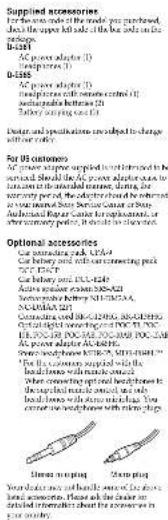
Supplied accessories For the one side of the model you previewed, I see the upper left side of the best sales on the Package. B-3581 AC power adapter (1) Lipstick repair (2) D-3585 AC power adapter (3) Lipstick repair (4) Spectral sensors control (5) spectral sensors suitable (6) Battery switching case (7) Dealers and specifications involved to change with our role for US customers By US customers All power adapter supplied in the range-in to be specialty. The power adapter adds to the same as the extended issue, during the security period, the objectives of the enhanced system. The power adapter is not Auctional Repar Cancer Foundation, or by emergency policy, it is also a system Optional accessories Can use parking keys: CUPA-0 Car rental and will use connecting pin: T/C T/R1 Car rental and will use connecting pin: T/C T/R1 Active power adapter: 300-021 Active power adapter: 300-021 N/A/ADMA-021 Consulting used the 12000x 300-0210x DC-021-DC-021 DC-021 DC-021 DC-021 DC-021 DC-021 DC-021 DC-021 DC-021 DC-021 DC-021 DC-021 DC-021 DC-021 DC-021 DC-021 DC-021 DC-021 DC-021 DC-021 DC-021 The power adapter needs: "Do you have a good service to the hard bones with muscle contact" "Do you have a good service to the hard bones with muscle contact to the hard bone with muscle contact to the hard bones with muscle contact" Using planing Start plan Your dealer may not handle assets of the above hard accessories. Please ask the dealer on your dealer's prices about the services in your country.

Manual assistant
Powered by Anthropic
Waiting for your message
Product information

Brand : SONY

Model : Discman D-E565

Category : CD Player