
AD 7958 - Humidifier ADLER - Free user manual and instructions
Find the device manual for free AD 7958 ADLER in PDF.


| Brand | Adler |
| Model | AD 7958 |
| Product Type | Ultrasonic Humidifier |
| Power Supply | 230V ~50Hz, 28W |
| Mist Intensity Levels | 4 adjustable levels |
| Timer Function | Yes, programmable up to 12 hours (1-hour increments) |
| Display | Digital with backlight, shows ambient temperature and humidity |
| Water Tank Capacity | Approximately 4.5 L |
| Water Level Indicator | Yes, 'waterless' icon and auto shut-off when empty |
| Water Type Recommended | Cold distilled water only |
| Essential Oils Compatibility | Not allowed (do not add oils, salt, or chemicals) |
| Cleaning Instructions | Empty and dry tank after each use; wipe base with dry cloth; do not submerge base |
| Safety Features | Auto shut-off when empty, overheat protection, RCD recommended |
| Use Location | Indoor only; keep at least 20 cm free space around device |
| Noise Level | Quiet operation |
Frequently Asked Questions - AD 7958 ADLER
User questions about AD 7958 ADLER
0 question about this device. Answer the ones you know or ask your own.
Ask a new question about this device
Download the instructions for your Humidifier in PDF format for free! Find your manual AD 7958 - ADLER and take your electronic device back in hand. On this page are published all the documents necessary for the use of your device. AD 7958 by ADLER.
USER MANUAL AD 7958 ADLER
natural_image
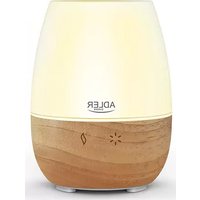
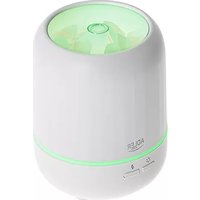
White ADLER EUROPE water purifier with digital display and control panel (no visible text or symbols on device body)AD 7958
(GB) user manual
(F) mode d'emploi
SAFETY CONDITIONS IMPORTANT INSTRUCTIONS ON SAFETY OF USE PLEASE READ CAREFULLY AND KEEP FOR FUTURE REFERENCE
The warranty conditions are different, if the device is used for commercial purpose.
-
Before using the product please read carefully and always comply with the following instructions. The manufacturer is not responsible for any damages due to any misuse.
-
The product is only to be used indoors. Do not use the product for any purpose that is not compatible with its application.
-
The applicable voltage is 230V, \~50Hz. For safety reasons it is not appropriate to connect multiple devices to one power outlet.
-
Please be cautious when using around children. Do not let the children to play with the product. Do not let children or people who do not know the device to use it without supervision.
5.WARNING: This device may be used by children over 8 years of age and persons with reduced physical, sensory or mental capabilities, or persons without experience or knowledge of the device, only under the supervision of a person responsible for their safety, or if they were instructed on the safe use of the device and are aware of the dangers associated with its operation. Children should not play with the device. Cleaning and maintenance of the device should not be carried out by children, unless they are over 8 years of age and these activities are carried out under supervision.
-
After you are finished using the product always remember to gently remove the plug from the power outlet holding the outlet with your hand. Never pull the power cable!!!
-
Never put the power cable, the plug or the whole device into the water. Never expose the product to the atmospheric conditions such as direct sun light or rain, etc.. Never use the product in humid conditions.
-
Periodically check the power cable condition. If the power cable is damaged the product should be turned to a professional service location to be replaced in order to avoid hazardous situations.
-
Never use the product with a damaged power cable or if it was dropped or damaged in any other way or if it does not work properly. Do not try to repair the defected product yourself because it can lead to electric shock. Always turn the damaged device to a professional service location in order to repair it. All the repairs can be done only by authorized service professionals. The repair that was done incorrectly can cause hazardous situations for the user.
-
Never put the product on or close to the hot or warm surfaces or the kitchen appliances like the electric oven or gas burner.
-
Never use the product close to combustibles.
12.Do not let cord hang over edge of counter or touch hot surfaces.
-
Never leave the product connected to the power source without supervision. Even when use is interrupted for a short time, turn it off from the network, unplug the power.
-
In order to provide additional protection, it is recommended to install residue current device (RCD) in the power circuit, with residual current rating not more than 30 mA.
Contact professional electrician in this matter.

-
Never use this device close to water, e.g.: Under shower, in bathtub, or above sink filled with water.
-
If using the device in bathroom after use remove the power plug from the socket, because water proximity presents risk, even if the device is turned off.
-
Do not allow the device or power adaptor to wet. If the device falls into water, immediately remove the power plug or power adaptor from the socket. If the device is powered, do not put hands in the water. Have the device checked by the qualified electrician before using it again.
-
Do not touch the device or power adaptor with wet hands.
-
The device has to be turned off after every use.
-
If the device utilises a power adaptor, do not cover it, because this can cause a dangerous temperature rise and can damage the device. Always connect the power adaptor cable to the device, and then connect the power adaptor to the power socket.
-
Never turn on a humidifier if it is not filled with water.
-
Use only clean, cold distilled water.
-
Do not add drugs or chemical substances to the tank, base or vapor outlet. Do not add aromatic oils, salt, decalcifying tablets, powders or cleaning agents to water.
-
Water tank cap should always be tightly screwed.
-
Make sure that the water mist outlet is not aimed directly at the walls, furniture, electrical outlets, electrical and electronic equipment and children.
-
Do not block the device ventilation. Keep at least 20 cm free space around the device. Do not block the water mist outlet.
-
Do no use the device if there is risk of developing condensation. Moisture may occur on the external or internal device parts if:
– the device is moved from a cold to a warm place,
– the heating system has just been turned on,
– the device is being used in a high moisture area,
– the device is cooled by the air conditioning cooling system.
If the unit may not operate properly if it develops moisture condensation; in extreme cases it can become damaged. In such case, do not use the device and leave it to dry for a few hours.
-
Do not tilt or overturn the device and do not attempt to add or drain water when the device is operating.
-
Do not remove the tank from the device base during the device operation.
-
Do not touch the device with wet hands.
-
The filled tank is heavy. When moving it, support it also from the bottom.
-
Do not use the humidifier when you see the water leak at the bottom.
-
Do not leave water in the humidifier it is not in use.
-
Clean the humidifier after each use. Follow the cleaning recommendations in this instruction.
-
Never let the tank in the humidifier base develop sediment, moisture or gather water (it could contaminate or even damage the ultrasonic nebulizer).
-
When the device is operating for a long time, the water mist emitted by the humidifier can settle on the floor and make it wet.
-
Too much humidity in the room can lead to moisture accumulation causing the growth of bacteria and fungi and damage to walls, furniture and wallpaper.
-
Do not lift the water tank with the water mist outlet.
-
Do not submerge the base of the humidifier.
DESCRIPTION OF THE DEVICE (fig A)
-
Water mist outlet
-
Water tank
-
Base
-
Control panel
CONTROL PANEL (diagram B)
-
ON/OFF button
-
MIST button
-
Humidity icon
-
TIMER button
-
"Waterless" icon
-
Humidity and time indicator
-
Humidity level Indicator
-
Backlight of display button
USING THE DEVICE
- Make sure that the humidifier is unplugged. Add water to the tank (A2) only when the device is not connected to power.
- Remove the water tank (A2), unscrew the water filter and fill the tank with cold distilled water.
- Wipe the tank with dry cloth until it's dry and put it on the base.
- Connect the device to power. The display panel (A4) will light up. The humidifier will wait for setting the mode.
- Turn the device by pressing ON/OFF button (B1). In order to change the intensity of the humidifying process press button MIST (B2). Adjusting of the intensity is a 4-stage, each pressing of the button (B2) changes the degree of 1. The level of intensity is visualized by humidifying intensity indicator (B7). During operation, press the TIMER button (B4) to program the desired working time of device. Each time you press the button, you change the preset working time by 1 hour. After finishing of time the device will go into standby mode. During work the device will show the temperature of surroundings and preset working time of device. You can turn on and turn of the backlight of display by pressing button (B8).
- To stop using a humidifier press the ON / OFF button (B1). Remove the plug from the socket. "No water" indicator: an information icon displays a lack of water (B5).
CLEANING AND MAINTENANCE OF THE DEVICE
- Turn off the device and remove the plug from the electric socket.
- Remove the water tank (A2) from the humidifier and empty it.
- Wash the water tank and remove the sediments and dirt. Dry the tank.
- Gently wipe the inside of the humidifier base dry.
CAUTION: Do not let the humidifier base get in water.
CAUTION: Do not use warm water to wash the humidifier.
TECHNICAL DATA
Power source:230 V\~50 Hz
Power: 28 W
This device is made in class II insulation and does not require grounding.
The device is compliant with the requirements of the following standards:
The Low Voltage Standard (LVD)
Electromagnetic compatibility (EMC)
The product is CE marked on the nameplate
To protect your environment: please separate carton boxes and plastic bags and dispose them in corresponding waste bins. Used appliance should be delivered to the dedicated collecting points due to hazarsous components, which may effect the environment. Do not dispose this appliance in the common waste bin.
DEUTSCH
OPIS UREĐAJA (crtež A)
- Izlaz vodene magle
-
Baza
-
Rezervoar za vodu
- Kontrolni panel
KONTROLNI PANEL (crtež B)
- Dugme ON/OFF
- Ikona ovlaživanja
- Ikona "waterless"
-
Indikator intenziteta ovlaživanja
-
Dugme MIST
- Dugme HUMIDISTAT
- Indikacija temperature i vremena
- Dugme pozadinskog osvetljenja displeja
UPOTREBA UREĐAJA
- Proverite da li je ovlaživač isključen iz napajanja. Dopunite rezervoar za vodu (A2) samo kada je uređaj isključen iz električne mreže.
- Uklonite rezervoar za vodu (A2), odvrnite dovod vode u rezervoaru, napunite ga hladnom destiliranom vodom.
- Obrišite rezervoar suvom krpom da se osuši, postavite ga na bazu uređaja.
- Upalit će se prikaz kontrolnog panela. Ovlaživač vazduha će čekati na postavljanje režima rada.
- Uključite rad ovlaživača gumbom ON/OFF (B1). Da bi se promijenio intenzitet ovlaživanja pritisnite gumb MIST (B2). Podešavanje intenziteta je s 4-koraka, svaki pritisak na gumb (B2) mijenja stepen za 1. Nivo intenziteta vizuelizuje se indikatorom intenziteta ovlaživanja (B7). U toku rada uređaja, pritisnite gumb Timer (B4) za programiranje vremena rada uređaja. Svaki pritisak dugmeta (B4) proširuje programirano vrijeme za jedan sat. Nakon programiranog vremena uređaj prelazi u način mirovanja. Tokom rada, uređaj će prikazivati na ekranu temperature okoline i vrijeme rada uređaja (B6). Pozadinsko osvjetljenje displeja se može uključiti ili isključiti pritiskom (B8).
- Da biste zaustavili korišćenje ovlaživača pritisnite gumb ON/OFF (B1). Izvadite utikač iz utičnice.
Indikacija nedostatka vode: informacijska ikona prikaže nedostatak vode (B5).
ČIŠČENJE I ODRŽAVANJE UREDJAJA
-
Isključite uređaj i uklonite utikač iz zidne utičnice.
-
Uklonite rezervoar za vodu (A2) iz ovlaživača, ispraznite ga.
-
Operite rezervoar za vodu i uklonite taloge i nečistoće. Posušite rezeroar.
-
Obrišite nježno i osušite unutrašnjost baze ovlaživača.
PAŽNJA: Ne dozvolite da baza ovlaživača namakne u vodi.
BESCHRIJVING VAN HET APPARAAT (afb A)
OPIS NAPRAVE (risba A)
| 1. Odtok vodne megle | 2. Rezervoar za vodo |
| 3. Baza | 4. Nadzorni panel |
NADZORNI PANEL (risba B)
| 1. Gumb ON/OFF | 2. Gumb MIST |
| 3. Ikona vlaženja | 4. Gumb HUMIDISTAT |
| 5. Ikona "waterless" | 6. Navedba vlažnosti in časa |
| 7. Kazalnik intenzivnosti vlaženja | 8. Gumb za osvetlitev zaslona |
UPORABA NAPRAVE
natural_image
Symbol of a trash bin crossed with a diagonal line, no text or numbers present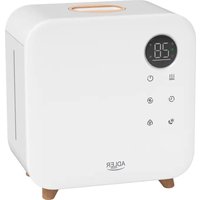
- AD 7958
- SAFETY CONDITIONS IMPORTANT INSTRUCTIONS ON SAFETY OF USE PLEASE READ CAREFULLY AND KEEP FOR FUTURE REFERENCE
- DESCRIPTION OF THE DEVICE (fig A)
- CONTROL PANEL (diagram B)
- USING THE DEVICE
- CLEANING AND MAINTENANCE OF THE DEVICE
- TECHNICAL DATA
- DEUTSCH
- OPIS UREĐAJA (crtež A)
- KONTROLNI PANEL (crtež B)
- UPOTREBA UREĐAJA
- ČIŠČENJE I ODRŽAVANJE UREDJAJA
- BESCHRIJVING VAN HET APPARAAT (afb A)
- UPORABA NAPRAVE
Brand : ADLER
Model : AD 7958
Category : Humidifier